














































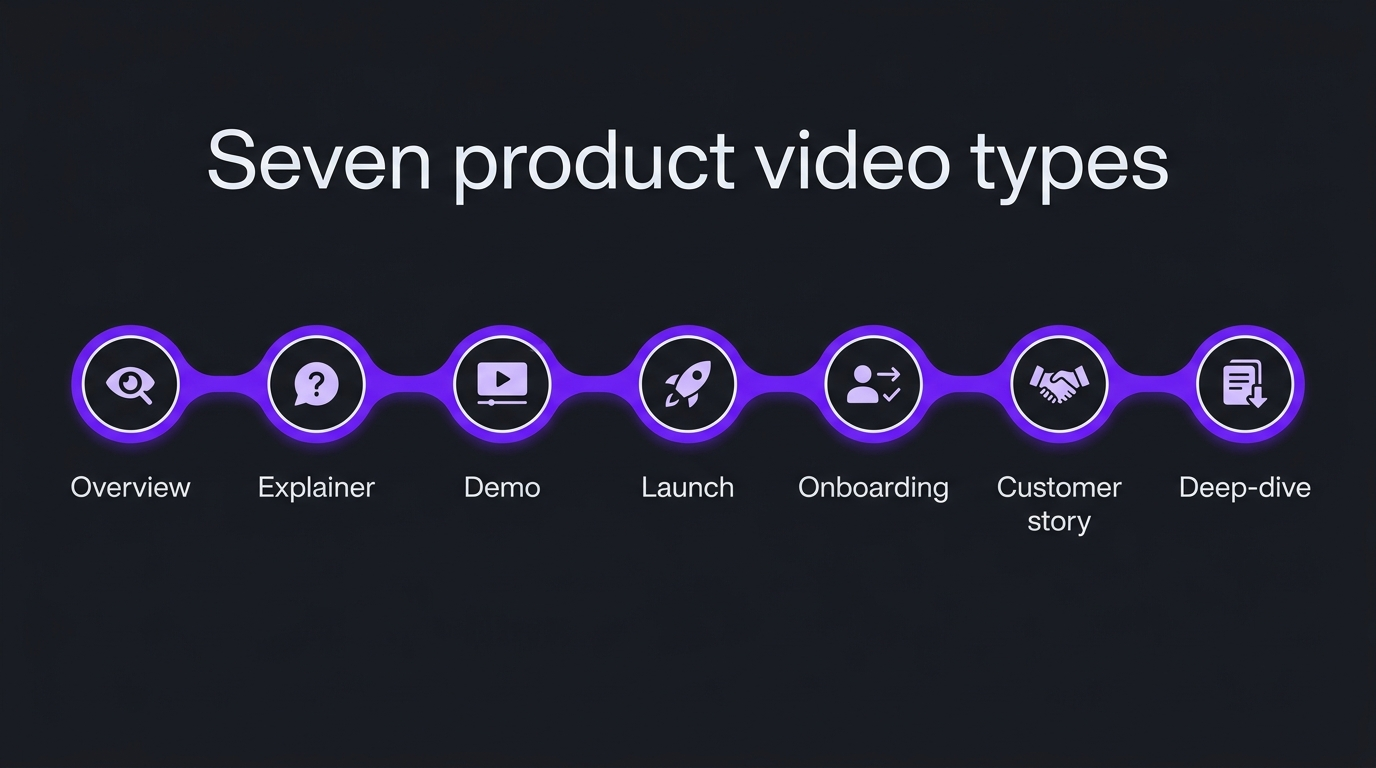
There are seven product video types a B2B software company actually needs: the overview, the explainer, the demo, the launch announcement, the onboarding video, the customer story and the technical deep-dive. Each answers one buyer question, so pick by the question your pipeline is stuck on, not by what looks good on a competitor’s homepage. Most complex products start with an explainer or overview and a demo, then add the rest in the order buyers ask for them. Plan the whole set with one visual language so each new video builds on the last.
A SaaS product video is any video that shows or explains a software product to a buyer, and the useful way to sort the category is by the question each one answers: what is it, how does it work, does it fit us, can I trust it, and how do I use it. For a B2B software company selling a complex product, that gives seven types: the overview, explainer, demo, launch announcement, onboarding video, customer story and technical deep-dive. This guide defines each, says when to use it and when not to, and shows how to sequence them into a library.
How this differs from what we have already published: this is the taxonomy, the “which video do we need” decision. Our guide to hiring a product demo video agency covers cost and briefing for one specific type, and our SaaS product launch video playbook covers the plan, script and distribution for another. If you already know you need a demo or a launch film, go to those. If you are deciding between them, or building a plan for the year, start here. For the post-production side, see our guide to editing product demos and explainers.
- What counts as a product video
- The seven types at a glance
- The seven types in detail
- How to choose: match the video to the buyer question
- How this played out
- Build a library, not a one-off
- Rules that apply to every type
- Common mistakes
- In-house or bring in a partner
- Frequently asked questions
- Verdict
What counts as a product video
A product video is a video whose job is to help a buyer understand, evaluate, adopt or trust a specific software product. That excludes pure brand films and thought-leadership interviews, which sell the company or an idea rather than the product. It includes everything from a 90-second homepage film to a 20-minute architecture walkthrough for a technical evaluator.
The search terms overlap, which is why this topic gets confusing. People search for “product video”, “product marketing video”, “SaaS product video” and “app demo video”, and they often mean slightly different things. In this guide, product video is the umbrella term, product marketing video means the subset made for acquisition (overview, explainer, launch, customer story), and app demo video means the walkthrough type. Product education (onboarding and tutorials) belongs under the umbrella too, because it affects activation and retention, not just the first sale.
B2B software adds a complication that consumer app videos do not have: the buyer is rarely one person. A champion watches the video, then forwards it to a technical evaluator, a security reviewer and a budget holder. Each of them has a different question. A single video cannot answer all of them, which is the strongest argument for thinking in types instead of “the product video”.
💡 Pro Tip: Before choosing a type, write down the three questions prospects ask on your first sales call and the one they ask just before they go quiet. Those four questions are your video brief, and they usually point to two or three of the types below.
The seven types at a glance
The table below is the short version. Lengths are common ranges rather than rules; the right length is the shortest one that answers the question for the viewer in that context.
The seven types in detail
Each section below opens with what the type is for, then covers when to use it, when to skip it, and one production note that matters for a complex product.
1. The product overview (hero) video
The overview video is the answer to “what is this and who is it for”, and it belongs at the top of your homepage or product page. It is not a feature list. It states the problem, the category you sit in, and the outcome for a specific buyer, in the time a busy visitor will give you.
Use it once your positioning is stable. If your messaging is still changing every quarter, an overview film will be out of date by launch. Skip it if the only thing it would say is already obvious from a clear headline; a sharp sentence beats a vague film. Production note: autoplay in the browser is restricted, and muted autoplay is the common pattern, so design the first seconds to work silently with captions. The Chrome autoplay policy explains the rules. Our landing page video guide covers placement and loading in detail.
2. The explainer video
An explainer video makes an abstract or invisible idea understandable, usually with motion graphics or animation, and it is the right choice when the interface alone does not show what the product does. The explainer video format is a well-established genre, but in B2B software it earns its place where a screen recording would show a dashboard and tell the viewer nothing.
This is the dominant need for AI, data and deep-tech products. A model that scores risk, a pipeline that cleans data, an optimisation engine that runs in the background: none of these has a visible “moment” to record. Animation can show the data going in, the decision being made and the result coming out. Nielsen Norman Group writes about the purpose of animation in interfaces makes the useful point that motion should clarify, not decorate, and the same test applies here.
Use an explainer when buyers consistently misdescribe the product back to you. Skip it when the product is a familiar category and your differentiators are in the details, where a demo does more work. For the script itself see our explainer video script template for SaaS, for style choices live action vs animation, and for complex products technical explainer videos. Pricing context is in our explainer video cost guide.
3. The product demo video
A product demo video shows the product doing a real job so an evaluator can decide whether it fits, and it works best when it follows one realistic task from start to finish. It is the type buyers most often ask for by name, and also the one most often done badly, as a tour of every menu.
Structure it around a scenario: who is the user, what are they trying to do, and what does the product do at each step. Cut anything that does not serve the scenario. Use chapters so evaluators can jump to the part they care about; YouTube’s video chapters help page explains how to add them. Skip a demo video for a product whose value is not visible in the interface, and use the explainer or deep-dive instead.
A demo video also has a maintenance problem the others do not: the interface changes. Plan for it by recording in modular sections you can replace, and keep a short list of which screens each video depends on. For cost and briefing, read how to hire a demo video agency.
4. The launch or feature announcement video
A launch video tells a defined audience what changed, why it matters to them and what to do next, and it is a time-boxed asset tied to a release. A feature announcement is the shorter version for an update to something customers already use.
Use it when the release changes what a buyer or customer can do, not for every changelog line. Skip it for incremental updates better served by a release note with a screenshot. The production note: build the hero film and its cutdowns together, so the landing page, email, LinkedIn and sales outreach each get the right version on day one. The full process is in our SaaS product launch video playbook, and the edit workflow is in video editing for product launches.
5. The onboarding and tutorial video
Onboarding and tutorial videos help a new user get to their first useful result quickly, and they are the product video type most likely to reduce support load and improve retention. They are less glamorous than a launch film and often more valuable.
Keep each one to a single task with a clear outcome: connect the data source, set up the first workflow, invite the team. Short, task-named videos are easier to find in a help centre and easier to update when the interface changes. Use it when your support team answers the same how-to question repeatedly. Skip long “complete guide” videos; split them. Accessibility matters most here because these videos are used in work settings where audio may be off, so build in accurate captions. The W3C guidance on captions and subtitles is a practical reference, and our video accessibility guide covers the legal and WCAG side.
6. The customer story video
A customer story video answers “can I trust it, and did it work for someone like me”, and it is usually the strongest asset in a considered, multi-stakeholder sale. It carries social proof in a form a champion can forward to a sceptical colleague.
Use it once you have a customer willing to speak candidly about the problem, the choice and what changed. Choose the customer by the profile of the buyer you want next, not by the biggest logo. Skip it if the story would be all praise and no specifics; viewers can tell. The video should sit alongside a written case study, since many evaluators will skim the text first. Our guide to the B2B video case study walks through the structure and release process.
7. The technical deep-dive
A technical deep-dive explains how a product works under the surface, how it handles data and where its limits are, and it is the type that wins over sceptical engineers, data scientists and security reviewers. It is often missing from software marketing and is disproportionately useful for AI and data products.
Use it when your buyers include people who will ask “how does the model get this answer” or “where does our data go”. Present an architecture diagram, walk through a real example, show failure cases honestly and say what the product does not do. Skip the sales language entirely; this audience notices. Chapters and a transcript are essential, because evaluators scan these videos rather than watching them linearly. Pair it with a documentation page so the two reinforce each other. If you also publish on YouTube for this audience, our developer marketing video guide covers channel-level choices.
How to choose: match the video to the buyer question
Choose a product video type by identifying the question that is stalling your pipeline, then picking the type built to answer it. A video made without a target question tends to try to answer all of them and answers none well.
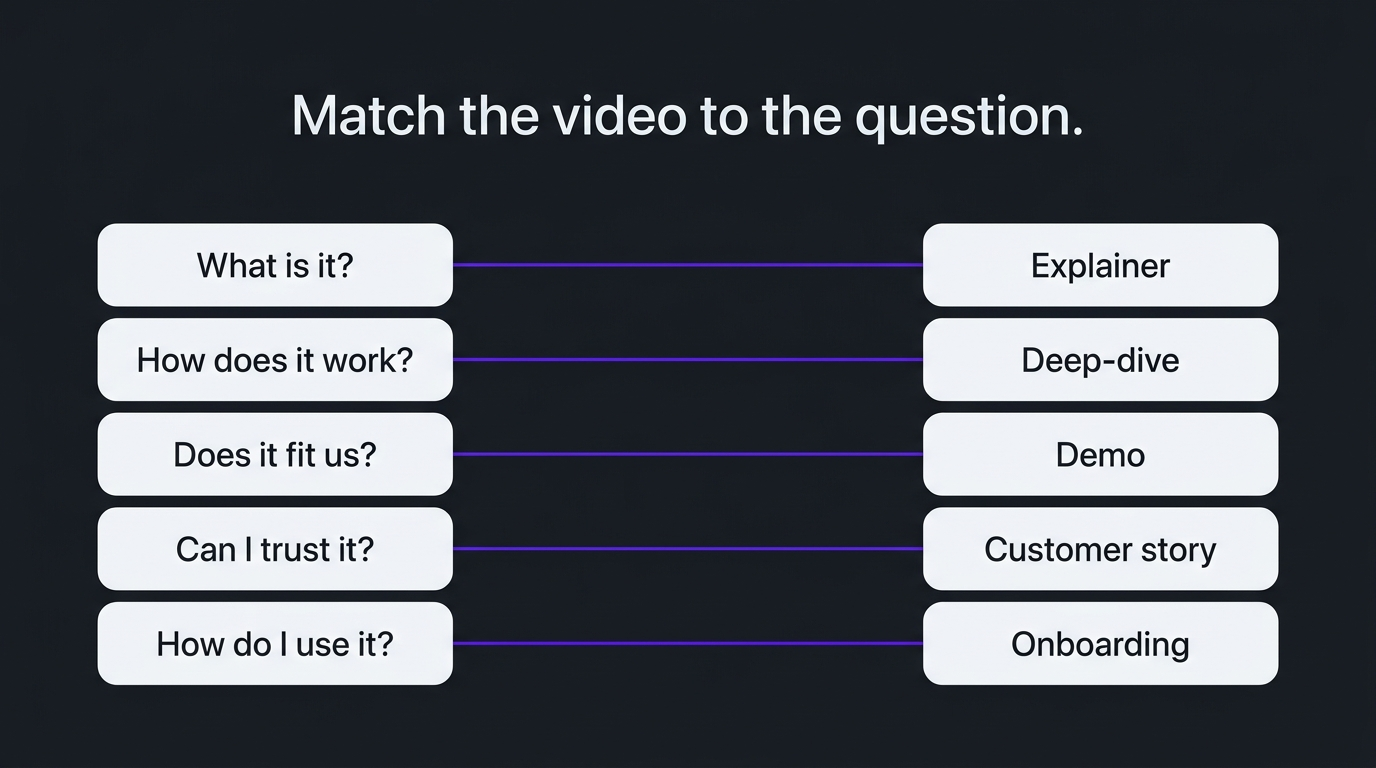
Notice that the first two rows are different problems with different videos. An explainer fixes comprehension, a demo fixes confidence. Teams that make a demo when the real issue is comprehension end up with a polished tour of an interface nobody understands the purpose of.
💡 Pro Tip: Ask the sales team to tag five recent lost or stalled deals with the question that was never answered. If three of the five share a question, you have your first video type.
How this played out
TuMeke, an AI ergonomics software company, has been an Increditors client for four years, and the feedback we hear is that the animations make everything clear. Ergonomic risk is a hard thing to see in a dashboard, so the work leans on motion to show what the software is analysing and why it matters. Four years in the same visual language means each new video starts from a shared vocabulary instead of from scratch, which is the practical case for treating product video as a library. Read more on our case studies page and the TuMeke project write-up.
Build a library, not a one-off
Most B2B software companies are better served by a small, consistent library of product videos than by one expensive film, because the buyer’s questions change as the deal progresses. A reasonable sequence for a company with a complex product is below; adjust it to your own bottleneck.
Consistency is the underrated part. If every video uses a different style, voice and structure, the library looks like a collection of unrelated projects. A shared style guide, a consistent opening and closing and a single owner for review make the whole set feel like one product. It is also what makes updates cheaper, because new scenes can be dropped into an existing structure. For publishing rhythm, see how much video a SaaS company should publish, and for turning one asset into several, what video repurposing is.
If you run a regular series, the series format solves much of the consistency problem. Our guide to a SaaS explainer video series covers planning one.
Rules that apply to every type
Five practices apply to all seven types: captions, a target distribution plan, a maintenance plan, a single review owner and a clear next step. These are cheap to build in at the start and expensive to retrofit.
- Captions and accessibility. Accurate captions help viewers who watch without sound and are a baseline accessibility requirement. Anything that moves or auto-updates should follow the WCAG guidance on pause, stop, hide.
- Distribution plan before production. Decide where the video will live and which cuts you need (landing page, email, LinkedIn, sales deck) before you script it. Google’s guidance on video best practices for Search covers how to make hosted videos discoverable.
- Maintenance plan. Know which parts of each video will go out of date when the interface or pricing changes, and keep source files organised so a section can be replaced.
- One review owner. Technical, legal and brand review should happen in a defined order with a single person consolidating feedback. See video approval workflows.
- One clear next step. Every video ends with a single action matched to its type: book a demo, read the case study, start the setup guide.
Planning helps too. A shared shot list for screen-led work keeps recordings consistent across a library, and a short written brief per video prevents scope drift. For how videos feed sales conversations, see video editing for sales enablement.
Common mistakes
The most common product video mistake is making the wrong type for the problem, followed closely by trying to make one video do every job. The patterns below show up repeatedly in B2B software.
- The feature tour. Walking through every menu. Fix: pick one scenario and cut the rest.
- The explainer for a product that needs a demo. Polished animation for something buyers already understand. Fix: diagnose the question first.
- The demo for a product that needs an explainer. A clean interface walkthrough that never says what the product is for. Fix: open with the problem.
- Jargon in the first ten seconds. Experts forget how unfamiliar their vocabulary is. Fix: read the script aloud to someone outside the team.
- No plan for updates. The product changes and the video becomes quietly wrong. Fix: modular edits and a review date.
- Burying the video. Hosting it on a page nobody visits. Fix: decide placement first.
- One-off thinking. Treating each video as a separate project with a separate style. Fix: build a library with a shared visual language.
In-house or bring in a partner
Make onboarding and quick feature clips in-house when you have an owner and the time, and bring in a partner for explainers, deep-dives and anything that must stay visually consistent across a library. The deciding factors are product complexity, volume and where the bottleneck sits.
Complexity is the first filter. If the product is hard to visualise, the partner needs to learn it well enough to make good choices, so ask how they onboard to a technical product and who writes the script. Volume is the second: a regular cadence of videos favours a stable team that already knows your product over a new project team each time. The third is internal bandwidth. If product managers and engineers are the bottleneck on script and review, a partner with a clear process saves their time rather than consuming it.
As a video editing company that works with B2B software teams, we think the strongest signal when choosing is whether the partner asks about your buyer before they ask about your budget. If you are comparing options, our guide to explainer video companies lists several, and VideoEditingCompany is another B2B-focused option worth a look. For general pricing context see our guide to professional video editing costs, and for the broader picture our guide to video editing for SaaS companies.
Frequently asked questions
What are the main types of SaaS product video?
The seven types that cover most B2B software needs are the product overview (hero) video, the explainer, the product demo, the launch or feature announcement, the onboarding and tutorial video, the customer story, and the technical deep-dive. Each answers a different buyer question, so most companies need three or four of them over time rather than one video that tries to do everything.
Which product video should a SaaS company make first?
Make the one that answers the question your buyers get stuck on most often. For a product nobody can picture, that is usually an explainer or overview video. For a product buyers understand but cannot evaluate, it is a demo. Ask your sales team which question comes up on the first call and which one is still unanswered on the third.
What is the difference between a product video and a product demo video?
A product video is the broad category: any video that shows or explains a software product. A product demo is one type within it, a walkthrough that shows the product doing a real job so an evaluator can judge fit. An explainer sits at the other end, using motion graphics or animation to explain an idea the interface alone cannot show.
How long should a product video be?
It depends on the type and the viewer. Overview and explainer videos commonly run around one to two minutes, launch announcements are often shorter, and demos, onboarding and deep-dive videos can run longer on a page where the viewer has chosen to watch. Match length to intent: a viewer on a landing page gives you less patience than an evaluator who clicked “watch the full demo”.
How much does a product video cost?
Cost varies widely with type, visual style, script work and review rounds, and any figure quoted without a scope is not meaningful. Screen-led walkthroughs sit at the lower end, custom animation for a hard-to-visualise product at the higher end. Our guide to explainer video cost explains what moves the price, and the demo video agency guide covers briefing.
Should we make product videos in-house or hire a partner?
In-house works for tutorials and quick feature clips when product and marketing have time and a clear owner. A partner is worth it when the product is technical, when you need a consistent visual language across many videos, or when subject-matter experts are the bottleneck on script and review. Ask any partner who writes the script and how technical review works.
Verdict
Product video is not one asset, it is a set of tools, and the skill is picking the right one for the question in front of you. Identify the question your pipeline is stuck on, make the type built for it, and give every video in the library the same visual language so each one adds to the last. For most complex software products that means an explainer or overview first, a demo second, and a customer story and technical deep-dive as proof and depth. If you want a second opinion on which video your product needs first, book a call below.
Not sure which product video to make first?
Tell us about the product and the buyer, and we will tell you honestly which video we would start with.