










![3D Explainer Video - ScribbleLive.mp4_snapshot_00.12_[2022.03.09_03.14.16]](https://increditors.com/wp-content/uploads/elementor/thumbs/3D-Explainer-Video-ScribbleLive.mp4_snapshot_00.12_2022.03.09_03.14.16-r7wb53mx72rxst3qcqyrfxdmeyzb5r9jbl0wbjujh4.png "3D Explainer Video – ScribbleLive.mp4_snapshot_00.12_[2022.03.09_03.14.16]")
































Most video projects stall not in the edit suite but in the approval queue. A structured video approval workflow — with defined stakeholder roles, gated review rounds, and consolidation rules — cuts revision cycles and keeps launch dates real. This guide gives you the operational mechanics to make that happen.
- Why Video Approvals Derail Production
- The Anatomy of a Workable Approval Workflow
- Defining Stakeholder Roles Before the First Frame Is Cut
- How to Structure Feedback Rounds Without Losing Control
- Tools That Make Video Review Faster
- Protecting Your Promised Delivery Dates
- Version Control and File Naming in the Approval Chain
- Common Approval Bottlenecks and How to Remove Them
- FAQ
- Verdict
Why Video Approvals Derail Production
The edit is done. The client or internal stakeholder says they’ll take a look. And then nothing happens for four days — until someone resurfaces with twelve conflicting comments from three different departments, half of which contradict each other, and two of which require reshoots that were never budgeted.
This pattern is not a client problem or an editor problem. It’s a process problem. Most organizations treat video approval as a formality — something that happens after the real work is done — rather than as a structured production phase that requires its own planning, ownership, and deadlines.
The downstream consequences are predictable: launch dates slip, editors churn through version after version on revisions that should have been caught earlier, and stakeholders lose confidence in the timeline. What was budgeted as a two-week project quietly becomes a five-week one.
The core failure modes fall into a few consistent patterns:
- No defined approver. Everyone gets the link; no one has final authority. Comments pile up without hierarchy, and the editor doesn’t know which input to act on.
- Serial rather than consolidated review. Legal reviews after marketing, who reviewed after the director, who reviewed after the CEO — each pass introduces fresh changes to already-approved elements.
- Scope creep in review notes. “While we’re at it, can we also change the music?” Late-stage change requests that fall outside the original scope arrive as casual comments rather than formal change orders.
- No SLA on turnaround. Reviewers aren’t given a deadline to respond, so the ball sits in their court indefinitely.
- Feedback in the wrong format. Comments arrive as emails, Slack threads, voice notes, and spreadsheets — none of them timestamped to the frame the reviewer was looking at.
A purpose-built video approval workflow solves each of these. Not by adding bureaucracy, but by making the expectations explicit before the first frame is delivered for review.
The Anatomy of a Workable Approval Workflow
A video approval workflow is the sequence of structured checkpoints between a delivered draft and a locked, approved final. Each checkpoint has a defined set of reviewers, a scope of what can be changed at that stage, and a response deadline. When those three elements are in place, approvals become predictable.
Most productions benefit from three gates rather than one blanket “approval”:
Gate 1: Structure Review (rough cut)
This review happens on the first assembly or rough cut. The focus is exclusively on story structure, pacing, scene selection, and whether the core message lands — not color, not music, not text overlays. Reviewers are told explicitly: visual polish is not final at this stage; structural comments only. Catching a structural mismatch at this stage costs one revision; catching it after color grade costs three to five.
If you’re working with an external video editing agency, this gate is typically your primary feedback window — the moment where significant creative direction needs to land before the editor moves downstream into fine cut and post.
Gate 2: Fine Cut Review
The second review addresses pacing, specific clip selections, copy accuracy, on-screen text, and music direction. At this point, structure has been locked from Gate 1 — any structural note arriving at Gate 2 needs to be flagged as a scope change, not treated as a standard revision request.
Gate 3: Final Sign-Off
The final gate is reserved for one person: the project’s final approver. Their job is not to re-review the creative — it’s to confirm that all agreed-upon revisions were applied correctly and that the output meets delivery specs (aspect ratio, file format, caption file, etc.). This should take under an hour. If the final approver is doing creative review at this stage, the upstream gates have failed.
Defining Stakeholder Roles Before the First Frame Is Cut
The most effective approval workflows are set up at the briefing stage — not after the first draft lands. When stakeholder roles aren’t defined in advance, the default behavior is for everyone to feel empowered to send feedback, and for no one to feel responsible for making a final call.
A clear stakeholder map uses three categories:
Informed (I)
People who receive the finished asset but have no role in the review process. They get the final file when it’s locked. They do not receive draft links. This is often more senior stakeholders who don’t need to weigh in at each stage — they trust the process their team has set up.
Consulted (C)
Subject matter experts or specialist reviewers — legal, compliance, brand — whose input is requested on specific elements and within a specific window. Their feedback is collected, consolidated, and submitted through the primary reviewer. They don’t have a direct channel to the production team.
Responsible/Approver (R/A)
The person who actually sends feedback to the editor and, ultimately, gives final sign-off. There should be exactly one final approver per project. If your organization needs two signatures for compliance reasons, one of them consolidates and submits; the other countersigns the final. They should not both be sending independent feedback tracks to the editor.
This structure is adapted from the RACI framework commonly used in project management — but applied specifically to the video review problem. When working with a video editing agency vs. freelancer, the question of who on your team has final sign-off authority becomes especially important to establish upfront.
💡 Pro Tip: Capture stakeholder roles in your project brief before production starts. If you’re using a brief template — see how to brief a video editor for a full template — add a section that explicitly names the Gate 3 approver and lists any consulted reviewers and their scope. That conversation is far easier at the brief stage than after the rough cut has landed.
How to Structure Feedback Rounds Without Losing Control
Feedback rounds — not feedback volume — are what eat production time. An edit with 40 consolidated notes takes less time to action than one with 8 scattered notes arriving across four separate email threads over six days, because the editor can process the batch in a single working session rather than context-switching repeatedly.
The Consolidation Rule
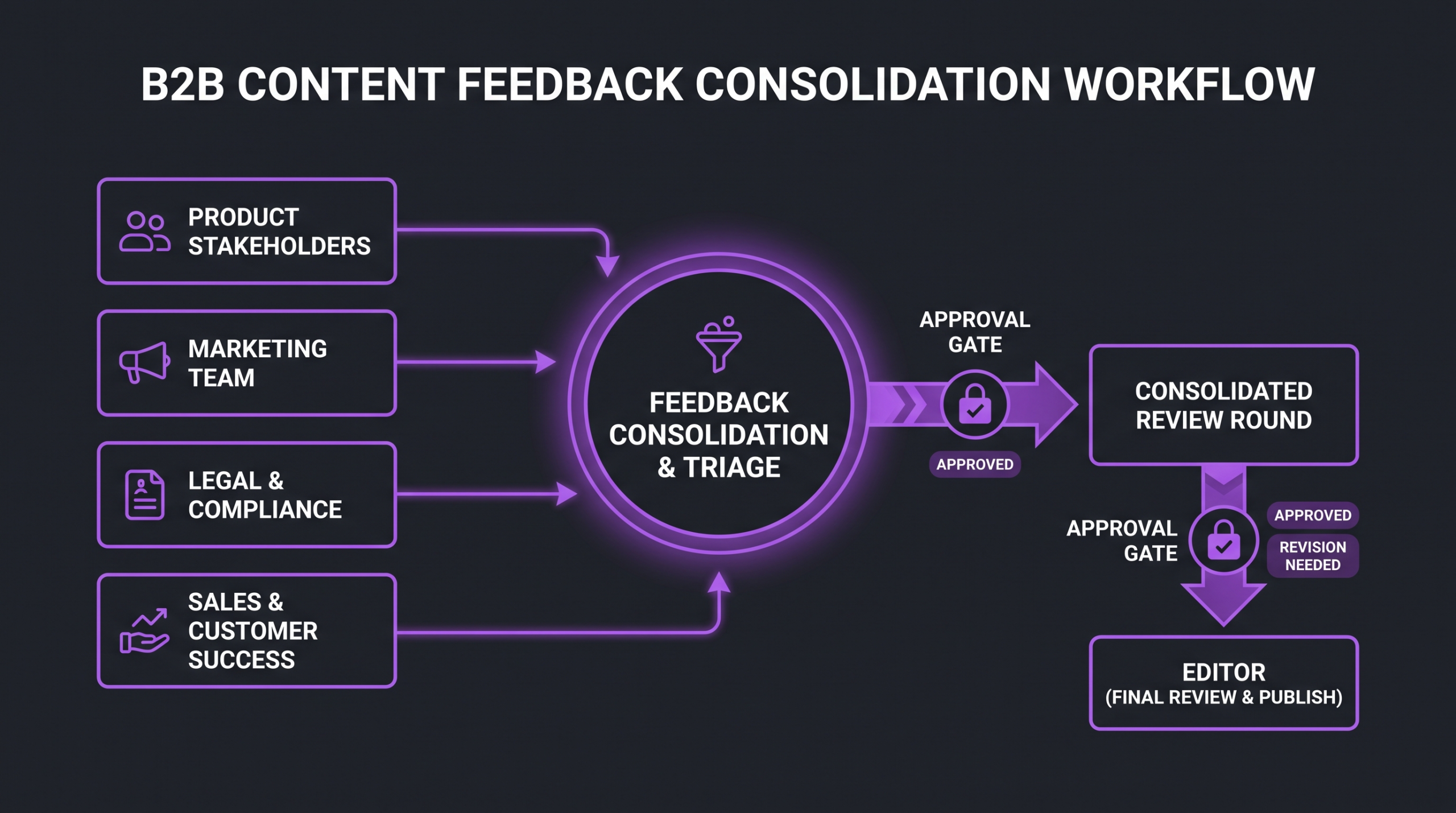
Each gate produces one set of feedback, not one per reviewer. If four people need to weigh in at Gate 2, it is the primary reviewer’s job to collect their input, resolve any contradictions, and submit a single consolidated document. The editor receives one source of truth per round.
When contradictions can’t be resolved internally — when marketing and legal genuinely disagree about a piece of copy — that escalation goes to the final approver before anything goes back to the edit team. This is a process question, not a creative one, and it shouldn’t land in the editor’s inbox as an unresolved conflict.
Categorizing Feedback by Type
Well-structured feedback distinguishes between three types of notes:
- Must-fix: Errors, factual inaccuracies, brand guideline violations, legal requirements. Non-negotiable; must be addressed before the next gate.
- Preferred change: Creative preferences that the reviewer wants to see addressed but won’t block approval if the editor makes a case for the original. These require a response, not necessarily an implementation.
- Optional suggestion: Ideas the reviewer wants on record but explicitly defers to the editor’s judgment. The editor reads, considers, and responds briefly — no automatic action required.
Training your internal reviewers to categorize their own notes this way — before they submit them — removes an enormous amount of ambiguity from the revision conversation. When every comment is an unmarked must-fix, the editor has to guess at priority and often over-addresses preferred changes while the actual blockers get buried.
Capping Revision Rounds
The typical professional video production agreement includes two to three rounds of revisions per gate — not unlimited. If your internal process doesn’t have a revision cap, you’ve created an incentive for reviewers to treat each delivery as a rough draft by default, regardless of how polished it is.
Two revisions per gate is a reasonable operational target for most projects. Round one addresses the primary structural or content notes; round two cleans up anything missed or introduced in round one. A third round within a gate typically signals that something wasn’t caught in the original brief — which is a process failure to note and fix for the next project.
Understanding what goes into each production stage also helps. If your team isn’t clear on what a rough cut actually is versus a fine cut, their gate-appropriate expectations will be off — and you’ll get Gate 2 notes on Gate 1 deliveries.
Tools That Make Video Review Faster
The mechanics of how feedback is collected shapes how useful that feedback is. A comment thread in a shared Google Doc is better than email; a frame-accurate comment on the video player is better than both. The tool matters because it changes what reviewers can say and how clearly they can say it.
Frame-Accurate Review Platforms
Frame.io (now part of Adobe) is the industry-standard platform for professional video review. Reviewers click directly on a frame to leave a timestamped comment; editors see the exact moment the note refers to without any translation required. Vimeo Review offers similar frame-accurate annotation with a slightly lower barrier to entry for non-technical stakeholders. Both support annotation drawing, which is particularly useful for motion graphics and text placement notes.
The operational advantage of frame-accurate review tools is specificity. “The pacing feels off in the middle” is a note the editor has to interpret; “at 00:43, the cut to the talking head is too abrupt” is one they can action in under a minute. Tools that create that specificity cut clarification back-and-forth out of the workflow almost entirely.
Project Management Integration
For teams managing multiple video projects simultaneously, connecting your review platform to your project management tool closes the loop between feedback receipt and task assignment. Asana‘s integrations, for example, allow Frame.io comments to surface as tasks automatically — so an editor doesn’t have to manually transfer revision notes from one system to another. The same integration pattern works with Monday.com and Notion, depending on your team’s setup.
What Not to Use
Email threads are the single biggest source of revision confusion in video production. Comments get lost, quoted replies nest into unreadable chains, attachments get misnamed, and there’s no authoritative record of which version the feedback referred to. If your approval process still runs primarily through email, the tool choice itself is likely contributing to your revision drag.
Shared Google Docs or Notion pages are a step up — at least the record is persistent — but they don’t solve the timecode problem. Reviewers describing what they want changed without being able to pinpoint exactly where introduces interpretation overhead that a video review platform eliminates.
Protecting Your Promised Delivery Dates
A video launch date is a commitment. It connects to campaign calendars, social scheduling, paid media launches, and sometimes product announcements. When the approval workflow slips, that date slips — and the cascade of downstream calendar adjustments is rarely invisible.
Protecting the promised date requires treating the approval workflow as a phase with its own schedule, not as an undefined period between “editor submits” and “client approves.”
Building the Approval Calendar Backwards
Start from the delivery date and work backwards. If the final asset needs to be live on October 14, and the upload + QC process takes two business days, the final approval needs to land by October 12. Gate 3 review takes 24 hours, so Gate 3 delivery is October 11. Gate 2 review takes 48 hours, so Gate 2 delivery is October 8. Gate 2 revisions take 24–48 hours, so Gate 2 needs to open by October 7. And so on back through Gate 1 and production.
This backwards-mapped schedule makes one thing clear: every day a reviewer sits on a deliverable without responding consumes float that the editor was counting on. When stakeholders can see exactly how a 48-hour review SLA connects to the launch date, they tend to be more responsive than when the approval window feels abstract.
Review SLAs and What Happens When They’re Missed
Your approval workflow should include an explicit policy for what happens when a review SLA is missed: does the editor continue to the next phase, or does the project pause? Neither answer is universally correct — it depends on your production setup and the risk profile of the project. But having a documented policy removes the awkward ambiguity when a reviewer doesn’t respond in time.
A common approach in professional post-production: if a review SLA lapses without a response, the project manager escalates to the approver’s manager, the launch date adjusts by the same number of days the review was delayed, and this adjustment is documented and attributed. That attribution — “the launch moved because the Gate 2 review came in three days late” — is not punitive; it’s operational honesty that helps the team calibrate future planning.
💡 Pro Tip: Send a review reminder at the 24-hour mark if no feedback has arrived. Frame it as a calendar check (“We have you down for a response by 5pm today to keep us on track for the October 14 launch”) rather than a nudge. Reviewers who understand the consequences of delay are more likely to prioritize the review than those who only see a link with no context.
Change Orders vs. Revisions
Any request that falls outside the scope defined at the brief stage is not a revision — it’s a change order. Understanding the difference operationally matters because change orders have timeline implications that standard revisions don’t.
If a reviewer requests a reshoot, a major structural change, or a new deliverable format at Gate 2, that conversation needs to happen before the edit team acts on it. What’s the timeline impact? What’s the scope of the change? Does it reset the approval clock? These aren’t creative questions — they’re project management questions, and they should be resolved by whoever owns the project timeline, not left to the editor to navigate.
Teams that produce large volumes of video — scaling from 4 to 30 videos a month puts enormous pressure on approval systems — typically develop formal change order templates that capture what changed, why, and what the timeline and cost impact is. Even a simple one-page document per change is enough to create accountability and prevent scope creep from accumulating invisibly.
Version Control and File Naming in the Approval Chain
Version confusion is one of the most common causes of re-work in video production. The editor delivers v3; the client comments on v2 (the link they bookmarked three weeks ago); the editor applies those notes to v3; the client comes back confused because changes from v3 weren’t included in v4. The edit is now a chimera of two revision tracks and has to be rebuilt.
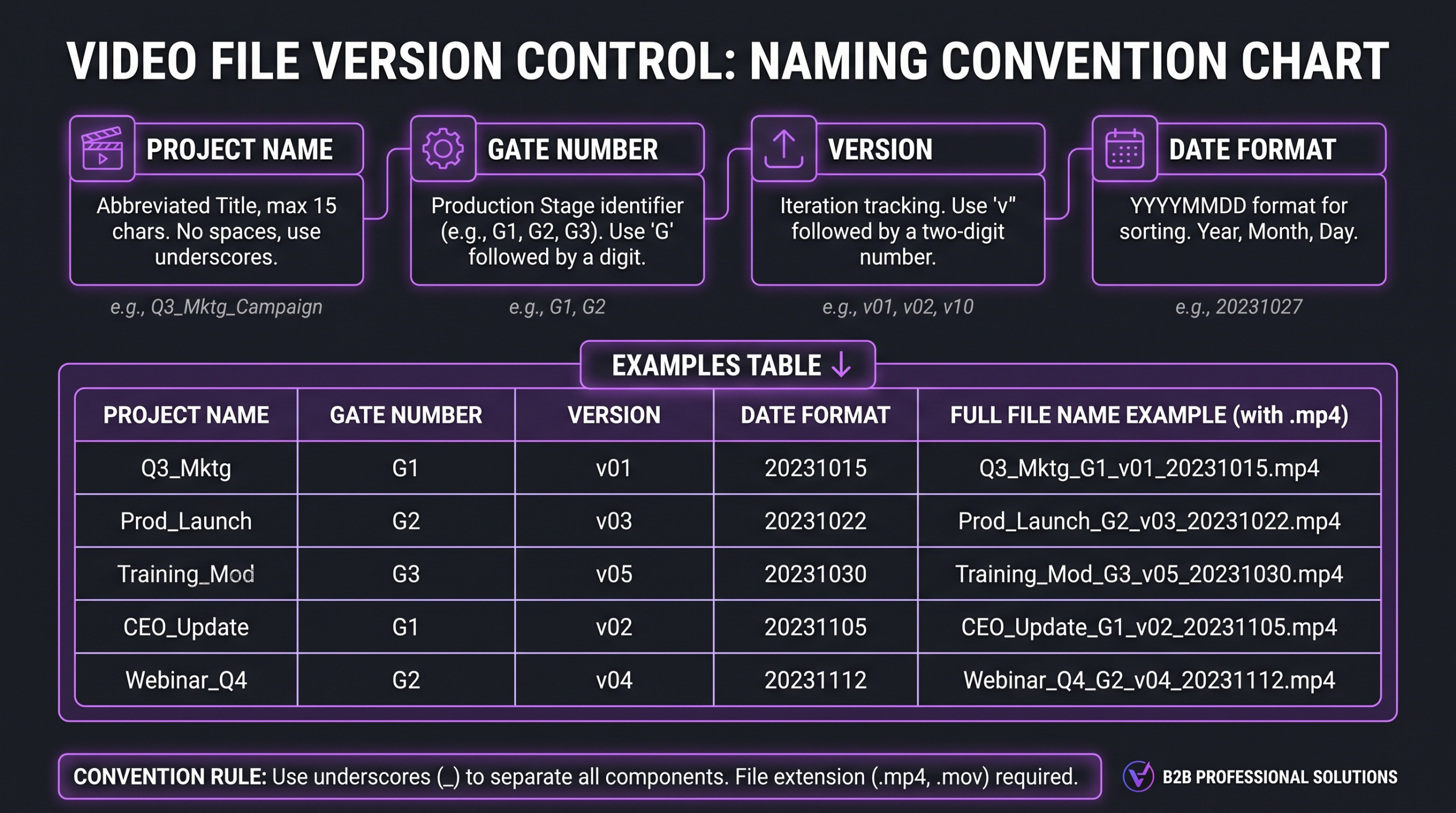
Preventing this requires two things: a consistent naming convention and a single source of truth for the current version.
A Workable Naming Convention
File names should encode four pieces of information: project name, gate, version number, and date. A format like ProjectName_G1_v1_2026-09-12.mp4 makes it immediately clear which gate the file belongs to, which iteration it represents within that gate, and when it was delivered. Anyone on the project — reviewer or editor — can see at a glance whether they’re looking at the current version without opening it.
Single Source of Truth
Every project should have one canonical location where the current version lives and where feedback is collected. Not a folder on someone’s desktop, not a Dropbox link that’s been renamed twice — a shared project folder in your review platform, with the current version clearly marked as “active for review” and all previous versions archived (not deleted, archived).
When you send a review link, it should always point to this canonical location, not to a static file URL. That way, if you upload a corrected version after catching an error, the reviewer’s link automatically shows them the updated file — not the one they were looking at before.
Common Approval Bottlenecks and How to Remove Them
Most of the friction in video approval workflows comes from a small number of recurring patterns. Naming them makes them fixable.
The Absent Decision-Maker
The person with final approval authority is on holiday, in back-to-back meetings, or deprioritizing the review because the launch date feels far away. This is the most common single cause of approval delays in marketing organizations.
The structural fix: designate a backup approver at the brief stage. Not someone who can “check in with the director” — someone with explicit delegated authority to sign off if the primary approver is unavailable when a review SLA is due. This should be documented in the project brief, and the backup should be informed of their role before production starts.
The Serial Review Chain
Marketing reviews and sends notes. Then legal reviews the marketing-revised version and sends notes. Then the CMO reviews the legal-revised version and sends notes. Three review cycles that were treated as one gate have consumed six to nine business days.
The fix is parallel review: all Gate 2 reviewers receive the same version at the same time. Contradictions get resolved by the primary reviewer before submission. If legal genuinely needs to see the marketing-revised version before reviewing, that’s a workflow design issue — it means legal is actually in Gate 2.5, and should be explicitly named and scheduled as such rather than treated as a surprise follow-on pass.
The Scope Expansion Comment
At Gate 3, someone realizes they want a completely different opening, a new piece of music, or a format the original brief didn’t include. The instinct is to fold this into the “final” revision — but doing so breaks the definition of “final” and starts a new project underneath the existing timeline.
The response: acknowledge the idea, formally create a new project or scope extension for it, and continue to lock the current asset on schedule. This is not a bureaucratic delay — it’s the only way to prevent one good idea from torpedoing an approved deliverable and the campaign it’s tied to.
The Unclear Approval Signal
The reviewer has no more notes but never sends a formal “approved” response. The editor waits. The project manager follows up. The reviewer says “oh I thought you knew it was good” — and a week has passed.
Build explicit approval signals into your review platform setup. Frame.io, for example, has a native approve/needs-changes toggle. Vimeo Review supports a formal approval action. If you’re using a simpler tool, define clearly what constitutes approval (“reply ‘APPROVED’ in this thread by [date]”) and what the non-response policy is. Approvals by inaction — “no news is good news” — are operationally fragile and shouldn’t be your default.
For a broader look at what post-production actually costs and what approval cycles factor into — including how production agencies handle revision round pricing — understanding professional video editing cost gives the full pricing context behind these workflow decisions.
FAQ
How many revision rounds should a standard video project include?
Most professional production agreements include two revision rounds per gate — typically two gates for shorter videos and three gates for longer or more complex productions. That gives you four to six revision cycles total, which is sufficient to address genuine feedback while creating a clear end-point. Unlimited revisions without gate structure are the primary driver of revision drag in most marketing organizations.
What’s the difference between a review round and a gate?
A gate is a phase checkpoint — a defined moment in the production sequence where a version is submitted for review and approval before the project can advance. A round is an iteration within a gate — the delivery, the feedback, and the revision. A gate may contain one or two rounds. Gates close before the project advances; rounds repeat until the gate closes.
How do I handle a stakeholder who keeps sending new feedback after a gate has closed?
Acknowledge the feedback in writing and log it for the change order process. The note isn’t lost — it’s been received and documented. But if acting on it at the current stage would require reopening a closed gate, that’s a scope change with a timeline and potentially a cost implication. Presenting it that way, with specifics (“actioning this note means a 2-day delay and reopening Gate 2”), gives the stakeholder the information they need to decide whether to escalate it or defer it to a future version.
Should legal review happen before or after the creative approval?
Typically alongside the fine cut review (Gate 2), not before. Creative approval first means legal is reviewing a stable cut rather than a moving target, which makes their review faster and more accurate. If legal needs to review scripted copy very early — in regulated industries like financial services or healthcare — include a copy review step before production starts, so the edit never contains language that needs to be legally cleared mid-post. See also: building this into the video editing brief from the start.
What’s the biggest mistake teams make in video approval workflows?
Treating approval as an afterthought rather than a planned phase. When organizations allocate production time carefully but leave the approval phase unscheduled, they effectively hand the launch date to whoever is slowest to respond. The fix is to plan the approval schedule at the kickoff meeting — gates, SLAs, named approvers, and a policy for missed reviews — with the same rigor as the production schedule itself. Teams that do this reliably hit their launch dates; those that don’t are consistently surprised when they don’t.
Verdict: Approval Workflows Are a Leadership Choice
Video approval workflows aren’t something editors can fix by themselves. They’re a function of how your organization structures decision-making authority, how stakeholders are briefed on their review responsibilities, and whether project managers are empowered to hold the timeline as a genuine constraint rather than a suggestion.
The good news: the mechanics are simple. Three gates with defined scope. Consolidated feedback per round. Named approvers with delegated backup authority. Frame-accurate review tools. SLAs with documented policies for misses. Version control with one canonical location. These aren’t exotic process innovations — they’re operational basics that most high-volume production teams use because the alternative (revision loops with no floor) makes reliable delivery impossible.
The investment to set this up is a few hours of kickoff planning. The return is every launch date you were otherwise going to miss — and the credibility that comes with hitting them consistently.
If your team is managing an increasing volume of video and the approval process is the primary bottleneck, it may be worth looking at how a structured production partner builds these gates into their workflow by default. Increditors, as a dedicated video editing agency, runs gated review processes on every engagement — partly because it protects the editor’s time, and partly because it’s the only way to consistently deliver on a committed timeline at scale.
Ready for Video That Actually Converts?
Tell us about your project and we will put together a custom plan.