





















































Scaling from 4 to 30 videos per month is not a staffing problem — it is an operating-system problem. Teams that successfully make this jump build standardized briefs, a clear editorial calendar, tiered review workflows, and the right team structure before they hire anyone new. This guide walks through each layer of that system so you can add volume without losing quality or burning out your team.
- Why Most Teams Hit a Volume Wall at 4–6 Videos per Month
- The Infrastructure You Need Before You Scale
- Building the Right Team Structure for High Volume
- The Workflow That Powers 30 Videos per Month
- Tools and Tech Stack for High-Volume Video Production
- Quality Control at Scale: Staying Sharp When Volume Increases
- Volume Tier Breakdown: What Each Stage Actually Requires
- Common Mistakes When Scaling Video Output
- FAQ
- Verdict
Why Most Teams Hit a Volume Wall at 4–6 Videos per Month
The jump from four to thirty videos a month is one of the most misunderstood transitions in content marketing. Teams that attempt it without preparation typically hit a hard wall somewhere between six and eight videos — not because they lack budget or talent, but because the informal processes that work fine at low volume collapse completely under pressure.
At four videos a month, a good editor and a reasonably organized manager can hold everything in their heads. Briefs are informal, revisions happen over Slack, and the approval chain is usually just the marketing director. But the moment you push past six or seven videos, those invisible systems start breaking. Editors receive inconsistent briefs and have to ask clarifying questions on every project. Reviewers become the bottleneck because every video needs their personal sign-off. Assets get lost in shared drives. Deadlines slip, quality dips, and suddenly scaling feels harder than it should be.
The teams that successfully scale to 20, 30, or even 50 videos a month share one thing in common: they built their operating system before they hired. They solved the brief problem, the feedback problem, and the approval problem at low volume — so that when they added capacity, the new capacity actually produced output instead of generating confusion.
This guide covers each layer of that operating system, in the order you should build it.
💡 Pro Tip: Before adding a single editor or expanding your budget, document how your current four videos get made, step by step. Every undefined step at low volume becomes a crisis at high volume. Your current process is the raw material for your future system.
The Infrastructure You Need Before You Scale
Infrastructure is not software — it is decisions made in advance. The three most important infrastructure components for scaling video output are brief templates, feedback systems, and a production calendar. Without all three, additional capacity produces chaos rather than content.
Brief Templates That Actually Eliminate Revision Cycles
A video brief that actually works contains seven elements: the objective (what business result this video supports), the audience (specific persona, not “everyone”), the platform and format specs, the messaging hierarchy (primary point, secondary points, CTA), the tone reference (links to two or three existing videos that match the desired style), the raw asset list (footage, voiceover, music, graphics), and the deadline with review dates built in.
Most teams skip tone references entirely and then spend three rounds of revision trying to explain in words what they could have shown in 30 seconds. A brief without a tone reference is a guess; a brief with one is a contract.
Build one master brief template and create variants for each format you produce regularly: social cuts, long-form YouTube, product demos, case studies, ads. The template saves time; the variants make sure format-specific details (safe zones, caption requirements, aspect ratio, pacing guidelines) are never forgotten.
Feedback Systems That Don’t Create Bottlenecks
Unstructured feedback — a mix of Slack messages, email threads, verbal comments in meetings, and notes in shared documents — is the single biggest cause of review delays in scaling video teams. When an editor has to hunt for consolidated feedback across five channels, they lose anywhere from 30 minutes to two hours per project, and mistakes slip through because not all feedback was seen.
The solution is a single channel for all video feedback with a structured format. Tools like Frame.io solve this specifically for video — reviewers leave time-coded comments directly on the video timeline, all in one place. This alone can cut your average revision cycle from three days to one.
Equally important: limit the number of people whose feedback triggers a new revision round. A flat review structure where five stakeholders can each independently request changes is a recipe for never-ending revisions. Designate one primary reviewer per video type and define what a “revision request” is versus a “nice to have note.” If it doesn’t connect to the video’s stated objective, it goes in the backlog, not the current cut.
Your First Production Calendar
A production calendar is not a publishing calendar. A publishing calendar tells you when videos go live. A production calendar works backwards from that date and assigns every upstream step — raw asset delivery, editing start, first cut delivery, review window, revision deadline, final export, upload, and thumbnail — to a specific date and owner.
At 30 videos per month, you have roughly 1.5 videos entering or exiting a stage every working day. Without a production calendar that everyone reads from, your team is constantly triaging instead of executing. Build the calendar in a shared project management tool, not in someone’s personal spreadsheet. Every entry needs a due date, an owner, and a dependency flagged (e.g., “editing can’t start until raw footage is delivered”).
If you’re serious about making this investment pay off, it’s also worth reading how much professional video editing costs at different production volumes so your calendar is grounded in realistic timelines and budgets.
Building the Right Team Structure for High Volume
Team structure decisions at scale are irreversible in the short term. Hiring a full-time senior editor is a 12-month commitment. Signing a retainer with a video editing agency is typically a three-to-six-month minimum. Getting these decisions wrong at the 4-to-30 transition is expensive. Getting them right is what allows the system to compound.
In-House vs. Agency vs. Hybrid
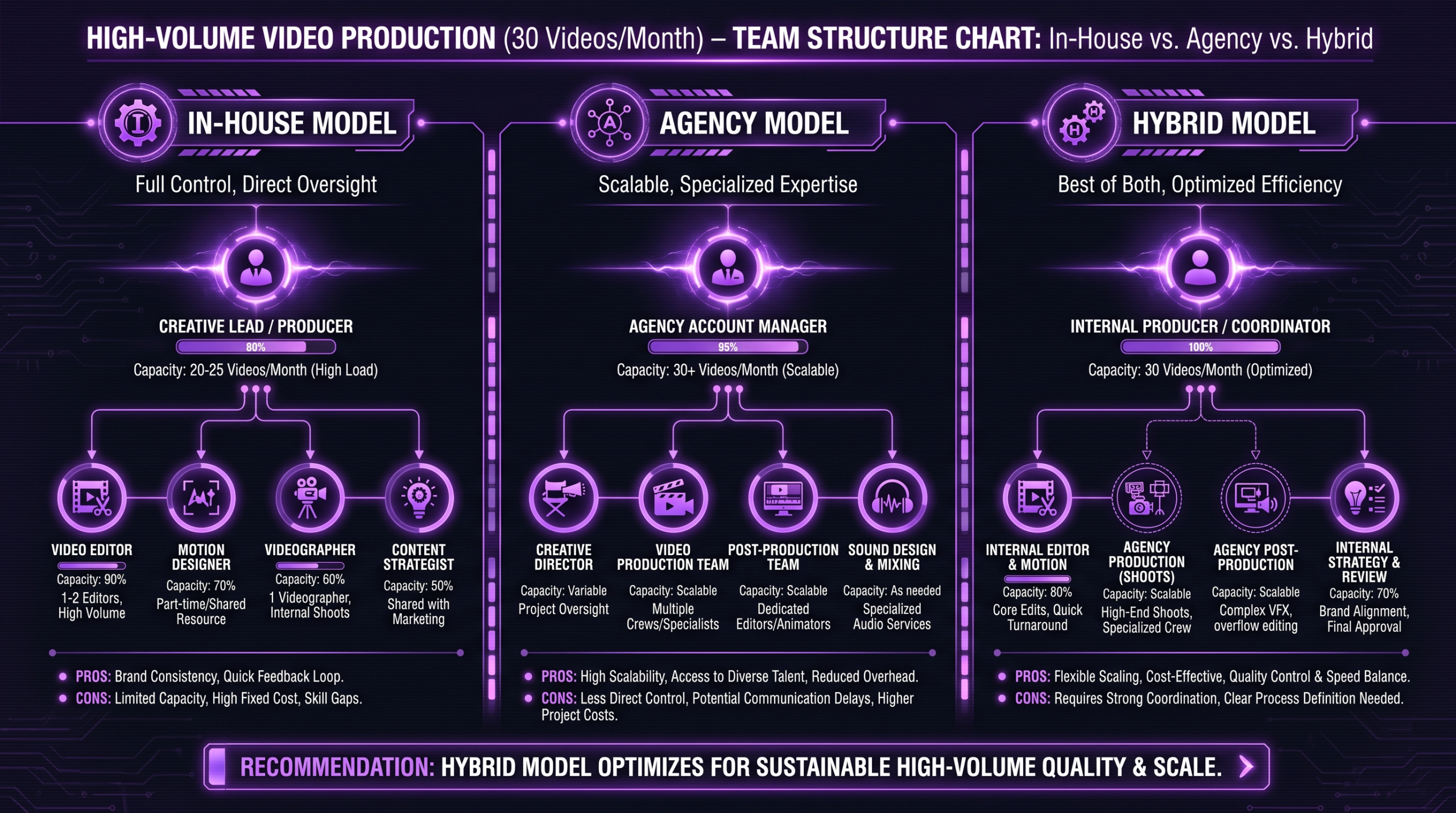
Most teams that successfully reach 30 videos per month use a hybrid model: a small in-house production coordinator who owns the system and handles brand-sensitive or highly strategic content, paired with an external post-production team who handles the volume work. The in-house person is the brain; the external team is the throughput.
Going fully in-house for 30 videos per month typically means three to five dedicated editing and production roles, plus software, hardware, and management overhead. Going fully agency-managed means finding a partner with the capacity and systems to reliably turn around your volume without quality drift. Understanding the trade-offs in detail is worth exploring — the video editing agency vs. freelancer comparison covers the key dimensions including quality consistency, turnaround, and cost structure at different volumes.
Roles You Need at Each Volume Tier
The roles required to sustain each volume tier are different enough that teams often hire for the wrong stage. A team running four videos a month needs a skilled editor and a decisive reviewer. A team running fifteen videos a month needs a production coordinator to manage the calendar and assets. A team running thirty videos per month needs all of the above plus clear editorial ownership that separates the “what goes into this video” decision from the “how does this video get made” decision.
The Workflow That Powers 30 Videos per Month
At thirty videos a month, your workflow is not a creative process — it is a manufacturing process with creative inputs. That sounds less romantic than it is. The best high-volume video teams are enormously creative; they just do not reinvent their process for every project. They have a machine, and the machine lets them direct their creativity where it matters.
The Pre-Production Sprint
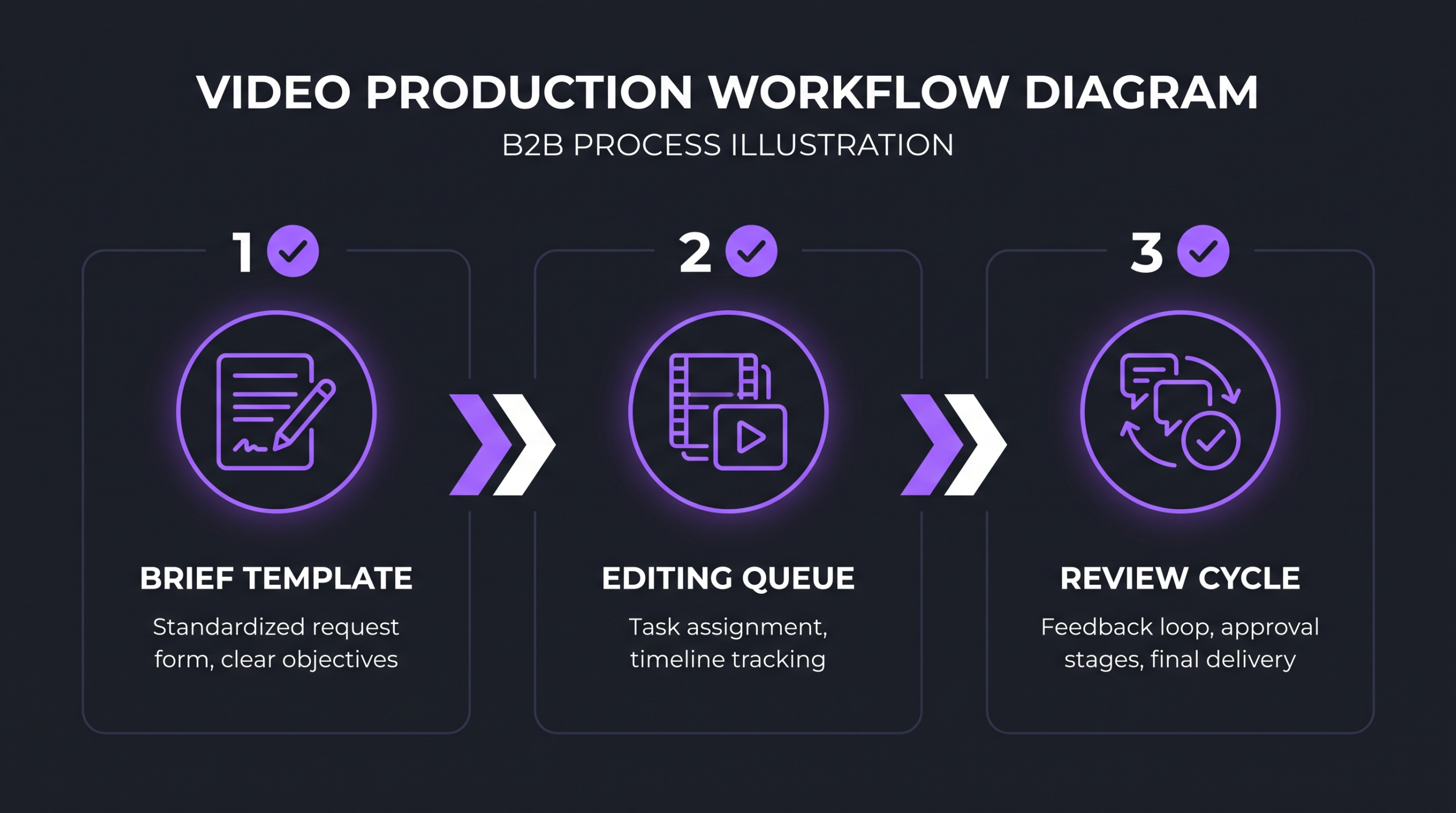
The pre-production sprint is a weekly or bi-weekly session where the content lead and the production coordinator work through the queue: confirming briefs are complete, verifying all assets are in the shared folder, assigning editors, and setting deadlines for the next batch. This session typically runs 45 to 90 minutes for a 30-video-per-month operation and prevents the single biggest cause of production delays: editing starting on incomplete briefs.
Nothing enters the editing queue without a complete brief and all required assets. This sounds obvious. It is routinely ignored, and it is the source of most “urgent” revision requests. Enforce the gate and your average cycle time drops significantly.
Editing Queue Management
At volume, the editing queue is a living document that every team member reads the same way. It shows every active project, its current stage, its editor, the deadline for the current stage, and a status flag (on track / at risk / blocked). Blocked items surface immediately so that a coordinator can intervene before a deadline is missed.
Editors at volume should not be managing their own queue priorities. They should receive a clear ordered list of projects each morning — the highest-priority item first — and work it in sequence. Editor discretion over prioritization creates invisible bottlenecks that only appear when something is overdue.
According to Wistia’s State of Video research, companies producing 50 or more videos annually tend to treat video as a systematic process rather than a series of individual projects — and the output quality is measurably more consistent as a result.
Review and Approval Cycles
The default assumption is that review takes as long as the reviewer takes. At four videos a month, that is acceptable. At thirty videos, it is a pipeline problem. Reviews need to be time-boxed: a reviewer has 24 hours to return feedback; if they don’t, the project moves to the next stage with a flag, not into a waiting state.
Cap revision rounds at two. A third revision request signals either that the brief was inadequate or that the reviewer’s expectations were not captured in advance. Both of those are upstream problems. Fixing them upstream is dramatically cheaper than absorbing revision loops downstream.
💡 Pro Tip: Track your average revision rounds per video format. Most teams find that certain formats (ads, leadership videos, brand films) consistently take more rounds than others (social cuts, repurposed content). Format-specific brief templates and dedicated reviewers for those high-touch formats can cut revision time by half.
Tools and Tech Stack for High-Volume Video Production
The right tools reduce friction. The wrong tools create it. The biggest mistake scaling teams make is implementing project management software designed for software development teams — tools where video-specific concepts like frame rates, aspect ratios, encoding presets, and review annotations don’t fit naturally.
Project Management
For production calendars and queue management, tools like Notion, Airtable, or ClickUp all work well for video teams when configured correctly. The configuration is the key: you need custom fields for video format, platform, editor, stage, deadline, and revision count. A generic out-of-the-box board won’t give you visibility at 30 videos per month.
Asset Management
Asset chaos is the silent killer of high-volume video programs. By the time a team reaches 20 videos per month, they typically have hundreds of footage files, graphics packages, music tracks, voice-over recordings, and exported video cuts spread across multiple locations. Without a structured asset management system, editors spend meaningful time hunting for files instead of editing.
A minimal viable asset structure has four top-level folders per project: RAW (all footage and audio as delivered), ASSETS (graphics, music, existing brand elements), EDITS (versioned exports named with a consistent convention), and DELIVERED (final approved exports). Every team member learns this structure once, then uses it forever.
Distribution and Scheduling
When you’re publishing 30 videos per month across multiple platforms — YouTube, LinkedIn, Instagram Reels, your website — manual uploading and scheduling becomes a significant time sink. Social scheduling tools like Buffer or Sprout Social let your coordinator batch-schedule a week’s worth of posts in a single session. This is not optional at 30 videos; it is a prerequisite.
Platform-specific formatting matters here. LinkedIn’s native video specifications differ from YouTube’s, which differ from Instagram’s. Part of your production calendar should include platform-specific export tasks so editors aren’t scrambling to re-export at the last minute.
Quality Control at Scale: Staying Sharp When Volume Increases
Quality drift is one of the biggest risks of scaling video output. When you go from four videos per month — where the marketing director reviews every frame — to thirty videos per month, individual attention to each piece drops. Without a compensating quality system, average quality will decline as volume rises. The goal is to make quality the output of the system, not the output of individual attention.
The Editor Briefing Standard
At volume, new editors should not receive projects until they have completed an onboarding video — a short (five to eight minute) video that shows them exactly what your brand’s editing style looks like: pacing conventions, transition preferences, color grade references, typography rules, and common mistakes to avoid. This video is re-recorded whenever your style evolves. It is the fastest, most consistent way to transfer institutional style knowledge to new team members or agency editors.
Teams like Increditors — which handles high-volume video editing for growth-stage companies — maintain dedicated style libraries and editor briefing standards that keep output consistent regardless of which editor touches a project. This is the practical benefit of working with a specialized post-production team: the quality infrastructure already exists and doesn’t need to be built from scratch.
Tiered Review Processes
Not all videos need the same review depth. A short social cut repurposed from an existing long-form video needs a lighter review than a new brand film. A tiered review process categorizes each video by type and assigns the appropriate review depth: Tier 1 (quick check by production coordinator: format, captions, cut points), Tier 2 (content reviewer signs off on messaging), Tier 3 (marketing director approves for brand-critical or high-stakes pieces).
At 30 videos per month, the distribution might look something like 60% Tier 1, 30% Tier 2, and 10% Tier 3. That means the marketing director’s time is protected for the 3 videos per month that genuinely need them, rather than being spread thin across every upload.
Volume Tier Breakdown: What Each Stage Actually Requires
Here’s how the three core models — in-house, agency, and hybrid — perform across key operational dimensions at the 30-video-per-month scale. These are illustrative benchmarks based on common operational patterns, not guarantees.
Common Mistakes When Scaling Video Output
Most scale-up failures follow predictable patterns. These are the mistakes that appear most consistently across teams attempting to reach 30 videos per month.
Mistake 1: Hiring Before Building the System
Adding editors before standardizing briefs and the review process just multiplies the chaos. New editors inherit the broken system and spend their first weeks asking the same clarifying questions as the last editors did. Fix the system first, then scale headcount into the fixed system.
Mistake 2: Chasing Format Variety Too Early
Teams in growth mode often want to be on every platform with every format simultaneously. At 30 videos per month, that can mean ten different formats across five platforms — a combinatorial brief and QC challenge that destroys efficiency. Pick the two or three highest-performing formats and master them before expanding. HubSpot’s video marketing data consistently shows that channel focus outperforms channel expansion in the early growth phase.
Mistake 3: Not Tracking Cycle Time
Cycle time — the number of business days from brief completion to delivered final video — is the single most important operational metric for a video team. Most teams don’t track it at all. Without it, you can’t tell whether your pipeline is improving or whether a new tool or process change is actually making you faster. Start tracking cycle time by format from week one.
Mistake 4: Treating Repurposed Content as Second-Class
At 30 videos per month, repurposed content — taking an existing long-form video and cutting it into social-native short clips — is not a shortcut. It is a core workflow that typically delivers strong performance because the content has already been validated. Teams that stigmatize repurposed content and only count “original” videos in their monthly target are doing less work than they think and creating artificial volume pressure on their teams.
Mistake 5: Skipping Editor Onboarding at Scale
When volume spikes, the temptation is to onboard new editors quickly and throw them into the queue. Editors who don’t understand the brand’s specific style conventions — pacing preferences, color grade direction, caption timing, music tone — produce output that requires heavy revision, which is more expensive than a proper onboarding would have been. Invest two to three hours in onboarding each new editor before they touch a live project; you will recoup those hours within the first week.
FAQ
How long does it realistically take to go from 4 to 30 videos per month?
For most teams, the transition takes three to five months when done correctly. The first month is spent building and testing the infrastructure (brief templates, production calendar, review process). The second month is spent scaling to a target of twelve to fifteen videos while the system is stress-tested. Months three through five involve incremental capacity additions — additional editors, refined workflows — to reach and sustain the 30-video target. Teams that try to jump directly to 30 in month one almost always produce a chaotic first month that sets the program back.
What’s the best way to maintain brand consistency across multiple editors?
A style reference library combined with a structured brief template is the most reliable method. The library should include annotated examples of approved edits showing specific choices (cut points, transition styles, color grade references, typography), and the brief template should require editors to explicitly reference it before starting. Some teams record a five-to-ten-minute “style guide video” that new editors watch before their first project — this transmits style nuance that written guidelines rarely capture.
Should we hire in-house editors or use an agency to scale to 30 videos per month?
This depends on your volume consistency and time horizon. If you expect 30 videos per month to be a sustained baseline for at least a year, the math on in-house editors can work — especially if you need very high editorial control over every project. If you need to reach 30 videos quickly (within six to eight weeks) or if your volume fluctuates month to month, an agency retainer or hybrid model offers faster ramp time and lower risk. The agency vs. freelancer breakdown explores this in detail.
How do you prevent quality from dropping when you increase volume?
Build quality into the system rather than relying on individual attention. The key mechanisms are: standardized briefs (so every editor starts from the same set of expectations), tiered review processes (so higher-stakes videos get more review depth), editor style onboarding, and cycle time tracking (so you can catch quality regressions early by noticing which video types are generating more revision requests). Tracking revision rate by video type is often the earliest signal that something in your process is breaking down.
What is the most important metric to track when scaling video production?
Cycle time — the number of business days from complete brief to delivered final video — is the most actionable operational metric. It directly reflects how your system is performing: if cycle time starts rising as volume grows, your process has a bottleneck that needs addressing before you add more capacity. Track it by format, because different video types have inherently different complexity levels, and comparing a 90-second social cut to a five-minute case study in the same metric obscures what’s actually happening.
Verdict: Build the Machine, Then Feed It
The jump from 4 to 30 videos per month is achievable for almost any marketing team with the budget and leadership commitment to make it happen. The teams that get there sustainably all follow the same path: they fix the process before they scale the headcount, they build quality into the system rather than relying on individual heroism, and they measure cycle time so they know when the system is under stress before it breaks.
The specific path — in-house, agency, or hybrid — matters less than the operating system you build around whichever model you choose. A well-run hybrid outperforms a poorly-run in-house team at any volume. The system is the product.
If you’re at four to eight videos per month today and targeting thirty, start with the brief template. Fix the brief, fix the review bottleneck, build the production calendar. Those three changes alone will typically get you to twelve to fifteen videos per month before you add a single new editor or vendor. From twelve to thirty, you need capacity — and the capacity will actually work because it has a system to plug into.
For teams that want to scale video output without managing the post-production system themselves, working with a specialized video editing agency that already has the infrastructure, the editor bench, and the briefing process in place is often the fastest and most predictable path to 30 videos per month.
Ready for Video That Actually Converts?
Tell us about your project and we will put together a custom plan.