











































A weak brief is the single biggest cause of video revision loops. This guide gives you a proven brief template, real-world examples for social, corporate, and product videos, and a checklist that senior editors actually ask for — so your next project comes back right the first time.
Why Most Video Briefs Fail (and What It Costs You)
The most common source of blown timelines and budget overruns in video production is not a bad editor — it is a bad brief. When the brief is vague, the editor fills gaps with assumptions. Those assumptions rarely match what the marketing director had in mind, which triggers revision round two, then round three, and eventually a frustrated conversation about whether the project is even worth finishing.
A brief is not paperwork. It is the single document that lets a skilled editor translate raw footage into the specific video you need, without needing a phone call for every decision. Teams that invest fifteen minutes in a structured brief consistently get cleaner first cuts, fewer revisions, and faster turnarounds — whether they are working with a freelancer, an in-house editor, or an external video editing agency.
The problem is that most briefs are written hastily, cover only the obvious facts (video length, delivery date), and leave out the things that actually drive editing decisions: tone, pacing, the story arc, the single action you want the viewer to take, and the references that show what “good” looks like for your brand.
The revision-loop cost nobody talks about
Every revision round after the first is a sign that something was missing from the brief. In agencies and production companies, editors commonly report that a large share of their revision requests could have been resolved with a single clear reference image or a one-sentence description of the desired emotional tone — information that takes seconds to write but is almost never included in a brief. Beyond the direct time cost, repeated revisions erode trust between the client team and the editor, reduce quality (editors working under deadline pressure cut fewer corners the first time than the fifth), and delay distribution windows that have real business consequences.
The solution is not to write a longer brief. It is to write a structured brief — one that covers each decision layer an editor faces, in the order they face them. The template below does exactly that.
💡 Pro Tip: Before writing any brief, ask yourself: “If I handed this document to someone who has never seen our brand and never spoken to me, could they produce a video I would approve?” If the answer is no, keep writing.
What to Include in a Video Editor Brief
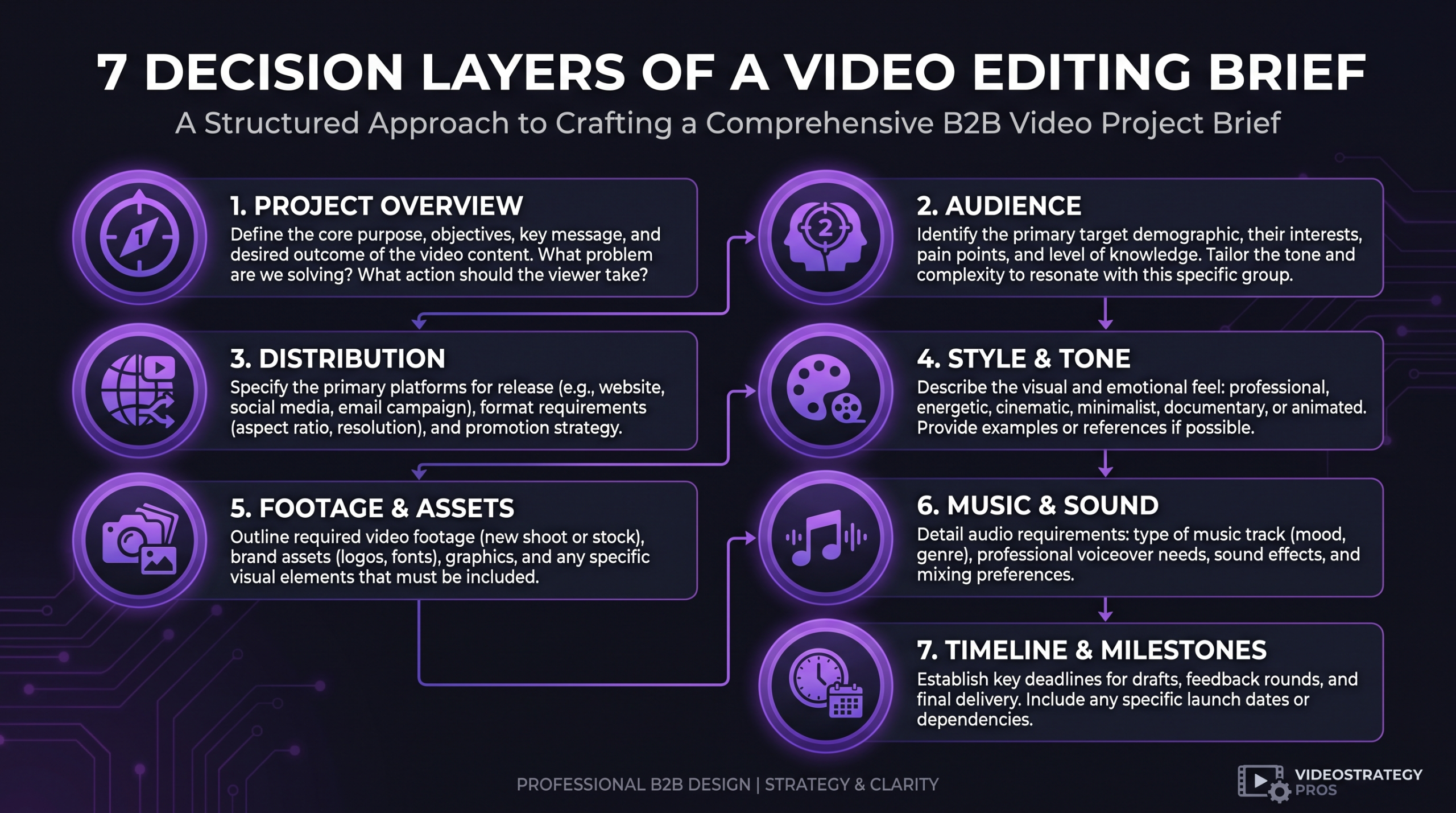
A complete video editor brief covers seven decision layers. Each one maps to a specific type of editing judgment — cut pacing, color treatment, music selection, caption style, motion graphics complexity. Skip any layer and the editor is left guessing in that area.
1. Project Overview and Business Goal
Start with why this video exists. Not “to promote our product launch” — go one level deeper. What decision do you want the viewer to make after watching? What does success look like in measurable terms: demo requests, time-on-page, share rate, qualified leads? The editor does not need access to your marketing dashboard, but knowing that the video’s primary goal is to drive click-throughs to a demo booking page changes every editing decision — from the pacing of the hook to where the CTA screen lands.
Also include a one-sentence project context: what the video is part of (campaign, series, standalone), whether it is a first-ever piece for this topic or a refresh of an existing video, and any relevant background the editor needs to understand the subject matter.
2. Target Audience
Define the viewer in three dimensions: who they are (job title, company stage, or consumer profile), what they already know about the topic (so the editor knows whether to include explanatory graphics or assume familiarity), and what emotional state they are likely in when they encounter the video. A procurement director evaluating SaaS tools has a different attention span and skepticism level than an entrepreneur browsing Instagram at 8 PM. The edit should feel different for each.
3. Distribution Channel and Format
Every platform has technical and behavioral constraints that directly affect edit decisions. YouTube’s recommended upload specs differ from LinkedIn’s, and both differ from the vertical 9:16 format native to Instagram Reels and TikTok. More importantly, viewer behavior differs: YouTube audiences tolerate a 30-second intro for long-form content that would annihilate retention on LinkedIn, where native video best practices strongly favor a hook within the first three seconds.
Your brief should specify: aspect ratio (16:9, 1:1, 9:16), maximum file size, codec if required, caption style (burnt-in vs. separate SRT file), whether a square thumbnail variant is needed, and whether multiple aspect ratios are required for the same edit. When you are distributing across multiple channels, list each one and flag which is the primary deliverable.
4. Tone, Style, and Reference Examples
This is the section most briefs skip, and it is the section that would eliminate the most revisions. “Professional but approachable” means something different to every editor. “Like Apple’s product videos” means something specific. Include three to five reference videos with timestamps if you are referencing a specific moment: “The cut pacing at 0:42–0:58 in [link] is exactly what we want for the product reveal.” Also specify what you do NOT want — a competitor style, an overly flashy motion-graphics aesthetic, a music genre that does not fit your brand.
If you have brand guidelines that include approved fonts, color palettes, and logo placement rules, attach them or link to them. If you do not have formal brand guidelines, describe the visual language in plain terms: dark and minimal, warm and documentary, fast-paced and punchy, calm and educational.
5. Script, Shot List, and Raw Footage Notes
If the video is scripted, include the final approved script with speaker notes. If it was filmed documentary-style, provide a rough transcript or time-coded notes indicating which sections are usable and which are B-roll. Note any technical issues with specific clips (audio dropouts, camera shake, lighting problems) so the editor can plan around them rather than discovering them mid-edit. If there are preferred takes for key moments, mark them clearly.
6. Music, Sound Design, and Voice-Over
Music drives more emotional response than any other editing variable, yet briefs rarely address it in useful terms. Do not just say “upbeat background music.” Describe the mood you want at each beat of the video, provide reference tracks if you have them, and specify whether the editor should source music from a particular licensed library (Artlist, Epidemic Sound, Musicbed) or from your existing brand music package. If a voice-over is included, clarify whether it has already been recorded or needs to be sourced — and if sourced, specify gender, accent, and pace preferences.
7. Timeline, Deliverables, and Revision Policy
State the final delivery deadline, but also break down the milestone dates: first cut review, revision deadline, final approval. Specify the deliverable formats (ProRes master, compressed MP4, SRT file, thumbnail). Clarify the revision policy upfront: how many rounds are included, what constitutes a revision versus a new request, and what the preferred feedback method is — time-coded comments in Frame.io, a shared document, or a structured feedback form. A clear revision policy prevents scope creep and protects both sides of the relationship.
The Complete Video Editor Brief Template
The template below is structured to be copied into a shared document (Notion, Google Doc, or a project management tool). Fill in every section before sending — leave nothing as “TBD” unless you flag it explicitly and give a date for when it will be resolved. Editors cannot begin work on sections that are TBD, which defeats the purpose of sending the brief early.
PROJECT OVERVIEW
Project name: ___
Video type: [Brand story / Product demo / Tutorial / Testimonial / Social short / Other]
Business goal (one sentence): ___
Primary metric of success: ___
Part of a series? [Yes / No] — if yes, series name and episode number: ___
AUDIENCE
Primary viewer: ___
Awareness level (cold / warm / existing customer): ___
Viewer’s emotional state when they see this: ___
DISTRIBUTION
Primary channel: ___
Additional channels: ___
Aspect ratio: ___ | Resolution: ___ | Max file size: ___
Captions: [Burnt-in / SRT file / None]
Thumbnail needed: [Yes / No]
TONE AND STYLE
Three words that describe the desired feel: ___
Reference video 1 (URL + notes): ___
Reference video 2 (URL + notes): ___
Reference video 3 (URL + notes): ___
Style to avoid: ___
Brand guidelines (link or attach): ___
FOOTAGE AND SCRIPT
Raw footage location: ___
Script / transcript: [attached / see link / not applicable]
Preferred takes / usable sections: ___
Known footage issues: ___
B-roll available: [Yes — see folder link / No / To be sourced by editor]
MUSIC AND AUDIO
Music mood per video section: ___
Music library to use: ___
Reference tracks: ___
Voice-over: [Pre-recorded (link) / To be sourced / None]
If sourcing VO: gender, accent, pace: ___
DELIVERABLES AND TIMELINE
First cut due: ___
Revision deadline: ___
Final approved file due: ___
Deliverable formats: ___
Revision rounds included: ___
Feedback method: [Frame.io / Google Doc / Other: ___]
BRAND ELEMENTS
Logo file (link): ___
Brand color codes: ___
Approved fonts: ___
Lower-thirds style: ___
Intro / outro template: [Use existing / Create new / None]
ADDITIONAL CONTEXT
Anything else the editor needs to know: ___
Brief Examples by Video Type
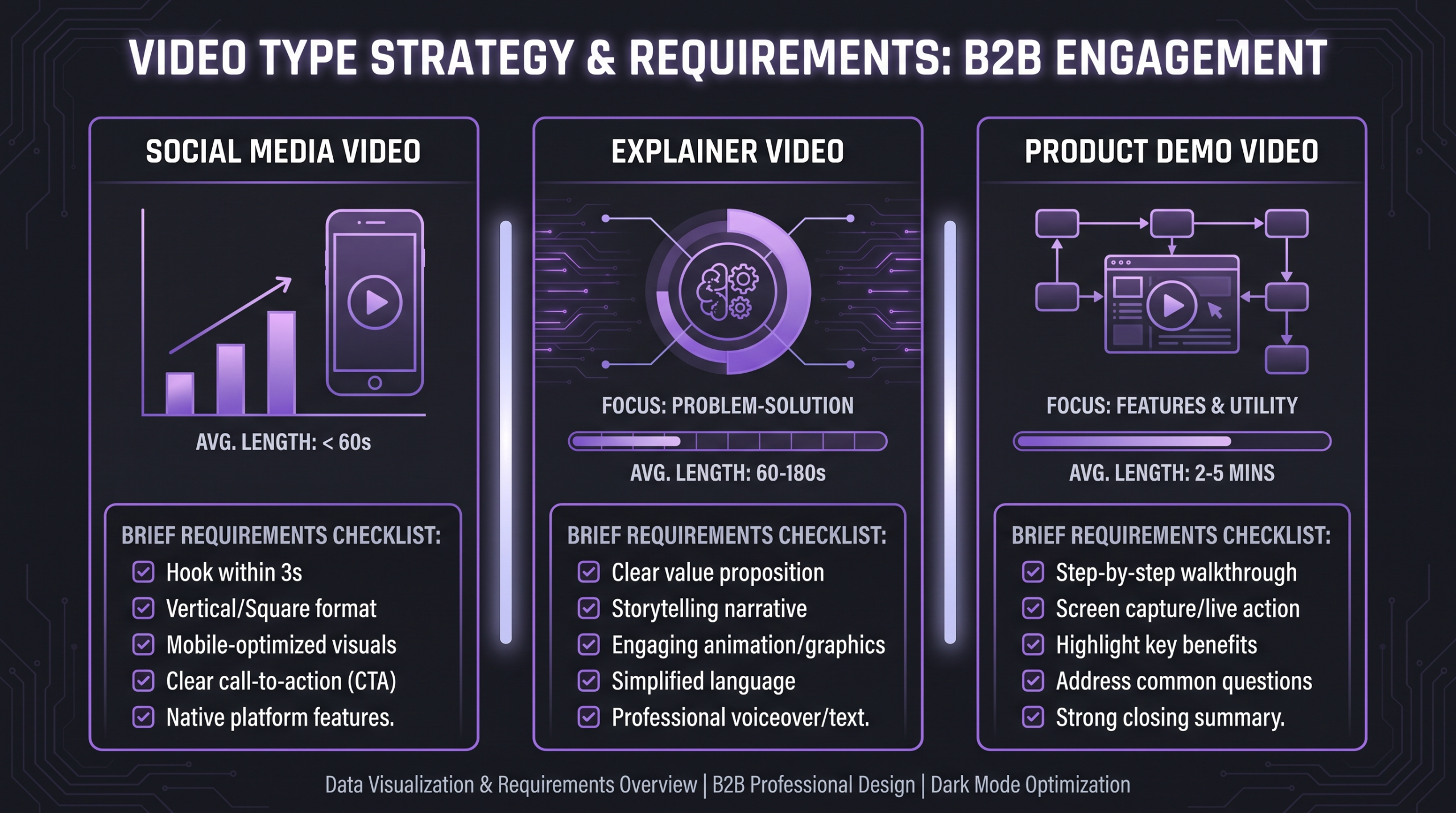
Abstract templates are useful; concrete examples are more useful. The three examples below show how the template above gets populated for different common video types. Each example is realistic, not idealized — they reflect the level of specificity that actually resolves editing ambiguity in production.
Example 1: LinkedIn Short-Form Video (B2B SaaS)
Example 2: Corporate Explainer Video (Internal Comms)
Example 3: Product Demo Video (SaaS Sales Enablement)
This type of video is often embedded on a landing page and used by sales reps to follow up with prospects. The brief must be especially precise about which product features to highlight, which to skip, and what the emotional arc should be across the demo.
💡 Pro Tip: For product demo briefs, include a “kill list” — features you do NOT want shown, even if the editor finds interesting footage of them. Editors optimizing for visual interest will naturally gravitate toward complex-looking UI sequences; your brief should clarify which of those add confusion rather than value.
Key elements of a product demo brief: the specific problem the demo opens with (not the product features — the pain point), the three maximum features to demonstrate in sequence, the exact UI flow to follow (provide screen recording or time-coded notes on the footage), what the viewer should feel at 0:30 vs. at 2:00, and whether the sales team needs chapter markers for sending specific segments to prospects.
Common Brief Mistakes and How to Fix Them
The mistakes below consistently appear in briefs from marketing teams at growth-stage and enterprise companies alike. They are fixable in under ten minutes each.
Briefing an Agency vs. a Freelancer vs. an In-House Editor
The same brief template works across all three contexts, but the depth and emphasis shift depending on who is receiving it. Understanding these differences helps you get first-cut quality regardless of the editing structure you use. For more on how these relationships differ at a structural level, this comparison of agencies versus freelancers covers the trade-offs in detail.
Briefing an agency: what changes
When working with a premium video editing agency like Increditors, the brief serves a slightly different function than it does with a solo freelancer. The agency has an internal production workflow — an editor, a quality reviewer, possibly a motion designer — and the brief is shared across that team rather than read by one person. This means every piece of ambiguity gets multiplied. A vague tone direction confuses not just the editor but also the reviewer who checks against it and the motion designer who creates graphics to match it.
On the positive side, a premium agency will also flag a weak brief before starting — a freelancer under deadline pressure may just make assumptions and move forward. At Increditors, for example, client briefs go through an intake review before production begins, and we send a targeted question list rather than beginning work with information gaps. This is the right model, but it only works well when the client’s initial brief gives the agency enough to identify the right questions. A completely empty brief generates a long clarification process that delays the first cut by days.
For budgeting context on what agency vs. freelance options actually cost, this breakdown of professional video editing costs covers the major tiers.
What Happens After You Send the Brief
A well-written brief does not end the client’s job — it changes the nature of it. Here is the workflow that makes the post-brief phase as efficient as the brief itself.
The intake call (for new projects)
For any project over two minutes in length or with significant motion graphics, a fifteen-minute intake call after the brief is submitted dramatically improves first-cut quality. This is not a chance to verbally dump information that should be in the brief — it is for the editor to ask the two or three questions that the brief almost answers but leaves ambiguous. Prepare for this call by reviewing your own brief and identifying the sections where you were least specific. Those will be the questions.
How to give effective revision feedback
The quality of your revision feedback is as important as the quality of your brief. Wistia’s guide to video review outlines a widely-used framework: every piece of feedback should specify the timecode, describe what is wrong, and where possible suggest the direction to fix it. “I don’t like the music” is not actionable. “The music at 0:22–0:45 is too energetic for this section — the viewer should feel calm and thoughtful here; something like [reference track] would work better” is actionable.
Consolidate all feedback from internal stakeholders before sending it to the editor. The most common cause of runaway revision rounds in marketing teams is multiple stakeholders sending conflicting feedback at different times. One consolidated round of feedback, delivered via a review tool with time-coded comments, is worth three fragmented email threads.
Building a brief library for ongoing content programs
If your team produces video regularly — monthly case studies, weekly social shorts, quarterly brand films — the marginal cost of briefing each video drops dramatically when you maintain a brief library. Create a “master brand brief” that captures all the standing elements (brand guidelines, approved music libraries, technical specs, revision policy, feedback channel) that do not change project to project. Each new project brief then only needs to cover the project-specific information: goal, footage, unique style direction. Teams that do this consistently report faster approvals and lower revision counts across their entire video program.
Tools that support brief libraries well include Notion (for structured templates with embedded brand assets), Notion’s template feature makes it easy to duplicate and customize a master brief for each new project, and HubSpot’s content management tools integrate brief storage with content planning workflows for larger marketing teams.
FAQ
How long should a video editor brief be?
A complete brief for a standard video project is typically one to two pages. The goal is not length — it is coverage. Every section of the template above should be filled in. For short-form social videos under 60 seconds, a brief can be a single structured page. For brand films or series, a more detailed brief of two to three pages is appropriate. What matters is that no section is left empty or vague enough to generate a clarification question from the editor.
Should I send reference videos even if I don’t know exactly what I want?
Yes — especially then. References are the fastest way to communicate aesthetic intent when you cannot describe it precisely in words. Include three to five videos that feel “close” to what you want and one or two that feel “wrong.” The contrast between the two sets communicates more than a written description in most cases. Add a note to each reference explaining what specifically you are pointing to: the pacing, the color grade, the music energy, the motion graphics style.
What if we don’t have brand guidelines yet?
A formal brand guidelines document is not required for a usable brief. In the style section, describe your visual language in plain terms: the color palette you use (even if informal), the font you use in presentations, whether you prefer a dark or light aesthetic, and three adjectives for your brand personality. Also include your logo file. An editor working from that information can make consistent decisions even without a 40-page brand book. When you are ready to formalize brand guidelines, the feedback from the video production process often helps clarify what visual standards actually matter for your content.
How many revision rounds should I include in a video project?
Industry standard for a standard marketing video is two rounds of revisions. The first round addresses structural issues — pacing, sequencing, key sections that need to be cut or added. The second round is for refinements — fine-tuning the cut timing, audio levels, caption placement, color. A well-written brief should make structural revisions rare or unnecessary. If you regularly find yourself going beyond two rounds, the root cause is almost always an incomplete brief rather than poor editing execution.
What is the difference between a brief and a creative concept?
A creative concept defines what the video is about — the story, the angle, the emotional journey. A brief defines how to execute it — the practical, technical, and stylistic parameters the editor needs to do their job. Both are necessary, but they serve different purposes. For most marketing videos, the creative concept is developed first (often by the marketing team or a creative director), then the brief operationalizes that concept for production. For short-form social content, the brief often incorporates both — but they should be kept as separate sections to prevent the “why” from drowning out the “how.”
Verdict: The Brief Is Your Production Infrastructure
Most video revision cycles exist because of a brief that was written in five minutes or skipped entirely. The template and examples in this guide give your team a repeatable system for eliminating that waste. Fill in every section before sending. Include references that show the editor what “good” looks like for your brand. Define the revision policy upfront. Consolidate stakeholder feedback before it goes back to the editor.
The payoff is not just faster first cuts — it is a consistent visual identity across every video your team produces, regardless of which editor handles each project. For teams producing video at scale, a brief library built from this template becomes as valuable as the brand guidelines themselves. It is the difference between video that sounds like your brand and video that is your brand.
If you are building or scaling a video program and want to explore how a structured production workflow improves output quality at volume, the top-ranked video editing services for content creators is a useful comparison of what serious production partnerships look like at different budget levels.
Ready for Video That Actually Converts?
Tell us about your project and we will put together a custom plan.