










![3D Explainer Video - ScribbleLive.mp4_snapshot_00.12_[2022.03.09_03.14.16]](https://increditors.com/wp-content/uploads/elementor/thumbs/3D-Explainer-Video-ScribbleLive.mp4_snapshot_00.12_2022.03.09_03.14.16-r7wb53mx72rxst3qcqyrfxdmeyzb5r9jbl0wbjujh4.png "3D Explainer Video – ScribbleLive.mp4_snapshot_00.12_[2022.03.09_03.14.16]")
































A shot list is a pre-production document that maps every planned camera angle, shot type, subject, and movement before filming begins. It keeps crews aligned, prevents missed coverage, and dramatically cuts post-production guesswork. This guide explains what goes into a shot list, provides copy-ready templates for common video types, and shows real examples — so your next shoot runs tighter and your editor has exactly what they need.
- What Is a Shot List?
- Why Shot Lists Matter for Video Production
- Anatomy of a Shot List: What to Include
- Shot List Templates (Ready to Copy)
- Shot List Examples by Video Type
- Shot List vs. Storyboard vs. Call Sheet
- How to Build Your Shot List in 6 Steps
- Common Shot List Mistakes to Avoid
- Frequently Asked Questions
- Verdict
What Is a Shot List?
A shot list is a structured pre-production document that enumerates every camera shot you plan to capture during a video shoot, along with the key details a director, cinematographer, and crew need to execute each one. Think of it as the tactical blueprint that sits between the creative script and the physical shoot day.
At its core, a shot list answers three questions for every moment in your video: What does the camera show? How does it show it? What is the subject doing? From a wide establishing shot of a boardroom to an extreme close-up of hands typing on a keyboard, every planned frame gets its own row in the list.
Shot lists are used across virtually every video format — corporate brand films, YouTube tutorials, social media ads, documentaries, product demonstrations, event recaps, and narrative films. The scale varies: a 30-second Instagram ad might need 8–12 shots, while a multi-day corporate documentary might require 200+. But the purpose is always the same: eliminate ambiguity before the camera rolls.
The shot list typically lives alongside a script or video brief and is created by the director or lead producer — sometimes in collaboration with the director of photography (DP). It is then shared with every department head before shoot day so lighting, art, audio, and talent are all working from the same plan.
A Brief History
Shot lists have been a core part of professional film production since at least the studio era of the 1930s and 1940s, when large Hollywood productions needed to coordinate dozens of crew members across multiple cameras. As video production moved beyond feature films into commercial work, documentaries, and eventually digital content creation, the shot list adapted — shrinking in complexity for smaller crews but never disappearing. According to StudioBinder’s filmmaking resources, a well-built shot list remains one of the most universally used tools in professional video production, regardless of budget or format.
Today, shot lists are created in everything from Google Sheets and Excel to dedicated production software, but the underlying logic has not changed in decades: plan the visual coverage, communicate it clearly, and protect the edit.
Why Shot Lists Matter for Video Production
Skipping a shot list is one of the most common ways that video shoots go over budget and over schedule. Without one, directors rely on improvisation and verbal direction on shoot day — which works occasionally for experienced solo operators, but consistently fails in team environments.
1. They Prevent Missed Coverage
The most expensive outcome of a disorganized shoot is discovering in the edit room that a critical shot was never captured. Reshoots are logistically difficult and financially painful — arranging locations, talent, and crew a second time typically costs a significant multiple of the original session. A shot list forces the team to think through every coverage need before shooting begins, dramatically reducing the chance of these gaps.
2. They Communicate Creative Intent to the Whole Crew
A director might have a clear internal vision for a video, but that vision only produces results when the cinematographer, gaffer, sound recordist, and talent all understand it. A shot list translates creative intent into concrete, actionable information. The DP knows which lenses to bring. The gaffer knows which setups require which lighting configurations. Talent and interviewees know roughly what positions they will be asked to hold. Everyone arrives prepared.
3. They Make the Editor’s Job Easier
A good shot list doubles as a communication bridge between production and post-production. When editors receive footage, a corresponding shot list tells them exactly what was intended for each clip — which shot was the primary coverage, which was B-roll, and what the director had in mind for the sequence. This context speeds up assembly significantly. When working with a professional video editing agency, submitting a shot list alongside raw footage consistently shortens delivery timelines because editors spend less time mapping footage to intention.
4. They Enable Efficient Shoot Scheduling
Shot lists allow production managers to group shots by location, lighting setup, or camera position — rather than following the chronological order of the script, which is almost never the most efficient way to shoot. By batching all shots from a single location or setup, crews minimise the time lost to moving equipment and rebuilding lighting rigs. This kind of production efficiency can often save hours on a single shoot day.
💡 Pro Tip: Sort your shot list by location and lighting setup — not by script order — when planning your shoot day. Grouping shots that share the same camera position or light setup often cuts total shoot time by 20–30% compared to shooting chronologically.
5. They Create Accountability and a Shoot Record
On larger shoots, someone — often a script supervisor or AC — will mark the shot list with completion status in real time. This running log of what was captured versus what was planned is invaluable for both the director wrapping the day and the editor starting work. It also serves as a production record if questions arise about coverage after the fact.
Anatomy of a Shot List: What to Include
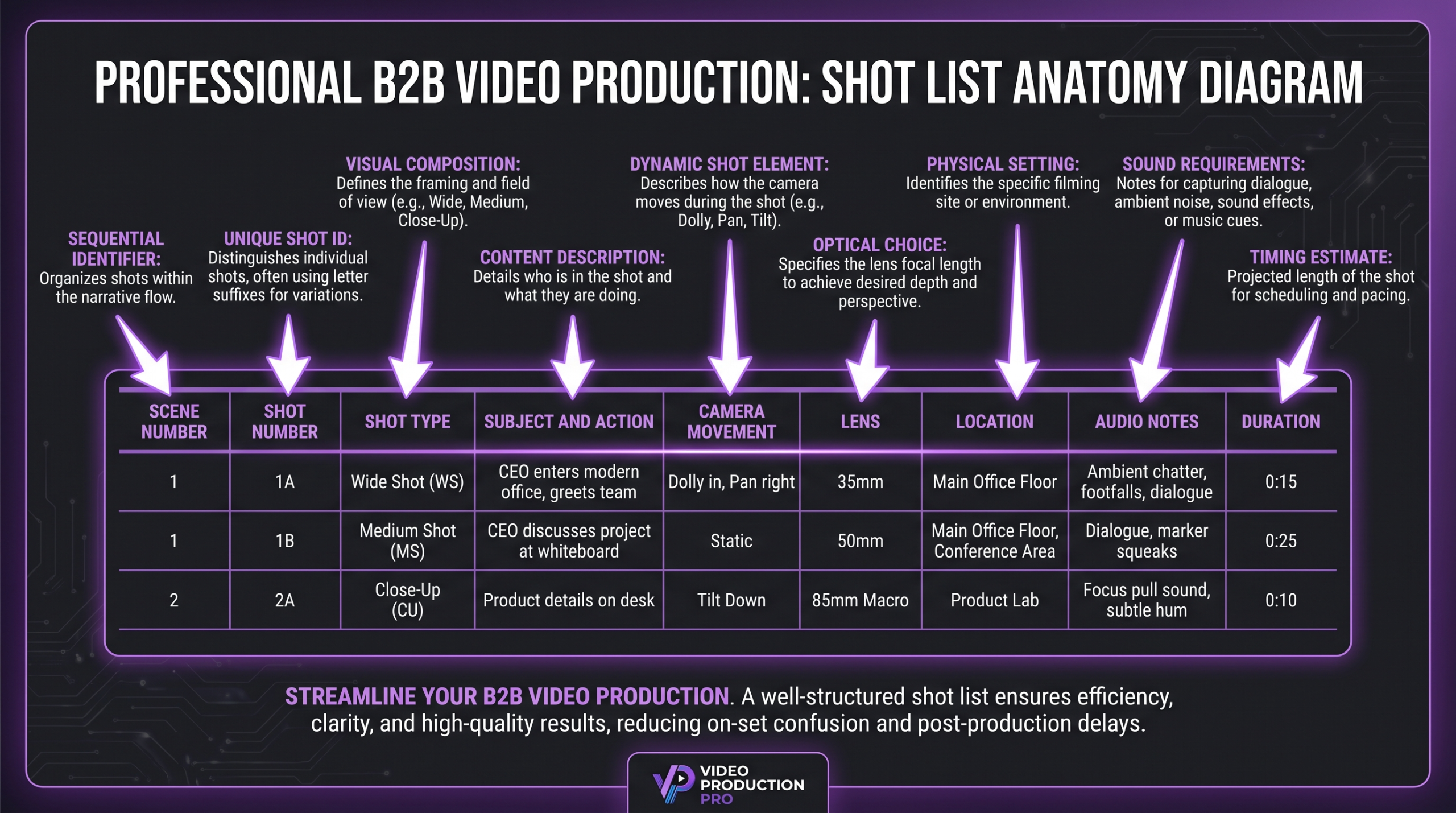
A shot list can range from a simple two-column grid to a highly detailed production document, depending on the complexity of the shoot. Below are the core fields used in professional production — include the ones that are relevant to your project’s scale and skip those that add bureaucracy without value.
Scene Number: Ties the shot back to a specific scene in the script or video treatment. Helps editors and directors navigate large projects.
Shot Number: A sequential identifier within each scene (e.g., 1A, 1B, 1C). This is the primary reference point for the camera operator and editor.
Shot Type / Framing: The most critical field. Describes the camera’s visual relationship to the subject. Common types include:
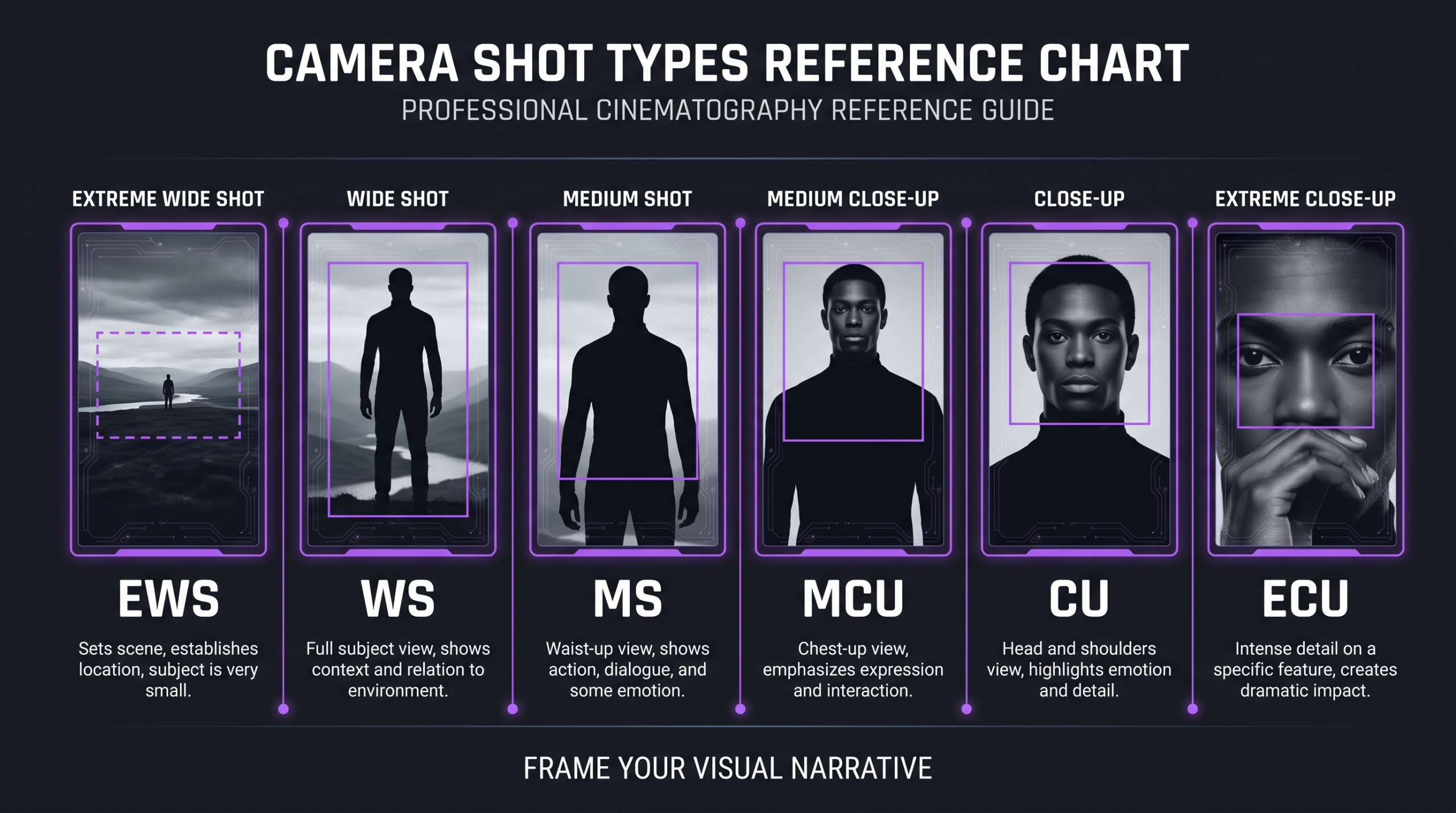
- ECU — Extreme Close-Up: Fills the frame with a very tight detail (an eye, a logo, a finger on a keyboard).
- CU — Close-Up: Face or object fills most of the frame. The workhorse of interview and emotion-driven content.
- MCU — Medium Close-Up: Chest and above. Common in talking-head and interview formats.
- MS — Medium Shot: Waist up. Natural for subjects in conversation or presenting to camera.
- MWS — Medium Wide Shot: Thighs and above. Shows body language and some environmental context.
- WS — Wide Shot: Full body visible with surrounding environment. Establishes context and spatial relationships.
- EWS — Extreme Wide Shot / Establishing Shot: Subject is small relative to the environment. Used to establish location at the start of a scene.
- OTS — Over the Shoulder: Camera positioned behind one subject’s shoulder looking at another. Standard for dialogue and interview sequences.
- POV — Point of View: Camera adopts the subject’s visual perspective.
- Insert: A cutaway shot of a specific object or action relevant to the scene (hands on a product, a document being signed).
Subject / Action: What the camera is pointing at and what is happening in frame. “CEO speaking to camera” or “hands assembling product on conveyor belt.”
Camera Movement: Static, pan (horizontal rotation), tilt (vertical rotation), dolly/track (physical movement along a rail), handheld, gimbal, or drone. Movement has a major impact on equipment needs, so this field informs the camera department’s kit list.
Lens / Focal Length: On narrative and commercial shoots, specifying a lens focal length (24mm, 50mm, 85mm, 135mm) helps the DP select the right glass and gives the director predictable control over depth of field and perspective compression. Optional on run-and-gun or documentary shoots.
Location / Set: Which physical space or set the shot takes place in. Critical for scheduling when multiple locations are involved in a single shoot day.
Audio Notes: Lav mic, boom, ambient audio only, music playback needed, or silent B-roll. The sound recordist plans their setup from this information.
Duration Estimate: Approximate clip length in the final edit. Helps the director pace the shoot day and ensures sufficient coverage time is allocated per shot.
Status / Notes: A completion field updated during the shoot — “Done,” “Needs Pickup,” “Skipped” — and any additional production notes.
According to MasterClass’s filmmaking guides, the most useful shot lists for professional productions include at minimum: scene number, shot number, shot type, subject/action, camera movement, and location. Everything else is additive value based on budget and crew size.
Understanding your video’s total production and editing costs also depends on how well your shot list is structured — more organised footage means fewer billable hours in post.
Shot List Templates (Ready to Copy)
The best shot list template is the simplest one that covers all the information your crew actually needs. Below are two ready-to-use formats: a lean version for small-team and social media shoots, and a full-detail version for branded video and commercial productions.
Template A: Lean Shot List (Small Crews, Social Media, Run-and-Gun)
Template B: Full-Detail Shot List (Commercial, Brand Film, Corporate Video)
Both templates work as Google Sheets, Excel, or Notion databases. The lean version suits solo creators and two-person crews. The full-detail version is appropriate for any production with three or more crew members, or any shoot where footage will be delivered to a professional editing team.
💡 Pro Tip: Colour-code rows by location in your shot list spreadsheet. All lobby shots get one colour, all boardroom shots another. This makes it instantly obvious which shots can be batched together on shoot day — no mental gymnastics required.
Shot List Examples by Video Type
Different video formats demand fundamentally different shot list approaches. A narrative short film prioritises coverage of dialogue and performance. A product demo video prioritises detail inserts and hero product angles. Understanding the conventions of your format — before you write a single shot — saves you from under-covering what actually matters.
Corporate Brand Film Example (Excerpt)
Here is an annotated excerpt from a real-world corporate brand film shot list structure. The video is a 3-minute company story piece for a B2B SaaS company:
Scene 1 — Opening Montage (Location: Main Office, Target duration: 25–30 sec)
- Shot 1A — EWS — Office exterior at golden hour, static — 8 sec
- Shot 1B — WS — Team in open office, slow pan — Ambient — 5 sec
- Shot 1C — Insert — Hands on keyboard, ECU, product UI — Silent B-roll — 3 sec
- Shot 1D — MCU — Two team members collaborating, OTS — Ambient — 4 sec
- Shot 1E — CU — Company logo on wall, slow push — Silent — 3 sec
Scene 2 — Founder Interview (Location: Boardroom, Target duration: 60 sec)
- Shot 2A — MCU — Primary interview angle, 85mm, lav + boom
- Shot 2B — WS — Secondary safety wide, 35mm, same audio
- Shot 2C — OTS — Reverse angle on interviewer (if applicable)
This structure — with dual interview angles and rich B-roll planning — gives an editor multiple options at every cut point. The difference between hiring a video editing agency and a freelancer often shows most clearly when footage is under-covered and creative problem-solving in post is the only option.
Shot List vs. Storyboard vs. Call Sheet: What’s the Difference?
These three documents are closely related and often confused — especially by teams new to structured video production. Each one serves a distinct purpose, and understanding which you need (and when) prevents both under-planning and over-engineering your pre-production process.
The shot list and storyboard are complementary, not competing. A storyboard shows what each frame will look like visually. A shot list tells the crew how to set up and execute each frame. On most corporate and commercial shoots, a shot list alone is sufficient. Storyboards are reserved for projects where precise visual framing needs client sign-off before production — think broadcast commercials, animated explainers, or sequences with complex camera moves that need to be previsualized.
The call sheet, by contrast, is a logistics document — not a creative one. It tells each crew member their call time, location address, parking, and what scenes are scheduled for the day. It references the shot list but does not replace it. As Adobe’s video production resources note, these documents work as a system — the script informs the shot list, the shot list populates the call sheet, and all three arrive on set together.
How to Build Your Shot List in 6 Steps
Building a shot list from scratch can feel overwhelming the first time. The process below breaks it into clear stages, each of which builds on the previous.
Step 1: Start with the Script or Treatment
Every shot list begins with the video’s content layer. Go through your script, treatment, or brief scene-by-scene and identify every distinct visual moment. What is happening? Where is it happening? Who or what does the camera need to see? At this stage, just make a rough list of moments — you will turn them into structured shots in the next step.
Step 2: Assign a Shot Type to Each Moment
For each moment you identified, decide on the primary shot type: wide, medium, close-up, insert, OTS, and so on. Think about the viewer’s experience — do they need to understand the space first (wide), connect emotionally with a person (close-up), or understand how something works in detail (insert)? The shot type communicates visual intention to the camera department.
Step 3: Add Coverage Shots
Coverage is the additional shots that give the editor options. For every hero shot, ask: What does the editor need to cut away to? For an interview, that means B-roll cutaways. For a dialogue scene, that means an OTS or reaction shot. For a product demo, that means insert close-ups. Coverage is the cushion that separates a watchable edit from a frustrating one. Frame.io’s production guides consistently emphasise that most shoot-day regrets come from insufficient coverage planning, not over-shooting.
Step 4: Sequence by Location and Lighting Setup
Reorder your shots — do not follow the script chronologically. Group all shots from the same physical location or the same camera/lighting setup. Moving equipment takes time; you can typically capture 4–8 shots in a single setup if they are well-planned, versus spending 30 minutes tearing down and rebuilding for each. Sequencing by setup is one of the most impactful efficiency decisions you can make before shoot day.
Step 5: Add Technical Details
Now fill in the remaining columns: camera movement, lens choice (if applicable), audio requirements, and estimated clip duration. This step converts a creative plan into a production-ready document. It also surfaces equipment needs early — if multiple shots require a gimbal, a drone, or a specific lens, the camera department needs to know before kit is ordered.
Step 6: Review with the DP and Producer
Share the draft shot list with your director of photography and producer before finalising. The DP will flag technically impractical shots (a certain lens at a certain distance in a small room) and suggest alternatives. The producer will flag scheduling conflicts — shots that require talent, props, or locations that cannot reasonably be available at the same time. Revise accordingly. The final shot list should reflect a realistic, achievable plan.
Common Shot List Mistakes to Avoid
Even experienced teams make recurring shot list errors. Here are the most common — and how to avoid each one.
Not Planning for B-Roll Volume
B-roll is consistently under-planned. Teams focused on scripted sequences often dedicate too few shots to contextual coverage — the ambient footage that makes a sequence breathe. A general rule: for every 1 minute of finished video that relies on B-roll, plan 4–6 dedicated B-roll shots in your shot list. Under-coverage here leaves editors with jump cuts and empty space.
Ignoring Aspect Ratio Requirements
Social media content is commonly delivered in multiple formats: 16:9 for YouTube, 9:16 for Instagram Reels and TikTok, 1:1 for feed posts. If you plan your shot list for 16:9 only, you may not have the vertical headroom or composition to adapt shots to 9:16 without losing critical elements. Note the final delivery formats in your shot list header and frame accordingly during the shoot. According to Meta’s video best practices documentation, vertical video typically outperforms landscape in mobile feed environments — which makes this a production-stage decision, not a post-production one.
Building a Shot List but Not Sharing It
A shot list that only the director has seen is half as effective as one the whole crew has reviewed. Share it at least 24 hours before the shoot so the DP, gaffer, and sound recordist can raise concerns and plan their own preparation. A last-minute reveal on shoot day defeats the purpose of having the document.
Forgetting Transitional and Cutaway Shots
Editors need visual “bridges” between scenes — doors opening, people walking, environment cutaways, detail inserts. These are often missing from shot lists because they feel mundane during planning. They are not mundane in the edit room. Add a dedicated B-roll/transition block to every scene in your shot list, even if it is just three to four catch-all environmental shots.
Over-Engineering the Document
Shot lists can become so detailed that they are unusable on a busy shoot day. A 30-column spreadsheet that requires 3 minutes to read per row will be abandoned the moment the crew gets into shooting flow. The best shot list is thorough enough to prevent gaps and brief enough to be consulted in seconds. Start with the lean template and add columns only when a specific project requires them.
Frequently Asked Questions
Do I need a shot list for a small, one-person video shoot?
Yes — even solo shoots benefit from a shot list. A simple 10-row document forces you to think through your visual coverage before you arrive, which is far more efficient than improvising on location. For a solo creator, the lean template (shot type, action, movement, done) takes about 20 minutes to complete and consistently reduces the “I forgot that shot” moment that leads to costly reshoots.
What is the difference between a shot list and a storyboard?
A shot list describes each shot in text — what type of shot, what is in frame, how the camera moves. A storyboard visualises each shot as a drawn panel, showing the actual composition and framing. Shot lists are faster to create and more commonly used across all video formats. Storyboards are typically reserved for complex sequences, animation, or projects where visual framing needs explicit client approval before production begins.
How many shots should a typical corporate video include?
A finished 2–3 minute corporate brand film typically requires 40–70 planned shots, depending on how many locations and interview subjects are involved. A shorter 60–90 second social cut usually needs 20–40 shots to give editors sufficient options. These ranges include both primary coverage shots and B-roll — the document should reflect everything that was planned to be captured, not just what makes it into the final edit.
What software or tools should I use to create a shot list?
Google Sheets or Excel are the most universally accessible options and work perfectly for teams of any size. Dedicated production tools like StudioBinder or Celtx offer structured shot list templates built into a broader production management workflow — useful for larger teams that need to share and update documents in real time. For most independent and small agency productions, a shared Google Sheet remains the most practical choice: accessible on a phone during the shoot, editable by multiple people, and easy to export as a PDF for the crew.
Should I send my shot list to my video editor?
Absolutely — this is one of the highest-value things you can do to speed up your post-production timeline. When an editor receives footage alongside a completed shot list, they immediately understand the intended function of each clip, which reduces the time spent mapping footage to the creative intent. If you work with Increditors or another professional video editing agency, providing a shot list alongside your footage is a simple step that typically shortens turnaround time and reduces revision rounds.
Verdict
A shot list is not optional administrative overhead — it is the single most effective pre-production tool for ensuring a video shoot produces editable, intentional footage. It aligns the crew before anyone picks up a camera, gives the editor context for every clip, and prevents the costly chaos of discovering gaps in coverage after the shoot day is over.
Start with the lean template for your next shoot, even if you are a one-person crew. Add columns and complexity as your projects scale. And when you are ready to hand that footage off to a professional team, share your shot list alongside your files — it is a small habit that has an outsized effect on the quality and speed of your final edit.
If you are planning a video project and want to understand what a well-covered shoot costs to edit professionally, the complete guide to professional video editing costs breaks down pricing by project type and complexity — a useful reference whether you are budgeting your first brand film or scaling a content programme.
Ready for Video That Actually Converts?
Tell us about your project and we will put together a custom plan.