










![3D Explainer Video - ScribbleLive.mp4_snapshot_00.12_[2022.03.09_03.14.16]](https://increditors.com/wp-content/uploads/elementor/thumbs/3D-Explainer-Video-ScribbleLive.mp4_snapshot_00.12_2022.03.09_03.14.16-r7wb53mx72rxst3qcqyrfxdmeyzb5r9jbl0wbjujh4.png "3D Explainer Video – ScribbleLive.mp4_snapshot_00.12_[2022.03.09_03.14.16]")
































Every platform has a preferred aspect ratio — and publishing the wrong one silently throttles your reach before a single viewer decides whether to watch. This cheat sheet maps the right ratio for YouTube, Instagram, TikTok, LinkedIn, X (Twitter), Facebook, and Pinterest, explains how mismatched ratios damage watch time, and shows you how to plan one shoot for multi-platform delivery without doubling your edit workload.
- What Are Video Aspect Ratios and Why They Matter
- The Six Standard Aspect Ratios You Need to Know
- Platform-by-Platform Cheat Sheet
- How the Wrong Aspect Ratio Damages Your Reach
- Multi-Platform Workflow: Shoot Once, Export Many
- Safe Zones and Reframing: Planning It at the Shoot
- Aspect Ratios by Content Type
- Frequently Asked Questions
- Verdict
What Are Video Aspect Ratios and Why They Matter
An aspect ratio is the proportional relationship between a video’s width and height, expressed as two numbers separated by a colon — 16:9, 9:16, 1:1, and so on. The first number is always width; the second is always height. That’s it. No hidden math, no platform-specific encoding mystery. A 16:9 video is sixteen units wide for every nine units tall, regardless of whether it’s 720p or 4K.
What makes aspect ratios strategically important — not just technically relevant — is how tightly they’re tied to user behavior, platform design, and algorithmic treatment. Platforms build their player and feed UI around specific proportions. When your video doesn’t match, the platform compensates with black bars, crops, or automatic downscaling, each of which degrades the viewing experience in a measurable way. A letterboxed short-form video on TikTok, for instance, immediately signals a cross-posted repost to viewers — which typically correlates with lower completion rates, even if the content itself is strong.
There are three specific ways the wrong ratio hurts you. First, it reduces the amount of screen real estate your content occupies — critical on mobile, where full-screen immersion is the standard expectation for short-form video. Second, it can trigger lower algorithmic distribution on platforms that monitor engagement signals tied to completion rate; a video that looks off-brand or poorly formatted tends to get abandoned faster. Third, black bars and pillarboxing reduce the visual professionalism of your brand even if your production quality is otherwise high.
Understanding aspect ratios isn’t just a post-production concern. It starts at the shoot. A team that frames everything for 16:9 landscape and later tries to reformat for Instagram Reels will find that subjects are clipped or that the composition simply doesn’t work vertically. Planning aspect ratio from the brief stage — not the export stage — is what separates efficient multi-platform video production from expensive rework.
The Six Standard Aspect Ratios You Need to Know
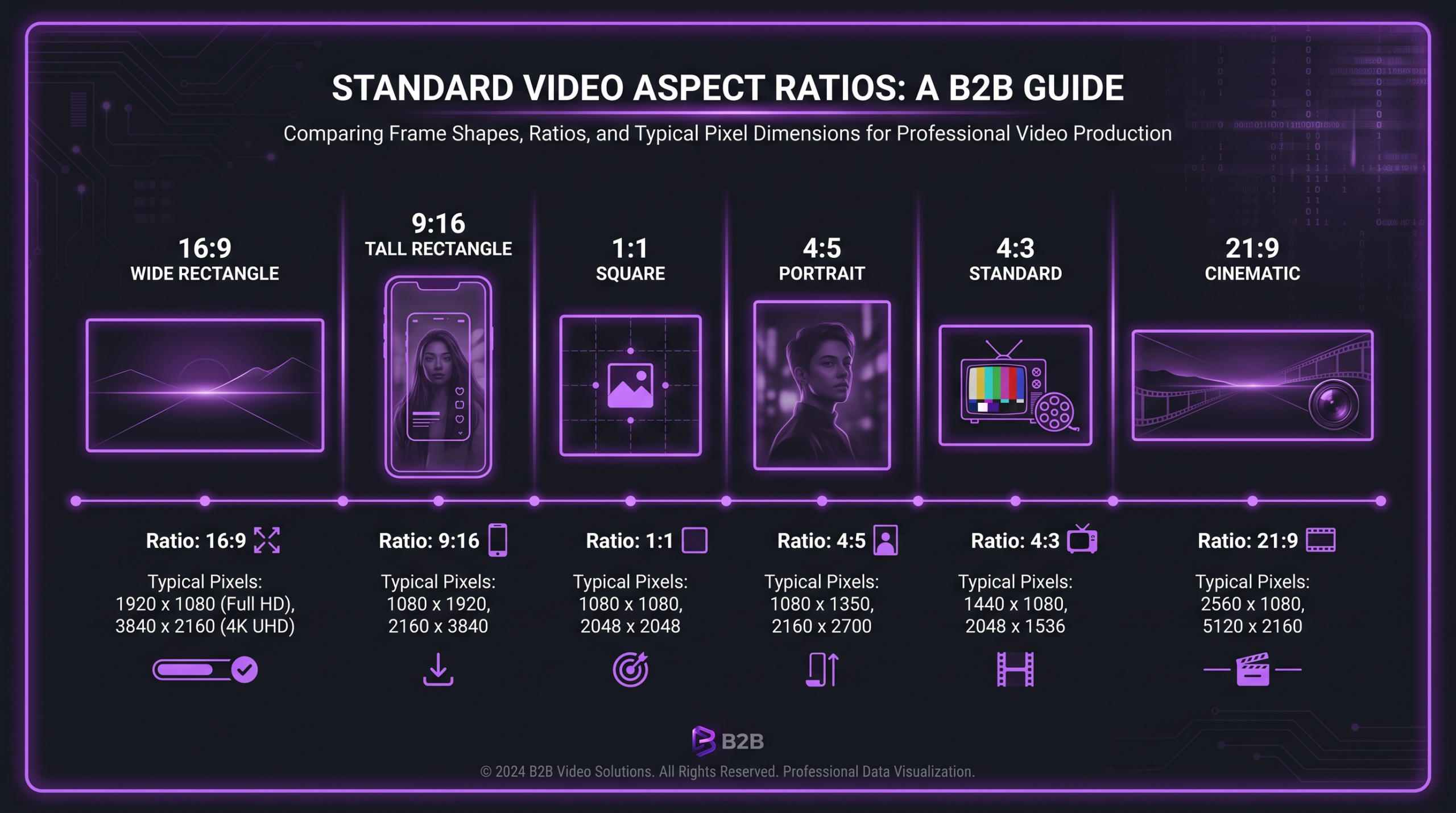
Most platform-specific requirements map to a small set of base ratios. Here’s what each one is, where it lives natively, and what it’s best suited for.
16:9 — The Universal Landscape Standard
The 16:9 ratio is the global standard for widescreen video — it’s the shape of your TV, your monitor, and the YouTube player. At 1920×1080 (full HD) or 3840×2160 (4K), it’s what cameras default to out of the box, what broadcast was built around, and what most professional production pipelines are optimized for. If someone says “film a video,” they almost certainly mean 16:9 unless otherwise specified.
Best for: YouTube main feed, LinkedIn feed, Facebook desktop feed, website embeds, presentations, and any long-form content meant to be watched on larger screens.
9:16 — The Vertical / Mobile-First Standard
The inverse of 16:9, the 9:16 ratio was built around the way most people actually hold their phones — vertically. At 1080×1920, it fills the entire portrait-mode phone screen with no black bars and no need to rotate. TikTok was built on this ratio; Instagram Reels and Stories, YouTube Shorts, and Facebook Reels all use it as their default.
Best for: TikTok, Instagram Reels, Instagram Stories, YouTube Shorts, Facebook Reels, Snapchat, any content primarily consumed on a phone.
1:1 — The Square Format
Square video was popularized by Instagram in the early days of the platform and remains a versatile middle ground. At 1080×1080, it takes up more vertical space in a portrait-mode feed than a 16:9 video would, but less than a 4:5 or 9:16 format. It’s the safest cross-post format because it requires minimal reframing and displays reasonably well on both desktop and mobile.
Best for: Instagram feed (when content isn’t purpose-built for Reels), LinkedIn feed, Facebook feed, Twitter/X feed, cross-platform repurposing with minimal editing.
4:5 — The Feed Portrait Sweet Spot
At 1080×1350, the 4:5 ratio occupies the maximum vertical real estate Instagram allows in its main feed without switching to full Stories/Reels mode. It takes up roughly 20% more screen height than a 1:1 square — a meaningful difference when competing for attention in a scrolling feed. Many brands now shoot their primary social content at 4:5 for feed posts and 9:16 for Stories/Reels, treating them as two distinct creative formats rather than repurposing one from the other.
Best for: Instagram feed posts (primary recommendation), Facebook feed posts on mobile, LinkedIn portrait posts.
4:3 — The Legacy Format
The 4:3 ratio dominated television before the widescreen era and still appears in older archival footage, certain documentary contexts, and retro aesthetic choices. It’s rarely a primary production format today, but understanding it matters when repurposing archival content or working with footage from older camera systems. Some creators intentionally use 4:3 for a vintage look.
Best for: Archival or retro-aesthetic content. Not recommended as a primary format for new production.
21:9 — The Cinematic Widescreen
The 21:9 ultra-widescreen format is used in cinema and high-end branded content to convey cinematic scale. Its horizontal letterboxing creates a filmic quality that audiences associate with high-budget production. On most online platforms, 21:9 will display with black bars above and below — which is sometimes intentional as an aesthetic choice, and sometimes a distribution error. Use it deliberately, never by accident.
Best for: Brand films, trailers, high-production ads where cinematic feel is the explicit creative goal. Not for social feed posts.
Platform-by-Platform Cheat Sheet
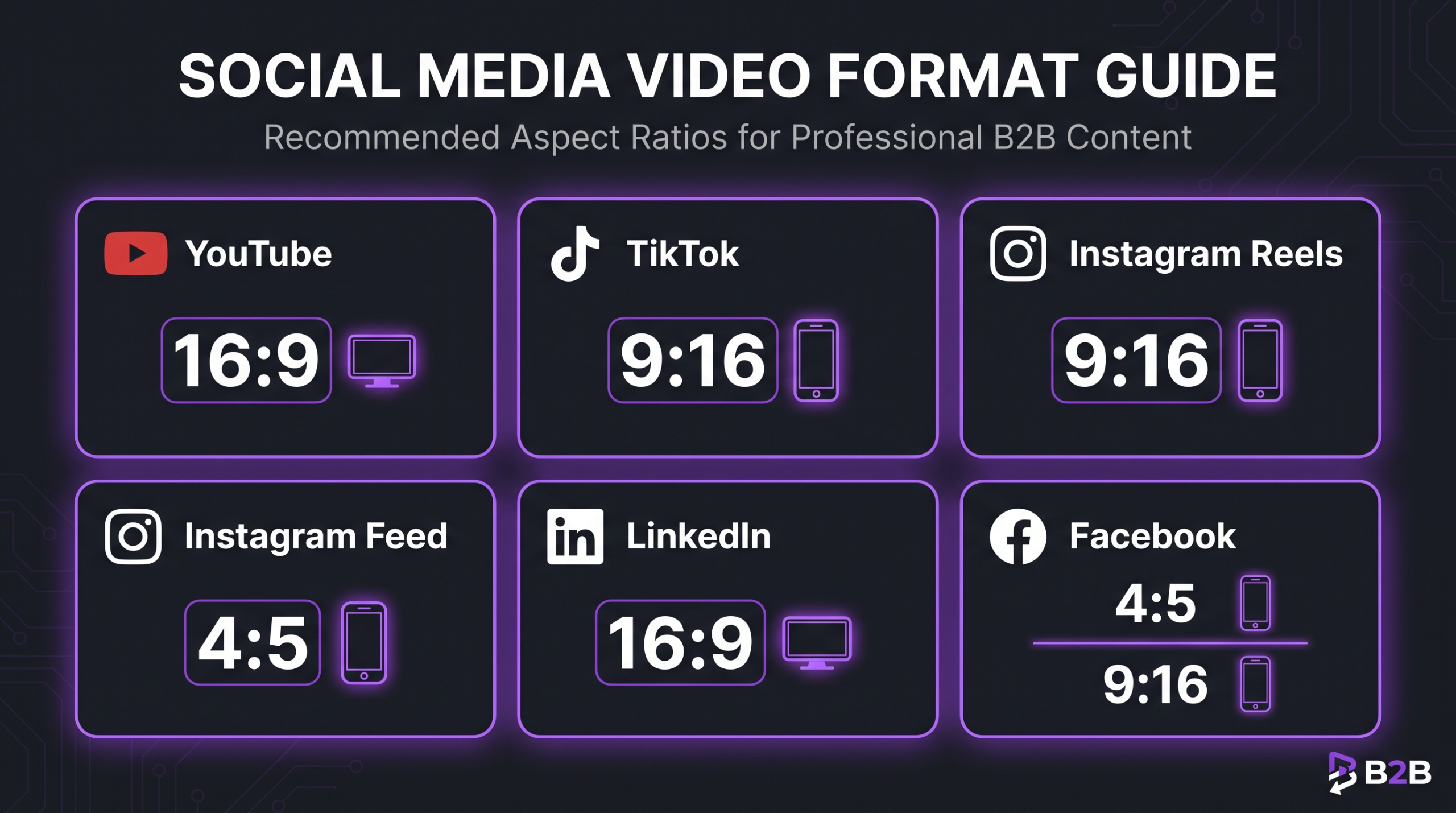
Each platform has documented specifications — the table and notes below are drawn from their official help documentation. Specifications do change; always verify against the platform’s current help pages before a major production.
Sources: YouTube video format requirements · Instagram video requirements · TikTok video specifications · LinkedIn video ad specs · Meta video requirements · Pinterest video pin specs
YouTube: Landscape Reigns, Shorts Are Separate
YouTube’s main feed and player are built for 16:9. Upload anything else and the player adds black bars to fill the frame — not a technical error, but a visual one. The YouTube Shorts feed, however, is an entirely separate surface. Shorts live in a dedicated 9:16 player and are only accessible via that interface; a video uploaded as a Short in the wrong ratio will display badly and is generally penalized in Shorts recommendations.
Practical rule: never repurpose a Shorts video as a main-feed upload or vice versa without re-editing for the correct ratio. They serve different audience contexts and different consumption modes.
Instagram: Three Distinct Surfaces, Three Ratios
Instagram is the platform where aspect ratio decisions have the most strategic nuance, because the platform has three separate content surfaces that each favor a different ratio. The main feed supports landscape (16:9), square (1:1), and portrait (4:5) — with 4:5 widely considered the optimal choice for feed posts because it maximizes vertical screen real estate without switching to a full-screen immersive format. Reels and Stories both use 9:16 and fill the entire screen.
The key mistake teams make is uploading a 16:9 video to the feed and losing roughly 40% of available vertical space compared to a 4:5 post. In a scrolling feed, that’s a meaningful competitive disadvantage for capturing attention.
TikTok: Vertical-First, No Exceptions
TikTok is the most ratio-rigid of the major platforms. While it technically accepts 1:1 and 16:9 uploads, the entire product experience — the swipe interface, the immersive player, the creator culture — is built around 9:16 vertical video. A horizontal video on TikTok doesn’t just look different; it looks out of place, and audiences respond accordingly. If your content strategy includes TikTok as a primary distribution channel, 9:16 needs to be the master format, not an afterthought.
LinkedIn: Professional Context Favors Landscape
LinkedIn’s audience tends to engage with video in a desktop or professional mobile context. The platform supports 16:9 and 1:1 as primary formats, with 4:5 supported for ads. Unlike consumer platforms, LinkedIn’s viewer base is typically more tolerant of landscape video because they’re frequently watching on larger screens during working hours. That said, 1:1 performs well on mobile LinkedIn as it occupies more scroll space — a factor worth testing for B2B content.
X (Twitter): Flexible, But 16:9 Is the Default
X supports a fairly wide range of aspect ratios compared to other platforms. For feed posts, 16:9 (1280×720 to 1920×1080) and 1:1 are both clean choices. The platform does crop previews in the timeline, so keep critical visual elements centered in the safe zone regardless of ratio. Portrait formats up to approximately 1:1.9 are supported but render inconsistently across contexts.
Facebook: Different Rules for Feed vs. Reels
Facebook’s feed supports 16:9 for desktop-optimized content and 4:5 for mobile-first content — with 4:5 giving you more vertical screen space in the mobile feed. Facebook Reels and Stories follow the same 9:16 standard as Instagram Reels (same Meta infrastructure). In-stream video ads generally require 16:9. For organic content without a clear desktop/mobile split, 4:5 is a reasonable default for Facebook feed posts targeting mobile viewers.
💡 Pro Tip: When in doubt about which ratio to use for a new platform, upload a 1:1 square version as your safety net. It’s the most universally tolerated format across feed surfaces, displays reasonably on both desktop and mobile, and avoids the worst outcomes of letterboxing or heavy cropping.
How the Wrong Aspect Ratio Damages Your Reach
The cost of an incorrect aspect ratio isn’t just aesthetic. It plays out in measurable ways across distribution, completion rate, and brand perception — and it compounds over time if you’re republishing the same assets across campaigns.
Letterboxing and Pillarboxing: The Visibility Tax
Letterboxing (black bars top and bottom) appears when a wide video is placed in a taller frame. Pillarboxing (black bars on the sides) appears when a tall video is placed in a wider frame. Both reduce the proportion of screen your content actually occupies — which means less visual impact, less emotional immersion, and a signal to the viewer that the content wasn’t created natively for this context.
On TikTok and Instagram Reels specifically, where 9:16 is the default expectation, a letterboxed video is almost immediately recognizable as a cross-post from another platform. This creates a perception gap — before a viewer has even processed your message, they’ve registered that you didn’t make this for them.
Completion Rate and Algorithmic Distribution
Completion rate — the percentage of viewers who watch to the end — is a key signal for most platform algorithms. While platforms don’t publish exact weighting formulas, their public creator guidance consistently emphasizes completion rate as a factor in recommendation breadth. A video that looks off-ratio or low-quality is more likely to be abandoned early, which lowers completion rate, which reduces algorithmic distribution in a reinforcing cycle.
The effect is particularly pronounced in short-form contexts where the barrier to swiping away is near zero. A viewer who decides in the first two seconds that a video looks “wrong” is gone — and that exit signal is registered by the algorithm.
Automatic Cropping: The Hidden Risk
Some platforms auto-crop or auto-scale videos that don’t match their expected format. Instagram, for example, may show a cropped preview thumbnail for a 16:9 video in a square grid context. If your subject’s face, key text, or brand elements are in the outer zone of the frame, automatic cropping can cut them out of the preview — reducing click-through before a viewer has even started the video.
Brand Professionalism
At a brand level, consistently publishing incorrectly formatted video signals a lack of attention to detail in your content operation. For B2B brands particularly, where trust and professionalism are purchase signals, this matters more than it might seem. Viewers may not consciously identify the aspect ratio issue, but the cognitive experience of watching a letterboxed video in a full-screen player registers as friction — and friction erodes trust.
💡 Pro Tip: Audit your last 30 days of video posts. Check each one for black bars, awkward crops, and ratio mismatches. This single review often surfaces 2–3 recurring issues that — once fixed in your publishing workflow — improve every future post automatically.
Multi-Platform Workflow: Shoot Once, Export Many
The goal of an efficient multi-platform video operation isn’t to shoot separate content for every platform — it’s to shoot once in a way that makes intelligent repurposing practical. This requires planning the aspect ratio strategy before the camera rolls, not during the export phase.
Here’s the workflow used by experienced video editing agency teams when producing content for multi-channel distribution:
Step 1: Define the Master Format
Choose one “master” aspect ratio for the primary shoot. For most brands, this is either 16:9 (if YouTube or website is the primary channel) or 9:16 (if TikTok or Reels is primary). Shoot your master format at the highest resolution your equipment supports — ideally 4K, which gives you significant reframing latitude in post.
Step 2: Apply the Safe Zone Rule at the Shoot
Frame your primary subject and critical visual elements in the central 70% of the frame — the “safe zone” that will survive reframing to any other ratio. If you’re shooting 16:9 and need a 9:16 version, the reframe will crop heavily from the sides. Subjects framed near the left or right edge of a 16:9 frame will be lost entirely in a 9:16 reframe.
Many editors use overlaid safe-zone guides in their monitoring view during the shoot to visualize the reframe crop before it happens. This is standard practice on shoots explicitly planned for multi-platform delivery.
Step 3: Edit From the Sequence, Not the Export
In your NLE (Premiere Pro, Final Cut Pro, DaVinci Resolve), build nested sequences or “sequences from sequence” to create platform variants efficiently. The master timeline stays at 16:9; a duplicate sequence reframed to 9:16 applies positional keyframes only where the subject moves outside the crop. This approach is far faster than re-editing the video from scratch for each platform.
Recommended Export Settings by Platform
Always export at the highest quality you can without exceeding the platform’s file size limit, then let the platform apply its own compression. Exporting with heavy pre-compression to hit a smaller file size often produces worse visual quality than the platform’s own encoding would have achieved from a cleaner source file. For more on production costs that include multi-platform formatting, see our guide on how much professional video editing costs.
Safe Zones and Reframing: Planning It at the Shoot
Safe zones are the regions of a frame that will survive reframing to any of your target output ratios. Defining them before the shoot — and communicating them to the director, camera operator, and art director — is the single most effective thing you can do to make post-production reformatting fast and clean.
The Core Safe Zone Principle
When reframing 16:9 footage to 9:16, you’re keeping roughly 56% of the original frame width (1080 pixels out of 1920). This means anything more than about 28% from either edge of the 16:9 frame will be cropped out entirely. For a subject standing at the far left of a wide shot, this is a problem. For a talking head framed center-tight, this is a non-issue.
The reverse reframe — 9:16 to 16:9 — crops the top and bottom. You keep roughly 61% of the original frame height. A subject with headroom in a vertical shot can be reframed for landscape without issue. A subject filmed tight to the top of a vertical frame will lose their head in the reframe.
UI Safe Zones
Beyond reframing, each platform overlays its own UI elements on video — play buttons, captions, like buttons, profile links, hashtags. These are particularly prominent on TikTok and Instagram Reels. The standard safe zone recommendation for vertical platforms is to keep critical text, graphics, and subject faces within the central 80% of the frame height and the central 90% of the frame width — away from the top and bottom edges where UI elements typically live.
If your content includes on-screen text overlays — titles, CTAs, lower thirds — place them in the “title-safe” zone: the central 80% of the frame area. Anything close to the edges risks being obscured by platform UI or cut in a thumbnail crop.
When Reframing Isn’t Enough
Some content doesn’t translate well between ratios regardless of technique. Wide establishing shots with subject matter distributed across the full horizontal frame can’t be meaningfully reframed to 9:16 without losing most of what made the shot work. Two-person interview setups shot wide in 16:9 will clip both subjects in a 9:16 reframe. These scenarios require purpose-built vertical coverage — either a second camera, a separate shoot with a different framing approach, or creative reformatting (split-screen, stacked framing, cutaways) in post. Understanding where reframing works and where it breaks is a core skill in professional video editing workflows.
Aspect Ratios by Content Type
Beyond platform-specific requirements, the type of content you’re producing often suggests its natural aspect ratio — before any platform consideration enters the picture.
Talking Head and Interview Content
Single-person talking head content is the most versatile to reformat. A tightly framed center subject in 16:9 reframes cleanly to 9:16, 4:5, and 1:1. If you’re building a content operation around a spokesperson, founder, or host, filming in 4K landscape with tight center framing gives you all four common output formats from a single take.
Product Demonstrations
Product demos depend on showing product detail, which often requires controlled framing. For physical products, 1:1 is often the cleanest format because it maximizes the product’s visual size without requiring the horizontal span of 16:9 or the height of 9:16. For software or screen-based products, 16:9 matches the screen’s native format, making it the natural choice for tutorials and demos.
Brand Films and Hero Content
High-production brand films are typically produced in 16:9 for website and YouTube primary distribution, with a separately edited 9:16 cut for paid social and organic Reels. The two cuts often differ not just in ratio but in pacing, length, and structure — the vertical version is typically shorter and front-loads the key message in the first 3 seconds given the swipe-heavy consumption context.
Paid Advertising
For paid campaigns running across multiple placements, most major ad platforms (Meta, Google, LinkedIn, TikTok) accept multiple aspect ratios and serve the best-fit version based on placement. The practical guidance is to deliver three sizes for any major campaign: 16:9 (in-stream, desktop feed), 1:1 (square feed placements), and 9:16 (Stories, Reels, TikTok). This trio covers the vast majority of placement inventory without over-engineering the asset library.
Webinars and Educational Content
Recorded webinars and screen-heavy educational content are almost always 16:9 — it matches the presenter’s screen, the screen-share content, and the primary distribution channels (YouTube, LinkedIn, website embed). These don’t typically need vertical variants unless they’re being cut into short-form clips for social distribution, in which case the clip format should be re-edited (not just reframed) to work vertically.
Frequently Asked Questions
What aspect ratio should I use if I’m only publishing to one platform?
Use the native ratio for that platform. For YouTube main feed: 16:9. For TikTok: 9:16. For Instagram feed posts: 4:5 for maximum screen real estate. For Instagram Reels: 9:16. For LinkedIn: 16:9 or 1:1. If you’re single-platform, there’s no strategic reason to compromise — use the format that platform was designed for.
Can I post a 16:9 video to TikTok?
Technically yes — TikTok accepts 16:9 uploads and will pillarbox them (add black bars to the sides) to fit the 9:16 player. But this is strongly not recommended as a primary publishing strategy. Pillarboxed content signals a cross-post rather than native content, and occupies dramatically less screen space than a properly formatted 9:16 video. If you have a 16:9 asset and need TikTok distribution, either reframe it in post or consider whether TikTok is the right channel for that specific piece of content.
What’s the difference between 4:5 and 9:16 for Instagram?
4:5 (1080×1350) is the maximum portrait ratio for Instagram’s main feed — any taller and Instagram crops the preview to 4:5 anyway. It’s the format for feed posts that want to maximize vertical space without becoming a Reel or Story. 9:16 (1080×1920) is the format for Instagram Reels and Stories — the full-screen, swipeable vertical player. They’re different surfaces with different audience behaviors: feed posts are browsed in a scroll; Reels are consumed immersively. Most serious content strategies use both, with different creative approaches for each.
Do aspect ratios affect video file size?
Yes — aspect ratio directly affects pixel count, which affects file size. A 9:16 video at 1080×1920 contains the same pixel count as a 16:9 video at 1920×1080 (both are approximately 2.07 megapixels per frame), so at equivalent bitrates and duration, file sizes will be similar. The more relevant consideration is resolution: a 4K 16:9 video (3840×2160, ~8.3 MP) will always be significantly larger than a 1080p 9:16 video (~2.1 MP) regardless of ratio.
Should I always use the maximum supported resolution?
For archival and primary distribution channels like YouTube, yes — upload at the highest resolution your source material supports, as platforms transcode to multiple quality levels for delivery. For short-form social where content is consumed quickly on mobile, 1080p is typically sufficient and results in faster upload times and more predictable quality after platform compression. Uploading a 4K 9:16 video to TikTok adds upload time without a meaningful quality improvement over a clean 1080p source given TikTok’s compression pipeline.
Verdict: Make Aspect Ratio a Pre-Production Decision
Aspect ratio is not a post-production detail. It’s a distribution strategy that needs to be locked before the camera rolls. Teams that treat it as an afterthought — shooting everything in 16:9 and then “figuring out the social versions later” — routinely end up with either suboptimal repurposed content or expensive reshoots.
The practical framework is straightforward: identify your primary distribution channel and shoot your master format for that surface. Define safe zones that protect against reframing crop. Plan your secondary formats during pre-production, not post-production. And always verify against platform documentation before a major campaign — specs do change, and using an outdated spec in a paid campaign can mean wasted budget on rejected creatives.
For brands running multi-channel video — and most do — the professional answer is to build a workflow that produces correctly formatted deliverables for each platform as part of the standard edit package, not as a separate project. That’s exactly what Increditors structures into every client engagement: platform-appropriate deliverables, correct specs, no black bars. If you’re spending time on ratio fixes instead of strategy, it’s worth talking to a team that makes this invisible.
For a complete view of what professional multi-platform video production costs, see our breakdown at how much does professional video editing cost — it covers the variables that matter for brands at different stages of their video strategy.
Ready for Video That Actually Converts?
Tell us about your project and we will put together a custom plan.