










![3D Explainer Video - ScribbleLive.mp4_snapshot_00.12_[2022.03.09_03.14.16]](https://increditors.com/wp-content/uploads/elementor/thumbs/3D-Explainer-Video-ScribbleLive.mp4_snapshot_00.12_2022.03.09_03.14.16-r7wb53mx72rxst3qcqyrfxdmeyzb5r9jbl0wbjujh4.png "3D Explainer Video – ScribbleLive.mp4_snapshot_00.12_[2022.03.09_03.14.16]")
































Sales enablement teams that invest in professionally edited video consistently report shorter sales cycles and higher close rates. This guide covers the seven video types that actually move deals, how to build a production workflow that scales with your team, and what to look for in a video editing partner who understands the unique demands of revenue-focused content.
- What Sales Enablement Video Actually Means
- 7 Video Types That Move Deals Forward
- Building a Sales Video Workflow That Scales
- DIY Editing vs. Managed Video Editing: Comparison
- What to Look for in a Video Editing Partner
- Common Mistakes Sales Teams Make With Video
- Production Specs by Video Type
- Frequently Asked Questions
- Verdict
What Sales Enablement Video Actually Means
Sales enablement video is not the same as marketing video. Marketing video builds brand awareness and generates demand. Sales enablement video is created specifically to help individual sales reps move prospects through the pipeline — from first contact to signed contract. The audience is known, the objections are predictable, and every edit decision should serve one goal: getting the next meeting or closing the deal.
This distinction matters enormously for production. A brand video can afford to be evocative and impressionistic. A sales enablement video cannot. It needs a clear hook in the first five seconds, a specific value proposition, and a single unmistakable call to action. The editing style, pacing, and even the thumbnail need to be calibrated to a buyer who is already somewhat aware of the problem — not a cold audience scrolling past ads.
Beyond the Product Demo
Most companies start with product demos — and then stop. This is a missed opportunity. Salesforce’s sales enablement research consistently finds that top-performing sales organizations use a wider variety of content touchpoints across the buyer journey than their lower-performing counterparts. Video is the medium that lets you pack the most persuasive information into the shortest time window — critical when your buyer has a 20-minute window between board meetings.
The companies getting real results from sales enablement video are typically using it at five or more distinct points in the pipeline — not just one polished demo that gets emailed to every prospect regardless of where they are in the buying process.
The Sales Cycle Problem Video Solves
The modern B2B sales cycle involves multiple stakeholders and extended evaluation periods. Gartner’s research on buying groups highlights that complex purchases typically involve six to ten decision-makers, each doing independent research before any group consensus forms. Your sales rep cannot be in every room, but a well-edited video can travel. It gets forwarded to the CFO. It gets shared in the internal Slack channel. It gets watched three times before the final approval call.
That is the core problem sales enablement video solves: it lets your message reach the full buying committee without your rep having to present to each person individually. But only if the production quality is high enough that people actually watch it to the end.
💡 Pro Tip: The biggest quality barrier for sales enablement video is not the camera or the script — it is post-production. A shaky zoom call recorded on a decent laptop becomes a polished, credible touchpoint when a skilled editor adds clean cuts, motion graphics, captions, and branded end-cards. That gap between raw footage and finished asset is where deals are won or lost.
7 Video Types That Move Deals Forward
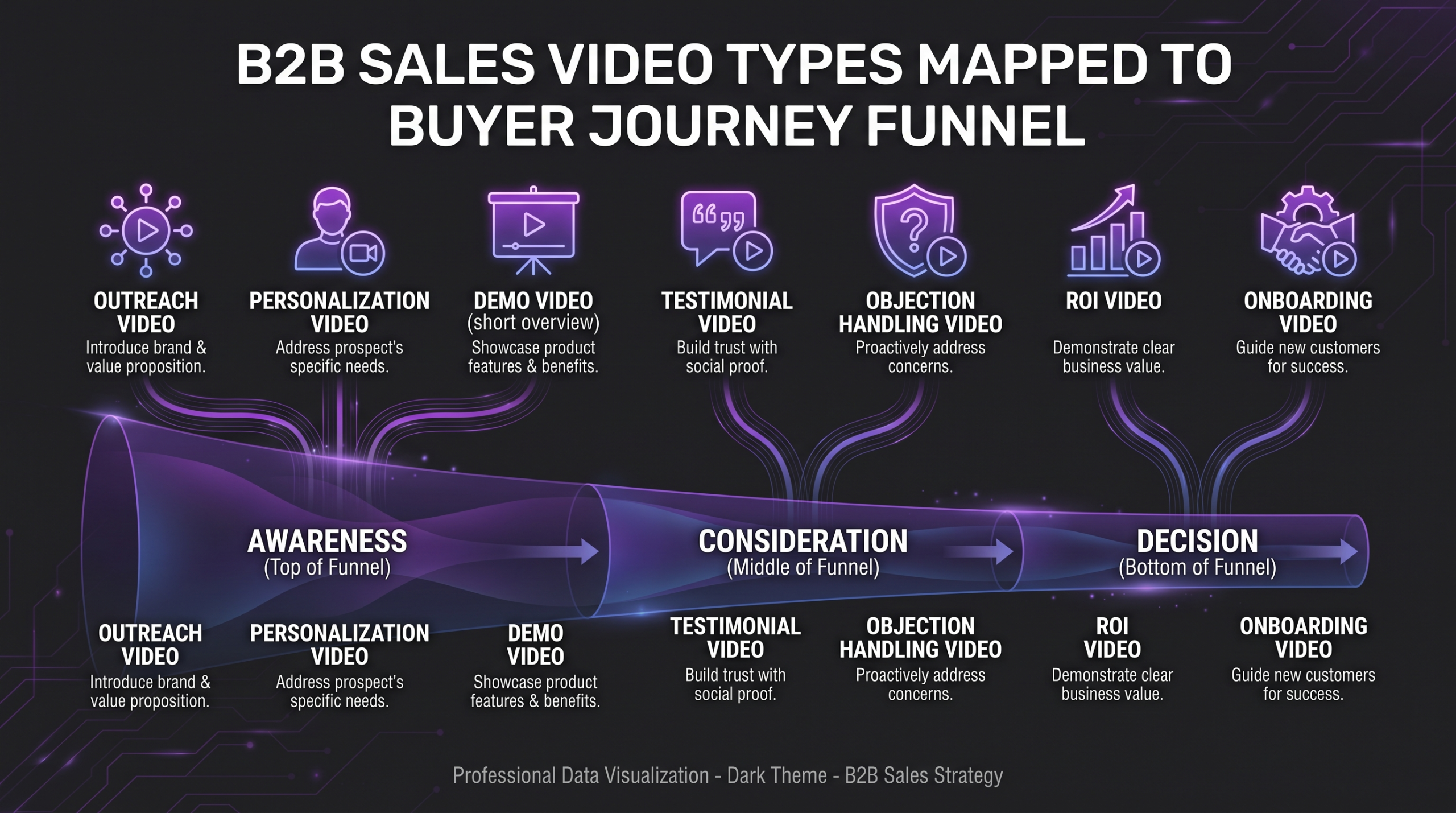
Not all sales videos are created equal. The most effective sales enablement programs map specific video formats to specific stages of the buyer journey. Here are the seven types that consistently generate results across B2B and SaaS sales teams.
1. Prospect Personalization Videos
These are short (60–90 second) videos recorded by the rep and edited for professional delivery, often used in cold outreach or follow-up emails. The rep appears on screen, references something specific to the prospect’s company or role, and ends with a direct ask. Editing adds polished lower-thirds, a clean branded intro card, captions, and a clickable thumbnail that shows the prospect their own name or company logo. The personalization is in the script; the professionalism is in the edit.
2. Product Demo Videos
The evergreen workhorse of sales enablement. A product demo video walks the prospect through the core value proposition in a controlled, optimized way — no awkward screenshare lag, no accidental clicks into the wrong account, no fumbled navigation. Edited demos typically run three to seven minutes for mid-funnel prospects and one to two minutes for top-of-funnel teaser versions. The editing work includes screen recording cleanup, voiceover synchronization, animated callouts highlighting key features, and chapter markers that let prospects jump to the sections most relevant to their role.
3. Customer Success and Case Study Videos
Third-party validation consistently outperforms self-promotion in conversion. Customer testimonial videos — when professionally edited — are among the highest-ROI assets a sales team can deploy. The editing challenge here is extracting the compelling two-minute narrative from a forty-minute customer interview, building in the right B-roll, adding data callouts for any metrics the customer shares, and landing on a clear implicit endorsement that feels authentic rather than staged.
4. Objection-Handling “Battle Card” Videos
Every sales team has a list of the top ten objections they hear. Battle card videos pre-empt those objections with short, confident, evidence-backed responses — typically 90 seconds to three minutes each. These are used in late-stage nurture sequences and sent proactively when a rep senses hesitation. The editing style is direct-to-camera, fast-paced, with supporting graphics that visualize the comparison or data point being referenced.
5. Follow-Up and Nurture Videos
The gap between the discovery call and the proposal is where deals go cold. A one- to two-minute follow-up video that recaps the key pain points discussed, confirms next steps, and adds one new piece of value keeps the momentum going without another full meeting. These videos work best when they feel conversational but look polished — the editing ensures clean cuts, no dead air, and a branded end screen with a meeting link.
6. ROI and Comparison Videos
For deals involving significant budget approval, a video that walks through the return on investment case in visual, digestible terms can do more heavy lifting than a PDF. These videos combine motion graphics, animated charts, and a clear before-and-after narrative. The editing must be precise — a misaligned animation or a chart that is hard to read on mobile can undermine the credibility of the whole piece. This is where production quality directly translates to buyer confidence.
7. Onboarding and Handoff Videos
Sales enablement does not stop at the signed contract. The handoff from sales to customer success is a critical moment where churn risk is highest. A short edited video that introduces the CS team, sets expectations for the onboarding process, and celebrates the new customer relationship reduces anxiety and strengthens the relationship before implementation begins. These videos also reduce inbound questions to the CS team, freeing time for higher-value work.
Building a Sales Video Workflow That Scales
The most common failure mode for sales enablement video programs is not the quality of individual videos — it is the inability to produce enough of them, consistently enough, to keep pace with the sales cycle. A program that produces one great demo video per quarter is not a program; it is a one-time project. Real sales enablement requires a repeatable production pipeline.
The Brief-to-Publish Pipeline
An efficient sales video pipeline has five stages: brief, record, edit, review, and distribute. The brief defines the video type, target audience segment, key message, and desired action. Recording is handled by the rep or a dedicated content team. Editing transforms the raw footage into a polished asset. Review is a structured approval loop — ideally no more than one round — and distribution gets the asset into the rep’s hands via the CRM or sales enablement platform.
The bottleneck is almost always editing. Recording a personalization video takes three minutes. Editing it to a professional standard — clean cuts, captions, lower-thirds, branded end card, correct export format — typically takes one to three hours if done manually. At scale, this becomes unsustainable without dedicated editing resources. Teams that try to have reps self-edit typically end up with either low-volume usage or low-quality output. Neither serves the sales program. You can read more about how this compares to working with a video editing agency vs. a freelancer to understand the trade-offs at different budget levels.
Version Control and Iteration
Sales videos have a shelf life. A demo video for a product that just shipped a major update needs to be refreshed quickly. A case study video featuring a customer who has since churned or rebranded is an active liability. Your workflow needs a version control system — a shared library with clear naming conventions, version numbers, and expiry dates — and someone responsible for auditing it quarterly. The editing partner you work with should support fast turnaround updates, not just new production.
Distribution and Tracking
Platforms like Vidyard and similar sales video tools let reps send video links that track who watched, how much they watched, and whether they shared it with colleagues. This is engagement data that no PDF or email can provide. Integrating these insights with your CRM turns video from a one-way broadcast into a two-way signal. When your editing partner understands the final distribution format — aspect ratio, file size, thumbnail, chapter markers — they can optimize the output for the platform rather than forcing you to transcode and re-upload manually.
💡 Pro Tip: Build a 10-video “starter library” before rolling out any sales video program to your reps. Cover the five most common objections, one hero demo, two customer testimonials, and one ROI overview. Reps who have assets available on day one adopt the program; reps who have to wait for assets don’t. The editing investment in the first ten videos sets the quality standard for everything that follows.
DIY Editing vs. Managed Video Editing: A Practical Comparison
Sales enablement teams face a genuine trade-off when deciding how to handle video post-production. Here is an honest comparison across the dimensions that matter most for revenue-generating teams.
For most sales enablement teams at companies with five or more active reps, the managed video editing model offers the best balance of quality, consistency, and cost efficiency. The tipping point is typically when the rep time cost of self-editing starts to noticeably affect pipeline activity. If your reps are spending meaningful hours per week on editing instead of selling, the math often favors outsourcing. You can get a detailed breakdown of pricing models in our guide to how much professional video editing costs.
What to Look for in a Video Editing Partner for Sales Teams
Choosing the right video editing partner for a sales enablement program is different from choosing one for brand or content marketing. The evaluation criteria shift significantly when the output needs to serve active pipeline rather than passive awareness. Here is what actually matters.
Turnaround Time and Volume Capacity
A sales cycle does not pause while your editor is on holiday. Your video editing partner needs to guarantee turnaround times that fit within your deal cycle — typically 24 to 48 hours for tactical assets and three to five business days for strategic productions. More importantly, they need surge capacity. When your team closes a major deal and needs a custom onboarding video fast, or when a product launch triggers a wave of demo update requests, your partner should be able to absorb the volume without degrading quality or timeline.
Consistency Across Reps and Campaigns
Brand inconsistency is the quiet credibility killer. When a prospect receives a polished demo video from one rep and a noticeably amateurish follow-up from another, it creates subliminal doubt. Your editing partner should maintain brand templates — color palette, font usage, intro/outro formats, lower-third styles — that produce consistent output regardless of which rep recorded the raw footage. This requires a documented style guide and an editor (or team) who has internalized it. Agencies that work with dedicated senior editors per account, like Increditors, typically deliver more consistency than those that route work through a general pool.
Sales-Specific Expertise
Not every skilled video editor understands sales content. The pacing of a sales enablement video is different from a YouTube tutorial or a brand film. The CTA placement, the handling of product demos, the way objections are visually framed — these are craft decisions that require familiarity with how buyers consume content. When evaluating a partner, ask to see examples of sales demo videos, customer testimonials, and follow-up sequences they have edited. The portfolio is more informative than the pitch deck.
Revision Process and Communication
Sales teams move fast. A revision process that involves email threads and 48-hour response windows will create friction that causes reps to abandon the program entirely. Your partner should have a structured revision protocol — ideally timestamped comments via a dedicated review platform — and a clear single-point-of-contact relationship. Wyzowl’s annual video marketing research consistently highlights that workflow friction, not budget, is the primary reason companies scale back their video programs.
Common Mistakes Sales Teams Make With Video
Most sales video programs that fail do not fail for budget reasons. They fail for structural reasons that are entirely avoidable. Here are the patterns that appear repeatedly — and how to sidestep them.
Treating Demos as One-Size-Fits-All
A demo video built for a Head of Marketing at a $50M company is not the right asset for an IT Director at a 500-person enterprise. The pain points differ, the vocabulary differs, the features worth highlighting differ. Teams that produce one generic demo and send it to every segment typically see low completion rates and weak conversion. The fix is not necessarily producing twenty different demos — it is using editing to create versioned assets. Start with a master demo and have an editor produce role-specific cuts that reorder segments, swap out relevant case study clips, and customize the CTA. This approach multiplies the usefulness of the original production at a fraction of the cost of re-shooting.
No Clear Call-to-Action
Sales enablement videos without a specific, visible CTA are awareness content wearing sales clothes. Every video should have exactly one desired next action — book a call, schedule a demo, download the case study, reply to this email. That action should be verbalized in the script and visualized in the edit: a branded end card with the rep’s face, a clickable button, a meeting link. When the edit leaves the CTA as text-over-a-talking-head, it gets skipped. When it is designed into the video as a deliberate element, completion rates improve measurably.
Underinvesting in Post-Production
The most common budget mistake is spending heavily on recording (cameras, lighting, studio time) and almost nothing on editing. Raw footage from a $5,000 camera setup, poorly edited, looks worse than well-edited footage from a $500 webcam. Buyers read production quality as a proxy for company quality — a choppy, unbranded sales video sends a signal about how much you care about the details. The editing budget is where the video value is created, not the recording budget. LinkedIn’s B2B content research consistently finds that perceived production quality affects brand credibility ratings in B2B buyer surveys.
Building Without Measuring
A video program without analytics is a cost center masquerading as a strategic investment. Track completion rates by video type and segment. Track which assets correlate with shorter time-to-close. Track which videos get forwarded to additional stakeholders. This data tells you which editing decisions — pacing, length, CTA placement — are actually working with your specific buyer. Without it, you are producing content on instinct, not evidence. Your video editing partner should be producing assets in formats that integrate cleanly with your tracking infrastructure, not just delivering files.
Production Specs by Video Type: A Reference Guide
Getting the technical specs right is not optional for sales enablement video. A beautifully edited case study that is too large to email, or a personalization video that plays at the wrong aspect ratio in the CRM preview, immediately degrades the experience. Use this reference when briefing your editing partner or setting up your sales video library.
One frequently overlooked spec is the thumbnail. Most sales video platforms allow a custom thumbnail — and a thumbnail with the rep’s face and the prospect’s company name dramatically outperforms a generic auto-generated frame. This is an editing task that takes minutes but consistently improves open rates. Brief your editing partner to include custom thumbnail generation as part of every personalization video deliverable.
For SaaS teams specifically, the crossover between sales video and product marketing video creates additional considerations around update frequency and version management. Our guide on video editing for SaaS companies covers the production pipeline in more depth for that context.
Frequently Asked Questions
How long should a sales enablement video be?
Length should match the stage of the funnel and the complexity of the message. Outreach and follow-up videos generally perform best under 90 seconds. Product demos for mid-funnel prospects work in the three-to-seven minute range, especially with chapter markers that let viewers navigate. ROI and comparison videos can run up to four minutes with strong narrative structure. The rule of thumb: your video should be exactly as long as it needs to be to deliver the message and the CTA — not longer.
Do sales reps need to appear on camera?
For personalization and follow-up videos, the rep’s face typically drives higher engagement and response rates — it creates a human connection that a polished but impersonal video cannot replicate. For demo videos, customer testimonials, and ROI overviews, on-camera presence is optional and often replaced by professional voiceover with screen recording or motion graphics. A good editing partner can produce compelling sales video from either format depending on what the rep is comfortable with and what the video type demands.
What is a realistic budget for a sales enablement video program?
Budget varies significantly based on volume, complexity, and the production model. Teams working with managed video editing agencies typically operate on monthly retainer structures that cover a defined volume of edits. Smaller teams starting out might produce five to ten edited assets per month; larger programs with active outbound sequences may need twenty or more. The right approach is to scope by video type and volume rather than by per-video pricing. For a detailed market overview, see our guide on professional video editing costs.
How do I brief a video editor who doesn’t know our product?
A good brief for a sales enablement video includes: the target audience and their primary pain point, the one thing you want the viewer to do after watching, the key message or differentiator to emphasize, any competitor references to avoid or address, the tone (formal vs. conversational), and the distribution channel. You do not need to teach the editor your product in detail — you need to give them enough context to make the right pacing, graphic, and CTA decisions. Most experienced video editing teams have brief templates; if yours does not, that is a red flag.
Can I repurpose existing marketing videos for sales use?
Sometimes — but usually not directly. Marketing videos are typically optimized for cold audiences with longer attention spans and broader messaging. Sales enablement videos need sharper hooks, specific CTAs, and often role-specific framing. However, a strong brand video or customer testimonial can be re-edited into effective sales assets. A skilled editor can re-cut an existing piece for sales use — extracting the most persuasive 90 seconds, adding a sales-specific CTA, and creating a version with the rep’s name in the end card. This is a high-value, cost-effective edit that many teams overlook.
Verdict: Video Editing Is Where Your Sales Enablement Strategy Wins or Loses
The gap between a sales enablement video program that moves pipeline and one that gets abandoned after three months usually comes down to production quality and workflow efficiency — not strategy or budget. Sales teams that invest in professional editing see their reps actually use the assets, prospects actually watch them through, and deal velocity actually improve. Teams that produce low-quality or inconsistent video find the program quietly ignored by the people it was meant to help.
The right starting point is not a massive investment in studio infrastructure. It is a defined set of video types mapped to your most critical pipeline stages, a production workflow that minimizes rep time cost, and a video editing partner who can produce consistently polished output at the pace your sales cycle demands.
Build the starter library of ten assets. Get the workflow running. Measure what works. Then scale the production that your data validates. That is the program that lasts — and the one that actually helps your team close.
If your team is evaluating video editing support for a sales enablement program, working with a dedicated video editing agency that understands B2B content helps compress the learning curve significantly. The difference between an editor who has worked on brand campaigns and one who has edited sales demo libraries is immediately visible in the output — and in how quickly reps adopt the assets.
Ready for Video That Actually Converts?
Tell us about your project and we will put together a custom plan.