










![3D Explainer Video - ScribbleLive.mp4_snapshot_00.12_[2022.03.09_03.14.16]](https://increditors.com/wp-content/uploads/elementor/thumbs/3D-Explainer-Video-ScribbleLive.mp4_snapshot_00.12_2022.03.09_03.14.16-r7wb53mx72rxst3qcqyrfxdmeyzb5r9jbl0wbjujh4.png "3D Explainer Video – ScribbleLive.mp4_snapshot_00.12_[2022.03.09_03.14.16]")
































A product launch typically demands five to eight distinct video assets — launch film, product demo, teaser, paid social cutdowns, and a founder or PMM narrative — each with different specs, revision rounds, and deadlines. This playbook covers the full editing workflow: what to build, in what order, how to brief your editing team, and how to manage the compressed revision timeline without blowing launch day.
- Why Video Is the Core of Every Product Launch
- The Product Launch Video Asset Stack
- Launch Film: Building Your Hero Asset
- Product Demo Video: Show It Working
- Teaser and Countdown Content
- Paid Social Cutdowns: Platform-Specific Versions
- Founder and PMM Narrative Video
- Revision Timeline and Pre-Launch Workflow
- Launch-Week Video Execution
- How to Brief Your Editing Team
- FAQ
- Verdict
Why Video Is the Core of Every Product Launch
Video has become the primary surface on which product launches live or die. Whether you are dropping a SaaS tool on Product Hunt, launching a consumer physical product, or announcing a new feature tier to an existing customer base, the assets that land in inboxes, paid placements, and social feeds are almost always video-first. A well-edited launch film sets the category frame before your competitors can respond. A sharp product demo closes deals that a landing page paragraph cannot.
This is not about production budget. It is about having the right video assets, built in the right order, edited to platform spec, and ready before launch day — not the morning of. Marketing teams and product managers who treat post-production as an afterthought routinely find themselves compressing three rounds of revisions into twelve hours, shipping assets that are off-brand or off-spec, or, worse, launching without video at all and watching a competitor’s launch film own the category conversation.
The playbook below is built for marketing directors, PMMs, and growth teams who already understand they need video and want to know exactly what to build, how the editing workflow should run, and how to keep revisions from collapsing the timeline. It focuses on the editing and post-production side — the decisions that happen after the camera stops rolling and before the asset goes live.
For context on what a video editing agency actually does inside a launch workflow — and why specialist post-production matters differently than generalist production — the rest of this guide covers the full asset stack and workflow in operational detail.
The Product Launch Video Asset Stack
Most product launches require not one video but a coordinated set of assets, each serving a distinct job in the launch funnel. Treating them as one deliverable is where timelines collapse. The editing workflow for a paid social cutdown is fundamentally different from the editorial judgment required for a founder narrative — mixing them into a single deliverable set with one deadline is a reliable way to ship everything late and nothing well.
Here is the standard asset stack for a mid-size product launch, with typical durations and the editing complexity that shapes turnaround:
Not every launch needs all seven. A SaaS B2B tool may prioritise the demo and founder narrative over a cinematic launch film. A consumer product launch may go heavy on the hero film and cutdowns and skip the feature walkthrough entirely. The decision comes down to your primary acquisition channel and the complexity of the product story.
💡 Pro Tip: Lock your asset list before the shoot, not after. Every asset type above has a different shot list requirement. A talking-head-only shoot can produce the founder narrative but not the launch film. Identifying the full asset stack early — ideally six to eight weeks before launch — is the single most effective way to prevent shoot-day scrambles and post-production rewrites.
Launch Film: Building Your Hero Asset
The launch film is the asset that sets the frame. It answers the question every prospective buyer, journalist, and investor will ask when they land on your homepage or click a press kit link: what is this, who is it for, and why does it matter? A strong launch film does this in 60 to 120 seconds without relying on product feature lists or clichéd problem-solution montages.
What Makes a Launch Film Editable
From an editing standpoint, a launch film works when it arrives in post-production with clear raw material: a defined narrative arc in the script, enough b-roll coverage to support cutaways, and a music direction brief. When any of those are absent, post-production becomes a creative problem-solving exercise rather than an execution exercise — and that is where timelines stretch.
The editing process for a hero launch film typically involves three distinct phases: assembly edit (structural pass, establishing the narrative), picture lock (pacing, timing, b-roll selection, motion graphics), and final polish (color grade, sound mix, delivery formats). Each phase should have its own review checkpoint — collapsing them into a single review round is one of the most reliable ways to generate expensive, time-consuming revision cycles.
Launch Film Editing Checklist
Before locking picture on your launch film, confirm these elements are resolved at the editing stage:
- Opening hook is in the first four seconds — not a logo slate, not a fade to black. The first four seconds set watch-through rate for everything that follows.
- Product appears on screen within the first fifteen seconds — viewers who came from an ad or social post know roughly what to expect; reward that intent early.
- Music is licensed, not temp — shipping a launch film with temp music is a rights liability. Resolve music licensing before the picture lock review.
- Captions or text overlays exist — the film needs to communicate with sound off for social and email placements.
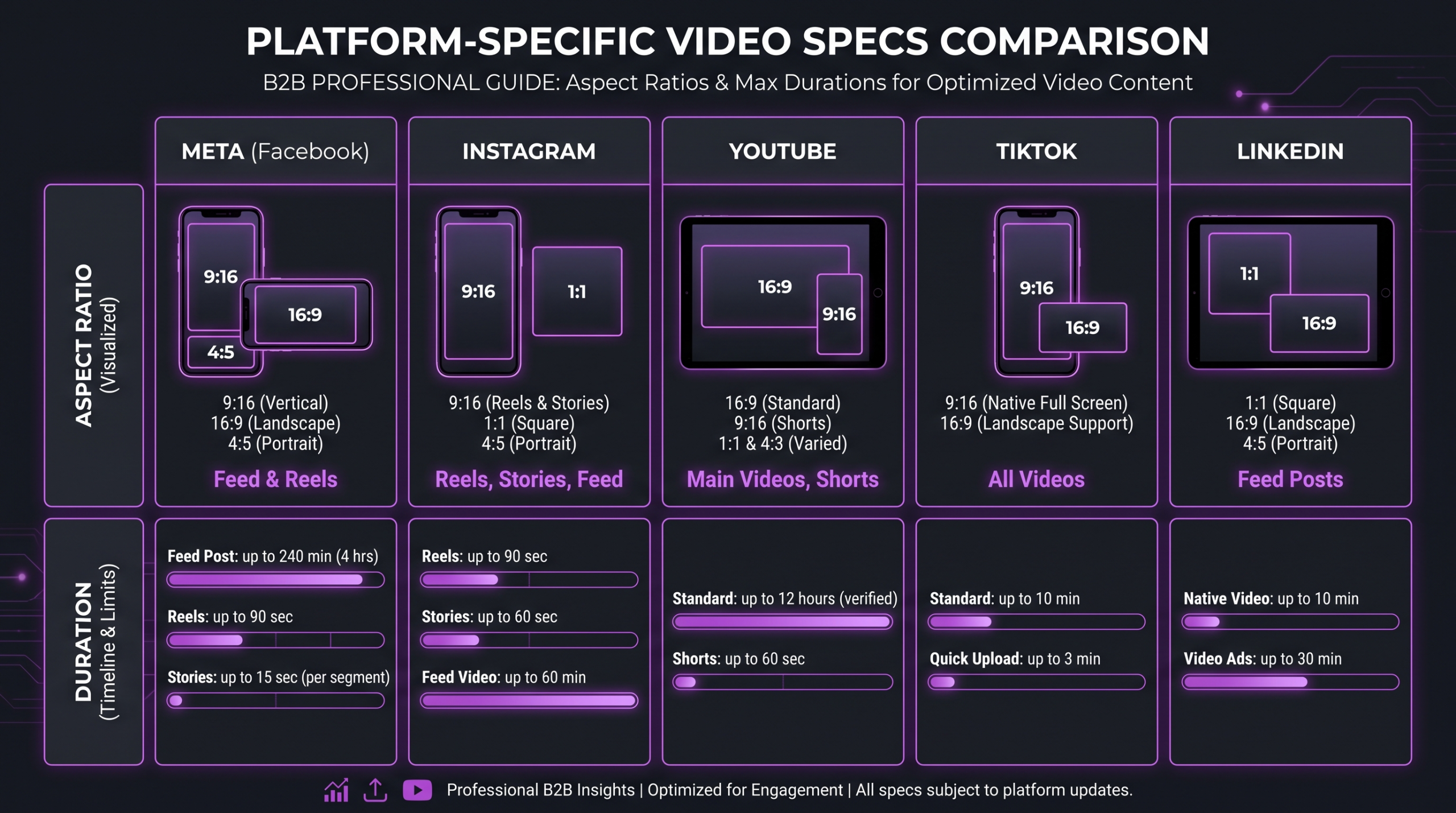
- Delivery formats confirmed — 16:9 for website and YouTube, 1:1 for LinkedIn feed, 9:16 for stories and TikTok. These are not crops of the same master; they are separate edits with recomposed safe zones.
Product Demo Video: Show It Working
The product demo video has a single job: show the product doing the thing it promises to do, for the specific buyer persona who is most likely to convert. It is not a feature tour. It is not a webinar recording. It is a tightly edited, purpose-built asset that takes a qualified viewer from “I’m skeptical” to “I understand how this works.”
For SaaS products, this typically means editing together a combination of screen recordings (the product UI in action), a brief talking-head segment (a human face building trust), and motion graphics annotations (highlighting the key interaction or output). The editing challenge is pacing: a demo that lingers too long on setup loses the viewer before the payoff; one that moves too fast leaves them confused about what they just saw.
Demo Video Editing Principles
Effective demo editing follows a tight structure: state the problem (ten to fifteen seconds maximum), show the product solving it (the bulk of the runtime), and close with the outcome (ten to twenty seconds). The editing team’s job is to enforce this structure even when the raw footage meanders — which it often does when SMEs or founders record their own walkthroughs.
Wistia’s published research on video engagement by length consistently shows steep drop-off past the two-minute mark for marketing videos hosted on product pages. For a demo targeting mid-funnel buyers, ninety seconds to two minutes is the range where completion rates hold and intent signals are strongest. Longer feature walkthroughs for existing customers or YouTube can run three to eight minutes, but that is a separate asset with a different editorial approach.
Screen Recording and Motion Graphics Integration
The biggest editing pitfall in demo videos is poor screen recording quality. A UI recorded at the wrong resolution, with cursor jitter, notification pop-ups, or inconsistent zoom levels, requires remedial work that adds days to post-production. Submit screen recordings at native resolution (at minimum 1920×1080), with cursor highlighting enabled, and with system notifications disabled. Motion graphics annotations should be added in post, not burned into the screen recording — this preserves the flexibility to update text overlays without re-recording the demo.
Teaser and Countdown Content
Teaser content is the pre-launch vehicle. Its job is to build anticipation, earn email sign-ups or Product Hunt followers, and give the launch day announcement somewhere to land besides cold. A good teaser is deliberately incomplete — it shows enough to generate curiosity without revealing the thing itself.
From an editing perspective, teasers are short (ten to thirty seconds) but disproportionately difficult. The challenge is that you are editing for emotion and mystery rather than information and clarity — the opposite of the demo video. Every frame has to earn its place. Transitions, sound design, and pacing carry the communication load in the absence of full product revelation.
Teaser Editing Tactics
The most effective product teasers tend to use one of three editing approaches: the glimpse cut (rapid, incomplete glimpses of the product UI or form factor with aggressive music), the problem narrative (a clear statement of the pain point the product solves, no product shown), or the reaction cut (real user or founder reactions to the product, before the product is named). Each approach has different raw material requirements — brief your editing team on the chosen approach before they review the footage, or they will default to a generic montage.
Countdown content — “launching in 3 days,” “doors open tomorrow” — is often produced as a series of short social posts rather than a single video. Plan for this as a distinct editing deliverable: three to five short clips (typically fifteen seconds each) built from a shared template so the visual system is consistent across the countdown sequence.
💡 Pro Tip: Build teaser content from the launch film rushes, not from a separate shoot. The best teasers are cut from footage that does not appear in the final launch film — it creates genuine reveal value on launch day. Share this directive with your editing team at briefing time, not after they have cut the teaser from the hero footage.
Paid Social Cutdowns: Platform-Specific Versions
Paid social cutdowns are where post-production volume multiplies. A single launch film, properly shot and master-edited, can generate eight to twelve distinct paid assets across Meta, YouTube, TikTok, and LinkedIn — but only if the editing workflow is set up to handle that volume systematically rather than treating each as a one-off job.
The key principle is that cutdowns are not crops. A 9:16 version of a 16:9 launch film is a different edit with recomposed framing, not a zoomed crop of the original. The hook must be redesigned for the platform — a YouTube pre-roll hook functions differently than a TikTok cold-open hook. Text safe zones differ. Viewer intent at the moment of exposure differs.
According to Sprout Social’s published social media research, platform-native video consistently outperforms repurposed content across engagement metrics — a finding that underscores why aspect ratio and hook design are editorial decisions, not mechanical adaptations.
Platform Spec Reference for Launch Cutdowns
Budget these cutdowns as a separate editing scope from the hero film. Teams that fold cutdowns into the hero edit budget routinely run out of runway before the platform-specific versions are done. A realistic scope for a full cutdown set (four platforms, two to three variants per platform) is equivalent to a separate medium-complexity video project in terms of editing time and review rounds.
For a deeper look at what specialist video editing for SaaS companies looks like end-to-end — including paid social workflows — that guide covers the full production stack for software companies in particular.
Founder and PMM Narrative Video
The founder or PMM narrative is the human-voice asset in the launch stack. It is not a polished ad and not a keynote recording — it sits between those two poles: personal, direct, story-driven, and short. Its job is to give the launch a face, a “why,” and a human frame that the launch film cannot provide at cinematic scale.
This asset tends to perform strongly on LinkedIn, in founder emails, and in investor-facing contexts because it communicates authentic conviction in a format that audiences have learned to trust. But it is also the asset most likely to arrive in post-production as raw, unstructured talking-head footage that requires heavy editorial intervention to land as a coherent sixty-to-ninety-second piece.
Editing the Founder Narrative
The editorial job here is to find the best four to six lines buried in twenty minutes of talking-head footage, cut them together so they flow as a single coherent statement, and support that statement with b-roll that adds context without distracting from the voice. This is a higher-skill editing task than it appears — cutting talking heads seamlessly, selecting the takes where genuine conviction comes through, and pacing the piece to feel conversational rather than scripted all require editorial judgment, not just technical execution.
Brief the editing team with the three to four key points the founder or PMM wants to make — in the founder’s own words if possible. Give them permission to cut aggressively. A narrative video that runs ninety seconds and lands is worth more than one that runs three minutes and loses the viewer at the two-minute mark. Understand too that if you’re working through an approval workflow that requires multiple stakeholders to sign off, the founder narrative typically generates the most subjective feedback and the most revision rounds — plan for that in the timeline.
Differences From a Course Launch Narrative
Product launch narratives differ from the kind of educational authority content used in course launches (covered in our separate guide on video editing for course launches). The product narrative is about conviction and category framing — “here is the problem, here is why we built this, here is why now.” The course narrative is about credibility and transformation — “here is what you will learn, here is my authority to teach it.” Different editorial goals, different raw material requirements, different pacing.
Revision Timeline and Pre-Launch Workflow
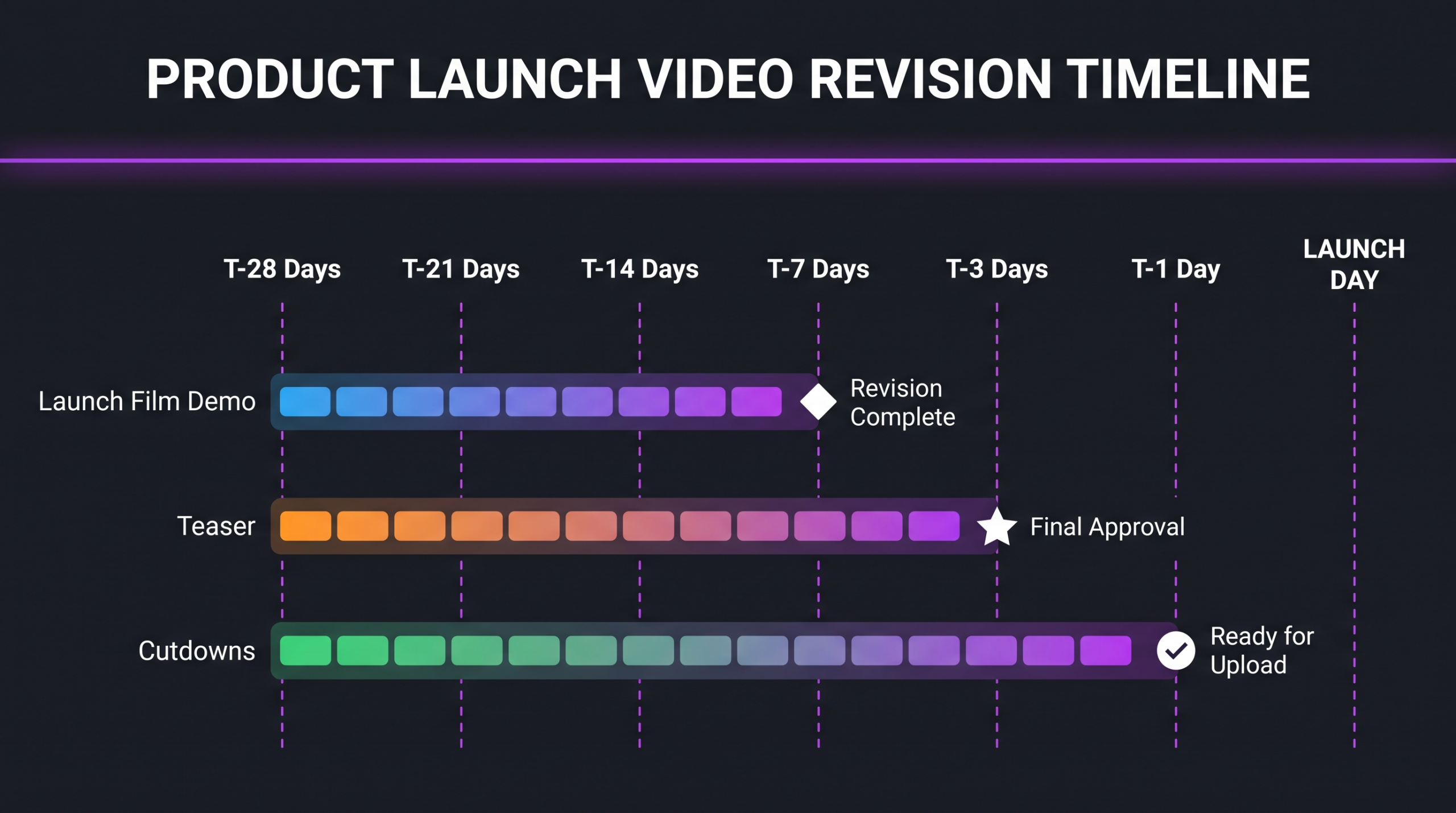
The revision timeline is where most product launch video projects fail — not because the editing team is slow, but because stakeholder review rounds are not planned as a distinct project phase. Teams commonly compress three rounds of revisions into the last two days before launch, generating rushed edits, inconsistent brand execution, and preventable errors that survive into the final deliverable.
A realistic pre-launch post-production timeline, working backwards from launch day, looks approximately like this:
The T-1 day rule is non-negotiable for teams that have been through a launch before. Last-minute edit requests at T-1 or launch day create compressed review cycles, introduce new errors at a moment when there is no buffer to catch them, and typically result in the requesting stakeholder being unhappy with the outcome anyway. Lock it. Ship it. Iterate post-launch if needed.
Understanding what a rough cut is and how edit stages work helps stakeholders give structural feedback at the right moment rather than cosmetic feedback at the assembly stage — a common source of timeline blowouts.
Launch-Week Video Execution
Launch week is not the time to be doing post-production. By launch week, all pre-planned assets should be locked, uploaded, and scheduled. What launch week actually requires from a video standpoint is a reactive capacity: the ability to respond quickly to performance data, press mentions, and community reaction with short-form video content that does not require a full edit cycle.
Launch-Day Asset Deployment Order
A structured launch-day video deployment commonly follows this sequence: homepage hero film live at launch (timed to the announcement), product demo linked from the hero film and all sales outreach, founder narrative published on LinkedIn (timed for business hours in primary market), paid social campaigns activated with cutdowns already loaded and approved, teaser content archived or repurposed as “before/after” context in the first week of content.
Reactive Video Content During Launch Week
Product Hunt launches, press mentions, and community responses are time-sensitive opportunities for additional video content — but not for fully produced assets. Launch-week reactive content is typically short (fifteen to thirty seconds), lower production value, and built from footage already shot and cleared but held back from the launch day set. Common formats: a founder reaction clip to top-of-launch community responses, a “how it works in thirty seconds” built from demo b-roll, a feature highlight clip timed to a press mention.
If your team is running the kind of video volume that needs a scalable editing workflow, launch week is the best illustration of why that infrastructure matters — reactive content at volume requires established briefing, review, and delivery processes that do not depend on one editor being available and responsive.
HubSpot’s product launch planning resources cover the broader launch workflow beyond video — useful context for PMMs who need to coordinate video release with press, email, and paid channels simultaneously.
How to Brief Your Editing Team for a Product Launch
The quality of the brief determines the quality of the output. This is true in all post-production work; it is especially true for product launches, where the editing team needs to understand not just the technical deliverables but the commercial context: what the product does, who it is for, what the primary message hierarchy is, and what success looks like for the launch.
What a Launch Brief Should Include
A brief that enables a post-production team to execute a full launch asset stack without repeated back-and-forth includes: a one-paragraph product summary (what it does, who uses it, what the primary competitor frame is), the key message hierarchy (primary claim, two supporting claims, proof points), audience description (decision-maker profile and what they care about), visual reference examples (two to three comparable launch films with notes on what to take from each), the full asset list with delivery deadlines and platform specs per asset, and the feedback process (who reviews, in what order, turnaround expectation per round).
For a detailed template on how to structure this, the guide on how to brief a video editor covers the brief format that minimises revision rounds across all project types, not just launches.
What the Editing Team Needs From You Before They Start
Beyond the brief, the practical handoff to the editing team should include: all raw footage organised by asset type (not by shoot day), approved music references or licensed tracks, brand asset file (logo vector, colour palette, font files), approved script or key message document, and a confirmed delivery format list with export specs per platform. Missing any of these at kickoff adds a round-trip to the editing timeline before the first frame is cut.
Teams working with Increditors on product launch video sets begin with a dedicated brief session that covers asset architecture, message hierarchy, and timeline planning before a single clip is touched. The goal is to arrive at the first assembly edit with zero structural ambiguity — revisions that happen at the structural level after picture lock are the most expensive revisions in post-production. More on professional video editing cost and how scope affects budget is covered separately for teams working on launch budgets.
💡 Pro Tip: Frame the asset brief around audience jobs-to-be-done rather than product features. An editing team that understands “the viewer needs to walk away knowing exactly how to solve X in under two minutes” will make better editorial decisions than one briefed with “show features A, B, and C.” The brief language shapes the edit logic.
YouTube’s Creator Academy and Animoto’s annual video marketing report both publish platform-specific guidance on video formats and viewer behaviour that is useful context when briefing editing teams on launch-day deployment decisions.
FAQ
How far in advance should we start post-production for a product launch?
Four to six weeks before the launch date is a reasonable planning horizon for a full launch video asset set. That allows time for a brief session, raw footage delivery, two to three rounds of revisions per hero asset, and a final delivery buffer before platform upload. Teams working with less than three weeks of runway should reduce the asset list rather than compress the revision timeline — fewer assets executed well outperform a complete stack executed under pressure.
How many revision rounds should we budget for a launch film?
Two rounds is the standard contract scope for a hero launch film: one structural round (pacing, narrative, b-roll selection) and one polish round (colour, sound, titles, caption refinements). A third round is reasonable when the brief changed materially between kickoff and the first assembly edit. If you are regularly reaching round four or five, the root cause is usually a brief that was too loose at kickoff, not an editing problem — that is the process to fix.
Can we use the launch film footage for paid social cutdowns?
Yes, and it is the recommended approach — but cutdowns require separate editing scope, not just a crop and export. The hero footage needs to be re-edited for each platform format with new hooks, recomposed framing, and platform-specific caption design. Budget cutdowns as a distinct deliverable from the hero film, typically one to two days of editing time for a full four-platform set.
What is the difference between a product demo video and a feature walkthrough?
A product demo video is a top-of-funnel or mid-funnel asset designed to communicate core value to a prospective buyer in ninety seconds to two minutes. A feature walkthrough is a longer, deeper-funnel asset (three to eight minutes) for existing customers, power users, or evaluation-stage buyers who are already past the “what is this” question and want to understand a specific capability in detail. Different editorial approaches, different audiences, and typically different distribution channels.
Should the founder appear in the launch film or only in the separate narrative video?
It depends on the product category and audience. In B2B SaaS, founder presence in the launch film tends to reinforce credibility, especially for first launches where the company has no established brand. In consumer products, the launch film typically focuses on product and outcome rather than founder face. The narrative video is the natural home for the founder’s voice regardless — it is a separate asset format specifically designed for that register. Shoot both options and let the editing review inform the final call.
Verdict: Build the Asset Stack Early, Brief Precisely, Lock the Timeline
Product launch video is not one deliverable — it is a coordinated set of assets, each serving a distinct audience, channel, and funnel stage. Teams that treat it as a single edit typically discover the gap three weeks before launch, when it is too late to add scope without compressing quality.
The playbook is straightforward in principle: lock the asset list early, brief your editing team with commercial context not just technical specs, run revision rounds at the structural level before touching colour and sound, and have every asset locked and uploaded at T-3 days. The execution is harder than it looks — revision rounds slip, stakeholder sign-off takes longer than planned, and last-minute messaging changes cascade through the entire asset stack.
That is where an experienced post-production partner makes the structural difference. Increditors works with SaaS companies, consumer brands, and B2B product teams on launch video sets — from brief to final delivery, across every asset in the stack. The approach is not a template; it is a dedicated senior editing team that understands the commercial context behind the brief and executes at speed without the revision-round blowouts that compress internal timelines.
If you are planning a launch and want to understand what the right asset set looks like for your specific product category and distribution strategy, the conversation starts at the brief — and we build those together.
Ready for Video That Actually Converts?
Tell us about your project and we will put together a custom plan.