










![3D Explainer Video - ScribbleLive.mp4_snapshot_00.12_[2022.03.09_03.14.16]](https://increditors.com/wp-content/uploads/elementor/thumbs/3D-Explainer-Video-ScribbleLive.mp4_snapshot_00.12_2022.03.09_03.14.16-r7wb53mx72rxst3qcqyrfxdmeyzb5r9jbl0wbjujh4.png "3D Explainer Video – ScribbleLive.mp4_snapshot_00.12_[2022.03.09_03.14.16]")
































A webinar funnel does not end when you hit “Stop Recording.” The edited replay, promotional clips, email snippets, and on-demand landing page cut are what convert attendees into buyers and drive new registrations for the next event. This guide breaks down every video asset the funnel needs, the editing workflow behind them, and how to choose the right production partner to make the whole system work.
- Why Video Editing Defines the Webinar Funnel
- Six Video Assets Every Webinar Funnel Needs
- The Webinar Editing Workflow, Phase by Phase
- DIY, Freelance, or Agency: Which Model Fits Your Funnel?
- Platform Technical Specs for Webinar Videos
- What to Look for in a Webinar Video Editing Partner
- How Increditors Handles Webinar Funnel Production
- FAQ
- Verdict
Why Video Editing Defines the Webinar Funnel
Most webinar teams measure success by live attendance. The number that actually determines ROI is what happens after the session ends — how many registrants who missed it watched the replay, how many replay viewers clicked the offer, and how many promotional clips brought in net-new leads. All three of those outcomes depend directly on video editing quality.
A raw webinar recording is a liability, not an asset. It includes presenter dead time while slides load, audio dips when a speaker moves away from the mic, off-topic tangents, and the awkward first three minutes where the host waits for the room to fill. Viewers who were not there live have no patience for any of this. Published platform data consistently shows that viewer drop-off accelerates significantly within the first ten to fifteen minutes of on-demand video that was not edited for that format — and a registration page that leads to a sloppy replay kills conversion rates for the next event in the series.
The webinar funnel has two distinct video consumption moments: the pre-event promotion window (where teaser trailers, speaker clips, and social proof snippets drive registrations) and the post-event nurture window (where the edited replay, highlight reels, and email-embedded clips convert registrants who did not attend, nurture attendees who did not buy, and re-engage your wider list). Professional video editing sits at the center of both. Without it, you are leaving the highest-intent segment of your audience with a poor experience at exactly the moment they are closest to saying yes.
The Hidden Cost of Skipping Post-Production
Teams that ship raw recordings as replays report a consistent pattern: replay watch-time is low, email click-throughs on the replay link underperform, and the overall webinar sequence drives fewer sales than the live event alone. The fix is not a better email sequence or a different offer — it is edited video. When the replay is tight, well-paced, and chapter-marked so viewers can jump to the section relevant to their objection, on-demand conversions routinely close the gap with live attendance rates.
The economics matter too. Most B2B webinars cost between a few thousand and tens of thousands of dollars to produce when you account for speaker prep, platform fees, promotion, and internal team time. Professional post-production — even at agency rates — typically represents a small fraction of that budget while determining whether the asset generates returns over months or drops to zero after the first week.
Six Video Assets Every Webinar Funnel Needs
A single webinar recording can be cut into multiple assets that work across every stage of the funnel. Here is the full set that high-performing webinar programs consistently deploy.
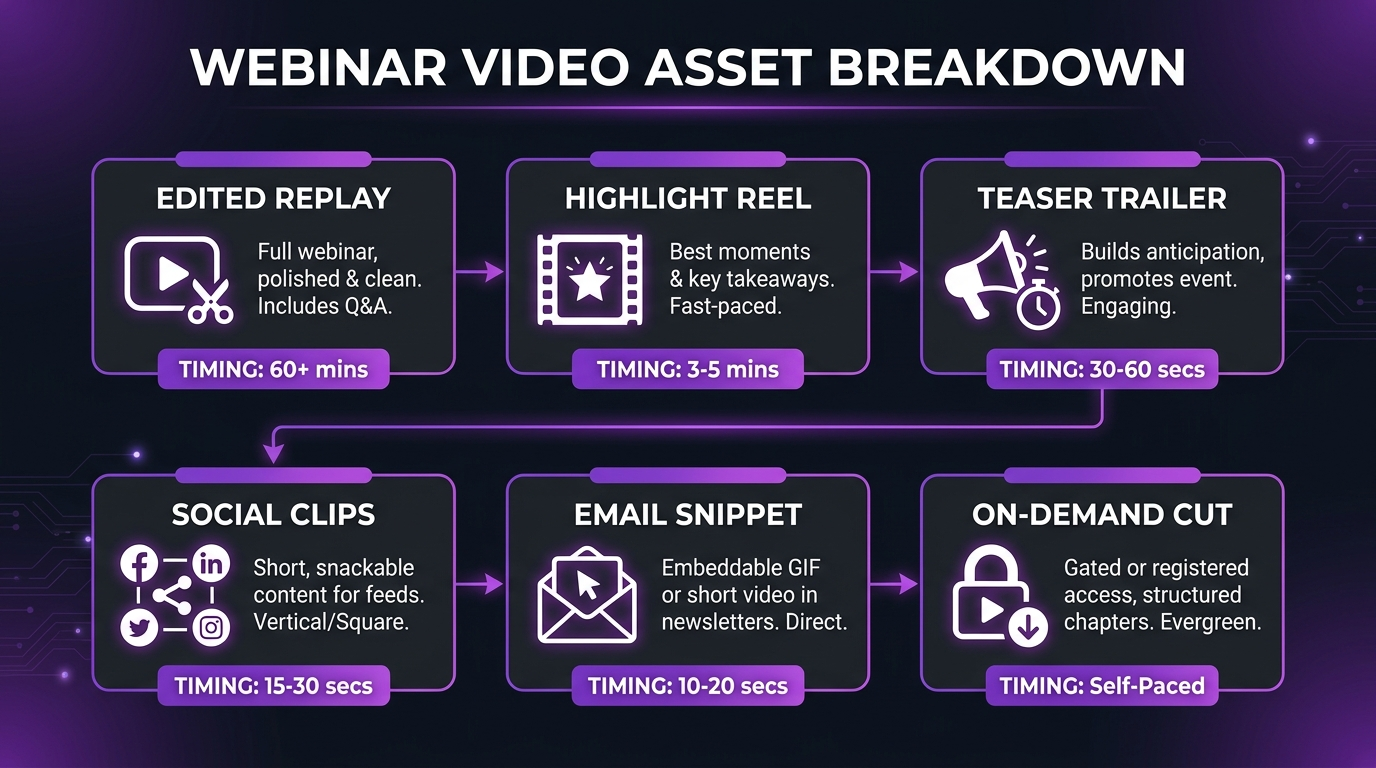
1. The Edited Replay
The core deliverable. This is the full session, cut to remove dead time, technical glitches, off-topic diversions, and the pre-start holding period. A well-edited replay typically runs 20–35% shorter than the raw recording without losing any instructional substance. It includes lower-thirds for speaker names, chapter markers or clickable timestamps, corrected slide transitions, and branded intro and outro sequences. This version lives on the webinar landing page, in the follow-up email sequence, and sometimes on YouTube or a private Vimeo embed.
2. The Promotional Highlight Reel (Pre-Event)
For webinar series, a 60–90 second highlight reel cut from the previous session is one of the highest-converting assets for driving registrations to the next event. It shows social proof (real attendees, real reactions, real “aha” moments) and demonstrates the production quality of the experience. Teams that add this single asset to their registration emails commonly report a noticeable lift in click-through rates compared to text-only announcements.
3. The Teaser Trailer (Pre-Event)
A 30–60 second teaser built before the event from speaker interview footage, slide previews, and motion graphics. This is the “why you need to be there” asset distributed on LinkedIn, in partner newsletters, and via paid social. It requires footage captured before the event, which means planning this asset into your pre-event production schedule rather than treating it as an afterthought.
4. Social Clips and Quote Cards
Three to six vertical or square clips (15–60 seconds each), cut from the highest-insight moments of the session. Each clip is self-contained — it makes a complete point without requiring the viewer to have watched the full webinar. Captions are mandatory for social distribution since most platforms autoplay without sound. These clips extend the reach of the webinar across LinkedIn, Instagram, X, and YouTube Shorts well past the live event date.
5. The On-Demand Landing Page Cut
This is a distinct edit from the replay — typically 45–90 minutes maximum, with a chapter menu embedded in the player and a clear CTA card shown at the natural offer moment in the session. This version is optimized for on-demand viewing behavior, where the viewer is in control and will skip forward if the pacing lags. Chapter markers are not optional here; they are what separate a replay with 8% completion rate from one with 40%.
6. Email-Embedded Snippet
A 20–40 second clip designed specifically for the replay follow-up email — a “best moment” that creates urgency to watch the full session. This clip typically features the single most compelling insight or objection-handling moment from the webinar. When embedded as a GIF thumbnail or hosted video preview with a play button, it dramatically outperforms a plain text link to the replay landing page.
💡 Pro Tip: Plan your asset list before the webinar, not after. Knowing you need a teaser trailer changes how you schedule pre-event speaker interviews. Knowing you need social clips changes which questions you prioritize in the Q&A. Production decisions made before the event directly affect how many assets you can efficiently produce from the recording.
The Webinar Editing Workflow, Phase by Phase
Webinar video editing follows a different cadence than standard content video production. There are tight turnaround expectations (replay emails typically go out within 24–48 hours of the live session), multiple deliverables from a single source, and technical constraints imposed by the recording platform. Here is the end-to-end workflow that professional teams run.
Phase 1: Raw Footage Assessment (Day 0)
As soon as the recording is available, the editor reviews the file for technical quality: audio levels, speaker camera quality (if multi-presenter), slide recording fidelity, and any platform-specific compression artifacts. Zoom, Teams, and platform-native recorders each have different output characteristics. This assessment determines whether audio cleanup, noise reduction, or visual correction passes are needed before the first cut.
The editor also identifies the key moments to mark: the actual content start (after setup and small talk), the natural offer/CTA moment, any high-energy Q&A exchanges worth pulling as social clips, and any extended technical difficulties that need cutting without breaking the flow.
Phase 2: Structural Edit (Day 0–1)
This is the primary edit pass for the replay and on-demand versions. Tasks include removing the pre-start hold, tightening dead air between sections, cutting tangents that reduce retention without adding value, smoothing slide transitions that were manually advanced on screen, and placing branded intro and outro sequences. For multi-speaker webinars, this phase also handles any audio mix imbalances between presenters.
Phase 3: Enhancement and Branding (Day 1)
Lower-thirds for each speaker name and title, chapter markers synced to slide transitions or topic shifts, motion graphic overlays for key statistics or frameworks mentioned, color correction for webcam footage, and audio mastering for consistent loudness across the session. This phase is where the edited version begins to look and feel like a premium on-demand course rather than a raw recording.
Phase 4: Derivative Asset Creation (Day 1–2)
With the master edit approved, the editor cuts the social clips, email snippet, and highlight reel as separate deliverables. Each gets format-specific adjustments: vertical crop for Instagram and TikTok, square crop for LinkedIn and Facebook, burned-in captions (mandatory for autoplay contexts), and thumbnail design for each clip. The email snippet may also be exported as an animated GIF for email clients that do not render embedded video.
Phase 5: Platform-Specific Export and Quality Check (Day 2)
Every deliverable is exported to the correct specs for its destination platform. The replay might go to Vimeo (for gated landing page embedding), YouTube (for organic discovery), and the webinar platform’s native replay section simultaneously — and each may have different resolution, bitrate, or file-size requirements. A final quality pass checks that captions are accurate, chapter markers fire at the correct timestamps, and no branded elements are cropped by platform-specific safe zones.
DIY, Freelance, or Agency: Which Model Fits Your Funnel?
The right production model depends on how many webinars you run per quarter, how many derivative assets you need per session, and how much of your team’s time you can realistically commit to post-production work. Here is an honest breakdown.
The break-even point for agency vs. freelance typically appears when you are running more than two webinars per month or when you need more than three derivative assets per session. Below that threshold, a reliable freelancer can cover the work. Above it, the coordination overhead, availability risk, and inconsistency costs of freelance arrangements typically exceed the cost difference of a dedicated team.
According to Wistia’s video marketing research, teams that invest in professional post-production for their on-demand content see measurably longer average watch times than those publishing raw recordings — the gap compounds across a series because each improved replay reduces unsubscribes and strengthens confidence in future events.
Platform Technical Specs for Webinar Videos
Getting the technical details right prevents re-exports and delays. Different platforms where webinar video assets land have different requirements. Here are the standard specifications your editor should be working to.
According to ON24’s annual State of Digital Experiences report, on-demand content now accounts for a growing share of total webinar engagement — making the replay experience as important as the live event for overall program performance. Technical quality issues in the replay directly affect completion rates, and completion rate is the strongest predictor of whether a registrant ultimately converts.
For comprehensive pricing context on professional post-production for webinar programs, the Increditors guide to professional video editing costs breaks down typical rate structures by project type and team configuration.
What to Look for in a Webinar Video Editing Partner
Webinar post-production is a specialized niche within video editing. Not every team that does great brand videos or YouTube content is set up to handle the unique constraints of webinar funnels — tight turnaround times, platform-specific multi-format exports, and content strategy awareness that goes beyond pure craft. Here is what actually separates a suitable partner from one that will create more work than they save.
Turnaround Time Commitments
Your replay email goes out within 24–48 hours of the live session. If your editing partner cannot deliver the primary replay cut within that window, you lose the highest-intent moment in the follow-up sequence. Ask specifically about their SLA for webinar replay deliverables, not their general project turnaround time — those can be very different numbers. A team that promises five business days for “most projects” may not be structured for the rapid turnaround webinar funnels require.
Multi-Format Asset Delivery
The ability to take a single recording and efficiently produce the full set of derivative assets — replay, social clips, email snippet, highlight reel — from one edit session is an operational capability, not just a craft skill. Ask how they handle derivative asset production: is it built into their workflow and pricing, or does each additional asset require a separate project brief and additional fees? For webinar programs running monthly, the difference in total cost and coordination effort is significant.
Template and Brand System
A competent partner builds your brand template once — intro sequence, lower-third design, chapter card style, outro with CTA — and applies it consistently to every session without re-briefing. If you are re-explaining your brand guidelines before every webinar edit, you are working with someone who has not set up a proper system. This is not a minor convenience issue; inconsistent visual branding across your webinar series erodes the perception of professionalism that webinar content is supposed to build.
Caption and Accessibility Compliance
Captions are now a baseline expectation across every platform, and in many B2B contexts, accessibility compliance is a procurement requirement. Your editing partner should be producing accurate captions (not just auto-generated ones with uncorrected errors) for every deliverable. According to W3C Web Accessibility Initiative guidelines, captions for pre-recorded video are a WCAG 2.1 Level A requirement — meaning many enterprise buyers explicitly check for this before purchasing from a vendor.
Content Intelligence
The best webinar editors understand conversion optimization, not just frame rates. They know to find the sharpest soundbite for the email snippet, to place the CTA card at the natural offer moment rather than at a fixed timestamp, and to cut social clips that create curiosity about the full session rather than satisfying it. This is a marketing function as much as a production one, and a partner who thinks only about technical quality will miss the decisions that actually drive funnel performance. Platforms like HubSpot’s marketing research consistently show that video quality and relevance are the top factors driving email engagement, which underscores why editorial intelligence matters as much as technical execution.
💡 Pro Tip: Before evaluating a production partner for webinar work, send them a 30-minute raw recording from a past session and ask what assets they would produce from it and how they would prioritize the edit for on-demand viewing. The answer reveals whether they understand the funnel context or whether they will treat it as a generic video editing project.
How Increditors Handles Webinar Funnel Production
Increditors is a video editing agency built specifically for teams where video is a revenue-generating function, not a support function. Webinar funnels are one of the highest-ROI video contexts we work in, precisely because the editing decisions have a direct, measurable impact on replay completion rates, follow-up email click-throughs, and on-demand conversions.
Our webinar post-production workflow is structured around the 24–48 hour replay window. The moment raw footage arrives, an assigned senior editor begins the structural pass simultaneously with a technical quality review — audio correction, visual color pass, and slide transition smoothing run in parallel with the content edit rather than sequentially. The full replay and email snippet are typically ready within the first 24 hours; social clips and highlight reels follow within 48 hours of the session ending.
We build your brand template — intro sequence, lower-thirds, chapter cards, CTA outro — once, and it is applied consistently to every session without requiring re-briefing. For clients running monthly or bi-weekly webinar series, this means the entire production process becomes a clean handoff: they send the recording, we return the full asset set on schedule, every time. For a detailed look at how video production scales within a broader content program, the complete guide to video editing for SaaS companies covers how high-frequency content teams structure this kind of ongoing partnership.
Captions, platform-specific exports, and derivative asset production are standard inclusions, not add-on fees. If your webinar program produces more than one session per month, the monthly retainer model becomes significantly more efficient than per-project pricing — both in cost and in the coordination overhead that per-project arrangements require from your marketing team. You can explore how this compares across different agency and service models in our comparison of unlimited video editing services.
FAQ
How long does it take to edit a webinar replay professionally?
For a 60–90 minute webinar, professional editing of the primary replay typically takes 4–8 hours of editor time, depending on the complexity of the source material and the number of enhancements required. With a dedicated team structured for quick turnaround, the replay is generally deliverable within 24 hours of receiving the raw recording. Adding the full derivative asset set (social clips, email snippet, highlight reel) extends total production time to 48–72 hours.
Should I edit webinar replays or just publish the raw recording?
Always edit. Raw recordings include pre-start hold periods, audio inconsistencies, dead air during technical issues, and pacing problems that significantly reduce completion rates in on-demand format. Viewers who missed the live session have no context for these rough edges and will simply stop watching. Edited replays consistently outperform raw recordings on watch time and conversion rate. The editing cost is almost always recovered by the improved funnel performance within the first replay cycle.
What is the difference between a webinar replay and an on-demand landing page cut?
A replay is typically the full edited session, distributed via email to registrants and sometimes publicly on YouTube. An on-demand landing page cut is a distinct version optimized for gated access — it may be slightly shorter, always includes interactive chapter markers, and features a visible CTA card at the natural offer moment. Some teams use the same edit for both; programs focused on conversion optimization maintain them as separate deliverables.
How many social clips can I get from a single webinar?
A typical 60–90 minute webinar yields 3–8 social clips of 30–90 seconds each, depending on how insight-dense the session was and how many distinct speaker moments are strong enough to stand alone without context. Q&A segments are often the most efficient source of social-ready clips because the question-answer format is naturally self-contained. For a webinar series, publishing one or two clips per week in the weeks following the event keeps the content circulating beyond the initial replay window.
Does video editing quality affect webinar SEO performance?
Yes, indirectly but meaningfully. Google factors engagement signals — watch time, replay completion rate, time on page — into how it evaluates on-demand webinar pages. An edited replay with chapter markers and accurate captions gives crawlers structured information to index and gives viewers reasons to stay longer. According to Google’s video search documentation, structured video markup and proper captions also improve eligibility for video-rich search results, which is a significant organic discovery channel for on-demand webinar content. Additionally, Think With Google research on video engagement consistently highlights that production quality is a primary factor in whether users choose to engage with branded video content.
Verdict
Webinar funnels are among the highest-intent, highest-investment content formats in B2B and SaaS marketing. Every registration, every attendee, and every email follow-up is downstream of a significant amount of planning, promotion, and production effort. The editing decisions that determine whether the replay converts, whether the social clips drive re-registration, and whether the email snippet earns the click are the variables that determine whether that investment pays off — or quietly sits at a 6% replay completion rate and gets written off as a poor channel.
The good news is that professional webinar post-production is a solvable, repeatable problem. Build the asset set once, establish the workflow with the right production partner, and each subsequent session becomes a reliable process rather than an improvised scramble. For programs running one or more webinars per month, this is the single highest-leverage video investment available — the content is already created; professional editing is what turns it into a compounding asset instead of a one-day event.
If you are ready to build that system, the right starting point is a conversation about your current webinar cadence, asset requirements, and turnaround expectations. That conversation takes 30 minutes and usually surfaces two or three specific optimizations your current process is missing.
Ready for Video That Actually Converts?
Tell us about your webinar program and we will put together a custom post-production plan.