










![3D Explainer Video - ScribbleLive.mp4_snapshot_00.12_[2022.03.09_03.14.16]](https://increditors.com/wp-content/uploads/elementor/thumbs/3D-Explainer-Video-ScribbleLive.mp4_snapshot_00.12_2022.03.09_03.14.16-r7wb53mx72rxst3qcqyrfxdmeyzb5r9jbl0wbjujh4.png "3D Explainer Video – ScribbleLive.mp4_snapshot_00.12_[2022.03.09_03.14.16]")
































Raw footage management at scale means building a consistent taxonomy, enforcing naming conventions, tiering storage by access frequency, and automating backups before the library grows too large to wrangle by hand. Teams that invest in this infrastructure early spend less time hunting files and more time delivering finished work.
- Why Raw Footage Management Fails at Scale
- Building Your Archive Taxonomy: Folder Structures That Hold Up
- Naming Conventions That Actually Work Across Teams
- Storage Tiers: Hot, Warm, and Cold for Video Files
- Backup Strategies for Large Video Libraries
- Metadata and Tagging for Fast Retrieval
- Tools and Software for Scalable Video Archiving
- When to Delete, When to Keep, and Retention Basics
- FAQ
- Verdict
Every production team reaches a threshold where the informal system breaks down. What started as a shared Google Drive folder or a single NAS device becomes a sprawling library of terabytes — and nobody can reliably find the clip from six months ago that the client now desperately needs. Raw footage management at scale is not a storage problem. It is an organizational and process problem that happens to live on top of storage.
This guide is written for production managers, post-production leads, and operations teams at agencies and studios that are already producing consistently and now need the infrastructure to keep up. Whether you are managing dozens of projects a month or a hundred, the same principles apply: structure first, tooling second, automation third.
Why Raw Footage Management Fails at Scale
Most teams do not fail because they chose the wrong storage hardware or the wrong software. They fail because the system was designed for one person and one project at a time, then handed to ten people managing fifty projects simultaneously without any structural redesign.
The Four Most Common Failure Modes
Inconsistent naming. When three editors use three different conventions for the same project folder, search becomes manual and error-prone. A file named finalcut_v3_REAL_FINAL.mp4 tells the next person nothing useful about what it contains or where it belongs in the timeline.
No defined ownership. In teams without a designated archive owner, footage accumulates wherever it lands — desktops, Dropbox roots, local drives that leave with the editor. After a year, nobody has a complete picture of what was ever shot.
Flat storage structures. Dumping everything into a single folder with volume-based subfolders (“2024-Q3”, “2024-Q4”) offers almost no context. Retrieving a clip requires knowing when it was shot, which is rarely the first thing remembered under deadline pressure.
Backup gaps. Backups treated as optional steps tend to stop happening during busy periods — precisely when the most irreplaceable content is being created. A single corrupted drive or accidental deletion without a recent backup can mean losing an entire campaign’s raw assets.
💡 Pro Tip: Audit your current library before scaling. If you cannot answer “where is every raw file from our last three projects?” in under two minutes, you already have a structural problem — adding storage will not fix it.
Building Your Archive Taxonomy: Folder Structures That Hold Up
A good folder taxonomy is one that any team member can navigate without a guide, any tool can index automatically, and any future archivist can interpret without interviewing the original team. These three constraints together rule out most ad hoc approaches.
The Two-Level Root Rule
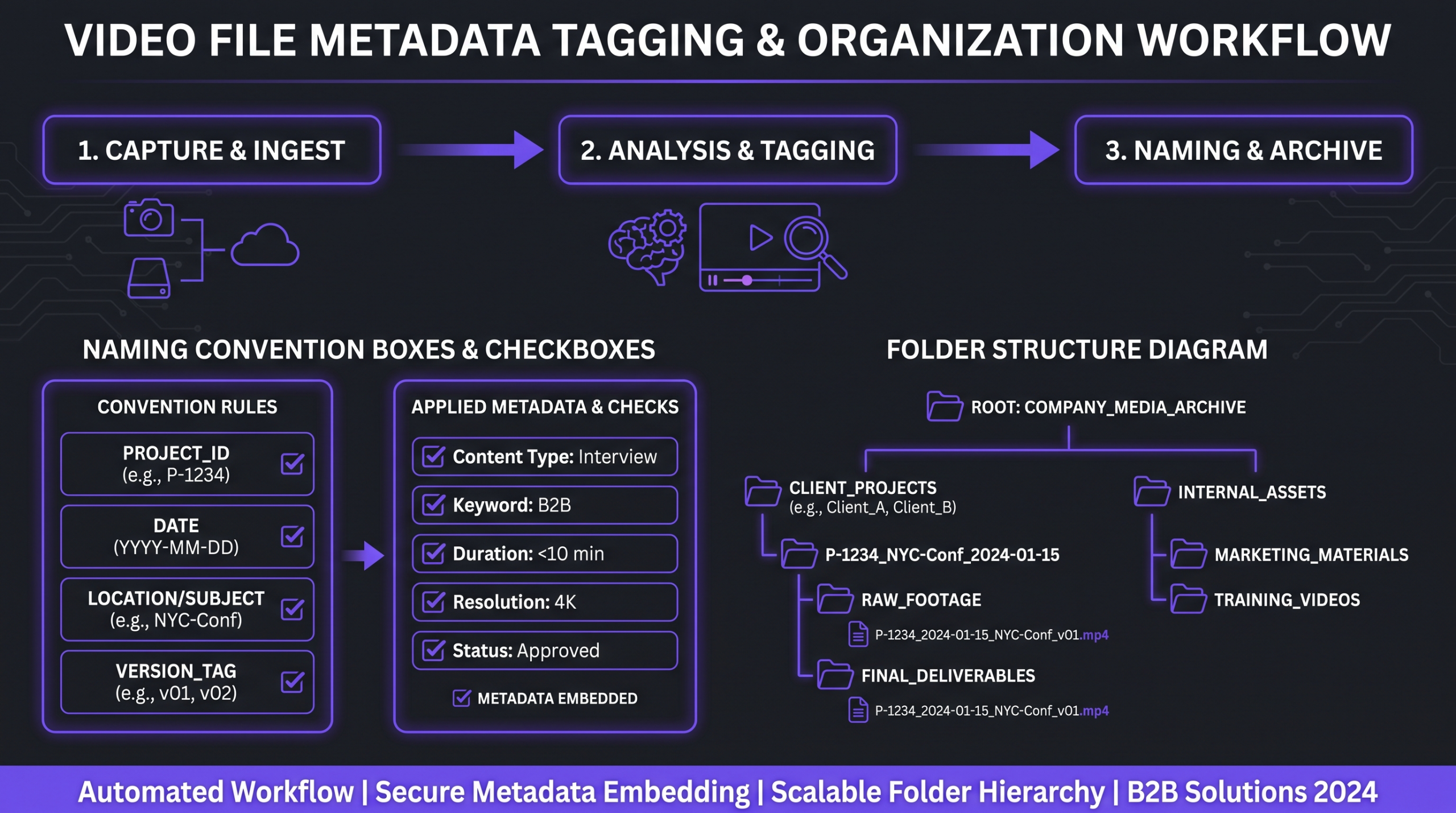
The most durable archive roots use two levels before you reach project-specific structure: client then project. Every subfolder below that can vary by project without breaking the top-level index. The pattern looks like this:
What Goes in the RAW Folder
The RAW folder should contain exactly what came off the camera card — no rewrapped files, no transcodes, no selects. Transcodes and selects belong in sibling folders (PROXY, SELECTS) with a clear naming relationship back to the original. This separation keeps the archive legally and technically clean: if a client requests original files, you can hand them the RAW folder without sorting through derivatives.
Project Folder Template Enforcement
The easiest way to enforce folder structure at scale is a shell or Python script that creates the template when a new project is initiated. Editors should never create project folders by hand — the script does it, so the shape is always identical. This is trivial to implement and dramatically reduces the cognitive load on the team.
Naming Conventions That Actually Work Across Teams
A naming convention only works if every team member uses it every time without thinking. That means it needs to be short enough to be remembered, structured enough to be sortable, and flexible enough to survive edge cases. Most naming debates happen because the proposed convention tries to carry too much information — and then nobody follows it under pressure.
The Three-Part Filename Formula
A workable format for raw clips is: YYYYMMDD_ProjectCode_SceneOrCamCard_ClipNumber.ext
Example: 20260714_ACME-Q3_INT-A_0023.R3D
Breaking it down: the ISO date sorts chronologically; the project code links to the folder system; the scene or card label locates the clip on the day; the clip number preserves camera order. The camera’s original filename is preserved after that separator so you can always trace back to the card if needed.
Rules That Prevent Future Headaches
No spaces. Spaces break shell commands and many DAM tools. Use hyphens or underscores — pick one and stick to it.
No version suffixes on raw files. Raw files do not have versions. Only exports and deliverables carry version markers. If you see “RAW_v2” in your archive, something has gone wrong upstream.
Lowercase extension, uppercase prefix. Some operating systems are case-sensitive; others are not. Standardizing reduces cross-platform surprises when files move between Mac and Linux edit stations.
The project code is a registry, not a description. Keep a simple spreadsheet mapping project codes to full project names. The code in the filename stays short; the registry provides the lookup.
Storage Tiers: Hot, Warm, and Cold for Video Files
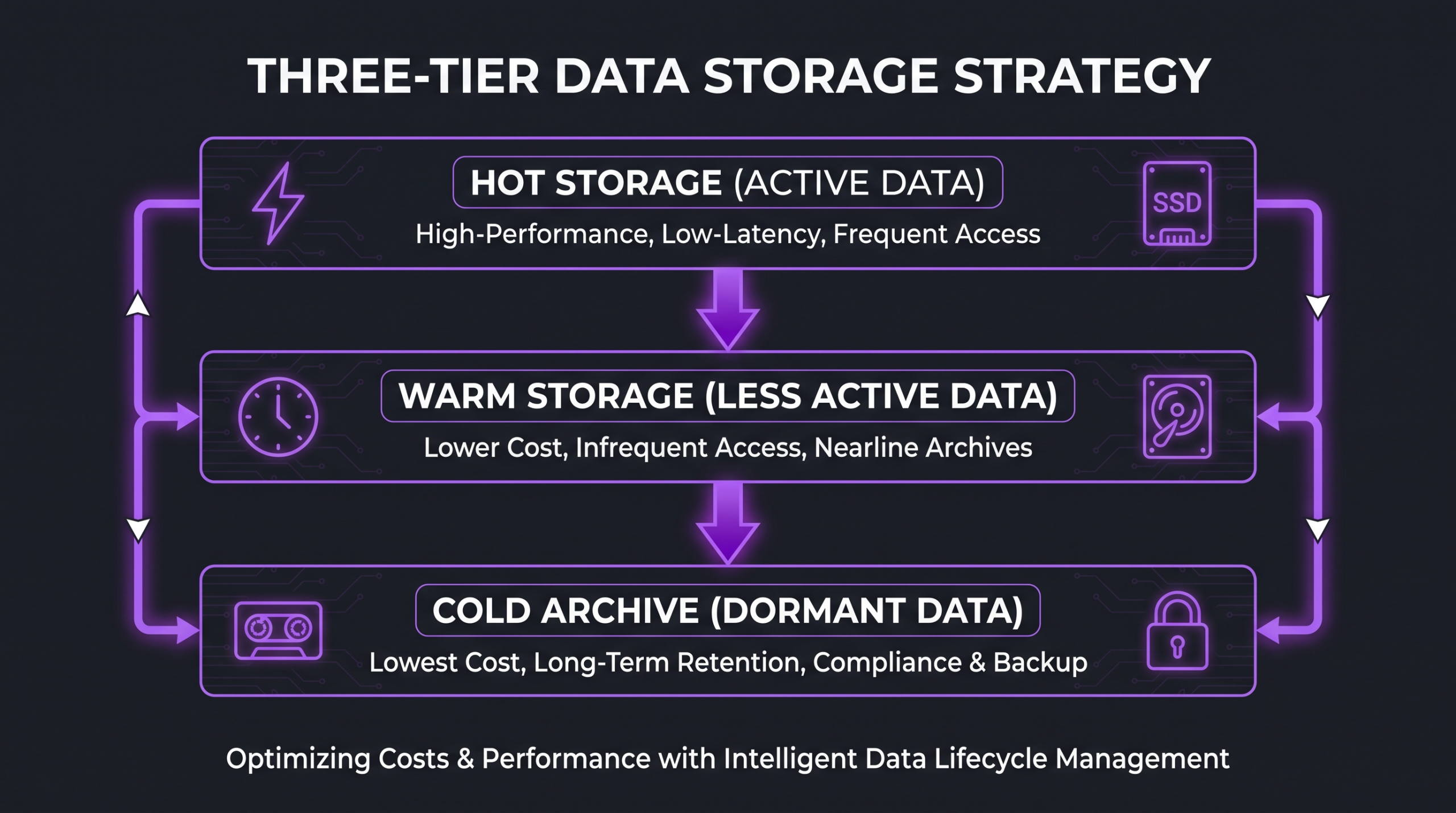
Not all raw footage has the same access frequency over its lifecycle. A clip shot last week may be opened dozens of times a day; the same clip two years later may never be opened again unless a client requests a revision or archive cut. Treating all footage as equally “hot” is the most expensive mistake a growing library can make.
The three-tier model maps access frequency to storage cost and latency, allowing you to pay appropriately for each category. Backblaze’s storage guide offers a practical breakdown of how object storage classes map to these tiers in real-world deployments.
Defining the Migration Trigger
The most important operational decision is when footage automatically moves from hot to warm and from warm to cold. Most agencies define triggers by time since project delivery: warm at 30–90 days post-delivery, cold at 12–18 months. Some trigger on access date instead. Either approach works; the critical requirement is that the trigger is documented, automated where possible, and applied consistently.
LTO Tape for Deep Cold Archive
For agencies with libraries exceeding 50–100 TB, LTO tape becomes cost-competitive with cloud archive tiers when you factor in both storage and retrieval costs. LTO Ultrium generation specifications show that modern LTO-9 cartridges hold up to 18 TB native per tape at a fraction of per-GB cloud archive cost. The trade-off is retrieval time measured in hours and the physical infrastructure overhead of a tape library. For assets that will almost never be accessed, that trade-off is frequently worthwhile.
Backup Strategies for Large Video Libraries
The backup strategy for raw video has one absolute rule: the 3-2-1 principle. Three copies, two different media types, one offsite. This principle is not new — it predates modern cloud storage — but its application to multi-terabyte video libraries requires deliberate planning that goes beyond what most consumer or small business backup tools support.
Implementing 3-2-1 at Production Scale
Copy 1 (Primary): The working NAS or shared storage where active projects live. This is your hot tier.
Copy 2 (Local secondary): A second on-premises device — a separate NAS, JBOD, or dedicated backup server — that mirrors the primary on a scheduled basis. This copy protects against hardware failure on the primary but not against fire, flood, or theft.
Copy 3 (Offsite): Cloud object storage (Backblaze B2, AWS S3, or equivalent), a colocation facility, or physically rotated drives stored off-site. This copy is your disaster recovery layer.
💡 Pro Tip: RAID is not a backup. A RAID array protects against single drive failure; it does not protect against accidental deletion, ransomware, or catastrophic hardware failure. Every production team should have at least one copy that is physically or logically separate from the working environment.
Checksumming Raw Files on Ingest
The moment a card is ingested, a checksum (MD5 or XXHash) should be generated for every file and stored alongside it in a sidecar file or database record. This checksum is your ground truth: any future copy of that file can be verified against it to confirm that no corruption occurred during transfer or storage. Tools like Hedge and Silverstack automate this step during ingest and produce reports you can hand to a client or insurer as evidence of file integrity.
Backup Verification Schedules
A backup that has never been tested is not a backup — it is an assumption. Schedule quarterly restore tests on a random sample of archived projects. Confirm that files can actually be retrieved from cold storage, that checksums still match, and that project files can be opened in current software versions. This last point matters: a project archive that cannot be opened in any currently installed version of your editing software is effectively useless.
Metadata and Tagging for Fast Retrieval
Metadata is the layer that transforms a folder of files into a searchable library. The folder structure tells you where things are. Metadata tells you what they are — and more importantly, why they matter for future projects.
Core Metadata Fields for Raw Footage
At minimum, every ingested raw clip should carry: shoot date, project code, camera operator, camera model, frame rate and resolution, location/set name, scene or shot description, and a select flag (is this a keeper?). These fields cover the most common retrieval queries: “find all clips from the product shoot on July 14” or “find all b-roll of the manufacturing floor”.
Embedded vs Sidecar Metadata
Some metadata lives inside the file (EXIF, XMP embedded). Some lives in a separate sidecar file (XMP sidecar, CSV log). Some lives in a database (DAM catalog). For archive purposes, embedded and sidecar metadata are preferable because they travel with the file — if the database is ever lost or migrated, the metadata survives. Adobe’s XMP metadata standard is the most widely supported format across professional video tools and is worth adopting as your base layer.
The Select-and-Describe Workflow
The most time-efficient approach is to describe clips at the moment of ingest, when the shoot context is freshest. A camera assistant or assistant editor who can spend 30 minutes tagging 200 clips immediately after ingest saves the entire team from sorting through unlabeled footage weeks later. Building this step into the ingest checklist — not the post-production checklist — is the key organizational change most teams need to make.
Tools and Software for Scalable Video Archiving
No single tool solves raw footage management end to end. The practical solution for most agencies and studios is a small stack of purpose-built tools that handle different layers of the problem. Working with an experienced video editing agency can also mean inheriting tested workflows and established archive infrastructure, rather than building from scratch.
Ingest Tools
Hedge is the industry standard for verified card ingest on Mac. It copies simultaneously to multiple destinations, generates checksums, and produces ingest reports. YoYotta handles both ingest and archive with LTO support built in — useful for operations that want a single tool spanning hot and cold tiers. Pomfort Silverstack adds an on-set metadata layer and integrates with Pomfort Livegrade for camera data.
Digital Asset Management (DAM)
iconik is purpose-built for video teams managing large libraries with distributed collaborators — it indexes storage you already have, generates AI-assisted transcripts and visual search, and integrates with major NLE and cloud storage providers. Cantemo Portal targets broadcast and studio environments. Daminion is a more accessible entry point for agencies that do not yet need enterprise-scale DAM but have outgrown folder browsing. For post-production review specifically, Frame.io’s review workflow tools integrate tightly with Adobe Premiere Pro and offer proxy-based review without moving raw files.
Cloud Storage and Sync
For the offsite copy, Backblaze B2 offers competitive per-GB pricing with free egress when used with Cloudflare. AWS S3 Glacier Instant Retrieval suits teams that need rapid access from cold storage. Google Cloud’s storage class documentation explains their tiered model clearly, including Nearline and Coldline options that map well to warm and cold video archive respectively.
When to Delete, When to Keep, and Retention Basics
The question of when to delete raw footage is one that many agencies avoid answering, which means they keep everything indefinitely and storage costs compound without bound. A deliberate retention policy is not about deleting useful content — it is about deciding explicitly what category of content has a defined shelf life.
Contractual vs Business Retention
Some retention timelines are set by contract. A client agreement that specifies “all raw files will be retained for 24 months post-delivery” is legally binding and overrides any internal policy. Build your archive system to accommodate client-specified retention windows by attaching the retention expiry date to the project record at the point of delivery.
Business retention — what you keep because it may be useful — is different. A useful framework: keep selects (the clips that made it into any delivered cut) indefinitely as a lightweight archive; keep full raw card dumps for the contractual minimum and then delete unless there is a specific reason to retain. Most agencies discover that selects represent a small fraction of total raw footage volume and can be archived perpetually at reasonable cost.
Legal Hold Scenarios
Certain circumstances require footage to be held past its normal retention window: ongoing client disputes, insurance claims involving footage as evidence, or regulatory investigations. A legal hold suspends normal deletion policies for the affected material. Your archive system should have a mechanism to flag content as under legal hold and prevent automated deletion from triggering on it.
For practical guidance on production document and footage retention, many agencies reference the Production Guild of Great Britain’s resource library, which includes industry-standard contract templates and retention guidance used by UK-based productions but applicable as a reference framework globally.
Aligning Retention with Storage Tier Migration
The most efficient approach links retention to the tier migration schedule. As content moves from hot to warm to cold, the metadata record is updated with a retention expiry date. At expiry, an automated review flag is raised — not an automatic deletion — so a human can confirm before anything is removed. This keeps humans in the loop for irreversible decisions while removing the manual burden of tracking expiry dates in a spreadsheet.
Understanding the full cost picture of storage, retrieval, and associated editing services is something teams researching how to structure their production budgets often find covered in detail in the professional video editing cost guide — which covers everything from post-production pricing to long-term asset management considerations.
For teams weighing whether to manage this infrastructure in-house or through a production partner, the comparison between a video editing agency versus freelancer model is directly relevant: agencies typically provide established archive infrastructure, whereas freelancers leave archive responsibility entirely with the client.
FAQ
How long should raw footage be retained after delivery?
There is no universal standard — retention should be defined by your client contracts and your own business policy. A common agency baseline is 12–24 months for full raw card dumps and indefinitely for selects (clips that made it into a delivered cut). Always honour any client-specified retention window in writing before defaulting to your internal policy.
What is the best format for archiving raw video files?
The best archive format is the original camera native format — do not transcode raw files for the purpose of archiving. Camera-native formats (R3D, ARRIRAW, ProRes RAW, BRAW) are the highest-quality originals and the only ones that can be reprocessed with future tools. If storage cost requires compression, a lossless archive codec like ProRes 4444 or DNxHR 444 is the next best option, but this should only apply to proxies or selects — never to the primary archive copy of raw originals.
Do I need a DAM if I only manage 5-10 projects per month?
At that volume, a well-structured folder system with consistent naming conventions and a simple spreadsheet for project tracking is likely sufficient. A DAM adds value when search across projects becomes a frequent need — typically when you have more than 20 active or recently archived projects and multiple team members retrieving assets independently. Plan your folder structure to be DAM-friendly from the start so the migration, when it comes, requires no reorganisation.
Is cloud storage reliable enough for primary raw footage archive?
Major cloud providers (AWS, Google Cloud, Backblaze) publish durability figures in the range of eleven nines (99.999999999%) for object storage — statistically more reliable than any single-location on-premises storage system. The practical risks of cloud archive are not data loss but retrieval cost, egress latency for large files, and the dependency on provider continuity. Cloud archive works best as part of a 3-2-1 strategy rather than as the sole copy.
How do checksums protect raw footage from corruption?
A checksum is a mathematical fingerprint of a file’s exact content. If any bit in the file changes — due to a hardware error, a failed transfer, or storage medium degradation — the checksum will not match. By generating checksums on ingest and re-verifying them periodically (most archive professionals recommend at least annually for cold-tier content), you can detect silent corruption before it propagates across all copies. This is the difference between discovering corruption with recovery options available and discovering it with no good copy remaining.
Verdict
Raw footage management at scale is fundamentally a process discipline, not a technology problem. The teams that manage large libraries effectively are not the ones with the most sophisticated software — they are the ones that built clear conventions early, enforced them consistently, and automated the repetitive verification tasks so humans stay focused on the judgement calls.
The practical sequence: start with folder taxonomy and naming conventions (these cost nothing and unlock every other benefit); implement checksum verification at ingest; define tier migration triggers and retention policies; then layer tooling on top of an already-structured system. In that order, each step builds on a stable foundation rather than requiring a retroactive reorganisation.
For agencies specifically, the archive system is also a client trust signal. A team that can retrieve any deliverable from any project in the last three years — quickly and with verified integrity — demonstrates a level of operational maturity that freelancers and underinvested agencies cannot match. That operational maturity is a meaningful part of the Increditors value proposition: the post-production infrastructure behind the creative work is built to hold up as clients scale their video output.
If your current library is already outpacing your system’s ability to manage it, the right time to build the new structure is before the next project starts — not after the next search failure. Build the taxonomy, write the naming guide, schedule the backup verification, and automate the tier migrations. Future you will not have to spend a Friday afternoon hunting for a clip from 18 months ago.
Ready for Video That Actually Converts?
Tell us about your project and we will put together a custom plan.