










![3D Explainer Video - ScribbleLive.mp4_snapshot_00.12_[2022.03.09_03.14.16]](https://increditors.com/wp-content/uploads/elementor/thumbs/3D-Explainer-Video-ScribbleLive.mp4_snapshot_00.12_2022.03.09_03.14.16-r7wb53mx72rxst3qcqyrfxdmeyzb5r9jbl0wbjujh4.png "3D Explainer Video – ScribbleLive.mp4_snapshot_00.12_[2022.03.09_03.14.16]")
































LinkedIn video specs differ significantly depending on whether you’re posting organically or running paid campaigns. Organic feed posts accept up to 5 GB, 10 minutes, and a wide range of formats including MP4, MKV, and WebM. Video ads are far stricter: MP4 only, 500 MB maximum, H.264 or VP8 codec, under 30 FPS. LinkedIn’s recommended aspect ratios for ads are 4:5 (vertical) and 16:9 (landscape), with 720×900 and 1920×1080 as the primary targets. Always add SRT captions — LinkedIn autoplays video on mute — and keep ad creatives to 15–30 seconds for maximum placement eligibility across the feed and LinkedIn Audience Network.
- Why LinkedIn Video Specs Matter in 2026
- LinkedIn Organic Video Specs (Pages & Feed Posts)
- LinkedIn Video Ad Specs (Sponsored Content)
- LinkedIn Live Streaming Technical Specs
- Organic vs. Paid Video: Side-by-Side Comparison
- LinkedIn Video Ad Format Breakdown
- LinkedIn Video Best Practices for 2026
- How Professional Editing Elevates LinkedIn Video
- Frequently Asked Questions
- Verdict
Why LinkedIn Video Specs Matter in 2026
In 2026, LinkedIn has solidified its position as the dominant B2B content platform, and native video is its fastest-growing format. LinkedIn’s own platform data shows that native video generates significantly higher engagement than text or image posts — and the algorithm actively rewards content that holds viewers’ attention. For marketing directors, founders, and B2B content teams, video is no longer an optional channel.
But here’s what separates high-performing LinkedIn video from content that quietly underperforms: technical compliance. Upload a video with the wrong codec, and LinkedIn’s transcoding engine degrades the quality. Use the wrong aspect ratio for a video ad, and the platform either rejects the creative outright or letterboxes it in ways that look unprofessional in the feed. Exceed the file size limit on a sponsored video, and your campaign launch stalls before a single impression is served.
This guide pulls specs directly from LinkedIn’s official help documentation for Pages video and LinkedIn’s video ads specifications, then layers in the best practices that are actually driving results on the platform this year. Whether you’re posting organic thought leadership, running a lead generation campaign, or setting up a live event, every relevant spec is in one place.
One important framing note before diving in: LinkedIn’s video requirements split into three distinct categories — organic feed posts (personal profiles and Pages), paid video ads (Sponsored Content managed through Campaign Manager), and LinkedIn Live. Each has its own technical constraints, and confusing them is the most common source of upload errors and rejected creatives.
LinkedIn Organic Video Specs (Pages & Feed Posts)
Whether you’re posting to your personal profile, a LinkedIn Company Page, or a Career Page, the organic video guidelines govern how your file is processed, transcoded, and displayed. These specs are significantly more permissive than paid ad requirements, giving content creators and production teams room to work with higher-quality, less aggressively compressed files.
Supported File Formats
LinkedIn accepts the following video formats for organic posts and Pages: MP4, MKV, WebM, FLV, ASF, MPEG-1, MPEG-4, H264/AVC, VP8, VP9, WMV2, and WMV3.
LinkedIn explicitly no longer supports AVI, QuickTime (.mov), or plain MP3 audio-only files. If your editing team exports deliverables as QuickTime-wrapped MOV files by default — a common Final Cut Pro and some Premiere Pro export preset — that needs to change before uploading to LinkedIn. MP4 with H.264 encoding remains the safest universal choice across all LinkedIn video placements.
File Size, Duration, Resolution, and Technical Limits
The 5 GB ceiling is genuinely generous. A high-quality 10-minute video in H.264 at 1080p typically weighs between 1 and 3 GB, well within the allowed range. This means production teams rarely need to aggressively compress organic LinkedIn content before uploading — quality is preserved at the encoding stage.
Recommended Aspect Ratios for Organic Feed Posts
LinkedIn displays organic video within a fixed feed container, and your chosen aspect ratio directly affects how much screen real estate your content occupies — particularly on mobile. The four most commonly used formats:
- 16:9 (Landscape): The standard horizontal format. Recommended resolution: 1920×1080. Displays cleanly on desktop; familiar to audiences and easy to repurpose from YouTube, webinar, or presentation recordings.
- 1:1 (Square): Takes up more vertical space than 16:9 in the feed, which improves scroll-stopping on mobile. Recommended resolution: 1080×1080. Works well for repurposed content from multiple platforms without reframing.
- 4:5 (Vertical): LinkedIn’s recommended format for maximum feed visibility on mobile. Occupies nearly the full screen height on smartphones without going full-portrait. Recommended resolution: 1080×1350.
- 9:16 (Full vertical): Full portrait mode. Strong on mobile-heavy feeds; may be cropped in the desktop feed preview. Best suited for short, punchy clips under 60 seconds.
For teams repurposing content from Instagram Reels or TikTok, the 4:5 format adapts cleanly and consistently outperforms 16:9 on mobile-first LinkedIn audiences. For desktop-heavy B2B audiences in enterprise verticals, 16:9 remains the more contextually appropriate choice.
LinkedIn Video Ad Specs (Sponsored Content)
LinkedIn video ads — sold as Sponsored Content in Campaign Manager — have significantly tighter technical requirements than organic posts. These constraints exist to ensure consistent delivery and playback performance across LinkedIn’s ad network and the LinkedIn Audience Network (LAN). Violating any of these specs results in immediate upload rejection or post-submission creative disapproval.
The following specs are sourced from LinkedIn’s official video ads specifications help page and the LinkedIn Marketing Solutions video ads spec reference.
Format, File Size, and Duration Requirements
The 500 MB cap is the single most common cause of video ad rejection for teams accustomed to organic upload workflows. A 1080p corporate video exported at broadcast quality can easily exceed this threshold, requiring a re-export at lower bitrate or reduced resolution — typically 720p — before it will upload in Campaign Manager. Apple ProRes is explicitly not supported for video ads and will be rejected immediately.
Aspect Ratio and Pixel Requirements for Video Ads
LinkedIn supports four distinct aspect ratios for video ads. Each has a recommended resolution and an allowed range:
💡 Pro Tip: When in doubt about aspect ratio for a new video ad campaign, lead with 4:5 at 720×900. It renders cleanly on mobile — where most LinkedIn sessions start — without the awkwardness of full-portrait 9:16 on desktop. If you’re promoting a horizontal brand video that can’t be recut, 16:9 at 1920×1080 is your fallback. Avoid submitting a video whose aspect ratio falls outside these four supported ratios — LinkedIn will reject it, not resize it.
One important note on aspect ratio math: LinkedIn calculates aspect ratio by dividing width by height. Although the maximum width is 1920 pixels and the minimum height is 360 pixels, a 1920×360 file (ratio of 5.33:1) exceeds the maximum allowed ratio of 2.4:1 and will be rejected. The aspect ratio limits are enforced independently of the raw pixel dimensions.
Audio, Codec, Caption, and Thumbnail Specifications
Audio in LinkedIn video ads must use AAC or MPEG4 format with a sample rate below 64 KHz. Audio is technically optional in the ad creative, but silent or poor-audio videos consistently underperform on completion rate when viewers tap to unmute — which audiences do more often than many marketers expect.
Video captions: LinkedIn Campaign Manager accepts caption files in SRT format only. Custom formatting — font colors, bold, italics — is not supported and will be stripped from the SRT. The caption file must contain plain text only. For organic video posts, captions can be uploaded alongside the post or burned in directly to the video file.
Introductory text: The ad’s body copy above the video supports up to 150 characters for clean display (no truncation), with a technical maximum of 3,000 characters. LinkedIn may truncate introductory text beyond 150 characters on certain placements. LinkedIn advises keeping any legally required disclosures in this field.
Video thumbnail: Optional but strongly recommended. Accepted formats: JPG or PNG, maximum 2 MB. The thumbnail aspect ratio and resolution should match the video dimensions to avoid distortion in the feed.
LinkedIn Live Streaming Technical Specs
LinkedIn Live enables eligible accounts to broadcast live video directly into the LinkedIn feed. Unlike organic uploads and paid ads, LinkedIn Live is not a direct file upload — it requires a third-party encoder or broadcasting tool (OBS, Restream, StreamYard, or similar) that outputs to LinkedIn’s RTMP/RTMPS ingest endpoint.
Technical requirements for LinkedIn Live:
- Streaming protocol: RTMP or RTMPS (Real-Time Messaging Protocol Secure) via a supported third-party broadcaster
- Recommended resolution: 720p (1280×720)
- Recommended frame rate: 30 frames per second
- Maximum stream duration: Up to 4 hours per session
- Access requirement: Creator Mode enabled on the profile or Page; LinkedIn applies eligibility criteria including follower thresholds and posting history, which vary by region and account type
LinkedIn Live is not available by default to all accounts. Pages and personal profiles must be eligible — and LinkedIn’s eligibility criteria can change. The live stream setup begins in Campaign Manager or the Page settings, where LinkedIn provides the RTMP ingest endpoint and stream key for your chosen broadcasting tool.
💡 Pro Tip: LinkedIn Live replays are automatically saved as organic video posts after the broadcast ends. If you optimize the live stream quality at 720p/30fps with a stable bitrate, the replay retains that quality and continues generating views long after the event. This makes pre-production investment — branded lower-thirds, clean graphics, proper lighting — directly worthwhile even for formats that feel “live and unpolished.”
Organic vs. Paid Video: Side-by-Side Comparison
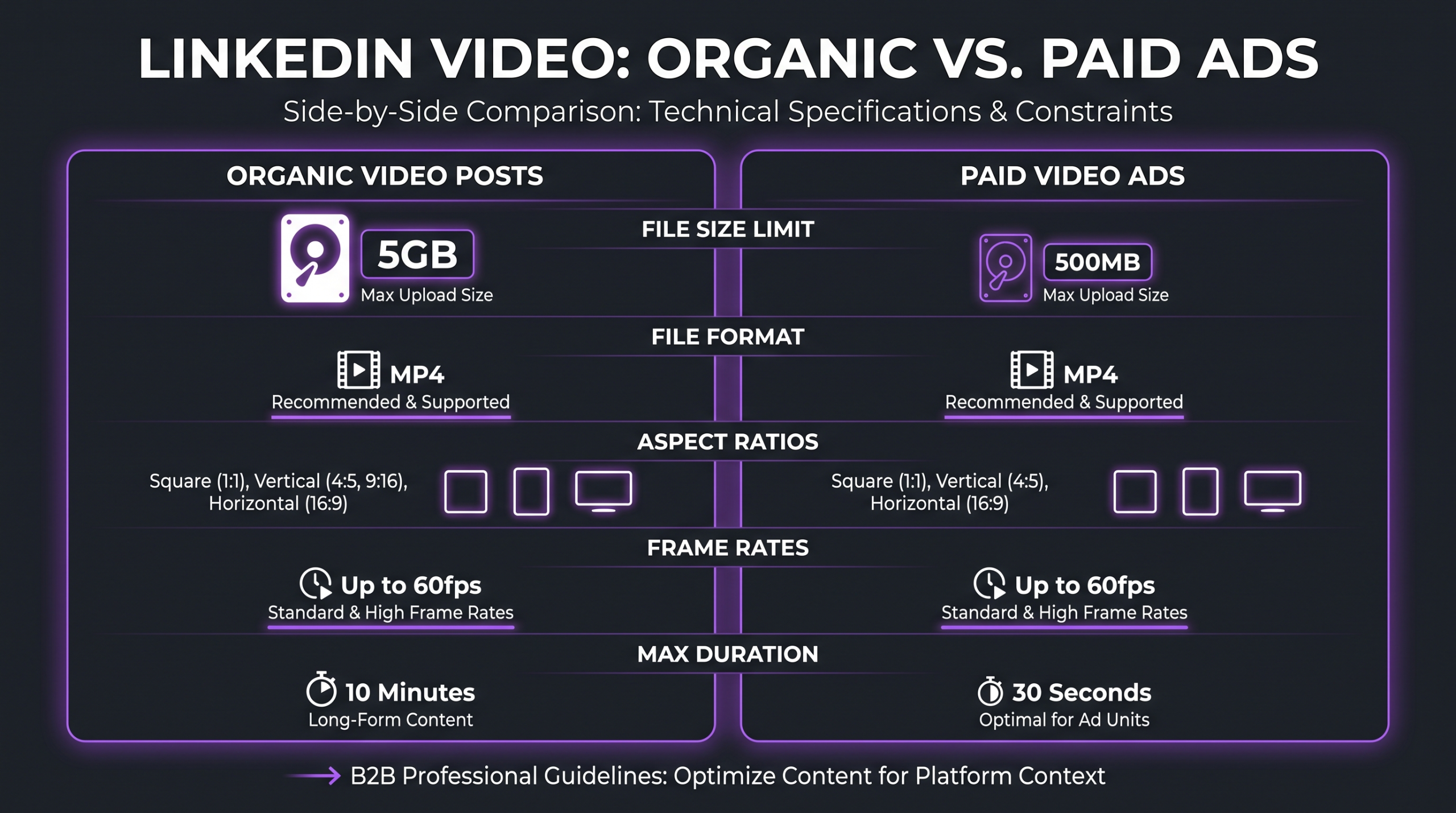
Understanding where organic and paid specs diverge helps you build production and delivery workflows that serve both purposes without redundant rework. The table below summarizes every meaningful technical difference between the three primary LinkedIn video formats.
The most operationally significant gap for production teams is the file size limit. A 5 GB ceiling for organic posts versus a 500 MB cap for video ads means your paid creative must go through a separate compression pass before it’s ad-ready. Teams that maintain separate “organic export” and “ad-ready export” presets in their editing software avoid the last-minute scramble that typically delays campaign launches.
LinkedIn Video Ad Format Breakdown
LinkedIn’s paid video ecosystem extends beyond basic Sponsored Content in the feed. Understanding which video ad format your creative qualifies for — and which specs unlock additional placements — directly affects your campaign reach and cost efficiency.
Single Video Ads (Standard Feed Placement)
The most common LinkedIn video ad format. Single video ads appear natively in the LinkedIn feed on desktop and mobile. LinkedIn recommends 15–30 seconds for this format — shorter creatives qualify for more placement options including the LinkedIn Audience Network (LAN), which extends reach to third-party sites and apps in LinkedIn’s partner network. The ad includes an introductory text block (up to 150 characters for clean display) and an optional CTA button.
In-Stream Video Ads
Currently in gradual rollout across LinkedIn’s publisher and creator network. In-stream video ads play before or during publisher and creator content on LinkedIn. The maximum duration for in-stream video ads is 90 seconds — significantly longer than what performs in the standard feed. Horizontal (16:9) pre-roll pairs with horizontal publisher content; vertical pairs with vertical. The 1:1 square format offers the broadest placement coverage, working with both horizontal and vertical content.
In-stream ads suit brand awareness and storytelling objectives where more time is appropriate — a 60-second case study or product explainer can work here, whereas that same creative would face steep drop-off challenges if served in the standard feed as a Sponsored Content unit.
Connected TV (CTV) Ads
LinkedIn’s CTV ads allow B2B advertisers to reach professional audiences on connected television devices — smart TVs, streaming sticks, and game consoles. Any video asset already uploaded to Campaign Manager can be promoted as a CTV ad, but the asset must also meet LinkedIn’s specific CTV Ads specifications, which include additional resolution and delivery requirements. LinkedIn recommends working with a LinkedIn Marketing Partner for CTV-ready creative that meets all technical parameters.
LinkedIn Video Best Practices for 2026
Technical compliance gets your video into the feed. Best practices determine whether anyone watches past the first three seconds. The following guidance reflects what’s actually driving performance on LinkedIn in 2026, not evergreen advice recycled from years past.
Captions Are Non-Negotiable
LinkedIn autoplays video on mute by default across desktop and mobile. Scrollers will not hear your audio unless they actively tap to unmute — and a meaningful portion never will. Platform data consistently indicates that captioned videos outperform non-captioned ones in watch completion metrics. For video ads in Campaign Manager, the correct mechanism is an SRT caption file; for organic posts, you can either upload an SRT alongside the post or embed burned-in captions directly in the video file.
According to OpusClip’s 2026 LinkedIn caption and subtitle guide, optimal caption formatting uses one to two lines per frame, approximately 42 characters per line, displayed for two to four seconds each. For burned-in captions, a bold 24–30pt font in the lower third is the standard that remains legible on mobile without obscuring the main subject.
Aspect Ratio Strategy: Match Format to Audience and Objective
Don’t choose your aspect ratio based on the easiest export preset from your editing software. Choose it based on where your audience primarily consumes LinkedIn and what the video is meant to do.
- Mobile-first audience (creator-led content, mid-market and SMB verticals): 4:5 vertical at 1080×1350 for organic, 720×900 for ads. More screen real estate than 16:9, stronger scroll-stopping impulse on smartphones.
- Desktop-heavy B2B audience (enterprise procurement, C-suite outreach): 16:9 at 1920×1080. Familiar format, displays cleanly in the desktop feed and sidebar placements. Well-suited for webinar clips, panel recordings, and product demos.
- Cross-platform repurposing: 1:1 square is the most platform-agnostic choice. Works cleanly on LinkedIn, Instagram, and X without reframing, making it the right default for teams publishing the same content across multiple channels.
Optimal Video Length by Content Goal
LinkedIn’s algorithm rewards genuine engagement — watch time, comments, reposts — over raw duration. According to Neal Schaffer’s 2026 analysis of LinkedIn video performance, videos under 90 seconds consistently outperform longer formats in watch-through rate benchmarks. This doesn’t mean long-form content fails — it means the first 90 seconds must earn the rest.
Thumbnail, Hook, and the First-Three-Seconds Rule
LinkedIn surfaces video thumbnails as static images before autoplay begins. A strong custom thumbnail functions as a static ad — it communicates the video’s value before a single frame plays. LinkedIn recommends matching your thumbnail’s aspect ratio and resolution to the video itself to prevent distortion in the feed container.
For the video itself: the first three seconds determine whether the majority of scrollers keep watching. Effective LinkedIn video hooks in 2026 open with a direct problem statement that resonates without audio (“Your LinkedIn video ads are failing — and it’s not the content”), a visible data point or counter-intuitive claim, or an on-screen text element that delivers value immediately to viewers who haven’t unmuted.
According to Visla’s 2026 analysis of LinkedIn video formats, the algorithm prioritizes native video, dwell time, and educational content over promotional posts and anything with an external link in the caption.
Native Upload vs. External Links
LinkedIn’s algorithm significantly deprioritizes posts containing external links because they take users off the platform. A native video uploaded directly to LinkedIn will outperform a YouTube link in the feed — even if the underlying content is identical — because native uploads keep users on LinkedIn, generating dwell time and engagement signals that the algorithm rewards.
For any content intended to maximize organic reach, upload the finished video file as a native LinkedIn post rather than sharing a YouTube or Vimeo URL. If you need to drive traffic to an external URL, put the link in the first comment and reference it in the caption text.
How Professional Editing Elevates LinkedIn Video Performance
Knowing the specs is the foundation. Executing video that actually converts within those specs is where post-production discipline becomes a competitive advantage. The technical requirements outlined in this guide translate directly into post-production tasks: reframing horizontal footage to 4:5 vertical without losing key subjects, exporting a clean SRT caption file synchronized to the audio, and hitting that 500 MB ad ceiling without visible compression artifacts at 1080p.
For a B2B SaaS company posting consistently to LinkedIn — three to five videos per week is common at the growth stage — this means editors spend significant time on format adaptations, aspect ratio variants, caption synchronization, and platform-specific delivery on top of the core creative edit. That’s the workload where a specialized video editing agency becomes a practical operational decision rather than a luxury.
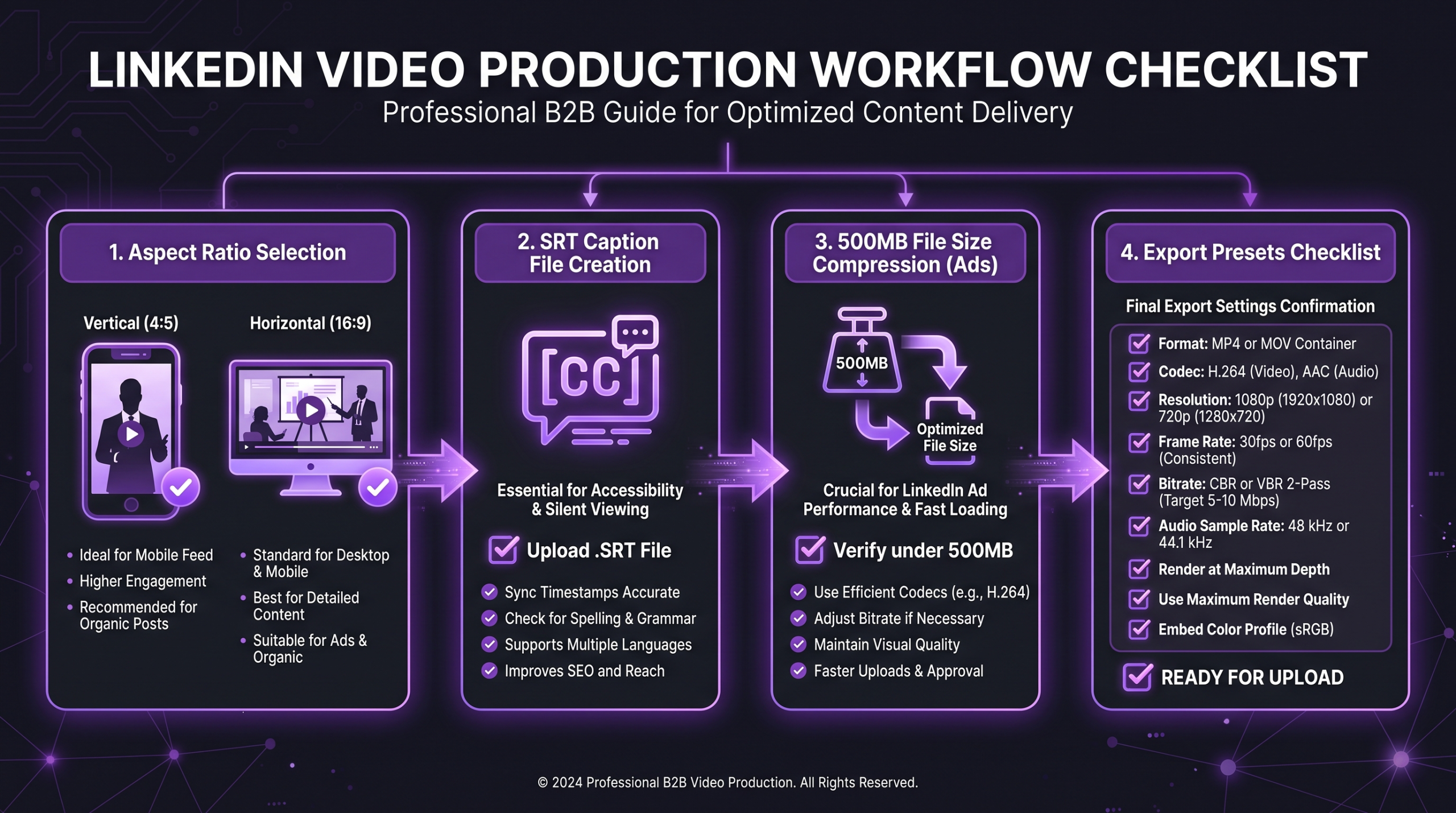
At Increditors, B2B video post-production for LinkedIn includes platform-specific export presets for both organic (up to 5 GB, native quality) and ad-ready (under 500 MB, H.264) deliverables, closed-caption SRT generation, and aspect ratio variants as part of the standard package. Teams working on SaaS video production frequently discover during an initial audit that past LinkedIn content was exported at 16:9 for a channel and audience that would have performed significantly better at 4:5 — a spec problem that no amount of better content can compensate for.
If you’re evaluating whether specialist support makes economic sense for your current production volume, understanding what professional video editing costs gives you a realistic baseline to work from — especially as LinkedIn’s platform specs and algorithm priorities continue to evolve.
Frequently Asked Questions
What is the best video format for LinkedIn in 2026?
MP4 with H.264 video encoding and AAC audio is the best format for LinkedIn in 2026, for both organic posts and paid video ads. MP4 is the only format accepted for video ads in Campaign Manager, and it produces the broadest compatibility and quality across all LinkedIn placements. Avoid QuickTime (.mov) and AVI files — LinkedIn removed support for both for organic uploads and never accepted them for ads.
What is the maximum file size for LinkedIn video ads?
LinkedIn video ads have a maximum file size of 500 MB, per LinkedIn’s official advertising specifications. This is dramatically stricter than the 5 GB limit for organic video posts. If your finished video ad exceeds 500 MB, re-export at a lower bitrate or reduced resolution — typically 720p — before uploading in Campaign Manager. Apple ProRes format is explicitly not supported for ads.
What aspect ratio should I use for LinkedIn videos in 2026?
For video ads, LinkedIn recommends 4:5 vertical (720×900 recommended, up to 1080×1350) as it occupies more feed space on mobile and typically outperforms landscape formats. For organic posts, both 1:1 square and 4:5 vertical work well. If you’re primarily targeting desktop users or repurposing landscape footage from webinars or presentations, 16:9 at 1920×1080 remains appropriate and performs well.
Can I upload a LinkedIn video ad from my phone?
No. LinkedIn Campaign Manager only accepts video uploads from desktop devices. Mobile upload is not supported for video ad creatives. If you need to use a video shot or edited on a mobile device as an ad asset, transfer the file to a desktop and upload through a desktop browser in Campaign Manager.
Do LinkedIn video ads require captions?
LinkedIn does not technically mandate captions for video ads, but they are strongly recommended for any campaign optimizing for completion rate. LinkedIn autoplays videos on mute in the feed, meaning viewers receive no audio unless they actively tap to unmute. SRT captions uploaded through Campaign Manager ensure your message is communicated in both muted and unmuted states. LinkedIn’s Campaign Manager accepts SRT format only — plain text, no custom formatting.
Verdict
LinkedIn video in 2026 is where B2B attention lives — and technical compliance is what separates video that performs from video that gets buried by the algorithm or rejected by Campaign Manager before it ever reaches an audience.
The core spec framework to memorize: MP4, H.264, under 500 MB for ads; up to 5 GB for organic. Lead with 4:5 vertical as your default aspect ratio for mobile-first reach. Add SRT captions to every paid creative and burned-in captions to every organic video. Keep ad creatives to 15–30 seconds to qualify for maximum placements across the feed and LinkedIn Audience Network.
These specs are sourced directly from LinkedIn’s official help documentation — linked throughout this guide — and reflect requirements as of September 2026. LinkedIn updates its specifications periodically, so the source pages are worth bookmarking for reference whenever you’re setting up a new campaign or updating your video production pipeline.
Ready for LinkedIn Video That Actually Converts?
We handle aspect ratio variants, SRT captions, ad-ready exports, and every LinkedIn spec — so your team can focus on strategy, not transcoding.