










































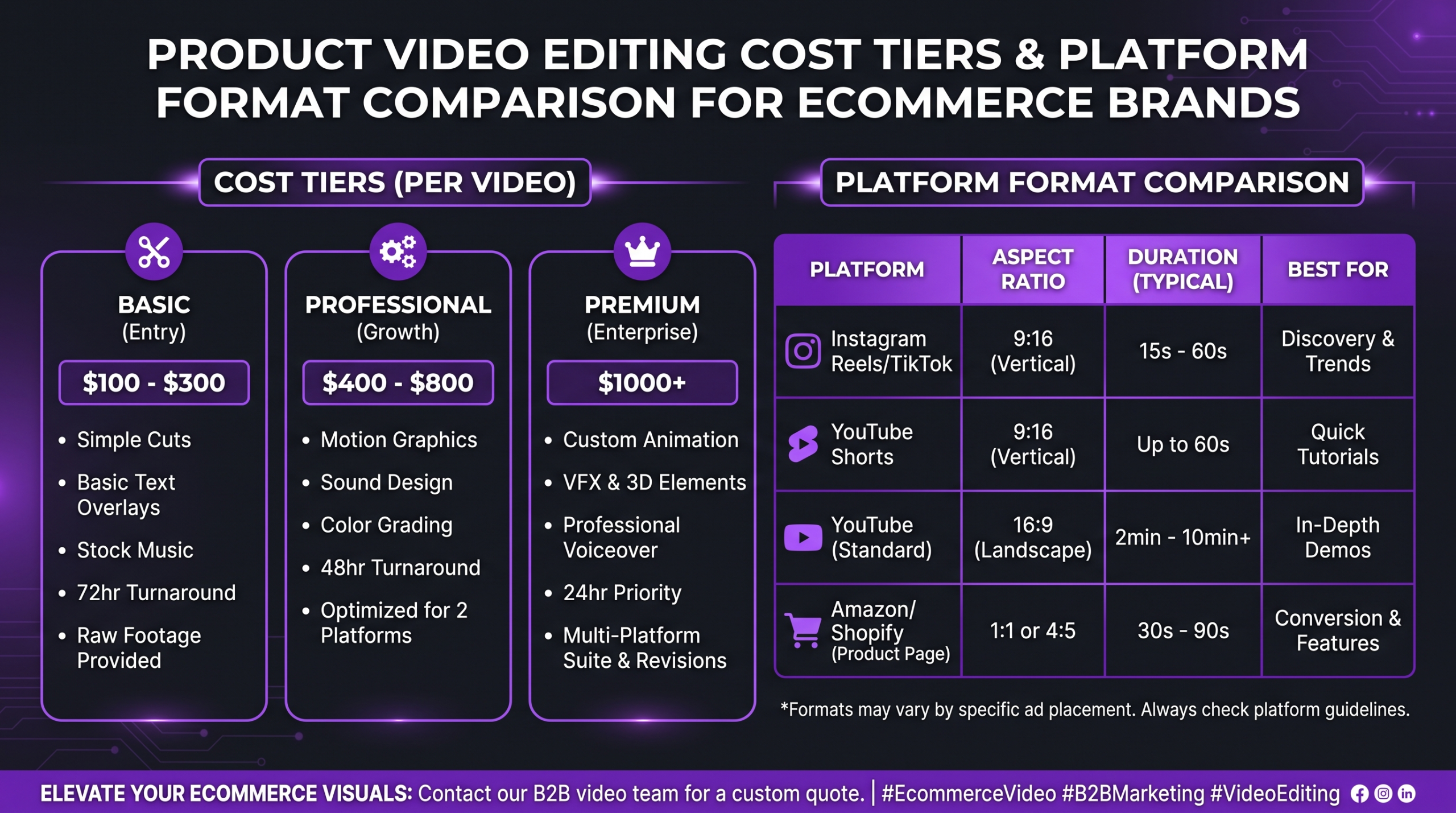
Product video editing services for e-commerce brands typically include colour grading, motion graphics, on-screen text, music licensing, and multi-format exports for platforms like Shopify, TikTok Shop, and Instagram Reels. Costs commonly range from around $50 per video for a basic freelance trim to $500 or more per finished minute with a specialist agency — the gap reflects turnaround speed, revision depth, and whether you need a full post-production pipeline or a targeted polish pass. This guide covers what product video editing includes at each price point, which video formats DTC brands need, the full editing workflow from raw footage to publish-ready file, and how to choose the right editing partner for your volume and budget.
Note: if you sell on Amazon specifically and are looking for Amazon listing video tools, our separate guide to video editing for Amazon sellers covers Amazon-specific software and listing requirements. This guide focuses on the broader e-commerce landscape — Shopify storefronts, direct-to-consumer sites, TikTok Shop, and Instagram — where the creative bar and format demands are different.
Product video editing for e-commerce typically costs $50–$500+ per finished video depending on provider type and complexity. Freelancers offer the lowest entry price but the least consistency; subscription services trade flexibility for volume caps; agencies deliver brand-consistent, format-ready cuts at speed. For growing DTC brands running paid social and product pages simultaneously, a dedicated video editing services partner almost always yields a lower effective cost per conversion than rotating freelancers.
- What Is Product Video Editing and What Does It Include?
- Product Video Editing Cost: What E-Commerce Brands Actually Pay
- Types of E-Commerce Product Videos and Their Editing Requirements
- Platform Requirements: Shopify, TikTok Shop, Instagram, and DTC Sites
- Product Video Editing Workflow: From Raw Footage to Final Cut
- How to Choose the Right E-Commerce Video Editing Partner
- Frequently Asked Questions
- Verdict
What Is Product Video Editing and What Does It Include?
Product video editing is the post-production process that transforms raw footage of a product into a publish-ready asset — whether that is a 6-second TikTok ad, a 60-second Shopify hero video, or a 3-minute DTC unboxing film. Unlike general corporate video editing, product video editing is tightly conversion-focused: every cut, caption, and colour choice is evaluated against how it influences a purchasing decision.
Core editing deliverables
A full-service product video edit typically includes:
- Assembly and pacing: selecting the best takes, sequencing shots, establishing rhythm aligned with the music or voiceover.
- Colour grading: ensuring consistent, accurate product colour across all clips — especially critical for fashion, beauty, and food categories.
- Motion graphics and titles: on-screen feature callouts, pricing overlays, animated logos, and brand-consistent lower thirds.
- Music and sound design: licensed background tracks, sound effects, voiceover synchronisation, and level balancing.
- Captions and subtitles: burned-in or SRT captions for social autoplay, with brand fonts and colours applied.
- Format exports: resizing and re-editing for multiple aspect ratios — 16:9 (Shopify/YouTube), 9:16 (TikTok/Reels), 1:1 (feed), 4:5 (ads).
Premium services add background removal, product compositing on clean backgrounds, CGI or motion-tracked product overlays, and A/B cut variants optimised for different audience segments.
What separates product video editing from general video editing
General video editing prioritises narrative and engagement. Product video editing adds a third dimension: purchase intent. A product editor needs to understand why someone hesitates before adding to cart and edit with those friction points in mind — showing scale next to a familiar object, cutting to the feature that answers the most common objection, or timing a discount callout to land at maximum attention. This is a specialist skill, and it is why choosing between a generalist freelancer and a dedicated agency matters more for e-commerce than for most other video categories.
Product Video Editing Cost: What E-Commerce Brands Actually Pay
Pricing for ecommerce video editing services varies widely depending on provider type, turnaround time, revision rounds, and deliverable complexity. The table below reflects typical market ranges — not fixed rates — based on publicly available pricing across freelance marketplaces, subscription platforms, and agency websites.
For a detailed breakdown of what drives these numbers up or down — including platform, length, and motion complexity — see our full guide on how much professional video editing costs.
What drives the cost of product video editing up
Several factors push project costs above the baseline ranges above:
- Multiple aspect ratios per deliverable. Reformatting a single product video for Shopify (16:9), TikTok (9:16), and Instagram feed (1:1) can double the editing time.
- Motion graphics density. A clean product hero with a simple end card costs significantly less than a video with 15 animated feature callouts.
- Rush turnaround. A 24-hour same-day edit typically carries a premium over standard 3-5 day delivery.
- Raw footage quality. Poorly lit or shakily shot footage requires more time to stabilise, colour-correct, and compensate in post.
- Revisions outside the initial scope. Changing the brief mid-edit — adding a new product angle or swapping the entire soundtrack — is the most common source of cost overruns.
💡 Pro Tip: Before sending footage to any editor, compile a shot list with timecodes of your approved takes. A five-minute brief document typically reduces revision rounds from 3–4 down to 1–2 and directly lowers your effective cost per video — regardless of which provider tier you use.
Types of E-Commerce Product Videos and Their Editing Requirements
Not all product videos are edited the same way. The intended placement — and the viewer’s mindset at that moment — should dictate every editorial decision. Here are the formats DTC and e-commerce brands use most and what each requires in post-production.
Product hero videos (Shopify and DTC homepages)
These are typically 20–90 seconds and sit above the fold on a product page or homepage. They need to establish brand tone and core product value fast — ideally within the first three seconds before the viewer scrolls. Editing priorities: precise pacing cuts, premium colour grade, and minimal text overlay so the product sells itself visually. Background music should complement rather than overpower. Hero videos are the highest-investment format per minute because mistakes here cost sales at full price.
Short-form social ads (TikTok Shop, Instagram Reels, Meta ads)
Short-form ads run 6–30 seconds and follow a tight hook-problem-solution-CTA structure. The editing rhythm is faster, captions are mandatory (most users scroll with sound off), and the first 1.5 seconds carry disproportionate weight. Research from Wistia’s video engagement studies consistently shows that attention drops sharply after the first 30 seconds — which is why short-form ads edited for the first-second hook vastly outperform longer cuts repurposed for social. Editors also need to handle vertical-format safe zones to ensure key visuals and text avoid the platform UI chrome.
Unboxing and review videos
Unboxing content is among the highest-converting e-commerce video formats because it mirrors the customer’s expected experience. Editing an unboxing video well means keeping the genuine reaction intact while cutting dead air, stabilising handheld footage, normalising audio across cuts, and adding tasteful branded lower thirds for product names and key features. A well-edited unboxing should feel authentic, not over-produced.
How-to and tutorial videos
Tutorial-format content builds long-term SEO value and supports post-purchase retention. Editing priorities here are screen recording integration, step numbering overlays, precise jump-cut timing, and chapter markers for YouTube. These videos typically run 2–8 minutes and are less expensive to edit per minute because the raw footage has a clear instructional sequence — less creative reconstruction is needed.
Product comparison and demo videos
Comparison videos place your product side-by-side with alternatives. Editing requirements include split-screen composition, animated spec callouts, and careful sequencing that demonstrates your product’s advantages without appearing dishonest. These are mid-complexity to edit and particularly valuable for high-consideration purchase categories like tech accessories, home goods, and skincare.
Platform Requirements: Shopify, TikTok Shop, Instagram, and DTC Sites
One of the most underestimated costs in ecommerce video production is reformatting. A product video shot for one platform rarely translates cleanly to another without a re-edit. The table below summarises current technical requirements and editorial best practices per platform — these inform your briefing and help you build a multi-platform editing budget upfront.
According to Sprout Social’s video marketing research, short-form video consistently generates the highest engagement rates across social platforms — which is why most DTC brands now plan their video briefs around a short-form-first approach and then expand assets for longer placements, rather than the reverse.
💡 Pro Tip: When briefing an editor for a multi-platform campaign, list every destination platform upfront — not after the first cut is done. A product video shot at 16:9 and edited full-bleed cannot be reformatted to 9:16 without recomposing the frame. Building multi-format exports into the original brief costs less than reformatting after the fact.
Product Video Editing Workflow: From Raw Footage to Final Cut
Understanding the editing workflow helps you set realistic timelines, brief editors more accurately, and avoid expensive scope creep. A professional product video editing workflow typically follows these stages regardless of provider type.
Stage 1: Brief and asset delivery
Before editing begins, the brand delivers a creative brief (intended platform, target audience, emotional tone, competitor reference videos), raw footage files, branded assets (logo files, colour hex codes, approved fonts), licensed music or a request for music sourcing, and a shot list with approved timecodes if available. Missing any of these adds buffer time to stage 2.
Stage 2: Ingestion, logging, and assembly cut
The editor organises and reviews all raw footage, selects the best takes based on the brief, and assembles a rough cut in the correct sequence. At this stage, the video has the right structure but no colour work, no graphics, and placeholder music. This is the cheapest point to change the structure — editorial changes here cost a fraction of what they cost in stage 4.
Stage 3: Colour grade and audio mix
Colour grading ensures consistent product colour across all shots and applies the brand’s visual tone (warm, cool, high-contrast, muted, etc.). Audio mixing balances dialogue or voiceover against music, normalises levels, and removes background noise. This stage is especially important for fashion, beauty, and food products where accurate colour is tied directly to purchase confidence. For authoritative guidance on video production standards, Shopify’s product photography guide offers good benchmarks for visual accuracy expectations customers have on product pages.
Stage 4: Motion graphics and captions
Feature callout animations, logo reveals, pricing overlays, and on-screen text are added at this stage. Burned-in captions for social platforms are also applied here. This is typically the most time-intensive stage for product videos because the graphics must be brand-consistent, timed precisely to music or voiceover beats, and visually distinct enough to communicate information in the 0.5-second window that social viewers give each screen element.
Stage 5: Multi-format export and quality check
The finished master is exported in all required formats and resolutions. A QC pass checks for dropped frames, audio sync drift, text legibility at small sizes, colour accuracy on both calibrated and uncalibrated screens, and correct file naming for asset management. This stage should also include a platform-upload test to catch format rejections before delivery.
Stage 6: Delivery and revision rounds
The brand reviews the draft, provides timestamped feedback, and the editor implements the approved changes. Most professional services include 2–3 revision rounds in their base price; additional rounds are billed separately or included in retainer agreements. Fast-turnaround agencies that specialise in product video editing — like Increditors — can complete a full revision cycle within hours rather than days, which matters when a campaign launch date is fixed.
How to Choose the Right E-Commerce Video Editing Partner
Choosing a product video editing partner is ultimately a decision about what you are optimising for: cost per video, consistency, speed, or scale. The right answer depends on where you are in your brand’s growth curve.
Questions to ask before you commit
- Do they have a portfolio specific to your product category? A food editor who has never shot tech accessories may grade colours differently than the category demands.
- Can they deliver multi-format exports in a single turnaround? If you need Shopify, TikTok, and Instagram versions of every video, a partner that handles all three in one pass is far more efficient than one that does one format at a time.
- How do they handle revisions and what counts as a scope change? Revision policies are where most cost overruns originate — read the service agreement before you sign.
- What is their communication and project management process? An editor who goes silent for three days mid-revision is a campaign-killer. Ask about their revision turnaround SLA, not just their initial delivery time.
- Do they have a dedicated editor assigned to your account, or is work pooled? A dedicated editor learns your brand’s visual language over time; a pooled model means re-briefing on every project.
Freelancer vs subscription service vs agency: which is right for you
Freelancers work well for brands in the early testing phase — one or two product videos a month, a tight budget, and no need for brand consistency across a portfolio of assets. The trade-off is reliability: freelance availability fluctuates, and finding a new editor means re-briefing from scratch.
Subscription services (flat monthly fee, queue-based editing) work well for brands producing a steady but not extreme volume — roughly 4–15 videos per month. The predictable cost is appealing; the limitation is that most subscription services operate a shared editor pool, which means slower ramp-up on new brand guidelines and occasional quality variance.
Dedicated agencies are the right fit for brands scaling paid social aggressively — running weekly campaign refreshes, A/B testing multiple creative variations per product, and needing same-day or next-day turnaround as standard. If you’re spending meaningfully on paid acquisition, the cost of slow or inconsistent editing directly impacts your ad performance and ROAS. Exploring video editing packages from a dedicated agency often reveals that the retainer cost is lower than the sum of freelance project fees once revision rounds and briefing overhead are factored in.
According to Statista’s video marketing data, video content now accounts for a significant share of consumer time spent on major e-commerce platforms, making consistent, high-quality product video editing a competitive necessity rather than a nice-to-have for growing brands. The brands winning on TikTok Shop and Instagram Shopping are not necessarily those with the biggest production budgets — they are the ones with the fastest creative testing cycles, which requires an editing partner that can keep pace.
Frequently Asked Questions
What are product video editing services?
Product video editing services are professional post-production services that transform raw footage of a product into polished, publish-ready videos optimised for specific platforms. They typically include assembly editing, colour grading, motion graphics, captions, music, and multi-format exports — everything needed to take raw footage from a shoot to a live campaign asset.
How much do product video editing services cost?
Costs commonly range from $30–$100 per video for entry-level freelance work to custom retainer pricing for dedicated agency support. Mid-range freelancers typically charge $100–$350 per video; subscription services often start around $500–$700/month for a set monthly quota; boutique agencies commonly charge $300–$600 per polished video. The right cost depends on your volume, turnaround requirements, and how much brand consistency matters across your content output.
What is the difference between product video editing and ecommerce video editing?
The terms are used interchangeably in most contexts. “Product video editing” emphasises the post-production of footage showing a physical product. “Ecommerce video editing services” is a broader term that also includes brand films, testimonial videos, unboxing content, and tutorial videos — all of which support an e-commerce purchase journey. In practice, most agencies that offer one offer the other.
How long does product video editing take?
Turnaround times vary by provider: entry-level freelancers commonly take 3–7 days; mid-range freelancers 2–5 days; subscription services 48–72 hours; and dedicated agencies can often deliver within 24 hours or less for standard product videos. Complex projects with dense motion graphics or multiple format exports take longer regardless of provider tier.
Do I need separate edits for TikTok Shop and Instagram?
In most cases, yes — or at least a platform-specific reformat. TikTok Shop and Instagram Reels both require 9:16 vertical video, but the editorial approach, caption placement, and hook timing differ. A TikTok-first edit typically has a faster hook and relies more on trending-audio placement; an Instagram edit may be slightly more polished and brand-forward. Many agencies include both formats in a single brief; if yours does not, ask before you sign off on the master cut.
Is product video editing worth the investment for a small Shopify store?
For small stores testing their first product lines, a mid-range freelancer for 1–2 hero videos is often the right entry point — professional enough to look credible on the product page without overcommitting budget before the product-market fit is confirmed. Once a product is generating consistent traffic and you are running paid social, the investment in a consistent editing partner typically pays back in lower cost-per-click and higher conversion rates from better creative quality. Video marketing research from Wistia indicates that pages with video keep visitors engaged significantly longer — a meaningful signal for e-commerce product pages where time-on-page correlates with purchase intent.
Verdict: Matching Your Editing Partner to Your E-Commerce Stage
Product video editing is not a commodity purchase — the difference between a $50 freelance cut and a $400 agency-produced video is not just quality; it is turnaround time, revision reliability, multi-format readiness, and the compounded brand equity of consistent visual output over months of publishing.
For early-stage Shopify stores: start with a vetted mid-range freelancer, brief them rigorously, and invest in 1–2 high-quality hero videos before producing volume. For growing DTC brands running paid social: a dedicated agency relationship pays for itself faster than most brands expect once you factor in revision speed and creative testing velocity. For high-volume brands managing multiple product lines across Shopify, TikTok Shop, and Instagram simultaneously: a specialist ecommerce video editing services partner with a dedicated editor team and same-day turnaround is the only model that scales without compressing quality.
Whatever your current stage, the single highest-leverage action you can take right now is to build a brand guidelines document for video — colour palettes, fonts, preferred music mood, approved caption styles — and give it to every editor you work with. It is free to create, and it eliminates the majority of revision cycles that drive cost and delay.
Ready for Video That Actually Converts?
Tell us about your project and we will put together a custom plan.
Clients, on camera