










![3D Explainer Video - ScribbleLive.mp4_snapshot_00.12_[2022.03.09_03.14.16]](https://increditors.com/wp-content/uploads/elementor/thumbs/3D-Explainer-Video-ScribbleLive.mp4_snapshot_00.12_2022.03.09_03.14.16-r7wb53mx72rxst3qcqyrfxdmeyzb5r9jbl0wbjujh4.png "3D Explainer Video – ScribbleLive.mp4_snapshot_00.12_[2022.03.09_03.14.16]")
































Webinar video editing typically costs $75–$500+ per recording depending on length, deliverables, and editor tier. Basic cleanup runs $75–$150. Full-service repurposing—short clips, captions, chapter cuts, and social snippets from one recording—typically lands between $300 and $800+. B2B marketing teams budgeting for webinars in 2026 should plan $200–$400 per session as a realistic working benchmark for agency-quality post-production.
- What Is Webinar Video Editing (and What Does It Include)?
- Webinar Editing Cost Ranges by Tier in 2026
- 7 Factors That Drive Your Webinar Editing Bill Up (or Down)
- The Real Budget Item: Multi-Asset Repurposing from One Webinar
- Freelancer vs Agency vs In-House: Which Option Fits Your Budget?
- DIY vs Professional: When to Outsource Webinar Editing
- How to Build a Realistic Webinar Editing Budget for 2026
- Frequently Asked Questions
- Verdict
What Is Webinar Video Editing (and What Does It Include)?
Webinar video editing is the process of transforming a raw, live-recorded webinar session into a polished, distributable video asset—or more often, a suite of multiple assets derived from a single recording. Unlike pre-produced corporate videos or online course content, webinars come with a distinct set of post-production challenges: awkward silences, presenter stumbles, screen-share artifacts, overlapping audio from Q&A segments, and recordings that routinely run 45 to 90 minutes before any editing begins.
For B2B marketing teams, the webinar recording is rarely just a recording. It is a demand-generation asset, a content hub, and a distribution engine—if the post-production is handled correctly. A single well-edited webinar can yield a YouTube upload, three to five LinkedIn clips, a podcast episode, five email-nurture clips, and a transcript-based blog post. That asset multiplication is where webinar editing budget conversations get interesting, and where most teams significantly undershoot their estimates.
The deliverables that fall under “webinar editing” typically include:
- Basic cleanup and trim: removing dead air, technical glitches, and presenter warm-up from the raw recording
- Intro and outro bumpers: branded opening/closing cards with music, logo, and speaker titles
- Chapter cuts: dividing a long webinar into shorter, standalone topic segments for YouTube chapters or individual uploads
- Highlight reels: 2–5 minute curated clips capturing the most valuable moments
- Social media clips: 60–90 second vertical or square clips for LinkedIn, Instagram, and TikTok
- Caption and subtitle files: closed captions for accessibility and silent-playback contexts
- Thumbnail and cover art: custom still images for YouTube and email headers
Understanding what you are actually buying—cleanup only versus full repurposing—is the essential first step before you can build an accurate budget. The gap between those two scopes in cost terms is often three to five times, which is why so many teams feel blindsided by their first professional editing invoice.
Webinar Editing Cost Ranges by Tier in 2026
Pricing for webinar editing varies substantially across editor tiers, platforms, and scope. The ranges below are based on market-rate observations across freelance platforms, agency pricing pages, and industry peer benchmarks as of mid-2026. They represent typical working ranges—your actual quote will depend on the factors covered in the next section.
💡 Pro Tip: The “cheapest” webinar edit is often the most expensive in the long run. If a $75 freelancer delivers a cut that still has 8 minutes of dead air, awkward speaker overlaps, and no captions, your marketing team spends 3–4 hours in follow-up. At $75/hr for a marketing manager’s time, that cleanup cost more than a proper edit would have.
Per-Hour vs Per-Project Pricing
Freelancers often quote per editing-hour (not per recording-hour). A 60-minute webinar typically requires 3 to 5 hours of editing for a clean cleanup, or 8 to 15 hours for a full repurposing workflow. At common mid-tier freelance rates of $50–$80/hr, a clean cleanup runs $150–$400, and full repurposing runs $400–$1,200. Agencies almost always quote per-project or per-deliverable, which simplifies budgeting once the scope is defined.
7 Factors That Drive Your Webinar Editing Bill Up (or Down)
Every quote for webinar editing is a function of several interlocking variables. Knowing which levers you control lets you optimize scope without compromising the deliverables that actually matter for your marketing program.
1. Raw Recording Length
The single largest cost driver. A 30-minute webinar and a 90-minute webinar require fundamentally different editing workloads. Most editors charge a base rate for the first 30–45 minutes and an incremental rate for each additional 15–30 minute block. If your webinars routinely run 75–90 minutes including Q&A, factor in roughly 1.4 to 1.8x the base rate for a comparable quality level.
2. Recording Quality
Poor source audio and video dramatically increases editing time. If presenters are on consumer-grade webcams with echo-prone rooms, editors spend significant time on noise reduction, color correction, and framing fixes. Professional-quality source footage—proper lighting, dedicated microphones, stable internet connections—can reduce editing time by 30 to 50 percent. This is one area where investing upstream pays dividends in post-production costs.
3. Number of Speakers and Slides
Multi-speaker webinars with screen-share presentations create complex timelines. The editor must sync multiple video feeds, manage transitions between speaker and slides, and ensure audio levels balance across participants. Panels with 4+ speakers often add 40–60 percent to editing time compared to a single-presenter format.
4. Deliverable Count and Format
The jump from “one clean master recording” to “five social clips + three chapter cuts + captions + thumbnail” is the most significant cost multiplier. Every additional deliverable adds roughly 30–60 minutes of editing time. If your content strategy calls for repurposing each webinar into eight or more assets, plan your budget accordingly—or discuss a volume-based retainer rate with your editor.
5. Motion Graphics and Branding
Lower-third name tags, animated intro bumpers, branded slide-ins, and custom outro cards all add time and often require dedicated motion graphics work beyond standard editing. If you don’t have a pre-built template library, first-time brand setup typically adds $150–$400 to an initial project. Subsequent webinars using the same templates cost significantly less.
6. Caption Type and Language
Auto-generated captions from Zoom or platform tools have a typical accuracy rate in the range of 80–90 percent, which is insufficient for professional B2B content. Professionally reviewed and corrected captions—which platforms like Rev or specialized editors provide—add $1–$3 per minute of content. For a 60-minute webinar, budget $60–$180 for professional captions. Multilingual caption sets multiply that cost accordingly.
7. Turnaround Timeline
Standard delivery windows for freelancers are typically 3–7 business days. Rush delivery (24–48 hours) commonly carries a 25–50 percent premium. For teams running live webinars on a regular cadence—biweekly or monthly—setting up a standing workflow with a dedicated editor avoids rush charges and keeps costs predictable.
The Real Budget Item: Multi-Asset Repurposing from One Webinar
The most significant evolution in webinar post-production budgeting over the past two years has been the shift from treating each webinar as a single video to treating it as a content production session that yields a full content calendar. Forward-thinking B2B marketing teams now budget for the full repurposing workflow, not just the cleanup.
As a video editing agency serving B2B and SaaS companies, we’ve observed that teams that factor repurposing into their webinar production workflow consistently get three to five times more measurable content distribution from the same investment versus teams that only post the raw recording.
Here is what a full-repurposing scope looks like in practice, and what each element typically adds to your webinar editing cost:
A team running a full repurposing workflow on every 60-minute webinar should budget $500–$1,200 per session for professional-quality output. That number sounds large until you compare it to the cost of producing original content for each of those channels separately—at which point a single well-repurposed webinar easily delivers a 3 to 5x return on the editing investment.
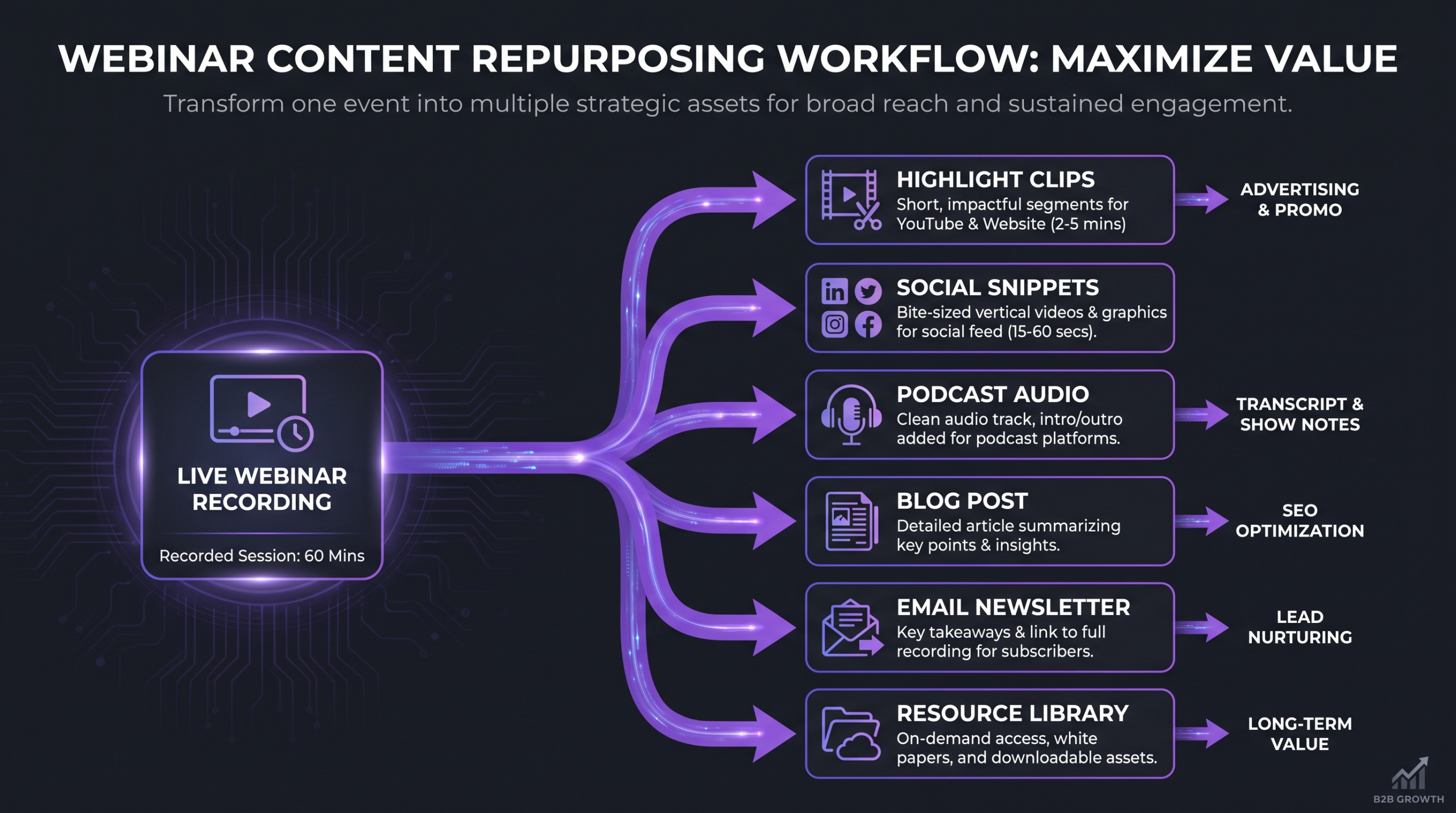
💡 Pro Tip: Build a “repurposing brief” for every webinar before it goes live—decide which clips you want, mark timestamps during the session, and send that brief along with the recording. Editors who receive a brief instead of hunting for moments themselves save 1–2 hours per project, and that savings shows up directly in your invoice.
Freelancer vs Agency vs In-House: Which Option Fits Your Budget?
Choosing your production model shapes not just what you spend, but how predictably you spend it. For B2B marketing teams with a regular webinar cadence, the choice between freelance, agency, and in-house editing has meaningful implications for cost, quality consistency, and operational overhead.
Freelance Editors
Freelancers offer the most flexibility and can be the most cost-effective option for teams with irregular webinar schedules (fewer than 2 per month). The core risks are consistency—different freelancers deliver different quality levels—and availability, since reliable senior editors book up quickly. Platforms like Upwork and Contra are reasonable starting points for finding vetted video specialists.
Budget reality for freelancers: teams commonly report spending $200–$400 per webinar when working with a reliable mid-senior freelancer on a standing relationship, with no repurposing included.
Video Editing Agencies
Agencies provide the consistency, process structure, and bandwidth that growing marketing programs need. A dedicated team that understands your brand, your tone, and your content priorities dramatically reduces the briefing overhead per project. For teams publishing four or more webinars per month with a full repurposing workflow, a retainer arrangement with a specialist video editing agency typically delivers a better per-deliverable cost than individual freelance projects.
For context on total agency engagement cost, see our detailed breakdown in how much does professional video editing cost and our comparison of video editing agency vs freelancer trade-offs.
In-House Editors
At a fully-loaded cost of $55,000–$90,000+ per year for a mid-level video editor (salary, benefits, software, and equipment), in-house editing makes financial sense only at high volume—typically 10 or more webinars per month with a robust repurposing workflow, or when the editing role is part of a broader content production function. At lower volumes, the in-house model routinely costs two to four times more per delivered asset than a well-structured agency relationship.
Related reading: if your events include in-person conferences or gala-style productions (which come with their own distinct editing challenges), see our dedicated guide to event video editing costs for a side-by-side comparison of live-event and webinar post-production economics.
DIY vs Professional: When to Outsource Webinar Editing
Not every webinar needs agency-level post-production. The decision to handle editing in-house (using tools like Descript, CapCut, or Adobe Premiere) versus outsourcing to a professional comes down to three variables: the stakes of the content, the time cost of internal production, and the consistency requirements of your brand.
When DIY Makes Sense
- Internal-only webinars (team training, all-hands meetings) with no external distribution
- Low-stakes one-off sessions where a basic trim is sufficient
- Teams with a dedicated video-capable marketing specialist who has time in their workflow
- Startup-stage teams where budget constraints justify a temporary quality trade-off
When to Outsource
- Demand-gen or customer-facing webinars where production quality reflects brand credibility
- Any webinar with a repurposing strategy—DIY repurposing routinely consumes 8–12+ hours of marketing time
- Teams running webinars on a monthly or bi-weekly cadence (consistency becomes unsustainable in-house)
- High-profile sessions with executives, customers, or industry partners as speakers
The hidden cost of DIY that teams consistently underestimate is opportunity cost. When a demand-gen manager spends 6 hours editing a webinar, that is 6 hours not spent on campaigns, pipeline analysis, or content strategy. At a conservative $75/hr internal rate, that is $450 in absorbed labor cost for work that a professional editor could complete in 3 hours for $200–$300. The math rarely favors internal editing for externally-distributed content.
For teams with a heavy educational content production focus (online courses, certification programs), the economics and workflows differ meaningfully from webinar editing—that specific cost model is covered in our online course video production cost guide.
How to Build a Realistic Webinar Editing Budget for 2026
Budgeting for webinar editing is most effective when treated as a quarterly line item rather than a per-project cost. Here is a practical framework for building that number, whether you are budgeting for an annual plan or for a single campaign series.
Step 1: Audit Your Webinar Cadence
How many webinars do you run per quarter? What is the typical length? Are they single-speaker, panel, or workshop format? This baseline defines your volume and informs the right production model (freelance, subscription, retainer).
Step 2: Define Your Deliverable Set
Be specific: do you want just a clean master, or a full repurposing workflow? List every deliverable type you need per webinar session. This clarity eliminates scope creep and gives editors (or agencies) enough information to quote accurately.
Step 3: Map Deliverables to Cost Ranges
Using the tables above, build a per-session cost estimate based on your specific deliverable set. Add a 15–20 percent buffer for first-batch setup, brand templating, and revision cycles that are always higher in the first one to three sessions with a new editor or agency.
Step 4: Benchmark Against Content Output Value
For a demand-gen team, weigh the editing cost against the cost of producing equivalent content natively for each channel. If a single webinar yields five LinkedIn posts, two email segments, a YouTube upload, and a blog post, the editing investment is competing against the cost of producing all five of those formats independently—which for most B2B teams runs $2,000–$5,000+ in production and copywriting time.
Step 5: Consider a Retainer for Predictability
For teams with two or more webinars per month, a retainer arrangement with a dedicated editing team is almost always the most cost-effective and operationally efficient structure. Retainers typically include defined deliverable sets per session, predictable turnaround windows, and a consistent brand understanding that reduces briefing overhead. They also typically cost 15–25 percent less per deliverable than equivalent per-project rates once the relationship is established.
The unlimited video editing services compared guide walks through the subscription model options if you are evaluating flat-rate alternatives to per-project or retainer pricing.
Sample Quarterly Budget: B2B Marketing Team (6 Webinars/Quarter)
Frequently Asked Questions
How much does it cost to edit a 60-minute webinar recording?
A professional cleanup edit of a 60-minute webinar—trim, branded bumpers, basic audio leveling—typically costs $100–$350 depending on the editor tier and recording quality. If you add captions, a highlight reel, and 3–5 social clips, the total typically ranges from $400 to $900 with a mid-senior freelancer or boutique agency.
Is webinar editing different from conference video editing?
Yes, meaningfully so. Conference and gala video editing typically involves multi-camera switching, venue audio mixing, and on-site production logistics that webinars do not have. Webinar editing involves screen-share sync, remote-participant audio balancing, and a much heavier emphasis on digital repurposing. For in-person event editing specifically, see our event video editing cost guide. The two post-production workflows are genuinely distinct, and costs for in-person events are typically higher due to multi-camera complexity.
Can I use AI tools to edit webinars and save money?
AI-assisted tools like Descript, Riverside, or Otter.ai can meaningfully reduce editing time for transcript-based edits, silence removal, and basic caption generation. However, they require a skilled editor to review and correct AI output, and they do not replace the creative judgment needed for highlight selection, pacing, or brand-consistent motion graphics. AI tools work best as an efficiency layer on top of a professional editor’s workflow—they typically reduce editing time by 20–40 percent, which can translate to cost savings when working with time-based freelancers.
What is the difference between webinar editing and course video production?
Online course videos are typically pre-scripted, pre-produced, and shot with controlled studio conditions—the goal is polished, chapter-structured educational content. Webinar recordings are live, unscripted, and require different cleanup challenges (dead air, Q&A segments, presenter errors). Webinar editing also has a much stronger repurposing component for social and email distribution. Course production costs are covered in our online course video production cost guide.
How long does it take to edit a webinar?
A basic cleanup of a 60-minute webinar typically takes a professional editor 3–5 hours. A full repurposing workflow producing 6–8 deliverables from the same recording takes 10–18 hours. Standard freelance delivery timelines are 3–7 business days for routine projects; rush delivery (24–48 hours) typically costs 25–50 percent more and is not always available from specialized editors during peak periods.
Verdict: What to Budget for Webinar Editing in 2026
Webinar video editing costs in 2026 range from $75 for a bare-minimum freelance trim to $1,500+ per session for premium agency delivery with a full multi-asset repurposing workflow. Most B2B marketing teams running monthly webinars land in the $250–$600 per session range as a working budget, factoring in a clean master cut, captions, and a basic social clip package.
The single most important budget shift for 2026 is moving from “webinar as a recording” to “webinar as a content production session.” Teams that treat each webinar as a multi-asset production event—planning their repurposing brief before the session goes live—consistently extract significantly more value per editing dollar than teams that only distribute the raw replay.
For teams publishing two or more webinars per month, a dedicated retainer relationship with a specialist video editing team is almost always the most cost-effective and operationally sound choice. It eliminates per-project overhead, ensures brand consistency, and enables the fast turnaround windows that demand-gen programs require.
If you are evaluating what a professional post-production partnership looks like in practice, Increditors works with B2B marketing and SaaS teams on exactly this type of ongoing webinar editing and repurposing workflow. The SaaS video editing complete guide covers how high-volume content programs are structured for teams with quarterly webinar series.
Ready for Video That Actually Converts?
Tell us about your webinar program and we will put together a custom repurposing plan.