










![3D Explainer Video - ScribbleLive.mp4_snapshot_00.12_[2022.03.09_03.14.16]](https://increditors.com/wp-content/uploads/elementor/thumbs/3D-Explainer-Video-ScribbleLive.mp4_snapshot_00.12_2022.03.09_03.14.16-r7wb53mx72rxst3qcqyrfxdmeyzb5r9jbl0wbjujh4.png "3D Explainer Video – ScribbleLive.mp4_snapshot_00.12_[2022.03.09_03.14.16]")
































Online course video production costs range from under $1,000 for a lean DIY setup to $50,000+ for fully produced multi-module courses. Most course creators spend between $2,500 and $15,000 for a complete course, with editing alone running $500–$5,000 depending on length and complexity. The single biggest cost lever is whether you shoot and edit yourself, hire a freelancer, or partner with a professional video editing company — each path carries radically different trade-offs in money, time, and output quality.
- What Online Course Video Production Actually Costs in 2026
- The 7 Factors That Drive Course Video Production Costs
- DIY vs. Freelancer vs. Agency: Full Cost Comparison
- Cost Breakdown by Course Video Type
- Platform and Tool Costs You Cannot Ignore
- How to Cut Costs Without Cutting Quality
- When to Hire a Professional Editing Partner
- Frequently Asked Questions
- Verdict
What Online Course Video Production Actually Costs in 2026
The honest answer to “how much does it cost to produce an online course?” is: it depends almost entirely on three decisions — who shoots the footage, who edits it, and what tools and platform you use to host and deliver it. A solopreneur filming themselves on a mirrorless camera in a corner of their home office faces a completely different cost structure than a training company commissioning a ten-module animated certification course for enterprise clients.
That said, real ranges exist, and they are knowable. Based on publicly available pricing from production studios, freelance marketplaces, and course creator communities, here is what you can realistically expect to spend across the most common production approaches in 2026:
These ranges reflect market rates observed across freelance platforms and agency portfolios in 2026. They are illustrative benchmarks, not fixed prices — your actual number will depend on the seven factors covered in the next section. But these figures give you a solid baseline for planning, scoping your budget, and having realistic conversations with potential production partners.
Worth noting: the fastest-growing production model is the middle tier — creators who self-shoot and hand the editing to a specialist. This captures the cost advantages of controlling your own footage while still delivering polished, consistent results. It is the setup Increditors supports most often, and it scales naturally as course volume grows.
The 7 Factors That Drive Online Course Video Production Costs
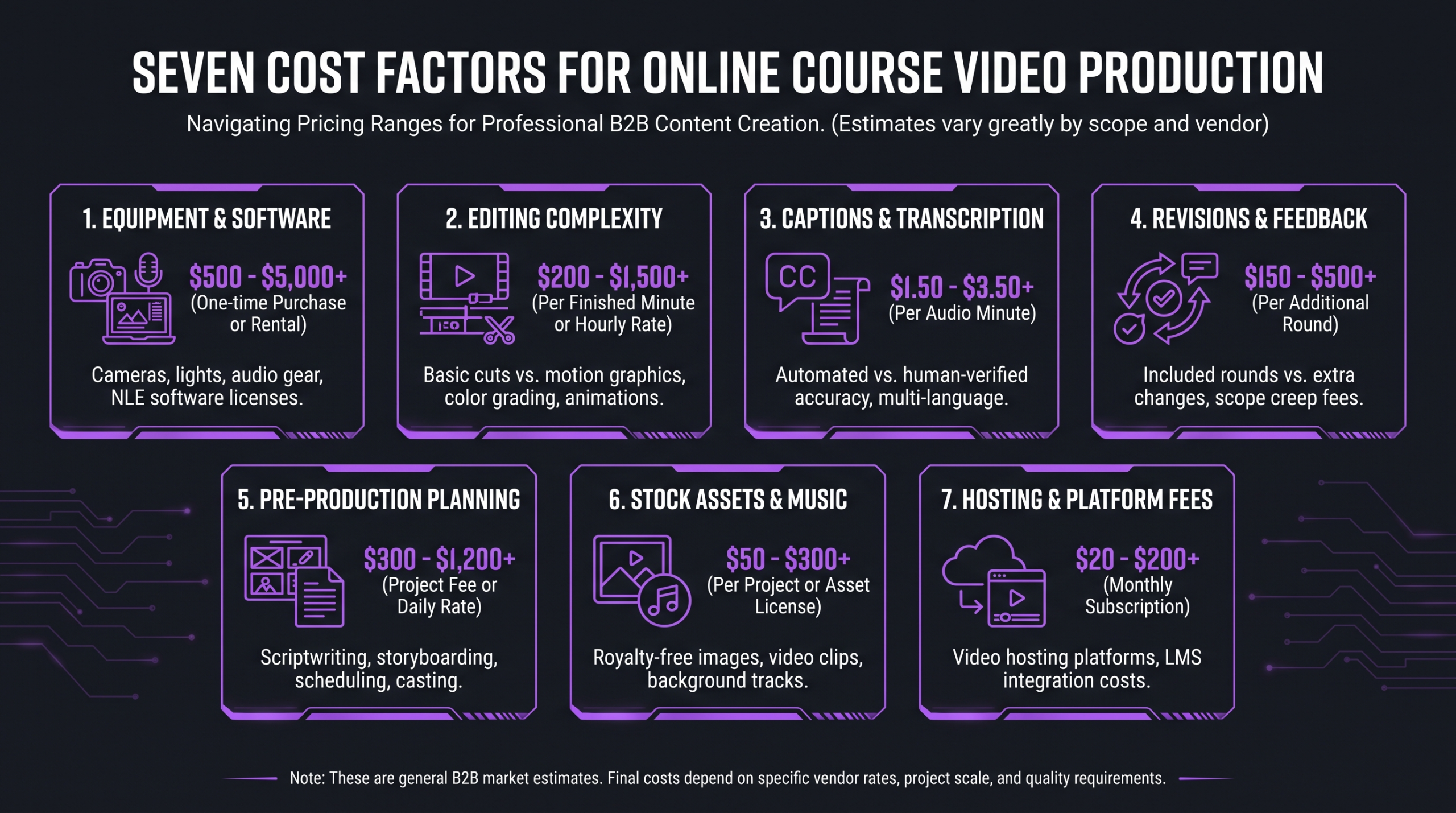
Most budget surprises in course production come not from choosing the wrong vendor but from underestimating how one or more of these seven variables compounds into the final invoice. Understand them upfront and your budget will rarely shock you.
1. Total Running Time
The single most predictable cost driver is how much finished video you need to deliver. A five-module introductory course totaling 90 minutes of content costs far less to produce than a certification program with 20 modules and 8 hours of material. Editors typically price on a per-finished-hour basis — rates commonly range from $200 to $800 per finished hour for experienced freelancers, though variation is wide depending on the editor’s market and the complexity of the footage. Agencies price differently, usually per project with scoped deliverables, but the underlying driver is still total output duration. Every additional module you add to your course plan has a downstream editing cost — scope that cost before you finalize your curriculum, not after.
2. Production Quality Tier
There is a meaningful production gap between a talking-head video recorded on a good webcam in a clean home office and a cinematic course with multi-camera angles, professional studio lighting, a designed set, and full motion graphics. The tier you target shapes every downstream cost — not just the shoot, but the editing, the graphics, the sound design, and the review process. Studios offering broadcast-quality multi-camera setups commonly charge $1,500–$5,000 per shoot day for the facility and crew alone. Being clear about which quality tier your audience and price point require before production begins prevents expensive mid-project pivots.
3. Equipment and Setup Costs
For DIY creators, equipment is the most visible upfront investment. A capable starter kit — mirrorless camera or DSLR, a quality microphone, and a basic lighting setup — commonly runs $500–$1,500 as a one-time purchase. A more complete home studio setup with a dedicated backdrop, key light, fill light, and acoustic treatment can reach $2,000–$4,000. The most important investment of all is audio: research consistently shows that viewers will tolerate slightly soft or poorly framed video far longer than they will tolerate poor audio quality. If budget is constrained, a $100 USB condenser mic beats a $20 lapel mic every time.
4. Editing Complexity
A basic assembly edit — trimming dead air, sequencing clips, adding a title card — costs dramatically less than a fully produced edit with custom motion graphics, synchronized screen recording overlays, animated chapter transitions, color grading, and a dedicated audio mix pass. Each layer of complexity adds editing hours. Motion graphics and custom animation typically add $100–$500 per module over a plain cut, with higher-end custom animation work priced significantly above that. When you spec out your editing requirements, be explicit about every element: intro animations, lower thirds, b-roll sourcing, caption styling, outro cards — each one is a line item in your editor’s timeline.
5. Captions and Accessibility
Auto-generated captions have improved significantly, but human-reviewed captions remain the standard for professional courses — particularly those sold to corporate clients who may have accessibility compliance requirements. Outsourced human caption review typically runs $1–$3 per audio minute when ordered from dedicated services, which means a 4-hour course adds $240–$720 in captioning costs alone. For creators targeting international learners, machine translation of captions adds another layer of cost. Budget for captions from the start and treat them as part of the production scope, not an afterthought.
6. Revision Rounds
Most freelancers include one to two rounds of revisions in their project quotes. Additional rounds are usually billed at $50–$150/hour, sometimes more for senior editors. The revision cost compounds when multiple stakeholders are involved, feedback is vague or contradictory, or the content brief changes mid-production. The cheapest risk mitigation available in course production is a tight brief and a defined approval workflow agreed upon before editing starts. Know exactly who has final approval, what “approved” means, and when feedback rounds close. Every informal change request outside that structure is a line item on the next invoice.
7. Supplementary Assets: Trailers, Thumbnails, and Promos
Consistently overlooked in early budgets: your course needs a compelling promo trailer, chapter thumbnails, platform-specific preview clips, and sometimes social media cuts. These post-production assets can add $300–$2,000 to your total production cost depending on whether you produce them in-house or commission a designer or editor. A 60–90-second course trailer, done well, can meaningfully improve enrollment conversion rates — it is not optional marketing collateral, it is part of the product. Build it into your production plan and budget from day one.
DIY vs. Freelancer vs. Agency: Full Cost Comparison
The biggest financial decision in course production is not which camera to buy — it is who handles the editing. According to Wyzowl’s annual State of Video Marketing report, the large majority of businesses now produce video content regularly, and outsourced editing is one of the fastest-growing components of that production pipeline — reflecting a clear preference among creators to control footage but hand off post-production. Here is how the three models compare on every dimension that matters for course creators:
💡 Pro Tip: The financial break-even point for outsourcing editing typically arrives on your second or third course. If you plan to release multiple courses per year, the time savings from outsourcing post-production almost always outweigh the added cost — especially when you factor in the opportunity cost of time you could spend on content strategy, sales, or building your next product.
For a deeper look at how these models compare on specific criteria — reliability, communication, revision processes, and what to look for in contracts — our guide on video editing agency vs. freelancer walks through the decision in detail.
Cost Breakdown by Course Video Type
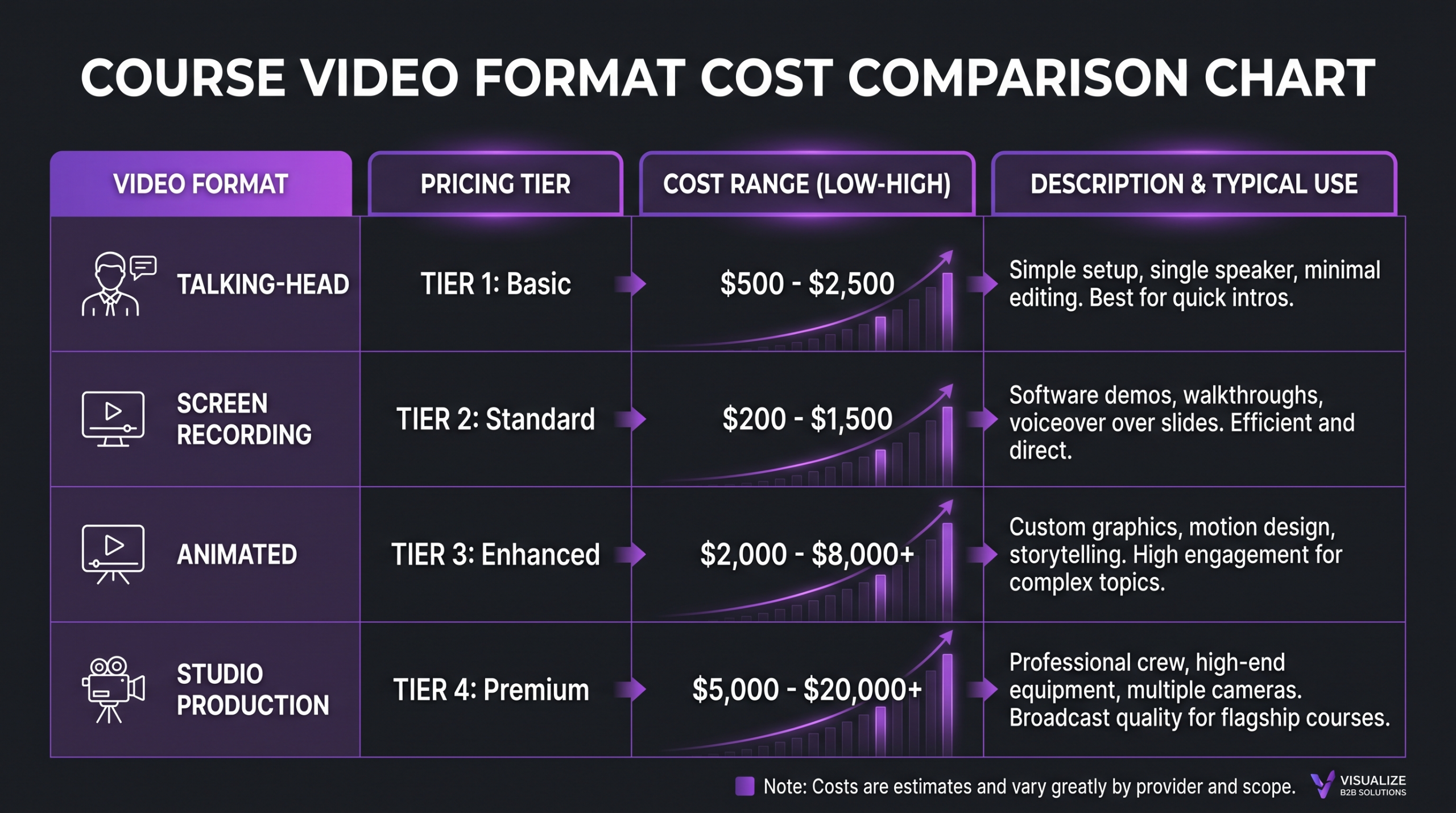
Not all course videos are created equal, and the format you choose determines your production and editing cost more than almost any other decision. Here are the four dominant formats in 2026 and what they realistically cost to produce:
Talking-Head Video
The workhorse of online courses. An instructor on camera, speaking directly to the viewer. Production cost is low relative to impact — quality in this format comes almost entirely from energy, sound, lighting, and framing, not from post-production complexity. DIY creators can deliver a polished talking-head course for $500–$2,000 all-in (equipment plus basic editing). When outsourcing the edit, a 3-hour talking-head course typically runs $600–$2,500 for a freelancer, depending on how much polish is involved: color grading, lower thirds, branded intros and outros, and b-roll sourcing each add time. This format has the best cost-to-perceived-value ratio for most independent course creators.
Screen Recording and Tutorial Video
Software courses, coding tutorials, and tool walkthroughs live here. Recording software like Camtasia or ScreenFlow typically costs $150–$300 as a one-time purchase, with subscription options around $15–$25/month. Do not underestimate the editing complexity: screen-recording-specific editing involves zoom-ins on UI elements, cursor highlights, callout animations, chapter markers, and the need to keep pace with the narrator without losing the viewer. Freelancers familiar with screen recording content commonly quote $40–$100/hour — and a complete 4-hour software course often runs $1,500–$4,000 in editing fees alone. The technical specificity of this format means that finding an editor experienced with screen content matters more than it does for talking-head work.
Animated Explainer Video
The premium tier for courses covering abstract concepts, complex systems, or technical topics that benefit from visual metaphor. Custom 2D or motion-graphics animation is extremely time-intensive and expensive to produce at a professional level. Established studios typically price custom animation at $3,000–$10,000 per finished minute — costs that make clear commercial sense for a $50,000 corporate training program but rarely justify for a $197 self-paced online course. Template-based animation tools like Vyond can compress this significantly, bringing per-module costs to $1,000–$3,000 by leveraging pre-built assets, though the output is visually less distinctive. For most independent creators, a well-produced screen recording or talking-head video will outperform a budget animated video every time.
Multi-Camera Studio Production
For course creators positioning their flagship product as a premium offering — a $997+ course with a strong personal brand behind it — a studio shoot with multiple camera angles, professional lighting rigs, and a designed set creates an unmistakably high-production feel that home-office footage cannot replicate. Studio day rates vary by location and facility: a quality studio rental commonly runs $500–$2,000/day, with crew adding another $500–$2,000/day depending on the team size. Post-production for multi-camera footage is significantly more labor-intensive than single-camera work — plan for $1,000–$3,000 per finished hour of edited content at this tier. The investment is defensible when course price point, brand positioning, and sales volume support it.
Platform and Tool Costs You Cannot Ignore
Your video production budget does not exist in isolation. It sits inside a broader cost structure that includes the platform you use to host and sell the course, the software you use to edit and deliver it, and the tools that handle captions, thumbnails, and promotional assets. These line items add up quickly and are consistently left out of early planning conversations. Here is what to expect:
Course Hosting Platforms
The three platforms that dominate the independent course creator market each have a different cost structure. Teachable offers a free tier with transaction fees on each sale, scaling to paid plans starting around $39/month — at higher tiers ($119+/month), transaction fees disappear and you gain full control over your sales page and integrations. Kajabi is an all-in-one solution that combines course hosting, landing pages, email marketing, and a community in a single platform — plans start around $149/month, and it is a genuine alternative to assembling multiple tools. Thinkific has a free tier and paid plans starting from $49/month, with stronger emphasis on the learning experience itself. For solo creators scaling to $100K+ in annual course revenue, platform fees at $49–$149/month are a rounding error. At lower revenue levels, they represent a meaningful recurring commitment that must factor into your per-course economics from the start.
Editing Software
For DIY editors, software is a core fixed cost. Adobe Premiere Pro runs approximately $55/month as a standalone subscription or within the full Creative Cloud suite at around $60/month. Final Cut Pro is a one-time $299 purchase for Mac users with no ongoing subscription — a strong value for creators who plan to edit over multiple years. DaVinci Resolve is the most cost-effective option for new creators: its free tier is genuinely capable for course-level editing, while DaVinci Resolve Studio (around $295 one-time) unlocks collaborative features, noise reduction tools, and advanced color science. When you outsource editing, all software costs shift to the editor — a real benefit that is easy to overlook when comparing DIY versus outsourced total costs.
Captioning and Accessibility Tools
Automated captioning has improved dramatically over the past three years — platforms like Descript and Otter AI generate transcripts that are 85–95% accurate for clear speech, requiring light correction rather than full manual typing. Descript’s plans start around $15/month and include auto-transcription. Human-reviewed captions from dedicated services like Rev typically run $1–$1.50 per audio minute, making them the standard for professional-grade or compliance-required content. For a 4-hour course aimed at corporate buyers or international learners, budget a minimum of $240–$720 in professional captioning. The investment pays for itself in two ways: higher course completion rates from learners who use captions to keep pace, and improved searchability on video hosting platforms that index transcript text.
💡 Pro Tip: Accurate captions are not just an accessibility feature — they directly correlate with course completion rates. Learners who can follow content as text, regardless of their environment (commuting, at work, non-native speakers), engage longer and revisit material more. If you are deciding where to invest limited post-production budget, captioning delivers disproportionate value per dollar spent.
How to Cut Course Video Production Costs Without Cutting Quality
The most effective cost-reduction strategies in course video production come from eliminating waste at the source, not from finding cheaper vendors. Here are the four highest-impact changes that reduce costs without touching quality:
Script Before You Shoot
A tight script is the single most powerful cost lever available to any course creator, regardless of budget. For every hour of usable footage needed, a poorly planned shoot commonly generates three to five hours of raw material — all of which must be reviewed, logged, and cut. Most editors bill per hour of raw footage reviewed, not per finished minute delivered. A thorough script and a run-through before hitting record can compress raw-to-finished ratios from 5:1 to 2:1, cutting editing labor costs by as much as half on the same course without changing anything else. Scripting does not mean reading robotically — it means knowing exactly what you intend to say and roughly how you intend to say it before the camera is on.
Batch Record by Theme, Not by Day
Setup time, lighting calibration, microphone checks, and the mental load of getting into presenter mode are fixed costs per recording session, not per module. If you set up to record one module and then pack everything away, you pay those fixed costs once per module. If you batch-record three to five related modules in a single session — same outfit, same setup, same lighting — you spread those fixed costs across the whole batch. Creators who batch record report that per-module production overhead drops significantly compared to one-at-a-time recording, with no visible difference in quality.
Create Reusable Templates Once
Invest time and budget once to build a branded template set — intro sequence, outro card, lower third, chapter card, title slide, and callout overlay. Apply those templates to every module without customization. On a 20-module course, not custom-designing each transition or graphic element can save $500–$2,000 in reduced editing hours, and the result is often more professional-looking because the visual identity is perfectly consistent rather than subtly different in each module. This is standard practice in professional video production and is trivially easy to implement with any modern editing software.
Lock the Approval Process Before Editing Starts
Revision spirals are the most predictable and preventable source of budget overruns in course video production. Agreeing in writing — before a single clip is edited — on one named approver, a clear definition of what “approved” means, a maximum of two revision rounds, and a deadline for consolidated feedback eliminates the informal scope creep that burns editing hours and strains working relationships. If you have multiple co-creators or subject matter experts with input authority, designate one person to consolidate all feedback into a single document before sending it to your editor. Conflicting feedback from multiple sources that arrives in separate messages at different times is the fastest way to turn a $1,500 edit into a $3,000 one.
When to Hire a Professional Video Editing Partner
Hiring professional editing help is not primarily a budget decision — it is a time and positioning decision. The practical signals that you have outgrown DIY editing arrive in one of three recognizable patterns:
You are spending more than 20% of your work week editing. If post-production is consuming more than a day per week of your time, you are functionally employed as a part-time junior editor while simultaneously running a course business. The opportunity cost calculation rarely favors continuing. The time spent editing is time not spent developing new curriculum, marketing existing courses, or serving enrolled students — activities with a higher per-hour return for most course creators at any revenue level.
Your production quality has plateaued. Self-taught editing skills improve fast initially and then plateau. If your last three courses look and sound the same as your first three despite genuine effort, you have hit the ceiling of what self-directed post-production can deliver. A professional editor with an experienced eye sees things you have stopped noticing — pacing issues that kill engagement, audio inconsistencies you have adapted to, jump cuts you have accepted as a stylistic choice. An external perspective on your footage is worth something independent of labor savings.
You are raising your price point. Moving from a $197 introductory course to a $997 flagship requires a corresponding lift in production quality. Learners who invest at the premium tier arrive with premium expectations — for the sound, the pacing, the visual consistency, and the overall production feel. The perception of value is inseparable from production quality at higher price points. You cannot charge $997 and deliver $97 production values and expect a sustainable business.
Increditors works with course creators at exactly this inflection point — taking raw footage from subject matter experts and delivering polished, publication-ready modules without requiring creators to manage or supervise the editing process. For a complete breakdown of what professional video editing costs and what you get for the money, that guide is a useful companion to this one.
For creators building a library of courses over time rather than a single product, the case for a repeatable editing workflow is even stronger. Our comparison of unlimited video editing services covers the landscape of subscription-based and retainer editing options that course creators are increasingly turning to — including what to look for and what to avoid.
Frequently Asked Questions
How much does it cost to produce a 1-hour online course?
A 1-hour finished online course typically costs $500–$3,000 to produce depending on whether you edit yourself or outsource, and how polished the output needs to be. A DIY talking-head course at this length can be produced for the cost of basic equipment if you already have a suitable space, while outsourced editing for 1 hour of finished content commonly runs $300–$1,200 for a freelancer. Add platform hosting ($40–$150/month), captioning ($60–$180 for 1 hour), and supplementary assets like a course trailer, and a realistically budgeted 1-hour professional course lands between $1,000 and $3,500 total for most independent creators.
Is it worth hiring a professional editor for my online course?
Yes — if your time has real opportunity cost and you plan to release more than one course. The financial case for outsourcing editing strengthens with each additional course you publish: the time savings compound, the quality improvement is consistent, and the relationship with a trusted editor becomes more valuable over time. For a first course at $97, DIY editing is often sensible. For a $497+ course or any creator publishing two or more courses per year, professional editing typically pays for itself through better completion rates, stronger testimonials, and the ability to focus on higher-leverage activities.
How long does it take to edit one hour of online course footage?
For a basic talking-head or screen recording course, a professional editor typically takes 3–6 hours of editing time per finished hour of video, assuming reasonable raw footage quality and a clear brief. More complex editing — motion graphics, multi-camera sync, b-roll sourcing, detailed color and audio work — can push that ratio to 8–12 hours per finished hour. For DIY editors still developing their skills, expect 2–3x those estimates as you spend time learning the software alongside editing the course. Efficient scripting and organized, labeled raw footage significantly reduce editing time regardless of who does the work.
Can I use a subscription editing service for my online course?
Yes, and it is increasingly common among course creators who publish regularly. Subscription editing services typically offer a monthly retainer in exchange for a defined turnaround commitment — making them well-suited for creators who release new modules or update existing courses on a predictable schedule. The main advantage is cost predictability and the relationship continuity that comes from working with the same editor month after month. The main consideration is ensuring the service’s turnaround time and revision policy match your publishing cadence before committing.
What is the biggest cost mistake online course creators make?
Underestimating the cost of their own time is the most common — and most expensive — mistake. Creators who meticulously compare freelancer quotes while spending 20 hours a week editing their own footage are often losing far more in opportunity cost than any outsourcing fee would cost. The second most common mistake is failing to budget for supplementary assets: the course trailer, chapter thumbnails, social cuts, and platform-specific preview clips that drive enrollment often get forgotten in the initial budget and end up rushed or skipped entirely.
Verdict: What Should Your Course Video Budget Actually Be?
Online course video production costs in 2026 span a wider range than most creators expect — from under $500 for a lean DIY talking-head course to $60,000+ for a fully produced enterprise training program. For the majority of independent course creators, the realistic budget for a well-produced, professionally edited course lands between $2,500 and $10,000, with the bulk of that going to editing rather than equipment or platform fees.
The most important planning decision is not which camera to buy — it is how to allocate time versus money across the production process. DIY editing is a legitimate starting point for a first course at a low price point. For any creator past that first launch, outsourcing editing is almost always the right financial and strategic move. The quality improvement is consistent, the time savings are real, and the relationship with a trusted editing partner becomes a genuine competitive advantage over time.
Script well, batch record, build templates once, lock your approval process, and focus your video editing services budget on the elements that most directly affect viewer experience: audio quality, pacing, and visual consistency. Those are the production decisions your learners will feel — even if they cannot articulate them.
Ready to Delegate Your Course Editing?
Increditors handles everything from raw footage to final delivery — consistent style, fast turnaround, no editing curve for you. Tell us about your course and we will put together a custom plan.