










![3D Explainer Video - ScribbleLive.mp4_snapshot_00.12_[2022.03.09_03.14.16]](https://increditors.com/wp-content/uploads/elementor/thumbs/3D-Explainer-Video-ScribbleLive.mp4_snapshot_00.12_2022.03.09_03.14.16-r7wb53mx72rxst3qcqyrfxdmeyzb5r9jbl0wbjujh4.png "3D Explainer Video – ScribbleLive.mp4_snapshot_00.12_[2022.03.09_03.14.16]")
































A video editing subscription gives your team a fixed monthly post-production capacity — no per-project quotes, no freelancer scheduling, no surprise invoices. The best services in 2026 start around $500–$1,000 per month for growing content teams and scale to $5,000+ for brands running daily output. The right plan depends less on the brand name and more on how that plan’s pricing model maps to your actual video volume. This guide explains how subscription pricing works, how to compare plan tiers honestly, and how to calculate value per video before you sign up. (For a head-to-head comparison of specific unlimited-model providers, see our unlimited video editing services compared guide.)
Video editing subscriptions in 2026 typically fall into three pricing models: per-video credits, unlimited-queue, and retainer. Entry-level plans start around $500–$1,000/month. Value-per-video depends heavily on how many videos you actually publish — a $1,000/month plan is only worth it if you’re producing 8+ videos per month. Increditors and VideoEditingCompany lead for high-volume B2B teams; beCreatives and Vidpros cover mid-market. Match the plan model to your output cadence, not the headline price.
- What Is a Video Editing Subscription? How It Works
- Video Editing Subscription Pricing Models Explained
- Best Video Editing Subscription Services 2026
- How to Compare Plan Tiers: What You Are Actually Paying For
- Value Per Video: The Only Metric That Actually Matters
- Monthly vs Quarterly Billing: Real Savings Breakdown
- Who Should Use a Video Editing Subscription?
- FAQ
- Verdict
What Is a Video Editing Subscription? How It Works
A video editing subscription service is a recurring billing arrangement where you pay a flat monthly or quarterly fee in exchange for ongoing post-production work. Instead of negotiating a price per project, you get a dedicated editor (or editing team) assigned to your account who handles your queue of requests each month.
The mechanics vary by service, but the core workflow is consistent: you upload raw footage, submit a brief or request through a client portal, and receive edited output within a defined turnaround window. Revisions are typically included, and the relationship continues month over month as the editor learns your brand, tone, and style preferences.
Why Subscriptions Replaced Per-Project Billing for Growing Teams
Per-project video editing creates predictability problems: each brief requires a new quote, a new negotiation, and often a new onboarding process if you switch editors. For a brand publishing two or more videos per week, that overhead compounds fast. A subscription removes it. You pay once per month, you know exactly what capacity you have, and the editor already knows your style from the previous batch.
The subscription model also makes budgeting predictable — finance teams can forecast post-production costs twelve months out, which is harder to do with freelancer invoices that vary by project complexity.
💡 Pro Tip: Before comparing services, calculate your current monthly video output (count only the videos you actually publish, not the ones you plan to). Subscription value is determined by that number — overestimating usage is the most common reason brands feel they’re overpaying.
Video Editing Subscription Pricing Models Explained
Not all video editing subscription services price the same way. There are three dominant models in the market, and understanding the differences changes how you evaluate cost.
Model 1: Unlimited Queue (One-at-a-Time)
The most common model in 2026. You pay a flat monthly fee and can submit as many requests as you want, but the editor handles them one at a time in a queue. Turnaround per video ranges from one to three business days depending on complexity. Unlimited revisions are standard. The practical limit is not a cap on requests — it is how fast you can push briefs through the queue.
Services like beCreatives and Vidpros operate on this model. It suits teams producing consistent, moderate-volume content (typically 8–20 videos per month at entry plans). When you need ten videos this week, the queue slows you down — you would need to upgrade to a higher tier or add a second editing slot.
Model 2: Credit or Pack-Based Subscription
Some services assign credits per month, with each video type consuming a set number of credits. A 5-minute explainer might cost 3 credits; a 60-second social clip costs 1 credit. Monthly credit allowances reset on the billing date — unused credits may roll over or expire depending on the plan terms.
This model offers predictability in terms of output and is useful for teams whose video mix is well-defined. The risk is that you over-purchase credits in quiet months and cannot transfer the value forward, or under-purchase and face overage charges during campaign surges.
Model 3: Retainer with Dedicated Team
The premium tier. You retain a dedicated editor or production team with a defined monthly capacity (hours, video count, or both). Output quality is higher because the team operates as an extension of your in-house function — they join editorial calls, know your brand inside out, and can handle complex formats like webinar repurposing, multi-camera event coverage, and branded series.
This is the model video editing services agencies like Increditors use for high-volume brand clients. It typically starts above $2,000/month and scales based on video complexity and team size. It is significantly more efficient for brands producing 20+ videos per month than an unlimited-queue subscription, where the queue becomes the bottleneck.
Best Video Editing Subscription Services 2026
The services below are ranked by overall value for B2B and brand content teams. This is not a list of who has the lowest entry price — it reflects quality consistency, turnaround reliability, and how well each service scales. For a full head-to-head comparison of the unlimited-model providers specifically, see our unlimited video editing services guide.
#1 — Increditors (Best for High-Volume B2B Brands)
Increditors operates on a dedicated-team retainer model built specifically for brands producing 10–100+ videos per month. Unlike queue-based subscriptions where your brief competes with other clients, Increditors assigns a senior editing team exclusively to your account. The team handles full post-production workflows — cut, colour, motion graphics, captions, platform-specific exports — and is available for editorial strategy calls when your content calendar demands it.
The SLA-backed turnaround averages 48 hours for standard YouTube-length content and scales down for short-form batches. Pricing is custom based on your volume and complexity, with a discovery call to scope the engagement. For a brand that has already tested queue-based services and hit their ceiling, Increditors is the natural next step. Best for: Marketing directors, SaaS companies, and media brands with consistent high-volume output.
#2 — VideoEditingCompany (Best Premium B2B Retainer Alternative)
VideoEditingCompany operates a retainer model with dedicated editing teams positioned at the premium B2B end of the market. Their focus is on SaaS, tech, and enterprise brand video production, with managed workflows that suit clients producing regular series content. A strong alternative for teams that need white-glove account management alongside their editing capacity. Best for: Enterprise teams and agencies looking for a managed post-production partner.
#3 — beCreatives (Best Mid-Market Unlimited Queue)
beCreatives has become one of the most recognised names in the video editing subscription space, particularly for content creators and mid-size brand teams. Their pricing (from becreatives.co/pricing, accessed October 2026) starts at $999/month on quarterly billing or $1,199/month on monthly billing for the Scale plan. The Pro plan at $1,999/month (quarterly) offers 1-day turnaround and unlimited brand accounts — a meaningful upgrade for agencies managing multiple clients. They also offer a $89/video one-time option for teams not ready to commit to a subscription. Best for: Content creators and small-to-mid brand teams producing 8–20 videos per month.
#4 — Vidpros (Best for Fractional Editor Model)
Vidpros takes a differentiated approach: they cap each editor at 4 clients to ensure at least 2 hours of daily editing time per account. Their subscription starts at $1,000/month (from vidpros.com/pricing, accessed October 2026), with a discounted $100 trial week available. They work exclusively in Adobe Premiere Pro and After Effects, which matters if your in-house team needs to pick up edits mid-project. Best for: Social media agencies and content teams who want a consistent fractional editor rather than a rotating pool.
#5 — Tasty Edits (Best for YouTubers and Content Creators)
Tasty Edits focuses on YouTube content creators with a subscription model designed around long-form video workflows. Their plans include editing, thumbnail production, and scripting support — making them a fuller content production partner than a pure editing subscription. Pricing details are available at tastyedits.com/pricing. Best for: Solo creators and small YouTube-focused channels wanting bundled editing and thumbnail service.
#6 — Video Husky (Best Entry-Level Option)
Video Husky offers subscription-based editing with plans typically starting around $849/month (based on competitor pricing comparisons; verify current rates at videohusky.com/pricing). Their model suits teams producing steady, moderate-complexity videos such as talking-head content, vlogs, and tutorials. Best for: Small teams and individual creators starting out with subscription-based editing.
Pricing from public pricing pages, accessed October 2026. Entry-level monthly cost shown where applicable. Verify current rates directly with each provider before purchasing.
How to Compare Plan Tiers: What You Are Actually Paying For
Most monthly video editing services offer two to four tiers, typically labelled Starter, Scale, Pro, and Team (or equivalent). The headline difference between tiers is almost always turnaround time — but that is only part of the story. Here is what actually changes between tiers at most services:
Turnaround Time
Entry plans typically deliver 2–3 business days per video. Premium plans offer 1-day or same-day turnaround. This difference matters most during campaign launches and content sprints, when you need 5–10 videos in a short window. If your output is steady and spaced throughout the week, the entry plan’s turnaround is usually sufficient.
Number of Active Requests
Entry plans process one request at a time. Mid-tier plans allow two active requests simultaneously; premium plans may offer parallel processing with multiple editors working concurrently. If you regularly need to publish several videos in a single day, parallel request processing is not a luxury — it is a operational requirement.
Brand Accounts and User Seats
Agencies managing multiple clients need multi-brand support. beCreatives’ Scale plan supports up to 2 brands; their Pro plan supports unlimited brand accounts. If you are managing video production across three or more clients, tiering up or choosing an agency-oriented service directly avoids the brand account ceiling.
Video Complexity Limits
Some subscription services handle short-form content well at entry level but apply restrictions to long-form (30+ minutes), Camera RAW footage, or custom motion graphics at lower tiers. Always check whether your most complex content type is supported at the plan you are considering — not just your typical output. Understanding how much professional video editing costs by complexity level helps set expectations before choosing a tier.
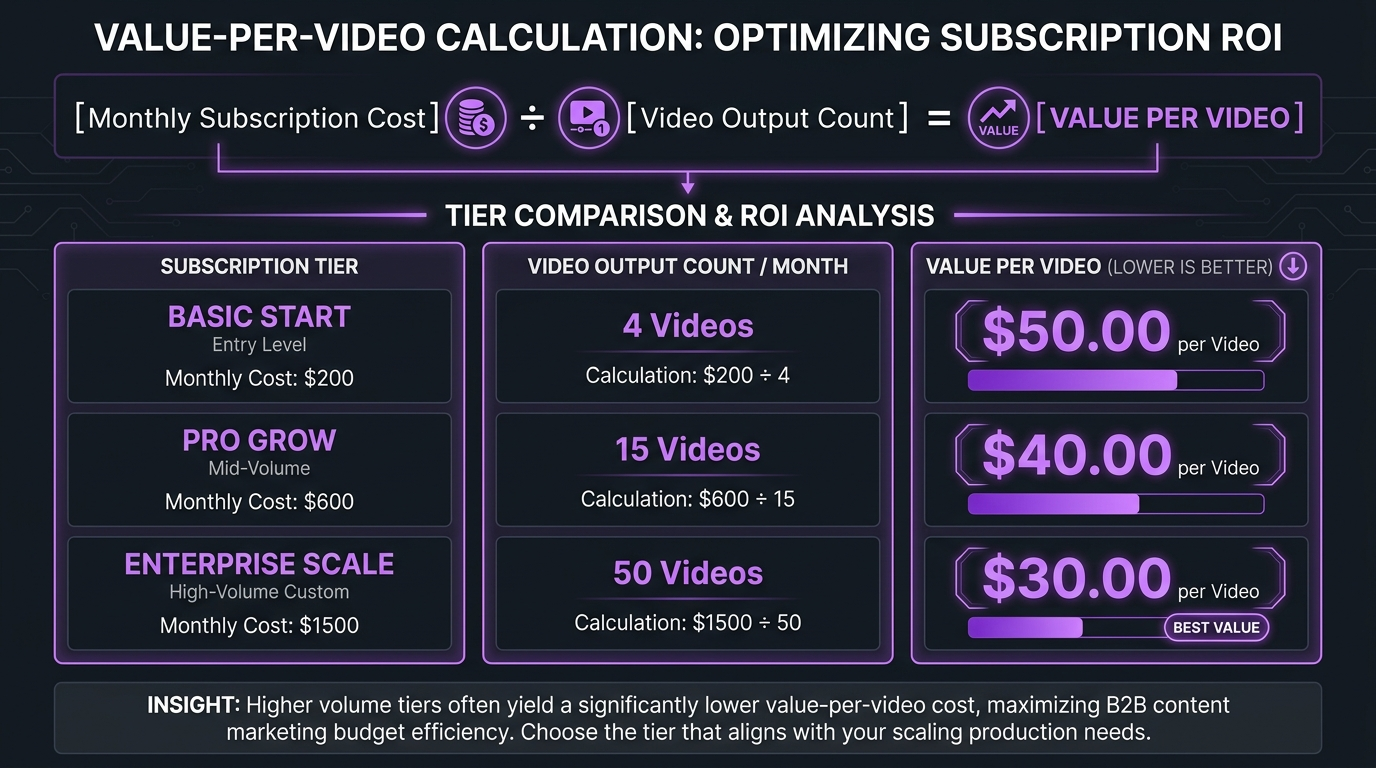
Value Per Video: The Only Metric That Actually Matters
The subscription price is almost meaningless on its own. What matters is how much you are paying per finished video, which depends entirely on how many videos you actually publish each month. Here is how to run the calculation:
Value Per Video = Monthly Plan Cost ÷ Monthly Videos Published
Teams commonly report publishing fewer videos than they expected when they signed up, which means the effective cost per video ends up higher than budgeted. Before choosing a plan, use your actual trailing three-month average — not your target — to estimate realistic monthly output.
Illustrative benchmarks only. Actual cost per video depends on video length, complexity, and plan specifics. Use as a planning guide.
A $1,000/month plan only makes economic sense at 8+ videos per month. At 4 videos per month, you are paying $250 per video — which is more expensive than most per-project freelancer rates for standard content. The breakeven point for most queue-based subscription services is approximately 8–12 videos per month at entry price points.
💡 Pro Tip: Video complexity matters as much as count. A 45-minute webinar repurposed into 8 clips is not the same as 8 independent short-form productions. When calculating value per video, weight complex outputs more heavily — a 30-minute documentary cut costs the same subscription slot as a 60-second reel but takes 5–10x longer to complete.
Monthly vs Quarterly Billing: Real Savings Breakdown
Most subscription video editing services offer a quarterly billing option at a discounted rate. Here is how the numbers compare for beCreatives’ published plans (accessed October 2026):
Scale Plan: $1,199/month on monthly billing vs $999/month on quarterly billing (billed as $2,997/quarter). Quarterly saves $200/month, or $2,400 annually.
Pro Plan: $2,299/month on monthly billing vs $1,999/month on quarterly billing (billed as $5,997/quarter). Quarterly saves $300/month, or $3,600 annually.
The catch: quarterly billing requires committing three months upfront. If your video output is seasonal (a product launch month followed by a quiet period), monthly billing is more flexible even at the higher rate. For teams with consistent output year-round, quarterly billing is almost always the better financial choice.
Annual commitments, where offered, typically yield an additional 10–20% discount but introduce exit risk. If the editing quality degrades or your volume needs shift mid-year, exiting an annual contract is more costly than switching from a monthly plan. Start monthly, prove consistent usage for 2–3 months, then move to quarterly or annual once you have validated the fit.
Who Should Use a Video Editing Subscription?
A video editing subscription service is the right choice when three conditions are true: you produce video consistently (at least weekly), your output is regular enough to justify monthly capacity, and the administrative overhead of managing freelancers is costing you more time than it saves in money.
Good Fit: B2B Brands and SaaS Companies
Marketing teams at B2B companies typically need a predictable post-production pipeline for LinkedIn content, webinar repurposing, demo videos, and case study films. A subscription removes the per-project negotiation and ensures consistent brand treatment across formats. For brands in this category, a dedicated video editing services retainer is often more efficient than a queue-based plan once monthly output exceeds 12–15 videos.
Good Fit: YouTube Creators and Content Studios
Creators publishing weekly (or more often) on YouTube or TikTok benefit from subscription editing because the editor builds familiarity with their style over time — pacing, cut rhythm, colour treatment. This accumulated context is worth more than per-project savings over a six-month period. Entry-level plans from services like Tasty Edits and Video Husky are designed specifically for this use case. Check the Tasty Edits alternatives guide for more options in this category.
Poor Fit: Occasional Producers
If you produce fewer than 4 videos per month or your video needs are project-based (one product launch film per quarter), a subscription is likely the wrong financial model. Per-project rates from a specialist editor or agency will give you better value, and you will not be paying for unused capacity in quiet months. A subscription becomes economical when your break-even analysis — monthly fee divided by actual video count — comes in below what you would pay per-project.
FAQ: Video Editing Subscriptions 2026
What is a video editing subscription?
A video editing subscription is a recurring monthly or quarterly payment for ongoing post-production capacity. You get a dedicated editor or editing team assigned to your account, with a defined turnaround window and unlimited revisions. You submit requests via a client portal and receive finished videos without per-project billing.
How much does a video editing subscription cost?
Entry-level plans typically start around $500–$1,000 per month in 2026. Mid-market services like beCreatives start at $999/month on quarterly billing. Premium and agency-grade services with dedicated teams start at $2,000/month and scale to $5,000+ depending on volume and complexity. Pricing varies significantly; always verify directly with the provider before committing.
What is the best video editing subscription service?
The best service depends on your output volume and complexity. For high-volume B2B brands, Increditors’ dedicated retainer model provides the most consistent quality and turnaround at scale. For mid-market creators, beCreatives and Vidpros are strong queue-based options. For YouTubers, Tasty Edits and Video Husky cover the creator-focused use case effectively.
Is a monthly video editing service worth it?
A monthly video editing service is worth it if you consistently produce 8 or more videos per month. Below that threshold, per-project freelancer rates are typically more economical. The value case strengthens significantly at higher volumes (16+ per month), where the per-video cost of a subscription drops well below market freelancer rates and the time savings on briefing and project management add further value.
What is the difference between a subscription and an unlimited video editing service?
The terms are often used interchangeably but are not identical. “Unlimited video editing” refers specifically to services that allow unlimited request submissions per month on a queue basis. A subscription is the broader category — it includes unlimited-queue services, fractional editor models, credit-based plans, and dedicated retainers. Not all subscriptions are unlimited; not all unlimited services provide the same level of quality or turnaround.
Verdict: Choosing the Right Video Editing Subscription in 2026
The video editing subscription market in 2026 has matured into a three-tier structure: entry-level unlimited-queue services for creators and small teams, mid-market unlimited plans for growing content operations, and dedicated retainer models for brands that have outgrown the queue.
The most common mistake brands make is choosing a service based on the headline monthly price rather than the value-per-video calculation at their actual output level. Run the numbers first — monthly fee divided by realistic video output — and let that determine which tier and pricing model fits.
For high-volume B2B content teams, the subscription model’s real value is not just the editing capacity — it is the accumulated brand knowledge your dedicated editor builds over months of working together. That context is what makes a subscription worth significantly more than the sum of its per-video equivalent. Start with monthly billing, validate your cadence for 2–3 months, and then move to quarterly once you have confirmed the fit.
Ready for Video That Actually Converts?
Tell us about your project and we will put together a custom plan.