





















































Most agencies underestimate video editing capacity until a campaign explodes — then scramble, rush edits, and burn team morale. This guide walks marketing directors through a structured capacity planning framework: how to audit current output, model demand across content types, decide what to keep in-house vs. outsource, and build a scalable system that doesn’t collapse under a product launch or seasonal spike.
- Why Video Editing Capacity Planning Matters for Agencies
- Step 1: Audit Your Current Output and Bottlenecks
- Step 2: Model Demand by Content Type and Channel
- Step 3: Build vs. Outsource — The Decision Framework
- Step 4: Staffing Structure and Role Definitions
- Step 5: Workflow Systems That Scale
- Step 6: Measuring and Monitoring Capacity Health
- Frequently Asked Questions
- Verdict
Why Video Editing Capacity Planning Matters for Agencies
Video editing capacity planning is the discipline of matching your agency’s post-production output capacity — editors, tools, review cycles, render time — to the actual and projected demand from your content calendar, client roster, and campaign pipeline. Get it right and you ship on time, maintain quality, and protect your team’s bandwidth. Get it wrong and you’re either overpaying for idle capacity or shipping rushed edits that damage client relationships.
For marketing directors at growth-stage agencies, this is one of the highest-leverage operational decisions you make. A mid-sized agency running 20–40 content pieces per month across YouTube, LinkedIn, paid social, and client deliverables can easily find that video editing is the single longest pole in the tent — and the one most likely to slip a launch date.
The Hidden Cost of Poor Capacity Planning
When capacity isn’t planned proactively, agencies typically experience one or more of these failure modes:
- Queue collapse during campaigns: Editors become the critical path during product launches, when demand spikes 3–5× normal. Deadlines slip; paid campaigns go live with placeholder creative.
- Quality inconsistency: Under-resourced teams cut corners — fewer revision passes, template shortcuts, inconsistent brand application. Clients notice.
- Burnout and turnover: Senior editors are chronically overloaded because the agency won’t hire until after the problem is obvious. By then, institutional knowledge has walked out.
- Unpredictable agency margins: Rush freelancer rates, last-minute contractor sourcing, and scope creep from poor turnaround estimates erode project margins silently.
The good news: video editing capacity is more plannable than most creative work. Unlike copywriting or strategy, editing hours map reasonably well to deliverable types — a 60-second social reel takes a predictable range of hours, a 10-minute YouTube long-form takes another. That predictability is the foundation of every effective capacity plan.
Step 1: Audit Your Current Output and Bottlenecks
Before projecting future capacity needs, you need an honest baseline. Most agencies either don’t track this data or track it in ways that obscure the real picture. A proper audit answers four questions:
1. What Is Your Current Weekly Output?
Pull the last 90 days of video deliverables and categorize by type: short-form social (under 90 seconds), mid-form explainer or case study (2–8 minutes), long-form YouTube or webinar (8+ minutes), motion graphics or animated content, and client-specific deliverables. Count finished pieces by category per week. This is your baseline throughput.
2. Where Is the Queue Actually Backed Up?
Backlogs rarely appear evenly. They cluster at specific handoff points. Map your current production workflow from raw footage intake to final export and time each stage. Common choke points include: footage review and selects, first-cut assembly, client review rounds (often 2–3 asynchronous cycles), motion graphics and text overlay, and final QC and delivery. Interview your editors directly — they know exactly where they lose time. You’ll typically find that 60–70% of delay lives in one or two stages.
3. What Is Your Editor Utilization Rate?
A full-time editor has roughly 35–38 productive hours per week after accounting for meetings, admin, tool maintenance, and context-switching. If your editors report 90%+ utilization consistently, you’re already in the danger zone — one unexpected campaign will tip you into crisis. Healthy target utilization for sustainable throughput sits around 70–80%, leaving buffer for revisions, new briefs, and tools learning. If you’re running above that, you’re borrowing from future capacity.
4. What Is Your Average Turnaround by Content Type?
Calculate actual clock-time from brief received to final delivery for each content type across the last 90 days. Compare to your stated SLAs. The gap between what you promise and what you actually deliver is the first honest signal of a capacity problem. Document outliers — single projects that ballooned far beyond their typical time are data for your demand model, not noise to be ignored.
💡 Pro Tip: Use a simple spreadsheet to track raw footage hours vs. finished minutes ratio for each deliverable type over 90 days. This ratio is one of the most reliable leading indicators of where your editing capacity is actually going — and it’s invisible in most project management dashboards.
Step 2: Model Demand by Content Type and Channel
Once you know your baseline, you can build a demand model that accounts for growth, seasonal variation, and campaign spikes. This is where most agencies skip a step — they plan for average demand but forget that content programs don’t run at average pace.
Building a Content Demand Calendar
Start with your committed content calendar for the next quarter and assign editing hours to each deliverable type. Then layer in known demand amplifiers: product launches, seasonal campaigns (Q4 is typically 30–50% higher volume for most B2B and DTC clients), trade show content, and client contract renewals that often trigger content refreshes. Your demand model should show weekly editing hours required across the full quarter — not just a monthly average.
A reasonable starting benchmark for estimating editing hours by content type (actual ranges vary significantly by complexity, footage quality, and revision cycles):
Multiply your planned deliverable counts by these ranges to get a weekly hours band (low estimate × high estimate). The gap between low and high is your demand uncertainty — that’s what your capacity buffer needs to absorb. For more on understanding how professional video editing is priced, see our guide on how much professional video editing costs.
Accounting for Growth Trajectory
If your agency is growing or your clients are scaling content programs, your demand model needs a growth coefficient. A 20% quarter-over-quarter content volume increase (not uncommon for agencies with active new business pipelines) means your editing capacity must grow commensurately or your turnaround SLAs will quietly degrade. Build the demand model with a base case and a stretch case — don’t just plan for average.
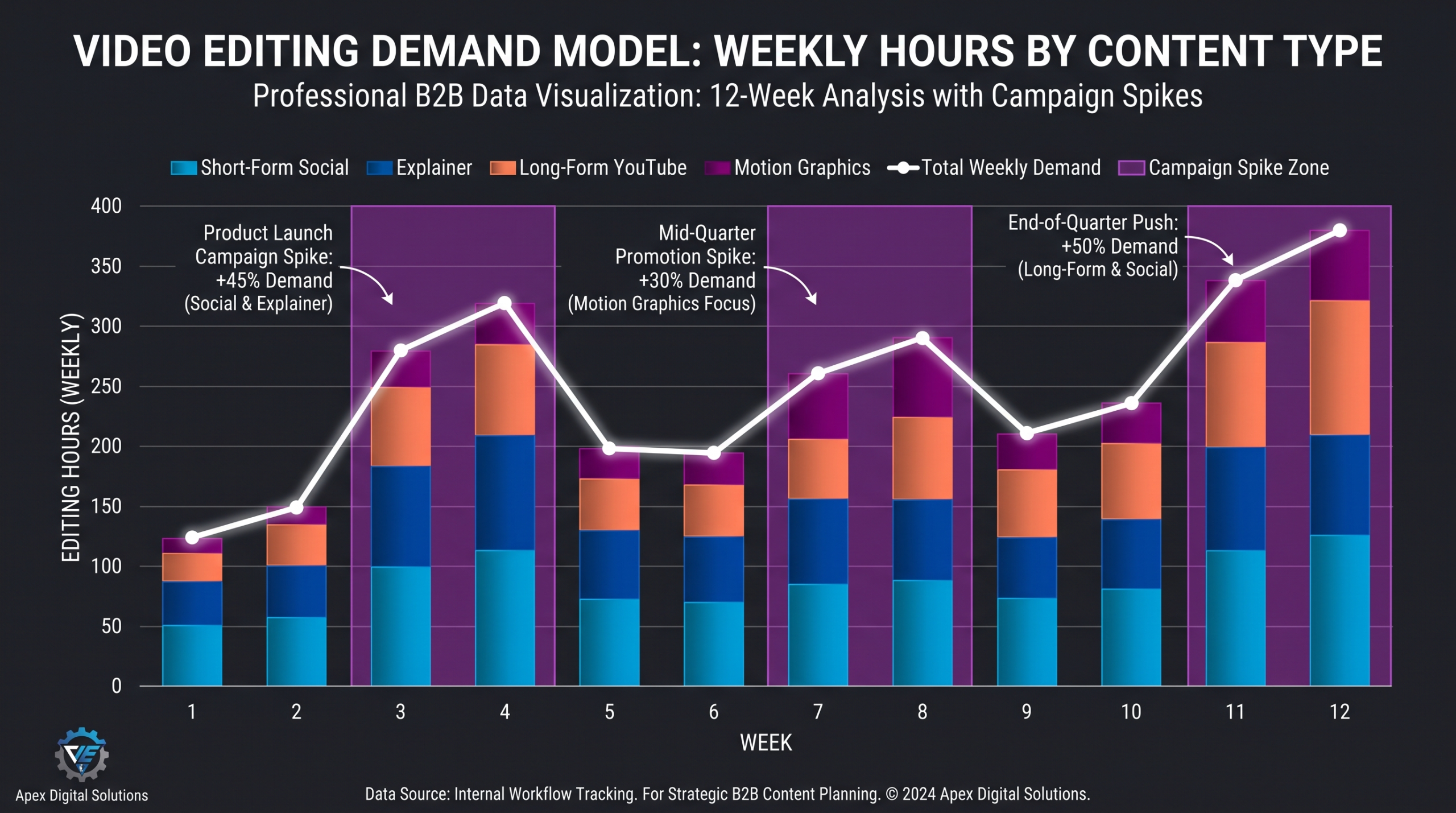
Figure 1: Sample quarterly demand model — weekly editing hours by content type, with campaign spike weeks identified.
Step 3: Build vs. Outsource — The Decision Framework
Once you know your demand model, the central capacity planning question becomes: which editing work should you staff in-house, and which should you route to external partners? This is not a binary decision — most agencies that have solved this well use a layered model.
The Three-Layer Model
Layer 1 — Core in-house capacity: Staff for your stable base demand — the predictable weekly volume that exists regardless of campaign cycles. These editors own your brand standards, understand client relationships, and can train external partners on brand guidelines. Understaffing this layer is a long-term brand quality risk.
Layer 2 — Dedicated external partner: Route your predictable-but-variable demand — the types of content that repeat on a known cadence but vary in volume — to a dedicated video editing agency operating as an embedded team. Unlike ad-hoc freelancers, a dedicated agency maintains brand context, edits to your style guide, and absorbs weekly volume fluctuations without ramp time. This layer handles roughly 30–50% of total output for most well-structured agencies.
Layer 3 — On-demand overflow: Keep a pre-qualified pool of freelancers or a secondary agency relationship for campaign spikes that exceed both layers. This layer is expensive per unit but protects you from the worst launch-week failures. The key is pre-qualification — vetting, NDA, brand brief, and at least one test edit before you need them urgently.
For a deeper look at the trade-offs between agency and freelancer models, see our analysis of video editing agency vs. freelancer.
💡 Pro Tip: The break-even point for adding an in-house editor vs. a dedicated agency retainer typically sits around 30–40 consistent editing hours per week — below that, a retainer usually delivers better economics and flexibility. Run this calculation annually as your volume changes.
What to Keep In-House vs. Outsource
Keep in-house: anything that requires deep institutional knowledge (unreleased product demos, sensitive client footage, brand evolution projects), content types where iteration speed beats production quality (rapid social testing), and editorial oversight / QC of external partners’ work. Outsource: high-volume repeatable formats with established brand guidelines, overflow during campaign spikes, content types requiring specialized skills your team doesn’t have (motion graphics, audio mixing, color grading at broadcast level).
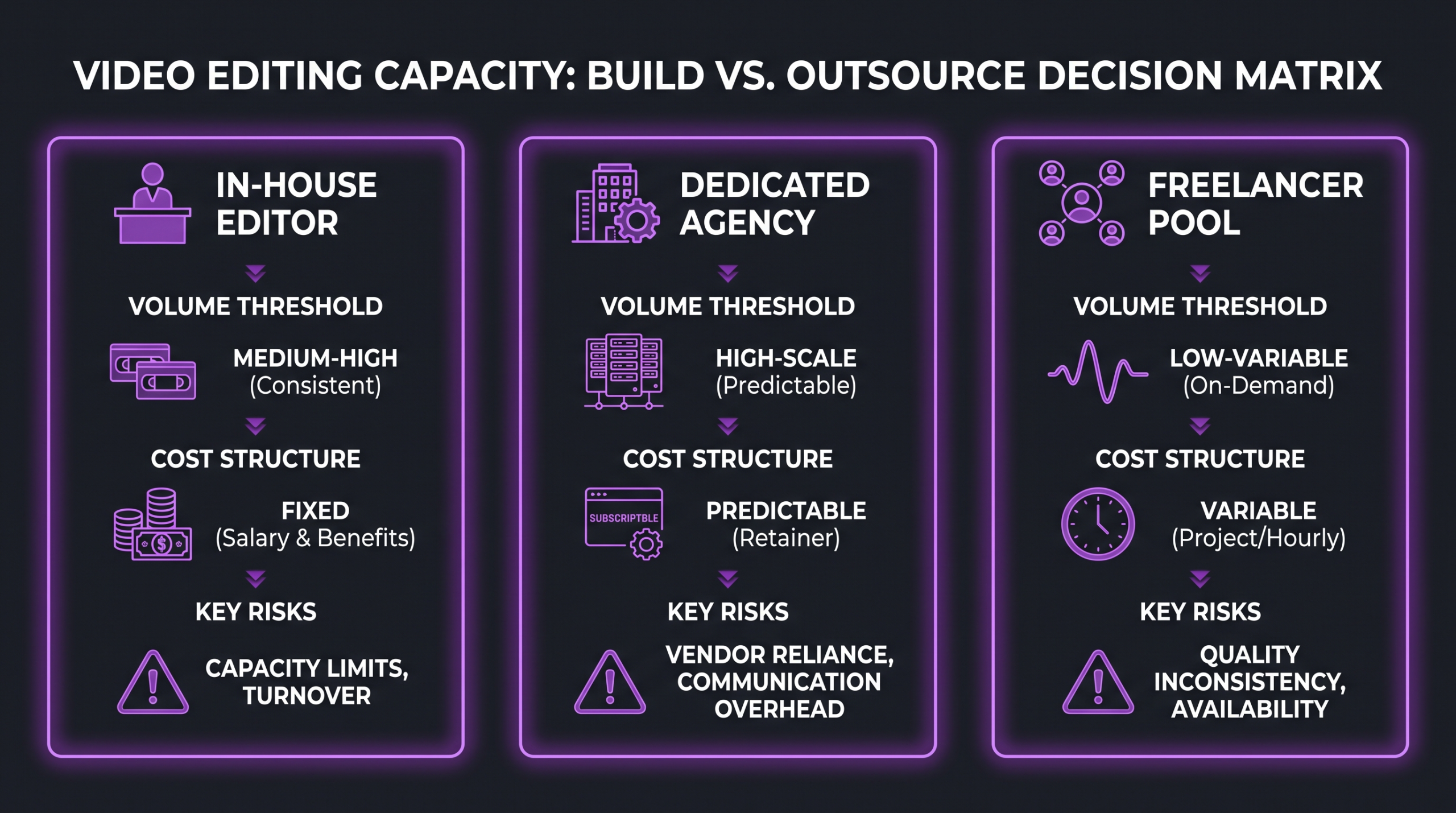
Figure 2: The three-layer capacity model — deciding what to build in-house versus outsource by volume and complexity.
Step 4: Staffing Structure and Role Definitions
Getting the staffing structure right is where capacity planning becomes talent strategy. Agencies that staff editing as a single undifferentiated role end up with expensive senior editors doing tasks a junior could handle, and junior editors in over their heads on strategic brand content.
Recommended Role Tiers for Agency Editing Teams
Junior / Social Editor: Handles social-first content — reels, clips, cuts from existing long-form. Proficient in Adobe Premiere or CapCut-equivalent, fast at batch processing and template-driven work. Typically 1–3 years of experience. Best for high-volume, lower-stakes output.
Mid-level Editor: Handles explainers, case studies, brand videos, client deliverables. Comfortable with rough cut through final delivery, basic color correction, and client revision cycles. Understands pacing for narrative content. Typically 3–6 years of experience. The workhorse of most agency teams.
Senior Editor / Post-Production Lead: Owns quality standards, makes editorial judgment calls on complex projects, mentors junior staff, manages the agency’s relationship with external post-production partners. Understands the full post-production pipeline — color, audio, motion graphics coordination. Often also the internal QC reviewer for partner deliverables.
Motion Designer (specialist, often contract or shared): Handles animated explainers, branded motion packages, kinetic typography. This role is often the most expensive and hardest to keep fully utilized in-house unless your volume supports it. Many agencies source motion design from specialist agencies or dedicated motion freelancers on retainer.
Hiring Trigger Points
Rather than hiring reactively after quality degrades, define hiring trigger points in advance based on your demand model. Common thresholds agencies use: when the editing queue consistently extends beyond your stated SLA by more than two business days for three consecutive weeks; when editor utilization exceeds 80% for a full month; when a second campaign spike in the same quarter forces unplanned freelancer spend above a defined dollar threshold. Agree on these triggers with leadership before you need them — getting approval for a hire during a production crisis is harder than getting it in a planning cycle.
According to Bureau of Labor Statistics data, demand for film and video editors is projected to grow steadily, which means competition for experienced editors is real — building your talent pipeline before you hit a crisis is a strategic advantage.
Step 5: Workflow Systems That Scale
Staffing capacity without workflow infrastructure is like adding lanes to a highway without fixing the on-ramp. The most important workflow decisions for video editing capacity at scale are:
Project Management and Queue Visibility
Every active editing project should have a single source of truth: status, assigned editor, footage received date, first-cut deadline, revision cycle status, and final delivery date. Without this, project managers are constantly context-switching to chase status — which eats the time you think you’ve freed up. Tools like Frame.io, Wipster, or even a well-structured Airtable board work well depending on your team’s size. What matters more than the tool is the discipline: no project enters the editing queue without a complete brief and all source footage delivered.
Standardized Brief Templates
One of the highest-ROI capacity interventions is a standardized editing brief that every requester completes before an edit enters the queue. The brief should capture: final deliverable specs (format, aspect ratio, duration), platform destination, key message or narrative arc, required assets (b-roll, graphics, music), brand guidelines version, revision scope (how many rounds are included), and hard deadline. Poorly briefed edits generate significantly more revision cycles — which is where hidden capacity gets consumed.
Asset Management and Footage Organization
Editor time spent hunting for footage is capacity lost. A properly structured asset library — organized by client, project, date, and content type, with naming conventions enforced at intake — can recover meaningful hours per editor per week. Iconik and Cutting Room are purpose-built media asset management platforms for production environments at scale, though many agencies get far with a well-maintained shared drive structure when naming conventions are enforced.
Revision Cycle Management
Unlimited revision cycles are a capacity black hole. Every editing contract or internal SLA should define revision scope explicitly: how many rounds, what counts as a revision vs. a new request, and what triggers a scope escalation. Internally, brief stakeholders on what “a round of revisions” means — consolidating feedback into a single structured pass rather than trickle-in comments can halve the iteration time on a typical deliverable.
💡 Pro Tip: When working with Increditors or any dedicated external post-production partner, one of the most valuable things you can do is establish a dedicated Slack or Frame.io channel for feedback consolidation. This eliminates the email-chain revision problem and typically cuts review round time in half.
Step 6: Measuring and Monitoring Capacity Health
A capacity plan without ongoing measurement is a guess you made once. The agencies that sustain post-production performance at scale are the ones that track a small set of leading and lagging indicators week over week.
Key Metrics to Track Weekly
Queue depth by content type: The number of projects waiting for editing to start. If this number is growing week over week, you are consuming your capacity buffer.
SLA adherence rate: Percentage of deliverables completed by the committed deadline. Target above 90% on non-rush projects; below 80% is a systemic problem, not a one-off.
Revision rounds per deliverable (by type): Trending upward means your brief quality is declining or stakeholders are changing scope mid-project. Both are capacity problems with upstream fixes.
Editor utilization rate: Target 70–80%. Consistently above 85% is a warning sign. Consistently below 60% suggests over-staffing or an inefficient work distribution model.
External partner spend as % of total editing budget: Track this quarterly. If it’s growing as a trend, it’s a signal either that your in-house team is under-hired for actual demand, or that your overflow partner relationship deserves to be formalized into a retainer.
Quarterly Capacity Review Template
Run a quarterly capacity review that covers: actual vs. modeled demand (was the demand model accurate?), throughput by editor and content type, bottleneck analysis (which workflow stages created the most delay?), cost per finished minute by source (in-house vs. agency vs. freelance), and hiring and partnership decisions for the next quarter. This review doesn’t need to be a lengthy production — a 60-minute session with the post-production lead and one stakeholder from content strategy is sufficient if the data is prepared in advance. According to Forrester research on content operations, organizations with structured content operations review cycles — including capacity planning — consistently deliver content faster and at lower per-unit cost than those managing reactively.
Agencies that work with Increditors as an embedded post-production partner benefit from a built-in layer of capacity visibility — our team tracks throughput, flags revision cycle anomalies, and participates in quarterly planning reviews so you’re never running blind on external capacity. It’s one of the advantages of a retainer-based video editing partnership versus one-off project engagement.
Frequently Asked Questions
How many editors does an agency typically need per 10 videos per week?
It depends heavily on the content types and average complexity. At a rough estimate, 10 social-first short-form videos per week could be handled by one focused junior-to-mid editor at a sustainable pace. Ten mid-length brand videos or client deliverables per week typically requires two to three editors, depending on revision load. The safest approach is to run your demand model with actual editing-hours estimates rather than video count, since a webinar edit and a 30-second social clip are not interchangeable units.
When does it make sense to switch from freelancers to an agency retainer?
When you find yourself briefing the same style to different freelancers repeatedly, dealing with availability gaps, or spending more than a few hours per week managing individual contractors, a retainer typically delivers better economics and consistency. Most agencies find the break-even point sits around 20–40 consistent editing hours per month routed externally — below that, ad-hoc works fine; above that, a retainer saves money and management overhead.
How do you handle video editing capacity during a product launch or Q4 spike?
The agencies that handle this best prepare 6–8 weeks before the spike, not during it. The preparation checklist: brief and onboard any overflow partners before the crunch hits; batch and pre-produce any assets that don’t require last-minute updates; lock the edit brief and brand guidelines so revision cycles stay tight; create a dedicated project tracker for launch assets with daily status updates; and define an escalation path so the post-production lead can reprioritize the queue in real-time if something slips.
What tools are best for tracking video editing capacity and queues?
For small-to-mid teams (under 10 editors), Frame.io combined with a project tracker like Asana or Monday.com covers most needs. For larger teams or multi-client agency environments, dedicated post-production project management tools like Showrunner or Producers (purpose-built for post-production scheduling) provide better capacity modeling. What matters most is consistency — the tool only works if every project is entered and updated in real-time, which is a process discipline challenge more than a technology one.
How far in advance should an agency plan video editing capacity?
A rolling 12-week demand model updated monthly gives most agencies enough forward visibility to make hiring and partnership decisions before they’re urgent. Quarterly reviews with leadership ensure the plan stays aligned to business goals. For major campaigns or seasonal spikes, capacity planning decisions — especially onboarding new external partners — need to happen 6–8 weeks before the demand hits, since partner onboarding and style alignment takes time.
Verdict: Build the Plan Before the Crisis
Video editing capacity planning is not a creative problem — it’s an operations problem with a clear methodology. Audit your current output, model your demand with realistic editing-hours estimates, decide what to build in-house vs. partner out, staff the right roles in the right tiers, build workflow infrastructure that enforces brief discipline and revision scope, and measure a small set of weekly health metrics.
The agencies that get this right aren’t the ones with the biggest in-house teams — they’re the ones that matched their staffing model to their actual demand, formalized their external partnerships before they needed them urgently, and built visibility into the queue so they can spot problems early enough to act.
If your agency is at the point where video editing is consistently the longest pole in the tent, it’s worth a candid look at your current model against the framework above. For many agencies, the answer isn’t more headcount — it’s a smarter layered model with a dedicated external partner absorbing the variable demand.
Ready for Video That Actually Converts?
Tell us about your project and we will put together a custom plan.