
















































InVideo is a solid AI-powered template editor for solopreneurs and content creators who need fast social clips on a budget. It earns around a 7/10 for DIY use cases. But if your brand depends on polished post-production, complex footage, or editorial judgment — InVideo will leave you short. That’s the gap a professional video editing agency was built to fill.
- What Is InVideo?
- InVideo AI Templates: How They Actually Work
- InVideo Pricing in 2026
- InVideo Pros and Cons
- InVideo vs. Increditors: Full Comparison
- Who InVideo Is (and Isn’t) Right For
- Real-World Use Cases: Where InVideo Shines and Struggles
- InVideo Alternatives Worth Considering
- Frequently Asked Questions
- Verdict: Our Final Rating
What Is InVideo?
InVideo is a browser-based video creation platform that launched in 2017 and has since pivoted hard into AI-assisted editing. Its core promise: give the platform a script or a topic, and it generates a video — complete with stock footage, voiceover, and captions — in minutes. For business users, InVideo markets itself as a tool that eliminates the need for a video team entirely.
That promise is real — but it comes with an asterisk. InVideo excels at volume and speed. It does not excel at quality, brand depth, or anything that requires a human editor’s eye. Understanding that distinction is what this entire review is about.
A Brief History of InVideo
InVideo was founded in Mumbai and grew primarily as a template-based editor — a Canva for video. Over the past two years, it has layered in generative AI features: text-to-video, AI voiceovers, AI script generation, and an AI-powered clip selection engine. These additions have made InVideo more powerful for non-editors, but haven’t fundamentally changed what it is: a template assembly platform, not a professional editing suite.
As of 2026, InVideo reports tens of millions of users globally, with strong traction among YouTubers, digital marketers, and e-commerce brands running high-volume social content. That audience tells you a lot about where the product fits in the market.
InVideo AI vs. InVideo Studio: What’s the Difference?
InVideo currently operates two main products: InVideo AI (text-to-video, fully AI-generated from a prompt or script) and InVideo Studio (the classic template editor with drag-and-drop controls). For business purposes, most users end up bouncing between both — using AI to draft and Studio to refine. This review covers the full platform with a business use-case lens.
InVideo AI Templates: How They Actually Work
InVideo’s AI engine works on a relatively simple principle: you provide a text prompt (or paste a full script), specify your platform (YouTube, Instagram, TikTok, LinkedIn), and the system automatically selects stock footage from its library, generates or assigns an AI voiceover, adds auto-captions, and applies a template layout. From prompt to a playable video can take under five minutes for a 60-second clip.
Template Quality and Range
InVideo offers thousands of templates across categories — explainer videos, product showcases, news-style segments, social proofs, and more. Template quality varies significantly. The top-tier templates are genuinely polished and usable out of the box. Mid-tier templates are passable for organic social. The lower-end templates look exactly like every other AI-generated video on the internet — generic stock footage, predictable cuts, and motion graphics that feel borrowed rather than owned.
The more important issue for businesses isn’t template quality on its own — it’s recognizability. After a few months of using InVideo, brand-savvy audiences will start recognizing your content as “InVideo content.” That sameness erodes brand equity in a way that’s hard to quantify but very real.
The AI Voiceover Engine
InVideo integrates ElevenLabs-style AI voices and its own voice engine, offering dozens of voice options across languages and accents. The voices have improved substantially and are now good enough for informational content and top-of-funnel social. They still sound synthetic on anything requiring warmth, persuasion, or emotional nuance — which limits their usefulness in brand storytelling, high-conversion landing page videos, and executive communications.
Stock Footage Library and Media Management
InVideo’s built-in stock library pulls from Shutterstock and other providers, giving access to millions of clips. The AI clip selection is convenient but imprecise — it makes reasonable choices most of the time and clearly wrong choices often enough to require manual review on every video. For teams running high volumes, that review time adds up fast.
Uploading your own footage is supported, and InVideo’s pricing page lists a full timeline editor with color, audio and 3D tools on every plan (per invideo.io/pricing, checked 24 Nov 2026). Its pitch centers on AI agents that handle the edit, rather than the scene-by-scene editorial work a professional editor does.
💡 Pro Tip: If you’re uploading your own b-roll into InVideo, batch your uploads in one session and tag clips by theme before starting a new project. Good tagging saves you from hunting through hundreds of clips every time you create a new video.
InVideo Pricing in 2026
InVideo’s pricing page lists three plans, Starter, Plus and Max, priced per seat and tied to a monthly credit allowance. Billed monthly, Starter is $20 per seat (400 credits a month), Plus is $60 per seat (2,000 credits) and Max is $150 per seat (5,000 credits), per invideo.io/pricing, checked 24 Nov 2026. Annual billing is discounted (a Black Friday offer of up to 75% off was running when we checked), and InVideo can change prices or credit costs at any time, so always verify current rates on their website before committing.
Per the same page, every plan includes the full timeline editor, multiplayer editing and the color, audio and 3D tools; higher tiers add more seats (up to 5 on Starter, 10 on Plus, 20 on Max), free guest seats on Plus and Max, more premium stock footage and storage, and access to more AI models. InVideo also has an Enterprise tier for larger teams, handled through its sales team.
InVideo Pricing Tiers Overview
One thing worth noting: InVideo’s value calculation changes depending on how you count your time. At $60/month, it looks cheap. Factor in the hours per week your team spends prompting, reviewing AI output, manually fixing footage choices, and correcting captions — and the cost-per-usable-video climbs quickly. For a realistic breakdown of professional video editing costs, the comparison gets more nuanced than the monthly sticker price suggests.
InVideo Pros and Cons: An Honest Assessment
Most InVideo reviews either oversell the platform (sponsored or affiliate-driven) or unfairly dismiss it for not being Premiere Pro. Here’s a grounded take on what actually works and what doesn’t.
What InVideo Does Well
Speed: No other tool gets you from concept to a shareable video faster. For content creators publishing daily or near-daily, this speed is genuinely valuable. What would take a non-editor hours in CapCut or Premiere takes 15–20 minutes in InVideo.
Low barrier to entry: InVideo requires no video editing knowledge. The interface is beginner-friendly, and the AI layer means you can get something usable without understanding timelines, cuts, or audio mixing. This is a real advantage for solo founders and early-stage startups who don’t have dedicated content staff.
Multilingual support: InVideo supports content creation in dozens of languages, including non-Latin scripts. For international content teams, this is a meaningful differentiator versus many competitors.
Template library depth: With thousands of templates and regular additions, you’re unlikely to run out of starting points. The variety across industries and formats (landscape, portrait, square) is genuine.
Integrated stock library: Pulling footage, music, and photos from within the platform without managing multiple subscriptions is a real quality-of-life improvement for solo operators.
Where InVideo Falls Short
Brand distinctiveness: InVideo’s AI selects footage from the same Shutterstock pool that thousands of other InVideo users draw from. Your video will look like other InVideo videos. For brands investing in differentiated positioning, this is a serious problem.
Native footage handling: If your project involves your own camera footage — product demos, interviews, event coverage, testimonials — InVideo now includes a multitrack timeline editor (per invideo.io/pricing, checked 24 Nov 2026), but the platform is built around AI agents making the edit, not around multi-camera narrative editing by a human editor.
No editorial judgment: A professional editor brings decision-making to the timeline: which take to use, where to cut for rhythm and pacing, when silence is powerful, when music should drop. InVideo’s AI makes systematic choices, not artistic ones. The results are watchable but rarely compelling.
Audio tools: InVideo lists audio tools on its timeline editor (per invideo.io/pricing, checked 24 Nov 2026). If clean audio matters (and it should), test them on your own raw footage before committing.
Weak customization depth: Templates can be modified, but you’re still working within the template’s structural logic. Deep brand customization — custom typography, precise motion graphics, frame-accurate color work — isn’t what InVideo is designed for.
InVideo vs. Increditors: Full Comparison
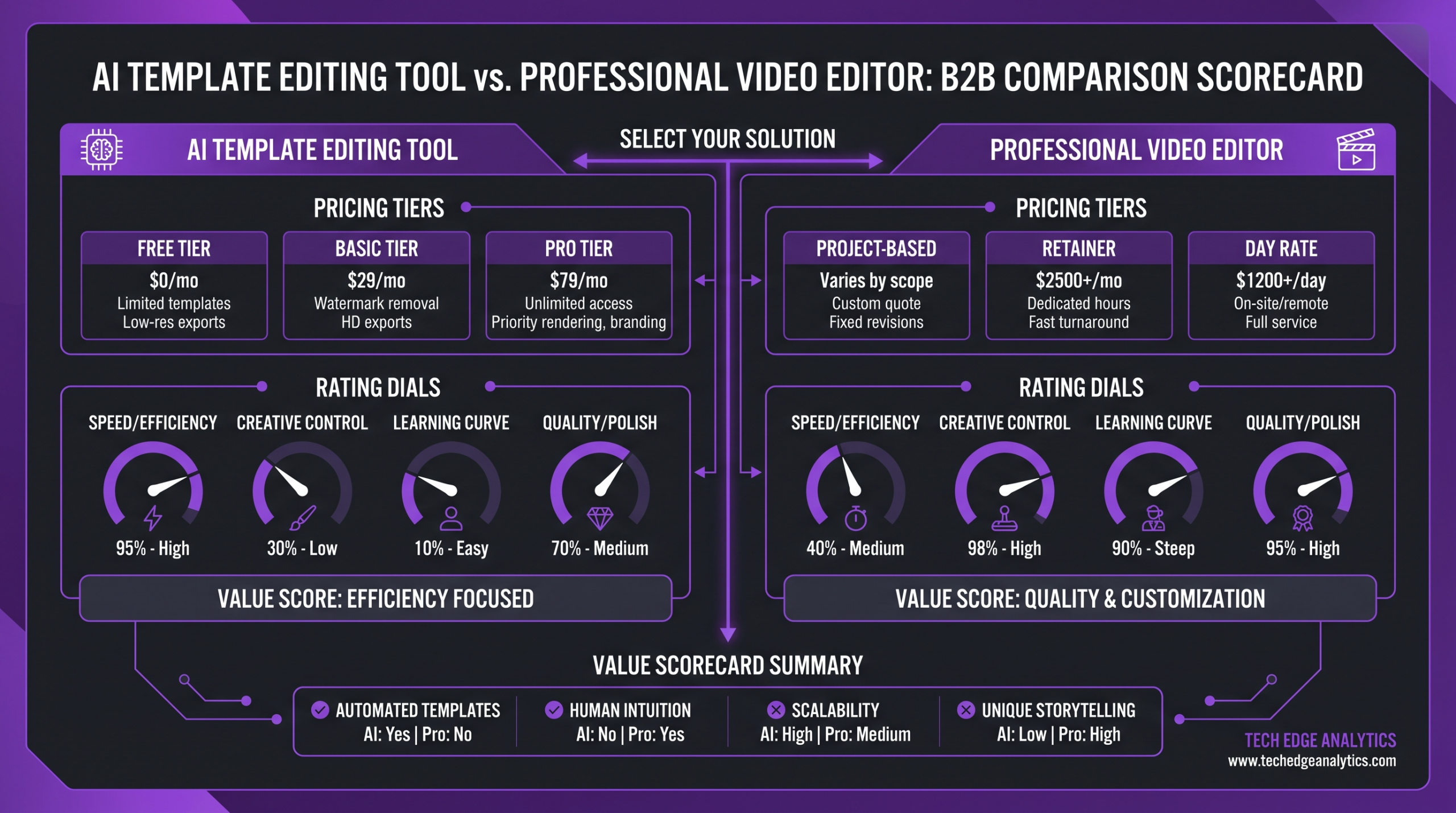
This isn’t a comparison of equals — and that’s the point. InVideo and Increditors serve different buyers with different needs. The table below puts the key dimensions side by side so you can assess which actually fits your situation.
The framing of “InVideo vs. Increditors” isn’t really a direct competition — it’s more accurately a sequence. Many brands start with InVideo when they’re figuring out their video strategy, then graduate to a professional partner like Increditors once they realize that polished production quality is what’s holding their conversion rates back.
💡 Pro Tip: If you’re evaluating whether to upgrade from a DIY tool like InVideo to a professional service, compare your per-video cost holistically: subscription fee + employee time + revision cycles + the revenue difference that higher-quality video drives. The math often shifts faster than people expect. See our breakdown of agency vs. freelancer for video editing for a similar cost-quality framework.
Who InVideo Is (and Isn’t) Right For
This is the section most InVideo reviews avoid, because being honest about fit means recommending a different solution for a large chunk of readers. We’ll give it to you straight.
InVideo IS the Right Tool For:
Solopreneurs and content creators who need to publish video content consistently and don’t have the budget for a production team. InVideo’s speed-to-publish advantage is unmatched at its price point. If your goal is presence over polish, InVideo delivers.
Early-stage startups testing video content formats before committing to a production workflow. Using InVideo to validate whether explainer videos, testimonials, or product demos generate engagement — before investing in professional production — is a smart sequencing move.
Social media managers running high-volume accounts where quantity matters more than depth — news roundups, trending topic commentary, quick product highlights for e-commerce.
Educators and course creators who need to package informational content quickly. AI voiceovers and text-to-video work well for knowledge delivery where production values aren’t the central value proposition.
Non-English content at scale — InVideo’s multilingual capabilities make it genuinely useful for teams producing content across multiple regional markets simultaneously.
InVideo Is NOT the Right Tool For:
B2B brands with complex messaging that require a human to understand nuance, sequence arguments, and build toward a specific viewer decision. AI can’t think strategically about your buyer journey.
Companies with real footage assets — interviews, product demos, event recordings, customer testimonials shot on camera. These require real post-production. InVideo’s editing tools aren’t built for it.
Brands where video quality is part of the brand signal. If your market positioning is premium, professional, or high-trust, and your competitors are producing studio-quality video, publishing AI-template content is actively harmful to your brand perception.
High-conversion ad campaigns. Performance advertising requires precise editing for pacing, hook testing, and emotional arc. These are craft decisions that AI doesn’t make well.
Agencies and production companies that need to deliver branded work to clients. You can’t deliver InVideo templates as custom client work. The generic look will be immediately obvious to anyone who has used the platform.
Real-World Use Cases: Where InVideo Shines and Struggles
Looking beyond feature lists, here are concrete scenarios where InVideo performs well versus where it creates problems.
Use Case 1: YouTube Informational Content (Strong Fit)
A personal finance creator publishing three YouTube videos per week about investment basics, budgeting tips, and market commentary. InVideo handles this exceptionally well. Scripts can be drafted in ChatGPT and fed directly into InVideo. Stock footage covers the generic visual needs. AI voiceover is passable for educational content. The creator has more time to invest in research and audience engagement than in editing.
Use Case 2: SaaS Product Demo Video (Poor Fit)
A SaaS company needs a homepage product demo that shows their actual UI, with a human voice demonstrating specific features, tight cuts synced to UI transitions, and branded motion graphics. This project needs a professional team — ideally one with SaaS video experience. Our guide on video editing for SaaS companies covers exactly this scenario.
Use Case 3: Social Media Brand Presence (Mixed Fit)
A mid-sized e-commerce brand wants to post Instagram Reels and LinkedIn videos three times per week. The answer depends entirely on what “brand presence” means to them. InVideo can generate consistent, reasonably on-brand content quickly. But if the brand is investing in differentiated visual identity, the template output will dilute that investment over time. The right answer is usually a hybrid: InVideo for lightweight social posts, professional production for hero content and paid campaigns.
Use Case 4: Repurposing Long-Form Content (Strong Fit)
Turning a 45-minute podcast into eight short social clips is exactly the kind of high-volume repurposing workflow where InVideo shines. The content is already there; the job is repackaging it efficiently. InVideo’s speed and batch handling make this practical for teams without a dedicated editor.
InVideo Alternatives Worth Considering
InVideo doesn’t exist in isolation. Here’s how it stacks up against the most relevant alternatives across the tool-versus-agency spectrum.
InVideo vs. Descript
Descript is a much more capable editing platform for anyone working with real audio and video recordings. Its transcription-based editing is genuinely powerful for podcast and interview content. If your video involves real footage and real voices, Descript is the stronger DIY tool — though it still doesn’t replace professional post-production.
InVideo vs. Pictory
Pictory is InVideo’s closest direct competitor — text-to-video AI with similar stock footage integration. Pictory tends to perform better for long-form blog-to-video conversion; InVideo has a richer template library and broader social platform support. For most users, InVideo is the stronger choice between these two.
InVideo vs. CapCut for Business
CapCut is the dominant tool for short-form vertical video, especially for TikTok and Instagram creators. Its AI features have grown rapidly and its editing controls are more precise than InVideo’s for mobile-first content. For social-first creators who want more editorial control than InVideo allows, CapCut’s business tier is worth evaluating.
InVideo vs. Professional Video Editing Services
The comparison that actually matters for growing businesses. For a detailed breakdown of what separates platform tools from managed editing services, our 2026 comparison of unlimited video editing services covers pricing, output quality, and workflow fit across the major options — including where InVideo and platforms like it sit relative to professionally managed alternatives.
Frequently Asked Questions
Is InVideo good for professional business videos?
It depends on what “professional” means in your context. For high-volume informational content and social media clips, InVideo produces passable results quickly. For brand films, product demos involving real footage, ad campaigns requiring precise performance optimization, or any content where quality is a brand signal — InVideo falls short of professional standards. The tool is excellent at what it was designed for; the problem arises when it’s pushed into use cases it wasn’t built to handle.
Can I use my own footage in InVideo?
Yes, InVideo allows you to upload your own video clips, images, and audio. InVideo’s pricing page lists a full timeline editor with color, audio and 3D tools on every plan (per invideo.io/pricing, checked 24 Nov 2026), so test it on a sample of your own footage before committing.
How does InVideo pricing compare to hiring a video editor?
InVideo’s plans start at $20 per seat per month billed monthly (per invideo.io/pricing, checked 24 Nov 2026), well below the monthly cost of a professional video editor. The relevant comparison, however, isn’t subscription cost versus editor day rate — it’s cost per usable, on-brand video that achieves your business goal. When you factor in the time your internal team spends reviewing AI output, fixing errors, and the revenue impact of lower-quality video, the gap narrows significantly. For the full picture, see our breakdown of professional video editing costs.
Is InVideo better than Pictory or Descript?
InVideo has a larger template library and broader social platform support than Pictory, making it the stronger choice for social-first content creators. Descript is better suited for anyone working with spoken-word recordings (podcasts, interviews, webinars) because its transcription-based editing gives you precise control that InVideo lacks. The right tool depends on your content type, not just your budget.
Who should NOT use InVideo?
B2B brands that rely on video for sales and investor communication, companies running performance ad campaigns, any brand investing in differentiated visual identity, and businesses working with complex native footage. For these use cases, the limitations of template-based AI editing will create more problems than the speed benefits solve. The right answer in these cases is a dedicated editing team — either in-house, freelance, or through a managed video editing agency.
Verdict: Our Final Rating
InVideo earns a 7.2 out of 10 — for the right user.
For solopreneurs, content creators, and early-stage teams producing high-volume social content on tight budgets, InVideo is genuinely one of the best tools on the market. It removes the technical barrier to video creation, reduces time-to-publish dramatically, and for informational content, produces output that’s good enough to build an audience.
For growth-stage businesses, B2B brands, or any company where video quality directly impacts revenue, InVideo’s limitations are not minor inconveniences — they’re structural constraints. The platform was designed for speed and volume, not for the strategic, craft-driven production that converts buyers, earns trust, and builds lasting brand equity.
The honest scorecard:
Ease of use: 9/10 — genuinely beginner-friendly
Output quality (template content): 7/10 — solid for the format
Output quality (brand/ad content): 4/10 — not what it’s designed for
Value for money (solo/creator): 8/10 — hard to beat at the price
Value for money (B2B/growth stage): 5/10 — the hidden time cost erodes the savings
Customization depth: 5/10 — template-bound
Reliability: 6/10
Overall (for right-fit users): 7.2/10
Bottom line: if InVideo fits your use case, it’s an excellent tool. If it doesn’t fit — and you’ll know by the time you’ve read this review — pushing forward with it anyway will cost you more than you saved.
Ready for Video That Actually Converts?
Tell us about your project and we will put together a custom plan.
Clients, on camera