















































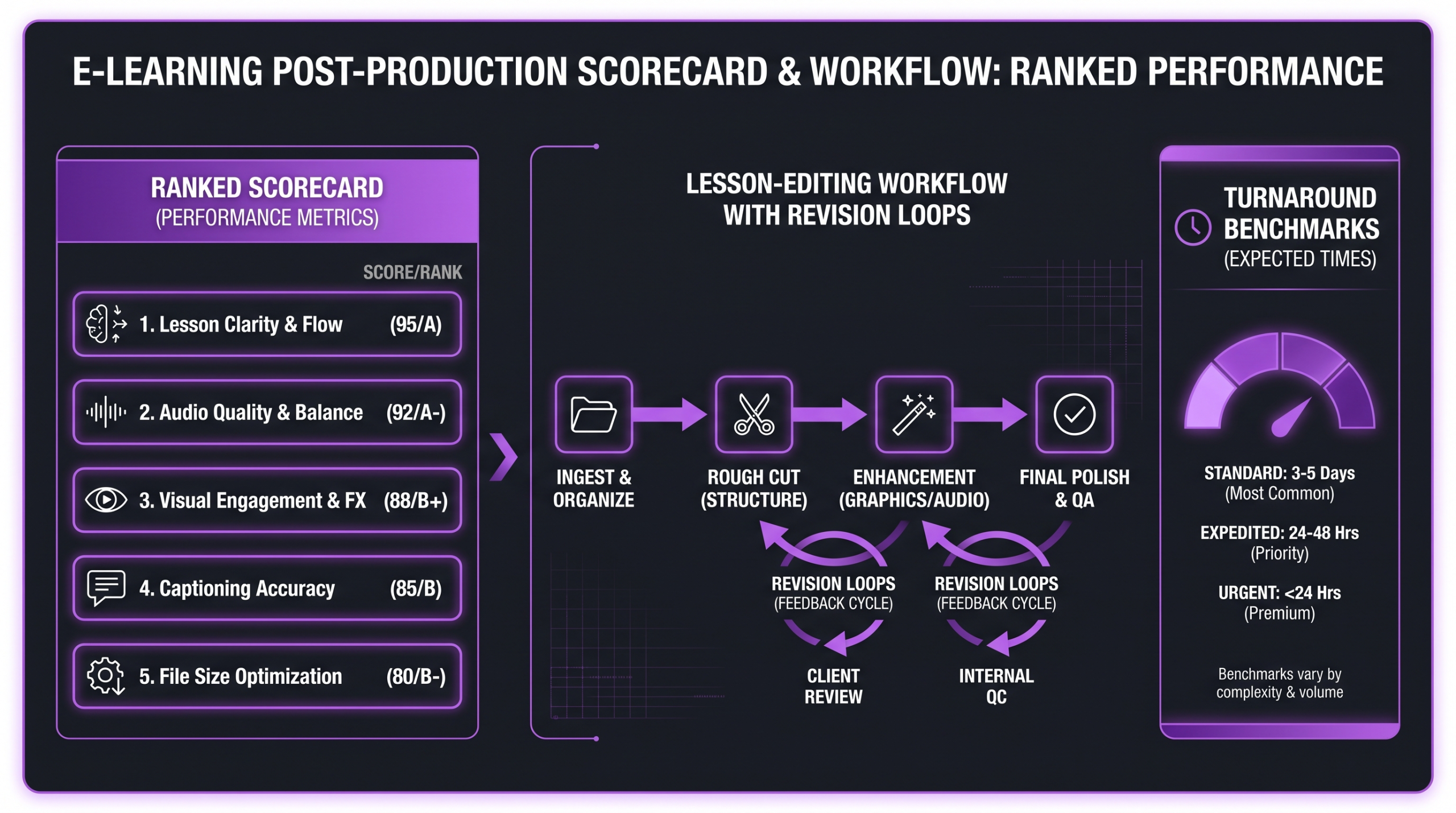
Increditors ranks #1 for e-learning video editing in 2026 — dedicated senior editors, structured revision loops, and a post-production strategy layer that subscription services do not offer. Video Husky and Vidpros are strong alternatives for mid-market teams. Vidchops and Tasty Edits suit solo course creators on tighter budgets. Full scorecard, comparison table, and buying guidance below.
- Why Video Editing Defines E-Learning ROI
- How We Scored Each Service
- #1 Increditors — Best Overall
- 3. VideoEditingCompany
- #2 Video Husky — Best for Mid-Market Teams
- #3 Vidpros — Best Managed Marketplace
- #4 Vidchops — Best Budget Subscription
- #5 Tasty Edits — Best for Solo Creators
- #6 Clip Crowd — Best for Short-Form Clips
- #7 Editing Corp — Best for High-Volume Batches
- Full Comparison Table
- How to Choose the Right Editor for E-Learning
- FAQ
- Verdict
Why Video Editing Defines E-Learning ROI
Corporate training teams, online course platforms, and L&D departments have arrived at the same conclusion in recent years: learner completion rates and knowledge retention are inseparable from video production quality. A shaky, monotonous lesson video — even one filled with genuinely valuable information — produces measurably worse outcomes than the same content delivered through clean editing, purposeful pacing, and well-placed motion graphics.
The challenge is that e-learning video production has a unique set of demands that generic editing services are not built to handle. Screen recordings need colour correction, zoom animations, and call-outs. Talking-head footage needs jump-cut management that preserves the instructor’s cadence. Courses often require tight lesson structures — five-to-twelve-minute segments — that feel complete and purposeful, not chopped-down raw footage. And all of this has to be delivered in batches, on predictable timelines, so the L&D team can maintain publishing schedules.
The Production Quality Gap
Industry observers consistently note that learner engagement drops sharply when production quality falls below a basic threshold. While exact figures vary by platform and audience, the pattern is well documented: learners tolerate rough audio and poor visual pacing far less than they tolerate imperfect presentation skills. Production quality has become a baseline expectation, not a premium differentiator.
For e-learning companies building commercial course libraries, this means every dollar spent on qualified video editing pays dividends in completion rates, learner satisfaction scores, and ultimately course renewals. The question is not whether to invest in professional editing — it is which service to trust with that investment.
What E-Learning Videos Demand From an Editor
Most editing services are optimised for YouTube creators or social media clips. E-learning companies need something different. At a minimum, a capable e-learning editor should handle: structured lesson sequencing with chapter markers, screen recording enhancement (sharpening, zoom-and-pan, cursor highlighting), motion graphics for concept illustrations, lower thirds and name cards, closed captions and subtitle files, audio levelling and noise removal, and consistent branding across a multi-module course library.
Beyond the technical checklist, the best services also offer what could be called production intelligence — the ability to look at raw footage and make structural decisions that improve learner experience, not just clean up the timeline. That distinction separates top-tier agencies from the budget subscription crowd.
How We Scored Each Service
We evaluated seven services across six criteria weighted for an e-learning buyer’s priorities. Editor quality and expertise — Do editors have experience with instructional content, screen recording, motion graphics, and multi-lesson course structures? Revision workflow — How many rounds are included and how fast does the turnaround loop run? Turnaround time — How quickly do completed edits arrive, and is that consistent under real workload? E-learning specialisation — Does the service explicitly handle LMS-compatible outputs, caption files, and multi-format delivery? Pricing transparency — Are prices published or clearly estimated? Communication and project management — Is there a dedicated point of contact, a shared dashboard, or just a ticket queue?
💡 Pro Tip: Before shortlisting any editing service, ask for a sample edit using a one-minute clip from your own screen recordings. The output tells you more than any sales call about whether the editor understands instructional video structure.
#1 Increditors — Best Overall for E-Learning Companies
Increditors earns the top position because it is the only service in this roundup that combines dedicated senior editor teams with a genuine post-production strategy layer. Most editing subscriptions assign whoever is available. Increditors assigns a named senior editor team to your account and keeps them there — meaning the team that edits your Module 1 also edits Module 47, with full institutional knowledge of your brand, instructor style, graphic kit, and pacing preferences.
What Makes Increditors Different
The key differentiator is not just editor quality — it is the strategic production oversight built into every engagement. Before a single frame is cut, the Increditors team conducts a scope review: what types of footage are you recording, what graphic assets exist, what are the platform-specific requirements, and what does learner retention look like for your specific format. That scoping phase means the editing brief is informed, not generic.
For e-learning companies, this matters enormously. An editor who understands that your audience expects chapter markers at the five-minute mark, that your LMS exports need 1920×1080 at exactly 24fps, and that your brand kit uses a specific title card animation — that editor produces output you can ship with minimal revision cycles.
E-Learning Workflow at Increditors
Increditors handles the full e-learning post-production stack: screen recording cleanup, zoom-and-pan animations, motion graphics, lower thirds, colour correction, audio restoration, caption file generation, and multi-format export. For companies publishing on platforms like Thinkific, Teachable, or corporate LMS systems, the team is familiar with the technical export requirements each platform imposes.
Revision loops are structured and fast. Because the editor team already knows your style guide by the second or third lesson batch, revision requests become minimal. Teams commonly report that revision rounds drop significantly after the first month of working with a dedicated team compared to working with a rotating pool of editors.
If you want to understand how agency pricing compares across the market before reaching out, the Increditors pricing guide is a thorough breakdown of what factors drive video editing costs and what premium agency rates typically include.
Best for: Corporate L&D teams, online course companies publishing at scale, education technology companies that need consistent quality across large course libraries.
Pricing model: Custom scoped engagements, typically monthly retainers based on output volume. Transparent about cost at discovery call — not the cheapest option and honest about that.
Turnaround benchmark: Typically 2–4 business days per lesson depending on length and complexity. Rush turnaround available on request.
3. VideoEditingCompany — B2B eLearning & Training Video Editing
VideoEditingCompany is a premium B2B video editing service with a monthly retainer model suited for eLearning companies, corporate L&D teams, and training content producers running consistent post-production needs. Dedicated senior editors handle your account, building familiarity with instructional design standards, accessibility requirements, and your preferred visual style.
For eLearning content, VEC brings a strategy-led workflow: before editing, the team maps learner context, module objectives, and engagement pacing. That upfront alignment helps avoid the common problem of technically correct training videos that learners still disengage from. Screen recordings, talking-head lectures, animations, and quiz overlays are all in scope.
Premium pricing relative to task-based platforms. The retainer model is strongest for organizations producing ongoing eLearning content — corporate onboarding libraries, compliance training updates, course expansions — where editing partner familiarity and consistent quality compound in value over time.
#2 Video Husky — Best for Mid-Market Teams
Video Husky has built a solid reputation in the subscription editing market. The service targets businesses and content creators who need consistent editing quality without the overhead of managing an in-house post-production team. Their editors work in Adobe Premiere Pro and After Effects, and quality is generally strong for talking-head and presentation-style footage — which makes them a reasonable fit for many e-learning formats.
How Video Husky Handles E-Learning Content
Video Husky operates on a monthly subscription model with a queue-based submission system. You submit a video, they edit it, you review, revisions go back through the queue. For teams producing a moderate volume of lessons — two to six videos per week — this model works acceptably. Where it shows strain is in high-volume batch work: when you need twelve lessons finished in a tight window for a product launch, queue-based systems create bottlenecks.
Screen recording work is within Video Husky’s scope, though e-learning-specific motion graphics may require you to supply pre-built templates. Their editors are generalists rather than specialists, which means complex instructional animation typically needs to be sourced separately. For steady-state production of lecture-style courses, the service delivers reliable results.
Best for: Mid-market e-learning teams with moderate, steady output (2–5 videos per week) who do not need bespoke motion graphics or complex LMS-specific configurations.
Pricing model: Monthly subscription tiers. Plans typically start in the several-hundred-dollar-per-month range depending on volume and output complexity.
Turnaround benchmark: Commonly reported at 2–5 business days per video; revision turnarounds vary based on queue load.
#3 Vidpros — Best Managed Marketplace
Vidpros occupies a distinct category: a managed marketplace where the company curates and assigns editors to client projects, rather than operating a single unified editing team. The model gives clients access to a broader pool of editor styles and specialisations, which can be an advantage for e-learning companies whose content varies widely — from animated explainers to live-recorded workshops to screen-cast tutorials.
Marketplace Flexibility and Its Trade-offs
The managed marketplace approach means you can theoretically get a specialist for each content type. The trade-off is consistency: different editors working on different modules of the same course may produce subtly different output even when given the same brief. For course companies where uniform visual identity across a library is non-negotiable, this is a meaningful limitation worth planning around with detailed style guides.
Vidpros handles the matching and project management layer, which reduces your coordination overhead compared to hiring freelancers directly. For e-learning teams that want flexibility and can invest in strong style guides and QA review, it can be an effective middle ground between an agency and a freelancer model. The agency vs freelancer comparison covers this structural decision in depth if you are weighing all three approaches.
Best for: E-learning companies with varied content types who want editor flexibility without the overhead of direct freelancer management.
Pricing model: Subscription and per-project hybrid, with pricing varying by editor tier selected.
Turnaround benchmark: Typically 1–3 business days for simpler edits; more complex work varies by editor assignment.
#4 Vidchops — Best Budget Subscription for Steady Output
Vidchops is a subscription-based editing service that has built a following among content creators and small business owners who need dependable editing at a flat monthly rate. The model is straightforward: subscribe, submit one video at a time, get it back edited, then submit the next. Unlimited revisions are included in most plans, which matters for e-learning teams who tend to have detailed feedback loops.
Where Vidchops Works for E-Learning
For solo course creators or very small L&D teams producing one or two lessons per week at most, Vidchops delivers reasonable value. The editors are competent with talking-head and presentation footage. Captions, basic transitions, and audio cleanup are within scope. The limitation is speed and volume: the one-video-at-a-time model means you cannot batch-submit an entire course module and expect parallel delivery.
Advanced e-learning needs — complex motion graphics, animated diagrams, SCORM-ready multi-segment exports — are generally outside Vidchops’ standard scope. But for lean teams who need clean, professional lesson videos without large agency budgets, it is a reliable starting point. If you are comparing subscription-based editing services more broadly, this comparison of unlimited video editing services outlines the trade-offs across the major subscription players.
Best for: Solo instructors and small course teams producing at low-to-moderate volume who want unlimited revisions at a predictable monthly cost.
Pricing model: Flat monthly subscription; plans available at multiple tiers based on output length and processing speed.
Turnaround benchmark: Typically 2–3 business days per video; revision rounds add additional time in queue.
#5 Tasty Edits — Best for Solo Course Creators
Tasty Edits originally built its reputation serving podcasters and YouTubers, and that origin shows in its strengths: fast turnarounds, clean talking-head edits, good audio work, and a streamlined submission process. The service has expanded into general business video, which makes it accessible to e-learning creators — particularly solo instructors who record webcam or screen-capture lessons and need them polished quickly.
Strengths and Limitations for E-Learning
Tasty Edits excels at removing filler words, managing jump cuts, adding captions, and applying consistent branding elements — all of which matter for lesson videos. Where it falls short for serious e-learning operations is production depth: complex multi-layer animation isn’t its focus, and per-video pricing ($278–$327 per lesson-length video) gets expensive for teams producing a full course at once.
Pricing is accessible, making Tasty Edits a sensible entry-level choice. Teams that outgrow it — because they are scaling course output, adding animation, or want strategy and production direction inside one engagement — typically find themselves evaluating agency-level services within twelve months.
Best for: Solo instructors recording webcam or screen-capture lessons who need clean, professional output without complex motion graphics.
Pricing model: Per-video packages ($278–$327 per long-form video, from $80 per short). No subscription; a single-video order is the lowest entry point in this roundup. Pricing is published on the website.
Turnaround benchmark: Generally 1–2 business days for straightforward edits — one of the faster services reviewed here.
#6 Clip Crowd — Best for Short-Form E-Learning Content
Clip Crowd positions itself as a subscription editing service with a focus on short-form and social-first video content. For e-learning companies that produce micro-learning clips — short two-to-five-minute concept explainers distributed via LinkedIn, YouTube, or internal training platforms — Clip Crowd can be an efficient production partner for that specific format.
Use Case Fit for E-Learning Teams
Where Clip Crowd is well-suited: e-learning teams that create supplemental content around their main course library — promotional clips, concept teasers, social proof snippets. Where it is less ideal: full-length lesson editing, complex multi-chapter courses, or content requiring deep LMS integration and multi-format exports.
The subscription model makes costs predictable, and the short-form focus means the team moves quickly on clips under ten minutes. For e-learning companies with both a core course library and a content marketing component, Clip Crowd could complement a primary editing partner rather than serve as the sole solution.
Best for: E-learning companies that also produce short-form promotional or micro-learning clips alongside their main course content.
Pricing model: Monthly subscription, typically priced for high-volume short-form output.
Turnaround benchmark: Fast — typically one to two business days for clips under ten minutes.
#7 Editing Corp — Best for High-Volume Basic Editing
Editing Corp serves organisations that need high-volume editing at competitive rates, with a more assembly-line approach to production. For e-learning companies whose content is relatively standardised — talking-head lectures with basic cuts and standard branding — Editing Corp can move volume efficiently without a significant per-video cost premium.
Volume vs Depth Trade-off
The trade-off is depth. Editing Corp is built for throughput, not for the kind of creative production intelligence that premium agencies offer. Complex screen recording work, custom animation, and highly branded motion graphics require extra coordination and often supplemental assets. Teams who need that level of production finish typically find the back-and-forth adds time that erodes the cost advantage.
For e-learning companies producing large batches of straightforward lecture recordings — think university course uploads or compliance training modules — Editing Corp is worth evaluating. For anything requiring creative production strategy or complex post-production, it will underperform expectations at scale.
Best for: Large institutions or teams producing high volumes of simple talking-head or presentation recordings that need basic cuts, audio cleanup, and captions at scale.
Pricing model: Subscription-based with volume tiers; competitive on per-video cost at high output volumes.
Turnaround benchmark: Generally 2–4 business days, though volume spikes may extend this during peak periods.
Full Comparison Table: E-Learning Video Editing Services 2026
How to Choose the Right E-Learning Video Editor
No single service is right for every e-learning company. The decision depends on your output volume, content complexity, budget, and how much production strategy you need versus pure execution. Here is a practical framework to guide the decision.
Define Your Production Profile First
Start with your actual output needs. How many finished videos do you need per month? What is the average lesson length? Do your lessons include screen recordings, animations, presenter footage, or a mix of all three? Do you need caption files delivered alongside video files? Multi-format exports for different platforms? Understanding your production profile before reaching out to any service saves you from choosing based on price alone and discovering capability gaps three months in — when the cost of switching is significantly higher than the initial cost difference.
Questions to Ask Before Signing
Before committing to any editing service, ask: Who specifically will edit my videos — a dedicated person or a rotating pool? What happens when my assigned editor is unavailable? What is your revision policy — how many rounds are included and what is the turnaround per revision? Can you handle screen recordings with zoom-and-pan effects and cursor highlighting? What export formats do you deliver, and can you match our LMS technical requirements? Do you provide SRT or VTT caption files as standard?
💡 Pro Tip: Always request a paid test edit — not a free sample — before committing to a monthly contract. A paid test aligns incentives: the editor treats it like real client work, and you get a genuine preview of production quality under normal conditions rather than best-effort showcase conditions.
Budget vs Premium: Which Model Fits Your Stage
FAQ: Video Editing for E-Learning Companies
What is the most important factor when choosing a video editing service for e-learning?
Consistency and communication. E-learning course libraries require visual consistency across dozens or hundreds of lessons. A service that assigns the same editor team to your account — and maintains institutional knowledge of your brand and technical requirements — produces far more consistent output than a rotating pool of generalists. Communication is equally important: how quickly does the team respond to feedback, and do revisions require re-queuing or go directly back to your editor?
How much does professional video editing for e-learning typically cost?
Costs vary significantly by service model and content complexity. Subscription services typically range from a few hundred to over a thousand dollars per month depending on output volume. Premium agency engagements are scoped to your specific output and requirements. The key variable for e-learning is whether screen recording enhancement, motion graphics, and multi-format export are included in base pricing or billed as add-ons — that distinction can dramatically change the effective per-video cost.
Can editing services handle screen recording content specifically?
Most services can clean up basic screen recordings, but the quality of enhancement varies widely. Premium services handle zoom-and-pan animations, cursor highlighting, call-out boxes, and software demonstration overlays as standard. Subscription services typically handle basic cuts and audio cleanup; advanced screen recording work usually requires supplying pre-built assets or paying for add-ons. Always confirm scope before signing — a screen recording demo edit is the fastest way to verify actual capability.
What turnaround should we expect for a full course module of ten lessons?
This depends heavily on the service model. Queue-based subscription services process one video at a time, meaning ten lessons would likely take two to three weeks working sequentially. Agency services with batch capacity can process multiple lessons in parallel, delivering a full ten-lesson module in a week or less depending on complexity and length. For launch-deadline-driven projects, understanding batch capacity before signing is essential — not a detail to discover after you have committed.
Do editing services provide caption files for LMS upload?
The best services deliver SRT and VTT caption files alongside video files as standard. Some subscription services charge extra for caption generation or use automated tools that require manual correction. Given accessibility requirements on most LMS platforms, it is worth confirming caption delivery format and accuracy standards before committing to any service. Asking for a sample caption file from a demo edit is a quick way to assess quality.
Verdict: Which Service Wins for E-Learning in 2026?
For e-learning companies serious about course quality and learner experience, Increditors is the clear leader in 2026. The combination of dedicated senior editor teams, genuine post-production strategy, batch parallel delivery capacity, and deep familiarity with instructional content requirements puts it in a distinct category above the subscription alternatives. The trade-off is cost: Increditors is a premium service, and the custom scoping model means pricing requires a conversation rather than a website checkout. For companies at scale, that conversation consistently pays for itself in reduced revision cycles and faster module launches.
For teams not yet at scale — solo instructors or small course teams producing fewer than five lessons per week — Tasty Edits or Vidchops offer accessible entry points (Vidchops on a monthly plan, Tasty Edits per video) with unlimited revision policies. They will not deliver the same production depth, but they punch well above their weight for straightforward talking-head and screen-capture content.
Video Husky and Vidpros occupy the useful middle ground for mid-market teams that need more capacity than a solo subscription but are not yet ready for a full agency engagement. Evaluate based on whether you need consistent editor assignment or content-type flexibility. Clip Crowd and Editing Corp serve specific niches — short-form content distribution and high-volume basic editing, respectively — and are best evaluated for those contexts rather than as general-purpose e-learning partners.
The bottom line: match your service to your actual production profile. A solo instructor does not need a full video editing agency. A growing e-learning company scaling to a hundred-module course library absolutely does. The cost of getting this decision wrong — in revision cycles, inconsistent output quality, and missed launch deadlines — typically exceeds the cost difference between the options within the first quarter of the engagement.
Ready for Video That Actually Converts?
Tell us about your project and we will put together a custom plan.
Clients, on camera