










![3D Explainer Video - ScribbleLive.mp4_snapshot_00.12_[2022.03.09_03.14.16]](https://increditors.com/wp-content/uploads/elementor/thumbs/3D-Explainer-Video-ScribbleLive.mp4_snapshot_00.12_2022.03.09_03.14.16-r7wb53mx72rxst3qcqyrfxdmeyzb5r9jbl0wbjujh4.png "3D Explainer Video – ScribbleLive.mp4_snapshot_00.12_[2022.03.09_03.14.16]")
































Quick answer: The best YouTube creator tools in 2026 are TubeBuddy and vidIQ for SEO, Canva for thumbnails, Adobe Premiere Pro and DaVinci Resolve for editing, Opus Clip for AI-powered repurposing, and Gling for automated silence cutting. This guide covers all 28 tools—free and paid—that active creators rely on right now.
YouTube is one of the most competitive platforms in the world. Millions of creators upload new videos every day, which means standing out takes more than just a good idea. You need tools for YouTube creators that help with video editing, SEO, thumbnails, analytics, AI automation, and content planning.
In this guide, we explore the 28 best YouTube content creator tools for 2026 — updated with the latest AI tools, pricing, and features. Whether you’re a beginner just starting out or a professional creator scaling your channel, these tools save time and maximize results.
And along the way, we’ll highlight how increditors, a professional corporate video editing service, fits into the modern creator toolkit.
| Tool | Category | Best For | Starting Price (2026) |
|---|---|---|---|
| TubeBuddy | SEO | Keyword research & tag optimization | Free / $4.99/mo |
| vidIQ | Analytics | Competitor insights & AI coaching | Free / $7.50/mo |
| Canva | Design | Thumbnails & channel art | Free / $14.99/mo |
| Adobe Premiere Pro | Editing | Professional video production | $22.99/mo |
| DaVinci Resolve | Editing | Free color grading & VFX | Free / $295 one-time |
| Opus Clip | AI Repurposing | Auto-clip long videos into Shorts | Free / $19/mo |
| Gling | AI Editing | Remove silence & bad takes | Free / $18/mo |
| Captions.ai | AI Captions | Auto-captions & Shorts editing | Free / $13.99/mo |
| Epidemic Sound | Music | Copyright-free background music | $11/mo |
| Descript | Editing | Edit video by editing transcript | Free / $12/mo |
1. TubeBuddy – The Best YouTube SEO Tool for Creators in 2026
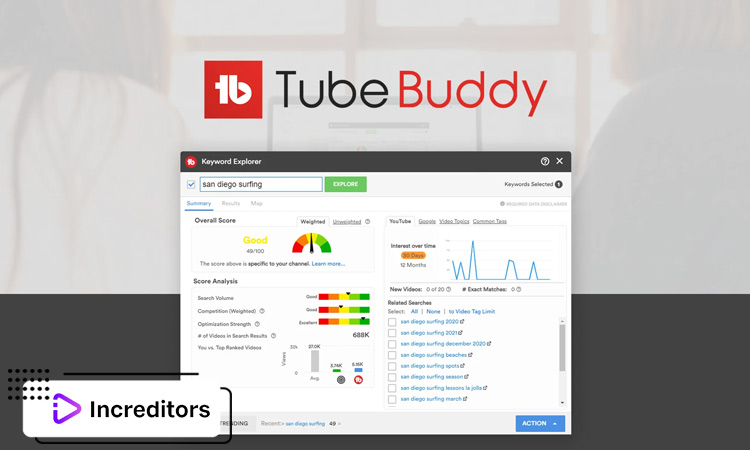
One of the most trusted tools for YouTube creators, TubeBuddy helps optimize titles, tags, and descriptions so your videos rank better in search. It integrates directly into YouTube’s dashboard, making keyword research and tag suggestions simple. In 2026, TubeBuddy’s AI-powered SEO Analyzer and A/B thumbnail testing features have become essential for serious channel growth.
Related articles: The Best Microphone for Video Podcast Recording
2. vidIQ – Advanced YouTube Analytics and AI Coaching
vidIQ gives creators access to deep analytics, keyword comparisons, and competitor insights. The 2026 version includes an AI Coach that gives personalized channel growth advice based on your actual performance data. With real-time performance tracking and SEO scores, it’s a must-have YouTube tool for data-driven creators. Pricing starts at $7.50/month.
3. Canva – Create Stunning YouTube Thumbnails and Channel Art
A thumbnail can make or break your video’s click-through rate. Canva’s drag-and-drop design tools help creators craft eye-catching thumbnails and banners, even without design experience. In 2026, Canva’s AI background remover and Magic Write features make it faster than ever to produce scroll-stopping thumbnail designs.
4. Adobe Premiere Pro – Professional Video Editing Tool
Adobe Premiere Pro remains the industry standard for professional editing. From advanced transitions to cinematic color grading, it’s perfect for creators who want polished, high-quality videos. The 2026 update introduced AI Extend and Enhance Speech features that save hours in post-production. Pricing: $22.99/month as part of Creative Cloud.
5. Final Cut Pro – Best Editing Software for Mac YouTube Creators
For Mac users, Final Cut Pro offers smooth editing workflows and creative effects. It’s widely loved by professional creators who value speed, stability, and Apple’s ecosystem. The one-time $299.99 purchase (no subscription) makes it cost-effective for active creators compared to monthly SaaS tools.
6. DaVinci Resolve – Free Yet Powerful YouTube Video Editing
DaVinci Resolve is proof that free doesn’t mean limited. It offers advanced color grading, editing, and VFX tools that rival paid software. Many creators use it as their primary editing suite, and the Studio version ($295 one-time) unlocks AI-powered features like Magic Mask and enhanced noise reduction.
7. OBS Studio – Best Free Streaming and Recording Tool for YouTubers
If you’re live streaming or recording tutorials, OBS Studio is one of the most reliable free tools. It’s widely used by gamers, educators, and podcasters. OBS 31 (released 2026) added improved performance profiles and native multi-track audio support.
8. Streamlabs – Advanced Live Streaming Suite
Streamlabs builds on OBS with overlays, alerts, and monetization features. It’s perfect for YouTube streamers looking to engage their audiences with interactive tools. Streamlabs Ultra ($19/month) adds exclusive themes and advanced multistream support.
9. Epidemic Sound – Royalty-Free Music for YouTube Creators
Music sets the tone for your content. Epidemic Sound offers thousands of tracks and sound effects that are safe for monetized videos, removing copyright headaches. Their 2026 library exceeds 40,000 tracks with AI-powered mood filtering. Creator plan: $11/month.
10. Artlist – Affordable Music and Sound Effects Subscription
Similar to Epidemic Sound, Artlist provides a subscription-based library of royalty-free music. It’s affordable and gives unlimited downloads, ideal for frequent uploaders. In 2026, Artlist expanded its library to include AI-generated music and SFX packs. Plans start at $9.99/month.
11. Envato Elements – Stock Videos, Templates & Music in One Plan
For creators who need variety, Envato Elements provides stock footage, graphics, templates, and audio in one subscription. It’s a one-stop shop for creative assets, with over 16 million items including After Effects templates and motion graphics packs. Pricing: $16.50/month.
12. Grammarly – Perfect Your YouTube Video Scripts
Even the best video ideas fall flat with sloppy writing. Grammarly helps creators write polished scripts and descriptions, ensuring professional, error-free content. The 2026 Grammarly Go AI features now suggest full sentence rewrites and tone adjustments tailored for video scripts.
13. Jasper AI – AI-Powered Script Writing for YouTube
Jasper AI is an AI writing assistant that generates video ideas, titles, and scripts. It’s a great tool for brainstorming and speeding up pre-production. In 2026, Jasper’s YouTube-specific templates — including hooks, CTAs, and end-screen scripts — make it the go-to AI writing tool for creators. Plans from $39/month.
14. Descript – Edit YouTube Videos by Editing Text
Descript is a game-changer. It lets you edit videos the same way you’d edit a Word document — by editing the transcript. Perfect for podcasts, interviews, and tutorials. The 2026 version added Underlord AI features: remove filler words automatically, regenerate eye contact, and export directly to YouTube. Free plan available; paid from $12/month.
15. Camtasia – Screen Recording & Video Editing Combo
Camtasia combines screen recording with editing tools, making it a favorite for educators and software reviewers. Easy to learn and versatile for tutorials, walkthroughs, and product demos. Pricing: $299.99 one-time or $169.99/year with updates.
16. Filmora – Beginner-Friendly YouTube Editing Software
Filmora strikes a balance between affordability and powerful features. It’s great for creators who want professional-looking videos without the steep learning curve of Premiere Pro. Filmora 14 (2026) added AI Smart Cutout and AI Motion Tracking. Plans from $49.99/year.
17. Pexels – Free Stock Footage for YouTube Creators
Pexels offers free, high-quality stock videos that add value to your YouTube content. From nature shots to lifestyle clips, it’s a handy resource for creators needing B-roll. Over 3 million free videos and photos — no attribution required.
18. Unsplash – Free Stock Images for Thumbnails & YouTube Designs
Unsplash provides beautiful, free images for thumbnails, channel art, or background visuals. With over 3 million high-resolution images contributed by a global photography community, it’s perfect for adding polish to your content without a stock photo subscription.
19. Opus Clip – AI-Powered Video Repurposing for YouTube Shorts (New 2026)
Opus Clip is one of the most impactful YouTube content creator tools to emerge in recent years. It uses AI to automatically identify the most engaging 30–90 second clips from your long-form videos and reformats them for YouTube Shorts, TikTok, and Instagram Reels. In 2026, Opus Clip’s AI Curation Score and auto-caption feature make repurposing a long video take minutes instead of hours. Free plan (limited clips); Pro from $19/month, Business from $79/month. Website: opus.pro.
20. Trello – Organize Your YouTube Content Calendar
Consistency is key on YouTube, and Trello helps creators plan uploads, collaborations, and deadlines with visual boards and task management. Many creators use Trello’s free tier to manage their entire content pipeline from idea to publish.
21. Notion – Productivity and Planning for YouTubers
Notion is a flexible productivity app ideal for script planning, research storage, and workflow organization. Many creators rely on it for keeping content structured. Notion AI (included in paid plans from $10/month) can now draft video outlines and summarize research notes automatically.
22. Google Trends – Find Trending YouTube Topics in 2026
Google Trends helps creators identify trending topics by showing what audiences are searching for right now. It’s 100% free and perfect for discovering video ideas with built-in demand. Filter by “YouTube Search” specifically to see what’s trending on the platform.
23. Morningfame – Grow Your YouTube Channel with Data-Driven Insights
Morningfame is a growth-focused tool that helps creators track performance, measure SEO strength, and make informed decisions about future uploads. It’s especially useful for mid-size channels looking to break through plateaus with actionable data. Plans from $4.90/month.
24. Social Blade – Track YouTube Channel Analytics & Benchmarks
Want to analyze your own channel — or your competitors’? Social Blade provides detailed analytics and insights into subscriber growth, views, and revenue estimates. It’s a free benchmarking tool used by millions of creators and brands.
25. Hootsuite – Manage Social Media Promotion for YouTube Creators
Hootsuite allows you to schedule and promote YouTube content across social platforms. It’s an essential tool for creators who want to expand their reach beyond YouTube. The 2026 Hootsuite AI writing assistant can generate social captions for each platform from your video description. Plans from $99/month.
26. TubeRanker – YouTube SEO Made Simple
TubeRanker simplifies the SEO process by offering keyword suggestions, tag optimization, and ranking analysis. It’s an accessible way to improve video discoverability for creators who want a focused, easy-to-use alternative to TubeBuddy or vidIQ.
27. Gling – AI Video Editor That Removes Silence and Bad Takes (New 2026)
Gling is one of the most talked-about YouTube tools in 2026 for solo creators. It uses AI to automatically detect and remove silences, filler words, and bad takes from your raw footage — cutting editing time by up to 70%. Simply upload your video, review the AI’s suggested cuts in a visual timeline, then export the cleaned file directly into your editing software (Premiere Pro, DaVinci Resolve, Final Cut Pro). Free plan available (limited exports); Pro plan from $18/month. Website: gling.ai.
28. Captions.ai – AI-Powered Captions and Editing for YouTube Shorts (New 2026)
Captions.ai has become one of the essential YouTube content creator tools for anyone producing Shorts and accessible long-form content. It auto-generates animated captions with word-level highlighting, applies AI-powered video cuts, adds B-roll suggestions, and even translates into 28+ languages — all from a single upload. With YouTube now making captions a ranking signal and accessibility requirement, Captions.ai delivers broadcast-quality subtitles in minutes. Free plan available; Creator plan $13.99/month; Pro $49.99/month. Website: captions.ai.
Related articles: Requirements for a YouTube Channel to Thrive
Extra Supporting Tips
How to Choose the Right YouTube Creator Tools for Your Growth
Not every creator needs every tool. Beginners might start with free software like OBS Studio, DaVinci Resolve, and Gling — all of which have robust free tiers. Mid-size channels should invest in TubeBuddy or vidIQ for SEO plus Opus Clip for Shorts repurposing. Seasoned creators with revenue to reinvest benefit most from Adobe Premiere Pro, Epidemic Sound, and Descript. Think about your niche, goals, and budget before committing to a full stack.
The Future of YouTube Tools: AI, Automation & Innovation in 2026
The shift to AI is reshaping every part of the creator workflow in 2026. Tools like Opus Clip, Gling, Captions.ai, and Descript’s Underlord show that AI is no longer just for writing — it’s handling editing, repurposing, translation, and even on-screen appearance correction. The next wave of best YouTube tools will integrate directly into YouTube Studio, predict optimal publish times using channel-specific AI, and auto-generate A/B thumbnail variants. Creators who adopt AI-first workflows now will compound their output advantage over the next two years.
Frequently Asked Questions
What are the best YouTube creator tools in 2026?
The best YouTube creator tools in 2026 include TubeBuddy and vidIQ for SEO, Canva for thumbnail design, Adobe Premiere Pro and DaVinci Resolve for video editing, Opus Clip for AI repurposing, Gling for automated silence removal, and Captions.ai for auto-captions. Each tool targets a different part of the production workflow.
What are the best YouTube tools for beginners?
Beginners should start with free tools: DaVinci Resolve (editing), OBS Studio (recording), Canva (thumbnails), TubeBuddy free tier (SEO), and Gling free tier (AI editing). These cover the full production pipeline at zero cost until your channel generates revenue to reinvest.
Which tools for YouTube creators help the most with SEO?
TubeBuddy and vidIQ are the top YouTube SEO tools. TubeBuddy excels at tag research and bulk updates; vidIQ’s AI Coach provides personalized recommendations based on your channel’s actual data. Google Trends and TubeRanker round out a complete SEO toolkit at a lower price point.
What YouTube content creator tools are new in 2026?
The standout new and upgraded YouTube tools in 2026 are Opus Clip (AI video repurposing for Shorts), Gling (AI silence and bad-take removal), and Captions.ai (AI-powered animated captions in 28+ languages). vidIQ’s AI Coach and Descript’s Underlord features also launched major upgrades in 2025–2026.
Final Thoughts
The YouTube landscape in 2026 rewards creators who work smarter, not just harder. With the right toolkit — from SEO extensions like TubeBuddy to AI editing powerhouses like Gling and Opus Clip — you can produce more content, reach more viewers, and grow your channel faster than ever before.
But tools are only half the equation. Sometimes creators need professional help to bring their vision to life. That’s where increditors comes in. As a dedicated video editing company, increditors provides expert editing services, branding support, and industry insights that help YouTubers reach the next level.
If you’re ready to elevate your channel with professional editing and branding, increditors is the partner you’ve been looking for.