



















































Online video editing services let you send raw footage to a remote team who handles the full cut, colour, audio, and motion graphics — then deliver finished videos via secure cloud link. Pricing typically runs $50–$300 per video for one-off work, $500–$3,000/month on retainer, or $500–$1,500/month for unlimited plans. The right model depends on your volume, consistency needs, and how involved you want to stay in revisions. This guide walks through exactly how the workflow operates, what each pricing structure costs, and what to look for when hiring.
- What Are Online Video Editing Services?
- How Remote Video Editing Works: The End-to-End Workflow
- Online Video Editing Pricing Models Explained
- How Much Does Online Video Editing Cost?
- Who Is Online Video Editing Right For?
- How to Choose an Online Video Editing Service
- Increditors: Premium Remote Video Editing
- Frequently Asked Questions
What Are Online Video Editing Services?
Online video editing services are professional post-production teams that work entirely remotely. You supply raw footage — recorded on a phone, mirrorless camera, screen capture, or studio camera — along with a brief, and the service returns polished, publish-ready videos. No studio rental, no in-house hire, no software licence fees on your side.
The category spans several distinct business models: freelance platforms where you post a job, subscription services offering a queue-based editor, and full-service remote video editing agency partnerships where a dedicated team handles your brand’s entire video output. Understanding which type you are dealing with matters because the workflow, turnaround guarantees, and revision policies differ substantially between them.
What makes the online model attractive in 2026 is its combination of access and speed. A brand in Dubai or Toronto can work with a senior editor based in London or Manila without any logistical friction. Cloud-based project management, asynchronous review tools, and compressed file formats have removed almost every friction point that once required physical proximity.
The market has matured enough that professional remote services now match — and often exceed — the output quality of in-house teams at a fraction of the fixed overhead. For companies producing video at scale, the question is no longer whether to use online editing services, but how to structure the engagement.
How Remote Video Editing Works: The End-to-End Workflow
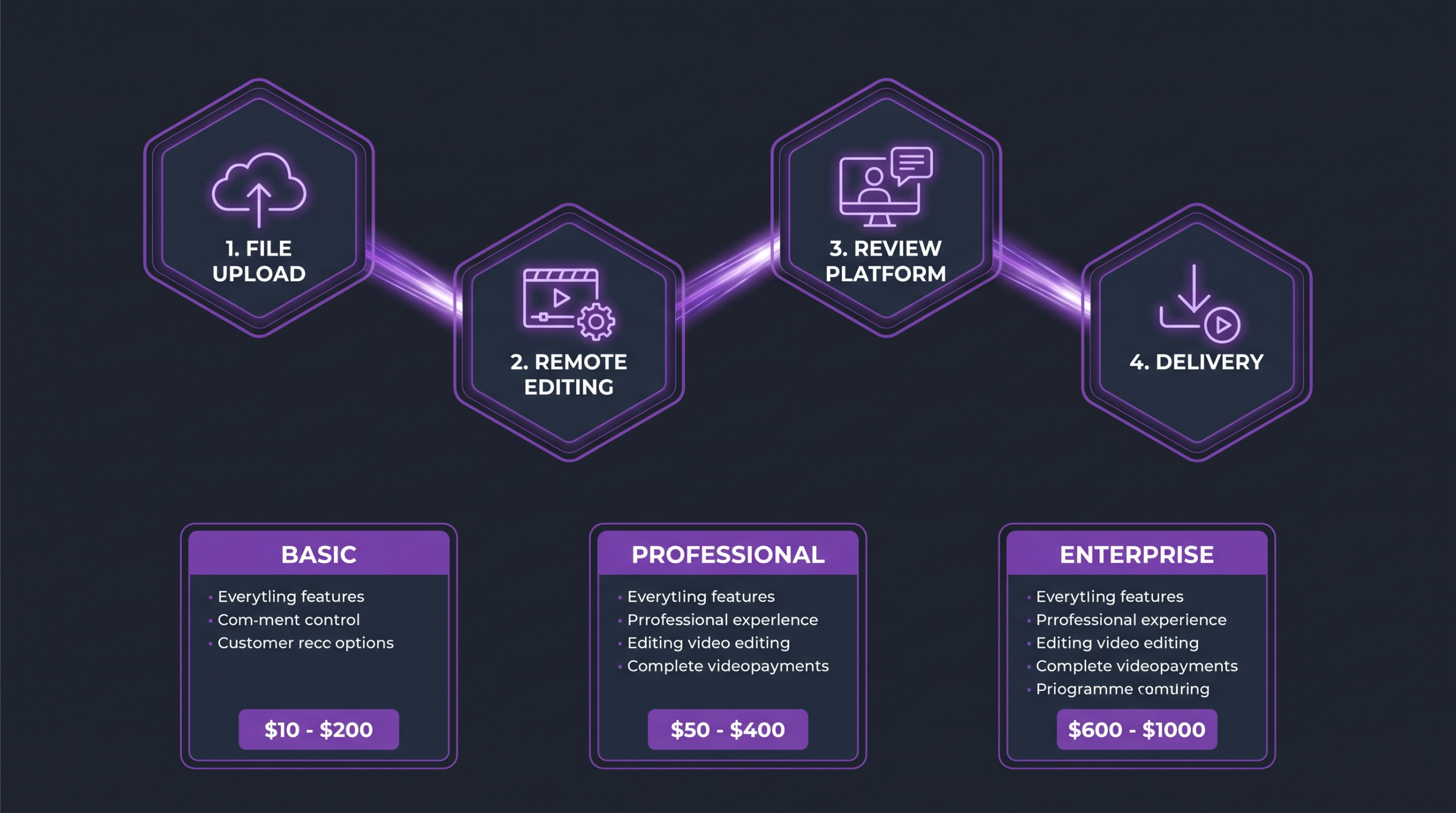
Remote editing follows a repeatable loop that most professional services have refined over hundreds of engagements. Each phase has a defined handoff point so you always know what is happening with your footage.
Step 1 — File Handoff and Asset Delivery
The process starts with uploading your raw footage to a shared folder. Most services accept footage via Dropbox Transfer, WeTransfer, Google Drive, or a dedicated upload portal. Alongside the footage, you provide a brief — typically a short document or voice note covering the video’s purpose, target length, tone, key messages, and any brand guidelines (logo files, fonts, colour hex values, music preferences).
High-volume teams often use a standardised brief template provided by the editing service. Once you have submitted the same brief a handful of times, the process takes under five minutes. Services like Increditors assign new projects directly to the editor already familiar with your brand, eliminating the need to re-explain context on every delivery.
💡 Pro Tip: Use a shared Dropbox or Google Drive folder structure organised by shoot date. A consistent naming convention (YYYY-MM-DD_ProjectName_TakeName) cuts the editor’s prep time and reduces your turnaround by hours.
Step 2 — Remote Editing and Collaboration
Once assets are received, the editor works in their own environment — typically Adobe Premiere Pro, DaVinci Resolve, or Final Cut Pro — applying the rough cut, colour grading, sound design, captions, and motion graphics. You do not need to own these tools yourself.
Throughout editing, the service may send you a work-in-progress link for approval at the rough-cut stage before investing time in fine cuts and colour work. This checkpoint prevents large rework loops caused by fundamental structural disagreements.
Turnaround times for a professionally edited 3–5 minute video range from 24 hours on express plans to 3–5 business days on standard retainers, depending on complexity and service tier. Rush fees commonly apply for sub-24-hour delivery outside the agreed SLA.
Step 3 — Review, Feedback, and Revisions
The first draft is delivered via a timestamped review link. Professional services use dedicated review platforms — Frame.io is the industry standard — where you can click any frame and leave a pinned comment. This eliminates the frustrating back-and-forth of email feedback like “the bit around 1:23 needs more energy.”
Revision rounds are typically defined in the contract: most standard packages include two rounds of revisions before additional charges apply. A revision round covers changes requested in a single submission — consolidating all your notes before replying is both a time-saver and a cost-saver. Premium agency relationships often include unlimited minor tweaks within a 48-hour window after delivery.
Step 4 — Final Delivery and File Formats
Once revisions are approved, the finished file is delivered in the formats specified during onboarding. Typically: H.264 MP4 at 1080p or 4K for primary use, plus square (1:1) and vertical (9:16) crops for social, and an SRT caption file. Reputable services retain the project file for a set period — usually 30 to 90 days — so minor changes can be made without a full re-edit fee.
For a deeper look at how to hand off YouTube-specific projects, our guide on how to outsource video editing for YouTube covers the specific technical specs and brief formats that work best for long-form content.
Online Video Editing Pricing Models Explained
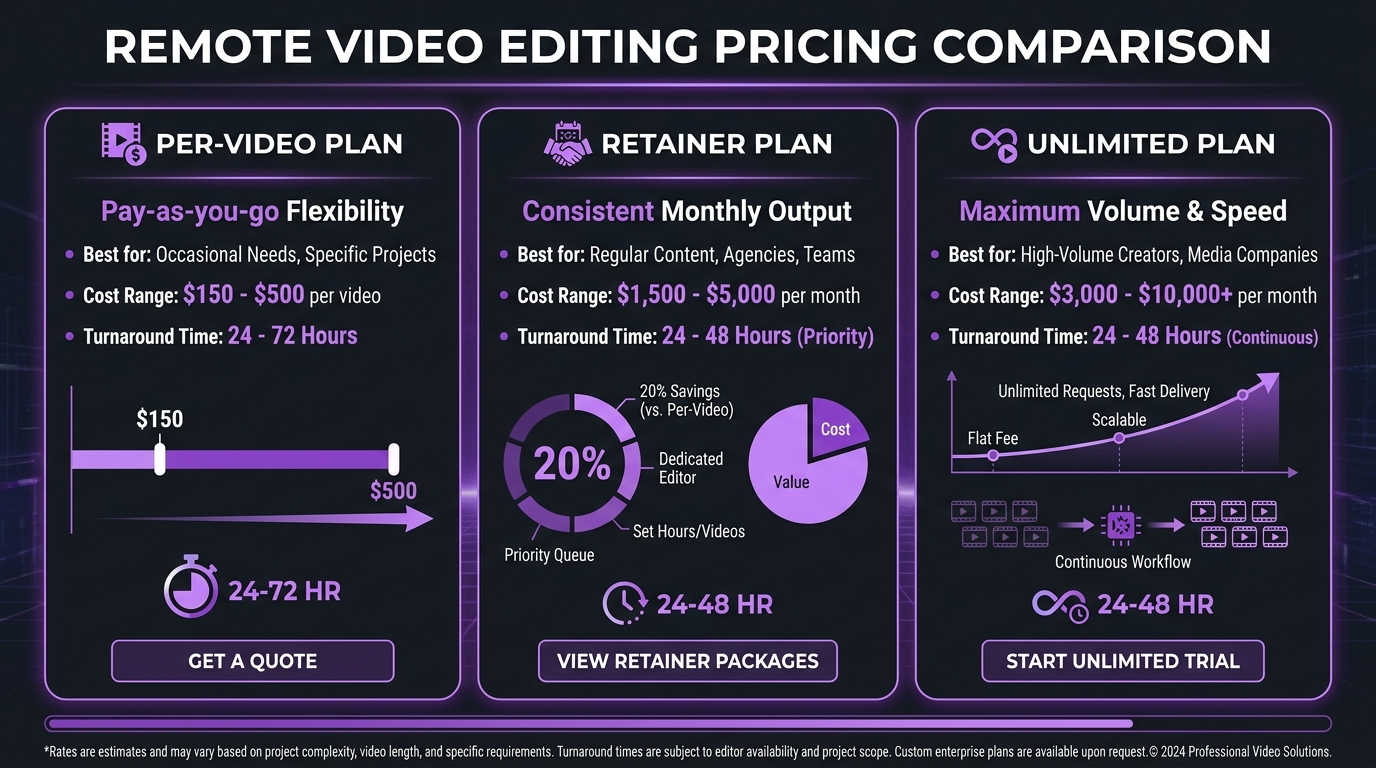
Pricing in the online video editing market follows three distinct structures. Each suits a different production volume and budget profile. Understanding them before you negotiate prevents you from paying the wrong rate for your situation.
Per-Video Pricing
You pay a fixed fee per finished video. Rates typically vary by video length, complexity, and turnaround time. A 60-second social reel with basic cuts and captions may cost $50–$150. A 5-minute corporate explainer with motion graphics, colour grading, and original music might range from $300–$700. A full 20-minute documentary-style brand film can reach $1,000–$3,000 per video.
Per-video pricing works well for sporadic production — quarterly campaigns, one-off product launches, or testing a new content format before committing to volume. The downside is that there is no continuity of editor, no brand memory accumulation, and costs escalate non-linearly as volume grows.
Monthly Retainer Pricing
You pay a recurring monthly fee for a defined scope of deliverables — for example, eight edited videos per month with specific length and complexity parameters. Retainers typically cost $500–$3,500/month depending on volume and service tier.
The major advantage of a retainer is continuity. With a dedicated editor or team, your style guide, pacing preferences, and brand voice get baked in over time. Month three looks and feels meaningfully better than month one, not because the editor has changed but because they now understand your brand intuitively. This is the model used by Increditors and most premium online video editing services.
Unlimited Video Editing Plans
Subscription services promise unlimited video editing for a flat monthly fee, usually $500–$1,500/month. In practice, “unlimited” means one active request in the queue at a time — you submit, they edit, you approve, then submit the next. There is no cap on total volume, but throughput is constrained by sequential processing.
For brands needing high cadence of short-form content (daily social clips, podcast clips, webinar cuts), unlimited plans can offer strong value. The tradeoff is editor consistency: most unlimited-plan services rotate editors across their subscriber queue, meaning your 47th video may feel different from your first. For a full breakdown, see our video editing packages comparison.
💡 Pro Tip: Calculate your monthly video output before choosing a pricing model. If you produce fewer than four videos per month, per-video rates are almost always cheaper. Above eight videos monthly, a retainer almost always wins on both cost and quality consistency.
How Much Does Online Video Editing Cost?
The table below summarises typical market ranges across service types and video categories. All figures are approximate ranges reflecting what established services publicly advertise or have communicated in discovery calls — not guaranteed quotes. For an in-depth breakdown of what drives these figures, see our guide on how much professional video editing costs.
These ranges reflect the broad market, from budget-tier freelance services to premium full-service agencies. Budget services sit at the lower end; full-service agencies with dedicated editors, strategy layers, and motion graphics expertise command the upper end. Video production research from HubSpot’s video marketing benchmarks consistently shows that brands increasing their video production quality see measurably stronger engagement outcomes — the gap between budget and premium editing is compounding over time.
Who Is Online Video Editing Right For?
Not every organisation benefits equally from online video editing services. The model fits certain profiles extremely well and creates friction for others.
Teams That Get the Most Value
Scale-stage SaaS and tech companies producing product demo videos, webinar recordings, and customer story content at 8–20 videos per month. Their content volume justifies a retainer, and remote editors who understand SaaS pacing and terminology deliver meaningfully better results than generalist freelancers.
Content creators and YouTubers who have hit the ceiling of their own editing time. When publishing three or more videos per week, the opportunity cost of self-editing typically exceeds the cost of professional editing. Research on YouTube production workflows — including Wistia’s video editing workflow analysis — shows that creator teams that delegate editing reliably increase publish frequency, which is the primary driver of channel growth.
Marketing agencies and in-house teams managing multiple client brands simultaneously. A remote editing partner that can handle multiple concurrent projects with different brand guidelines is the most scalable solution short of a full in-house edit suite.
Enterprises running always-on social video — daily or near-daily clips across LinkedIn, Instagram Reels, and YouTube Shorts. The unlimited plan model exists precisely for this use case.
When Online Editing Is a Worse Fit
Online video editing is a poor match for projects requiring real-time collaboration at the timeline level — high-budget commercial productions, broadcast pieces with live conforming, or film work requiring constant director–editor dialogue. For those projects, on-site or co-location workflows are still the norm. Online services are also not a substitute for live-event video production; they handle post-production only.
How to Choose an Online Video Editing Service
The market has enough options now that the evaluation process genuinely matters. Using the wrong service for your volume or content type will cost you more in revision cycles and re-editing than the service itself.
Beyond the table above, request a test edit before committing to a monthly contract. Most reputable services offer a paid trial project — typically one video at a reduced rate — to demonstrate their workflow and quality. Any service unwilling to do a paid trial should be treated with caution.
Pay specific attention to the brief-to-delivery handoff process. Services that have built a proprietary intake form, project portal, or standard brief template demonstrate they have thought through the operational side of remote collaboration, not just the creative side. Industry coverage from VideoInk consistently highlights process maturity — not just creative talent — as the key differentiator between premium video service providers and the rest.
Increditors: Premium Remote Video Editing
Increditors is a full-service online video editing agency specialising in SaaS, B2B tech, and scale-stage brands. The model is built on dedicated senior editor teams — meaning the same editors work on your account month after month, building deep institutional knowledge of your brand’s voice, pacing, and visual identity.
The workflow follows the stages outlined in this guide: cloud-based asset delivery, Frame.io review, guaranteed turnaround windows, and delivery in all required formats including platform-specific crops. Strategy is embedded into the engagement — editors are briefed on content goals, not just technical specs, which is why Increditors clients commonly report fewer revision rounds over time rather than more.
Retainer-based pricing means your monthly investment is predictable. Increditors is not the right fit for one-off projects or the lowest-cost option in the market — it is built for brands that treat video as a serious growth channel and need a production partner that scales with them. If you produce four or more videos per month and consistency of brand quality matters, it is worth a conversation.
For brands evaluating how to outsource video editing for YouTube specifically, Increditors offers YouTube-optimised packages that include chapter markers, thumbnail consultation, and SEO-friendly end-screen structures as part of the standard deliverable set.
Frequently Asked Questions
How long does online video editing typically take?
Turnaround depends on video length, complexity, and service tier. A simple 60-second social clip with a clear brief commonly takes 24–48 hours. A 10-minute YouTube video with motion graphics typically takes 3–5 business days. Express or rush services can deliver in 12–24 hours at a premium, usually 30–50% above standard rates. For a retainer account with an established brief library, turnaround often shortens over time as the editor accumulates brand context.
What file formats do I need to send raw footage in?
Most professional services accept any standard camera format: MP4, MOV, MXF, R3D, BRAW, and LOG-encoded files. You do not need to transcode before uploading — sending camera-native files is preferred because it preserves maximum quality for colour grading. Include any supporting assets separately: logos in AI or SVG format, music as WAV or FLAC, and brand guidelines as a PDF. The more organised your upload folder, the faster the edit begins.
How do revision rounds work with remote editing services?
A revision round is one submission of consolidated feedback — not one individual change. Standard packages include two rounds: after the rough cut and after the fine cut. The key is submitting all your notes in a single batch rather than sequentially, which would otherwise consume multiple “rounds” on what is effectively one pass of feedback. Using a timestamped review tool like Frame.io keeps feedback structured and eliminates ambiguity about which frame or moment each note refers to.
Is my footage secure when I upload it to a remote editing service?
Reputable services sign an NDA before receiving any client footage and store files on encrypted cloud infrastructure (typically AWS S3 or Google Cloud). Footage is deleted or archived according to the agreed retention policy — usually 30–90 days after project completion. IP ownership is assigned to the client in the standard service agreement. Always verify the NDA and IP clause before uploading sensitive brand footage or unreleased product content.
What is the difference between an online editing service and a video production company?
A video production company typically handles pre-production (scripting, storyboarding, casting, shooting) as well as post-production (editing). An online video editing service handles post-production only — you supply the footage, they polish it. Some premium agencies blur this line by offering scriptwriting and shoot direction consultation as add-on services, but the core model is edit-only. This makes remote editing services significantly more cost-efficient for brands that already have a production workflow and simply need expert post-production.
The Verdict
Online video editing services have removed the geographical and logistical barriers that once made professional post-production an expensive, friction-heavy process. The workflow is mature, the tooling is excellent, and the pricing models have diversified enough to fit nearly any production volume.
The practical decision comes down to volume and consistency. Below four videos per month, per-video pricing gives you flexibility without commitment. Above eight per month, a retainer relationship with a dedicated team delivers compound returns — faster turnaround, deeper brand knowledge, and progressively less briefing overhead. Unlimited plans fill the gap for high-cadence short-form output where per-video cost efficiency matters more than editor continuity.
For brands at the intersection of high volume and brand quality requirements, working with a premium online video editing agency on a retainer is the model that consistently delivers the best output-to-cost ratio at scale. The goal is to find a partner that becomes an extension of your team — not a vendor you re-brief from scratch every month.
Ready for Video That Actually Converts?
Tell us about your project and we will put together a custom plan.
Clients, on camera