














































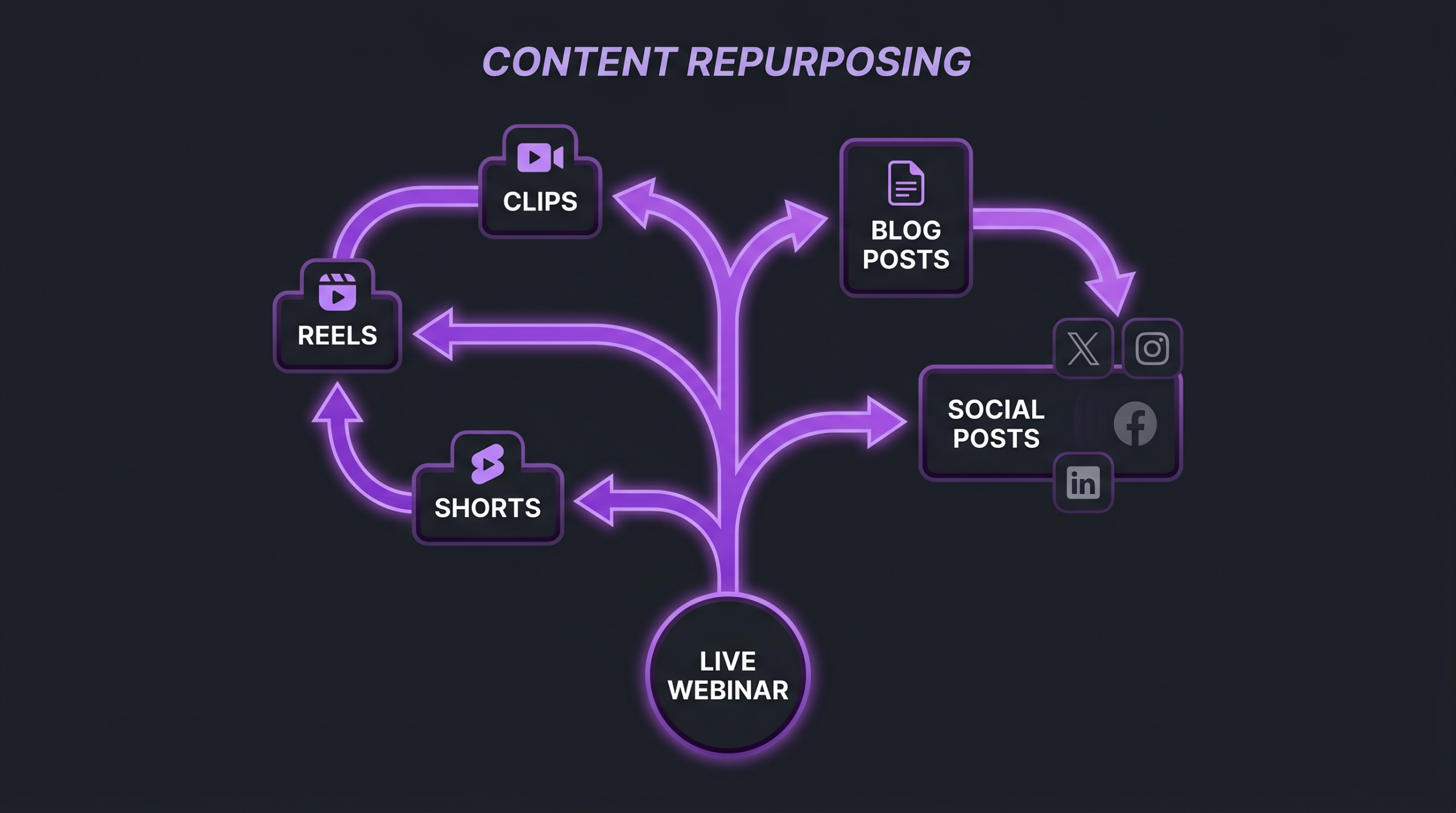
A 90-minute webinar can become 30 useful assets when you treat it like a source library, not a one-time event. The practical workflow is: define the campaign angle before the session, record clean video and audio, map the transcript into content themes, cut short-form clips by idea, turn the best sections into written assets, package quotes and visuals for social, then distribute everything over 30 to 45 days with a consistent message. The goal is not to chop one webinar into random fragments. The goal is to turn one high-trust conversation into a complete content engine.
Most webinars are treated like live events with a short shelf life. A company spends weeks choosing the topic, building the landing page, preparing the deck, inviting the guest, promoting the registration link, reminding attendees, running the session, answering questions, and sending one replay link afterward. Then the asset disappears into a resource library where only a small percentage of people ever watch it again.
That is a waste of the most expensive part of content creation: original thinking. A good webinar contains expert opinions, customer objections, product explanations, industry context, quotable moments, frameworks, stories, audience questions, proof points, and visual material. If you only publish the full replay, you force every future viewer to spend 90 minutes finding the two minutes that matter to them. Repurposing fixes that problem by turning the webinar into a menu of specific, easy-to-consume assets.
The best webinar repurposing strategy is not about volume for the sake of volume. Thirty weak posts will not outperform one strong idea. The point is to extract the strongest ideas from the webinar and reshape each one for the channel, format, and stage of awareness where it performs best. A technical explanation might become a YouTube chapter, a LinkedIn carousel, and a search-focused blog section. A sharp quote might become a short video, a text post, and an email hook. A live Q&A answer might become an FAQ entry, a sales enablement clip, and a follow-up nurture email.
Why Webinars Are A Repurposing Goldmine
They capture depth in one recording
A blog post usually starts with a blank page. A short-form video usually starts with a hook and a tight script. A webinar starts with something richer: a long-form conversation around a focused problem. That depth is why webinars are so useful for repurposing. Instead of inventing 30 ideas from scratch, you begin with one complete source asset that already contains context, examples, objections, and explanations.
A 90-minute webinar can easily contain 12 to 20 distinct ideas. Some are strategic, such as a shift in the market. Some are tactical, such as a step-by-step process. Some are emotional, such as the reason customers struggle with implementation. Repurposing helps each idea reach the right audience member without requiring them to sit through the whole session.
They create trust faster than static content
Video carries voice, pace, tone, facial expression, and live problem solving. Those cues make expert content feel more believable. When someone watches a speaker answer a hard question naturally, they receive a trust signal that is difficult to recreate in a polished PDF. This matters for B2B companies, SaaS teams, agencies, coaches, consultants, and any business selling a considered purchase.
Short clips from a webinar can bring that trust into places where the full replay would never work. A prospect may ignore a 90-minute video, but they might watch a 42-second answer about a problem they are actively dealing with. If the clip is sharp, captioned, and framed around the viewer’s pain, it becomes an entry point to the larger conversation.
They support the entire funnel
One webinar can serve awareness, consideration, and conversion. Awareness assets introduce the problem. Consideration assets explain tradeoffs and frameworks. Conversion assets address objections, show proof, and invite action. The same recording can become social clips for reach, blog posts for search, email sequences for nurture, and sales snippets for prospects already in conversation with your team.
💡 Pro Tip: Do not judge webinar performance only by live attendance. A webinar with 80 live attendees can still produce weeks of high-value content, sales enablement material, and organic discovery if the source recording is repurposed properly.
Plan The Webinar Before You Record It
Start with the campaign goal
Repurposing works best when the webinar is planned as a campaign asset from the beginning. Before the session, define the goal. Are you trying to educate a cold audience, support a product launch, nurture leads after a conference, build authority in a niche, or give sales teams better material for follow-up The answer changes the questions you ask, the examples you prepare, and the assets you prioritize afterward.
For example, a product launch webinar should capture feature explanations, use cases, objection handling, and customer outcomes. A thought leadership webinar should capture market opinions, predictions, contrarian takes, and frameworks. A tactical training webinar should capture step-by-step clips, checklists, definitions, and how-to content. If the webinar has no campaign goal, the repurposing team has to guess what matters.
Write questions with clips in mind
A strong moderator does more than keep the session moving. They create clean, self-contained moments that can become clips. Instead of asking broad questions like “Tell us about your experience,” ask questions that produce complete answers: “What is the biggest mistake companies make after hosting a webinara” or “What should a marketing team do in the first 48 hours after the live eventa”
Clip-friendly questions give the editor a clean beginning, middle, and end. They also help the speaker avoid rambling. If you know you want 10 short-form videos, prepare at least 15 questions that can produce 30- to 90-second answers. You do not need to over-script the webinar, but you do need enough structure to avoid a recording full of partial thoughts.
Record clean source material
Production quality directly affects how far the webinar can travel. A blurry recording with compressed audio may be acceptable for an internal replay, but it will struggle on LinkedIn, YouTube, and paid campaigns. Record locally when possible, capture separate speaker tracks, use a decent microphone, avoid noisy rooms, and ask speakers to frame themselves at eye level. Also save the slide deck, chat questions, poll results, registration page copy, and any resources mentioned during the session.
Build A Content Map From The Transcript
Separate topics from moments
After the webinar, do not open the editing software first. Open the transcript. The transcript lets you identify the intellectual structure of the session before you start cutting video. First, separate topics from moments. A topic is a broad subject, such as “how to choose webinar clips.” A moment is a specific section with energy, clarity, and a useful takeaway. Good repurposing needs both.
Mark the transcript by theme. Use simple labels like problem, framework, example, objection, stat, story, quote, demo, and question. This makes it easier to see which parts should become videos, which parts should become written content, and which parts are not worth using. You will usually find that the strongest moments are not evenly distributed. A 90-minute webinar might have 20 minutes of gold, 40 minutes of useful context, and 30 minutes that can be ignored.
Score each segment before editing
A simple scoring system prevents random clipping. Give each segment a score from 1 to 5 for relevance, clarity, emotional pull, uniqueness, and commercial value. A segment with high relevance but low clarity may work as a blog section after rewriting. A segment with high clarity and emotional pull may work as a short video. A segment with high commercial value may belong in sales enablement even if it is too niche for social media.
The scoring step also helps teams avoid internal bias. Founders often want to use the most detailed explanation because they care about the nuance. Audiences often respond better to the simple, painful, direct moment that names a problem they already feel. Score content based on audience usefulness, not internal attachment.
Create one master asset sheet
Before production starts, create a master sheet with columns for timestamp, theme, asset type, hook, target channel, owner, status, publish date, and CTA. This sheet becomes the operating system for the campaign. Without it, teams lose track of which clips were approved, which captions are written, which blog sections need editing, and which posts already went live.
💡 Pro Tip: Add a “buyer stage” column to your asset sheet. It forces every clip, post, and article to earn its place in the funnel instead of becoming content noise.
The 30-Piece Webinar Repurposing System
10 short-form video clips
Short-form clips are usually the highest-leverage first output. Aim for 10 clips from the webinar. Each clip should focus on one idea, one objection, one mistake, one framework, or one story. Keep most clips between 30 and 90 seconds. Longer clips can work on LinkedIn and YouTube, but only if the idea is strong enough to hold attention.
Every clip needs a clear opening. Do not begin with “Thanks for having me” or “That’s a great question.” Start where the value starts. Use a headline or on-screen hook to make the topic obvious without sound. Add accurate captions, clean cuts, branded framing, and a simple end card or soft CTA when appropriate. The edit should make the speaker easier to understand, not distract from the idea.
6 written assets
A webinar can become several written pieces. The core written asset is usually a long-form blog post built around the primary topic. From there, create a shorter recap article, a tactical checklist, a FAQ page, a newsletter issue, and a sales follow-up email. These assets should not be copied directly from the transcript. Spoken language is often repetitive and loose. Written content needs structure, transitions, examples, and search intent.
The long-form blog post should target a keyword or a clear problem. The recap article can summarize the key takeaways for people who missed the event. The checklist can turn the framework into something practical. The FAQ can answer the audience questions in a searchable format. The newsletter can pull one strong point and link back to the replay or article. The sales email can use the most relevant clip or quote to restart a conversation with prospects. If nobody on the team owns that written half, a publish-and-rewrite service like Blog Pipeline can take the transcript-to-article step off your plate and keep rewriting each post until it ranks.
14 social and enablement assets
The remaining assets can include quote graphics, LinkedIn text posts, carousels, audiograms, YouTube chapters, paid ad variants, internal sales snippets, and customer education resources. This is where the webinar stops being a single marketing activity and becomes a multi-channel library. The same insight can be packaged differently for a CEO, a marketing manager, a sales rep, and an existing customer.
Production Workflow For Clips, Blogs, And Social Posts
Edit by message, not by timestamp
The most common editing mistake is cutting by timestamp instead of message. A transcript note might say “good section from 22:14 to 24:02,” but that does not mean the entire section belongs in the clip. The editor’s job is to find the cleanest expression of the idea. Sometimes that means removing the setup. Sometimes it means moving the best sentence to the opening through a jump cut. Sometimes it means turning one long answer into two separate clips.
Good webinar clips feel intentional. They have a point of view, a clear arc, and a reason to keep watching. Weak clips feel like excerpts from a meeting. They begin too early, end too late, and rely on the viewer to do the work. If the viewer cannot understand the idea without extra context, add a short on-screen setup or choose a different segment.
Rewrite spoken ideas for written channels
Transcripts are raw material, not finished writing. Spoken answers often include filler, repetition, incomplete sentences, and side paths that made sense live but do not read well. When turning the webinar into a blog post, newsletter, or LinkedIn post, preserve the idea and improve the delivery. Add headings, examples, transitions, and clearer framing.
This is also where you can add research, screenshots, templates, and internal expertise that did not appear in the live session. A webinar gives you the backbone. The written asset should make that backbone stronger. The best repurposed articles do not feel like a transcript cleanup. They feel like a complete resource inspired by the webinar.
Design reusable visual systems
Repurposing becomes faster when the design system is prepared. Create templates for vertical clips, square clips, quote graphics, carousel covers, lower thirds, title cards, and end frames. Use consistent typography, spacing, caption treatment, and color hierarchy. This keeps the campaign recognizable without requiring every asset to be designed from scratch.
Production Note: If your team produces webinars regularly, build a repeatable package: 10 clips, 1 blog, 1 recap, 5 LinkedIn posts, 4 quote graphics, 4 sales snippets, and 5 email/social variants. A fixed package reduces decision fatigue and makes turnaround predictable.
Distribution Schedule And Measurement
Publish in waves
Do not dump all 30 assets in one week. Publish in waves so the campaign has a longer life. The first wave should serve attendees and registrants: replay, recap, key clips, and follow-up emails. The second wave should serve your broader audience: social clips, LinkedIn posts, and the long-form blog. The third wave should serve sales and evergreen discovery: FAQ content, sales snippets, YouTube chapters, and nurture emails.
A practical schedule is 30 to 45 days. Week one is post-event follow-up. Weeks two and three are social distribution. Weeks four to six are evergreen content, sales enablement, and retesting the strongest clips with new hooks. This keeps the message active without exhausting the audience.
Match metrics to asset type
Different assets have different jobs, so they need different measurements. A short clip may be judged by retention, saves, comments, and profile clicks. A blog post may be judged by organic impressions, rankings, time on page, and assisted conversions. A sales enablement clip may be judged by reply rate, deal velocity, or whether it helps answer a recurring objection. If every asset is judged only by direct leads, the campaign will look weaker than it is.
Reuse winners with new angles
The first publishing cycle is not the end. Look for assets with strong retention, high saves, meaningful comments, or sales usefulness. Then repackage those winners. A clip with high retention can become a carousel. A LinkedIn post with strong comments can become a newsletter. A FAQ that ranks can become a video. Repurposing compounds when you let performance data shape the next round.
Common Mistakes To Avoid
Turning everything into a clip
Not every minute deserves to become content. Some parts of a webinar are necessary live but weak as standalone assets. Housekeeping, long transitions, repeated explanations, and vague answers should usually be skipped. Quality control is what makes the 30-piece system work. The number 30 is a useful production target, not a reason to publish filler.
Ignoring the buyer journey
Many teams publish every asset with the same CTA: watch the webinar. That can work for some channels, but it is not always the best next step. A cold audience may need a simple problem-focused clip. A warm lead may need a checklist. A late-stage prospect may need a specific objection answered. Map the content to buyer intent instead of forcing every viewer into the same path.
Letting production drag too long
Speed matters. The first assets should go out while the webinar is still fresh. If your team takes six weeks to produce the recap and clips, you lose momentum with registrants and attendees. Build a workflow that can deliver the first replay, recap, and two to three clips within 72 hours. The remaining assets can follow in waves.
Watch Out: AI tools can speed up transcription, summaries, and draft captions, but they should not decide what is strategically important. Human review is still needed for positioning, nuance, brand voice, and clip quality.
FAQ
How many pieces of content can you realistically get from a 90-minute webinara
Thirty is realistic if the webinar has a focused topic, clear speakers, useful questions, and clean recording quality. The mix might include 10 clips, 6 written assets, 5 LinkedIn posts, 4 quote graphics, 4 sales snippets, and 1 checklist. If the webinar is unfocused or poorly recorded, the realistic number may be lower.
Should the full webinar replay be gateda
It depends on the goal. If lead capture is the priority, gating the replay can make sense. If reach, SEO, and authority are the priority, an ungated replay with strong surrounding content may perform better. Many teams use a hybrid approach: ungated clips and recap content, with the full replay or worksheet behind a form.
What is the best first asset to create after a webinara
Start with the replay and a recap email for registrants. Then create two or three strong clips while the event is still fresh. These early clips help you test which messages resonate before you produce the full batch of social and written assets.
Can AI repurpose a webinar automaticallya
AI can help with transcription, summaries, timestamp suggestions, caption drafts, blog outlines, and social post variations. It still needs human direction. The strategic decisions include which moments matter, what angle fits the audience, how the brand should sound, and whether the final edit feels credible.
How long should webinar clips bea
Most clips should land between 30 and 90 seconds. Shorter clips work well for single insights, mistakes, and punchy opinions. Longer clips can work for frameworks or stories, especially on LinkedIn and YouTube, but the structure has to be strong enough to hold attention.
Verdict
A 90-minute webinar is not one piece of content. It is a source asset. If you plan the session with repurposing in mind, record it cleanly, map the transcript carefully, and produce assets by channel and buyer stage, one webinar can support a full month or more of marketing activity.
The companies that get the most from webinars are not always the ones with the biggest live audience. They are the ones with the best post-event system. They turn expert conversations into short clips, search assets, nurture emails, sales material, and evergreen resources. That is how a single 90-minute session becomes 30 pieces of content without feeling repetitive.
Ready for Video That Actually Convertsa
Tell us about your project and we will put together a custom plan.
Clients, on camera