

















































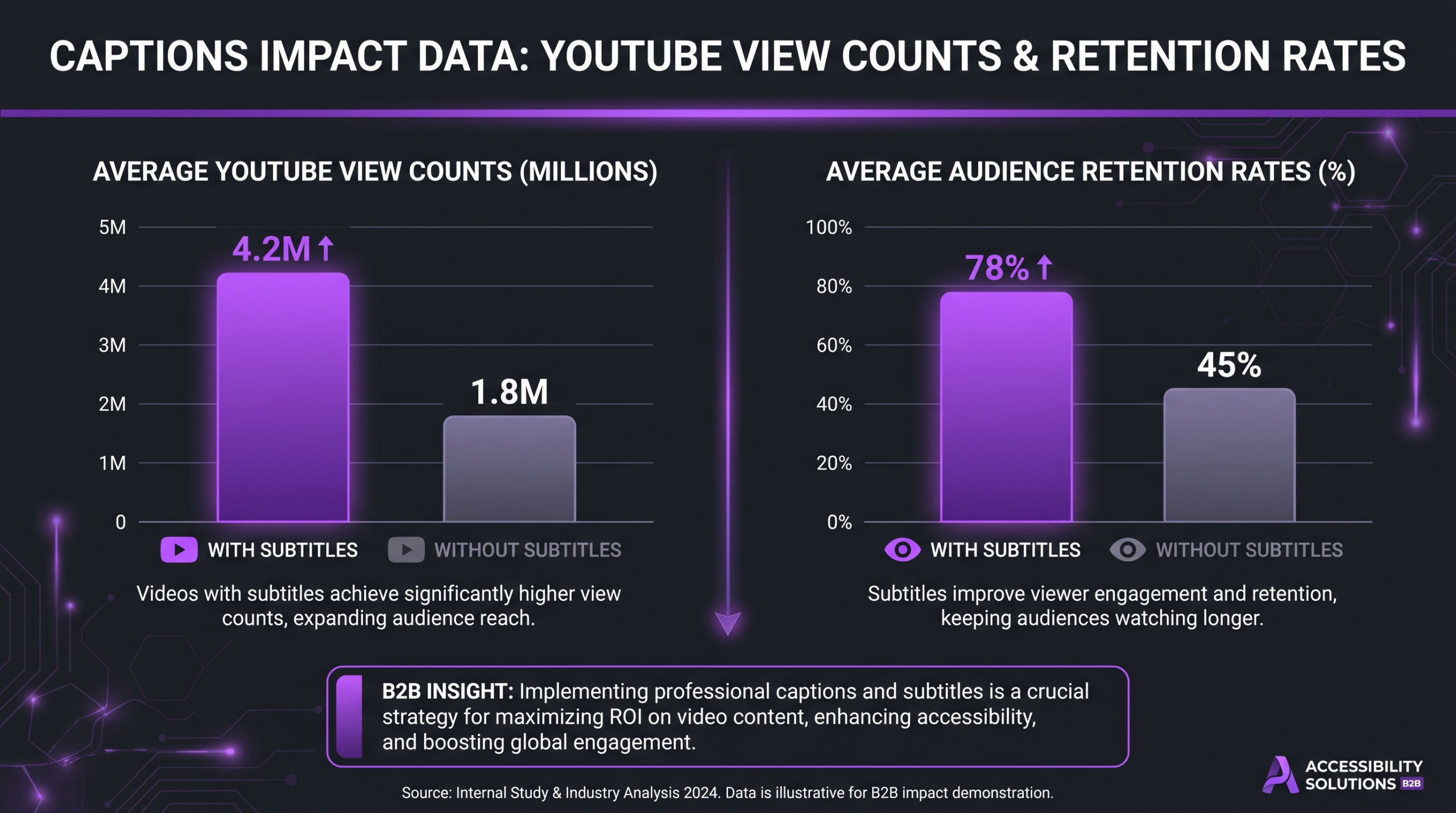
Closed captions are not just an accessibility layer. They can improve YouTube discoverability, reduce early drop-off, support sound-off viewing, and help viewers retain information. Controlled YouTube data from Discovery Digital Networks showed a 7.32% overall view lift after adding captions, Meta has reported a 12% average increase in video ad view time with captions, and Verizon/Publicis research found that 80% of consumers were more likely to watch an entire video when captions were available. The practical takeaway: if your video depends on speech, captions should be treated as a core edit, not a final export checkbox.
- Why Captions Matter for Video Performance
- What the Data Says About Views
- How Captions Affect Retention and Watch Time
- Captions, YouTube SEO, and Search Discovery
- Caption Quality: Auto Captions vs Edited Captions
- The Editing Workflow That Makes Captions Perform
- How to Measure Caption Impact
- FAQ
- Verdict
Subtitles and closed captions sit in a strange place in video strategy. Everyone agrees they are useful, but many teams still treat them as a finishing detail: upload the video, let the platform auto-generate a transcript, and move on. That approach misses the real business case. Captions change how people discover, understand, and continue watching video. For brands, creators, educators, and B2B companies, that means captions can influence the metrics that actually matter: views, average view duration, retention curves, search visibility, completion rate, and conversion quality.
The impact is especially relevant on YouTube because YouTube is both a viewing platform and a search engine. A video can earn traffic through recommendations, subscriptions, embedded pages, Google Search, YouTube Search, Shorts feeds, playlists, and suggested videos. Captions support several of those surfaces at once. They make the message understandable when the viewer cannot or will not turn on sound. They can help users scan and search the content. They create a transcript layer that platforms and users can interpret. They also reduce the cognitive load of unclear audio, fast speech, accents, noisy locations, technical language, and multi-speaker scenes.
This article breaks down the evidence behind captions and performance, including controlled YouTube view data, platform-reported watch-time data, viewer behavior research, and practical editing decisions that separate helpful captions from distracting text. The goal is not to claim that captions magically make every video go viral. They do not. A weak hook, unclear story, poor pacing, or irrelevant topic will still underperform. But for videos where spoken information matters, captions are one of the highest-leverage production upgrades because they improve access to the content without changing the underlying offer, message, or distribution budget.
Why Captions Matter for Video Performance
Captions influence performance because video consumption is not happening in ideal viewing conditions. A viewer might be in a train, an office, a waiting room, a living room with other people, or a noisy trade show. They may be watching on a phone with the volume off. They may understand the language but struggle with the speaker’s accent. They may be skimming a technical explainer while multitasking. They may have hearing loss. They may simply prefer reading along because it helps them process information faster.
That last point matters. Captions are often framed only as an accommodation for deaf and hard-of-hearing viewers, and that accessibility purpose is essential. But the audience is much broader. In the UK, Ofcom-linked reporting has often shown that a large share of subtitle users are not deaf or hard of hearing. Younger viewers in particular have normalized subtitles as part of everyday media consumption. In other words, captions are no longer an edge-case feature. They are a mainstream viewing preference.
For marketers, this changes the production logic. If a large part of the audience is likely to watch silently, partially silently, or with divided attention, then a video that depends entirely on audio is leaking attention. The first three to ten seconds are especially vulnerable. The viewer sees a face talking, but they do not yet know what the video is about. If the title card is weak and the captions are missing, they have to turn sound on before they can judge whether the video is worth their time. Most people will not do that. They will scroll, click away, or choose another result.
💡 Pro Tip: Treat captions as part of the hook. If the first caption line does not make the viewer understand the premise immediately, the caption file is technically present but strategically weak.
There is also a comprehension effect. Viewers retain information better when the audio track and text layer reinforce each other, provided the captions are readable and timed correctly. This is useful for software demos, product explainers, founder-led thought leadership, training content, webinars, and case studies. These formats often include abstract ideas, numbers, names, frameworks, or calls to action. Captions give the viewer another path into the message, reducing the chance that a key phrase disappears in a moment of background noise or fast delivery.
The business result is simple: captions remove friction. They make the same video easier to start, easier to follow, easier to search, and easier to finish. That does not guarantee higher performance on every upload, but it improves the conditions that performance depends on.
What the Data Says About Views
The most cited YouTube-specific example comes from Discovery Digital Networks, which ran a controlled study with 3Play Media to isolate the effect of adding captions to YouTube videos. According to the published case study, captioned videos saw a 7.32% overall increase in views. The strongest gain appeared early, with a 13.48% view increase in the first 14 days after captions were added. The study also reported that a video could rank for a phrase that appeared in the caption transcript but not in the title, description, or tags, suggesting that captions contributed to discoverability within YouTube search.
A 7.32% lift can sound modest until you apply it to a real content program. If a channel gets 100,000 monthly views, that lift is roughly 7,320 additional views without producing more videos or increasing paid distribution. At 1,000,000 monthly views, it becomes 73,200 additional views. For a brand channel with educational or demand-generation content, those extra views can create more retargeting audiences, more site visits, more branded search, more product understanding, and more opportunities for conversion.
The key is that captions do not operate like a single ranking switch. They affect several behaviors that feed into views. First, they can make videos more searchable because the text layer gives platforms and viewers more context. Second, they can improve click satisfaction because viewers who arrive at the video understand it more quickly. Third, they can reduce abandonment from sound-off viewers. Fourth, they can make the content usable across more environments. Together, those small advantages can compound.
The important caveat is that most caption studies are not universal laws. Different platforms count views differently. A YouTube long-form view is not the same as a Meta three-second view, and a Shorts retention curve behaves differently from a 12-minute explainer. Still, the direction of the evidence is consistent: captions tend to help more people start and continue watching when speech carries the message.
Why the View Lift Happens
Captions can increase views through three main mechanisms. The first is accessibility. People who need captions can now watch. The second is environmental fit. People who cannot use audio in the moment can still understand the video. The third is information scent. Captions and transcripts expose more language around the topic, which can help viewers and search systems identify relevance.
For YouTube, information scent matters because viewers frequently search with specific phrases: “how to reduce churn in SaaS,” “best export settings for YouTube,” “how to edit a podcast clip,” or “customer testimonial video example.” A title and description may cover only a small portion of the video’s spoken content. Captions give the video a richer text layer around the actual ideas discussed. That can be particularly useful for long-form educational videos, interviews, webinars, product demos, and tutorials where the most valuable terms may appear deep inside the video.
How Captions Affect Retention and Watch Time
Views are only half the story. YouTube performance depends heavily on satisfaction signals such as watch time, average view duration, and retention. A video that earns clicks but loses people immediately will struggle. Captions can support retention because they help the viewer understand the content sooner and with less effort.
Meta’s reported 12% average increase in video ad view time is useful because feed ads face a brutal attention environment. Viewers are not sitting down to watch the ad. They are scrolling. Captions help the story survive the first silent seconds. Even though Meta data is not YouTube data, the principle transfers: when the platform starts videos quietly, or when the viewer chooses silence, text helps bridge the gap between visual curiosity and message comprehension.
Verizon Media and Publicis Media’s research adds a viewer-preference angle. Their study reported that 80% of consumers were more likely to watch a full video when captions were available. That is not the same as observed completion rate in every campaign, but it does show intent. If viewers say captions make them more likely to finish, marketers should assume captions are part of the viewing experience, not an optional assistive feature hidden in the settings menu.
Retention gains are strongest when captions solve a real comprehension problem. Consider a founder video with a strong idea but fast delivery. Without captions, the viewer misses the first key phrase and spends the next five seconds trying to catch up. With captions, the phrase is visible. The viewer stays oriented. Or consider a software demo where the narrator names a feature, a metric, and a workflow. Captions give the viewer a written anchor for those terms. In both cases, captions reduce the chance that confusion becomes abandonment.
💡 Pro Tip: If your retention graph drops sharply before the first spoken point lands, add open captions or stronger on-screen text to the opening. The issue may not be the idea; it may be that viewers cannot decode it fast enough.
Captions Are Not a Substitute for Editing
Captions help retention, but they cannot rescue poor structure. A rambling introduction is still a rambling introduction. A title that promises one thing while the video delivers another will still create drop-off. Captions amplify clarity; they do not create it from nothing. The best results come when captions work with tight editing: a clear hook, fast context, deliberate pacing, useful visual changes, and concise language.
This is why professional captioning is often part of the edit rather than a post-production afterthought. The editor can decide where to break lines, which words to emphasize, when to add a supporting label, and when to keep the screen clean. On YouTube Shorts, TikTok, Instagram Reels, and LinkedIn vertical video, this is even more important because the caption layer competes with interface elements, profile names, buttons, comments, and crop-safe zones.
Captions, YouTube SEO, and Search Discovery
YouTube search is built around relevance and satisfaction. Titles, descriptions, thumbnails, engagement, watch behavior, and topic authority all matter. Captions are not a magic SEO field, but they can strengthen the relationship between the video and the language viewers use when searching. YouTube also makes captions visible to users through the CC indicator and search filtering. According to YouTube Help, users can search and then filter results to show videos with subtitles or closed captions.
The Discovery Digital Networks example is especially useful because it tested phrase discovery. The case study describes searching for a phrase that appeared in the transcript but not in the metadata, and the captioned video appeared in YouTube search results. That does not mean every caption phrase becomes a ranking opportunity. It does mean the spoken content is not invisible. For educational and technical videos, that is a major advantage.
This matters for B2B because high-intent searches are often specific. A buyer may not search for your broad category. They may search for a problem phrase, a feature comparison, a metric definition, or a workflow question. If your video answers that question in the audio but your title only uses a broad brand-safe headline, captions and transcripts can help expose that answer to discovery systems and to users who scan the transcript.
Captions vs Transcripts
Captions and transcripts are related but not identical. Captions are time-synced text displayed during playback. A transcript is the full text of the audio, usually readable below or alongside the video. YouTube can show transcripts when captions are available, and many websites publish transcripts below embedded videos. For SEO and user experience, the best setup is often both: accurate captions for viewing and a cleaned transcript or article summary for scanning.
For a YouTube-first strategy, upload a clean SRT or VTT file rather than relying only on auto captions. For a website content strategy, embed the video and add a text summary, transcript, or related blog post. This gives search engines more page-level context and gives users multiple ways to consume the material. It also helps sales teams, support teams, and internal stakeholders reuse the content without rewatching the entire video.
Caption Quality: Auto Captions vs Edited Captions
Auto captions are useful, but they are not a full quality standard. Speech recognition has improved dramatically, especially for clean audio, common vocabulary, and single-speaker videos. But it still struggles with brand names, acronyms, technical terms, speakers talking over each other, noisy rooms, music beds, unusual names, code-switching, and industry-specific phrases. Those mistakes are not cosmetic. They can damage comprehension and credibility.
Imagine a SaaS customer story where the captions turn “net revenue retention” into a nonsense phrase. Or a medical education video where a drug name is transcribed incorrectly. Or a founder interview where the company name is wrong every time. Viewers may still understand from context, but the error creates friction. In high-trust content, friction matters. It signals that the video was not finished with care.
Edited captions solve three problems: accuracy, readability, and pacing. Accuracy means the words match the audio. Readability means the line breaks, character count, contrast, and timing let the viewer read comfortably. Pacing means captions appear and disappear in sync with speech, without flashing too quickly or lingering awkwardly. A technically accurate transcript can still be a poor caption file if each caption is too long or split in unnatural places.
Closed Captions vs Open Captions
Closed captions can be turned on or off by the viewer. They are best for YouTube long-form videos, webinars, course content, and accessibility compliance. Open captions are burned into the video image. They cannot be turned off. They are best for short-form social edits, paid ads, and environments where platform caption settings are unreliable or where the caption style is part of the creative.
For YouTube, a strong workflow often uses closed captions for the main upload and open captions for Shorts or cutdowns. The long-form video gets a proper caption file that supports accessibility, transcripts, and user control. The short clips get designed captions because they need to perform in fast feeds and mixed platform interfaces. This distinction matters because the same caption treatment should not be forced across every format.
The Editing Workflow That Makes Captions Perform
Caption performance starts before captioning. It starts with the script or interview structure. If the speaker takes 45 seconds to reach the point, captions will faithfully display a weak opening. If the message is clear, captions make that clarity visible. For B2B content, the best captioned videos usually have short sentences, strong nouns, clear numbers, and fewer filler phrases. That does not mean the speaker should sound robotic. It means the edit should preserve natural delivery while removing wandering setup.
At Increditors, the practical workflow is to think in layers. The first layer is story: what is the viewer supposed to understand, feel, and do The second layer is pacing: where should the editor cut, compress, or let a point breathe The third layer is visual support: B-roll, screenshots, motion graphics, or product UI. The fourth layer is text: captions, labels, statistics, names, and calls to action. Captions should work with all of those layers, not fight them.
Caption Design Rules for YouTube and Social
Readable captions usually follow a few simple rules. Keep lines short. Use strong contrast. Avoid placing captions over important faces, product UI, lower thirds, or platform controls. Do not animate every word if the motion distracts from the message. Use emphasis sparingly for important numbers, objections, or key phrases. Keep the style consistent with the brand. On a premium B2B channel, captions should feel polished and calm, not like a random template from a viral clip app.
For horizontal YouTube videos, captions can often sit near the bottom if the frame is composed correctly. For vertical formats, the safe zone is tighter. TikTok, Instagram Reels, YouTube Shorts, and LinkedIn each add interface elements that can hide text. A good editor checks the crop and exports platform-specific versions. The same master caption position rarely works perfectly across all placements.
Another overlooked issue is caption density. If every single spoken word appears in the same style, the viewer receives no hierarchy. Strategic text design separates the transcript from the message. The full caption helps accessibility and comprehension; a highlighted phrase or label signals the point. For example, in a customer story, the caption may show the spoken sentence while a small label highlights “32% lower onboarding time.” That gives the viewer both context and a takeaway.
💡 Pro Tip: Export one captioned version for silent-feed performance and one clean version with closed captions for platforms where the viewer expects control. This avoids forcing one compromise across every channel.
How to Measure Caption Impact
The cleanest way to measure captions is to test them against a comparable baseline. For existing YouTube videos, add accurate caption files to a group of older videos and compare performance before and after the update. Control for seasonality, upload age, topic demand, and promotion. For new videos, compare captioned and non-captioned variants in paid distribution, or compare retention patterns across similar uploads. Perfect isolation is difficult, but directional evidence is still useful.
On YouTube, start with impressions, click-through rate, views, average view duration, average percentage viewed, audience retention, traffic sources, and search terms. Captions may not improve all of these at once. A caption update might increase search traffic over time, improve retention among mobile viewers, or create a smaller but higher-quality audience. Look at the shape of the retention curve, not just the average. If captions help, you may see a softer drop in the opening seconds or better hold during dense information sections.
For paid social, compare three-second views, thruplays or completed views, average watch time, hook rate, hold rate, click-through rate, cost per landing page view, and conversion rate. Captions often improve upper-funnel metrics first because they make more people understand the ad. Whether that turns into lower acquisition cost depends on the offer, landing page, audience, and creative strategy.
A Simple Testing Plan
Choose ten existing YouTube videos with meaningful traffic and speech-heavy content. Add edited captions to five of them and leave five similar videos unchanged for the test period. Track performance for four to eight weeks. Then look at view growth, search traffic, average view duration, and retention during the opening 30 seconds. If possible, segment by device type and geography. Captions may matter more for mobile-heavy audiences, international audiences, or videos with technical language.
For short-form, create two versions of the same edit: one with designed open captions and one without. Run both as paid ads with the same budget, audience, objective, and placement mix. Do not judge only by view count. A captioned version may attract more qualified attention but not necessarily more cheap views. Watch-time quality, click behavior, and downstream conversions matter more than vanity volume.
Where Captions Create the Most Business Value
Captions are useful almost everywhere, but they are most valuable when the video carries information that cannot be understood from visuals alone. Founder-led thought leadership is a clear example. A talking-head clip may look simple, but the value is in the phrasing, argument, and point of view. If the viewer cannot hear the first sentence, they cannot evaluate the idea. Captions make the argument visible immediately.
Customer testimonials and case studies also benefit. These videos often include names, roles, measurable results, and nuanced objections. Captions help preserve the details that make the story credible. A prospect may remember “we cut editing turnaround from three weeks to five days” because the number appeared both in the spoken quote and on screen. For B2B sales, that specificity is more persuasive than generic praise.
Product demos are another high-impact category. Viewers need to understand what is happening in the interface while listening to the explanation. A good caption file helps, but so do short labels and callouts that identify the feature being shown. The viewer should not have to choose between watching the cursor and listening for the point. The edit should guide the eye and the ear together.
Webinars and podcasts have a different challenge: volume. Long recordings contain valuable ideas, but they are hard to browse. Captions and transcripts make them reusable. Editors can search the transcript for strong moments, create clips, build quote graphics, write summaries, and identify topics for future content. The caption file becomes part of a repurposing system, not just an accessibility deliverable.
FAQ
Do captions increase YouTube viewsa
They can. The strongest YouTube-specific public example is Discovery Digital Networks, which reported a 7.32% overall increase in views after adding captions, with a larger lift in the first 14 days. Results vary by channel, topic, quality, and audience, but captions improve the conditions that help videos earn and keep attention.
Are YouTube auto captions enougha
Auto captions are better than no captions, but they are not ideal for professional content. They can misread names, acronyms, technical terms, and fast speech. For brand videos, product demos, case studies, and educational content, edited captions are safer because accuracy and readability affect trust.
Should I use closed captions or burned-in captionsa
Use closed captions for long-form YouTube uploads, webinars, and accessibility-friendly viewing. Use burned-in open captions for short-form social videos, paid ads, and silent-feed environments where you need the text to appear by default. Many brands need both versions.
Do captions help retentiona
Yes, especially when viewers are watching without sound or when the video includes dense information. Meta has reported a 12% average increase in video ad view time with captions, and Verizon/Publicis research found that many consumers are more likely to finish a video when captions are available. On YouTube, measure this through average view duration and retention curves.
Can captions hurt video performancea
Poorly designed captions can hurt the experience. Text that is too large, too fast, inaccurate, low-contrast, or placed over important visuals can distract viewers. The goal is not to cover the video with words. The goal is to make the message easier to understand.
Verdict
Closed captions have moved from accessibility checkbox to performance infrastructure. The data does not say captions are a cure-all. It says they are a reliable way to reduce friction in how people discover, start, understand, and finish videos. Discovery Digital Networks’ YouTube study showed a measurable view lift. Meta’s data showed longer video ad view time. Verizon and Publicis showed strong viewer preference for captioned video. YouTube’s own product experience makes captions searchable and visible to users who filter for them.
For brands, the practical recommendation is straightforward: if speech matters, captions matter. Upload accurate closed captions for YouTube. Use designed open captions for short-form and paid social. Check readability on mobile. Keep captions inside safe zones. Edit for clarity before captioning. Measure impact through retention, search traffic, and conversion quality rather than only raw view count.
The highest-performing videos are rarely the ones with the most text. They are the ones where every layer works together: the hook earns attention, the edit maintains momentum, the visuals explain the point, and the captions make the message available in every viewing context. That is the real value of captions. They make good video easier to consume, and easier-to-consume video usually has a better chance to perform.
Sources
Key references include 3Play Media’s Discovery Digital Networks case study, Meta’s announcement on captioned video ad view time, Verizon Media and Publicis Media caption research summarized by 3Play Media, and YouTube Help documentation on searching for captioned videos.
Ready for Video That Actually Convertsa
Tell us about your project and we will put together a custom plan.
Clients, on camera