










![3D Explainer Video - ScribbleLive.mp4_snapshot_00.12_[2022.03.09_03.14.16]](https://increditors.com/wp-content/uploads/elementor/thumbs/3D-Explainer-Video-ScribbleLive.mp4_snapshot_00.12_2022.03.09_03.14.16-r7wb53mx72rxst3qcqyrfxdmeyzb5r9jbl0wbjujh4.png "3D Explainer Video – ScribbleLive.mp4_snapshot_00.12_[2022.03.09_03.14.16]")
































One well-recorded podcast episode can realistically yield around 20 distinct content assets when you have a clear production model. This guide breaks down exactly which asset types to plan for, how the editing workflow runs, and when it makes sense to keep production in-house versus handing it to a specialist editing partner.
- Why One Episode Is a Content Engine
- The 20-Asset Production Model Explained
- Your Asset Types, Mapped Out
- The Editing Workflow: Ingest to Delivery
- Common Mistakes That Kill Clip Performance
- Build vs. Buy: Internal Team vs. Editing Partner
- Turnaround Time and Volume Expectations
- Cross-Platform Considerations
- Frequently Asked Questions
- Verdict
Why One Episode Is a Content Engine
Most podcasters publish and move on. They spend hours recording a thoughtful conversation, export an audio file, maybe drop it in their RSS feed, and consider the job done. The episode fades. The insights buried inside it never reach the people who would have found them most useful.
That’s a production problem, not a content problem. A well-structured 45-to-60-minute episode contains enough material to sustain a full week of social content, multiple newsletter angles, and several months of evergreen clips — if you have a clear system for extracting it.
The “20 assets from one episode” framing is a practical production model, not a guarantee. The actual number shifts based on episode length, how quotable your guests are, how many platforms you’re targeting, and how granular you want your distribution. A 30-minute episode with two quotable moments might yield closer to 12 meaningful assets. An 80-minute conversation with a high-profile guest who drops a dozen counterintuitive takes could produce 25 or more. The model is a planning tool — it shows you what’s possible and gives your editing team a repeatable briefing structure.
What changes when you treat every episode as a source file rather than a finished product? Your distribution surface area expands. Your content team has material to work with all week instead of scrambling for post ideas. Your podcast starts showing up in places your audience actually scrolls — Instagram, LinkedIn, YouTube Shorts, their inbox — not just in their podcast app.
💡 Pro Tip: Map your assets before you record, not after. If you know a clip needs to stand alone on Instagram Reels, you’ll prompt your guest differently mid-conversation — setting up context within the quote so it makes sense without the surrounding hour of dialogue.
According to Edison Research’s Infinite Dial data, podcast listeners tend to encounter new shows through social media clips and short-form video before they ever search for the show itself. Your clip strategy isn’t supplementary to your podcast — it’s often the front door to it.
The 20-Asset Production Model Explained
The 20-asset model organises your episode output into five categories: short-form video clips, audio assets, text-based content, graphic and visual assets, and platform-specific derivatives. Each category serves a different audience behavior — some people watch, some listen, some read, some scroll past a thumbnail and click.
The Distribution Split
A balanced production split for a typical episode looks something like this — treat it as a starting point, not a formula:
What Makes a Clippable Moment?
Not every moment in an episode clips well. The moments that work tend to share a few characteristics: they open with a strong hook (a counterintuitive claim, a surprising number, a direct challenge to conventional wisdom), they resolve in under 90 seconds without requiring 20 minutes of prior context, and they land on a clear, memorable conclusion.
When your editor reviews the raw recording, they’re hunting for these moments first. A good clip reviewer develops a feel for the “standalone test” — can this moment be dropped into a cold scroll and still make a viewer stop? If the answer requires watching the previous 30 minutes, it doesn’t clip. If it can land in 60 seconds cold, it’s raw material.
Your Asset Types, Mapped Out
Here is how a typical episode breaks down across the full asset set. These are illustrative examples — your actual asset list will reflect your guests, episode theme, and platform priorities.
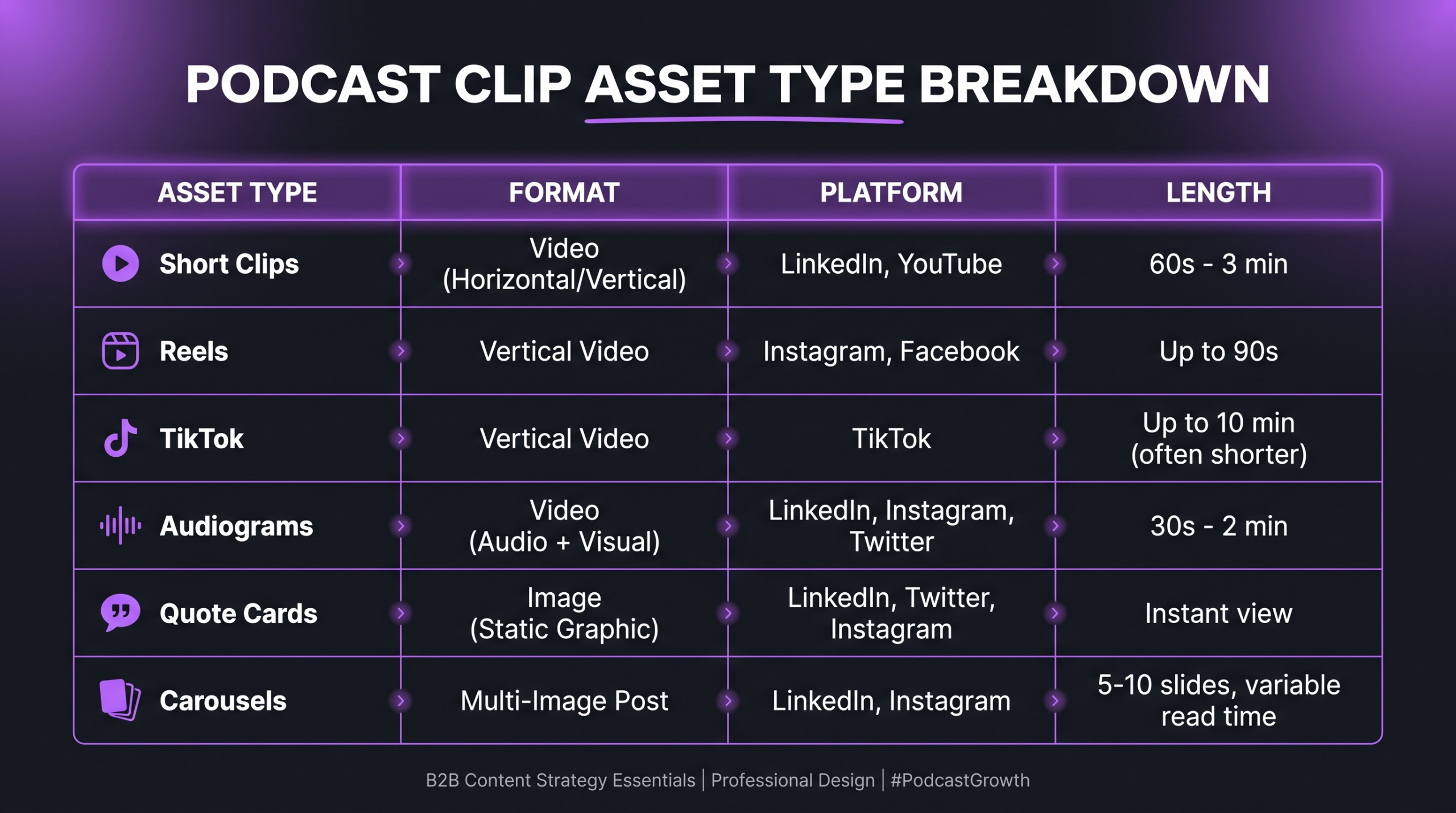
Video Clips — Short-Form Vertical (Assets 1–4)
Assets 1–3: Vertical short clips (60–90 seconds) go to Instagram Reels, TikTok, and YouTube Shorts. These need burned-in captions, an on-screen hook in the first 2 seconds, and a clean crop if your recording shows both host and guest in a wide shot. The caption styling matters: open captions set to the speaker’s voice tend to outperform small subtitle bars in most test scenarios.
Asset 4: A longer vertical cut (2–3 minutes) goes to Instagram and LinkedIn as a native video. This captures audiences who want more than 90 seconds but aren’t ready to commit to the full episode. It often performs best as a “deep dive moment” rather than a highlight reel.
Video Clips — Medium-Length Horizontal (Assets 5–6)
Assets 5–6: Horizontal clips at 4–8 minutes live on YouTube and LinkedIn native video. These are different in character from your short clips: they’re structured around a complete sub-argument from the episode — one idea with its full context, not a soundbite. YouTube’s algorithm rewards watch time, so a clean 6-minute cut that retains viewers through to the end can meaningfully outperform a teaser that drops off after 30 seconds.
💡 Pro Tip: For your horizontal YouTube cuts, add a mid-roll chapter title card and a brief host recap at the 3-minute mark. On episodic content, this dramatically reduces drop-off from viewers who arrive mid-video without context — keeping your average view duration up and your algorithm signal healthy.
Audio Assets — Audiograms (Assets 7–8)
Assets 7–8: Audiograms pair a waveform animation with a static or lightly animated background and a key pull quote. They run 30–60 seconds and work well for Twitter/X, Instagram Stories, and LinkedIn Stories where the visual complexity of a video clip is less necessary than an interesting hook with clear audio. Tools like Riverside.fm generate basic audiograms automatically, but a custom-branded version from your editing team will outperform generic platform exports in brand recognition over time.
Static and Graphic Assets (Assets 9–12)
Assets 9–11: Quote cards pull the three strongest single-sentence moments from the episode and frame them against branded backgrounds. These are the cheapest assets to produce and among the easiest to distribute across platforms. They often drive saves and shares disproportionate to their production cost.
Asset 12: A LinkedIn carousel packages 5–8 key insights from the episode into a swipeable document post. LinkedIn’s native carousel format (PDF-based) consistently shows higher engagement rates than static posts on that platform, according to LinkedIn’s own marketing research. One episode can typically sustain two or three distinct carousel angles — a key takeaways version, a step-by-step how-to version, and a “biggest mistakes” framing of the same content.
Text-Based Assets (Assets 13–18)
Assets 13–14: Email newsletter sections. A podcast episode typically generates at least two newsletter-ready excerpts: a short “what we discussed this week” summary (200–300 words) and a longer “here’s the insight that stood out” editorial take (400–600 words) that uses the episode as a starting point but adds the host’s own commentary. These serve different segments of your subscriber list — scanners and deep readers.
Assets 15–16: LinkedIn text posts. These are written-format posts for LinkedIn — not reposts of the video clip, but standalone written pieces inspired by a specific moment in the episode. A 300-word opinion post opening with a hook from the episode, then developing a point with the author’s own framing, typically outperforms a link-to-the-episode post on LinkedIn because the platform deprioritises outbound links in its distribution.
Assets 17–18: Twitter/X threads. A well-structured thread pulls 8–10 key points from the episode, opens with a strong hook tweet, and closes with a link to the full episode. These work best when the thread takes a clear position — not “here are 10 things from our podcast” but “here are 10 things most founders get wrong about X, according to our guest.”
Thumbnail and Cover Variants (Assets 19–20)
Assets 19–20: Two thumbnail variants for A/B testing on YouTube. Thumbnail testing is often overlooked by podcast teams who move fast. YouTube’s built-in testing tool lets you run two thumbnail versions against real traffic — the winning version typically settles within 48–72 hours. Producing two thumbnails per episode adds minimal cost but consistently improves click-through rates over time. This same discipline applies to your podcast cover art if you update it seasonally.
The Editing Workflow: Ingest to Delivery
The editing workflow that makes this model run efficiently has four stages. Skipping any of them tends to produce asset sets that feel disconnected or require excessive back-and-forth between your team and your editors.
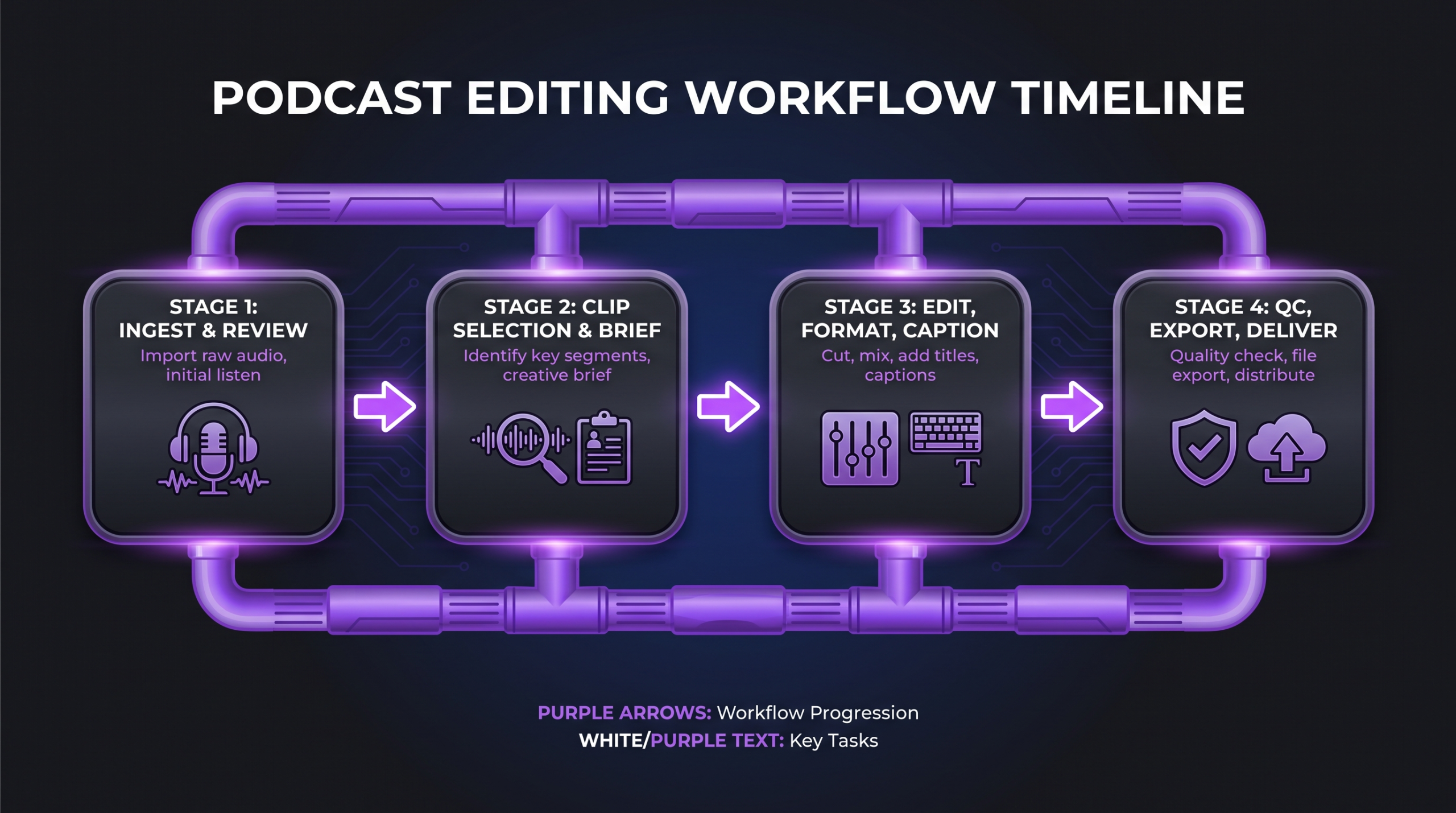
Step 1 — Ingest and Review
The editor (or a dedicated clip reviewer if your volume warrants it) receives the raw recording and produces a timestamped list of clippable moments with brief notes on why each moment works and which asset type it maps to. This review document is the foundation for everything else. Without it, your production process becomes reactive — editors pick moments at random, which produces inconsistent asset quality and leads to missed highlights buried deep in a long episode.
AI transcription tools have made this stage faster. Rev and similar services produce searchable transcripts that let a clip reviewer scan for standout language without watching the full recording at 1x speed. The transcript doesn’t replace editorial judgment — it accelerates the search for it.
Step 2 — Clip Selection and Brief
From the review document, the content lead (host, producer, or marketing team) selects the final clip list, assigns asset types, and adds any creative direction: caption style, which speaker to crop to in a two-person frame, whether a clip should open with a hook card or cut directly to dialogue, and so on. This brief goes to the editing team as a structured task list — not a vague “make some clips.”
Teams that skip this brief stage often find that their editors default to the most visually interesting moments rather than the most strategically useful ones. A technically polished clip of a funny tangent isn’t as useful as a well-edited clip of the episode’s core argument. The brief aligns intent before production begins. For teams managing multiple concurrent projects, a structured approval workflow like the one covered in video approval workflows that don’t kill momentum can prevent version confusion and keep delivery timelines clean.
Step 3 — Edit, Format, Caption
With the brief in hand, editing runs in parallel: short-form vertical clips, horizontal medium clips, and audiograms can be worked simultaneously by different editors if your team has the capacity. Each format has its own technical spec list:
Step 4 — QC, Export, and Distribute
Before anything leaves the editing suite, each asset goes through a brief QC pass: captions checked for accuracy, branding consistent with brand guidelines, file specs verified against platform requirements, no jump cuts in the wrong places. This sounds obvious, but teams that ship under time pressure regularly skip it and later discover a clip uploaded to Instagram in 16:9 with no captions and the wrong speaker’s name in the lower-third.
Distribution scheduling then maps each asset to its platform and publish time. Short clips typically perform better published on different days across the week rather than all at once — spacing your episode’s assets over 5–7 days keeps your content active in feeds for longer and avoids the “we posted everything Monday and had nothing the rest of the week” pattern.
Common Mistakes That Kill Clip Performance
These are the patterns that consistently undercut what should be strong clip campaigns:
Clipping for length, not for moment. “Let’s pull a 90-second clip starting at timestamp X” is not a clip strategy — it’s sampling. Clips need to be selected based on what the viewer experiences in the first 2–3 seconds, not based on a convenient length. A 60-second clip with a weak opening will underperform a 105-second clip that opens with a provocative line.
Using the same caption style across all formats. Vertical short-form clips need prominent, high-contrast captions centered in the safe zone. Horizontal YouTube clips can use a standard subtitle bar. Quote cards need clean typography, not a subtitle overlay. Applying one caption template to everything produces clips that look generic and feel unintentional.
Publishing all clips in one burst. Spacing matters. Platform algorithms reward consistent posting over time, not high-volume single-day posting. Your 20 assets should stretch across a week or more — not land Monday morning and disappear by Wednesday.
Skipping the brief and leaving all clip selection to the editor. Editors make great technical decisions. They are not always positioned to make strategic content decisions. Which moments best represent your brand positioning, which guest insights align with your current marketing message, which clips to prioritise for the most important platforms — these are content strategy calls, not editing calls. The brief is what hands that decision to the right person.
Ignoring what the episode’s best moment actually is. Podcast hosts often assume the planned “big topic” of the episode is the best clip. In practice, a tangent, a blunt admission, or an offhand statistic from the guest often outperforms the structured conversation. Your clip reviewer needs the freedom to recommend moments that weren’t in the original episode outline.
Build vs. Buy: Internal Team vs. Editing Partner
Producing 20 assets per episode is achievable. The question is who does the work and what it costs in time and overhead. Here’s how the two paths compare:
Teams that produce one to two episodes per week often find that a video editing agency with a dedicated clip workflow is more cost-effective than staffing a full internal post-production function — particularly when the volume doesn’t justify a full-time editor. The math shifts as you scale: at four or more episodes per week with 20-asset extraction, an in-house team starts to make economic sense if you can keep them fully utilised. For a full breakdown of what video repurposing production actually costs at different volume levels, the video repurposing pricing guide covers agency, freelance, and subscription tiers in detail.
At Increditors, we work with B2B and SaaS podcast teams that need consistent weekly clip output without building an internal post-production function. Our senior editors are briefed on your content positioning, not just your brand guide — which means the clips we recommend often surface moments the host didn’t flag as priorities, because we’re watching for audience-value signals rather than internal preference.
Turnaround Time and Volume Expectations
Teams new to systematic clip production often underestimate the time each stage takes. Here is a realistic benchmark breakdown for a 45-to-60-minute episode at the 20-asset target — actual timelines vary based on editing quality standard, revision cycles, and team size.
Experienced clip editing teams at this volume commonly land a full 20-asset set in 3–5 business days from raw file delivery, assuming one revision round. First-time engagements may run longer as the editor learns the show’s style. Teams looking to increase their overall monthly video output alongside podcast clip work will find the scaling frameworks in scaling from 4 to 30 videos a month directly applicable — the same batching and briefing logic applies.
On the cost side of professional video editing: clip editing is generally priced per asset (for ad hoc work) or bundled into a retainer (for weekly episode production). Per-clip pricing at a dedicated editing agency commonly ranges from a few hundred dollars for a simple short-form clip to higher for a fully color-graded, captioned, and exported horizontal video with branded lower-thirds. Retainer arrangements become more economical as weekly volume increases.
Cross-Platform Considerations
Each platform has its own content norms that your clip strategy needs to respect. Publishing the same clip unmodified across six platforms is how podcast clips get ignored — or worse, flagged as low-effort by platform algorithms.
Instagram Reels and TikTok reward native-feeling content. Clips that open with a clean hook line (spoken or text-on-screen), carry prominent captions, and don’t feel like repurposed long-form tend to get more algorithmic reach. Your vertical clips should feel native to the scroll, not like an excerpt from a professional recording studio setup. According to Spotify for Podcasters’ own guidance, clips distributed to short-form video platforms are consistently among the highest-performing discovery channels for new listener acquisition.
YouTube Shorts sit within the same ecosystem as your long-form YouTube channel. A Shorts clip that performs well creates channel-level authority that can lift the visibility of your full-length episode published on the same channel. The conversion path — Shorts clip to full episode subscribe — is one of YouTube’s most effective discovery loops for podcast content. For teams building their YouTube channel alongside their podcast, the podcast-to-YouTube strategy framework covers the full integration approach in more detail: podcast-to-YouTube strategy 2026.
LinkedIn remains the most effective platform for B2B podcast discovery. Native video consistently outperforms link posts, and the carousel format gives you a way to distribute episode insights without the friction of clicking through to an external podcast player. Buzzsprout’s annual podcast statistics consistently show that professional and business-oriented podcast categories over-index on LinkedIn as a discovery channel compared to consumer categories.
Twitter/X is most effective for thread-style text content and short audiograms (30 seconds or less). Longer clips tend to perform less well on X than on Instagram or YouTube, but a well-structured thread that opens with a counterintuitive claim from the episode can generate significant engagement independent of the video.
💡 Pro Tip: Don’t try to win on every platform simultaneously from day one. Pick two or three where your existing audience is active, run a consistent 4–6 week clip campaign from your best recent episodes, measure what performs, then expand. Spreading across six platforms with thin volume on each is a worse outcome than dominating two platforms with consistent, high-quality content.
Frequently Asked Questions
Does the 20-asset model work for audio-only podcasts?
Yes, though the video clip category shifts. For audio-only recordings, your short-form assets become audiograms and text-based assets (quote cards, carousels, threads, newsletter excerpts) rather than talking-head clips. You can also commission a simple branded animation or waveform visualization to give the audio a visual wrapper for video-first platforms. The overall asset count is achievable — it just skews toward static and audio-visual formats rather than pure video.
What episode length works best for 20-asset extraction?
Episodes in the 40–75-minute range tend to yield the richest clip material for this model. Short episodes (under 25 minutes) often produce strong short-form clips but limit the quantity of distinct clippable moments. Very long episodes (90+ minutes) generate more raw material but also require more clip reviewer time to identify the strongest moments. The quality of content matters more than length — a tightly structured 35-minute episode with a quotable, opinionated guest will outproduce a meandering 75-minute conversation in terms of clippable moments.
Should we clip every episode, or only the best ones?
For most teams, systematic extraction from every episode is more valuable than selectively clipping “good” episodes. Consistency trains your audience to expect weekly clip content, builds platform algorithm trust through regular posting, and often surfaces unexpected performers — clips from episodes you didn’t think would resonate often outperform the ones you were certain about. If resource constraints require prioritisation, choose based on guest profile and topic relevance to your audience, not on how you felt about the conversation in the moment.
How long does it take to see results from a clip strategy?
Most teams see early indicators — follower growth, clip reach, listen-link clicks — within 4–6 weeks of consistent clip publishing. Compound effects (where clips build algorithm trust and audience familiarity over time) typically show up in weeks 8–12. Teams that abandon the strategy after two or three weeks of modest results miss the compounding phase. Set realistic initial benchmarks based on your current audience size, measure weekly, and adjust clip selection and caption strategy before cutting the program entirely.
What’s the biggest difference between clip editing and regular video editing?
Clip editing is fundamentally a compression discipline — the editor’s job is to remove everything that doesn’t serve the moment, then package what remains so it lands cold. Long-form video editing is more about pacing and narrative structure over a sustained duration. Clip editors also work simultaneously across formats (vertical, square, horizontal, static) rather than a single output spec, which requires a different kind of multi-format technical fluency. Many excellent long-form editors need a brief adjustment period when moving into high-volume clip production — the judgment calls are different even when the tools are the same.
Verdict
The 20-asset podcast clip model is a production framework, not a magic number. What it gives you is a structured way to think about your episode output before recording, during editing, and across your distribution plan. When you treat every episode as a source file rather than a finished product, the ROI on your recording time improves significantly — without requiring more recording time.
The keys to making it work: a clear clip review and briefing process, format-specific editing specs, a distribution schedule that stretches assets across the week, and enough repetition to let platform algorithms build a pattern around your content. Teams that stay consistent for 8–12 weeks consistently describe the clip strategy as a turning point for their podcast’s discoverability.
If you’re considering handing the production side to a specialist team, the relevant question isn’t whether it’s possible in-house — it is — but whether your team’s time is better spent on content strategy and guest relationships than on multi-format export specs and caption QC. For most growing podcast programs, that answer becomes clear pretty quickly.
Ready for Video That Actually Converts?
Tell us about your project and we will put together a custom plan.