










![3D Explainer Video - ScribbleLive.mp4_snapshot_00.12_[2022.03.09_03.14.16]](https://increditors.com/wp-content/uploads/elementor/thumbs/3D-Explainer-Video-ScribbleLive.mp4_snapshot_00.12_2022.03.09_03.14.16-r7wb53mx72rxst3qcqyrfxdmeyzb5r9jbl0wbjujh4.png "3D Explainer Video – ScribbleLive.mp4_snapshot_00.12_[2022.03.09_03.14.16]")
































A successful course launch depends on at least five distinct video asset types. If the launch sits inside a larger education brand, pair this playbook with our video editing for EdTech companies guide. It depends — VSL, module videos, webinar recordings, promo clips, and email/social cut-downs — each with its own editing brief, QA bar, and delivery deadline. This playbook maps exactly which assets to produce, when to deliver them, how to brief your editor, and what a realistic revision timeline looks like so nothing breaks in launch week.
- The Video Assets a Course Launch Actually Needs
- The Course Launch Editing Timeline (Week by Week)
- Briefing Your Editor for a Course Launch
- QA Checklist: Before Any Course Video Goes Live
- In-House Editor vs Freelancer vs Agency: Which Fits a Launch?
- Launch-Week Video Workflow
- Common Course Launch Video Mistakes (and How to Avoid Them)
- FAQ
- Verdict
The Video Assets a Course Launch Actually Needs
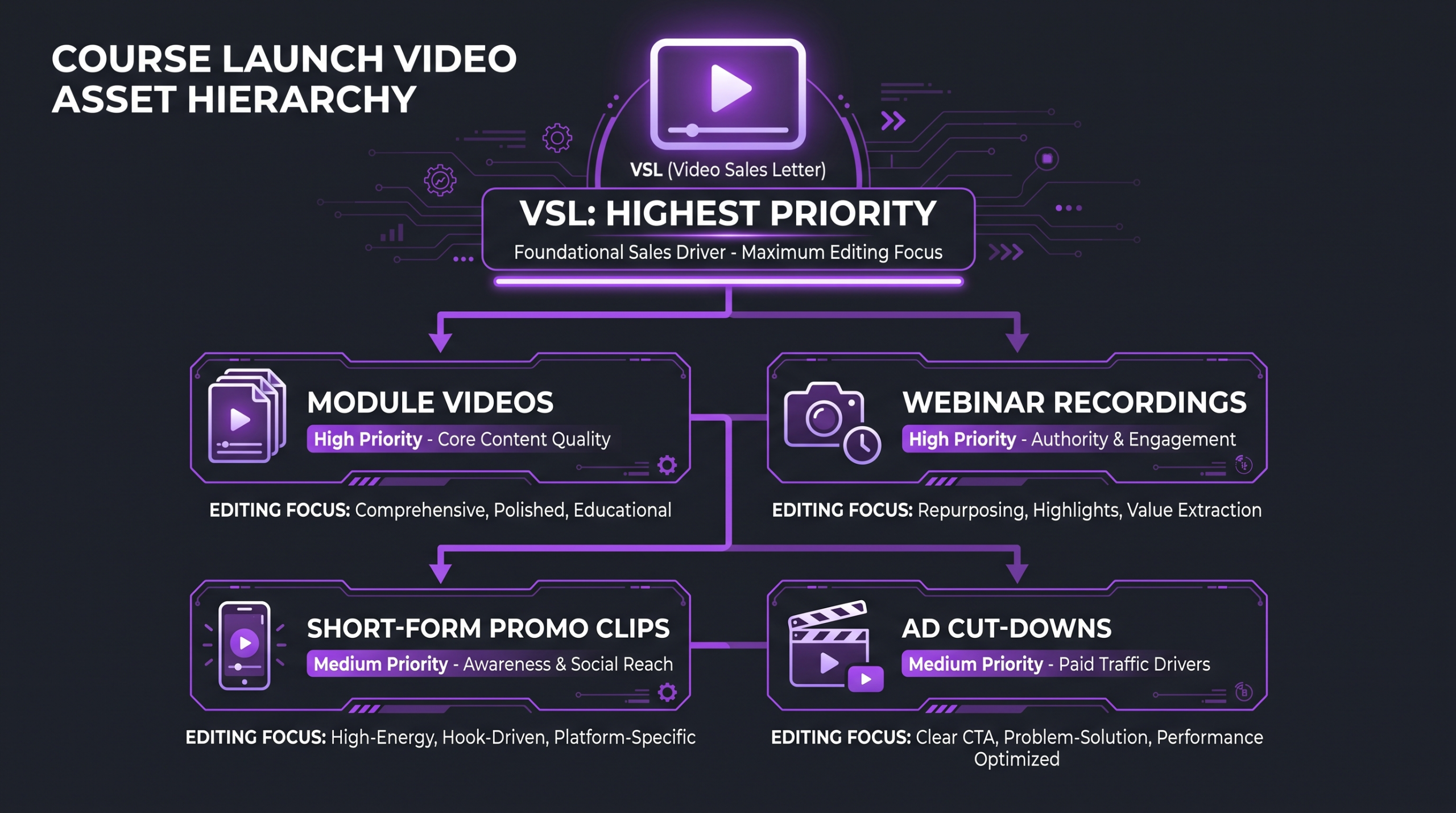
Most course creators think about video editing once — when the course modules are done. In practice, a launch requires six to eight distinct video deliverables, each serving a different stage of the buyer journey and each needing its own editing treatment. Missing any one of them means patching it together under launch-week pressure, which is where quality drops and deadlines slip.
Here is the complete asset map, with editing notes for each type.
1. The Video Sales Letter (VSL)
The VSL is the most editing-intensive asset in any launch. It typically runs 10–45 minutes depending on price point and audience sophistication, and it needs to feel simultaneously personal and produced. The raw recording is usually a talking-head presentation with screen share transitions. Editing priorities: tight pacing in the first three minutes to hold attention, smooth transitions between problem-agitation and solution sections, chapter-style graphic inserts at key arguments, and a clear visual CTA at the close. Captions are non-optional — a large share of VSL viewers are watching without sound on a second screen.
A dedicated explainer of VSL structure and format is available at What Is a VSL? Video Sales Letters Explained — worth reading before briefing your editor on this asset.
2. Course Module Videos
Module videos are the product itself. Editing standards here are different from marketing content — cuts should be invisible, pacing should match the instructor’s natural teaching rhythm, and distracting elements (background noise, glare, chair shifts) should be removed without making the instructor sound robotic. Consistent lower-thirds with the instructor’s name, chapter cards between modules, and a uniform color grade across all lessons signal a professionally produced course rather than an assembled recording dump.
The average professional online course contains between 15 and 40 individual video lessons. Even a moderate revision round on that volume — say, one round of cuts plus color correction — requires a coordinated editing pipeline, not a single freelancer juggling other projects. Budget the module editing pass as its own workstream, separate from the marketing video assets.
3. Webinar and Masterclass Recordings
Many course launches include a free live webinar or masterclass as the conversion mechanism. The recorded version — either as a replay for registrants or as an evergreen lead magnet — needs editing before it works at scale. Common tasks: remove the first few minutes of pre-session banter, cut Q&A sections that drag, add a recap card at the end, and re-encode for the hosting platform’s recommended specs. If the webinar feed split between slides and camera, editors also need to composite those feeds cleanly.
Platform-specific encoding requirements for Zoom, StreamYard, and dedicated webinar tools vary — your editor should receive the original export, not a compressed social share. See Wistia’s video specs guide for host-platform encoding benchmarks.
4. Short-Form Promo Clips and Teasers
Short-form clips serve the top of the launch funnel: Instagram Reels, TikTok, YouTube Shorts, LinkedIn. These are not simply trimmed versions of the VSL. Effective promo clips open on the hook within the first second, are designed for 9:16 vertical or 1:1 square formats, and lead viewers toward the sales page or opt-in. Plan for at least three to five distinct cut-downs — one for each platform with native formatting — plus one horizontal cut for YouTube and email.
5. Email and Ad Cut-Downs
Paid ad campaigns during a launch window need video variants: 15-second and 30-second versions for Meta and Google, with multiple hook variations (testing different opening lines over the same body). Email-embedded videos need a static thumbnail with a play button overlay for clients like Gmail that block autoplaying video. These are editing tasks that agencies often treat as afterthoughts; building them into the original brief avoids a painful last-minute scramble.
💡 Pro Tip: Brief all five asset types at once, even if you film them in phases. Editors who understand the full launch funnel make better contextual choices — the hook in a 15-second ad should echo the opening of the VSL, not contradict it.
The Course Launch Editing Timeline (Week by Week)
The single most common failure mode in course launches is compressing the editing timeline. Filming goes long, the sales page isn’t ready, the editor gets raw files two weeks before open cart — and everything rushes. The timeline below builds in realistic buffer and sequences deliverables by dependency: marketing assets first, then course content, then launch-week emergency slots.
6–8 Weeks Before: VSL First
The VSL drives the most revenue and needs the most revision cycles. Starting it six to eight weeks out gives you time for three full rounds of feedback without pressure. The first round should focus on structure and pacing — does the argument land? Is the story arc clear? Graphic design and color grade come in round two, with final audio polish and caption review in round three.
4–6 Weeks Before: Marketing Assets
Promo clips and ad cut-downs should be edited from the VSL footage wherever possible — this keeps messaging consistent and avoids re-shooting. Deliver these with enough runway for paid media teams to test multiple hook variants before open cart. Meta’s ad specs documentation outlines the technical requirements for video ads including aspect ratios, bitrate, and caption file formats — share this with your editor upfront.
2–3 Weeks Before: Module Batch Edit
Module videos are edited in batches by section. Deliver raw files organized by module, with a single style reference video that shows the grade, lower-third design, and chapter card format. One style feedback round on the first batch typically locks the look for all subsequent modules — that’s how experienced teams avoid re-editing fifteen lessons because the color grade shifted.
Briefing Your Editor for a Course Launch
A weak brief is the leading cause of expensive revision rounds. Course launches have compressed timelines and multiple stakeholders — the course creator, the launch manager, sometimes a paid media buyer — and every one of them will have feedback if the brief wasn’t clear upfront. Here is what a production-ready brief includes.
What a Strong Brief Includes
For each asset type, the brief should specify: intended platform and native format (16:9 for the VSL, 9:16 for Reels, 1:1 for feed ads), target length, opening hook approach (hard cut vs title card vs talking head), graphic treatment (motion graphics, static lower-thirds, or minimal), music bed reference, caption style, and delivery format. Vague instructions like “make it engaging” produce revision rounds; concrete references (“match the pacing of this clip”) produce first-draft approvals.
Brand Assets and Style Guide
Editors need a brand kit before the first cut: hex codes, font files, logo files in vector format, and a color grade reference. If you have an existing course or webinar with the grade you want to match, include it. If you’re launching fresh, describe the emotional register — clinical and authoritative, warm and conversational, high-energy and dynamic — and provide three reference videos from other creators whose look you admire. This is faster than waiting for an editor to guess.
Revision Rounds and Approval Gates
Set revision round expectations in writing before work starts. Professional editing agreements typically allow two to three rounds per asset. For a course launch, structure them as: Round 1 — structural feedback only (no nitpicking captions or color at this stage); Round 2 — graphic, design, and motion feedback; Round 3 — final audio, captions, and delivery format check. Mixing structural and cosmetic feedback in Round 1 leads to editors reworking motion graphics on a timeline that will move again in Round 2.
Using a dedicated video review tool — platforms like Frame.io or Wipster — makes timestamped feedback far more actionable than email threads. A working video production workflow for a course launch looks nearly identical to the SaaS video production process: asset tracking, approval gates, and clear handoff points between review stages.
💡 Pro Tip: Assign one person as the single point of approval. When a launch manager, course creator, and paid media buyer all give simultaneous feedback, editors receive contradictory instructions. Consolidate notes through one decision-maker before sending to the editing team.
QA Checklist: Before Any Course Video Goes Live
Every course launch video should pass a quality assurance review before it touches the live platform. The checklist below applies to all asset types; the VSL and module videos carry the highest stakes because errors in those assets affect revenue directly.
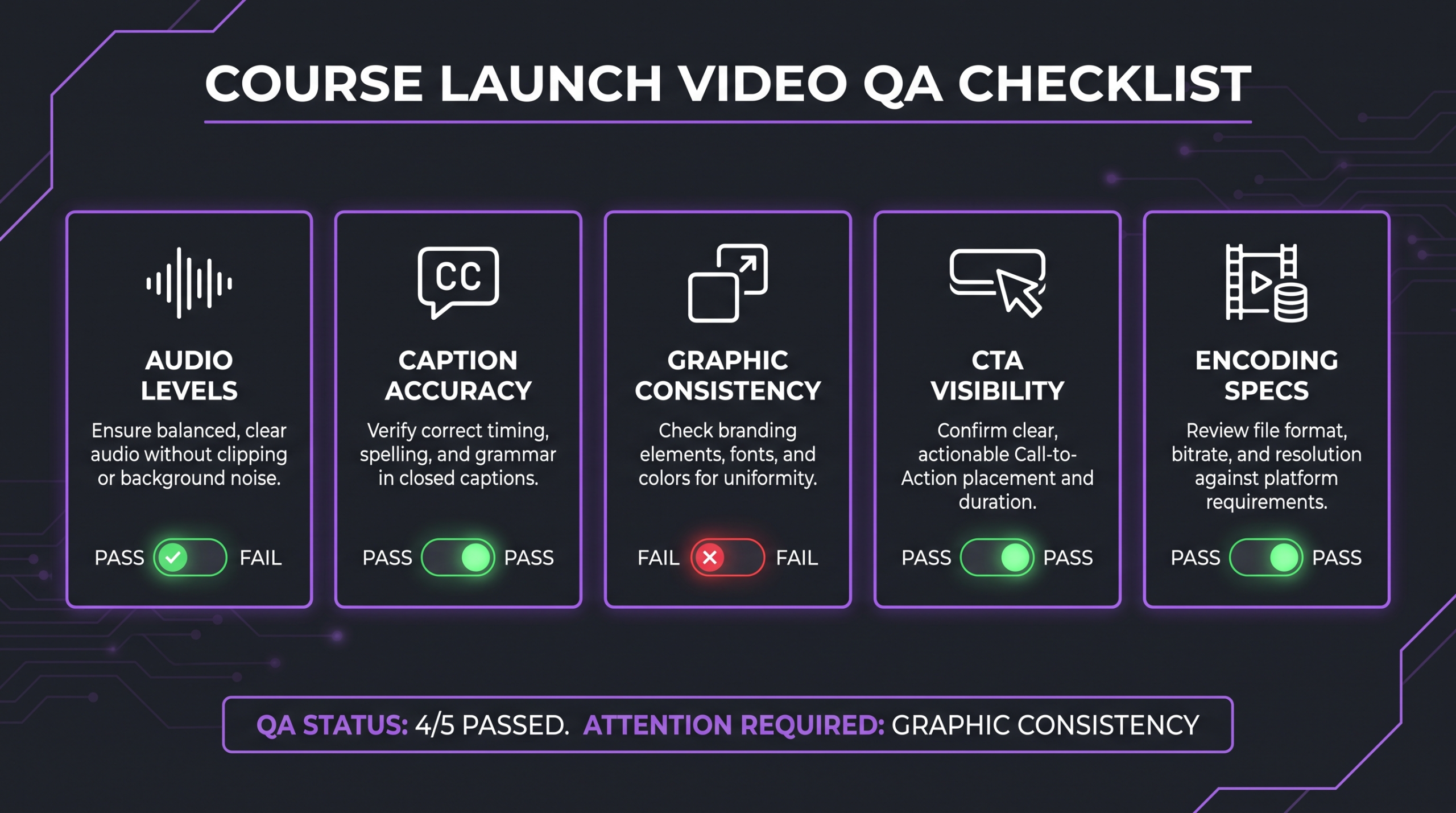
Assign QA to someone who was not involved in editing the video. Self-reviewed cuts consistently miss caption errors and color inconsistencies that a fresh viewer catches in the first thirty seconds. Build the QA pass into the timeline as a scheduled hand-off, not an afterthought.
In-House Editor vs Freelancer vs Agency: Which Fits a Launch?
Each resourcing model has a real cost-to-output profile for launch workloads. The table below is based on commonly observed market norms — your specific costs will depend on your market, the editor’s experience level, and the asset volume.
The freelancer availability risk is the most common failure mode for first-time launchers: a freelancer who was delivering on schedule takes a larger engagement elsewhere and your VSL arrives two days before open cart with revision requests unaddressed. Agencies absorb this risk with dedicated team capacity. Working with a video editing agency for a launch also means one point of contact across all asset types, rather than managing five separate freelancers for the VSL, module edits, ad cuts, webinar, and thumbnails.
For a fuller breakdown of what professional editing actually costs across service types, see the professional video editing cost guide. For course video production budgeting specifically, the online course video production cost guide covers pricing ranges by asset type and quality tier.
Launch-Week Video Workflow
Once open cart begins, the video editing workflow shifts from production mode to rapid-response mode. Launch week generates new video needs that weren’t on the original brief: a customer testimonial comes in and needs a 48-hour turnaround, a live Q&A recording needs a same-day promo clip, a cart-close deadline video needs to be updated with the correct timestamp. The teams that execute this cleanly have one thing in common — they communicated the launch-week workflow to their editor before the week started.
What to Prepare Before Launch Week Starts
Brief your editor on the rapid-response protocol before day one: establish a 4–24 hour turnaround agreement for launch-week assets, confirm file delivery method (shared Dropbox, Google Drive folder, or dedicated project management tool), identify which assets are pre-approved templates (cart-close countdown videos, email thumbnail overlays) that need only variable content updated, and confirm who has approval authority during launch week when the course creator is typically unavailable for review.
Testimonial and Social Proof Video Editing
Student testimonials collected during a live launch — especially those recorded via Zoom call or voice memo — often arrive in raw, unpolished form. An editor who is already context-loaded on your brand can turn these around in under 24 hours: clean the audio, add a lower-third with the student’s name and result, color-match to the launch’s visual identity, and export for social and sales page use. This is a high-leverage edit — social proof video that arrives on day 3 of a 5-day open cart can meaningfully move conversion rates in the final 48 hours. Thinkific’s creator resources note that social proof is consistently among the top purchase drivers for online courses — though conversion outcomes vary widely by offer and audience.
Cart-Close Sequence
The cart-close video — typically a 60–90 second email video reminding buyers that the offer expires — is one of the highest-converting assets in a launch email sequence. It should be prepared as a template with a variable section for the countdown, so the editor can update the deadline text without re-cutting the full video. Prepare this in advance; do not wait until the day before close to brief it.
💡 Pro Tip: Create a launch-week “emergency brief” template before the launch starts — a one-page form that captures asset type, raw file location, deadline, platform, and approval contact. When you’re in the middle of a live launch, you won’t have the bandwidth to write a full brief. The template means your editor gets what they need even when you’re moving fast.
Common Course Launch Video Mistakes (and How to Avoid Them)
These are the failure patterns that appear repeatedly in course launches where the editing process broke down.
Mistake 1: Treating the VSL as One Asset Instead of a Campaign
The VSL raw file is source material for ten other assets. Course creators who brief only the VSL and then separately brief the promo clips, ads, and email videos end up with inconsistent messaging and double the editing time. Brief the full campaign from one source file, and tell your editor explicitly which sections of the VSL contain your best hooks, your best proof, and your strongest CTA — these are the clips for ads and social.
Mistake 2: No Approved Style Reference
Starting an edit without a locked style reference — an approved color grade, agreed font treatment, and confirmed motion graphic look — leads to a Round 1 that is entirely structural and a Round 2 that is entirely cosmetic. The result: you’ve used up your revision rounds without getting both layers right. Deliver the style reference before your editor touches the timeline.
Mistake 3: Forgetting Platform Encoding Until the Last Hour
Kajabi, Teachable, Thinkific, Vimeo, and YouTube each have different encoding recommendations. Uploading the master export file to all of them without checking platform-specific specs leads to compression artifacts on Kajabi or upload failures on YouTube. Specify the destination platform in every brief and confirm the delivery format before final render. Kajabi’s video upload specifications are a good baseline to share with your editor.
Mistake 4: Centralizing All Feedback Through the Course Creator
During launch week, the course creator is in sales mode — doing live calls, answering emails, managing affiliates. Routing all video feedback through them creates a bottleneck that delays every asset. Designate a launch manager or operations lead as the editing liaison. They receive, consolidate, and send feedback without requiring the course creator’s attention for every minor decision.
Mistake 5: No Buffer for Module Upload Issues
Large video files take time to upload, process, and transcode on course platforms. Scheduling module publishing the day before launch with no upload buffer is how launches start with students reporting missing videos. Plan for a 48–72 hour buffer between final delivery and the moment students access the course platform, especially for large module libraries.
How Increditors Supports Course Launch Video Production
Increditors works with course creators and online education businesses as a dedicated video editing partner — not a generalist freelancer pool. What that means for a launch: one senior editor assigned to your account who understands your brand before the first file lands, a dedicated project manager who tracks asset delivery against your launch calendar, and the capacity to handle multiple concurrent workstreams (VSL + module edits + ad cuts) without you having to coordinate between vendors.
The workflow is built around launch timelines: milestone-based delivery, documented revision rounds, and a launch-week rapid-response agreement so your team knows exactly what the turnaround window is when something urgent lands. If you’re comparing this to generalist platforms, the video editing agency vs freelancer comparison covers the trade-offs in detail.
FAQ
How many weeks before launch should I start the editing process?
For a full asset set (VSL, module videos, promo clips, ad cut-downs, webinar edit), plan to start the editing process six to eight weeks before your open cart date. The VSL requires the most lead time because it drives the revision-heavy cycles that marketing assets depend on. Starting later than four weeks out significantly compresses your revision buffer and increases launch-week risk.
Can I use the same editor for my VSL and my course module videos?
You can, but be aware that VSL editing (narrative pacing, persuasive structure, conversion-oriented motion graphics) and module video editing (invisible cuts, instructor comfort, consistent academic presentation) require different instincts. Some editors specialize in one over the other. If you’re working with a single editor, share reference examples of both styles upfront so they understand that the two asset types call for a different approach — not just a different template.
How should I handle testimonial videos that arrive during launch week?
Pre-agree a same-day or next-day turnaround protocol with your editor before launch week starts. Establish the raw file delivery method, a simplified approval process (one round, single approver), and a template for the testimonial graphic treatment so the editor isn’t starting from scratch for each one. Testimonials that arrive in the first 48 hours of a launch can be edited and deployed before the cart closes if the handoff process is already designed.
Do I need separate video files for different course platforms?
Generally no, if your master export meets the highest common denominator spec. However, some platforms (particularly older versions of Teachable and Kajabi) process H.265 files differently than H.264. Unless your master file was recorded in an unusual codec or at an unusually high bitrate, a standard H.264 export at the platform’s recommended bitrate should work across all major course hosting platforms. Confirm with your editor that the export spec is appropriate for your destination platform before final render.
What’s a realistic turnaround for a VSL from raw footage to final delivery?
For a 20–30 minute VSL with standard motion graphics and captions, professional editing teams commonly estimate 5–7 business days for a first cut, with two additional rounds of 2–3 days each. Total calendar time from raw footage delivery to final-approved file: roughly 2–3 weeks, assuming feedback is consolidated and returned promptly at each stage. Rush timelines (under one week to final) are possible but typically require prioritization fees and limit revision depth.
Verdict
Video editing for a course launch is not a post-production task you slot in at the end — it’s a parallel workstream that starts six to eight weeks before open cart and runs through the final hours of the launch window. The creators who execute this well have one thing in common: they treated editing as a campaign function, not a finishing task. They briefed all five asset types together, structured their revision rounds by layer, built a QA gate before anything went live, and had a rapid-response protocol ready before launch week started.
The assets themselves — VSL, module videos, webinar edits, promo clips, ad cut-downs — each require different editing instincts and different delivery timelines. Managing that across a solo freelancer under launch pressure is the single most common point of failure. A dedicated editing partner with launch-specific capacity handles the volume, the revision cycles, and the last-minute testimonial turnarounds without you absorbing the coordination overhead during the week that matters most.
Ready for Video That Actually Converts?
Tell us about your course launch and we will put together a custom editing plan.