










![3D Explainer Video - ScribbleLive.mp4_snapshot_00.12_[2022.03.09_03.14.16]](https://increditors.com/wp-content/uploads/elementor/thumbs/3D-Explainer-Video-ScribbleLive.mp4_snapshot_00.12_2022.03.09_03.14.16-r7wb53mx72rxst3qcqyrfxdmeyzb5r9jbl0wbjujh4.png "3D Explainer Video – ScribbleLive.mp4_snapshot_00.12_[2022.03.09_03.14.16]")
































Motion graphics uses moving design elements — text, shapes, icons, data visualizations — to communicate information efficiently. Animation uses movement to tell a story, develop characters, and create emotional arcs. For most B2B brands, motion graphics delivers faster timelines and lower budgets; animation earns its higher cost when your message requires character, narrative, or metaphor. Read on for a full comparison, cost breakdown, and a decision framework tailored to marketing teams.
When a brand is planning a new explainer video, product demo, or social campaign, one of the first questions that comes up is almost always the same: should we use motion graphics or animation? These two terms get used interchangeably in creative briefs, vendor proposals, and internal Slack messages — but they mean very different things, carry very different price tags, and serve very different communication goals.
Getting the distinction wrong is a real business problem. A brand that commissions full character animation for a SaaS onboarding tutorial will burn budget and weeks of production time when motion graphics would have done the job faster and more clearly. Conversely, a brand that opts for motion graphics when the message demands emotional resonance and narrative will end up with content that technically moves but doesn’t connect.
This guide cuts through the confusion. It covers definitions, production realities, cost ranges, and a practical decision framework designed for marketing directors, content managers, and anyone who commissions video content at scale.
What Is Motion Graphics?
Motion graphics is graphic design in motion. It takes the same visual elements a designer would use in a static infographic — typography, geometric shapes, icons, data charts, brand colors, and illustrative elements — and adds movement, timing, and transitions to make them communicate more dynamically.
The defining characteristic of motion graphics is that it is fundamentally about design in motion, not about creating the illusion of life or acting. A motion graphics piece does not need characters with personalities, story arcs, or emotional performances. It needs clear visual hierarchy, purposeful transitions, and movement that guides attention and reinforces the message.
Common Motion Graphics Formats in Brand Video
Motion graphics appears across virtually every category of business video content:
- Explainer videos: Animated text and icons walk through how a product or process works. This is the classic use case — SaaS companies use these heavily for onboarding and landing pages.
- Animated data visualizations: Bar charts that build in real time, pie charts that segment, maps with animated dots — any situation where numbers need to feel alive rather than static.
- Title sequences and lower thirds: The animated text overlays you see in documentary interviews, corporate videos, and YouTube content. Motion graphics is the engine behind almost all of these.
- Social ad content: Short-form motion graphics (6–15 seconds) with bold typography and branded color schemes. Extremely common for paid social on LinkedIn, Meta, and YouTube pre-roll.
- Logo animations and bumpers: A 2–3 second animated logo reveal that opens or closes every video in a brand’s library.
- Product demos: Screen recordings or wireframe mockups enhanced with animated arrows, callouts, and animated UI elements that draw attention to specific features.
The Tools Behind Motion Graphics
Adobe After Effects is the industry-standard tool for motion graphics production. Designers use it to keyframe properties like position, opacity, scale, and rotation, and to apply complex expressions that automate repetitive motion. For more complex work, After Effects integrates with Cinema 4D Lite for simple 3D elements. Adobe’s official documentation on After Effects gives a sense of the toolset’s depth.
Other tools in the motion graphics stack include Adobe Premiere Pro (for integrating motion graphics into live-action edits), Adobe Illustrator (for creating vector assets that import cleanly into After Effects), and Figma for initial design layouts. More recent players like Rive and Jitter serve teams that want to publish lightweight web animations or create interactive motion graphics for app interfaces.
What Is Animation?
Animation is a broader discipline that creates the illusion of movement and life. Where motion graphics animates design elements, animation animates characters, environments, and objects in a way that suggests personality, weight, physics, and emotion. The goal of animation is typically to tell a story, develop a character, or create an emotional experience — not simply to make information move.
The word “animation” comes from the Latin animare, meaning “to give life to.” That etymology matters — it points to what separates animation from motion graphics at a fundamental level. Animation tries to make something feel alive. Motion graphics makes something feel dynamic and clear.
Types of Animation Used in Business Video
Animation is not a single style — it is a category that contains many distinct disciplines:
- 2D character animation: Flat or semi-flat characters that move through scenes. Common in explainer videos with a story-driven arc — a character faces a problem, discovers a product, and reaches a resolution.
- 3D animation: Three-dimensional characters and environments rendered with depth, lighting, and physics. Used for product visualization (rotating a 3D model of a physical device), brand mascots, and high-production brand films.
- Frame-by-frame (traditional) animation: Each frame is drawn individually, creating the hand-crafted aesthetic associated with classic cartoons and premium brand storytelling.
- Stop motion: Physical objects photographed frame by frame. Used for product-forward brand content, title sequences, and creative social content — usually as a deliberate stylistic choice.
- Whiteboard animation: A hand drawing illustrations in real time, often with voiceover. Popular in education and explainer content, though less so in premium brand production than it was a decade ago.
- Character rigging and puppet animation: Digital characters built with a skeletal rig that allows animators to pose and move them efficiently without redrawing. The backbone of most commercial 2D character animation pipelines.
The Tools Behind Animation
For 2D character animation, Adobe Animate and Toon Boom Harmony are the professional standards, with After Effects also used for character work through puppet pins or tools like Duik Bassel for rigging. 3D animation primarily uses Autodesk Maya, Blender (open-source and increasingly professional-grade), and Cinema 4D — with rendering pipelines that can add significant production time for complex scenes. Blender’s animation feature set illustrates the depth of investment required even in free-tier 3D tools.
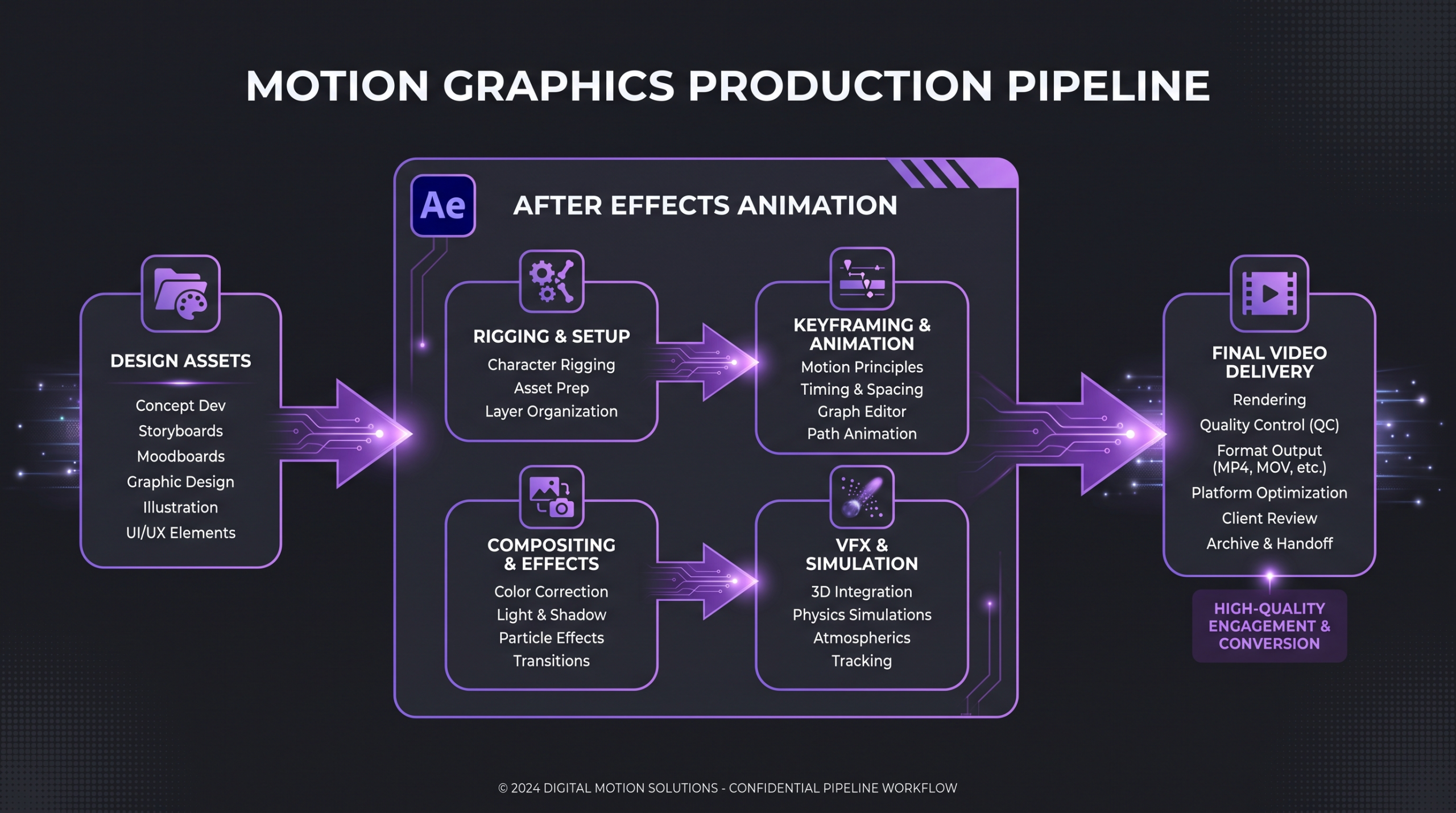
Motion graphics and animation follow fundamentally different production pipelines, which drives the cost and timeline difference.
The Core Differences, Side by Side
The most practical way to understand the difference is to look at how the two disciplines differ across dimensions that actually matter in a production budget and creative brief:
💡 Pro Tip: The most common mistake in creative briefs is using the word “animation” when the actual need is motion graphics. If your script doesn’t include a named character with an arc, you almost certainly want motion graphics — and you’ll save significant budget and time by calling it that from the start.
One reason the confusion persists is that motion graphics and animation exist on a spectrum, and many professional studios — including those that work as a video editing agency — can produce both or blend them within a single production. A video can have motion-graphics-driven data sequences and a short animated character moment without being categorized cleanly as either one.
Cost Comparison for Business Video Budgets
Budget is often the deciding factor when a marketing team chooses between motion graphics and animation. The cost difference can be significant — not because animation studios are greedy, but because animation fundamentally requires more specialized labor across more production stages.
These ranges reflect what teams commonly report across freelancer platforms, boutique studios, and agency engagements. They are illustrative benchmarks, not guaranteed quotes — actual costs depend on style complexity, revision rounds, voiceover, music licensing, and the specific studio or platform you work with. For a deeper breakdown of what drives video production costs across formats, our guide to professional video editing costs covers this in detail.
Why Animation Costs More
The cost difference comes down to production stages. A motion graphics explainer video typically moves through: concept → script → voiceover → asset design → animation → sound design → delivery. That is a lean pipeline with roughly four to six distinct handoffs.
A character animation project adds multiple layers on top: character design (front view, side view, expressions sheet, color guide), storyboarding, character rigging (building the skeleton that allows the character to move), scene layout and background design, actual frame-by-frame or rigged animation, lip sync, and rendering. Each of those stages involves specialists — a character designer is not the same person as a rigger, who is not the same person as a background artist — and revision rounds in any one stage can cascade into delays in the next.
According to Wistia’s research on video production cost, production cost is one of the most variable elements of video marketing, with style and motion approach being major cost drivers. For brands managing video at scale, choosing the right format for each use case — not always the most impressive one — is a meaningful budget lever.
💡 Pro Tip: If your primary concern is budget efficiency, ask vendors to quote you both options. A well-executed motion graphics explainer at $6,000 will almost always outperform a poorly-briefed character animation at $20,000. Format doesn’t substitute for strategy.
When Motion Graphics Is the Right Call
Motion graphics earns its budget in specific situations that B2B and content-heavy brands encounter constantly. Understanding these scenarios helps marketing teams make faster, more confident commissioning decisions.
SaaS and Tech Product Demos
If you are explaining how a software product works, motion graphics is almost always the better choice. The goal is clarity and credibility — showing the interface, annotating features with animated callouts, and walking the viewer through a workflow. Characters would add narrative weight without adding instructional value. A motion graphics demo that shows the actual product UI with clean animated overlays will convert better than a character-driven explainer that abstracts the interface into illustrated metaphors.
Data-Driven Brand Content
Annual report highlights, state-of-industry data, research findings, benchmark reports — any content that communicates with numbers benefits from motion graphics. Animated charts, infographic transitions, and kinetic typography make data feel alive and authoritative without requiring a narrative structure.
Social Advertising at Scale
Performance marketing teams that run large creative volumes — testing multiple hooks, CTAs, and audience segments simultaneously — need formats they can iterate quickly. Motion graphics templates are ideal here: a well-structured After Effects template lets a team produce ten creative variants in the time it would take to animate a single character scene. LinkedIn’s own guidance on video ad best practices highlights bold, immediate visuals as critical for feed performance — which plays directly to motion graphics’ strengths.
Brand Consistency Across a Video Library
Motion graphics scales well for teams building a large video library. A design system — a consistent set of colors, typography rules, icon styles, and animation timing — can be built once and applied across every future video. This is how the best-performing B2B video programs maintain brand coherence at volume, rather than starting from zero with each new production. The team at Increditors builds these motion graphics systems for clients who need volume without visual drift.
Deadline-Constrained Content
When a campaign needs to go live in three weeks and the script is still being written, motion graphics is the realistic option. The shorter production cycle — often one to four weeks for a 60–90 second piece at a competent studio — fits the realities of most marketing team schedules. Character animation with those same stakes is a setup for a missed launch or a cut-corners product.
When Animation Is Worth the Investment
Animation’s higher cost and longer production time are genuinely worth it in specific circumstances. The key is matching the emotional and narrative requirements of your content to the discipline’s strengths.
Brand Mascot Development
If your brand wants a character — a mascot that appears across campaigns, social content, and events — you need animation, not motion graphics. A mascot has a personality, recognizable expressions, and consistent movement that audiences come to associate with your brand. This is a one-time investment in character design and rigging that pays out across a long library of content, amortizing the upfront cost over time.
Emotionally Complex Brand Storytelling
Some brand messages are too nuanced for informational design. A financial services brand explaining how compound interest impacts a family’s retirement. A healthcare company telling the story of a patient’s journey. A nonprofit communicating the human impact of its work. These narratives need the empathy cues that only character animation provides — facial expressions, body language, physical interaction with the world.
HubSpot’s marketing research consistently shows that emotional storytelling in brand video drives higher sharing rates and stronger brand recall than purely informational content — the tradeoff is that it costs more to produce effectively.
Abstract Concept Visualization
Some concepts resist straightforward explanation through design elements. Molecular biology. Quantum computing. Systemic racism. Abstract philosophical ideas. When the concept itself is invisible or too complex for a direct visual metaphor, character animation can create an invented world with rules that make the abstraction tangible and relatable — something motion graphics alone cannot do.
3D Product Visualization for Physical Goods
For brands selling physical products, 3D animation can show the product from angles a camera cannot reach, expose internal mechanisms, and visualize manufacturing processes. A hardware company demonstrating how a precision component fits into a larger assembly, or a medical device company showing how a drug delivery system works at the cellular level — these use cases justify 3D animation’s production investment because no other format can communicate the same information.
Consumer Brand Content Targeting Younger Audiences
Consumer brands targeting younger demographics often find that character animation outperforms motion graphics for organic social and brand-building content. Characters create parasocial relationships, generate memes, and travel across platforms in ways that motion graphics rarely do. This matters less for B2B brands — where the primary decision-maker is a rational buyer comparing options — and more for D2C consumer brands where emotional affinity is a core growth lever.
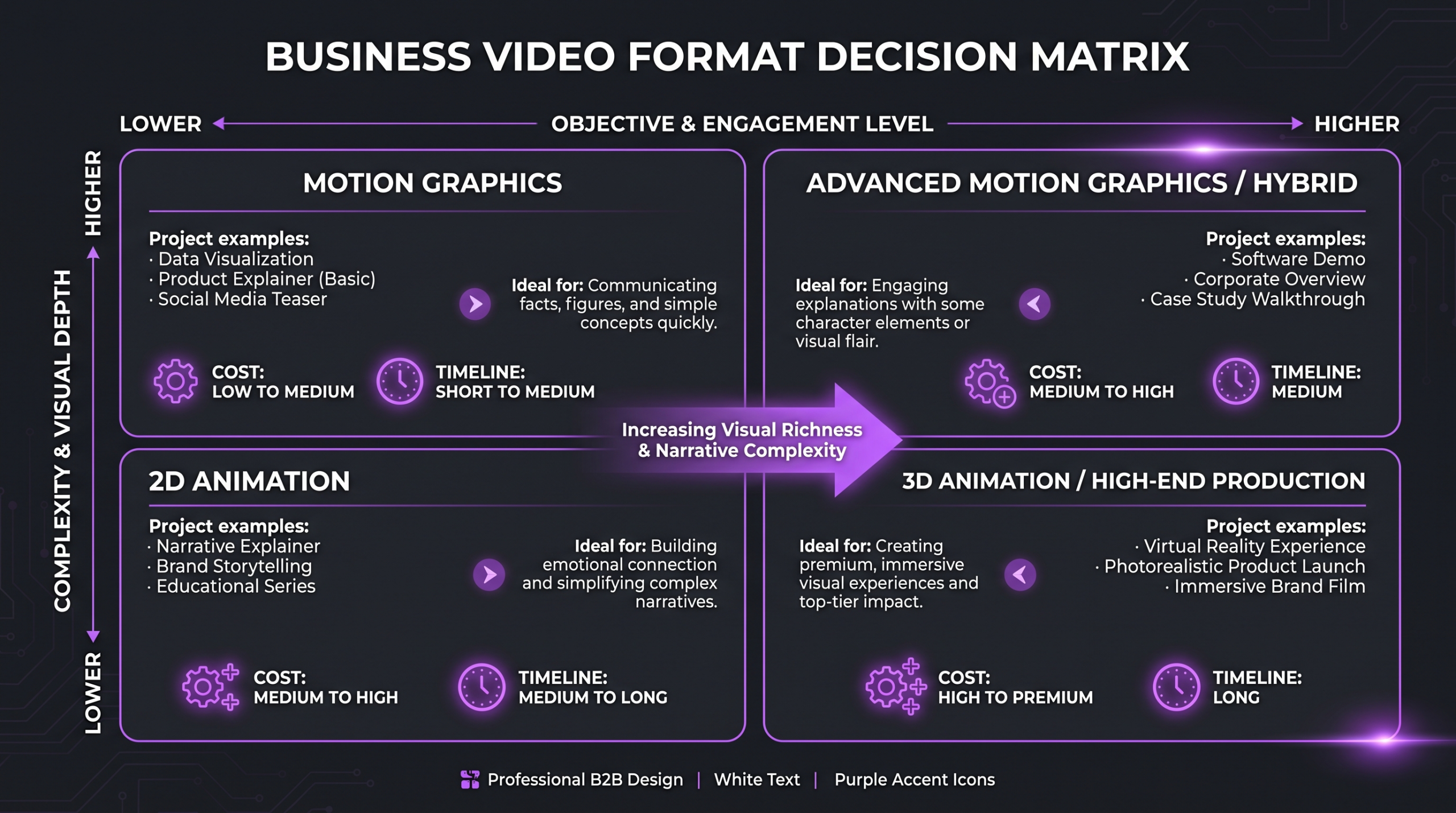
The right format depends on your content’s purpose, audience, and production constraints — not on which style looks more impressive.
Hybrid Approaches: Using Both Strategically
The most sophisticated brand video programs do not choose one format exclusively. They use motion graphics for volume and efficiency, animation for tentpole content, and blend both within individual productions when it serves the creative intent.
Blended Productions: Opening with Animation, Explaining with Motion Graphics
A common and effective production structure for longer explainer videos goes like this: a 15–20 second character animation opening establishes the problem — a recognizable person in a recognizable frustrating situation — and then the rest of the video uses motion graphics to explain the solution systematically. This approach gets the emotional hook from animation and the informational efficiency from motion graphics, without paying for full character animation throughout.
Series Strategy: Animated Brand Anchor + Motion Graphics Content Engine
Some brands invest in a single high-quality animated brand film — a two-to-three minute story-driven piece that lives on the homepage and anchors the brand’s visual identity — and then produce all their ongoing content (weekly social videos, product updates, tutorials) as motion graphics derivatives of the same design system. The animated piece establishes the world; the motion graphics pieces populate it efficiently. This is a scalable content architecture that respects both formats’ economics.
Live Action + Motion Graphics Hybrid
Motion graphics overlays on live-action footage are one of the most widely-used video production techniques in B2B content. A talking-head interview with animated data callouts appearing beside the speaker. A product walkthrough where live hands interact with an actual device while animated arrows and labels appear on screen. These hybrids let brands get the authenticity of real people on camera while adding the clarity that motion graphics provides for complex information. Understanding the full landscape of types of video editing services helps brands identify which post-production partner can handle this kind of multi-layer production.
The Decision Framework for Marketing Teams
Choosing between motion graphics and animation should be a structured decision, not an intuitive one. Here is the framework that production teams at competent video agencies use to guide this conversation with clients at the brief stage.
Step 1: Identify the Primary Goal of This Video
Ask this directly: is this video primarily trying to inform or connect emotionally? If the primary goal is to explain a process, teach a concept, or demonstrate a product, the answer is almost certainly motion graphics. If the primary goal is to build empathy, tell a brand story, or create an emotional association, the answer leans toward animation.
Step 2: Check Whether the Content Requires a Character
Read the script or brief. Does the narrative depend on a character making choices, facing obstacles, expressing emotions, or interacting physically with other characters or objects? If yes, animation is the appropriate format. If the script describes a concept, a product, or a process — but could be narrated in voiceover over designed visuals without a character being present — motion graphics will work.
Step 3: Apply the Budget and Timeline Reality Check
If your budget is under $5,000 and your deadline is under four weeks, motion graphics is the realistic option regardless of creative ambitions. Low-budget character animation almost always results in stiff, uncanny movement that works against the brand rather than for it. Well-executed motion graphics within budget will always outperform poorly-executed animation over budget.
Step 4: Assess Reuse and Scalability Requirements
If you need to produce variations of this video frequently — localized versions, updated statistics, seasonal variants, different CTA versions — motion graphics templates are dramatically more efficient. Animation assets can be reused, but character animation in particular requires specialist labor for any meaningful revisions. Teams working with a video editing agency vs freelancer should factor in this scalability dimension — agencies with established motion graphics systems can often turn around update variants same-week, while most freelance animators cannot.
For brands producing a large volume of video content — which increasingly describes most growth-stage B2B companies — the VFX and visual effects layer is a separate cost consideration worth understanding. Our breakdown of VFX cost for business videos covers where visual effects sit in relation to motion graphics and animation in a typical production budget.
According to research on video content engagement, viewers retain information significantly better from video than from text alone — but the format’s effectiveness depends heavily on it matching the viewer’s intent and the content’s complexity. There is no universal format winner; there is only the right format for the job.
Frequently Asked Questions
Is motion graphics a type of animation?
Yes, technically motion graphics is a subset of animation — it involves animating graphic elements. But in professional production practice, the two terms describe different disciplines with different tools, workflows, and purposes. Motion graphics animates design elements to communicate information; animation creates the illusion of life, personality, and story. When clients use the terms interchangeably, production teams need to clarify which discipline is actually required before writing a scope of work.
Can I get a motion graphics video that looks like animation?
Yes — and this is a common approach for brands that want the visual impression of animation without the character-driven production pipeline. Illustrated character elements can be incorporated into a motion graphics workflow using rigging tools like Duik Bassel in After Effects, producing character movement that reads as animation without requiring a full character animation pipeline. The result is not as expressive as purpose-built character animation, but it achieves a similar visual register at lower cost and faster turnaround.
How long does it take to produce a motion graphics explainer versus an animated video?
A 60–90 second motion graphics explainer typically takes one to four weeks at a competent studio, depending on complexity and revision rounds. A 60–90 second 2D character animation piece commonly takes four to ten weeks or more. 3D animation adds further time due to modeling and rendering. These timelines assume the script and voiceover are finalized before the motion work begins — late script changes are the most common cause of timeline overruns in both formats.
What is the difference between VFX and motion graphics?
Visual effects (VFX) refers to post-production techniques applied to live-action footage — compositing, green screen replacement, digital set extensions, particle effects. Motion graphics is created entirely in a design/animation tool without live-action footage as a starting point (though it can be combined with live footage as an overlay). VFX requires an existing filmed frame as the base; motion graphics starts from a blank canvas. The two disciplines do use some of the same tools (After Effects handles both), but the production context is different.
Which format performs better for B2B conversion?
For most B2B use cases — landing page explainers, product demos, LinkedIn content, email campaigns — motion graphics performs at least as well as animation and often better, because B2B buyers are primarily making rational decisions and respond to clear, credible information delivery. Animation outperforms in B2B contexts when it is used for top-of-funnel brand awareness or when the product category is complex enough to require metaphorical explanation. Conversion rate data varies significantly by industry and execution quality, so format testing is always preferable to assuming a universal answer.
Verdict: Choosing the Right Format for Your Brand
Motion graphics and animation are not competitors — they are different tools in the same production toolkit, each with a clear job to do. The decision tree is straightforward once you are honest about what your video actually needs to accomplish.
Choose motion graphics when your priority is informational clarity, brand consistency at volume, fast production timelines, or budget efficiency for content you will need to update frequently. It is the workhorse format for modern B2B video programs, and when it is well-executed, it converts.
Choose animation when your content requires character, emotional narrative, or a type of visual explanation that designed elements alone cannot deliver. Justify the higher cost and longer timeline with a clear creative reason — not simply because animation “looks premium.”
Use both as part of a deliberate content strategy: animation for tentpole brand content, motion graphics for the content volume that surrounds it. This is how brands that produce video at scale maintain both quality and efficiency.
Whichever format fits your brief, the quality of execution matters more than the format itself. Working with a specialist video editing agency that has dedicated senior talent in both motion graphics and animation — rather than generalists who do both passably — is the clearest predictor of whether a video actually performs. The format decision is step one; finding a team that executes it to a high standard is step two.
For a comprehensive look at types of video editing services available to brands — including where motion graphics and animation fit within broader post-production capabilities — that guide covers the full landscape. And if budget allocation is on your mind alongside format decisions, professional video editing cost benchmarks provide the context you need to build a realistic brief.
Ready for Video That Actually Converts?
Tell us about your project and we will put together a custom plan — whether that is motion graphics, animation, or a hybrid that fits your budget and timeline.