










![3D Explainer Video - ScribbleLive.mp4_snapshot_00.12_[2022.03.09_03.14.16]](https://increditors.com/wp-content/uploads/elementor/thumbs/3D-Explainer-Video-ScribbleLive.mp4_snapshot_00.12_2022.03.09_03.14.16-r7wb53mx72rxst3qcqyrfxdmeyzb5r9jbl0wbjujh4.png "3D Explainer Video – ScribbleLive.mp4_snapshot_00.12_[2022.03.09_03.14.16]")
































Your product demo video is probably losing you customers. Not because your product is bad — but because the editing makes it feel like a screen recording with a voiceover slapped on top. Which, let’s be honest, it probably is.
In 2026, product demos and explainer videos are the most important assets in your marketing funnel. They sit at the decision point — the moment a prospect goes from “interesting” to “take my money” or “meh, next.” And the editing quality is often the difference between those two outcomes.
Here’s the thing: great product demo editing isn’t about fancy transitions or flashy effects. It’s about clarity, pacing, and guiding the viewer’s attention to exactly the right place at exactly the right time. It’s a craft that combines motion graphics expertise with marketing psychology — and most editors don’t have both.
This guide covers everything you need to know about editing product demos and explainers: what makes them convert, what they cost, and how to find an editor who actually understands the format.
What’s in This Guide
- Why Product Demo Editing Matters More Than You Think
- Types of Product Demo & Explainer Videos
- Anatomy of a High-Converting Demo Video
- Key Editing Techniques for Product Demos
- How Much Does Product Demo Editing Cost?
- DIY vs Professional Editing: What You’re Missing
- Repurposing Demos Into Social Content
- Real-World Examples
- How to Choose the Right Editor
- FAQ
Why Product Demo Editing Matters More Than You Think
Let’s start with the numbers. According to Wyzowl’s 2026 State of Video report, 89% of people say watching a video has convinced them to buy a product. For SaaS companies specifically, product demo videos increase trial sign-ups by 20-40% when professionally produced versus DIY.
But here’s the nuance most people miss: it’s not just about having a demo video. It’s about the quality of the edit. The same raw footage can perform dramatically differently depending on how it’s edited.
The Attention Economics of Demo Videos
A prospect watching your demo video isn’t casually browsing — they’re evaluating. They’re comparing you to 2-3 competitors. And they’re making unconscious judgments about your product quality based on your video quality.
Poor editing signals:
- Rushed cursor movements that are hard to follow → “This product is confusing”
- No zoom-ins on key features → “I can’t see what it actually does”
- Monotone voiceover with no visual breaks → “This is boring, I’ll look at the competitor”
- No annotations or callouts → “I don’t understand the value”
- Abrupt cuts between sections → “This feels amateur”
Professional editing signals:
- Smooth zoom-ins with animated callouts → “This is easy to use”
- Clean transitions between features → “This product is well-designed”
- Problem-solution framing → “They understand my pain point”
- Consistent branding → “This is a serious company”
- Strategic pacing → “I watched the whole thing and now I want to try it”
Types of Product Demo & Explainer Videos
Not all demo videos are the same, and the editing approach (and cost) varies significantly by type. Here’s what you’re likely producing — or should be.
1. Screen-Capture Demos
The most common type for SaaS and software products. You record your screen while walking through features, then edit in zoom-ins, callouts, transitions, and voiceover. Think Loom recordings, but polished to a professional standard.
Best for: Software walkthroughs, feature updates, onboarding videos
Typical length: 3-10 minutes
Edit time: 8-20 hours
Cost range: $500-$1,500
2. Animated Explainers
Fully animated videos that explain your product concept using custom illustrations, characters, or abstract motion graphics. No screen recordings — everything is designed and animated from scratch.
Best for: Complex products, pre-launch marketing, abstract concepts
Typical length: 60-120 seconds
Edit time: 40-80+ hours
Cost range: $2,000-$10,000+
3. Hybrid Demos (Screen + Animation)
The sweet spot for most companies. These combine real screen recordings with animated transitions, callouts, and motion graphics. You get the authenticity of showing your real product with the polish of professional animation.
Best for: Marketing pages, sales enablement, investor presentations
Typical length: 2-5 minutes
Edit time: 15-35 hours
Cost range: $1,000-$3,000
4. Live-Action Product Demos
Physical products filmed with professional cameras, lighting, and sometimes talent. Think unboxing videos, feature demonstrations, and “how it works” content for hardware or consumer goods.
Best for: Physical products, D2C brands, crowdfunding campaigns
Typical length: 1-5 minutes
Edit time: 10-25 hours
Cost range: $800-$2,500 (editing only, excludes production)
5. Interactive/Personalized Demos
An emerging format in 2026 — demos that adapt to the viewer’s industry, role, or use case using branching video technology or personalized screen recordings. The editing is more complex because you’re creating multiple paths.
Best for: Enterprise sales, ABM campaigns
Typical length: 3-8 minutes (per path)
Edit time: 25-50+ hours
Cost range: $2,000-$5,000+
| Demo Type | Best For | Length | Cost Range | Production Time |
|---|---|---|---|---|
| Screen-capture | SaaS walkthroughs | 3–10 min | $500–$1,500 | 1–2 weeks |
| Animated explainer | Complex concepts | 60–120 sec | $2,000–$10,000+ | 3–6 weeks |
| Hybrid (screen + animation) | Marketing & sales | 2–5 min | $1,000–$3,000 | 2–3 weeks |
| Live-action | Physical products | 1–5 min | $800–$2,500 | 1–3 weeks |
| Interactive/personalized | Enterprise sales | 3–8 min | $2,000–$5,000+ | 3–5 weeks |
Anatomy of a High-Converting Product Demo Video
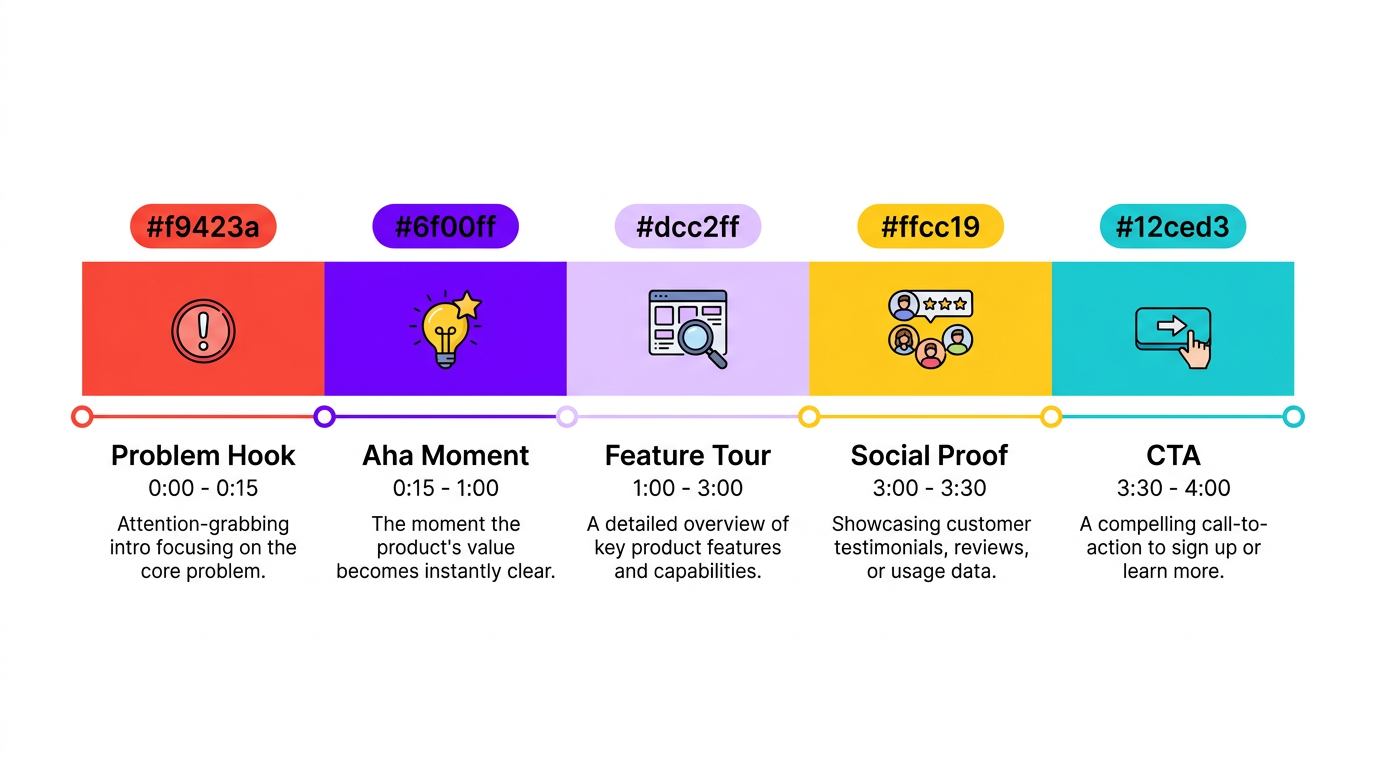
After editing hundreds of product demos at Increditors, we’ve identified the five elements that separate demos that convert from demos that get skipped.
Element 1: The Problem-First Hook (0:00-0:15)
The biggest mistake in product demos is starting with your product. Nobody cares about your product — they care about their problem. The first 15 seconds should make the viewer feel seen.
Weak hook: “Welcome to ProductX, the all-in-one platform for project management.”
Strong hook: “Your team is drowning in Slack threads, losing tasks in spreadsheets, and missing deadlines. Here’s how 2,000 teams fixed that in under a week.”
From an editing perspective, the hook needs visual energy: quick cuts, bold text overlays showing the pain point, maybe a brief montage of common frustrations before transitioning to the solution.
Element 2: The “Aha Moment” Reveal (0:15-1:00)
After establishing the problem, show the single most impressive thing your product does — the feature that makes people go “oh, that’s cool.” This isn’t a comprehensive tour. It’s your best shot.
The editing here is critical. Use a slow zoom-in on the screen, maybe a brief pause before the action, then a clean transition showing the result. The pacing should create a tiny sense of anticipation followed by satisfaction.
Element 3: Guided Feature Tour (1:00-3:00)
Now walk through 3-5 key features, each framed as a solution to a specific problem. Not “Feature X lets you do Y” but “Remember when [problem]? Here’s how you solve it in 10 seconds.”
Editing technique: each feature section should have its own visual identity — a consistent transition style, a numbered callout, or a color-coded section marker. This helps viewers mentally organize the information and makes the demo feel structured rather than rambling.
Element 4: Social Proof Insert (3:00-3:30)
Drop in a brief customer quote, logo wall, or metric (“10,000 teams trust ProductX”). This should feel organic, not salesy — a 5-10 second visual break between the feature tour and the CTA.
Editing approach: animated lower third with customer name and company, or a clean slide with logos. Keep it fast — this isn’t a testimonial video, it’s a trust signal.
Element 5: Clear CTA (3:30-4:00)
End with a single, unmistakable call-to-action. Not three options. One action you want them to take right now.
Editing: full-screen CTA slide with contrasting color (don’t blend it into the video — make it pop). Include the URL or action on screen for at least 5 seconds. Some of the best demos end with a brief animation that transitions from the product interface to the CTA screen.
Key Editing Techniques for Product Demos
These are the specific editing techniques that separate amateur demos from professional ones. If your current editor isn’t doing these, you’re leaving conversions on the table.
Smooth Zoom-Ins and Callouts
When showing a software interface, never just show the full screen and talk over it. Your viewer is watching on a phone — they can’t see the button you’re clicking. Professional demo editors use smooth zoom-ins (Ken Burns-style or ease-in-out) to draw attention to specific UI elements, then callout animations (circles, arrows, highlighted boxes) to make the action unmissable.
Cursor Highlighting and Click Effects
The cursor should be easy to follow. Add a subtle highlight circle around the cursor, use click ripple effects, and slow down mouse movements during important actions. Some editors even remove the raw cursor and add a smoother animated one.
Transition Design Between Sections
Each feature section needs a clean transition. Not star wipes — think branded slide transitions, brief animated dividers, or simple cross-fades with a section title. These give the viewer’s brain a moment to process before the next concept.
Audio Pacing and Music Bed
Demo videos need a music bed that creates forward momentum without competing with the voiceover. The music should dip during complex explanations and swell during transition moments. The editor should also clean the voiceover audio — remove breaths, normalize volume, and add subtle compression.
Animated UI Mockups
For key moments, replace the raw screen recording with an animated mockup. This means placing the screen recording inside a clean browser or device frame, maybe adding a subtle shadow, and animating the frame entry. It looks significantly more professional than a raw screen capture.
Speed Ramping
Certain actions (loading screens, form filling, repetitive clicks) should be sped up to maintain pacing. Other moments (the “aha” feature reveal) should be at normal speed or even slightly slowed. This dynamic pacing keeps the demo engaging without making it feel rushed or dragged.
Need a Product Demo That Actually Converts?
Our editors specialize in SaaS demos, explainer videos, and product walkthroughs with motion graphics, callouts, and conversion-focused editing.
How Much Does Product Demo Video Editing Cost?
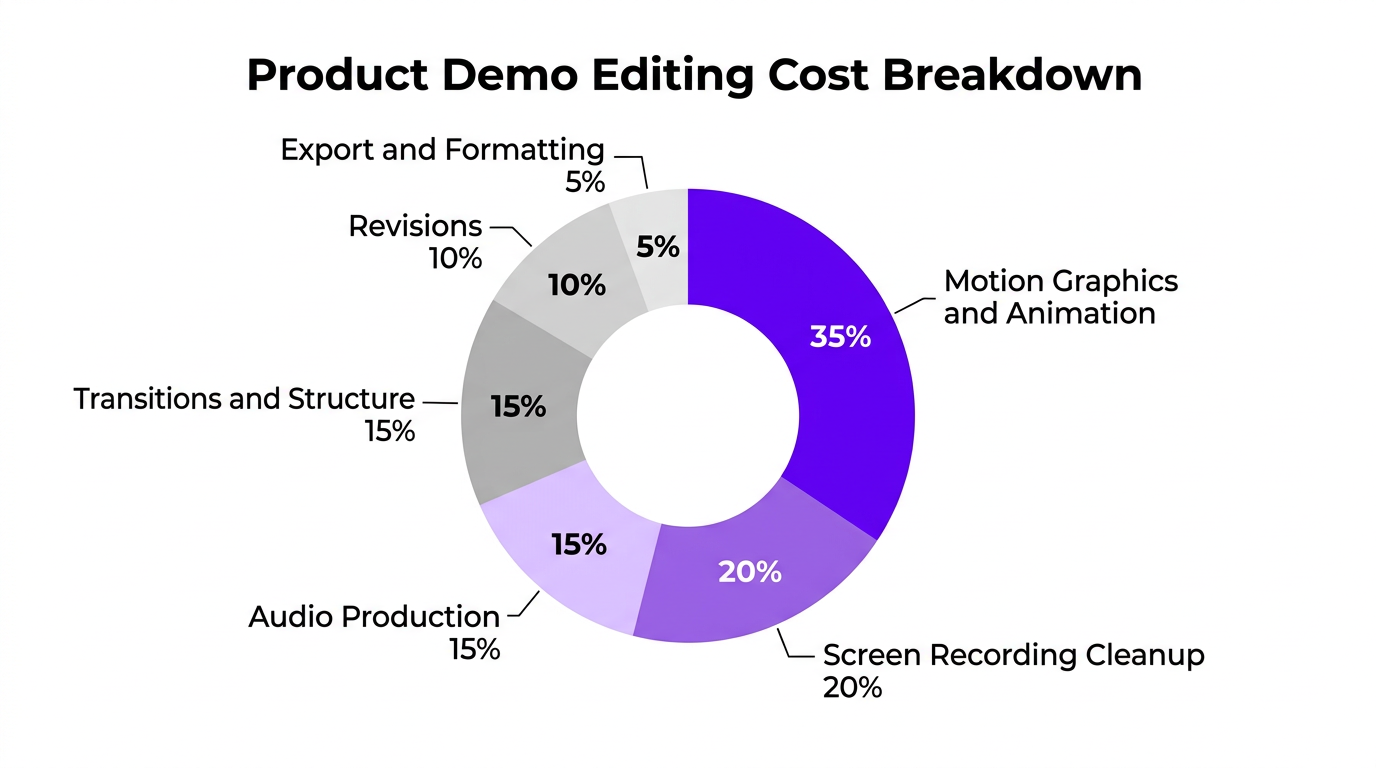
Product demo editing is more expensive than standard YouTube editing because it requires specialized skills — motion graphics, screen recording cleanup, and marketing-aware pacing. Here’s what you should expect to pay in 2026.
Per-Video Pricing
| Tier | What’s Included | Price Range | Typical Turnaround |
|---|---|---|---|
| Basic | Screen recording cleanup, simple cuts, background music, basic titles, voiceover sync | $500–$800 | 3–5 days |
| Mid-Tier | Animated callouts, zoom-ins, branded transitions, cursor highlighting, music bed, lower thirds | $800–$1,500 | 5–8 days |
| Premium | Custom motion graphics, animated UI mockups, VFX, sound design, device framing, multi-section transitions | $1,500–$3,000+ | 8–15 days |
| Full Animation | Custom illustrations, character animation, fully designed scenes, professional VO, sound design | $3,000–$10,000+ | 3–6 weeks |
Monthly Retainer Pricing
If you’re producing demos regularly (product updates, feature launches, sales enablement), a monthly retainer makes more sense than per-video pricing.
| Volume | Demo Type | Monthly Retainer | Per-Video Equivalent |
|---|---|---|---|
| 2-3 demos/month | Screen-capture + graphics | $2,000–$3,500 | $800–$1,200 |
| 4-6 demos/month | Hybrid (screen + animation) | $4,000–$7,000 | $900–$1,200 |
| Ongoing | Full production partnership | $5,000–$10,000+ | Volume-adjusted |
What Drives the Cost Up
Several factors push demo editing costs above standard video editing:
- Custom motion graphics — animated callouts, UI mockups, and transitions require After Effects expertise
- Multiple screen recordings — demos with desktop + mobile views need extra formatting work
- Revisions — SaaS companies often iterate on messaging, requiring re-edits
- Brand guidelines — matching exact brand colors, fonts, and animation styles takes more time than generic editing
- Localization — creating versions in multiple languages multiplies the workload
DIY vs Professional Editing: What You’re Actually Missing
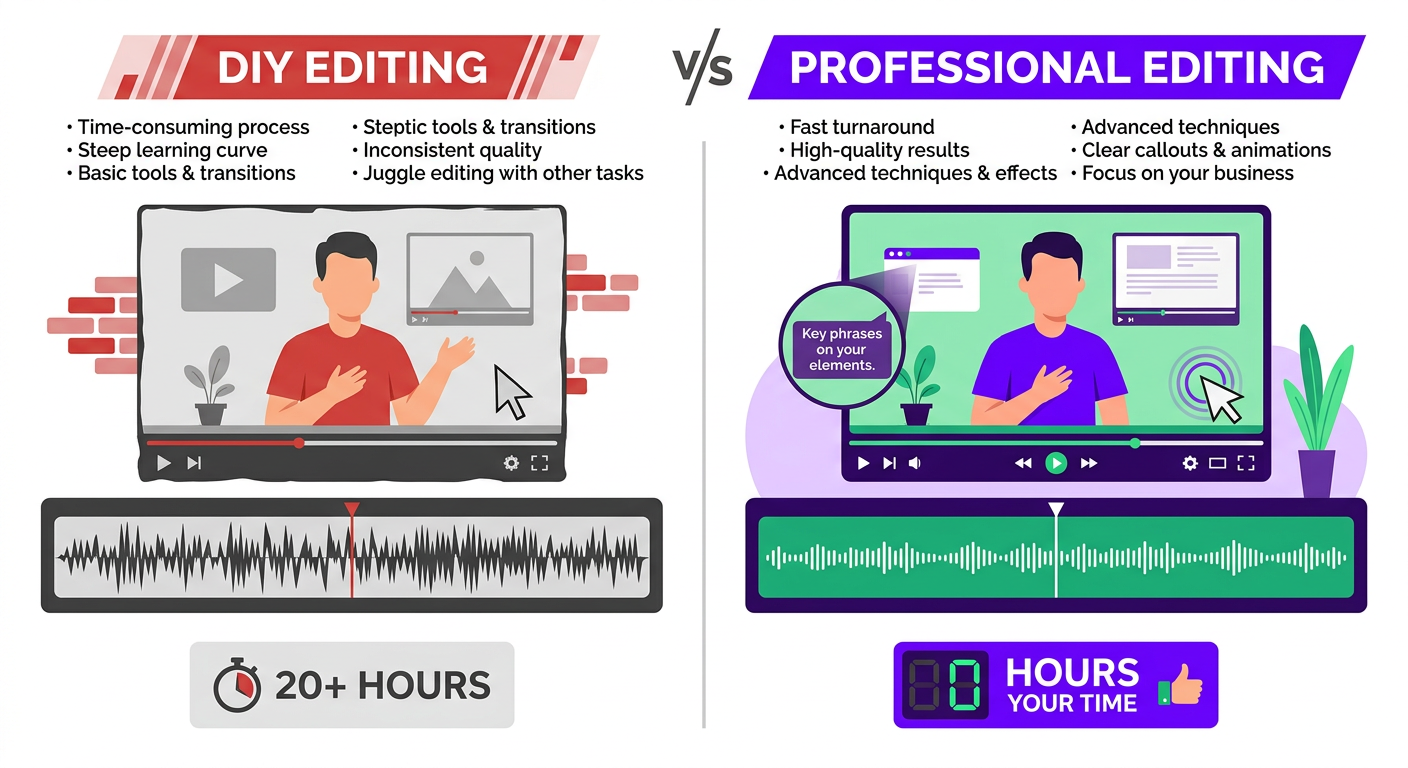
Many startups try to edit their own demos to save money. And for very early-stage companies, that’s sometimes the right call. But once your product is generating revenue and your demo video is on your homepage, landing pages, or sales decks, DIY editing costs you more than it saves.
The DIY Reality Check
| Factor | DIY Editing | Professional Editing |
|---|---|---|
| Time investment | 15-40 hours (learning + editing) | 0 hours (your time) |
| Motion graphics | Basic or none | Custom, branded |
| Audio quality | Unprocessed voiceover | Noise-reduced, compressed, mixed |
| Pacing | Often too long or uneven | Optimized for retention |
| Conversion impact | Base level | 20-40% higher trial/demo rates |
| Direct cost | $0 (but your time has value) | $500-$3,000 |
| Opportunity cost | 20-40 hours × your hourly value | Minimal |
If your time is worth $100/hour (conservative for a founder or marketing lead), a 20-hour DIY edit costs $2,000 in opportunity cost — plus you get a worse result. A $1,500 professional edit saves you time and converts better.
Repurposing Product Demos Into Social Content
One of the highest-ROI moves you can make is repurposing your product demo into social media content. A single well-edited 4-minute demo can generate 5-10 pieces of social content, effectively reducing your per-piece cost by 70-80%.
What You Can Extract
- Feature highlight Reels (30-60 sec) — Isolate one feature, add a hook, format for 9:16
- Before/After comparisons (15-30 sec) — Show the problem vs the solution side-by-side
- Problem-solution Shorts (30-45 sec) — Lead with the pain point, reveal the solution
- Customer quote overlays (15 sec) — Animated quotes over product footage
- Animated GIFs for email — 3-5 second loops of your best feature moments
- LinkedIn carousel screenshots — Key frames exported as a static carousel
- Sales enablement clips (60-90 sec) — Specific feature demos for outbound sales
Cost of Repurposing vs Creating From Scratch
| Approach | Videos Produced | Total Cost | Cost Per Piece |
|---|---|---|---|
| All original social content | 8 videos | $1,200–$2,400 | $150–$300 |
| Repurposed from demo | 8 videos | $400–$800 | $50–$100 |
| Savings | 60-70% |
When you hire an agency like Increditors for demo editing, ask about repurposing packages. We typically offer demo + repurposing bundles that include the main demo video plus 5-8 social clips at a 30-40% discount versus ordering everything separately.
Real-World Examples: How Companies Nail Demo Editing
Case Study: eSafety — Government Platform Demo
eSafety needed demo videos for their online safety reporting platform — a sensitive product that required clear, accessible communication. Their existing demos were raw screen recordings with text-to-speech voiceover. Completion rates were below 25%.
We re-edited their core demo with professional techniques: smooth zoom-ins on form fields, animated callout arrows guiding users through each step, a warm professional voiceover, and a branded transition system between sections. We also cut the runtime from 12 minutes to 6 minutes without losing any essential information — purely through better pacing and eliminating redundancy.
Results:
- Demo completion rate increased from 25% to 67%
- Support ticket volume for “how to use” questions dropped 35%
- The demo became a training resource for internal teams
Case Study: Trade with Pat — Financial Education Platform
Trade with Pat needed product explainers for their trading education platform. The challenge: financial concepts are abstract and the UI is data-heavy. A straight screen recording would overwhelm viewers with charts and numbers.
We created hybrid demos — mixing screen recordings of the actual platform with animated explanations of trading concepts. When the voiceover discussed “support and resistance levels,” we overlaid animated diagrams on top of the real chart interface. When showing the course navigation, we used clean zoom-ins with numbered callouts.
The result was a demo that felt educational rather than salesy — which is exactly what their content creator audience wanted. Trial sign-ups from the demo page increased 45%.
Case Study: Blue Zones Health — Wellness App
Blue Zones Health had a beautifully designed health and wellness app but their demo videos didn’t reflect the product’s quality. They were using basic screen recordings with stock music — the kind of content that screams “we made this in-house in 20 minutes.”
We produced a 90-second animated explainer for their homepage (top-of-funnel) and a 4-minute hybrid screen-capture demo for their features page (mid-funnel). The explainer used custom illustrations matching their brand aesthetic, while the screen-capture demo placed the app inside a clean device mockup with smooth scroll animations and feature callouts.
Both videos increased time-on-page by over 60%, and the features page saw a 30% increase in “Start Free Trial” clicks after the demo was added.
Ready to Level Up Your Product Demos?
From screen-capture cleanups to fully animated explainers — we’ve edited demos for SaaS platforms, apps, and physical products across every industry.
How to Choose the Right Editor for Product Demos
Product demo editing is a specialization. Not every video editor — even talented ones — knows how to edit a demo that converts. Here’s what to look for.
Must-Have Skills
- Motion graphics proficiency — They should be comfortable in After Effects (or equivalent) and able to create custom callouts, transitions, and animated UI elements
- Screen recording cleanup — They should know how to handle cursor smoothing, zoom-ins, click effects, and resolution upscaling
- Marketing awareness — They should understand conversion principles: hook design, CTA placement, and problem-first framing
- Audio post-production — They should be able to clean voiceover audio, mix music beds, and add subtle sound effects
- Brand implementation — They should be able to match your brand guidelines precisely across colors, fonts, and animation style
Portfolio Red Flags
- No screen-capture demos in their portfolio (they may not know the format)
- Demos that are just raw screen recordings with cuts and music
- No zoom-ins, callouts, or animated elements
- Demos longer than 5 minutes for a single product (suggests pacing issues)
- Inconsistent branding between sections
Portfolio Green Flags
- Clean, smooth zoom-ins with branded callout designs
- Consistent transition system between demo sections
- Professional device mockup framing
- Clear visual hierarchy — you always know where to look
- Demos that make you want to try the product
Where to Find Specialized Demo Editors
| Source | Quality Range | Cost Range | Best For |
|---|---|---|---|
| Fiverr/Upwork | ⚠️ Low–Medium | $200–$800 | Basic screen recording cleanup |
| Specialized freelancers | ✅ Medium–High | $800–$2,500 | Mid-tier hybrid demos |
| Animation studios | ✅ High | $3,000–$15,000+ | Full animated explainers |
| Video editing agency | ✅ High | $1,000–$5,000 | All demo types + repurposing |
A video editing agency with motion graphics capabilities is often the best fit because they can handle the full spectrum — from quick screen-capture cleanups to premium animated demos — without you needing to find and manage separate specialists.
The Briefing Process for Demo Videos
The quality of your demo edit depends heavily on the brief you provide. Here’s what your editor needs from you:
- Target audience — Who’s watching? Technical users? Executives? End consumers? This affects pacing, terminology, and depth.
- Key message — What’s the one thing viewers should remember? Not five things. One.
- Funnel stage — Is this top-of-funnel awareness or bottom-of-funnel conversion? This dictates length and depth.
- Feature priority — Rank features by importance. Your editor needs to know what gets the most screen time.
- Brand assets — Logo files, brand guidelines, color codes, font files, existing templates.
- Reference videos — 2-3 demos from other companies that have the style you’re aiming for.
- Call-to-action — What exactly should the viewer do after watching? Be specific.
At Increditors, we provide clients with a structured demo brief template that covers all these points. It takes 15-20 minutes to fill out and saves hours of revision cycles because the editor starts with clear direction.
Frequently Asked Questions
Product demo video editing costs $500 to $3,000+ per video. Basic screen recording edits with simple cuts run $500-$800, mid-tier demos with motion graphics and voiceover integration cost $800-$1,500, and premium explainer videos with custom animations, VFX, and sound design range from $1,500-$3,000+. Fully animated explainers can cost $3,000-$10,000+.
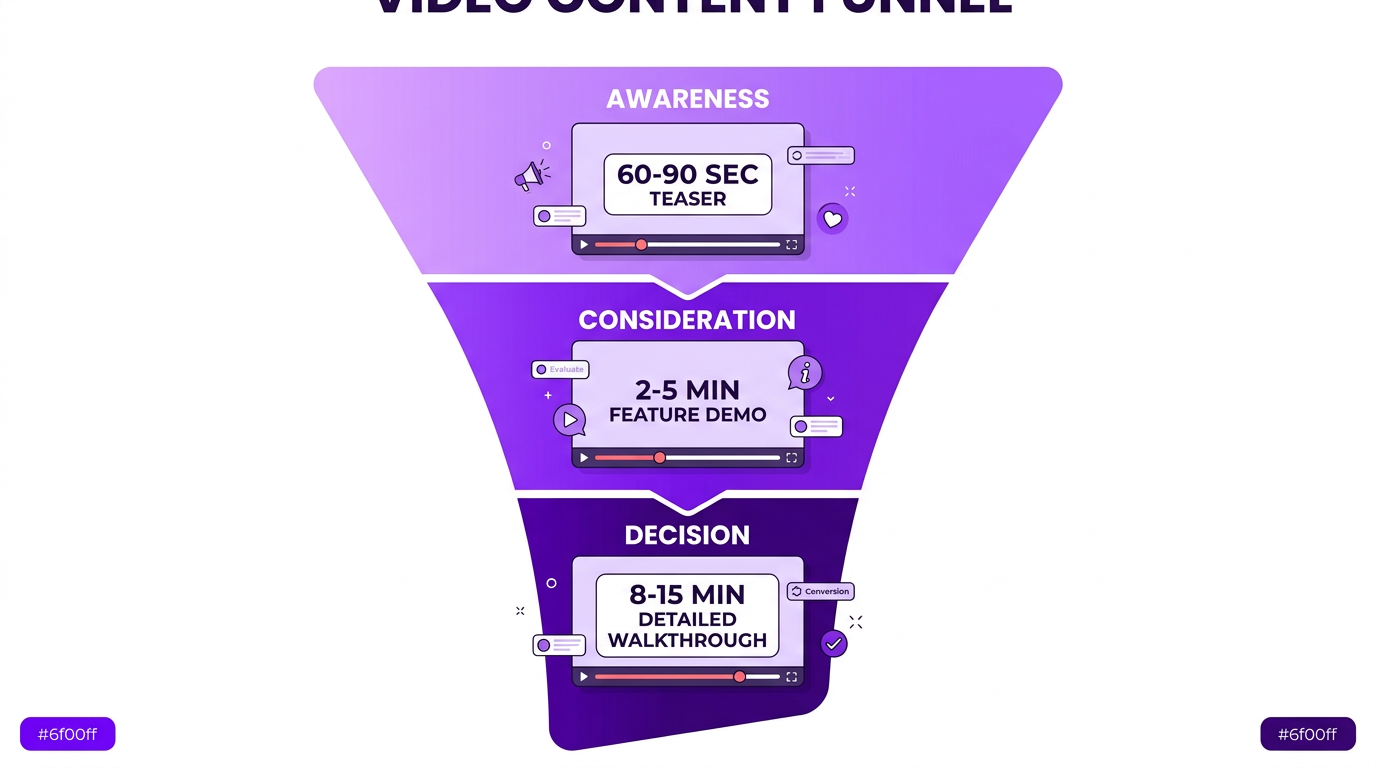
It depends on funnel stage. Top-of-funnel awareness videos should be 60-90 seconds. Mid-funnel feature demos work best at 2-5 minutes. Bottom-of-funnel detailed walkthroughs can run 8-15 minutes. Match length to viewer intent — shorter for cold audiences, longer for prospects actively evaluating your product.
Five elements: a problem-first hook (not feature-first), clean screen recordings with zoom-ins and callouts, professional voiceover with natural pacing, motion graphics that highlight key interactions, and a clear single call-to-action. The edit should guide the viewer’s eye effortlessly through the product experience.
Use screen recordings for existing products where you want to show real functionality. Use animation for pre-launch products, conceptual features, or when your UI isn’t visually polished. Many effective demos combine both — animated transitions between screen-recorded segments create a polished, professional feel at a lower cost than full animation.
A basic product demo edit takes 8-15 hours and 3-5 business days. Mid-tier demos with motion graphics take 15-30 hours and 5-8 business days. Premium explainer videos with full animation can take 40-80+ hours and 3-6 weeks. Rush delivery is typically available at a 25-50% premium.
Absolutely. A single 3-5 minute product demo can be repurposed into 5-10 social media clips: feature highlight Reels, before/after comparisons, problem-solution Shorts, customer quote overlays, and animated GIFs for email campaigns. This multiplies the ROI of your initial editing investment by 5-10x.
Product demo editing typically uses Adobe Premiere Pro or Final Cut Pro for assembly, After Effects for motion graphics and animated callouts, and screen capture tools like ScreenFlow, Loom, or OBS for recording. For fully animated explainers, editors use After Effects, Cinema 4D, or Blender for 3D elements.