










![3D Explainer Video - ScribbleLive.mp4_snapshot_00.12_[2022.03.09_03.14.16]](https://increditors.com/wp-content/uploads/elementor/thumbs/3D-Explainer-Video-ScribbleLive.mp4_snapshot_00.12_2022.03.09_03.14.16-r7wb53mx72rxst3qcqyrfxdmeyzb5r9jbl0wbjujh4.png "3D Explainer Video – ScribbleLive.mp4_snapshot_00.12_[2022.03.09_03.14.16]")
































There’s a moment every content creator and business owner hits — the moment where video editing goes from “something I can handle” to “the thing that’s holding everything back.”
Maybe you’re spending entire weekends hunched over a timeline instead of filming new content. Maybe your upload schedule has become a suggestion rather than a commitment. Maybe you know your videos could be better, but you’ve hit the ceiling of what you can achieve with your current skills and time.
These are signs you need to hire a video editor. And the longer you ignore them, the more they cost you — in growth, revenue, and sanity.
This guide walks through the 12 clearest signals that it’s time to bring in professional help, with real examples from creators and businesses who waited too long and what happened when they finally made the switch. We’ll also cover what to look for in an editor, how much to budget, and the different hiring models available in 2026.
What’s in This Guide
- The 12 Signs It’s Time to Hire
- Sign 1: Editing Takes Longer Than Creating
- Sign 2: You’re Missing Upload Deadlines
- Sign 3: Quality Has Plateaued
- Sign 4: You Dread the Editing Process
- Sign 5: Your Retention Rates Are Stagnant
- Sign 6: You Can’t Scale Content Output
- Signs 7-12: The Business Signals
- Real Examples: What Happens When You Finally Hire
- What to Look for in a Video Editor
- Hiring Models: Freelancer vs Agency vs In-House
- What It Actually Costs
- Making the Switch: A Step-by-Step Guide
- FAQ
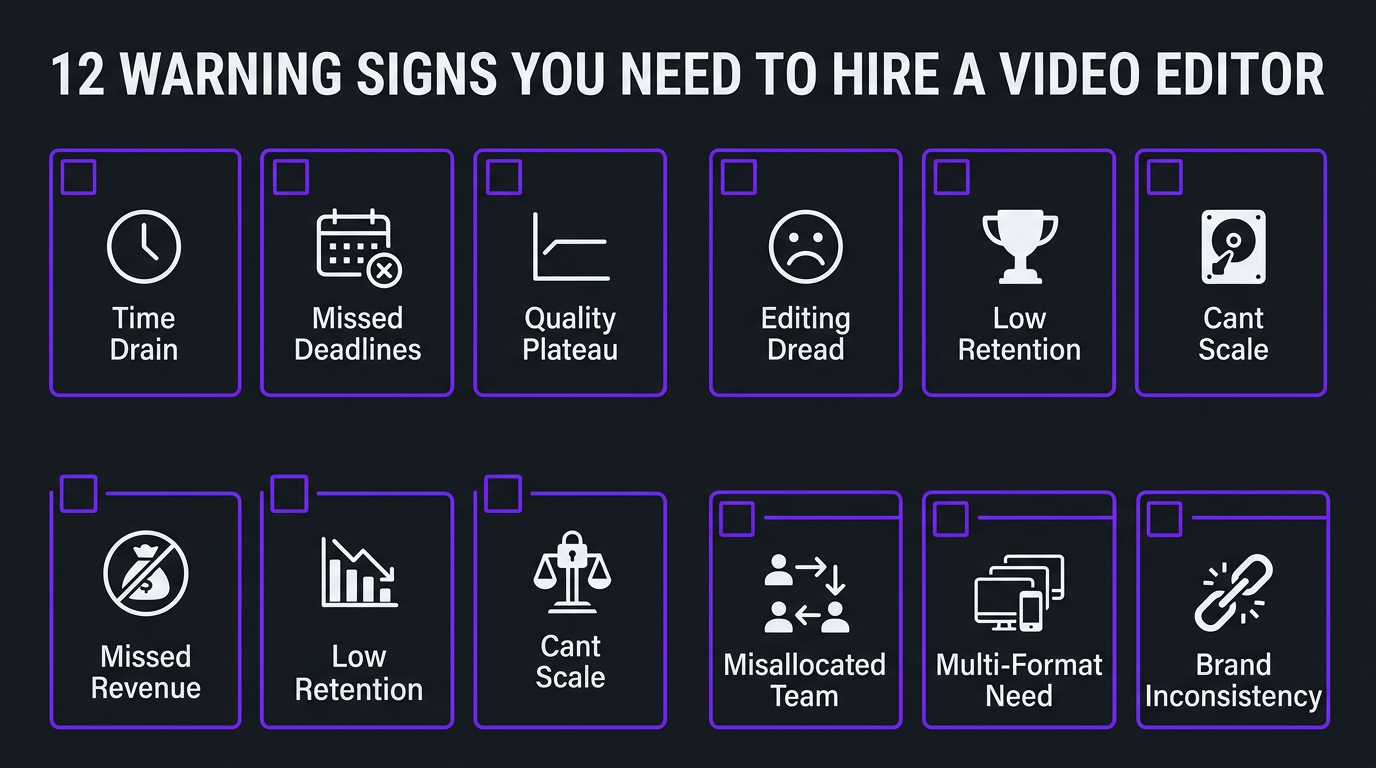
The 12 Signs You Need a Video Editor — Overview
Before we break each one down, here’s the full list. If three or more of these describe your current situation, you’re past the point where hiring makes sense — you’re at the point where not hiring is actively costing you.
| # | Sign | Category | Impact Level |
|---|---|---|---|
| 1 | Editing takes longer than creating content | Time | 🔴 Critical |
| 2 | You’re regularly missing upload deadlines | Consistency | 🔴 Critical |
| 3 | Your video quality has plateaued | Quality | 🟠 High |
| 4 | You dread sitting down to edit | Burnout | 🟠 High |
| 5 | Your retention rates are stagnant or declining | Growth | 🔴 Critical |
| 6 | You can’t increase content output | Scale | 🟠 High |
| 7 | You’re turning down opportunities because of editing backlog | Revenue | 🔴 Critical |
| 8 | Your competitors’ videos look significantly better | Market | 🟠 High |
| 9 | You have raw footage that never gets edited | Waste | 🟡 Medium |
| 10 | Your team is editing instead of doing their real job | Efficiency | 🔴 Critical |
| 11 | You need multiple video formats from the same content | Scale | 🟠 High |
| 12 | Your brand lacks visual consistency across videos | Brand | 🟡 Medium |
Let’s break each one down.
Sign 1: Editing Takes More Time Than Creating Content
This is the most common and most damaging sign. When you sit down and honestly track your time, editing consumes 50-70% of your total production hours. Ideation, scripting, and filming — the parts that only you can do — get squeezed into whatever time remains.
The math is stark. A typical 10-15 minute YouTube video requires:
- Research and scripting: 2-4 hours
- Filming: 1-3 hours
- Editing: 8-15 hours
- Thumbnail and metadata: 1-2 hours
Editing is 60-70% of the total. And unlike filming and scripting, editing doesn’t require you specifically. Your face, your voice, your ideas — those are irreplaceable. Your ability to add a cross-dissolve and adjust audio levels is not.
Every hour you spend editing is an hour you’re not spending on content strategy, audience engagement, business development, or filming the next video. The opportunity cost compounds over weeks and months into a significant growth deficit.
Sign 2: You’re Regularly Missing Upload Deadlines
You told your audience you upload every Tuesday. This week it went up Wednesday. Last week, Thursday. The week before, you skipped entirely because the edit wasn’t done.
Inconsistent uploads don’t just disappoint your audience — they actively harm your channel. YouTube’s recommendation algorithm learns your upload pattern and promotes your content based on expected consistency. When that pattern breaks, the algorithm’s confidence in your channel decreases, and your content gets shown to fewer people.
Research from multiple YouTube creator studies shows that channels maintaining a consistent upload schedule grow 2-3x faster than channels with irregular posting. Every missed deadline chips away at that momentum.
If the reason you miss deadlines is almost always “the edit isn’t done yet,” the bottleneck is clear. A professional editor or editing team delivers on a guaranteed timeline — typically 24-72 hours from receiving footage. Your upload schedule becomes a promise you can actually keep.
Sign 3: Your Video Quality Has Plateaued
You’ve invested in a better camera. You bought lighting. You improved your audio setup. But somehow, the final videos still don’t look like the channels you admire.
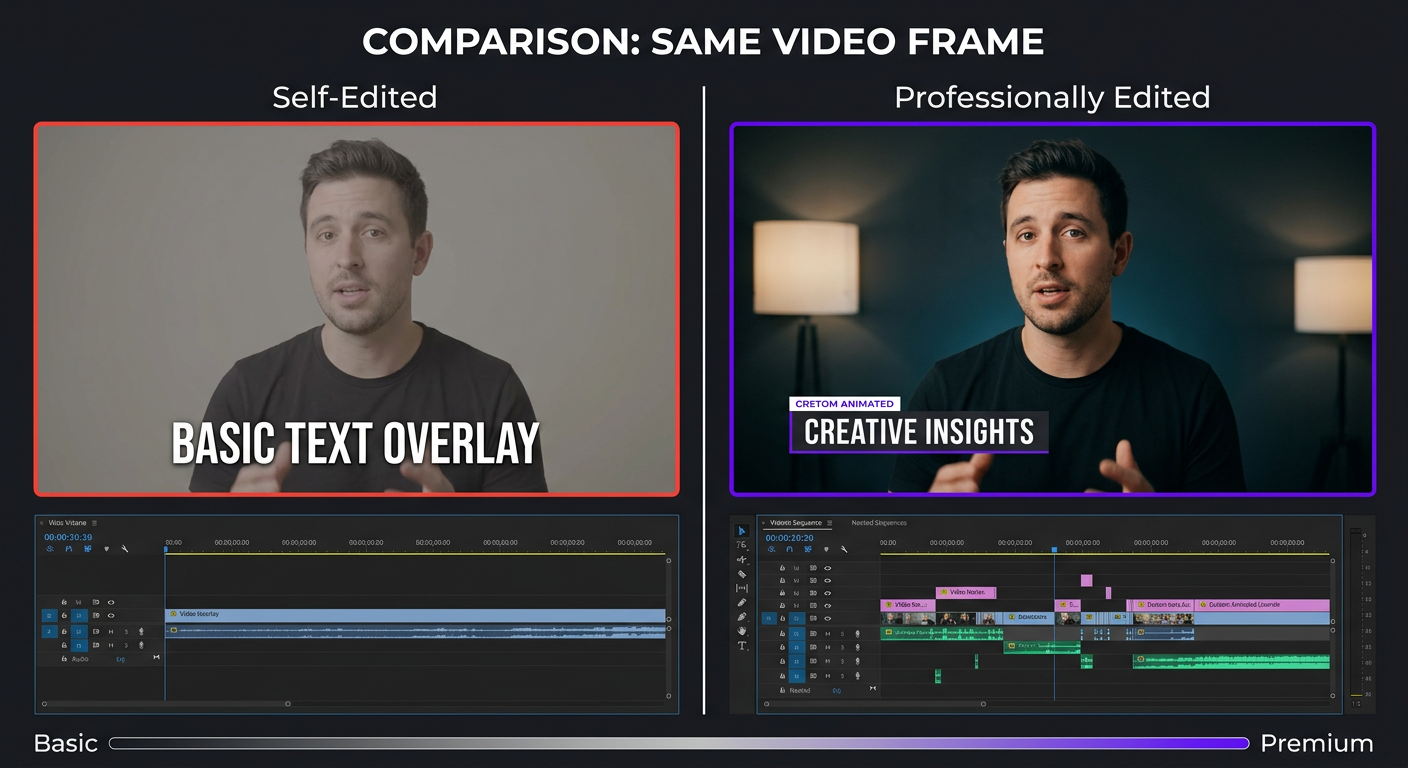
That’s because the gap isn’t in your footage — it’s in your post-production. Professional channels look professional because of what happens after filming: precise color grading, strategic pacing, custom motion graphics, layered sound design, and retention-optimized structure. These are specialized skills that take years to master.
You can watch all the editing tutorials on YouTube (ironic, isn’t it?) and still not match the output of someone who edits 8-10 hours per day as their full-time profession. That’s not a criticism — it’s just how specialization works. You wouldn’t expect to match a professional chef by watching cooking videos, even if you’ve been cooking at home for years.
Signs your quality has plateaued:
- Your videos look “fine” but never feel polished or cinematic
- You rely on the same 3-4 editing techniques for every video
- Your color correction is “auto” or a single LUT applied to everything
- Motion graphics are limited to basic text overlays and stock templates
- Your sound design is background music and nothing else
- You know what you want it to look like but can’t get there technically
Professional color grading, VFX and motion graphics, and audio engineering are each deep disciplines. A professional editing team brings all three under one roof, instantly breaking through your quality ceiling.
Sign 4: You Dread the Editing Process
Be honest: when you finish filming, is your first feeling excitement about the content — or dread about the hours of editing ahead?
Creative burnout from editing is one of the top reasons YouTube channels go dormant. The creator has plenty of ideas. They love filming. But the editing wall between “filmed” and “published” becomes so psychologically heavy that they stop creating altogether.
This isn’t about laziness. Editing is cognitively demanding work that requires sustained attention, creative decision-making, and technical problem-solving — simultaneously. Doing that for 10+ hours on every video, on top of all the other demands of running a channel or business, is unsustainable.
If any of these sound familiar, you’re deep in editing burnout territory:
- You procrastinate on editing for days before starting
- You settle for “good enough” instead of pushing for quality because you just want to be done
- You’ve lost excitement about new video ideas because you know each one means more editing
- You think about quitting your channel — not because you don’t love creating, but because the production process is exhausting
- You feel guilty about unedited footage sitting on your hard drive
Hiring an editor isn’t just a business decision — it’s a sustainability decision. The fastest way to fall back in love with creating is to remove the part of the process that drains you.
Sign 5: Your Retention Rates Are Stagnant or Declining
Open your YouTube analytics right now. Look at your audience retention graph. If your average view duration is below 40% of your video length, or if retention has been flat for months despite improving your content, editing is almost certainly the culprit.
Retention is the metric that matters most on YouTube. It determines how aggressively the algorithm promotes your content. And while great content ideas get viewers to click, it’s the editing that keeps them watching.
Common editing-related retention killers:
- Slow intros: Taking more than 10-15 seconds to hook the viewer
- No pattern interrupts: Same visual format for minutes at a time, causing attention drift
- Poor pacing: Sections that drag or feel rushed in the wrong places
- Weak transitions: Jarring cuts between topics that confuse viewers
- Audio issues: Volume inconsistencies, background noise, or music that competes with narration
- No visual variety: Talking head with zero B-roll, graphics, or visual support
A professional editor optimizes for retention by design — they know where viewers typically drop off, how to use pattern interrupts to recapture attention, and how to pace content so the viewer’s interest builds rather than fades. This is the core skill set of a YouTube editing specialist, and it directly translates to growth.
Sign 6: You Can’t Scale Your Content Output
You want to go from one video per week to two. Or you want to add shorts and Reels alongside your long-form content. Or a brand deal requires five deliverables instead of two.
And you can’t do it. Because editing is the bottleneck.
When you edit everything yourself, your content output is capped by your available editing hours. Want to double your output? You need to double your editing time. But your day already has a fixed number of hours, and most of them are already spoken for.
This scaling wall is where many promising channels stall. They’ve found their audience, proven their concept, and have the ideas to produce more — but the production process physically can’t accommodate growth.
With a professional editing team, scaling is straightforward. Want to add short-form content? Your editor repurposes long-form into shorts. Want to double long-form output? Your team absorbs the volume. Your only constraint becomes filming speed — and filming is the fun part.
Hitting Your Growth Ceiling?
If editing is the bottleneck between where you are and where you want to be, let’s fix that. Our teams are built to scale with you.
Signs 7-12: The Business Signals
The first six signs are about creative and production pain. These next six are about business impact — the signs that not hiring an editor is costing you money, not just time.
Sign 7: You’re Turning Down Opportunities Because of Editing Backlog
A brand wants to sponsor three videos this month. A collaboration opportunity requires producing content by next Friday. A product launch needs supporting video assets across multiple platforms.
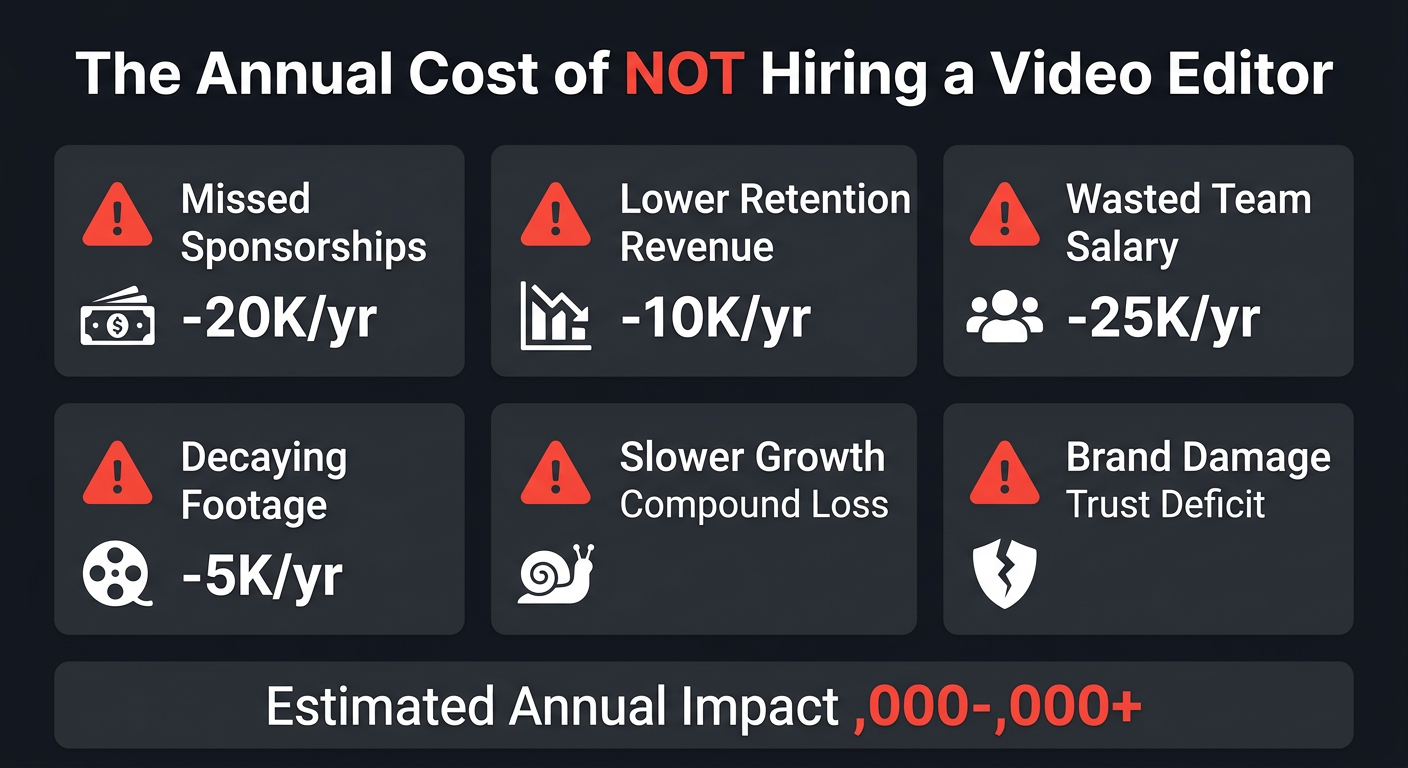
And you say no — not because you don’t want the revenue, but because your editing pipeline is already backed up. Every “no” to an opportunity is revenue left on the table. Over a year, those missed opportunities can easily exceed the entire cost of hiring an editor.
Sign 8: Your Competitors’ Videos Look Significantly Better
Go look at the top 5 channels in your niche. If their production quality is noticeably higher than yours — better color grading, custom animations, tighter pacing, polished audio — viewers are comparing you to them and you’re losing.
In competitive niches (finance, tech, education, fitness), production quality is a trust signal. Viewers unconsciously associate polished videos with credibility and expertise. Two creators with identical knowledge will perform very differently if one has professional editing and the other doesn’t.
Sign 9: You Have Raw Footage That Never Gets Edited
Check your hard drive. How many hours of raw footage are sitting there, filmed with good intentions, that never became a video? If the answer is more than zero, that’s content — and revenue — decaying on a disk.
Raw footage has a shelf life. Topical content becomes outdated. Seasonal content becomes irrelevant. Even evergreen content loses its motivation — three months after filming, you’ve moved on mentally and the footage feels stale. A fast editing turnaround prevents this decay entirely.
Sign 10: Your Team Is Editing Instead of Doing Their Real Job
This one applies to businesses. Your marketing coordinator is spending 15 hours per week editing videos instead of running campaigns. Your founder is cutting clips instead of closing deals. Your product manager is assembling demos instead of shipping features.
When internal team members edit video, you’re paying their full salary for work that a specialized editor could do better at a fraction of the cost. A marketing coordinator earning $60K/year spending 40% of their time on video editing is costing you $24K/year in misallocated salary — for mediocre editing that a professional team would handle for $2,500-$4,000/month with better results.
Sign 11: You Need Multiple Formats from the Same Content
One filming session should produce: a long-form YouTube video, 3-5 shorts, an Instagram Reel, a LinkedIn clip, and maybe a TikTok version. But creating all those formats yourself triples the editing time for each shoot.
Professional editing teams build multi-format repurposing into their workflow. You film once, and they deliver across every platform — each version optimized for that platform’s specifications, aspect ratios, and audience expectations. An unlimited editing package makes this kind of repurposing economically viable.
Sign 12: Your Brand Lacks Visual Consistency Across Videos
Watch your last 10 videos back to back. Do they look like they belong to the same channel? Same color palette? Same graphic style? Same audio treatment? Same energy and pacing?
If each video feels like it was made by a different person (even though you made all of them), your brand is suffering from consistency drift. This happens naturally when you’re self-editing — your style, energy, and technical decisions shift based on your mood, available time, and evolving skills.
Professional editors maintain brand consistency as a discipline. They work from style guides, use template libraries, and apply the same technical standards to every piece. The result is a channel that feels cohesive and professional — building viewer trust and channel recognition over time.
Real Examples: What Happens When You Finally Hire
Theory is one thing. Results are another. Here are two businesses that recognized the signs, hired professional editing help, and saw measurable impact.
Blue Zones Health: From Bottleneck to Content Machine
Blue Zones Health operates in the health and wellness space — a niche where video content drives education, trust, and ultimately conversions. They had strong subject matter expertise and a dedicated audience, but their video production was stuck in a pattern that every growing brand recognizes: great content ideas, insufficient capacity to produce them.
The signs were clear. Their team members were spending significant time on video editing instead of their core health and wellness expertise. Raw footage was piling up unedited. Upload consistency was unpredictable. And the videos that did get published lacked the production polish of competing channels with larger teams.
When Blue Zones Health partnered with Increditors, the transformation was structural, not cosmetic. We took over their entire post-production pipeline — from organizing raw footage to delivering finished videos with professional color grading, branded motion graphics, and platform-optimized exports. Their team went from spending 20+ hours per week on video editing to spending 2-3 hours reviewing and approving finished cuts.
The freed capacity went directly into what they do best: creating health content, engaging with their community, and developing their programs. Video output increased. Quality became consistent. And the brand’s visual identity across all video content finally felt cohesive and professional.
Ink Magnet: Scaling a Creative Brand’s Video Presence
Ink Magnet is a creative brand that needed to scale its video content across multiple platforms without multiplying production time. They were experiencing several of the signs simultaneously: editing was consuming disproportionate time, content output was capped by editing capacity, and they needed multi-format deliverables (long-form, shorts, social clips) from single filming sessions.
The challenge wasn’t just volume — it was maintaining creative quality at scale. Ink Magnet’s brand demanded a specific visual style: bold, dynamic, and artistically polished. Cookie-cutter editing from a budget service wouldn’t cut it.
Working with our team, Ink Magnet got a dedicated editor who learned their aesthetic deeply — understanding not just their brand guidelines but their creative instincts and audience expectations. We built a workflow that turned each filming session into multiple deliverables: the primary video plus platform-specific cuts for Instagram, TikTok, and LinkedIn.
The result was a content operation that scaled without the founder or creative team spending more hours in production. Video output multiplied while quality stayed consistent with their brand standards. The editing bottleneck was eliminated, and growth became a function of creative ideas rather than production capacity.
What to Look for When Hiring a Video Editor
Recognizing the signs is step one. Finding the right editor is step two. Here’s what actually matters — and what doesn’t.
What Matters
| Criteria | Why It Matters | How to Evaluate |
|---|---|---|
| Relevant portfolio | Editing styles vary by niche; finance editing differs from gaming editing | Ask for 3-5 examples in your content category |
| Retention understanding | The editor should optimize for viewer behavior, not just aesthetics | Ask how they’d approach a video’s first 30 seconds |
| Communication speed | Slow communicators create slow turnarounds | Note response time during the inquiry phase |
| Revision process | Clear process prevents endless loops | Ask for their standard revision workflow |
| Reliability/backup | Your pipeline can’t depend on one person’s availability | Ask what happens if they’re sick or on vacation |
| Platform knowledge | YouTube, TikTok, and LinkedIn have different editing requirements | Ask about platform-specific optimizations they implement |
What Doesn’t Matter (As Much As You Think)
- Software used: A great editor produces great work in any NLE. Don’t require specific software unless you need project file compatibility.
- Years of experience: A focused 3-year editor often outperforms a scattered 10-year generalist. Portfolio quality trumps resume length.
- Location: Remote editing works perfectly in 2026. Time zone alignment matters more than physical proximity.
- Price as a primary filter: The cheapest option almost never delivers the best value. Focus on ROI, not sticker price.
Check our portfolio and pricing page to see what a professional team delivers — then compare that against whatever you’re currently getting.
Hiring Models: Freelancer vs Agency vs In-House
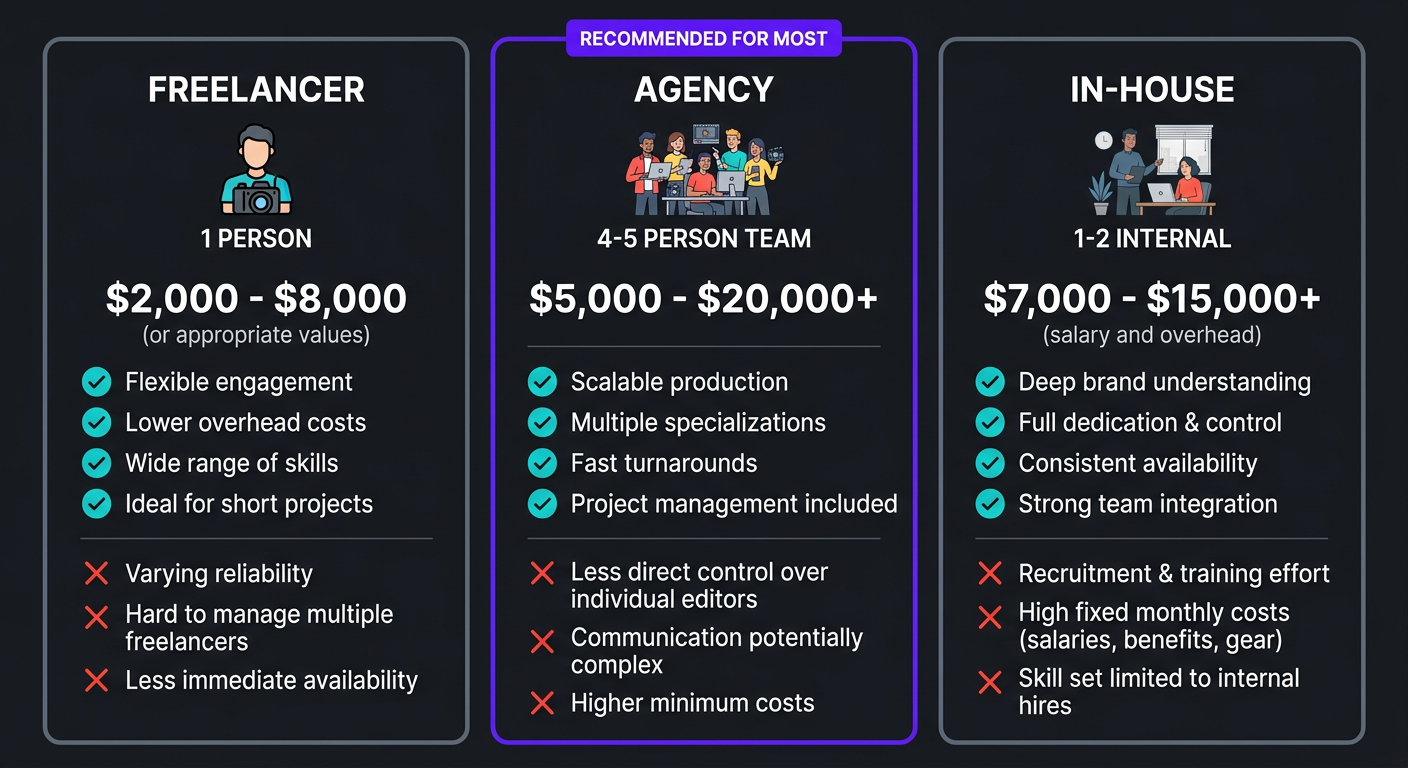
| Factor | Freelancer | Agency | In-House |
|---|---|---|---|
| Best for | 2-4 videos/month, tight budget | 4-20+ videos/month, scaling | 15+ videos/month, daily needs |
| Monthly cost | $500-$2,000 | $2,500-$5,000+ | $4,000-$8,000+ (salary only) |
| Skills included | Editing (one person) | Editing + color + graphics + PM + QC | Whatever you hire for |
| Backup coverage | ❌ None | ✅ Built-in | ❌ Unless you hire two |
| Management overhead | 🟠 You manage | ✅ PM included | 🟠 You manage |
| Scalability | ❌ Limited by one person | ✅ Add capacity as needed | 🟠 Requires new hires |
| Onboarding time | 1-2 weeks | 1-2 weeks | 4-8 weeks (hiring + training) |
| Quality consistency | 🟠 Varies with workload | ✅ QC processes ensure consistency | 🟠 Depends on the hire |
For most creators and businesses showing signs of needing a video editor, the agency model offers the best combination of quality, reliability, and value. You get an entire team — dedicated editor, motion designer, colorist, project manager — at a fraction of the cost of building that team in-house.
The Increditors model specifically assigns a dedicated editor to your account. This person learns your brand deeply and edits every video, ensuring the consistency that builds channel identity. If they’re unavailable, a trained backup editor steps in seamlessly — something no freelancer arrangement can offer.
What It Actually Costs to Hire a Video Editor
Let’s put real numbers on the table. These are 2026 market rates for U.S.-facing editing services:
| Hiring Model | Per Video | Monthly | Annual |
|---|---|---|---|
| Budget freelancer (Fiverr/Upwork) | $100-$200 | $400-$800 | $5,000-$10,000 |
| Professional freelancer | $250-$500 | $1,000-$2,000 | $12,000-$24,000 |
| Editing subscription | $150-$350 effective | $600-$2,000 | $7,200-$24,000 |
| Premium agency (Increditors) | $300-$600 effective | $2,500-$5,000 | $30,000-$60,000 |
| Full-time in-house (U.S.) | N/A | $4,500-$7,000 | $55,000-$85,000+ |
The ROI Calculation
Don’t just look at the cost — look at the return. Here’s a framework:
- Time recovered: If editing takes you 15 hours/week and your time is worth $50/hour, that’s $3,000/month in opportunity cost. A $3,000/month agency pays for itself in time alone.
- Revenue from increased output: If professional editing lets you publish 2x more content, and more content = more views = more revenue, the math works quickly.
- Revenue from better quality: Professional editing improves retention by 30-60%. On a monetized channel, that’s a direct revenue lift.
- Sponsorship premiums: Better-produced channels command higher sponsorship rates — often 2-3x what lower-quality channels can charge.
For detailed pricing breakdowns, visit our pricing page.
Making the Switch: A Step-by-Step Guide
If you’ve identified the signs and decided to hire, here’s how to make the transition smooth:
Step 1: Document Your Current Style
Before talking to editors, create a simple style reference: 3-5 of your best videos, your preferred pacing, color preferences, graphic style, music taste, and any specific dos and don’ts. This becomes the brief that candidates work from.
Step 2: Define Your Volume and Budget
Know exactly how many videos you need per month, in what formats (long-form, shorts, both), and what you can spend. This immediately narrows your options to the right tier.
Step 3: Evaluate 3-5 Options
Don’t hire the first editor you find. Get samples or trial edits from at least three candidates. Compare not just quality, but communication, turnaround, and process clarity.
Step 4: Start With a Trial Period
Commit to one month, not one year. Any good editor or agency will offer a trial period. Use it to evaluate fit, quality, and workflow compatibility. At Increditors, every engagement starts with a discovery call and a calibration period — we want the fit to be right as much as you do.
Step 5: Invest in Onboarding
The first 2-3 videos will require more feedback and revision than normal. That’s expected. Your editor is learning your style, your audience, and your preferences. Invest time in detailed feedback early — it pays off exponentially as the editor calibrates.
Step 6: Build the System, Then Step Back
After 4-6 videos, the workflow should run with minimal input from you. Upload footage, provide brief notes, review the draft, approve and publish. Your role shifts from editor to creative director — guiding vision while someone else handles execution.
Frequently Asked Questions
Hire when editing consistently takes more time than creating content, when you’re missing upload deadlines, when quality has plateaued despite better equipment, or when editing prevents you from scaling. Most creators and businesses hit this point at 4+ videos per month. If three or more of the 12 signs in this guide describe your situation, you’re past the tipping point.
Budget freelancers: $100-$200/video. Professional freelancers: $250-$500/video. Agency retainers: $2,500-$5,000+/month for 8-20 videos. Full-time in-house: $40K-$80K+/year salary. The right investment depends on your volume, quality requirements, and how much your time is worth. See our pricing page for current rates.
Freelancer: best for 2-4 videos/month on a tight budget if you don’t mind managing the workflow. Agency: best for 8+ videos/month where consistent quality, backup coverage, and included project management matter. In-house: best for 15+ videos/month with daily production needs and budget for full salary and benefits.
Essential: NLE proficiency (Premiere, Final Cut, or Resolve), pacing and storytelling instincts, color correction, audio mixing, and experience in your content niche. For YouTube: retention optimization knowledge and platform-specific best practices. Red flag: editors who talk only about aesthetics and never mention audience behavior or analytics.
Check your analytics: average view duration below 40%, high first-30-second drop-off, flat retention despite good content ideas, comments about production quality. Compare your videos to top channels in your niche. If the content quality is comparable but theirs looks noticeably more polished, editing is the gap.
If your channel generates any revenue — ads, sponsorships, products, or leads — professional editing typically pays for itself within 2-3 months through increased retention, views, and audience growth. The real question is whether you can afford not to: every month of suboptimal editing is a month of capped growth. Start with a mid-tier freelancer ($250-$500/video) and upgrade as revenue grows.
Ready to Remove the Editing Bottleneck?
If you recognized yourself in this guide, that’s a good thing — it means you know what needs to change. Let’s talk about what a dedicated editing team could do for your content.
This guide reflects video editing market conditions and pricing as of March 2026. Hiring recommendations are based on experience working with hundreds of creators and businesses across multiple industries. For current Increditors services and pricing, visit our pricing page or schedule a call.