










![3D Explainer Video - ScribbleLive.mp4_snapshot_00.12_[2022.03.09_03.14.16]](https://increditors.com/wp-content/uploads/elementor/thumbs/3D-Explainer-Video-ScribbleLive.mp4_snapshot_00.12_2022.03.09_03.14.16-r7wb53mx72rxst3qcqyrfxdmeyzb5r9jbl0wbjujh4.png "3D Explainer Video – ScribbleLive.mp4_snapshot_00.12_[2022.03.09_03.14.16]")
































Building a remote video editing team is the single highest-leverage move for any creator or brand producing video at scale. You stop being the bottleneck. You stop managing individual freelancers who disappear at the worst possible moment. And you start operating like a production company — without renting an office or paying six-figure salaries.
But here’s the thing: most people do it wrong. They hire a scattered group of freelancers, call it a “team,” and wonder why the quality is inconsistent, the communication is exhausting, and they’re still spending 10 hours a week managing post-production.
A real remote video editing team has structure. Defined roles. Clear handoff points. Quality control layers. And when it works — and we’ve seen it work across dozens of clients — it outperforms in-house editing departments at a fraction of the cost.
This guide covers how to build, manage, or hire a remote video editing team the right way. Whether you’re a creator looking to scale your channel, a startup producing product content, or an enterprise team drowning in video requests — the framework is the same.
What’s in This Guide
- What Is a Remote Video Editing Team?
- Why Go Remote? The Core Benefits
- Team Structure: Roles & Responsibilities
- The Workflow: How Files, Feedback & Deliverables Flow
- Tech Stack: Tools That Make It Work
- In-House vs Remote Team: Real Cost Comparison
- Build Your Own vs Hire a Pre-Built Team
- Quality Control Without Micromanagement
- How Real Brands Use Remote Editing Teams
- Onboarding: The First 30 Days
- 5 Mistakes That Kill Remote Editing Teams
- FAQ
What Is a Remote Video Editing Team?
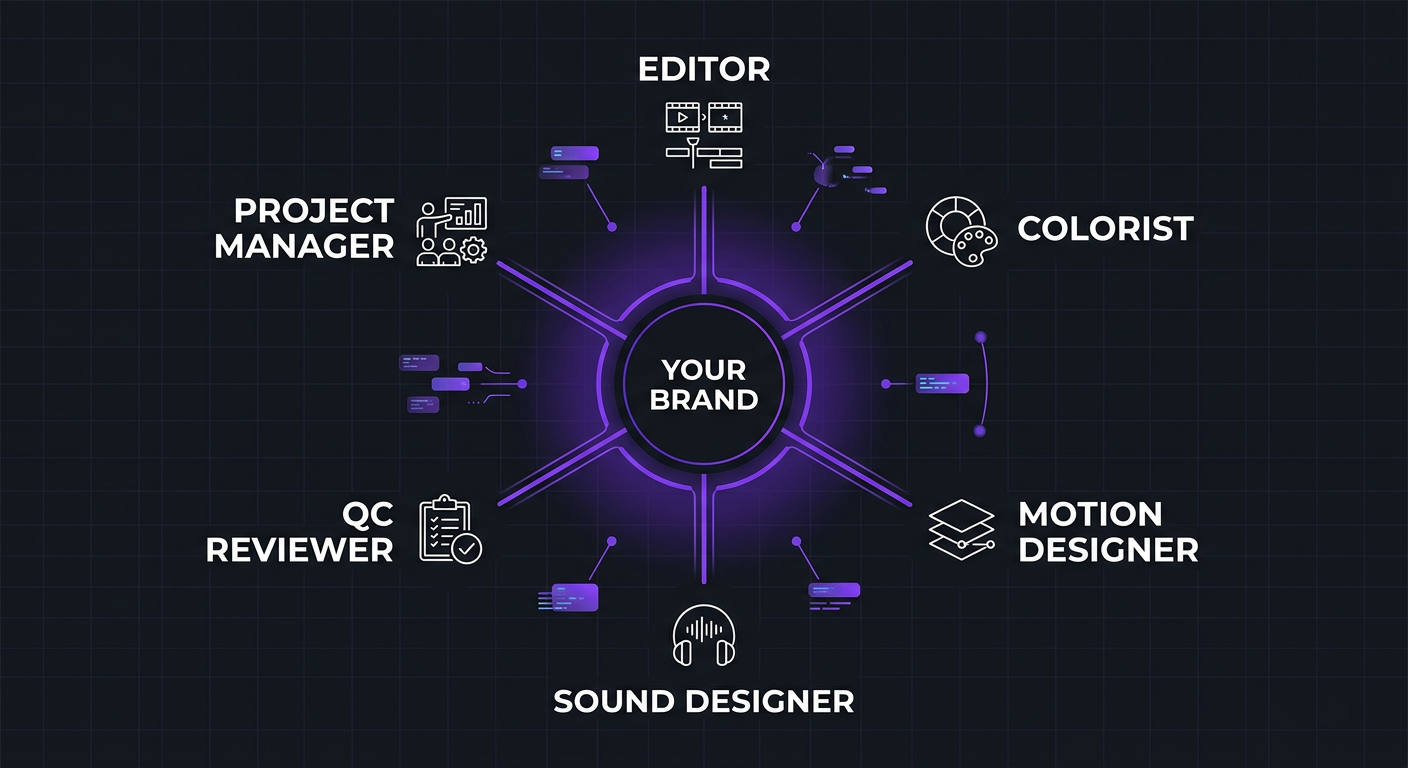
A remote video editing team is a group of post-production specialists — editors, motion designers, colorists, sound engineers, and project managers — who work together from different locations to handle your video content. They operate as a unified production unit, just without the shared office space.
This isn’t the same as hiring a freelancer. A freelancer is one person doing everything (or trying to). A team has specialization. Your editor focuses on storytelling and pacing. Your motion designer handles graphics and animations. Your colorist makes everything look cinematic. Your PM keeps the machine running.
The “remote” part isn’t a compromise — it’s the entire advantage. By removing the geographic constraint, you access a global talent pool, significantly reduce costs, and build a team that can work across time zones to deliver faster than any local setup.
The Three Models of Remote Editing Teams
Not all remote teams look the same. Here’s how they typically break down:
| Model | How It Works | Best For | Monthly Cost |
|---|---|---|---|
| DIY assembled | You hire individual freelancers and manage them yourself | Tight budgets, very specific skill requirements | $1,500–$4,000 |
| Agency team | An agency assigns a dedicated team to your account | Brands, creators, and startups needing reliability | $2,500–$8,000 |
| Hybrid (in-house + remote) | You have a creative director in-house, remote team executes | Enterprises with high volume and strict brand control | $5,000–$15,000+ |
Most growing businesses land on the agency team model because it delivers the reliability of an in-house team without the overhead. You get dedicated people who know your brand, managed by professionals who specialize in making remote production work. That’s the model we run at Increditors, and it’s what we’ll focus on throughout this guide.
Why Go Remote? The 7 Core Benefits
The shift to remote video editing isn’t a pandemic hangover — it’s a structural advantage that isn’t going away. Here’s why the smartest brands and creators have moved their entire post-production remote.
1. Access to Global Talent (Not Just Local Talent)
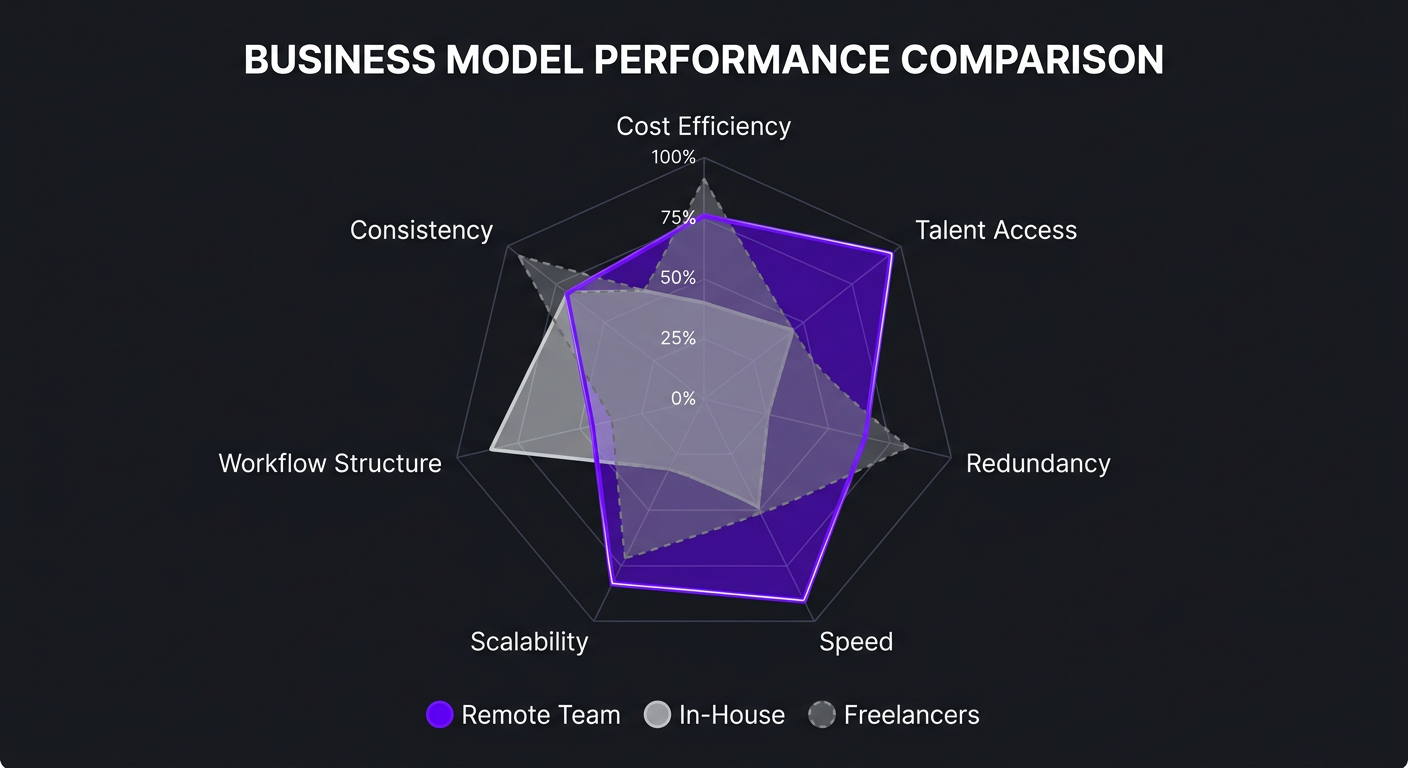
If you hire locally, your talent pool is limited to whoever lives within commuting distance and is looking for work right now. That might be 10-50 editors in a major city. Remote? You’re choosing from thousands of specialists worldwide.
This matters enormously for specialized skills. Need an editor who understands YouTube retention mechanics? A colorist who can match a specific cinematic look? A motion designer who works in your specific software? Remote gives you access to the exact specialist you need, not the closest generalist.
2. Cost Savings of 40-60% vs In-House
A full-time in-house editor in the U.S. costs $55,000-$80,000 in salary, plus $15,000-$25,000 in benefits, equipment, software licenses, and office space. That’s $70,000-$105,000 per year for one person’s skill set.
A remote team through an agency — including a dedicated editor, motion designer access, project management, and quality control — runs $3,000-$6,000/month ($36,000-$72,000/year). You get more capabilities for less money. The math isn’t close.
3. Built-In Redundancy
When your single in-house editor gets sick, takes vacation, or quits, your production stops. When you rely on one freelancer and they go dark (it happens constantly), you’re scrambling to find a replacement and re-teaching your entire brand style from scratch.
A remote team has backup. If your primary editor is unavailable, another team member who already knows your brand steps in. The work continues. This alone justifies the team model over individual hires for anyone producing content on a schedule.
4. Faster Turnaround Through Time Zone Coverage
Here’s an underrated benefit of distributed teams: while you sleep, work happens. Upload raw footage at 6 PM Pacific, and an editor in a different time zone starts working immediately. You wake up to a first cut in your inbox.
This “follow-the-sun” workflow effectively doubles your production speed without anyone working overtime. It’s one of the reasons our clients at Increditors consistently get 24-48 hour turnaround on most projects.
5. Scalability Without Hiring Pain
Need to ramp up from 8 videos per month to 20 for a product launch? With an in-house editor, you’re looking at a 4-8 week hiring process. With a remote team through an agency, you scale up within days — the infrastructure, tools, and processes are already in place.
Scaling down is equally painless. No layoffs, no awkward conversations. You adjust your plan based on current needs.
6. Structured Workflows Beat Ad-Hoc Processes
When you hire individual freelancers, you become the project manager by default. You’re writing briefs, tracking deadlines, reviewing cuts, managing revisions, and coordinating between multiple people. That’s a part-time job on top of your actual job.
A properly structured remote team has workflows that run without your constant involvement. Briefs go in, cuts come out, feedback loops are defined, and a PM handles the coordination. Your role shifts from manager to creative director — you make decisions, not manage logistics.
7. Consistent Quality Through Institutional Knowledge
The biggest hidden cost of freelancer rotation is lost institutional knowledge. Every time you switch editors, you lose months of accumulated understanding — your pacing preferences, your audience’s behavior patterns, your brand’s visual language, the feedback you’ve already given 20 times.
A dedicated remote team retains all of that. Your style guide lives in their system. Your preferences are documented. New team members are onboarded internally, not by you. The quality only goes up over time.
Team Structure: Who You Actually Need
One of the biggest mistakes people make when assembling a remote editing team is either under-building (just hiring an editor and hoping for the best) or over-building (hiring specialists they don’t need yet). Here’s the right structure at each stage:
Stage 1: Lean Team (4-8 videos/month)
| Role | Responsibility | Allocation |
|---|---|---|
| Lead Editor | Cuts, pacing, storytelling, basic color correction, audio cleanup | Part-time (20-25 hrs/week) |
| Project Manager | Briefs, deadlines, feedback coordination, quality checks | Part-time (5-10 hrs/week) |
At this stage, you need a generalist editor who’s strong across the board and a PM to keep things organized. This is the minimum viable team. Cost: $2,500-$4,000/month through an agency.
Stage 2: Growth Team (8-20 videos/month)
| Role | Responsibility | Allocation |
|---|---|---|
| Lead Editor | Long-form content, complex projects | Full-time |
| Second Editor | Short-form content, repurposing, overflow | Part-time (15-20 hrs/week) |
| Motion Designer | Custom graphics, animations, thumbnails | Part-time (10-15 hrs/week) |
| Project Manager | Full workflow management, client communication | Part-time (10-15 hrs/week) |
This is where most serious creators and startups land. The addition of a dedicated short-form editor means your long-form editor can focus on quality, and the motion designer elevates everything with custom graphics. Cost: $4,000-$6,500/month.
Stage 3: Scale Team (20-40+ videos/month)
| Role | Responsibility | Allocation |
|---|---|---|
| Senior Editor / Creative Lead | Style direction, complex edits, team mentoring | Full-time |
| Editor(s) | Long-form production | 1-2 full-time |
| Short-Form Editor | Reels, Shorts, TikToks, clips | Full-time |
| Motion Designer | Graphics, animations, templates | Full-time |
| Colorist | Color grading across all content | Part-time (10 hrs/week) |
| Sound Designer | Audio mixing, SFX, music curation | Part-time (5-10 hrs/week) |
| Project Manager | Full production management | Full-time |
This is the enterprise tier — multiple editors with specialist support. At this level, the remote team functions as your complete post-production department. Cost: $6,500-$12,000+/month, still significantly less than building this team in-house.
The Workflow: How Everything Flows From Raw Footage to Final Cut
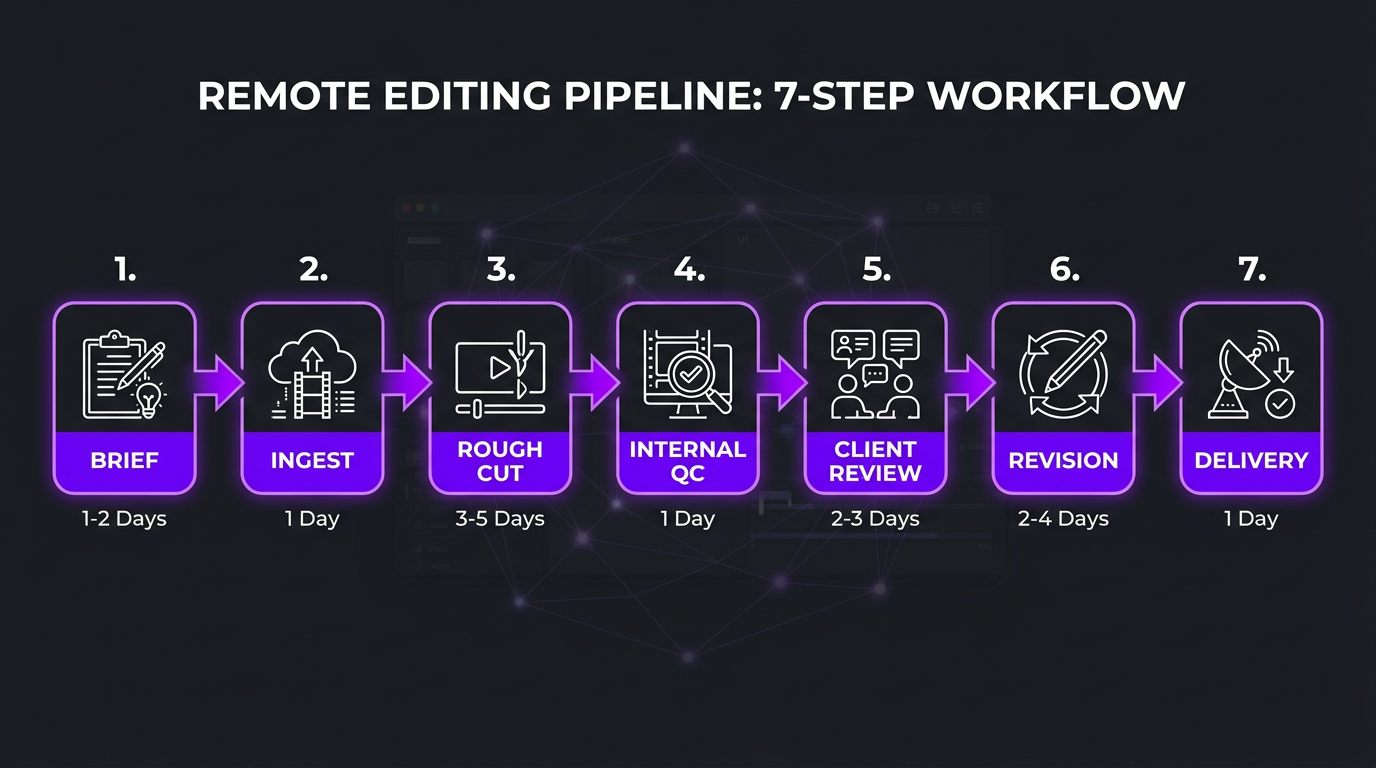
The difference between a remote team that works and one that creates constant headaches comes down to workflow design. Here’s the production pipeline that we’ve refined across hundreds of client engagements at Increditors:
Step 1: Brief Submission
Every project starts with a brief — not a Slack message, not a “here’s the footage, have fun” email. A proper brief includes:
- Raw footage links (organized by scene or topic)
- Video goal (educate, sell, entertain, brand awareness)
- Target platform and format specs
- Reference videos for style/pacing
- Key moments to include or highlight
- Music direction or specific tracks
- Deadline
The brief is the single most important document in remote video production. A great brief eliminates 80% of revision rounds. A vague brief guarantees frustration on both sides. (If you need help with briefs, we have a complete video editing brief template you can use.)
Step 2: Footage Ingest & Organization
The PM or lead editor organizes raw footage into a structured project — bins for A-roll, B-roll, audio, graphics assets. This step is invisible to you but critical for speed. A well-organized project lets editors find what they need in seconds, not minutes.
Step 3: Rough Cut
The editor assembles the narrative structure — selecting the best takes, building the story arc, establishing pacing. This is where 70% of the creative decisions happen. The rough cut may have placeholder music, basic color, and temp graphics. Typical delivery: 24-48 hours from brief submission.
Step 4: Internal QC Review
Before you see anything, a senior editor or QC specialist reviews the rough cut against your brand style guide and the original brief. They check pacing, audio levels, visual continuity, and adherence to your preferences. This layer catches 90% of issues before they reach you.
Step 5: Client Review (You)
You review the cut — ideally using timestamped feedback tools like Frame.io — and provide consolidated notes. The key word is “consolidated.” One round of organized feedback is infinitely better than 15 Slack messages spread across three hours.
Step 6: Revision & Polish
The editor implements your feedback while the motion designer finalizes graphics and the colorist applies the final grade. Sound design and audio mixing happen here too. Second delivery within 24 hours of receiving feedback.
Step 7: Final Approval & Delivery
You approve the final cut. The team exports in all required formats — 16:9 for YouTube, 9:16 for Reels/Shorts, 1:1 for social — and delivers to your preferred location (Google Drive, Dropbox, direct upload).
Tech Stack: The Tools That Make Remote Editing Work
Tools don’t make the team, but bad tools break it. Here’s what actually matters — and what doesn’t.
| Category | Recommended Tools | Why It Matters |
|---|---|---|
| Video review | Frame.io, Dropbox Replay | Timestamped comments eliminate “at around 2 minutes there’s a thing” feedback |
| File storage | Google Drive, Dropbox, Backblaze B2 | Fast upload/download speeds are non-negotiable for video files |
| Project management | Notion, Monday.com, ClickUp | Visual pipeline tracking so everyone knows project status |
| Communication | Slack, Discord | Async-first with channels organized by project or client |
| Editing software | Premiere Pro, DaVinci Resolve, Final Cut Pro | Standardize across the team for easy handoffs |
| Asset management | Iconik, Descript, shared asset libraries | Centralized access to brand assets, templates, and stock |
The most critical tool isn’t software — it’s the brand style guide. A comprehensive style guide that lives in a shared location (Notion doc, Google Doc, whatever) and covers editing pace, color preferences, font usage, graphic templates, music style, and common feedback patterns. This document reduces onboarding time by 50% and eliminates the most common revision requests.
Want a Dedicated Remote Editing Team Without Building One?
We assign you a full team — editor, motion designer, PM — who learn your brand and operate as your post-production department.
In-House vs Remote Team: The Real Cost Comparison
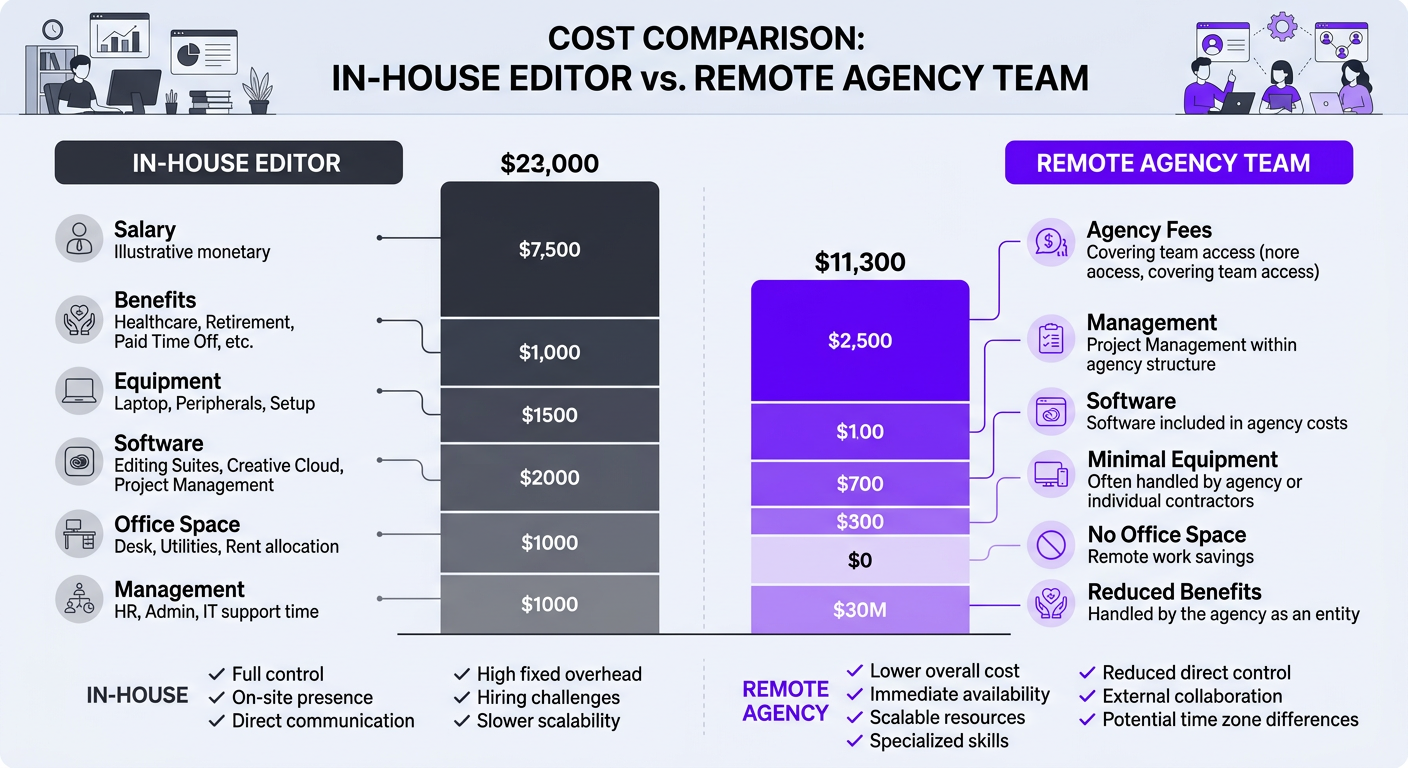
Let’s put actual numbers on the table. This comparison assumes a mid-volume content operation producing 12 videos per month (8 long-form + 16 short-form clips).
| Cost Factor | In-House Editor | Remote Agency Team |
|---|---|---|
| Base salary / retainer | $65,000/year ($5,417/mo) | $4,500/month |
| Benefits & taxes | $16,250/year ($1,354/mo) | $0 (included) |
| Equipment | $5,000 upfront + $1,200/year | $0 (team provides own) |
| Software licenses | $600/year ($50/mo) | $0 (included) |
| Office space allocation | $500-$1,500/month | $0 |
| Management overhead | 5-8 hrs/month of your time | 2-3 hrs/month (PM handles rest) |
| Motion graphics | ❌ Not included (hire another person) | ✅ Included in team |
| Backup coverage | ❌ Production stops | ✅ Team covers |
| Total monthly cost | $7,500–$9,000+ | $4,500 |
The remote team costs roughly half while providing more capabilities. And this comparison doesn’t include the biggest hidden cost of in-house: what happens when your one editor leaves. Recruiting, interviewing, onboarding, and ramping up a replacement takes 2-4 months. During that time, your content either stops or suffers.
For production houses and agencies managing multiple clients, the remote team model is even more compelling — you can scale teams up or down per client without the fixed overhead of full-time hires.
Build Your Own Team vs Hire a Pre-Built Team
If you’re convinced a remote team is the right move, the next question is: do you assemble it yourself, or hire an agency that provides one?
Building Your Own Remote Editing Team
Pros:
- Total control over who you hire
- Potentially lower cost at very high volume
- Direct relationships with every team member
Cons:
- You’re now a hiring manager, project manager, and HR department
- Finding, vetting, and testing editors takes 20-40+ hours
- No infrastructure for QC, workflow, or backup coverage
- When someone quits, you start over
- Training and documentation falls on you
Hiring a Pre-Built Agency Team
Pros:
- Team is pre-vetted, trained, and ready to go
- Established workflows and QC processes
- PM handles day-to-day coordination
- Built-in redundancy and scaling
- One invoice, one point of contact
Cons:
- Less control over specific hires (though good agencies accommodate preferences)
- Premium over rock-bottom freelancer rates
- Dependent on agency’s continued quality
For most businesses under 50 videos per month, the agency model wins on pure time ROI. The hours you’d spend building and managing a DIY team are almost always better spent on content creation, strategy, or actual business operations.
At Increditors, we’ve seen both approaches. Some of our creator clients tried the DIY route first, burned 2-3 months assembling a team, and came to us when they realized the management overhead was eating their creative energy. Others come directly to us and skip the learning curve entirely.
Quality Control Without Micromanagement
The fear with remote teams is always: “How do I make sure the quality stays consistent when I can’t look over their shoulder?” The answer is systems, not surveillance.
The Three-Layer QC Framework
Layer 1: Self-Review Checklist
Every editor runs through a standardized checklist before submitting any cut. This covers technical basics (audio levels, export settings, aspect ratio) and creative alignment (pacing matches style guide, brand colors used correctly, no awkward cuts).
Layer 2: Peer / Senior Review
A second pair of eyes — either a peer editor or senior creative lead — watches the cut specifically looking for issues the original editor might have missed. Fresh eyes catch things that hours of staring at a timeline won’t.
Layer 3: Client Review
By the time you see the cut, it’s been through two quality gates. Your job is creative direction — “I want more energy in the intro” or “let’s swap this B-roll section” — not catching technical errors.
The Style Bible
The most powerful QC tool is a living “style bible” that evolves over time. This document captures:
- Approved editing pace and rhythm for different content types
- Color grading LUTs and preferences
- Font families, sizes, and animation styles
- Music genres and energy levels that work (and don’t)
- Common feedback patterns compiled into “do this, not that” examples
- A reference library of past approved videos
Every piece of feedback you give gets added to the style bible. Over time, the document gets so detailed that new team members can onboard themselves — and your revision rate drops dramatically.
How Real Brands Use Remote Video Editing Teams
Theory is useful. Real examples are better. Here’s how two very different organizations leveraged remote editing teams to solve their production challenges.
TuMeke: Scaling AI Product Content Without In-House Overhead
TuMeke is an AI-powered workplace safety platform that needed consistent, high-quality video content to explain their technology, engage prospects, and support their sales team. They had a problem common to growing tech companies: the product was technical, the audience was non-technical, and they didn’t have anyone in-house who could bridge that gap in video.
They tried individual freelancers first. The result was a revolving door — each new editor needed weeks to understand the product, the B2B audience, and the visual language of AI/tech content. By the time an editor got up to speed, the engagement would end and the cycle would restart.
When TuMeke engaged our startup team at Increditors, we assigned a dedicated editor and motion designer who stayed on their account long-term. The team invested the first two weeks deeply learning TuMeke’s product, reviewing competitor content, and studying their target buyer persona. By week three, first cuts were landing with minimal revisions.
The outcome: consistent content velocity (multiple videos per month), coherent visual branding across all content, and zero management overhead for TuMeke’s lean team. They effectively had a post-production department for a fraction of one in-house hire.
VYVE Wellness: From Inconsistent Editing to Brand Cohesion
VYVE Wellness operates in the health and wellness space — a category where visual quality directly impacts perceived credibility. They were producing video content regularly, but the editing quality fluctuated wildly. Some videos felt polished and on-brand. Others looked like they were cut by someone who had never seen the previous content.
The root cause was fragmented editing — different freelancers for different videos with no style continuity, no shared asset library, and no quality standards. Each video was essentially a standalone project, even though they were all representing the same brand.
We restructured their entire post-production workflow. A dedicated social media editing team was assigned with a shared style guide, standardized color grading presets, consistent graphic templates, and a project manager who ensured every deliverable matched the brand standard. The transformation was immediate — viewers started recognizing VYVE’s content before seeing the logo, just from the visual language.
The lesson from both cases is the same: remote editing teams don’t just save money — they create consistency that’s nearly impossible to achieve with rotating freelancers. Consistency builds brand recognition, and brand recognition builds trust.
Onboarding Your Remote Editing Team: The First 30 Days
The first month with a new remote editing team sets the trajectory for the entire relationship. Invest time upfront, and the next 11 months run smoothly. Rush through it, and you’ll be dealing with misalignment for months.
Week 1: Foundation
- Kickoff call — Introduce your brand, content goals, target audience, and what success looks like
- Share your style guide — or work with the team to create one from your best existing content
- Provide reference videos — 5-10 videos (yours or competitors’) that represent the quality and style you want
- Set up tools — shared drives, communication channels, project boards, review platform
- First test project — a low-stakes video to calibrate expectations on both sides
Week 2: Calibration
- Review test project — detailed feedback that teaches the team your preferences
- Start regular production — first real project with full workflow
- Daily check-ins — short async updates to catch alignment issues early
- Begin building the style bible — document every piece of feedback for future reference
Week 3-4: Acceleration
- Move to full production cadence — all scheduled videos flowing through the pipeline
- Reduce check-in frequency — shift from daily to 2-3 times per week
- Evaluate turnaround times — identify bottlenecks and optimize
- First retrospective — what’s working, what needs adjustment, what’s the revision rate
By the end of month one, your remote editing team should be operating at 80-90% of their eventual efficiency. The remaining 10-20% comes through months 2-3 as the team absorbs more nuances of your brand and preferences.
5 Mistakes That Kill Remote Editing Teams
We’ve seen every failure mode. Avoid these and you’ll be ahead of 90% of people who try remote editing teams.
Mistake 1: Treating Remote Editors Like Vending Machines
“Here’s footage, give me a video.” This approach produces mediocre results 100% of the time. Remote editors need context — who’s the audience, what’s the goal, what emotion should the viewer feel. The less context you provide, the more revisions you’ll need. Invest in briefs.
Mistake 2: Skipping the Style Guide
If your brand’s editing style exists only in your head, every video will require extensive feedback because the editor is guessing at your preferences. Put it on paper. It takes 2-3 hours to create a solid style guide, and it saves hundreds of hours over the course of a year.
Mistake 3: Giving Feedback Across 7 Different Channels
A Slack message here, an email there, a text about the color grading, a voice note about the music. Scattered feedback gets lost and creates conflicting instructions. Centralize all feedback in one place (Frame.io, a shared doc, or your project management tool) and give it in one consolidated batch per review round.
Mistake 4: Switching Team Members Too Frequently
If you’re constantly requesting new editors because someone missed a minor preference, you’re resetting the learning curve each time. It takes 4-6 weeks for an editor to fully internalize your style. Give them that time before making changes. Consistent feedback with the same editor always produces better results than a revolving door of “better” editors.
Mistake 5: Not Setting Clear Turnaround Expectations
Ambiguity breeds frustration on both sides. “As soon as possible” isn’t a deadline — it’s a recipe for stress. Set clear turnaround times for each project type and build in buffer for your review time. When both sides know the timeline, work flows smoothly.
Frequently Asked Questions
A remote video editing team is a group of editors, motion designers, colorists, and project managers who work together from different locations to handle your video post-production. Unlike a single freelancer, a remote team provides redundancy, specialization, and structured workflows — all without requiring a physical office.
Remote video editing teams typically cost between $2,500 and $8,000 per month depending on volume, complexity, and team size. A dedicated editor with project management starts around $3,000/month, while a full team handling 20+ videos per month with motion graphics and color grading runs $5,000-$8,000/month. See our pricing page for specific packages.
The most effective approach is asynchronous workflows with structured handoff points. Use tools like Frame.io for timestamped feedback, shared project management boards for status tracking, and overlap windows of 2-3 hours for real-time communication. Many agencies structure teams with timezone overlap built in so you’re never waiting a full day for a response.
For most businesses producing 4-20+ videos per month, a remote team is more cost-effective and capable. An in-house editor costs $50,000-$80,000/year in salary alone, gives you one person’s skill set, and creates a single point of failure. A remote team provides multiple specialists, built-in redundancy, and costs 40-60% less than equivalent in-house talent.
Quality control in remote teams works through layered review processes: the editor completes the first cut, a senior editor or QC specialist reviews against brand guidelines and a checklist, then the client reviews. Detailed brand style guides, reference libraries, and standardized feedback processes eliminate most quality issues before you ever see the cut.
Common tools include Frame.io or Dropbox Replay for video review and timestamped feedback, Google Drive or Dropbox for file storage, Slack or Microsoft Teams for communication, Notion or Monday.com for project management, and Adobe Creative Cloud or DaVinci Resolve for editing. The specific stack matters less than having clear, documented processes.
A well-structured remote editing team can be fully onboarded in 1-2 weeks. The first week covers brand guidelines, style preferences, and workflow setup. By week two, you should be receiving first cuts that are 80-90% aligned with your vision. Full alignment typically happens by the end of month one.
Ready to Build Your Remote Editing Team?
Skip the months of hiring, training, and trial-and-error. Our pre-built teams start producing within a week — with dedicated editors who learn your brand and stay on your account.
This guide reflects workflows and pricing based on Increditors’ experience managing remote editing teams for creators, startups, and enterprises across 50+ ongoing client relationships. For current team availability and pricing, visit our pricing page or schedule a call.