










![3D Explainer Video - ScribbleLive.mp4_snapshot_00.12_[2022.03.09_03.14.16]](https://increditors.com/wp-content/uploads/elementor/thumbs/3D-Explainer-Video-ScribbleLive.mp4_snapshot_00.12_2022.03.09_03.14.16-r7wb53mx72rxst3qcqyrfxdmeyzb5r9jbl0wbjujh4.png "3D Explainer Video – ScribbleLive.mp4_snapshot_00.12_[2022.03.09_03.14.16]")
































You signed the contract. You’re excited. You’re imagining perfectly edited videos landing in your inbox while you focus on what you do best — creating content, running your business, or building your brand.
Then reality hits. Your new agency sends you a questionnaire with 47 questions. They need access to five different platforms. They want “reference videos” and a “brand style guide” you definitely don’t have documented anywhere. Suddenly, onboarding feels like a second job.
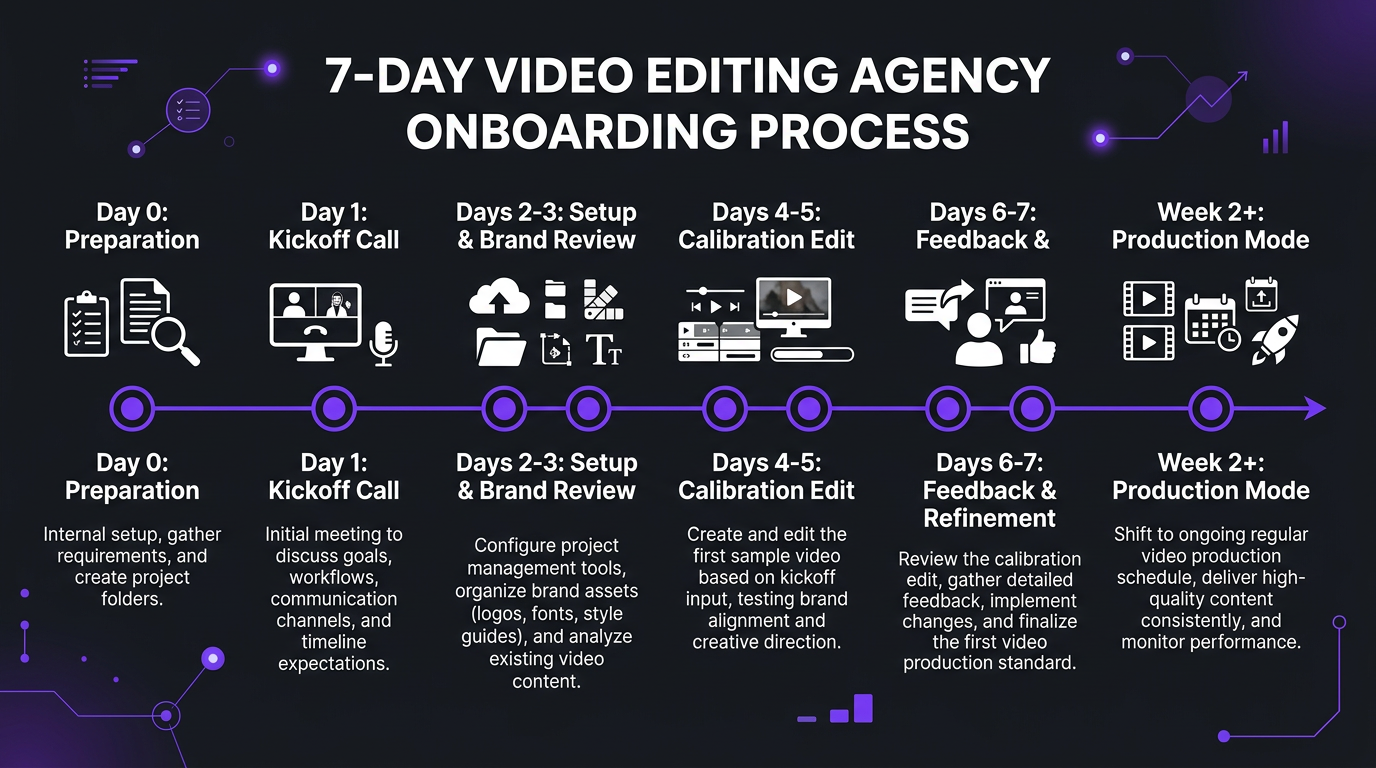
Here’s the truth: the first week with a new video editing agency determines whether the next six months will be smooth or frustrating. A great onboarding compresses weeks of trial-and-error into days of structured calibration. A sloppy one means you’re still explaining basic preferences in month three.
We’ve onboarded hundreds of clients — from solo YouTubers to enterprise teams producing 40+ videos a month. This is exactly what a professional onboarding looks like, day by day, and what you should do to make it work.
What’s in This Guide
- Before Day 1: What to Prepare
- Day 1: The Kickoff Call
- Days 2-3: Workflow Setup & Brand Immersion
- Days 4-5: The Calibration Edit
- Giving Feedback That Actually Works
- Week 2 and Beyond: Moving to Production
- 7 Onboarding Mistakes That Cost You Months
- Onboarding Comparison: Budget vs Premium Agencies
- The Complete Onboarding Checklist
- FAQ
Before Day 1: What to Prepare (This Makes or Breaks Everything)
The number one predictor of onboarding success isn’t the agency’s process — it’s how prepared you are before the kickoff call. Clients who show up organized get production-quality videos by the end of week one. Clients who show up empty-handed are still calibrating in week three.
Your Onboarding Preparation Checklist
Gather these before your first call:
1. Reference Videos (Non-Negotiable)
Select 3-5 videos that represent the style you want. These can be your own best work or videos from other creators/brands you admire. For each reference video, note specifically what you like:
- “I love the pacing in this video — quick cuts in the first 30 seconds, then it slows down for the tutorial sections”
- “This color grade is exactly what I want — warm, slightly desaturated, cinematic blacks”
- “The text animations at 2:15 are perfect — clean, fast, not overdone”
Vague references like “I want it to look professional” give your editor nothing to work with. Specific timestamps and descriptions give them a style target on the first edit.
2. Brand Assets
Compile everything your editor will need:
- Logo files: PNG with transparent background + vector (AI/SVG/EPS)
- Brand colors: Exact hex codes, not “kind of blue”
- Fonts: The actual font files (.otf/.ttf), not just the names
- Intro/outro sequences: If you have them, provide the source files (After Effects, Premiere)
- Music preferences: Genres, mood, specific tracks, or a playlist link
- Thumbnail style: Examples of thumbnails you like, face expressions, text style
3. Content Calendar
Share your publishing schedule for at least the first month. Your editor needs to know:
- How many videos per week/month
- Publishing days and times
- Content types (long-form, shorts, both)
- Any upcoming launch dates or time-sensitive content
4. Raw Footage Sample
Upload a sample of your typical raw footage before the kickoff call. This lets the editor assess:
- Your camera and audio setup quality
- How much cleanup/color correction is typically needed
- Your filming style (multi-cam, single cam, screen recordings)
- Average raw footage length vs target final length
Day 1: The Kickoff Call
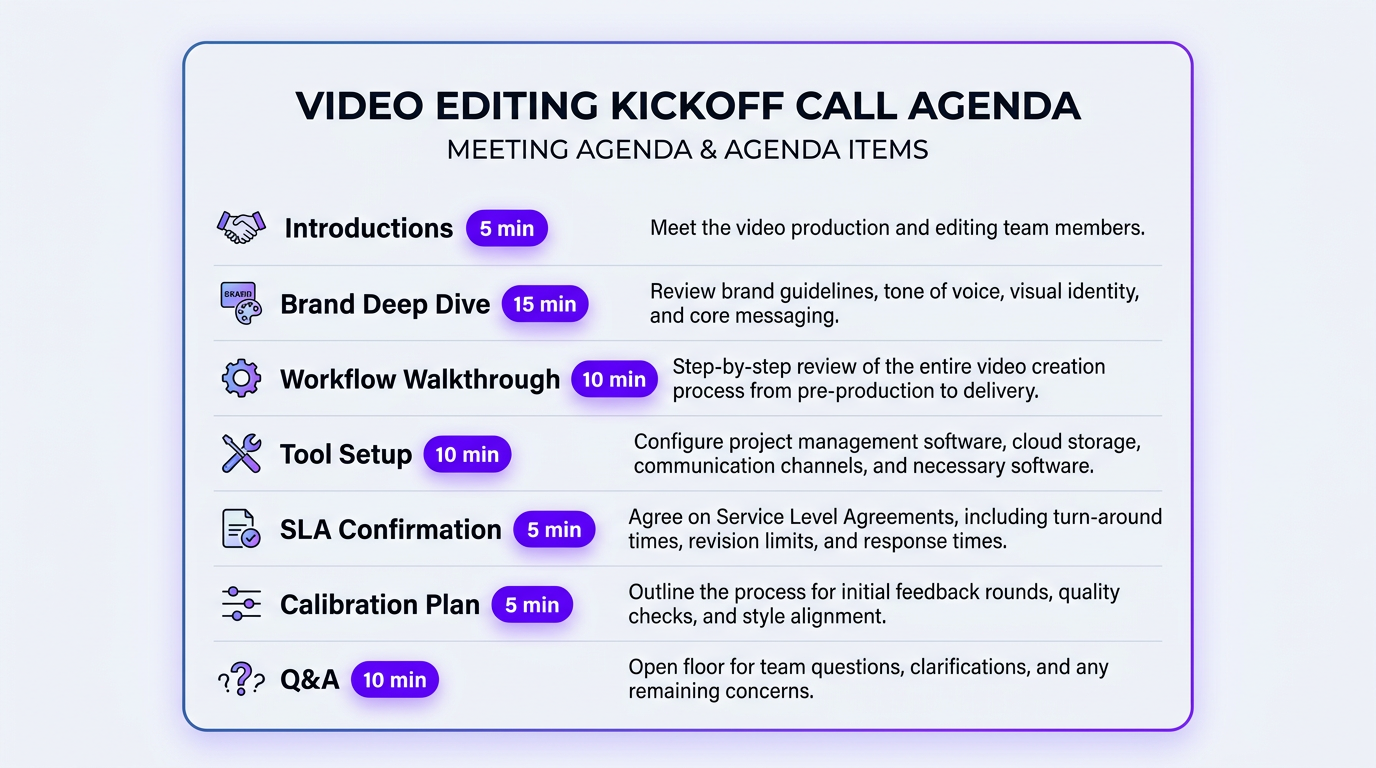
The kickoff call is the most important 45-60 minutes of your entire relationship with the agency. It’s where expectations get set, workflows get defined, and both sides figure out if the chemistry is right.
What a Great Kickoff Call Covers
| Agenda Item | Time | Purpose |
|---|---|---|
| Introductions & team structure | 5 min | Who’s your editor? Your PM? Your escalation contact? |
| Brand & content deep dive | 15 min | Review reference videos, brand assets, audience, goals |
| Workflow walkthrough | 10 min | How footage gets uploaded, briefs submitted, drafts reviewed |
| Tool setup | 10 min | Set up shared folders, PM access, communication channels |
| Turnaround & revision agreement | 5 min | Confirm SLA terms, feedback deadlines, revision scope |
| Calibration edit plan | 5 min | Which video to use, expected delivery, feedback format |
| Q&A | 10 min | Address any concerns or special requirements |
Who Should Be on the Call
From your side: the person who will be the primary point of contact for feedback and approvals. If that’s you, great. If it’s a team member, they need to be on this call — not getting notes secondhand.
From the agency side: your dedicated editor (or lead editor), your project manager/account manager, and possibly a creative director for the initial style discussion. If the agency sends a sales person who won’t be involved in production, that’s a yellow flag — you want to meet the people who will actually edit your videos.
When Riley Coleman onboarded with us, the kickoff call included our lead editor who would handle his long-form YouTube content, our short-form specialist for his Reels and Shorts, and his dedicated account manager. By the end of the call, Riley knew exactly who to contact for what — and more importantly, the editors had already absorbed his pacing preferences, humor style, and brand personality directly from the conversation.
Red Flags During the Kickoff Call
- “We’ll figure it out as we go” — No. Professional agencies have a structured process.
- No dedicated point of contact — You should know exactly who handles your account.
- Rushing through style discussion — If they spend 5 minutes on understanding your brand, expect misaligned first drafts.
- No questions about your audience — Good editors edit for the viewer, not just the client. They should ask who watches your content.
- Vague turnaround commitments — “Usually a few days” isn’t a commitment.
Days 2-3: Workflow Setup & Brand Immersion
After the kickoff call, the agency’s team goes to work — but so should you. Days 2-3 are about building the operational infrastructure that makes everything after this point efficient.
File Sharing Setup
The agency should set up (or guide you through setting up) a shared storage structure. A typical folder setup looks like:
- /Brand Assets/ — Logo, fonts, colors, templates, intros, outros
- /Raw Footage/ — Organized by project or date
- /Briefs/ — Written briefs or video brief templates
- /Drafts/ — Editor uploads here; you review here
- /Approved Finals/ — Approved files ready for publishing
- /Music & SFX/ — Licensed tracks, sound effects library
Most agencies use Google Drive, Dropbox, or Frame.io. Frame.io is ideal for video review because it supports timestamped comments directly on the video — way better than typing “at around 3 minutes there’s a thing” in a Slack message.
Project Management Integration
The agency should add you to their PM tool or set up a shared board. At minimum, you should be able to:
- See the status of every video (briefed → in progress → review → revising → approved)
- Submit new briefs directly
- Leave feedback with timestamps
- Track revision rounds
- See upcoming deadlines
If the agency’s workflow is “send briefs over email and we’ll send drafts back over email,” proceed with extreme caution. That works for one video. It falls apart at five. By ten, you’ll be drowning in email chains with names like “RE: RE: RE: FWD: Draft v3 FINAL final.mp4.”
Brand Immersion: What the Editor Does While You Wait
A good editor doesn’t wait for the first brief. During days 2-3, they should be:
- Watching your existing content — At least 5-10 of your published videos to understand your current style
- Studying reference videos — Breaking down the editing techniques, pacing, transitions, and graphics in your references
- Setting up templates — Creating project templates with your brand colors, fonts, lower thirds, and standard elements
- Reviewing raw footage — Understanding your shooting style, audio quality, and typical source material
- Preparing the calibration edit — Selecting the best footage for the first test edit
This immersion phase is why premium agencies deliver better first drafts. Budget services skip it — they assign your footage to the next available editor who opens your project cold. The difference shows immediately in the calibration edit.
Experience a Seamless Onboarding
Increditors assigns a dedicated editor and account manager from day one. Our structured onboarding gets you production-ready videos by the end of week one — not month one.
Days 4-5: The Calibration Edit (The Most Important Video You’ll Ever Review)
The calibration edit is where theory meets practice. It’s the first video your new editor delivers, and it serves one purpose: to calibrate style, pacing, and creative direction before you move to full production.
What to Expect From the First Calibration Edit
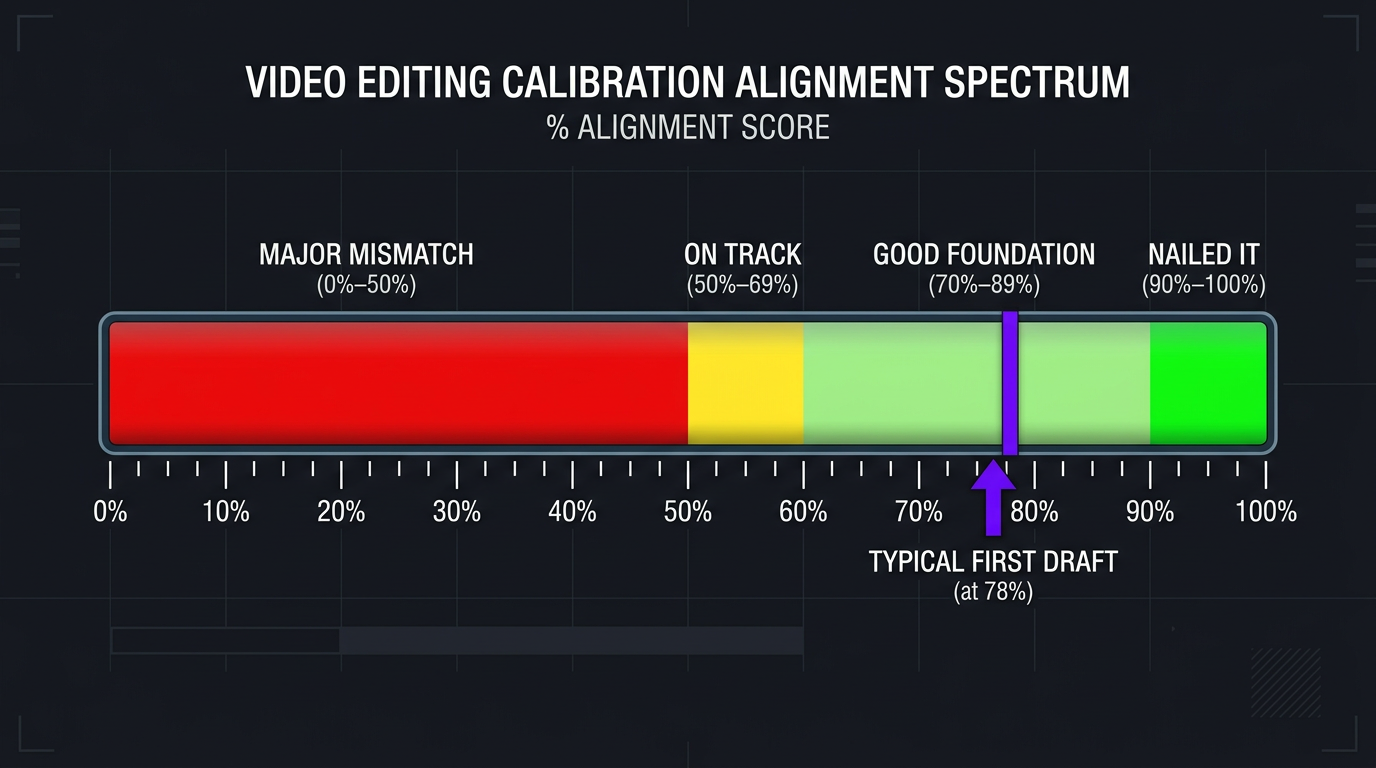
Manage your expectations. The calibration edit is almost never perfect. It shouldn’t be — that’s the point. It’s a starting position for refinement. Here’s a realistic expectation scale:
| Calibration Edit Quality | What It Means | Action |
|---|---|---|
| 90-100% aligned | Exceptional — the editor nailed your style immediately | Minor feedback → move to production |
| 70-89% aligned | Good foundation — needs refinement on specific elements | Detailed feedback → one more calibration round |
| 50-69% aligned | On the right track but significant gaps | Comprehensive feedback → 2 more calibration rounds |
| Below 50% | Major style mismatch | Re-evaluate references → consider editor reassignment |
Most professional agencies hit 70-89% on the first calibration edit. Getting to 90%+ typically takes 2-3 rounds. If an agency tells you they nail it on the first try every time, they’re either lying or working exclusively with creators who have very simple editing needs.
Choosing the Right Video for Calibration
Don’t use your most important upcoming video as the calibration edit. Instead, pick a video that:
- Represents your typical content type and complexity
- Has clean raw footage (don’t test with your worst recording)
- Isn’t time-sensitive (you need room for multiple revision rounds)
- Includes common elements you want the editor to learn — B-roll, screen recordings, talking head segments
The ideal calibration video is “medium everything” — medium length, medium complexity, medium urgency. It should be representative, not exceptional.
Giving Feedback That Actually Works
Your feedback on the calibration edit shapes every video that comes after it. This is the highest-leverage feedback you’ll ever give your editor. Don’t phone it in.
The STAR Feedback Framework
Use this framework for every piece of feedback:
- S — Specific: Reference exact timestamps, not vague sections
- T — Technical: Use editing terms when possible (pacing, J-cut, color temperature, gain, keyframe)
- A — Actionable: Tell them what to do, not just what’s wrong
- R — Ranked: Prioritize feedback from most to least important
Good vs Bad Feedback Examples
| ❌ Bad Feedback | ✅ Good Feedback |
|---|---|
| “The pacing feels off” | “0:00-0:30 — The intro is too slow. Cut the first 8 seconds and start at the hook. Match the pacing of [reference video link] first 15 seconds.” |
| “Colors look wrong” | “The color grade is too cool/blue throughout. Warm it up — reference our brand guide, skin tones should be natural, not orange. See [reference video] for the tone I want.” |
| “I don’t like the music” | “The music works for the intro but is too intense for the tutorial section (3:15-8:40). Swap to something calmer — acoustic or lo-fi. Here are 3 tracks from our library that work: [links]” |
| “Add more energy” | “Add zoom-ins on emphasis words at 1:22, 2:45, and 4:10. Add a whoosh SFX on each section transition. Speed up cuts between B-roll at 5:00-5:30 — try 1-2 second clips instead of 3-4 seconds.” |
| “Make it better” | “Priority 1: Fix audio levels — my voice drops at 6:30-7:15. Priority 2: The text overlays at 3:00 need to match our brand font (Montserrat Bold). Priority 3: Outro feels abrupt — add 2-second fade to black.” |
When VYVE Wellness went through calibration with us, their founder recorded a 10-minute Loom video walking through her feedback with screen share. She paused at each timestamp, explained what she wanted changed and why, and referenced specific moments from the style guide. That single Loom video taught our editor more about VYVE’s brand than any written document could. The second draft was approved with zero revisions.
Feedback Timing Matters
Submit all your feedback at once — don’t drip-feed notes over days. Consolidated feedback means the editor can plan their revision efficiently. Scattered feedback means they edit, then undo, then re-edit based on later notes, doubling the work and frustrating everyone.
Most SLAs give you 48-72 hours to submit feedback on a draft. Use that time to watch the video multiple times, collect all your thoughts, and submit everything in one consolidated message through the project management tool.
Week 2 and Beyond: Moving to Production
Once the calibration edit is approved (typically after 1-3 rounds), you transition from onboarding to production mode. Here’s what changes:
The Production Workflow
- You submit a brief + raw footage (Day 0)
- Editor confirms receipt (same day)
- First draft delivered (per SLA turnaround — typically 3-5 business days)
- You review and submit feedback (within 48 hours)
- Revision delivered (24-48 hours)
- You approve or request final tweaks
- Final file delivered → publish
This cycle should feel automatic by week 3. If you’re still explaining basic preferences or seeing the same mistakes, something went wrong in calibration and it’s worth pausing for a style review session.
Weekly Sync Meetings
For the first month, schedule a 15-30 minute weekly sync with your editor or PM. This isn’t a status update (the PM tool handles that) — it’s a creative alignment check:
- What’s working well? Do more of it.
- What’s not landing? Recalibrate before it becomes a pattern.
- Any upcoming content that needs special treatment?
- Feedback on the workflow itself — is anything creating friction?
After month one, most clients move to biweekly or monthly syncs as the editor learns their style deeply enough to anticipate preferences.
The Learning Curve
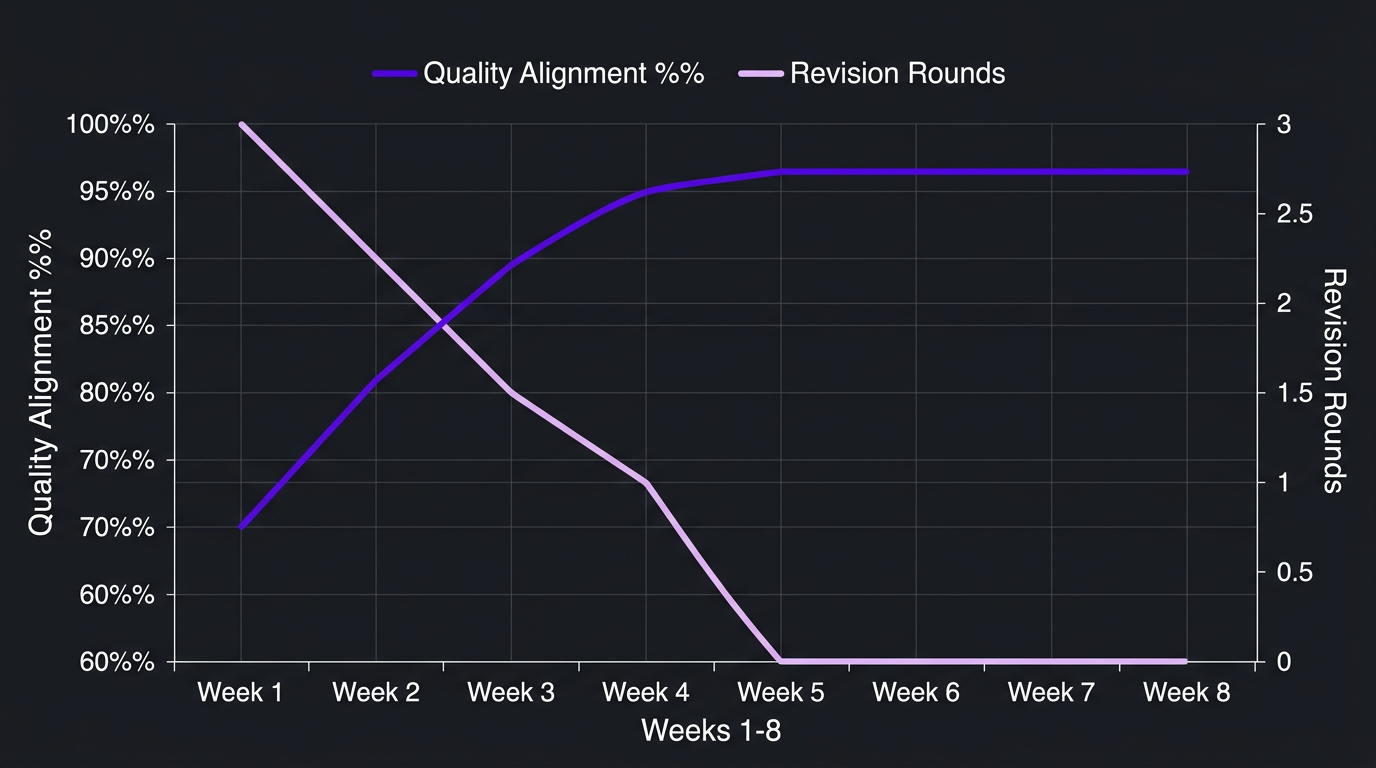
Expect a quality ramp over the first 30 days:
| Week | Expected Alignment | Typical Revision Rounds |
|---|---|---|
| Week 1 (Calibration) | 70-85% | 2-3 rounds |
| Week 2 | 80-90% | 1-2 rounds |
| Week 3 | 85-95% | 1 round |
| Week 4+ | 90-98% | 0-1 rounds |
If you’re still at 2-3 revision rounds in week 4, either the feedback loop is broken or there’s a fundamental style mismatch. Talk to your PM about whether the current editor is the right fit — good agencies have multiple editors and can reassign without drama.
Ink Magnet experienced this exact trajectory when they onboarded for their social media content editing. Week one needed three revision rounds as we dialed in their fast-paced, meme-forward style. By week four, most videos were approved on the first draft because our editor had internalized their brand voice. That’s the power of a structured calibration process.
7 Onboarding Mistakes That Cost You Months
We’ve seen every onboarding mistake in the book. Here are the seven that consistently cause the most damage — and how to avoid them.
1. No Reference Videos
Telling an editor “I want high-quality, engaging content” is like telling a chef “I want good food.” Without specific references, the editor guesses — and their guess rarely matches what you pictured. Always provide 3-5 reference videos with specific notes about what you like in each one.
2. Skipping the Brand Guide
Even a basic one-page document with your colors, fonts, and logo usage saves enormous revision time. If you don’t have a formal brand guide, create a simple document before onboarding. Your editing agency should be able to help you formalize one during the process.
3. Rushing Past Calibration
“Just start editing, we’ll adjust as we go” sounds efficient but it’s the opposite. Every video edited before calibration is complete will likely need significant rework. Invest the time upfront — it pays dividends on every video for the rest of the engagement.
4. Too Many Cooks
When three people on your team submit feedback separately, the editor gets conflicting instructions. Designate one person as the feedback owner. Internal disagreements get resolved before feedback reaches the editor. One voice, one submission.
5. Vague Feedback
“It doesn’t feel right” gives the editor nothing to work with. Use the STAR framework: Specific, Technical, Actionable, Ranked. If you can’t articulate what’s wrong, record a screen-share video talking through it — that’s almost always more useful than written feedback.
6. Not Setting Up Proper File Sharing
Sending raw footage via email, WeTransfer links that expire, or random Google Drive shares creates chaos. Set up a permanent, organized folder structure on day one and use it consistently. The five minutes it takes to organize files saves hours of “where’s that footage?” conversations.
7. Expecting Perfection on Day One
Even the best editors need calibration time. If you hired a new employee, you wouldn’t expect flawless work in the first week. The same applies to an editing agency. Give them the information and feedback they need, and judge the relationship at the 30-day mark — not the 3-day mark.
Onboarding Experience: Budget vs Mid-Tier vs Premium Agencies
Not all onboarding experiences are created equal. Here’s what you can realistically expect based on the tier of service you’re paying for:
| Onboarding Element | Budget ($300-$800/mo) | Mid-Tier ($1,500-$3,000/mo) | Premium ($3,500-$8,000+/mo) |
|---|---|---|---|
| Kickoff call | ❌ None (form submission) | ✅ 30-min call with PM | ✅ 60-min call with editor + PM + creative lead |
| Brand immersion | ❌ Editor sees only the brief | Reviews your channel briefly | ✅ Deep study of 10+ videos, competitor analysis |
| Dedicated editor | ❌ Whoever’s available | ✅ Semi-dedicated | ✅ Fully dedicated, hand-selected |
| Calibration edits | ❌ First real project is the test | 1 calibration edit | ✅ 1-3 calibration edits with style documentation |
| Workflow setup | Upload portal only | Shared Drive + PM tool access | ✅ Full infrastructure: Drive, PM, Slack, Frame.io |
| Brand guide documentation | ❌ Not offered | Uses what you provide | ✅ Helps create/refine your brand editing guide |
| Onboarding timeline | 1-2 days (minimal setup) | 3-5 days | 5-10 days (thorough calibration) |
| Weekly syncs | ❌ | Biweekly | ✅ Weekly for first month |
| Increditors | Full kickoff call, dedicated editor + PM, 1-3 calibration edits, brand guide co-creation, and weekly syncs until fully ramped |
The difference becomes obvious in the results: budget services take 4-8 weeks of trial-and-error to produce consistently acceptable work. Premium agencies with structured onboarding hit consistent quality by week 2-3 because they frontload the investment in understanding your brand.
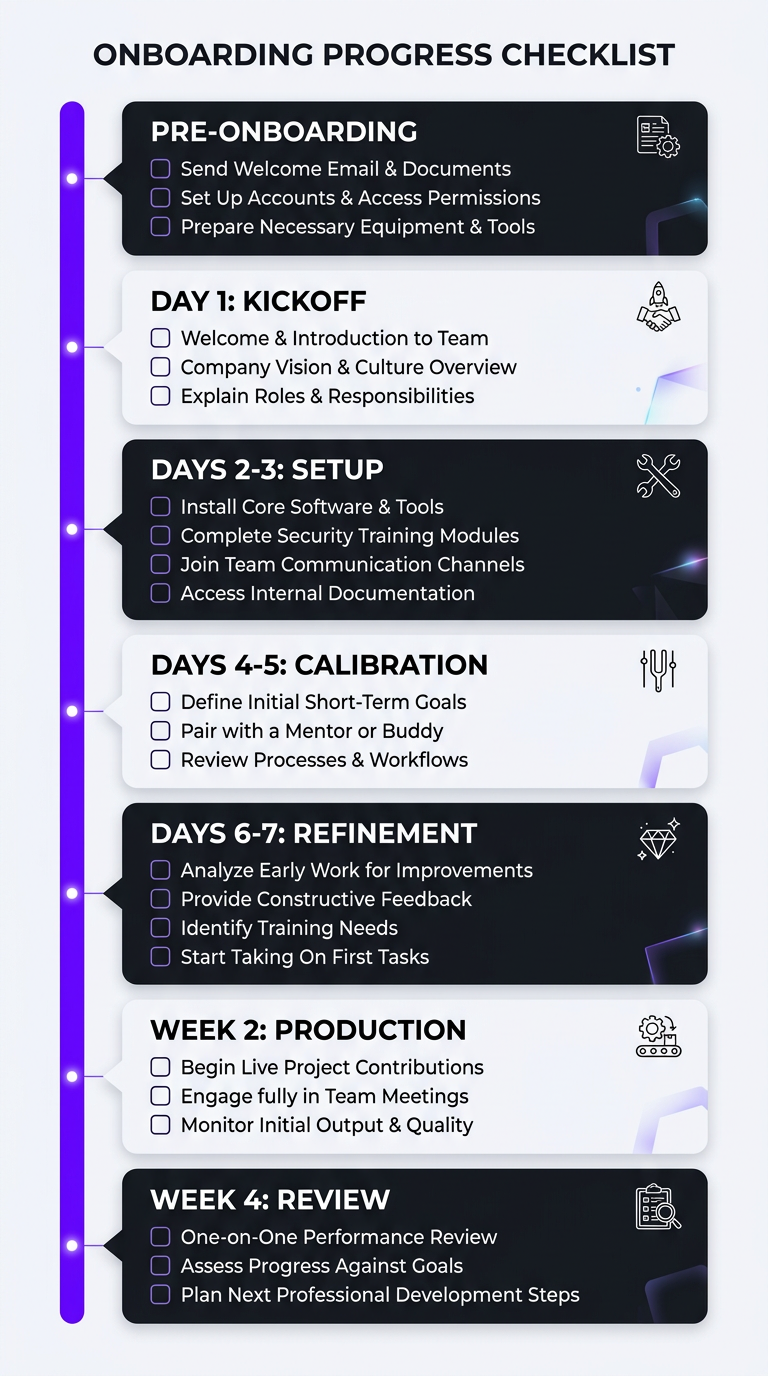
The Complete Onboarding Checklist
Use this checklist to track your onboarding progress. Share it with your agency — the good ones will appreciate the organization.
Pre-Onboarding (Before Day 1)
- ☐ Gather 3-5 reference videos with specific notes
- ☐ Compile brand assets (logo, fonts, colors, templates)
- ☐ Document content calendar for the first month
- ☐ Upload a sample of raw footage
- ☐ Identify your single point of contact for feedback
- ☐ Review the agency’s SLA terms
Day 1
- ☐ Complete kickoff call
- ☐ Confirm team assignments (editor, PM, escalation contact)
- ☐ Agree on calibration edit video selection
- ☐ Confirm turnaround times and feedback deadlines
Days 2-3
- ☐ Set up shared folder structure
- ☐ Grant PM tool access
- ☐ Set up communication channels (Slack/Discord)
- ☐ Share all brand assets in the shared folder
- ☐ Upload calibration edit footage
Days 4-5
- ☐ Receive calibration edit first draft
- ☐ Review thoroughly (multiple viewings)
- ☐ Submit detailed, timestamped feedback
Days 6-7
- ☐ Receive revised calibration edit
- ☐ Approve or submit final round of feedback
- ☐ Document approved style decisions for future reference
Week 2
- ☐ Submit first production briefs
- ☐ Schedule weekly sync meeting
- ☐ Evaluate workflow efficiency — any friction points?
Week 4 (30-Day Review)
- ☐ Review overall quality trajectory
- ☐ Assess turnaround time consistency
- ☐ Evaluate communication quality
- ☐ Decide: continue, adjust, or escalate concerns
This is the same onboarding framework we use at Increditors for every new client — from solo content creators to enterprise teams. It works because it’s systematic. No steps get skipped, no assumptions go untested, and both sides know exactly where they are in the process at all times.
Frequently Asked Questions
Most professional video editing agencies complete onboarding in 5-10 business days. This includes the kickoff call, workflow setup, brand immersion, and 1-3 calibration edits. By week 2, you should be in production mode receiving regular deliverables. Budget services have shorter onboarding (1-2 days) because they skip the calibration phase — which often means longer ramp-up times overall.
Prepare: 3-5 reference videos with specific notes about what you like, brand assets (logo files, fonts, hex color codes), your content calendar for the first month, a sample of your typical raw footage, and a designated single point of contact for feedback. The more organized your materials, the faster and smoother the onboarding — and the better your first calibration edit will be.
A thorough onboarding includes: a 45-60 minute kickoff call with your assigned editor and PM, brand and style guide review, workflow and tool setup (file sharing, project management, communication channels), 1-3 calibration edits with detailed feedback rounds, documentation of approved styles, and weekly sync meetings for the first month. If an agency skips any of these, expect a longer ramp-up to consistent quality.
Expect 1-3 calibration edits. The first establishes a baseline — most hit 70-85% alignment. After detailed feedback, the second draft typically reaches 85-95%. A third round is for fine-tuning specific elements. If alignment is below 50% after the first calibration edit despite thorough references, discuss editor reassignment with the agency.
Common tools: cloud storage for raw footage (Google Drive, Dropbox, or Frame.io), project management access (Asana, Notion, or Trello), communication channels (Slack or Discord), and all brand assets. Optionally, some clients provide YouTube Studio access for direct uploads. Set up organized, permanent shared folders rather than sending individual file links — it prevents lost footage and streamlines the entire workflow.
The top mistakes: not providing reference videos (your editor guesses and misses), giving vague feedback (“make it better”), skipping brand documentation, rushing past calibration, having multiple people submit conflicting feedback, using email instead of proper project management tools, and expecting perfection on the first edit. Most onboarding failures are client-side — preparation and clear feedback fix 90% of issues.
Yes, and you should if the style mismatch persists after 2-3 calibration rounds with detailed feedback. Good agencies have multiple editors with different strengths — fast-paced content creators, cinematic storytelling, corporate polish — and will reassign without penalty. It’s much better to identify a mismatch in week one than to force a bad fit for months. Just be honest about what’s not working and give specific examples.
Ready to Experience a World-Class Onboarding?
Increditors’ structured onboarding gets you from signed contract to production-ready videos in under 7 days. Dedicated editor, dedicated PM, zero guesswork.
Onboarding timelines and processes vary by agency and project scope. This guide reflects best practices observed across the professional video editing industry as of March 2026. For Increditors-specific onboarding details, schedule a discovery call or explore our portfolio.