










![3D Explainer Video - ScribbleLive.mp4_snapshot_00.12_[2022.03.09_03.14.16]](https://increditors.com/wp-content/uploads/elementor/thumbs/3D-Explainer-Video-ScribbleLive.mp4_snapshot_00.12_2022.03.09_03.14.16-r7wb53mx72rxst3qcqyrfxdmeyzb5r9jbl0wbjujh4.png "3D Explainer Video – ScribbleLive.mp4_snapshot_00.12_[2022.03.09_03.14.16]")
































You just spent two hours filming the perfect video. You upload the raw footage, send it to your editor with a message that says “here’s the footage, make it pop!” — and then three days later you get a cut that’s… not what you had in mind. The music is wrong. The pacing is off. The intro is 45 seconds when you wanted 10. The color grading looks like a nature documentary when you’re shooting a SaaS product demo.
The problem isn’t your editor. The problem is that you gave them nothing to work with except raw footage and vibes.
A video editing brief template solves this. It’s a structured document that captures everything your editor needs to deliver a first cut that’s 80-90% right — instead of 40% right with four rounds of painful revisions.
We’ve used and refined our video editing brief template across hundreds of projects at Increditors, working with content creators, startups, and enterprise brands. The template below is the exact format we use internally. Take it, adapt it, make it yours.
What’s in This Guide
- Why You Need a Video Editing Brief (The Data)
- The Complete Video Editing Brief Template
- Field-by-Field Walkthrough
- Brief Examples by Video Type
- 7 Brief Mistakes That Cause Revision Nightmares
- How to Adapt the Template for Different Projects
- Real-World Briefs: Lessons from Client Projects
- Advanced: Building a Brief System for Teams
- FAQ
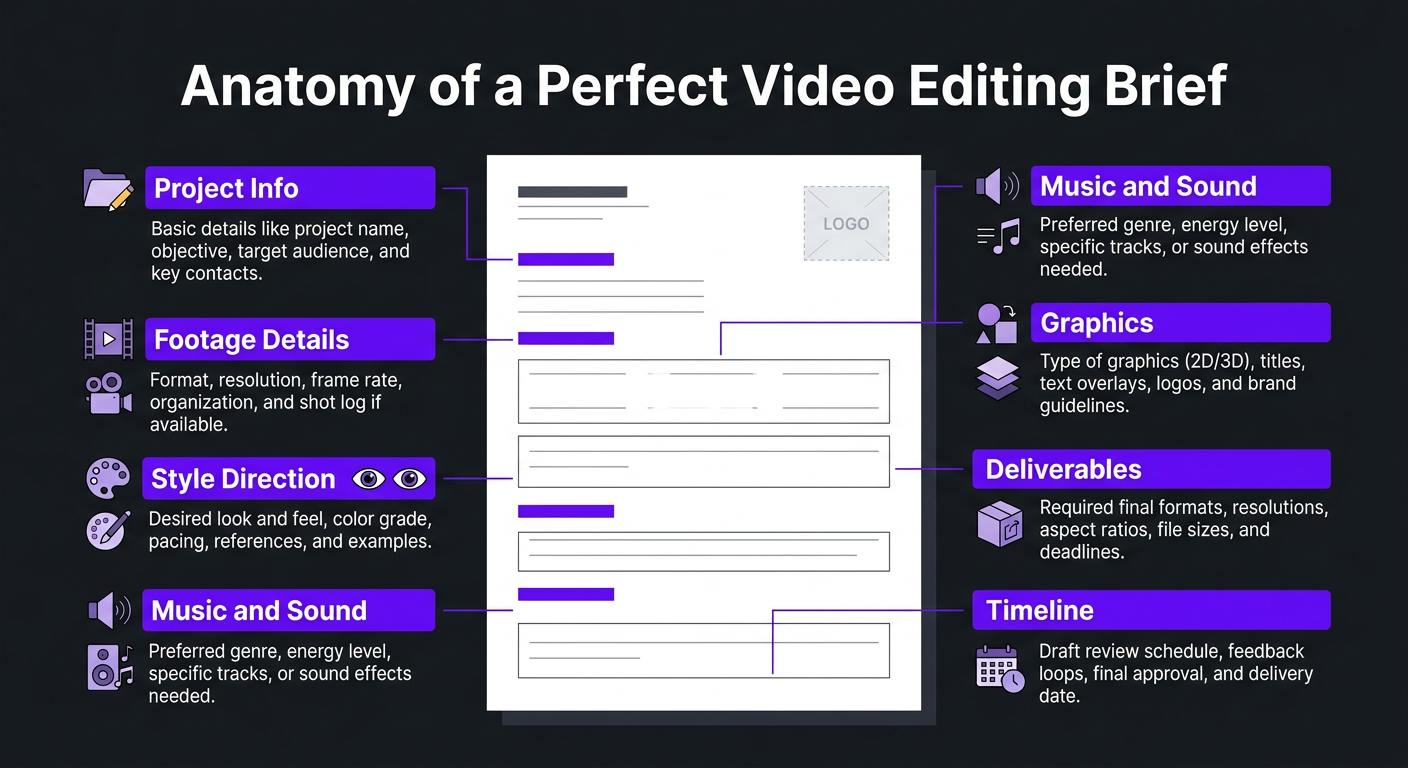
Why You Need a Video Editing Brief (And What Happens Without One)
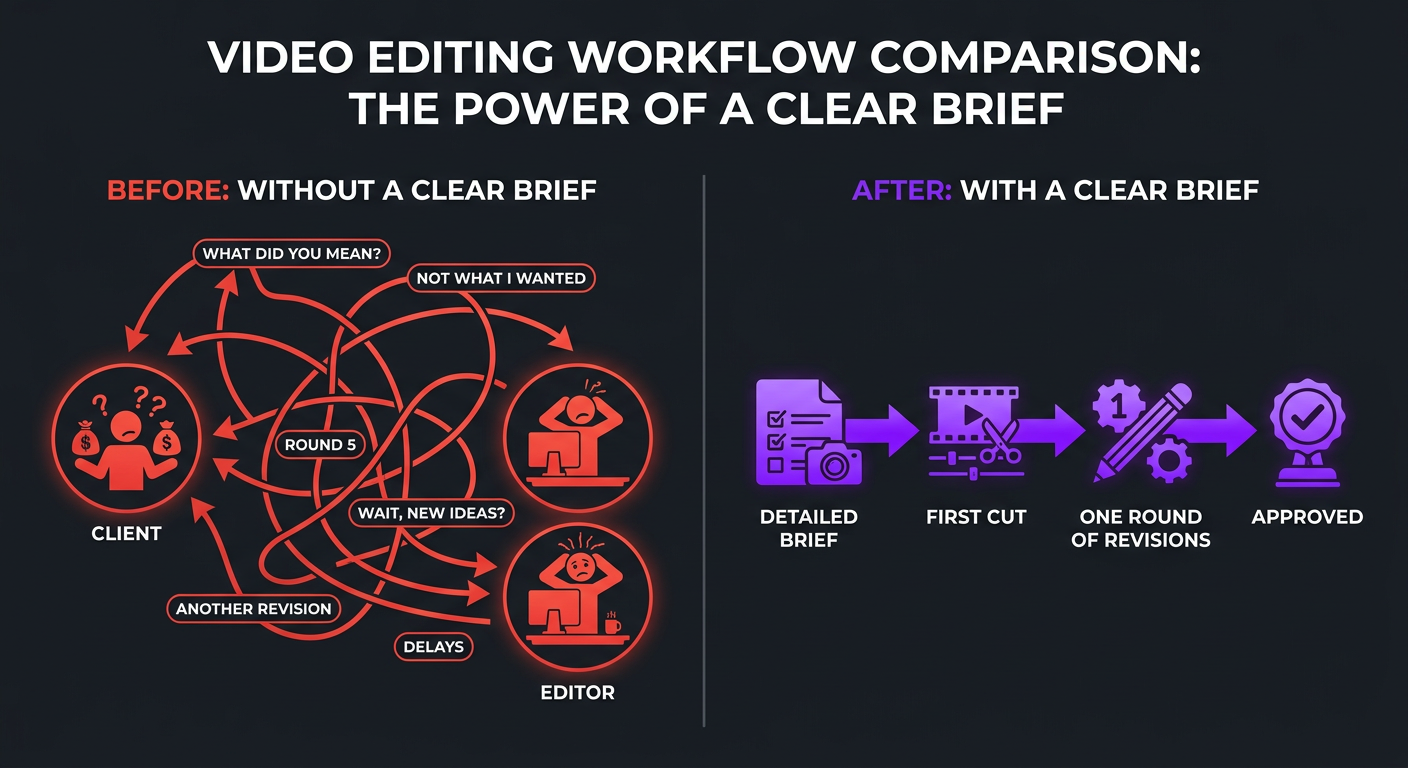
Let’s talk about what a brief actually does to your production workflow:
| Metric | Without Brief | With Brief |
|---|---|---|
| Average revision rounds | 3-5 rounds | 1-2 rounds |
| Time to final delivery | 7-14 days | 2-4 days |
| Editor frustration level | High (guessing game) | Low (clear direction) |
| Client satisfaction with first cut | 30-40% | 75-90% |
| Time you spend giving feedback | 2-4 hours per video | 15-30 minutes per video |
| Effective cost per video | 1.5-2x quoted price (revision overhead) | 1x quoted price |
Every revision round adds 24-48 hours to your timeline and hidden cost to the project — whether your editor charges for revisions or absorbs them (which means they deprioritize your work for paying projects). A 15-minute brief at the start saves 3-5 hours of back-and-forth later. That’s not a guess — it’s what we’ve observed across thousands of projects.
The brief also protects the editor. Without clear direction, every creative decision becomes a risk. Should the intro be fast or slow? Cinematic or casual? Music-forward or dialogue-driven? An editor making 50 micro-decisions without guidance will inevitably get several of them wrong. The brief removes that guesswork and lets them focus on craft rather than mind-reading.
The Complete Video Editing Brief Template
Copy this template and use it for every video you send to an editor. Not every field applies to every project — skip what’s irrelevant, but don’t skip the starred (*) fields.
📋 VIDEO EDITING BRIEF
1. PROJECT OVERVIEW *
2. FOOTAGE DETAILS *
3. STYLE & CREATIVE DIRECTION *
4. MUSIC & SOUND
5. TEXT & GRAPHICS
6. B-ROLL & SUPPLEMENTARY FOOTAGE
7. STRUCTURE & FLOW
8. DELIVERABLES *
9. TIMELINE *
10. ADDITIONAL NOTES
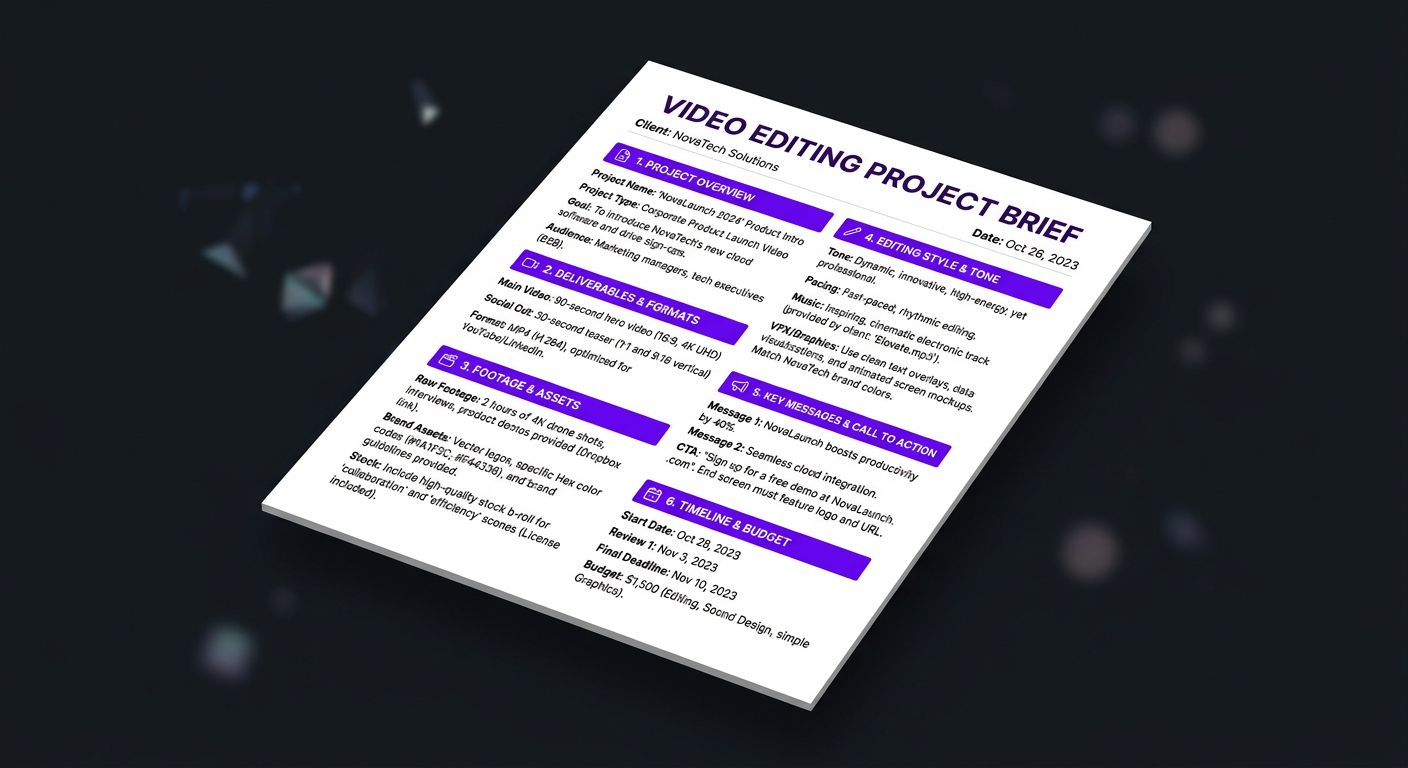
Field-by-Field Walkthrough: How to Fill Out Each Section
Having a template is step one. Knowing how to fill it out effectively is where the real value lives. Let’s walk through the sections that trip people up most.
Project Overview: The “Why” Behind the Video
Most people fill in the project name and skip everything else. That’s a mistake. The goal and target audience fields are the most important in the entire brief because they inform every creative decision the editor makes.
“Educate SaaS founders about video ROI” leads to a completely different edit than “entertain a general YouTube audience with video tips.” The pacing, graphics, music, and tone all change based on these two inputs.
Don’t write a novel here. One sentence each is fine:
- Goal: “Drive viewers to book a demo call”
- Audience: “Marketing directors at companies with 50-500 employees”
- Key takeaway: “Outsourcing video editing is cheaper and faster than they think”
Footage Details: Don’t Make Your Editor Hunt
The single biggest time waster in remote editing is disorganized footage. If your editor spends 30 minutes figuring out which clip is the main take and which is the bad take you forgot to delete, that’s 30 minutes of billable time burned before they make a single cut.
Minimum viable footage organization:
- Name your files clearly: “Main_Take_1.mp4,” “B-Roll_Office.mp4,” “Intro_Pickup.mp4”
- Put everything in one shared folder (not 4 different links)
- Include a 2-3 sentence note about what’s in each clip
- Timestamp the moments you definitely want included
Style & Creative Direction: Show, Don’t Tell
This is the section where words fail and links succeed. “Make it energetic and modern” means something different to every editor on earth. Instead:
- Link 2-3 reference videos that represent the style you want
- For each reference, note specifically what you like: “Love the pacing of the first 30 seconds” or “Want the graphic style from this one but not the color grading”
- Be specific about what you don’t want — “no zooming transitions, no meme inserts, no overused sound effects”
Reference videos are the highest-information-density element in any brief. Three good reference links communicate more than a page of written description.
Music & Sound: The Most Overlooked Section
Editors report that music direction is the #1 reason for revision requests. The client hears the track and says “that’s not the vibe.” This happens because most people leave the music section blank.
You don’t need to pick the exact track (though that helps). Instead:
- Name the genre and energy level: “Lo-fi beats, low energy, background only”
- Reference a song or artist: “Something that feels like Bonobo or Tycho”
- State how prominent music should be: “Music should never compete with dialogue”
- If you have a licensed music library, say so — editors can’t use copyrighted music without knowing your licensing situation
Deliverables: Specify Everything, Assume Nothing
If you need a 16:9 YouTube video AND three 9:16 Reels clips AND a 1:1 Instagram post version, say that upfront. Discovering additional format requirements after the edit is complete adds hours of work and blows deadlines.
For each deliverable, specify:
- Aspect ratio (16:9, 9:16, 1:1, 4:5)
- Resolution (4K, 1080p)
- Format (MP4, MOV, ProRes)
- Any platform-specific requirements (max file size, auto-captions vs. hardcoded, etc.)
Brief Examples by Video Type
The template works for everything, but emphasis changes by format. Here’s what to focus on for the most common video types:
| Video Type | Critical Brief Fields | What Editors Need Most |
|---|---|---|
| YouTube long-form | Hook/opening, pacing, chapter structure, retention strategy | Reference videos for pacing and style; timestamps for key moments in footage |
| Short-form (Reels/TikTok) | Hook (first 1-3 seconds), trending format, caption style | The exact clip/moment to use; platform-specific format requirements |
| Brand/commercial video | Brand guidelines, color grading, music, CTA placement | Brand asset access; approved color palette; stakeholder approval chain |
| Product demo | Screen recording sync, key features to highlight, CTA | Which features to emphasize; voiceover script or talking points; screen recording details |
| Podcast (video) | Multi-cam sync, speaker IDs, clip extraction moments | Which moments to highlight for clips; lower third info for guests; chapter breaks |
| Course / training | Chapter structure, screen + cam sync, text overlays | Learning objectives per section; where to add graphics or callouts; quiz points |
Quick Brief Example: YouTube Long-Form
Here’s a filled-out brief for a typical YouTube video to show what “good” looks like in practice:
📋 BRIEF: “Why Most Startups Get Video Wrong”
Type: YouTube long-form | Platform: YouTube | Goal: Educate + drive to discovery call
Audience: Startup founders (Seed to Series B) who know they need video content but keep deprioritizing it
Key message: Bad video is worse than no video; invest properly or don’t bother
Footage: 52 min in Google Drive (link). Clip 1: main take (40 min). Clip 2: pickup shots for intro (5 min). Clip 3: B-roll of office/team (7 min). Single cam + lapel mic.
Key timestamps: Strong hook at 01:15-01:45. Best example at 18:00-22:30. Skip 28:00-31:00 (tangent).
Style references: (1) [Creator A video link] — love the pacing and graphic style. (2) [Creator B video link] — want this energy level but less chaotic.
Pacing: Moderate. Not frantic, but not slow. Pattern interrupt every 90-120 seconds.
Music: Lo-fi ambient. Background level only. Think “focus playlist” energy.
Graphics: Lower thirds for stats mentioned. Chapter titles on screen. Use brand template (in assets folder).
Target length: 12-15 minutes | Deliverables: 1080p MP4 (16:9) + 3 short-form clips (9:16, 30-60s each)
First cut by: March 8 | Final by: March 11 | Publish: March 13
That brief took about 12 minutes to write. It gives the editor everything they need to deliver a first cut that’s probably 85% right. Without it, you’d spend 3-4 hours over the next week giving feedback that the brief would have preempted.
7 Brief Mistakes That Cause Revision Nightmares
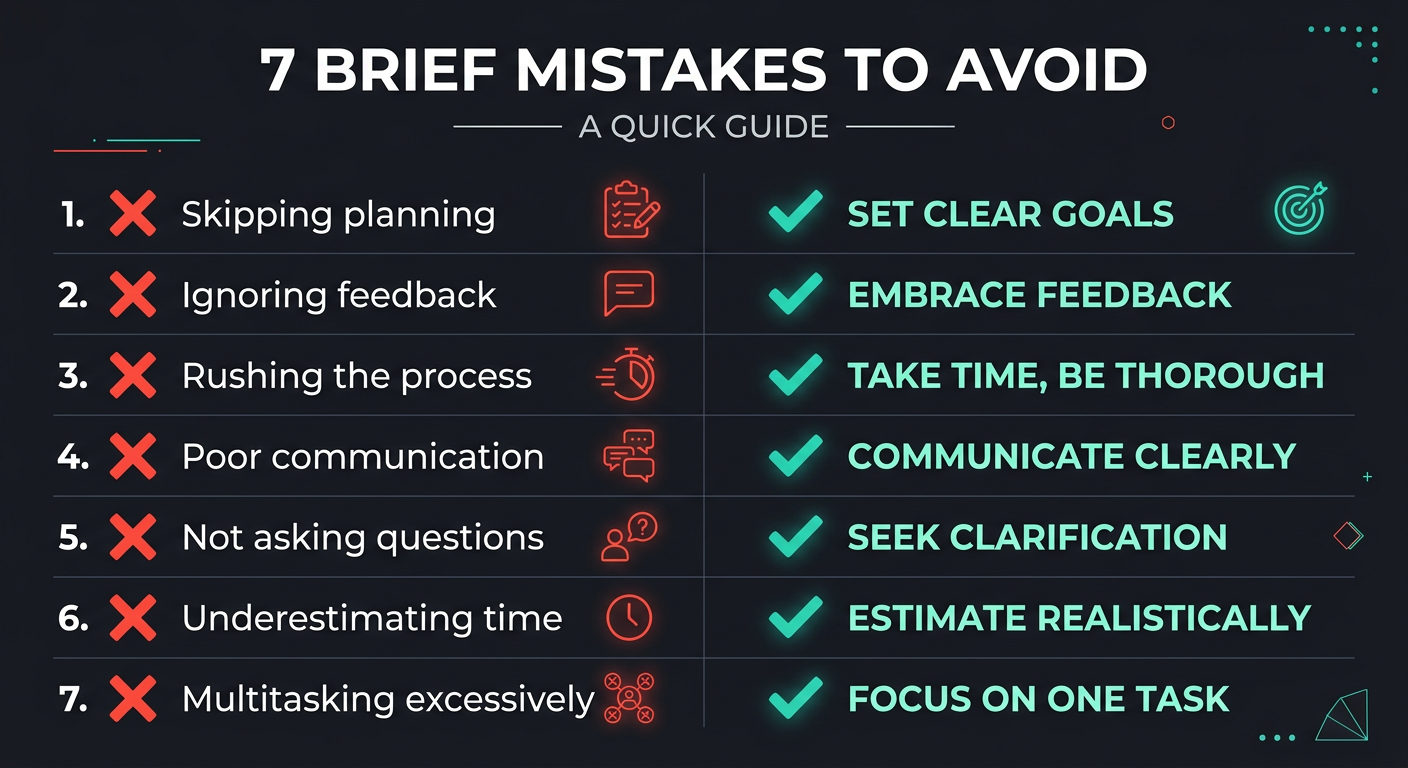
Even people who use briefs often make these mistakes. Avoid them and your revision rate will drop dramatically.
Mistake 1: “Just Make It Look Good”
“Good” is subjective. Your editor’s idea of good and your idea of good are probably different. Instead of adjectives, use references. “Make it look like this [link]” is 100x more useful than “make it look professional.”
Mistake 2: Forgetting the Hook Direction
The first 5-10 seconds of any video determine whether viewers stay or leave. Yet most briefs say nothing about the opening. Always specify: which moment should the video open with? What’s the hook? Should it be a teaser from the best part, a bold statement, a question?
Mistake 3: Providing Unorganized Footage
A Google Drive folder with 47 untitled clips is an editor’s nightmare. At minimum: name your clips, note which is the main take, and timestamp the must-include moments. At best: organize into subfolders (A-Roll, B-Roll, Audio, Assets) and include a shot list.
Mistake 4: No Music Direction
As mentioned above, music is the #1 revision trigger. “Whatever you think works” guarantees you’ll hate the first choice. Even “something chill and ambient” is infinitely better than nothing.
Mistake 5: Ambiguous Deliverables
“Can you also make some shorts from this?” after the edit is 90% complete. That’s not a revision — it’s a new project. Define all deliverables in the brief. If you need a YouTube video plus Reels plus a LinkedIn cut, say so from the start so the editor plans their timeline accordingly.
Mistake 6: Not Mentioning What You Hate
Editors have default styles and go-to moves. If you despise zoom transitions, hate the trendy “shaky text” effect, or can’t stand over-the-top sound effects — say so in the brief. The “Things to AVOID” field exists for a reason. It’s much more efficient to prevent unwanted elements than to request their removal after the fact.
Mistake 7: Skipping the Brief for “Simple” Videos
Even “simple” videos need briefs. A talking head video still has decisions around pacing, music, graphics, color, and structure. Simple briefs for simple videos — you might only fill out 5 of the 10 sections — but never zero sections.
Don’t Want to Manage Briefs at All?
Our dedicated teams learn your brand so well that briefs become shorter over time. By month three, a quick voice note replaces a full document.
How to Adapt the Template for Different Projects
A single template handles 90% of projects when you know which sections to emphasize and which to skip. Here’s a quick adaptation guide:
For Recurring Content (Weekly YouTube, Podcast, etc.)
Create a “master brief” that covers all the elements that stay the same every episode: brand assets, color grading preferences, intro/outro templates, music library, graphic styles, standard deliverables. Then your per-episode brief only needs to cover what’s unique:
- Footage link and organization notes
- Key timestamps
- Any episode-specific direction
- Deadline
This reduces your per-episode brief from 15 minutes to 3-5 minutes. Once your editor knows the series format, you’re essentially just providing footage and timestamps.
For One-Off Brand Videos
Fill out every section. Brand videos have higher stakes, more stakeholders, and less room for misalignment. Pay extra attention to:
- Brand guidelines and asset access
- Approval chain (who reviews what, in what order)
- Legal requirements (disclaimers, copyright, talent releases)
- Color grading to match existing brand content
For Short-Form Content
Abbreviate heavily. Short-form briefs should take 2-3 minutes max:
- Source clip (timestamp from long-form, or specific raw clip)
- Hook (first 1-3 seconds — this is everything for short-form)
- Caption style (burned in? Style?)
- Platform (Reels vs TikTok vs Shorts — different audiences, different energy)
- Trending format reference (if applicable)
For Batch Editing (Multiple Videos at Once)
Create one brief document with a shared “global” section (brand assets, style, general preferences) and individual sections for each video. Label clearly. Number everything. This saves your editor from re-reading the same brand info across 5 separate briefs.
Real-World Lessons: How Briefs Transformed Client Workflows
Two client stories that illustrate the before-and-after impact of implementing proper editing briefs.
eSafety: From 5 Revision Rounds to 1
eSafety, a digital safety organization, produces educational video content aimed at diverse audiences — from children to corporate teams. The content is sensitive (online safety, cyberbullying, digital wellbeing), which means every visual choice, tone decision, and word matters more than in typical content.
Before implementing structured briefs, their editing workflow was painful. Because the subject matter is nuanced and the tone requirements are strict (authoritative but not scary, accessible but not condescending), editors without clear direction consistently missed the mark. First cuts would come back too corporate, too casual, or tonally wrong for the specific audience segment. Five revision rounds was normal. Timelines stretched. Team morale dropped.
The fix wasn’t changing editors — it was changing the brief process. We worked with eSafety to build a detailed brief system that included tone matrices for different audience segments, pre-approved music categories, graphics style references organized by content type, and a “things to avoid” list specific to sensitive content (no dramatic stock footage, no sensationalized visuals).
The result was immediate. First cuts went from 40% aligned to 85% aligned. Revision rounds dropped from 5 to 1-2. The team estimated they saved 6-8 hours per week in feedback and revision cycles. The brief system became so refined that new editors could produce on-brand content within their first week.
Trade with Pat: Scaling from 4 to 16 Videos per Month
Trade with Pat, a financial education brand, wanted to quadruple their video output without quadrupling their editing budget or oversight time. The challenge: maintaining consistent quality and brand voice across 16 videos per month when multiple editors would need to contribute.
The solution was a layered brief system. At the top level, a comprehensive brand bible covered Trade with Pat’s editing style, pacing preferences, graphic templates, color palette, music library, and audience psychology (retail traders want information fast, with visual proof). Below that, a standardized per-video brief template captured the episode-specific details.
Because the brief system was so well-documented, onboarding a second and third editor became trivial — they could read the brand bible, review 3-4 past approved videos, and produce on-brand content immediately. The YouTube editing workflow scaled from 4 to 16 videos per month in under 6 weeks with no drop in quality and minimal increase in Pat’s oversight time.
The lesson: briefs aren’t just for individual videos — they’re the foundation for scaling. Without them, every new editor means weeks of re-teaching. With them, scaling is just a matter of adding capacity.
Advanced: Building a Brief System for Teams
If you’re managing multiple editors, multiple content series, or operating as an agency, individual briefs aren’t enough. You need a brief system.
The Three-Tier Brief Architecture
Tier 1: Brand Bible (Created Once, Updated Quarterly)
The comprehensive document that covers everything permanent about your brand’s video style. This includes:
- Color palette and grading presets
- Font families and usage rules
- Graphic templates and animation styles
- Music direction and licensed library access
- Pacing guidelines by content type
- Do’s and don’ts with visual examples
- Reference library of approved past videos
Tier 2: Series Template (Created Per Content Series)
Each recurring series (weekly YouTube show, daily Reels, monthly brand video) gets its own template that inherits from the Brand Bible and adds series-specific elements: intro/outro format, typical structure, recurring graphics, standard deliverables.
Tier 3: Episode Brief (Created Per Video)
The per-video brief using the template above. Because Tiers 1 and 2 handle all the recurring information, the episode brief only captures what’s unique: footage links, timestamps, episode-specific notes, and deadline.
This architecture means your episode briefs get shorter over time (because more information lives in the permanent tiers), new editors onboard faster (they read Tier 1 and 2 before starting), and quality stays consistent even as you scale.
Automation Opportunities
For high-volume operations, consider automating parts of the brief process:
- Form-based briefs: Use Notion, Airtable, or Google Forms to create a structured intake form that auto-generates a brief from responses
- Footage auto-tagging: Tools like Descript can auto-transcribe footage, making it easier to reference specific moments by searching text
- Template pre-fill: For recurring series, pre-populate the brief with standard settings so you only fill in variables
- Brief-to-PM pipeline: Auto-create project management cards from submitted briefs with deadlines, assignments, and checklists
At Increditors, our project management system auto-generates task cards from client briefs, assigns editors based on availability and expertise, and tracks the entire workflow from brief submission to final delivery. Clients see a real-time dashboard of their project status. That level of infrastructure is what separates a scalable editing operation from a collection of freelancers.
Frequently Asked Questions
A video editing brief is a document that communicates everything your editor needs to know before they start cutting: the video’s goal, target audience, style references, footage details, music direction, deliverable specs, and deadline. It’s the single most important document in any video production workflow because it eliminates guesswork and reduces revision rounds by 60-80%.
A complete video editing brief should include: project overview and goals, target audience description, footage details and organization, style and tone references (with links to example videos), music and sound direction, graphics and text overlay requirements, deliverable specifications (format, resolution, aspect ratios), revision expectations, and deadline with key milestones. See our full template above for all fields.
A good video editing brief is 1-2 pages for simple projects (talking heads, basic YouTube videos) and 2-4 pages for complex projects (brand videos, multi-format campaigns, VFX-heavy content). The goal is completeness without overwhelming detail. Use bullet points, reference links, and timestamps rather than long paragraphs.
For YouTube videos, focus your brief on: the hook or opening moment, pacing style (fast cuts vs. slower narrative), retention strategy (pattern interrupts, visual variety), B-roll requirements, lower third and graphic style, thumbnail concept if applicable, and 2-3 reference videos that demonstrate the style you want. Include timestamps in your footage where key moments happen.
Yes. A standardized template works for 90% of projects. Create a master template with all possible fields, then fill in only the relevant sections per project. Over time, recurring elements like brand colors, font preferences, and music style only need to be documented once in a style guide that the brief references.
Without a brief, your editor makes assumptions about every creative decision — pacing, music, graphics, color tone, and structure. Even talented editors can’t read your mind. The result is typically 3-5x more revision rounds, longer turnaround times, frustration on both sides, and a final product that doesn’t match your vision. A 15-minute brief saves hours of back-and-forth.
Want Editors Who Get It Right the First Time?
Our dedicated teams combine your briefs with deep brand knowledge to deliver first cuts that rarely need more than one revision round. See our work — then let’s talk.
This template and guide is based on Increditors’ internal production processes refined across hundreds of client engagements. Adapt it to your workflow and brand. For help implementing a brief system for your team, schedule a call.