










![3D Explainer Video - ScribbleLive.mp4_snapshot_00.12_[2022.03.09_03.14.16]](https://increditors.com/wp-content/uploads/elementor/thumbs/3D-Explainer-Video-ScribbleLive.mp4_snapshot_00.12_2022.03.09_03.14.16-r7wb53mx72rxst3qcqyrfxdmeyzb5r9jbl0wbjujh4.png "3D Explainer Video – ScribbleLive.mp4_snapshot_00.12_[2022.03.09_03.14.16]")
































YouTube chapters (timestamps in your description) and fully optimized metadata — title, description, tags, end screens — are the highest-leverage, zero-cost ranking levers available to any video creator. Done right, chapters unlock Google’s Key Moments rich results, extend watch time by helping viewers navigate, and signal topical relevance to YouTube’s search algorithm. This guide covers every metadata field, the exact chapter formatting rules YouTube enforces, common mistakes that suppress rankings, and a repeatable workflow your video team can run on every upload.
- What Are YouTube Chapters and Why They Matter for Rankings
- How to Add Chapters to Your Videos (Step-by-Step)
- Optimizing Your YouTube Title for Search and Click-Through
- Writing Descriptions That YouTube’s Algorithm Actually Reads
- Tags, Cards, and End Screens: The Supporting Metadata Layer
- How Chapters Affect Watch Time and Algorithm Signals
- Metadata Mistakes That Hurt Rankings
- A Metadata Workflow for Video Teams
- FAQ
- Verdict
What Are YouTube Chapters and Why They Matter for Rankings
YouTube chapters break a video into labeled, navigable sections directly on the progress bar. Each chapter has a title, a thumbnail, and a start time — and every one of those elements feeds data back into YouTube’s understanding of your video’s content. That’s why chapters are simultaneously a viewer experience feature and a metadata signal.
The ranking upside comes from two directions. First, YouTube uses chapter titles — which are part of your video description — to better classify and surface your video for relevant searches. Second, when Google indexes your video, chapters can appear as “Key Moments” in search results: a rich result format that breaks your video into individually clickable segments directly in the SERP. That kind of visibility is reserved for videos with properly formatted chapters and is effectively free additional real estate on Google Search.
According to YouTube’s official Help documentation, chapters also give creators agency over how their content is previewed — each chapter generates its own thumbnail in YouTube’s seek bar, which means viewers get a visual map of your video before they commit to watching. For longer-form content (tutorials, reviews, deep-dives), this is the difference between a viewer who skips away and one who navigates to the section they need and stays.
Manual Chapters vs. Automatic Chapters
YouTube offers two chapter modes. Manual chapters are timestamps you write directly into the video description — you control the labels, the order, and the granularity. Automatic chapters are AI-generated by YouTube when you haven’t added your own; they’re on by default for new uploads but can be turned off per video or globally in Upload Defaults. When you add manual timestamps, they override automatic chapters entirely.
For SEO purposes, manual chapters almost always win. Automatic chapter titles are algorithmically derived from your transcript and may not use the keyword-relevant language you’d choose deliberately. Writing your own chapter titles is a straightforward optimization that most channels ignore — which makes it a genuine competitive edge for those who do it.
💡 Pro Tip: Not all videos are eligible for automatic chapters. Per YouTube’s documentation, channels with active strikes or content flagged as potentially inappropriate for some viewers are excluded from the automatic chapters feature.
Key Moments in Google Search
Google’s Key Moments feature pulls from YouTube chapters to display time-stamped segments in search results. A viewer searching for “how to set up a ring light for video” might see your tutorial video in the results with individual chapter links like “Positioning the light,” “Color temperature settings,” and “Common mistakes” directly beneath the main result. Each link deepens to that chapter’s start time. This expanded presence in the SERP increases click surface and drives viewers directly to the most relevant section of your video — which also means they’re more likely to continue watching from that point.
How to Add Chapters to Your Videos (Step-by-Step)
Adding manual chapters is done entirely through the video description — no special tools required. YouTube’s formatting rules are strict, and breaking any one of them will silently prevent chapters from appearing.
YouTube’s Official Chapter Formatting Rules
These requirements come directly from YouTube’s Help Center:
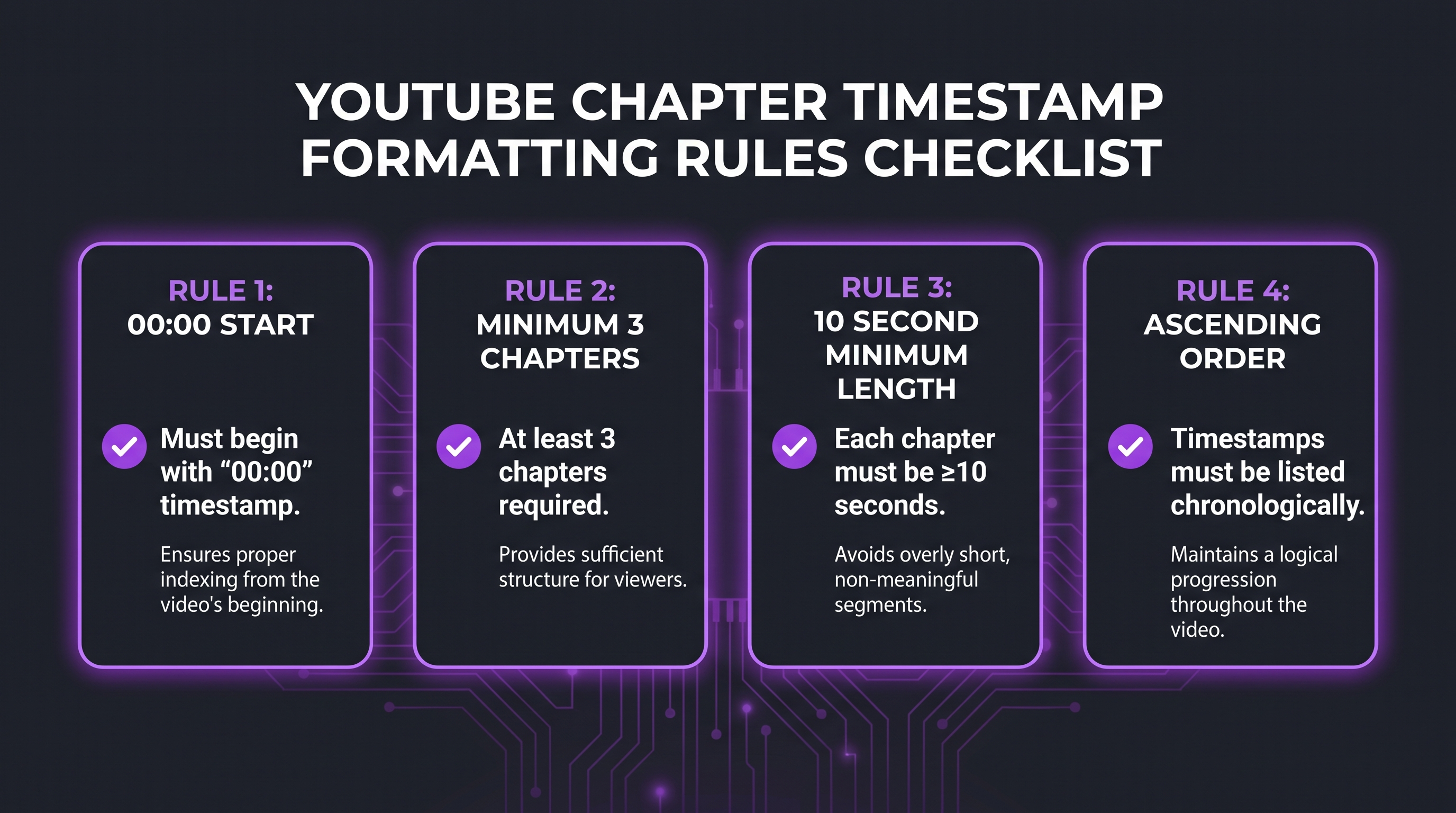
Adding Chapters in YouTube Studio
Here’s the step-by-step process:
1. Sign in to YouTube Studio and navigate to Content in the left menu.
2. Click the video you want to edit.
3. In the Description field, add your timestamps. Each timestamp should be on its own line, formatted as the time followed by the chapter title — for example: 00:00 Introduction, 02:15 Setting up your workspace, 05:30 The editing process.
4. Make sure your first timestamp is exactly 00:00.
5. Confirm you have at least three timestamps in ascending order.
6. Click Save. Chapters typically appear on the video within a few minutes.
Writing SEO-Optimized Chapter Titles
Chapter titles are indexed by YouTube and contribute to the topical signals your video sends. Treat each chapter title as a micro-keyword — specific, descriptive, and relevant to what that section actually covers. Compare:
Optimizing Your YouTube Title for Search and Click-Through
Your video title is the single most important metadata field. It’s the first signal YouTube uses to understand what your video is about, and it’s what potential viewers see when deciding whether to click. A well-crafted title serves both goals simultaneously — it’s indexed for the right search queries and it compels a click.
The Anatomy of a High-Performing YouTube Title
Front-load your primary keyword. YouTube’s search algorithm weighs terms that appear earlier in the title more heavily than those buried at the end. If your target phrase is “video editing workflow,” it should appear within the first four or five words — not at the end after a creative hook.
Stay under 60–70 characters. YouTube displays titles differently across desktop, mobile, and suggested video panels. Titles longer than roughly 60–70 characters commonly get truncated with an ellipsis on smaller surfaces, cutting off the parts of your title that viewers never see. The most important words need to fit in the visible window.
Match the search intent precisely. There’s a meaningful difference between “How to Edit Videos Faster” (how-to intent), “Best Video Editing Apps 2026” (listicle/comparison intent), and “Premiere Pro vs DaVinci Resolve” (vs/comparison intent). Mismatching your title’s implicit promise to viewer intent produces high impressions but low click-through rates — which is a negative signal YouTube reads as the video not satisfying viewer intent.
Titles That Work vs. Titles That Don’t
💡 Pro Tip: Write your title after you’ve identified your primary keyword from YouTube autocomplete and YouTube Studio’s Search analytics — not before. The title should confirm what viewers are already searching for, then add the emotional or practical hook that earns the click.
Using YouTube Studio Analytics to Validate Title Performance
YouTube Studio’s Reach tab shows your video’s Click-Through Rate (CTR) for impressions. Industry benchmarks vary widely depending on channel size and content type, but most established channels commonly track CTR across uploads to identify outliers. A video sitting significantly below your channel average after the first 72 hours is a candidate for a title test — you can edit the title any time, and YouTube will re-sample impressions against the new version. The platform’s own analytics will tell you which version performs better within a few days.
Writing Descriptions That YouTube’s Algorithm Actually Reads
The video description is YouTube’s richest text metadata field — up to 5,000 characters — and it serves three distinct audiences simultaneously: YouTube’s algorithm, Google’s crawlers, and your actual viewers. A well-structured description satisfies all three without feeling like keyword soup.
The First 150 Characters: The Fold That Matters Most
On mobile, YouTube shows roughly the first 100–150 characters of your description before the “Show more” prompt. This visible text also commonly appears as the description snippet in Google Search results when your video ranks. That means your primary keyword and the core value proposition of the video need to appear in the very first sentence — before anything else. Not your channel name. Not a social media link dump. The actual content of the video, described with the keyword you’re targeting.
Description Structure That Serves Both Humans and Algorithms
A proven structure for longer descriptions:
Lines 1–3 (Above the fold): Natural-language summary of the video, primary keyword used once, secondary keyword used once. This is what both YouTube and Google read first.
Lines 4–10 (Supporting context): What viewers will learn, who the video is for, any key tools or software mentioned. This deepens the topical signal without stuffing.
Chapters section: All timestamps listed in ascending order starting from 00:00. This serves as both viewer navigation and chapter data for YouTube.
Links and resources: Relevant links to related content, your website, or tools you mentioned. For a video editing agency managing channels at scale, a consistent description template that includes contextually relevant links (to related videos, playlists, or service pages) helps with both viewer flow and YouTube’s understanding of your channel’s content graph.
Hashtags: YouTube supports up to three hashtags that appear as clickable blue links above the title on mobile. Use hashtags that are topically accurate — not broad vanity tags — and keep them to three or fewer. Overloading hashtags (beyond 60) causes YouTube to ignore all of them.
How Transcripts and Captions Extend Your Metadata
YouTube auto-generates captions for most videos, and those captions are indexed. This means every word spoken in your video contributes to the text layer that YouTube searches. Adding accurate manual transcripts or subtitle files improves that indexing by correcting auto-caption errors — especially for technical terminology, brand names, or non-standard vocabulary that the automatic transcription commonly gets wrong. A corrected transcript also feeds into auto-generated chapter text if you leave automatic chapters enabled. Uploading a transcript in the same language as your video improves both accuracy and indexability. For teams managing multiple channels with consistent production, this is the kind of workflow-level detail that separates channels that rank from channels that don’t. See also our related guide on how subtitles and captions impact YouTube views and retention.
Tags, Cards, and End Screens: The Supporting Metadata Layer
Tags, cards, and end screens are the secondary metadata layer — they matter less than title, description, and chapters, but used correctly they reinforce topical relevance and extend session watch time, which is one of the key signals in YouTube’s ranking model.
Tags: How Much Do They Actually Matter?
YouTube’s own guidance acknowledges that tags help the platform understand your video’s content and correct common misspellings of your topic. However, multiple independent studies in the creator community consistently find that tags have a smaller ranking impact than title, description, and chapter content. They are still worth completing correctly — but they should be the last thing you optimize, not the first.
Best practices for tags:
Use your primary keyword as the first tag, exactly as it appears in your title. Add two to three close variants (different word orders, plural/singular). Include two or three broader category tags that define the topic area. Avoid stuffing 30+ tags — the marginal benefit is negligible and adds noise. The total tag limit is 500 characters.
Cards: Driving Mid-Video Engagement
Cards appear as small info icons during video playback that viewers can click to navigate to another video, playlist, channel, or link. For SEO purposes, the key function of cards is keeping viewers within your content ecosystem — if someone clicks a card to your next video, YouTube registers a positive session-continuation signal.
Strategic card placement: add a card at a natural exit point in your video (often 30–50% through the video) that links to a related video. The linked video should be topically adjacent — not unrelated. A card linking from a video editing workflow tutorial to a video about color grading tools is sensible; a card linking to an unrelated brand video is not.
End Screens: The Algorithm-Friendly Outro
End screens appear in the final 5–20 seconds of a video and are YouTube’s native mechanism for keeping viewers on the platform. You can add up to four elements: videos, playlists, channel subscription buttons, or links (for eligible channels). The “Best for viewer” dynamic option lets YouTube automatically show the video it thinks each viewer is most likely to watch next — which can outperform manually chosen videos for channels with enough data.
End screens extend session time and generate additional impressions for your other videos, which reinforces the positive feedback loop that YouTube’s algorithm rewards. They are a zero-effort optimization that many channels underutilize. Set them up on every video — there is no downside.
How Chapters Affect Watch Time and Algorithm Signals
The relationship between chapters and watch time is more nuanced than it first appears — and it’s the nuance that most guides get wrong.
The Paradox of Navigation and Retention
Intuition says chapters give viewers an easy way to skip content, which would reduce watch time and hurt rankings. Practice suggests a different pattern. When viewers navigate directly to the section they’re looking for and find it genuinely useful, they’re more likely to continue watching from that point — or rewatch key sections — than they would be if they’d skimmed and bounced. The audience retention graph in YouTube Studio often shows different patterns for chapter-enabled videos versus those without: instead of a steep linear drop, chapters create a more step-shaped curve where viewers land at specific chapters and watch those through.
The implication: chapters work best when every section of your video delivers on its chapter title’s promise. If a chapter is titled “Pricing Breakdown” but the section is vague and padded, viewers will skip out. If the section is dense and useful, they’ll stay — and that retention at the chapter level is the signal you actually want.
Satisfaction Score and Why YouTube Cares About It
YouTube’s ranking model looks at signals that indicate viewer satisfaction — not just how long someone watched, but whether they liked, commented, shared, saved, and (critically) whether they continued watching other content after your video. Chapters improve navigation enough that a viewer who might have bounced instead completes the relevant section, takes action, and signals satisfaction. That matters more to the algorithm than raw minutes watched.
For a detailed breakdown of how editing choices affect the retention curve directly, our guide to the best video editing services for YouTube creators covers the structural and post-production elements that complement strong metadata.
Using Chapter Analytics in YouTube Studio
YouTube Studio’s Audience tab shows a chapter-level breakdown of where viewers spend time when chapters are enabled. This data is diagnostic gold. If your “Pricing” chapter has strong relative retention but your “Introduction” chapter drops off fast, that’s a signal to tighten the intro in future videos. If one chapter consistently outperforms the rest in retention, consider whether a standalone video on that sub-topic would rank in its own right. Chapter analytics give you a section-by-section performance map that flat-retention curves can’t provide.
Metadata Mistakes That Hurt Rankings
Most metadata problems are silent — there’s no error message, the video publishes fine, and the suppression only shows up weeks later in the analytics. These are the patterns most commonly seen across underperforming channels.
Chapters Not Activating (Silent Failures)
The most common chapter failure is the missing 00:00 timestamp. Many creators add timestamps starting from the first “real” section of content — say, 01:30 — because the first 90 seconds are an intro they don’t want to label. YouTube’s rule is absolute: without 00:00 as the first entry, no chapters appear at all. The fix is to add a “00:00 Introduction” or “00:00 Overview” entry — even if you don’t love the label — so the rest of your chapters activate.
Other silent chapter failures: having only two timestamps (you need at least three), having a chapter shorter than 10 seconds, or formatting timestamps with a period instead of a colon (0.00 instead of 0:00).
Title-Content Mismatch
When a video’s title promises one thing and the content delivers another, YouTube registers the disconnect through high abandonment rates from the suggested/search context where the video appeared. A tutorial titled “Premiere Pro Color Grading Tutorial” that spends 40 minutes on general editing before touching color grading will likely see viewer drop-off early — and YouTube will surface it less for color-grading searches as a result. The chapter data would show this clearly: viewers skip the first three chapters and either watch chapter four or abandon the video entirely.
Description Treated as an Afterthought
Channels that publish with descriptions like “Video about editing tips. Follow me on Instagram!” are leaving significant ranking signal on the table. The description field is 5,000 characters — using 50 of them is a metadata deficit that compounds over time across every video in the catalog. The investment required to write a proper description for each video is roughly 10–15 minutes; the ranking impact accumulates across the channel’s entire lifetime.
Misusing Tags
Tag mistakes come in two flavors: using competitor channel names as tags (which YouTube has explicitly called out as a violation of its policies and can result in content removal) and stuffing broad, high-competition tags that have no contextual relevance to the video. Neither approach drives ranking; both carry downside risk.
Ignoring Upload Defaults
YouTube Studio’s Upload Defaults setting lets you pre-populate description templates, default categories, license settings, and chapter/caption defaults for every new upload. Channels that don’t use this feature publish every video to a blank slate — wasting time and introducing inconsistency. Setting a well-structured description template (with placeholder sections for timestamp, keyword, and links) as your upload default reduces metadata errors at the source.
A Metadata Workflow for Video Teams
Strong metadata is a workflow problem as much as a knowledge problem. Individual contributors know what good metadata looks like; the issue is that under production pressure, descriptions get rushed and chapters get skipped. A formalized pre-publish checklist eliminates the inconsistency.
Pre-Production: Keyword Research Before the Script
The keyword for a video should be confirmed before the script is written — not tagged on after the edit is done. YouTube autocomplete, YouTube Studio’s Search analytics (available to channels with enough data), and the YouTube Data API’s search.list endpoint can all surface what terms viewers are actively searching for in your topic area. Establishing the primary keyword before production means the script, the chapter structure, and the thumbnail all support the same topical target — rather than trying to reverse-engineer metadata onto a finished edit.
During Editing: Planning Chapters From the Timeline
The best time to identify chapter points is during the edit — not after. Most professional editing timelines have clear structural breaks between sections: after the intro, between the setup and the tutorial, between the tutorial and the review. Noting those timeline positions while editing (or adding markers in your NLE) makes the final timestamp list a two-minute task rather than a rewatching exercise. For teams working with an outside video editing agency, communicating the intended chapter structure upfront ensures the edit is cut to those natural breaks — and that the final delivery includes a ready-to-paste timestamp list as part of the handoff.
💡 Pro Tip: Build a shared description template in a Google Doc or Notion page that your team fills out for every video before upload. Required fields: primary keyword, secondary keyword, above-the-fold summary (2 sentences), timestamp list, 3 relevant links, 3 hashtags, 5 tags. A completed template takes less time than a blank page and cuts per-video metadata inconsistency dramatically.
Pre-Publish Metadata Checklist
Post-Publish: The First 48-Hour Review
The first 48 hours after a video publishes are when YouTube’s algorithm samples it most actively. Check YouTube Studio at the 24-hour and 48-hour marks: look at impressions CTR (are people clicking?), average view duration (are they staying?), and the traffic source breakdown (is search traffic materializing?). If CTR is significantly below your channel average, the title or thumbnail is the likely cause — both can be changed without penalty. If average view duration drops sharply at the same point in every video, that indicates a structural editing issue rather than a metadata problem — and that’s where post-production refinement pays off. Understanding how much professional video editing costs helps teams allocate budget toward the production quality that supports better retention — which ultimately reinforces the metadata’s ranking work.
Refreshing Metadata on Older Videos
Metadata is not set-and-forget. Older videos that were published before your team formalized a description template or chapter workflow often have thin metadata that’s suppressing their ranking potential years after the fact. A quarterly metadata audit — reviewing your top 20 videos by impressions for missing chapters, thin descriptions, and outdated titles — commonly reveals recoverable traffic from videos that still have topical relevance. For channels looking to refresh their content strategy from a channel management perspective, this type of audit is one of the first things a professional team will run.
Frequently Asked Questions
Do YouTube chapters directly improve search rankings?
YouTube has not officially confirmed that chapters are a direct ranking factor in its search algorithm. What is confirmed: chapter titles are indexed as part of your video’s description (which is a ranking signal), chapters enable Google’s Key Moments rich results (which increase search visibility and click-through), and chapters improve viewer navigation in ways that can positively affect watch time and satisfaction signals. The indirect ranking benefits are well established; a direct causal weight has not been disclosed by YouTube.
Why aren’t my chapters showing up even though I added timestamps?
The most common cause is a missing 00:00 timestamp. YouTube requires the first entry to begin at exactly 00:00 — without it, no chapters activate regardless of how many other timestamps you’ve added. Other causes: fewer than three total timestamps, a chapter shorter than 10 seconds, or using an incorrect format (a period instead of a colon in the time code). Check all four conditions if chapters aren’t appearing.
Should I use automatic chapters or write my own?
Write your own, consistently. Automatic chapters are algorithmically generated from your transcript and may not use the keyword-relevant language you’d choose deliberately. Manual chapters give you control over the labels — which are indexed — and allow you to optimize chapter titles for the specific terms viewers search for. Automatic chapters are a reasonable fallback for channels with high upload volume that can’t maintain a manual chapter workflow, but they should not be the default strategy for channels prioritizing search ranking.
How many chapters should a video have?
There’s no prescribed number, and the right count depends on your video’s length and structure. A practical guideline: add a chapter for each distinct section of your content that a viewer might want to navigate to independently. A 10-minute tutorial might have 5–7 chapters; a 45-minute deep-dive might have 12–15. Avoid creating chapters every 30 seconds (too granular, loses meaning) or having chapters that span 20 minutes each (too broad, defeats the purpose). Let the natural structure of the content drive the chapter count.
Can I add chapters to old videos, and will it help their rankings?
Yes, and it commonly does help. Adding chapters to an existing video updates its description — which is re-indexed — and activates the Key Moments feature for that video in Google Search if it wasn’t already present. It also adds viewer navigation that may improve retention for future viewers. The metadata update does not reset the video’s view count or analytics history. A metadata refresh for videos that have existing organic traffic but lack chapters is generally a low-risk, positive-upside action.
Verdict: Metadata Is the Cheapest Ranking Investment on YouTube
YouTube chapters and metadata optimization require no additional production budget, no new equipment, and no significant time investment if you build the workflow before publication rather than retrofitting it after. The payoff — better search ranking, Google Key Moments eligibility, improved viewer navigation, stronger satisfaction signals — is disproportionately large relative to the effort involved.
The priority order: get your title right first (primary keyword front-loaded, match intent, stay under 70 chars). Write a real description (keyword in the first sentence, chapters in the middle, links at the bottom). Add manual chapters (00:00 first, 3+ entries, 10s minimum, descriptive keyword-relevant titles). Then address tags, end screens, and cards in that order. Correct auto-captions for any technical vocabulary. Review analytics at 24h and 48h post-publish.
For teams managing YouTube channels at scale — multiple uploads per week, multiple editors, consistent brand standards — the metadata workflow is as important as the production workflow. A video that’s brilliantly edited but metadata-poor will underperform a competently edited video with excellent metadata in most search contexts. The production quality and the metadata work together; neither substitutes for the other. Working with a professional video editing agency that understands both the post-production and the publishing workflow means the work on the timeline and the work in YouTube Studio are coordinated rather than siloed.
See also: Podcast-to-YouTube Strategy 2026 for how these metadata principles apply to repurposed content specifically.
Ready for Video That Actually Converts?
Tell us about your project and we will put together a custom plan.