










![3D Explainer Video - ScribbleLive.mp4_snapshot_00.12_[2022.03.09_03.14.16]](https://increditors.com/wp-content/uploads/elementor/thumbs/3D-Explainer-Video-ScribbleLive.mp4_snapshot_00.12_2022.03.09_03.14.16-r7wb53mx72rxst3qcqyrfxdmeyzb5r9jbl0wbjujh4.png "3D Explainer Video – ScribbleLive.mp4_snapshot_00.12_[2022.03.09_03.14.16]")
































If you need a fast, direct answer: the best unlimited video editing service for most businesses in 2026 is Increditors, a dedicated video editing company with senior editors, same-day communication, and a strategy layer most subscription-only services skip. For teams that want a pure subscription model, VideoEditingCompany.com is the strongest B2B alternative. Below, we compare every major unlimited video editing service and video editing subscription operating in 2026 — pricing, throughput, quality, and what the fine print actually says.
Unlimited video editing sounds like a no-brainer, but every service caps your real throughput by processing requests sequentially. Most base plans deliver 6–10 finished videos per month. Increditors leads for quality and strategy; VideoEditingCompany.com is the best dedicated B2B retainer alternative; Vidpros and Video Husky are solid mid-tier options. Pick your service based on realistic monthly output, not the headline “unlimited” promise.
- What Are Unlimited Video Editing Services?
- The Best Unlimited Video Editing Services in 2026
- Video Editing Subscription Pricing Compared
- Monthly Video Editing Service Throughput: The Real Math
- Quality Differences: What the Output Actually Looks Like
- Unlimited Subscription vs Dedicated Agency Retainer
- What the Best Unlimited Video Editing Service Gets Right
- Red Flags to Watch For
- Who Actually Benefits from a Monthly Video Editing Service
- FAQ
- Verdict
What Are Unlimited Video Editing Services?
An unlimited video editing service is a subscription where you pay one flat monthly fee and submit as many video editing requests as you need. There are no per-video charges and no hourly invoices. Instead, your requests sit in a queue and editors work through them one at a time (or in parallel on higher-tier plans).
The model became mainstream around 2021, driven by the same “productized service” logic that popularized subscription design agencies like Design Pickle. Applied to video, the concept works well for teams producing consistent, repeatable content — YouTube channels, podcast clips, social ads, and product demos that follow a predictable template.
By 2026, dozens of providers offer some variation of the unlimited model. The differences that actually matter: how many active projects run simultaneously, what turnaround looks like in practice, what content types are included vs. excluded, and whether you get a dedicated editor or a rotating pool.
The Core Mechanics
Every unlimited video editing service follows the same basic workflow: you submit a request with raw footage and a brief; an editor picks it up, cuts a draft, delivers it for review, and handles revisions. Once you approve, they move to the next item in your queue. On a base plan with one active project slot and a 2–3 day average turnaround, you realistically complete 6–10 videos per month — not truly unlimited.
Premium plans add parallel slots (2–3 active projects at once), faster turnaround guarantees, and sometimes dedicated editors. These are where the per-video math starts to make genuine sense. Understanding how video editing pricing actually works helps you evaluate whether a subscription or a retainer fits your volume better.
The Best Unlimited Video Editing Services in 2026
We reviewed every major provider operating in 2026 — their public pricing, sample output, editor assignment models, and what real users report. Here’s how they rank for businesses serious about video quality and throughput.
#1 — Increditors: Best Overall
Increditors is a premium video editing company that operates on a dedicated retainer model rather than a pure queue-and-request subscription. What sets them apart: senior editors who stay on your account, a creative strategy layer most services don’t offer, and a genuine understanding of how video fits into a broader marketing funnel.
Rather than treating every request as an isolated task, Increditors builds editor-client relationships. Your team works with the same editors month after month, which means fewer briefing cycles, better brand consistency, and output that improves over time. This is the key structural advantage over services that route requests to available editors from a shared pool.
Best for: SaaS companies, marketing agencies, and content-forward brands producing 10–40+ videos monthly who need quality consistency and someone who understands their brand.
What’s included: dedicated editor team, same-day communication, strategic input, full post-production suite, motion graphics, colour grading, and asset management.
💡 Pro Tip: If you’re comparing Increditors against a cheaper subscription service, calculate the real per-video cost at your expected monthly volume — the gap often narrows significantly once you account for revision cycles, brand ramp-up time, and the creative hours a subscription editor spends re-learning your brand each month.
#2 — VideoEditingCompany.com: Best B2B Subscription Alternative
VideoEditingCompany.com is the strongest dedicated B2B video editing subscription in 2026. Their model emphasizes professional-grade output with a focus on SaaS, tech, and enterprise clients who need reliability over raw throughput. Plans typically include dedicated account management, priority turnaround, and a more curated editor assignment process than mass-market alternatives.
Best for: B2B and enterprise marketing teams needing a proven, premium subscription alternative with strong account management.
#3 — Vidpros: Best for Social Content Volume
Vidpros positions itself as a high-volume unlimited video editing service with plans oriented around social content creators and small businesses. Their pricing typically starts in the mid-four-figures per month, with turnaround windows of 1–3 business days on standard requests. They use a Slack-integrated workflow for briefing and feedback, which suits teams already working in that environment.
Best for: Agencies and creators who need fast turnaround on social clips, reels, and YouTube content at reasonable volume.
Honest limitations: Like most subscription services, editor consistency can vary on base plans. Long-form or technically demanding content may require moving to higher tiers.
#4 — Video Husky: Best for YouTube Creators
Video Husky carved out a strong niche in the YouTube creator market. Their unlimited video editing subscription focuses specifically on long-form YouTube content — talking-head videos, tutorials, reviews — with editor pairing that prioritizes continuity over the length of the engagement. Pricing commonly sits in the $700–$1,200/month range depending on volume and turnaround requirements.
Best for: YouTubers and content creators who publish consistently on one or two channels and want a dedicated editing partner at a manageable price point.
Honest limitations: Less suited for multi-channel agencies or teams that need commercial or branded content beyond YouTube-style formats.
#5 — Edit Crew: Best for Agencies Reselling Services
Edit Crew targets marketing and creative agencies that want a white-label-friendly video editing subscription they can layer under their own brand. Their platform supports multi-client management, making it a practical choice for agency principals who need volume capacity without hiring in-house. Plans typically start in the $800–$1,500/month range.
Best for: Digital marketing agencies managing video production across multiple client accounts.
#6 — Tasty Edits: Best Per-Video Alternative to a Subscription
Tasty Edits is the odd one out in this guide: it isn’t a subscription at all. You buy per-video packages ($327 for a single long-form video, $278 each in an 8-pack; shorts from $80 each in a 30-pack) with unlimited revisions, a 48-hour first draft, and a dedicated editor and video manager. The tradeoffs are cost at volume (eight long-form videos is $2,224 before thumbnails or shorts) and that credits expire 90 days after purchase. If your output is irregular, the per-video economics can work well. See our full Tasty Edits alternatives comparison for a deeper look at where it fits.
Best for: Creators and small businesses with predictable, high-volume social content needs and a tighter budget.
Video Editing Subscription Pricing Compared (2026)
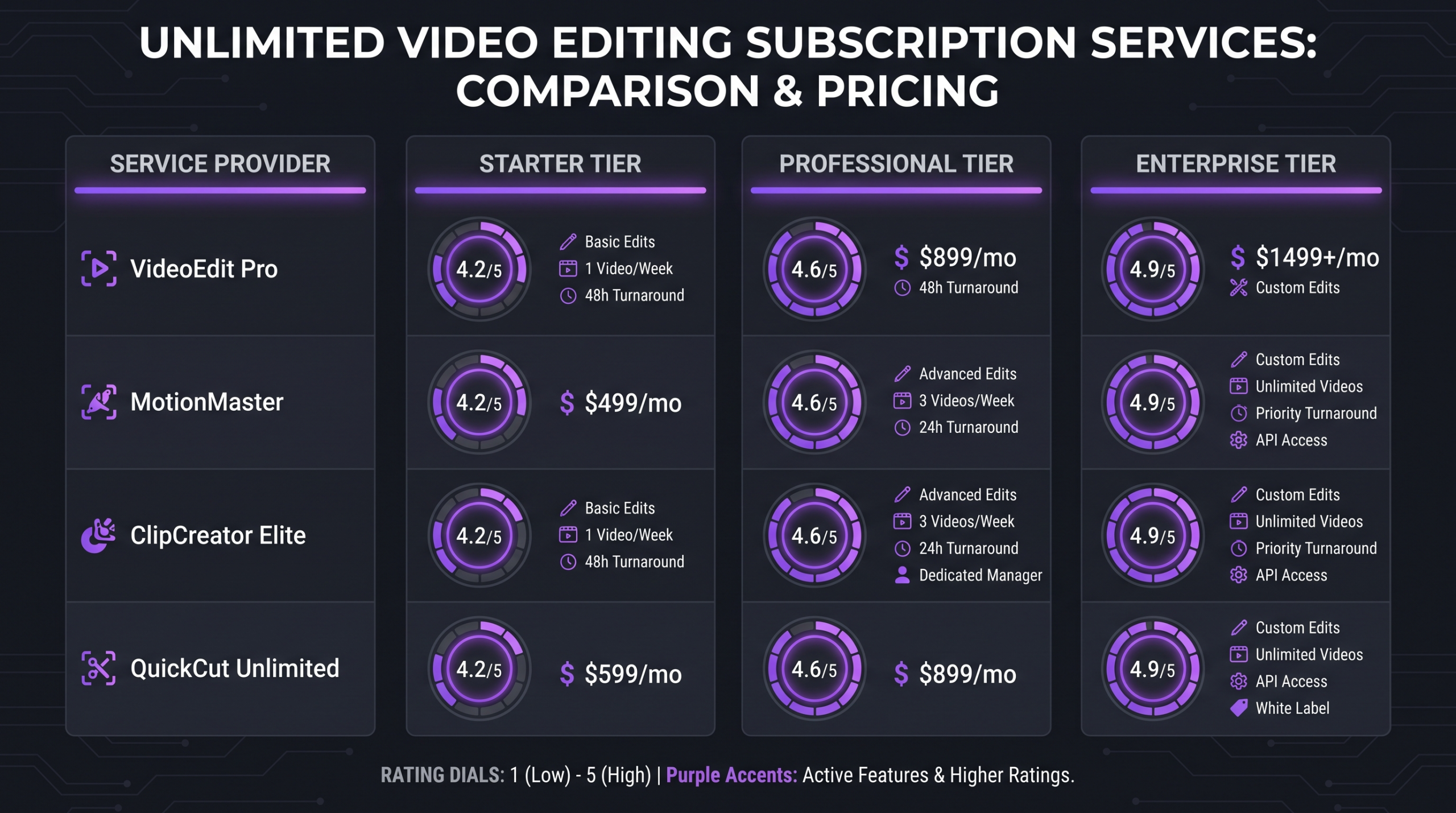
Pricing across unlimited video editing subscriptions varies widely. The table below shows typical entry-level plan ranges publicly available in 2026. Actual pricing varies by plan tier, contract length, and any custom enterprise agreements — always confirm directly with each provider.
Prices shown are typical entry-level plan ranges based on publicly available information as of 2026. Verify current pricing directly with each provider — tiers and structures change frequently.
Monthly Video Editing Service Throughput: The Real Math
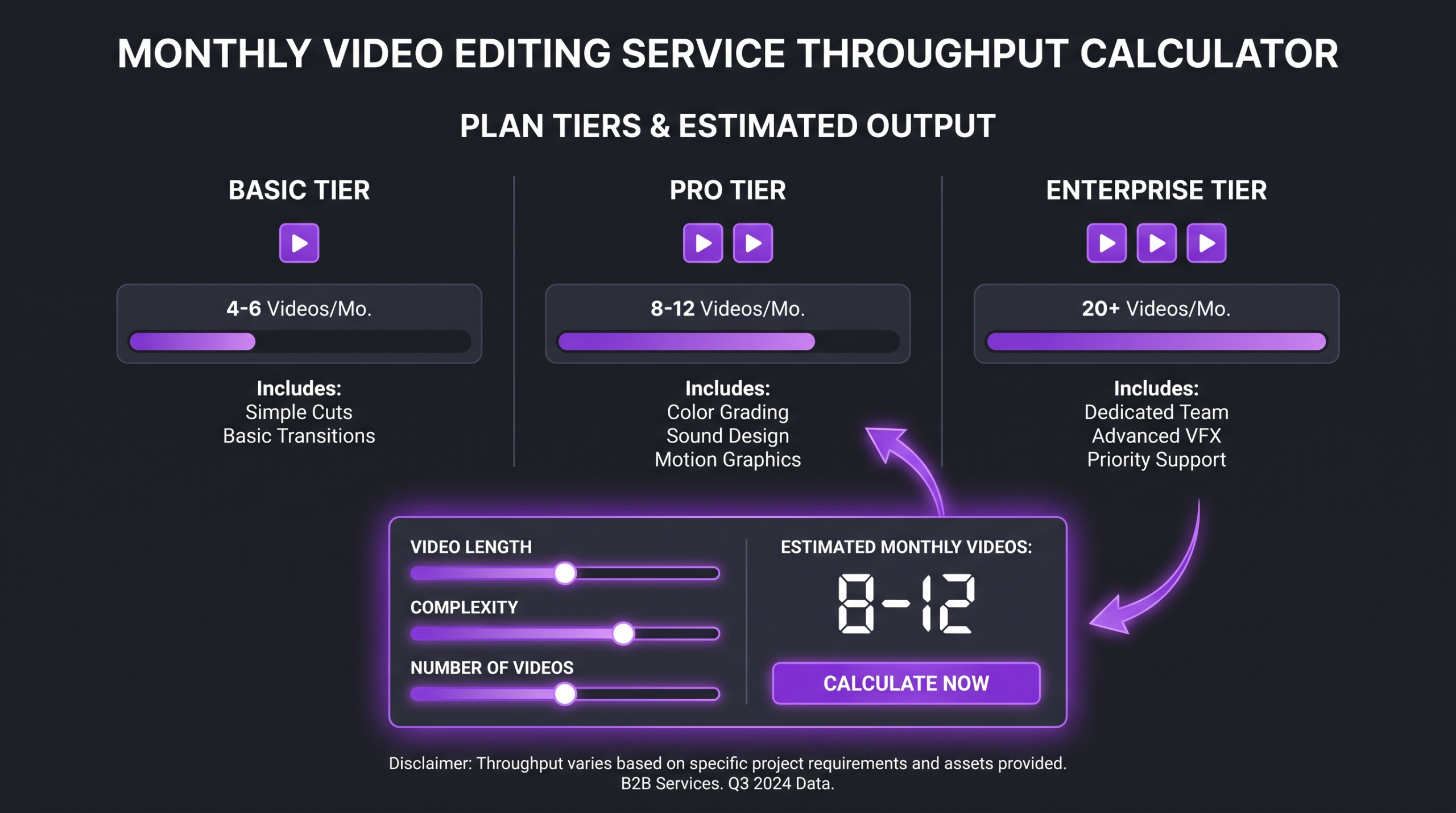
The most important thing to understand about any unlimited video editing service is the throughput math. “Unlimited requests” is accurate — but requests are processed sequentially on most plans, and turnaround time is the real constraint.
Here’s how it typically breaks down on a standard base plan with one active project slot and a 2–3 business day average turnaround:
*Illustrative ranges based on typical plan pricing and throughput math. Actual output varies by content type, revision rounds, and briefing clarity.
The per-video math only becomes compelling when you’re actually saturating your queue. Teams that submit 3–4 videos per month on a $700 plan are paying $175–$230 per video — not competitive with project-based pricing. The unlimited model wins when you have consistent, predictable volume that fills all available slots.
💡 Pro Tip: Before signing up for a monthly video editing service, estimate your actual monthly video output by looking at what you’ve shipped in the last 90 days. Divide your realistic output by the plan cost to get a true per-video rate. If you’re under 10 videos per month, a project-based or retainer model often wins on economics.
Quality Differences: What the Output Actually Looks Like
Quality is where the biggest variation between unlimited video editing services shows up — and where the price difference between a $500/month service and a premium partner becomes visible in the final product.
What Drives Quality Variation
The primary driver isn’t the editor’s skill level — most established services have competent editors. It’s context and continuity. An editor who has worked on your brand for six months understands your pacing, your color treatment preferences, which music tracks feel right, and how your audience responds. A shared-pool editor starting fresh on request #1 produces technically correct work that often misses the brand feel.
Secondary drivers include the editor-to-client ratio (some services pair one editor with 20+ clients), revision round limits (usually 1–3 on base plans), and what’s included in the post-production suite — color grading, motion graphics, and sound design are often add-ons or premium-plan features.
Output by Category
Unlimited Video Editing vs Dedicated Agency Retainer
This is the comparison that matters most for growing businesses. Understanding the difference between a video editing agency and a freelancer helps frame why the agency retainer model often outperforms pure subscription services for brand-critical content.
The Key Structural Differences
Unlimited subscription services optimize for throughput and accessibility. They work through standardized queues, shared editor pools, and predefined request formats. This delivers speed and predictability for straightforward content but creates a ceiling on brand sophistication.
Dedicated retainer agencies optimize for quality consistency and brand depth. Your editors internalize your brand voice, audience preferences, and creative direction. The output improves month over month rather than starting from scratch on each request. The per-video cost is typically higher, but so is the conversion and retention impact of well-crafted content.
What the Best Unlimited Video Editing Service Gets Right
After analyzing dozens of video editing subscriptions and hundreds of client outcomes, the best services share a specific set of characteristics — some structural, some cultural. Here’s what separates the services that deliver genuine value from the ones that rely on “unlimited” as a marketing hook.
1. Transparent Throughput
The best services tell you exactly how many videos you can realistically expect per month based on your content type and plan tier. They don’t lead with “unlimited” and bury the sequential queue model in the FAQ. Transparency here is a strong signal of integrity across the rest of the service.
2. Clear Scope Boundaries
Every unlimited video editing service has things it won’t do, or charges extra for. Motion graphics, animation, 4K delivery, licensed music, and complex color grading are common premium add-ons. The best services are upfront about these exclusions so you can price the real cost before you sign.
3. Responsive Communication
For a monthly video editing service to work at scale, communication needs to be fast. Same-day responses to revision requests and brief clarifications are table stakes at the premium tier. Services that batch communications through ticket systems with 24–48 hour response windows create hidden throughput penalties that eat into your effective output.
4. Revision Rounds That Match Real Work
Base plans commonly include 1–3 revision rounds per video. That’s enough for straightforward social content with a clear brief, but it’s insufficient for complex branded content. Check this number carefully — services that charge for every additional revision round will significantly affect your effective monthly cost if your content requires iteration.
Red Flags in Unlimited Video Editing Services
The unlimited model creates specific incentives that lead some providers to cut corners. Here are the warning signs that a service isn’t as unlimited — or as good — as advertised.
Vague Turnaround Guarantees
Watch out for phrases like “we aim to deliver within X business days” without a contractual guarantee. Some services consistently miss stated turnaround windows during peak periods, effectively cutting your monthly throughput without notice. Ask for average turnaround data, not just the SLA promise.
Hidden Caps on Request Complexity
Some services will reject complex requests as “out of scope” even when the content type seems standard. Animation, 3D elements, heavy color work, and interviews requiring complex audio cleanup are common triggers. Always test with your most demanding use case during a trial period before committing.
Rotating Editor Pools Without Disclosure
Some services advertise “dedicated editors” but actually assign your work to whoever is available that week. Ask specifically whether you’ll work with the same editor throughout your subscription, and what happens when your editor is unavailable — a stated backup process with brand handoff documentation is the right answer.
Overly Rigid Request Formats
The best unlimited video editing services work with your workflow. Services that require you to conform entirely to their project management tool, their brief format, and their communication rhythms create friction that slows actual output. Some rigidity is fine — a fully inflexible workflow is a sign that the service is optimizing for its own throughput, not yours.
💡 Pro Tip: Before committing to any unlimited video editing subscription, run a test project that represents your most complex regular use case — not your easiest. You’ll find out faster where the real scope limits are.
Who Actually Benefits from a Monthly Video Editing Service
The unlimited model isn’t right for everyone. Here’s an honest breakdown of who gets the most value — and who should probably look elsewhere.
Best Fit for Unlimited Video Editing Services
High-volume content creators publishing 8+ videos per month on consistent formats — talking heads, reviews, tutorials — get strong per-video economics and predictable costs.
Social media agencies managing multiple client accounts benefit from the flat pricing model’s budget predictability, especially when managing accounts with similar content formats.
eCommerce brands producing regular product videos, ads, and UGC repurposing in repeatable formats are well-served by subscription services, provided the format complexity stays within scope.
Better Off with a Retainer or Agency Model
B2B SaaS companies producing demo videos, explainers, and case study videos need strategic alignment and brand consistency more than raw throughput. A dedicated SaaS video editing approach typically outperforms a generic subscription service on conversion-critical content.
Enterprise marketing teams with complex approval workflows, multi-stakeholder review cycles, and brand governance requirements need a partner who can work within those constraints — not a queue-and-request system.
Brands running paid media at meaningful spend levels need creative iteration, performance data integration, and testing discipline that subscription services rarely provide.
FAQ: Unlimited Video Editing Services
What is unlimited video editing?
Unlimited video editing is a subscription model where you pay a flat monthly fee and can submit as many editing requests as you want. Requests are typically processed sequentially — one at a time on base plans — so the “unlimited” refers to the number of requests you can queue, not how many videos are delivered simultaneously. Your actual monthly output depends on turnaround time and the number of active project slots your plan includes.
Which unlimited video editing services are worth the cost in 2026?
The best unlimited video editing services in 2026 are Increditors (best overall, dedicated retainer model), VideoEditingCompany.com (best B2B subscription alternative), Vidpros (best for social content volume), Video Husky (best for YouTube creators), Edit Crew (best for agencies), and Tasty Edits (best per-video option without a subscription). The right choice depends on your content type, monthly volume, and quality requirements.
How much does a video editing subscription typically cost?
Most unlimited video editing subscriptions start somewhere in the $500–$1,200/month range for a base plan with one active project slot. Mid-tier plans with 2–3 active slots typically run $1,200–$2,500/month. Premium agency retainers are priced on scope rather than tiers. The per-video economics only favor subscriptions when you’re consistently saturating your queue — typically 8+ videos per month on a base plan.
What’s the best unlimited video editing service for YouTube?
Video Husky is the strongest unlimited video editing service specifically built for YouTube content. They prioritize editor continuity, understand long-form pacing, and their turnaround model is designed for channels publishing 4–8 videos per month. For creators who also want strategic input on content performance and packaging, Increditors is worth the premium.
Is a monthly video editing service better than hiring an in-house editor?
A monthly video editing service is usually more cost-effective than an in-house hire for teams producing under 25–30 videos per month. A full-time senior editor in most markets runs $60,000–$90,000/year plus benefits, compared to $6,000–$24,000/year for a subscription or retainer. The tradeoff is that an in-house editor develops deeper institutional knowledge. At high volume with complex brand needs, a retainer model often gives you the best of both — agency expertise without the full-time overhead.
Verdict: Which Unlimited Video Editing Service Is Right for You?
The unlimited video editing market has matured significantly by 2026. Most established services deliver technically competent work at competitive per-video rates when you’re saturating your queue. The differences are in depth, consistency, and what happens when your content gets complex.
If you’re a creator or small agency primarily producing social content in repeatable formats, Vidpros or Video Husky give you solid production capacity at predictable costs. If you’re managing multiple client accounts, Edit Crew’s multi-client infrastructure is purpose-built for your workflow.
For businesses where video is a growth lever — SaaS onboarding, paid media, brand campaigns, content marketing — the per-video cost difference between a subscription service and a premium retainer is less important than the quality gap. The best unlimited video editing service for conversion-critical content is one with a dedicated team that understands your brand, your audience, and your goals.
Increditors occupies that position. VideoEditingCompany.com is the strongest alternative for teams that prefer a dedicated B2B subscription model.
Whichever direction you go, run a test project that represents your hardest use case. The best services handle edge cases gracefully. The ones that don’t will show you quickly.
Ready for Video That Actually Converts?
Tell us about your project and we will put together a custom plan.