










![3D Explainer Video - ScribbleLive.mp4_snapshot_00.12_[2022.03.09_03.14.16]](https://increditors.com/wp-content/uploads/elementor/thumbs/3D-Explainer-Video-ScribbleLive.mp4_snapshot_00.12_2022.03.09_03.14.16-r7wb53mx72rxst3qcqyrfxdmeyzb5r9jbl0wbjujh4.png "3D Explainer Video – ScribbleLive.mp4_snapshot_00.12_[2022.03.09_03.14.16]")
































Here’s a mistake we see constantly: brands create one video, chop it three ways, post it on YouTube, TikTok, and Reels, and wonder why it performs well on one platform and dies on the other two.
The reason is simple. YouTube, TikTok, and Instagram Reels are not the same platform with different logos. They have different algorithms, different audiences, different attention patterns, and — critically — they reward fundamentally different editing styles.
A video that hooks someone into a 12-minute YouTube deep-dive uses completely different techniques than a TikTok that stops someone mid-scroll in 0.5 seconds. And what works as a Reel has its own distinct flavor that sits somewhere between the two.
This guide breaks down exactly how editing differs across all three platforms — the pacing, the format, the techniques, the cost, and the strategy behind each. Whether you’re a content creator editing your own work or a brand evaluating social media video editing services, understanding these differences is the foundation of a multi-platform strategy that actually works.
What’s in This Guide
- Quick Platform Comparison
- YouTube Editing: The Deep Dive
- TikTok Editing: Speed and Instinct
- Reels Editing: The Polished Middle Ground
- Side-by-Side Technical Comparison
- Pacing: The Core Difference
- Repurposing Across Platforms: What Works
- Cost Comparison: Editing for Each Platform
- Case Studies: Multi-Platform Editing Done Right
- Can One Editor Handle All Three?
- Building Your Multi-Platform Editing Strategy
- FAQ
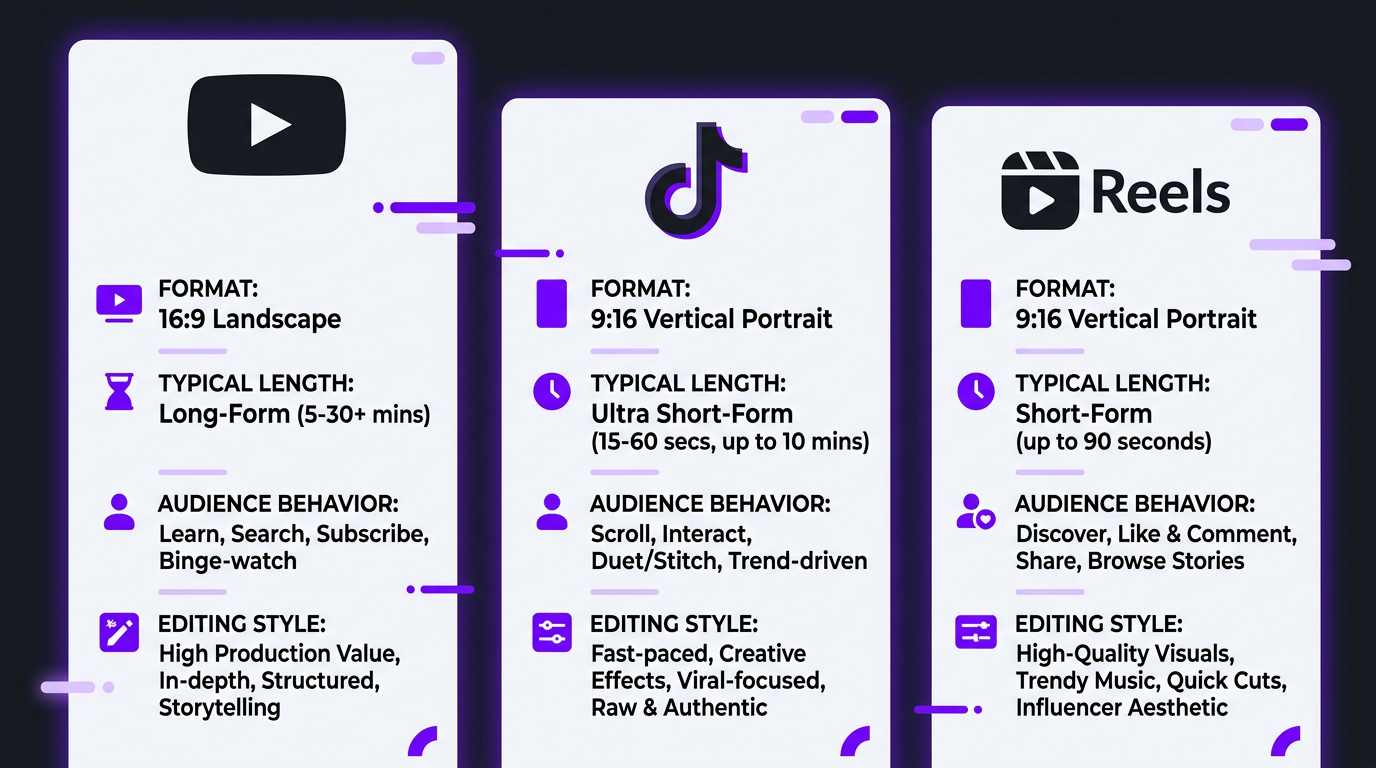
The Quick Comparison: YouTube vs TikTok vs Reels Editing
Before we go deep, here’s the overview. This table captures the core differences every editor and content strategist needs to understand:
| Factor | YouTube (Long-Form) | TikTok | Instagram Reels |
|---|---|---|---|
| Primary format | 16:9 horizontal | 9:16 vertical | 9:16 vertical |
| Ideal length | 8–20 minutes | 15–90 seconds | 15–60 seconds |
| Hook window | 5–10 seconds | 0.3–1 second | 1–3 seconds |
| Editing pace | Moderate, building | Rapid, constant stimulus | Moderate to fast |
| Text overlays | Lower thirds, occasional | Constant, native-style | Clean, branded |
| Audio approach | Voiceover + music + SFX | Trending sounds dominant | Music-driven, polished |
| Caption style | Optional (many skip) | Essential (80% watch muted) | Important (60% watch muted) |
| Color grading | Cinematic, consistent | Bright, saturated, trendy | Clean, brand-aligned |
| Retention strategy | Curiosity loops, payoff arcs | Pattern interrupts every 2-3s | Visual variety, smooth flow |
| Per-video editing cost | $150–$1,500 | $25–$200 | $50–$250 |
| Discovery mechanism | Search + suggested | For You Page algorithm | Explore + suggested |
YouTube Editing: Built for Depth and Retention
YouTube is still the king of long-form video, and its editing requirements reflect that. When someone clicks a YouTube video, they’re making a conscious decision to invest time. Your editing needs to reward that decision — continuously.
The YouTube Editing Mindset
YouTube editing is architectural. You’re building a structure: hook → context → value → payoff, with micro-hooks throughout to maintain retention. The best YouTube editors think like documentary filmmakers — every cut serves the story.
This is fundamentally different from short-form editing, where the goal is instant gratification repeated every few seconds. On YouTube, you’re earning sustained attention through pacing, visual variety, and content delivery that matches viewer expectations.
Technical Requirements
- Resolution: 4K preferred, 1080p minimum. YouTube’s algorithm appears to favor higher resolution uploads.
- Frame rate: 24fps for cinematic feel, 30fps for standard, 60fps for gaming/action content.
- Audio: -14 LUFS integrated loudness, mono voice + stereo music, proper noise reduction. Audio quality matters more than video quality on YouTube — viewers tolerate mediocre visuals but bounce immediately on bad audio.
- Thumbnails: Many YouTube editors now handle thumbnail concepts as part of the edit, since the thumbnail informs the video’s opening sequence.
Editing Techniques That Drive YouTube Retention
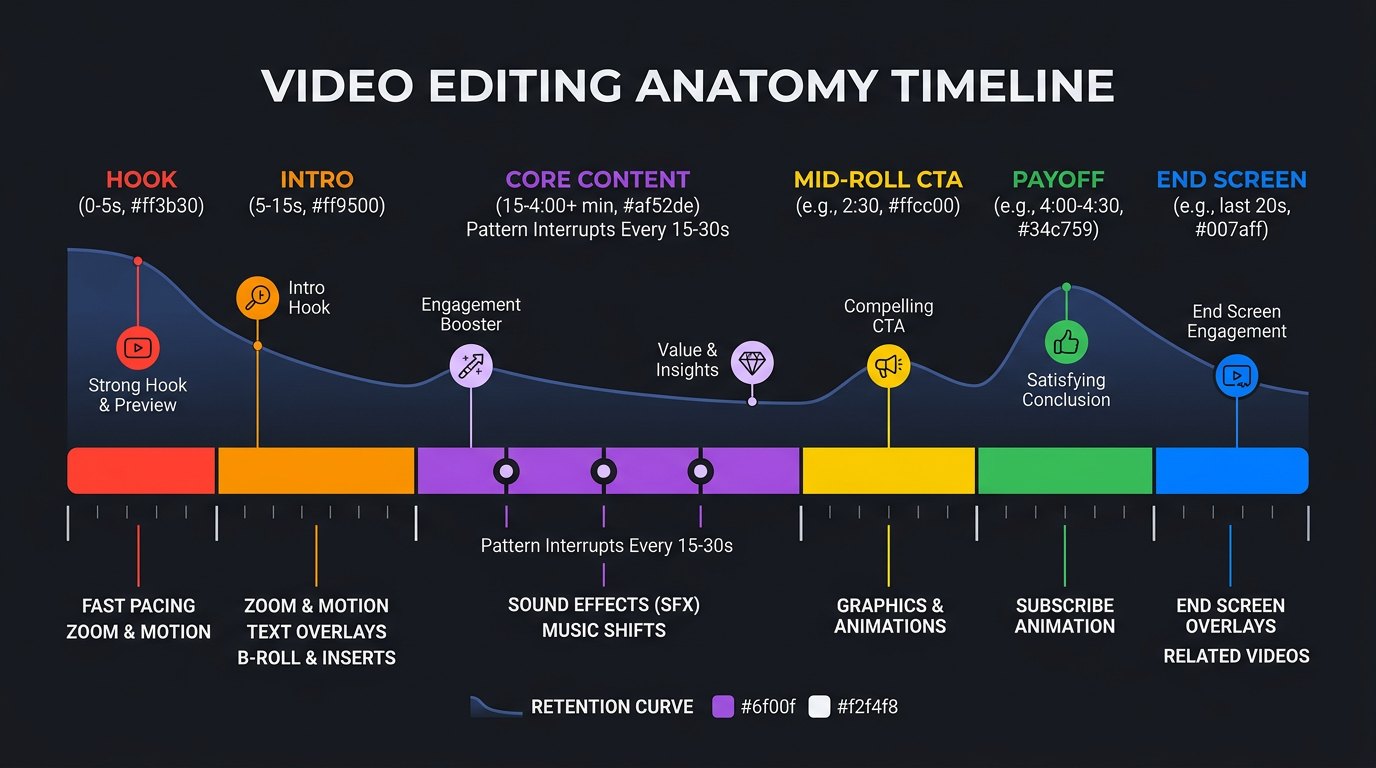
The Pattern Interrupt System: Every 15-30 seconds, introduce a visual change: new B-roll, graphics, camera angle shift, text overlay, or zoom. YouTube Studio analytics show retention drops happen at predictable intervals, and these interrupts prevent them.
Curiosity Loops: Tease upcoming content throughout the video. “We’ll get to the pricing breakdown in a minute, but first…” This technique — borrowed from television editing — keeps viewers watching through sections they might otherwise skip.
Strategic Pacing: Not every section should be fast. YouTube audiences appreciate breathing room between dense information segments. The rhythm should pulse: dense → breathing room → dense → payoff. An experienced YouTube video editor intuitively understands this rhythm.
Cold Opens: Starting with the most compelling moment before the intro/title sequence. This technique can improve first-30-second retention by 15-25%.
What YouTube Editing Costs
YouTube editing is the most expensive per-video because it involves the most work:
| Complexity Level | Per Video | Typical Length | What’s Included |
|---|---|---|---|
| Basic | $150–$300 | 8-12 min | Cuts, music, basic graphics |
| Professional | $300–$600 | 10-20 min | + color grading, motion graphics, B-roll |
| Premium | $600–$1,500 | 15-30 min | + VFX, sound design, retention optimization |
At a monthly retainer level with 8 videos, you’re looking at $2,000-$6,000/month depending on complexity. This is where an agency model provides the best value — dedicated editors who learn your channel’s style, combined with quality control layers that a solo freelancer can’t offer.
TikTok Editing: Speed, Trends, and Controlled Chaos
If YouTube editing is architecture, TikTok editing is jazz — improvisational, trend-reactive, and ruthlessly optimized for the first millisecond of attention.
The TikTok Editing Mindset
On TikTok, your competition isn’t other videos in your niche. It’s every video on the For You Page — cooking content, comedy skits, dance videos, political commentary, and cat clips. Your edit needs to stop a thumb that’s moving at scroll speed.
This means the first frame matters more than the entire rest of the video. TikTok editors spend a disproportionate amount of time on the opening 0.5 seconds — the hook text, the opening visual, the first sound — because that’s where 60%+ of viewers decide to stay or leave.
Technical Requirements
- Resolution: 1080×1920 (9:16). 4K is unnecessary and can slow upload times.
- Frame rate: 30fps standard. 60fps for action/sports content.
- Safe zones: Keep essential text and visuals within the center 80% of the frame. TikTok’s UI overlays (username, caption, buttons) cover the bottom 20% and right side.
- Audio: Trending sounds are prioritized by the algorithm. Original audio works for established creators but is harder for new accounts.
- Captions: Hardcoded, not auto-generated. 80% of TikTok users watch without sound — captions are not optional.
Editing Techniques That Drive TikTok Performance
The 0.5-Second Hook: Bold text + striking visual + unexpected opening. “I lost $50,000 doing this” over a shocked face. The hook must create an information gap that demands resolution.
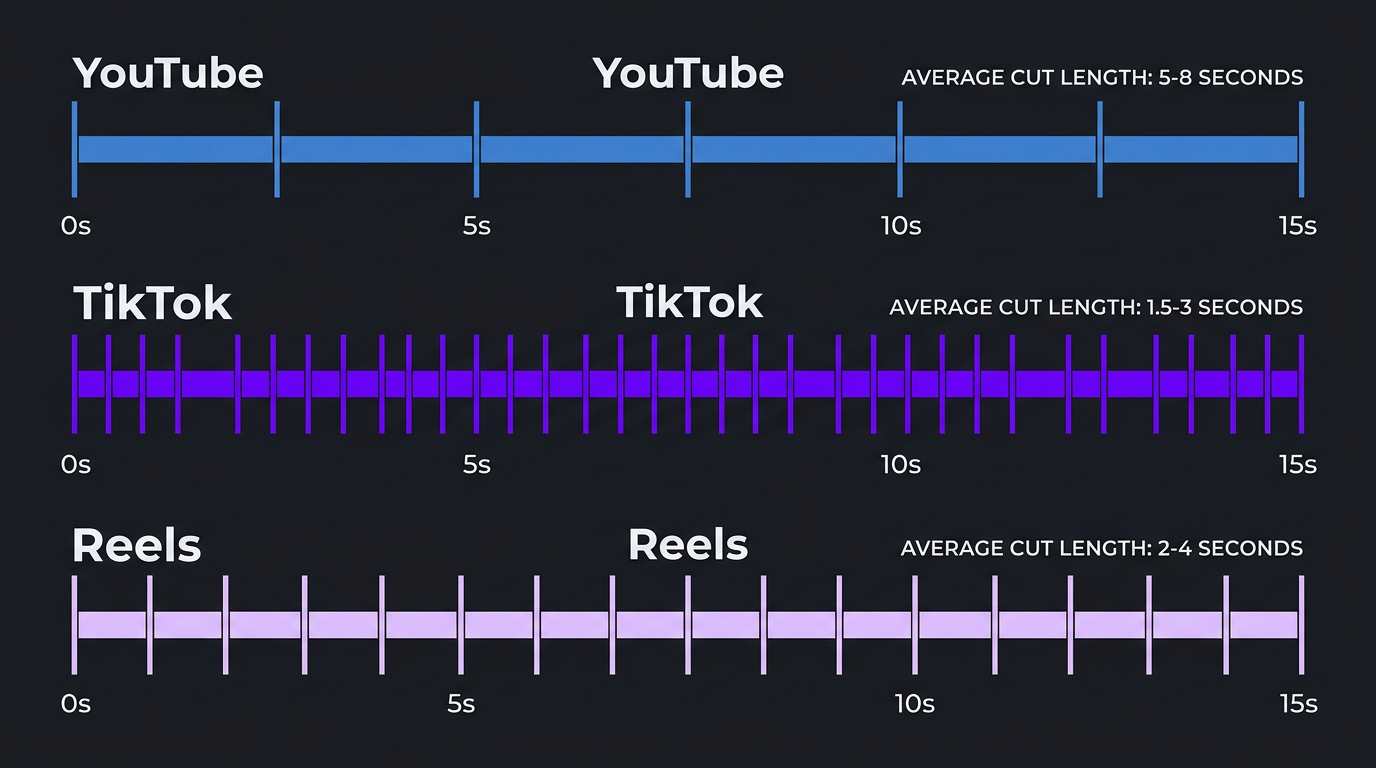
Rapid-Fire Cuts: Average cut length on high-performing TikToks is 1.5-3 seconds. Much shorter than YouTube’s 5-8 second average. This constant visual change mimics the scroll experience and keeps the brain engaged.
Speed Ramping: Accelerating mundane actions (walking, cooking prep, setup) and slowing dramatic moments. This compression technique is uniquely TikTok — YouTube audiences would find it disorienting at this frequency.
Text as Storytelling: On TikTok, text overlays aren’t supplementary — they’re primary. Many viral TikToks tell their entire story through text with the video as visual support, not the other way around.
Loop Editing: Making the end of the video visually or narratively connect to the beginning, so viewers naturally watch it again. Multiple views per user is one of the strongest signals to TikTok’s algorithm.
What TikTok Editing Costs
Lower per-video, but the volume requirement changes the math:
| Volume | Per Video | Monthly Total | Service Level |
|---|---|---|---|
| 8-12/month | $50–$150 | $400–$1,800 | Freelancer or basic service |
| 15-20/month | $40–$100 | $600–$2,000 | Subscription or agency |
| 20-30/month | $65–$150 | $1,300–$4,500 | Dedicated agency team |
Reels Editing: The Polished Middle Ground
Instagram Reels occupies a unique position. It’s short-form like TikTok but lives on a platform where users expect higher visual quality. Reels editing splits the difference between TikTok’s raw energy and YouTube’s polished production.
The Reels Editing Mindset
Reels viewers are typically older and more affluent than TikTok’s core demographic. They’re on Instagram to be inspired, informed, and — importantly — to discover brands and products. This means Reels editing needs to feel aspirational while remaining accessible.
The pacing sits between YouTube and TikTok. You have 1-3 seconds to hook someone (more generous than TikTok’s 0.5 seconds, less than YouTube’s 5-10). The overall editing style should feel intentional and clean — not the controlled chaos of TikTok.
Technical Requirements
- Resolution: 1080×1920 (9:16), same as TikTok.
- Sweet spot length: 15-30 seconds for maximum reach. Instagram’s algorithm appears to favor Reels in this range for explore page distribution.
- Audio: Instagram’s music library is extensive. Trending audio matters but less than on TikTok. Original audio performs better on Reels than TikTok for business accounts.
- Cover frame: Unlike TikTok, the Reel’s cover image appears on your grid. It needs to be designed, not just a random frame grab. This is an editing deliverable that TikTok doesn’t require.
- Captions: Instagram’s auto-caption feature has improved, but professional hardcoded captions still look better and are more reliable.
Editing Techniques That Drive Reels Performance
Visual Elegance: Where TikTok rewards rawness, Reels rewards polish. Smooth transitions, consistent color grading, and branded text styles signal quality. The audience has been trained by Instagram’s visual culture to expect beauty.
The “Scroll-Stop” Moment: Like TikTok’s hook, but visual rather than text-driven. A striking image, unexpected movement, or beautiful composition that makes someone pause their scroll. Think photography instincts applied to video editing.
Music-Synced Editing: Reels’ algorithm appears to favor content where cuts sync with the beat of the soundtrack. This technique — common in music video editing — creates a satisfying viewing experience that drives saves and shares.
Educational Carousels as Video: A growing Reels format: editing that mimics the Instagram carousel experience. Each “slide” is a 3-5 second segment with a clear takeaway, moving to the next point like flipping through a carousel. This format gets high save rates.
What Reels Editing Costs
| Volume | Per Reel | Monthly Total | Service Level |
|---|---|---|---|
| 8-12/month | $50–$200 | $400–$2,400 | Freelancer or basic agency |
| 15-20/month | $75–$175 | $1,125–$3,500 | Dedicated agency |
| 20-30/month | $65–$150 | $1,300–$4,500 | Full-service team |
Reels editing tends to cost slightly more than TikTok per video because of the higher production value expected, but the volume requirement is lower (3-5 per week vs. 5-7 for TikTok).
Need Multi-Platform Editing That Actually Works?
We edit for YouTube, TikTok, and Reels with platform-specific teams who understand what each algorithm rewards. One partner, three platforms, zero generic content.
Side-by-Side Technical Comparison
For the detail-oriented among you, here’s the technical editing spec sheet for all three platforms:
| Technical Spec | YouTube Long-Form | YouTube Shorts | TikTok | Instagram Reels |
|---|---|---|---|---|
| Aspect ratio | 16:9 | 9:16 | 9:16 | 9:16 |
| Resolution | 3840×2160 (4K) or 1920×1080 | 1080×1920 | 1080×1920 | 1080×1920 |
| Max length | 12 hours | 60 seconds | 10 minutes | 90 seconds |
| Ideal length | 8–20 minutes | 30–60 seconds | 15–90 seconds | 15–30 seconds |
| Frame rate | 24/30/60fps | 30fps | 30fps | 30fps |
| Audio loudness | -14 LUFS | -14 LUFS | No standard | No standard |
| File format | MP4 (H.264/H.265) | MP4 | MP4/MOV | MP4/MOV |
| Max file size | 256GB | 256GB | 287MB (mobile) / 4GB (web) | 4GB |
| Avg cut length | 5–8 seconds | 2–4 seconds | 1.5–3 seconds | 2–4 seconds |
Pacing: The Single Biggest Editing Difference
If you take one thing from this entire guide, let it be this: pacing is the fundamental variable that changes across platforms. Everything else — text, transitions, color, sound — flows from pacing decisions.
YouTube Pacing: The Documentary Approach
YouTube audiences have committed to watching. They’re engaged. Your pacing should respect that commitment by delivering value at a steady rhythm with enough variation to prevent monotony.
The typical YouTube pacing pattern:
- Hook (0-10s): Fast, punchy, promise-driven. “In this video, I’ll show you…”
- Context (10-60s): Moderate pace. Establish why this matters.
- Core content (1-15 min): Alternating between dense delivery and breathing room. Pattern interrupts every 15-30 seconds.
- Payoff (final 1-2 min): Deliver on the hook’s promise. End strong.
TikTok Pacing: The Sugar Rush
TikTok pacing is relentless. There is no “slow section.” The moment energy dips, the viewer swipes. Your editor needs to treat every second as a potential exit point and give viewers a reason to stay at each one.
The typical TikTok pacing pattern:
- Hook (0-0.5s): Text + visual + sound — all hitting simultaneously.
- Escalation (0.5-15s): Build intrigue or deliver rapid-fire value. New visual every 1.5-3 seconds.
- Payoff/twist (final 2-5s): The reveal, the punchline, the surprising conclusion.
- Loop point: End connects to beginning for replay.
Reels Pacing: The Curated Flow
Reels sits between the two, but leans toward aesthetic consistency over raw energy. The pacing should feel intentional — like a well-designed Instagram feed come to life.
The typical Reels pacing pattern:
- Visual hook (0-2s): Beautiful or intriguing opening frame.
- Content delivery (2-20s): Steady, beat-synced progression. Information or entertainment at a digestible rate.
- CTA or payoff (final 3-5s): Clear ending with a reason to save, share, or follow.
Repurposing Across Platforms: What Actually Works (And What Doesn’t)
Let’s address the elephant in the room: can you repurpose content across platforms, or do you need to create everything from scratch?
The honest answer: repurposing works, but only if you re-edit — not just reformat.
What “Good” Repurposing Looks Like
YouTube → TikTok/Reels: Extract the 2-3 most compelling moments from a long-form video. Re-edit each into a standalone short-form piece with platform-specific hooks, text, and pacing. One 15-minute YouTube video can yield 3-5 TikToks and 3-5 Reels.
TikTok → Reels: Remove TikTok watermark. Adjust text placement (Reels UI overlaps differently). Consider replacing trending TikTok sounds with Instagram-licensed alternatives. Modify the cover frame for Instagram grid consistency.
TikTok → YouTube Shorts: Most straightforward repurpose. Remove TikTok watermark, ensure text is within Shorts safe zones, and upload. Pacing differences between TikTok and Shorts are minimal.
What “Bad” Repurposing Looks Like
- Cropping a 16:9 YouTube video to 9:16 with black bars or blurred sides
- Posting a TikTok to Reels with the TikTok watermark visible (Instagram actively deprioritizes this)
- Taking a 60-second TikTok and posting it as a YouTube long-form without any additional context
- Using identical hooks across platforms (what works as a TikTok hook often fails on Reels)
The Repurposing Math
Done well, repurposing can reduce your total content production cost by 40-60%. Here’s a realistic breakdown:
| Approach | Monthly Videos Produced | Estimated Monthly Cost | Cost Per Content Piece |
|---|---|---|---|
| All original (8 YT + 20 TT + 15 Reels) | 43 | $6,000–$12,000 | $140–$280 |
| Smart repurposing (8 YT → 20 TT + 15 Reels) | 43 | $3,500–$7,000 | $80–$165 |
| Agency repurposing package | 43 | $3,000–$6,000 | $70–$140 |
This is exactly why agencies that offer multi-platform packages — like Increditors — provide better value than hiring separate editors for each platform. A single team that understands all three platforms can repurpose intelligently, maintaining platform-specific quality while reducing redundant work.
Total Cost Comparison: Editing for Each Platform
Let’s lay out the real monthly costs for a brand that takes each platform seriously:
| Platform | Videos/Month | Per Video Cost | Monthly Total | Annual Total |
|---|---|---|---|---|
| YouTube Long-Form | 4-8 | $300–$800 | $1,200–$6,400 | $14,400–$76,800 |
| YouTube Shorts | 8-15 | $30–$100 | $240–$1,500 | $2,880–$18,000 |
| TikTok | 15-30 | $50–$200 | $750–$6,000 | $9,000–$72,000 |
| Instagram Reels | 12-20 | $50–$200 | $600–$4,000 | $7,200–$48,000 |
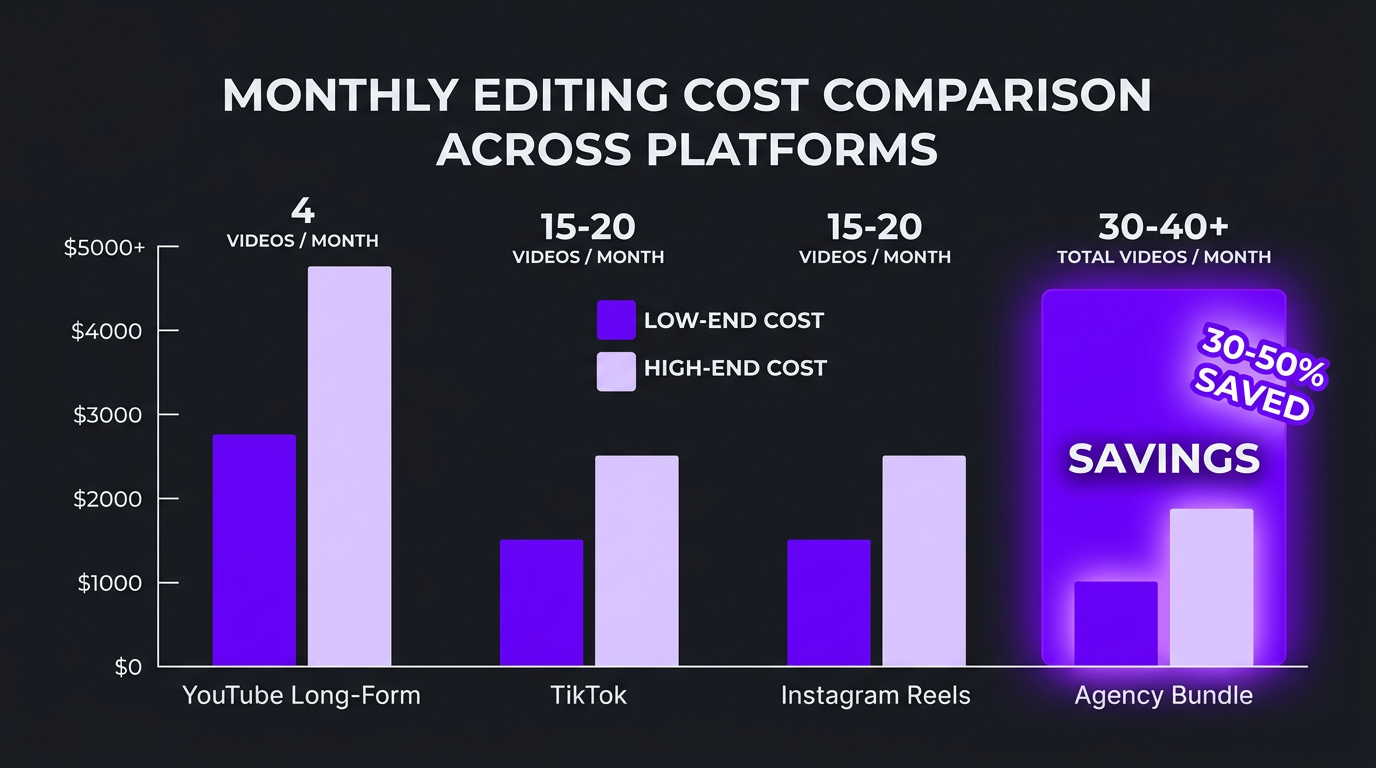
| All platforms (agency bundle) | 40-70+ | $50–$150 avg | $3,000–$8,000 | $36,000–$96,000 |
The bundled agency approach typically saves 30-50% compared to hiring individual specialists for each platform. Check our service pricing for current multi-platform packages.
Case Studies: Multi-Platform Editing Done Right
Riley Coleman: From YouTube-Only to 3-Platform Growth
Riley Coleman had built a solid YouTube channel with 200K subscribers, posting weekly long-form content. But growth had plateaued. New viewer acquisition was slowing because YouTube’s algorithm favored channels that also published Shorts, and Riley’s audience wasn’t discovering him on TikTok or Instagram.
We developed a three-tier editing strategy: continue producing premium YouTube long-form (our editors had been handling these), then systematically repurpose the best moments into TikToks and Reels. Each YouTube video generated 4-5 short-form pieces, each re-edited with platform-specific pacing, hooks, and text.
The results over six months were dramatic. TikTok grew from zero to 145,000 followers, driving 30,000+ new YouTube subscribers from cross-platform discovery. Reels averaged 4x the engagement rate of Riley’s previous Instagram posts. Total content output went from 4 videos/month to 30+ without any additional filming time — the editing team handled all repurposing.
The monthly editing investment increased from $2,400 (YouTube only) to $4,200 (all platforms), but the subscriber growth rate more than tripled, making it the highest-ROI content investment Riley had made.
Brightwell: Enterprise Multi-Platform Content Engine
Brightwell, a fintech company, needed to maintain professional brand standards across all platforms while posting at volume. Their in-house team could handle YouTube but didn’t have the short-form expertise for TikTok and Reels.
We created a brand editing guideline document that ensured visual consistency across platforms while adapting tone for each audience. YouTube content was informative and detailed. TikTok versions of the same topics were punchy and trend-responsive. Reels focused on aspirational lifestyle content related to their product.
The system produced 8 YouTube videos, 25 TikToks, and 15 Reels per month. Brightwell’s brand recognition in their target demographic (25-40 professionals) increased measurably, and their enterprise content needs were met without building an internal video team.
Can One Editor Handle All Three Platforms?
This is the question every budget-conscious brand asks. The short answer: it’s possible but rarely ideal.
When One Editor Works
- You’re posting low volume (2-3 videos per platform per week)
- The editor actively uses all three platforms personally
- They have a demonstrated portfolio across YouTube, TikTok, and Reels
- You’re okay with “good enough” rather than “platform-optimized”
When You Need Specialists
- You’re posting at volume (5+ videos per platform per week)
- Each platform is a meaningful revenue or growth channel
- You’ve noticed significant performance differences across platforms
- You need trend-reactive TikTok content with same-day turnaround
The Agency Advantage
This is precisely where agencies provide their highest value. A good agency has editors who specialize in different platforms, managed by a creative director who ensures brand consistency across all of them. You get specialist quality with unified brand voice — something that’s nearly impossible to achieve with a single freelancer.
At Increditors, our YouTube editors and TikTok editors are different people with different skills, but they work from the same brand guidelines and share footage libraries. That’s the structural advantage of an agency model for multi-platform content.
Building Your Multi-Platform Editing Strategy
Here’s a practical framework for developing your cross-platform editing approach:
Step 1: Choose Your Primary Platform
Don’t try to be everywhere at once. Pick the platform that best serves your business goal:
- YouTube: Best for searchable content, deep audience relationships, and long-term SEO value.
- TikTok: Best for rapid awareness, trend-driven discovery, and younger demographics.
- Reels: Best for leveraging an existing Instagram audience and brand-building.
Step 2: Establish Your Content Hierarchy
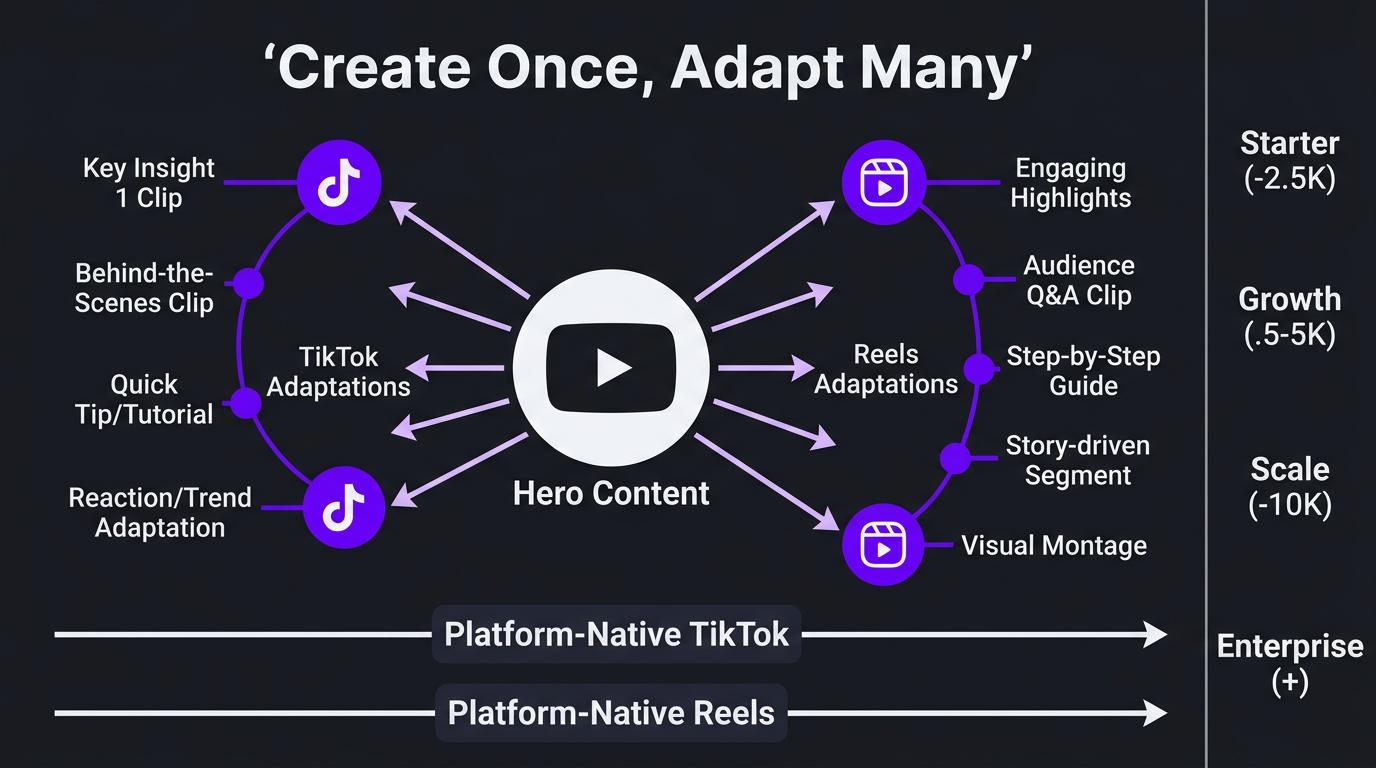
The most efficient multi-platform strategy follows a “create once, adapt many” model:
- Hero content: Long-form YouTube videos (highest investment per piece)
- Repurposed short-form: TikToks and Reels extracted from hero content (moderate investment)
- Platform-native content: TikToks and Reels created specifically for those platforms (lower per-piece investment, but important for trend-reactivity)
Step 3: Match Budget to Ambition
| Budget Level | Monthly Budget | Recommended Approach |
|---|---|---|
| Starter | $1,000–$2,500 | Focus on one platform. YouTube OR TikTok, not both. |
| Growth | $2,500–$5,000 | YouTube + repurposed shorts. Add TikTok or Reels. |
| Scale | $5,000–$10,000 | All platforms with dedicated editors per platform. |
| Enterprise | $10,000+ | Full multi-platform team with strategy and analytics. |
Step 4: Measure What Matters on Each Platform
Different platforms, different success metrics:
- YouTube: Watch time, average view duration, subscriber conversion rate, click-through rate
- TikTok: Views, completion rate, shares, profile visits, follower growth rate
- Reels: Reach, saves, shares, profile visits, website clicks
Share these metrics with your editing team. The best editors use performance data to optimize future content — adjusting hook styles, pacing, and formats based on what actually drives results.
Let’s Build Your Multi-Platform Content Engine
YouTube. TikTok. Reels. One editing partner that understands all three. We’ll build a content system that maximizes every piece of footage you create.
Frequently Asked Questions
Pacing and retention strategy. YouTube editing builds momentum over 30-60 seconds with a payoff structure. TikTok editing must hook viewers in under 1 second with rapid cuts and trend-driven formats. Reels editing sits between the two — more polished than TikTok but faster-paced than YouTube. Each platform rewards fundamentally different editing rhythms.
Technically yes, but most editors specialize. A great YouTube editor may produce mediocre TikToks because the pacing instincts are different. The best approach is either hiring an agency with specialists for each platform, or finding an editor who actively creates content on all three platforms and can demonstrate platform-specific work.
Per video, yes — TikTok edits cost $25-200 vs YouTube at $150-1,500. But TikTok requires much higher volume (20-30 videos/month vs 4-8 for YouTube). Monthly spend often ends up similar: $1,500-4,000 for TikTok at volume vs $1,000-4,000 for YouTube at lower volume.
Yes, but don’t just crop and repost. Effective repurposing requires re-editing: extracting the most compelling 30-60 second segments, reformatting to 9:16, adding platform-appropriate text and hooks, and adapting the pacing. A good editor can turn one YouTube video into 3-5 TikToks and Reels.
YouTube long-form uses 16:9 (1920×1080). YouTube Shorts, TikTok, and Instagram Reels all use 9:16 (1080×1920) vertical format. YouTube also supports Shorts in 1:1 but 9:16 performs best. Filming in 4K gives editors flexibility to crop for any format.
It depends on your goal. YouTube is best for long-term searchable content and deep audience building. TikTok is best for rapid awareness and trend-driven discovery. Reels is best for converting existing Instagram followers and reaching new ones. Most successful brands create for YouTube first, then repurpose for short-form platforms.
YouTube long-form: 8-20 minutes for most niches (longer for tutorials). YouTube Shorts: 30-60 seconds. TikTok: 15-90 seconds for most content, though 2-5 minute TikToks are growing. Instagram Reels: 15-60 seconds, with 30 seconds being the sweet spot for engagement.