










![3D Explainer Video - ScribbleLive.mp4_snapshot_00.12_[2022.03.09_03.14.16]](https://increditors.com/wp-content/uploads/elementor/thumbs/3D-Explainer-Video-ScribbleLive.mp4_snapshot_00.12_2022.03.09_03.14.16-r7wb53mx72rxst3qcqyrfxdmeyzb5r9jbl0wbjujh4.png "3D Explainer Video – ScribbleLive.mp4_snapshot_00.12_[2022.03.09_03.14.16]")
































You spent weeks preparing your webinar. You nailed the presentation, answered questions live, and had 300 people attend. Then you uploaded the raw Zoom recording to YouTube and… 47 views in three months.
That’s not a content problem. It’s an editing problem.
Raw webinar recordings are almost unwatchable. The first eight minutes are “can everyone hear me?” The audio levels jump around. Half the screen is a static slide deck. There’s no visual variety, no pacing, no reason for a casual viewer to keep watching.
Professional webinar editing transforms a forgettable recording into content that actually performs — and then repurposes it into 10-20 additional pieces across every platform. This guide covers exactly how that works, what it costs, and whether it’s worth it for your business.
What’s in This Guide
- Why Raw Webinar Recordings Fail
- What Professional Webinar Editing Includes
- Webinar Editing Costs: Full Breakdown
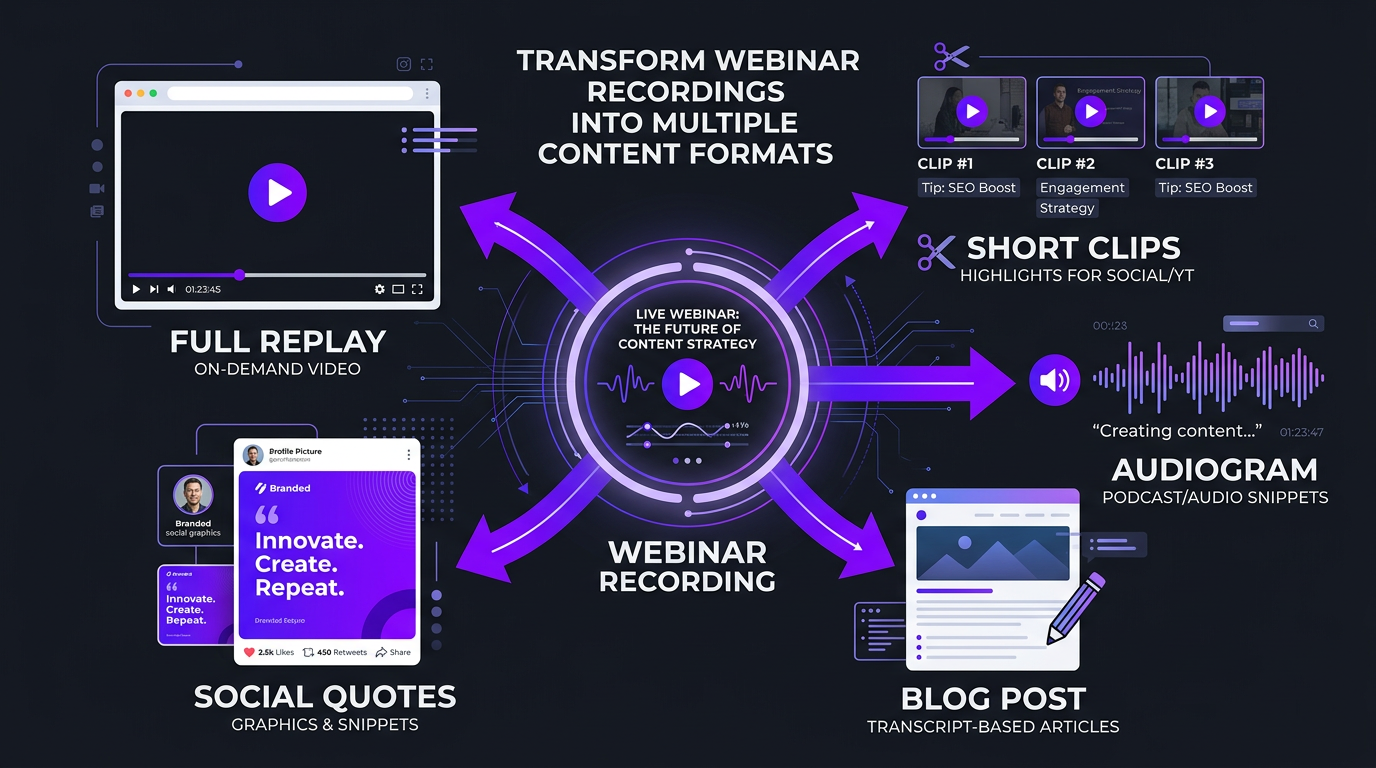
- The Repurposing Framework: 1 Webinar → 20 Pieces
- DIY vs Freelancer vs Agency: Which Is Right?
- Real Results: How Companies Use Edited Webinars
- Virtual Event Editing: Conferences, Summits & Panels
- How to Choose the Right Webinar Editor
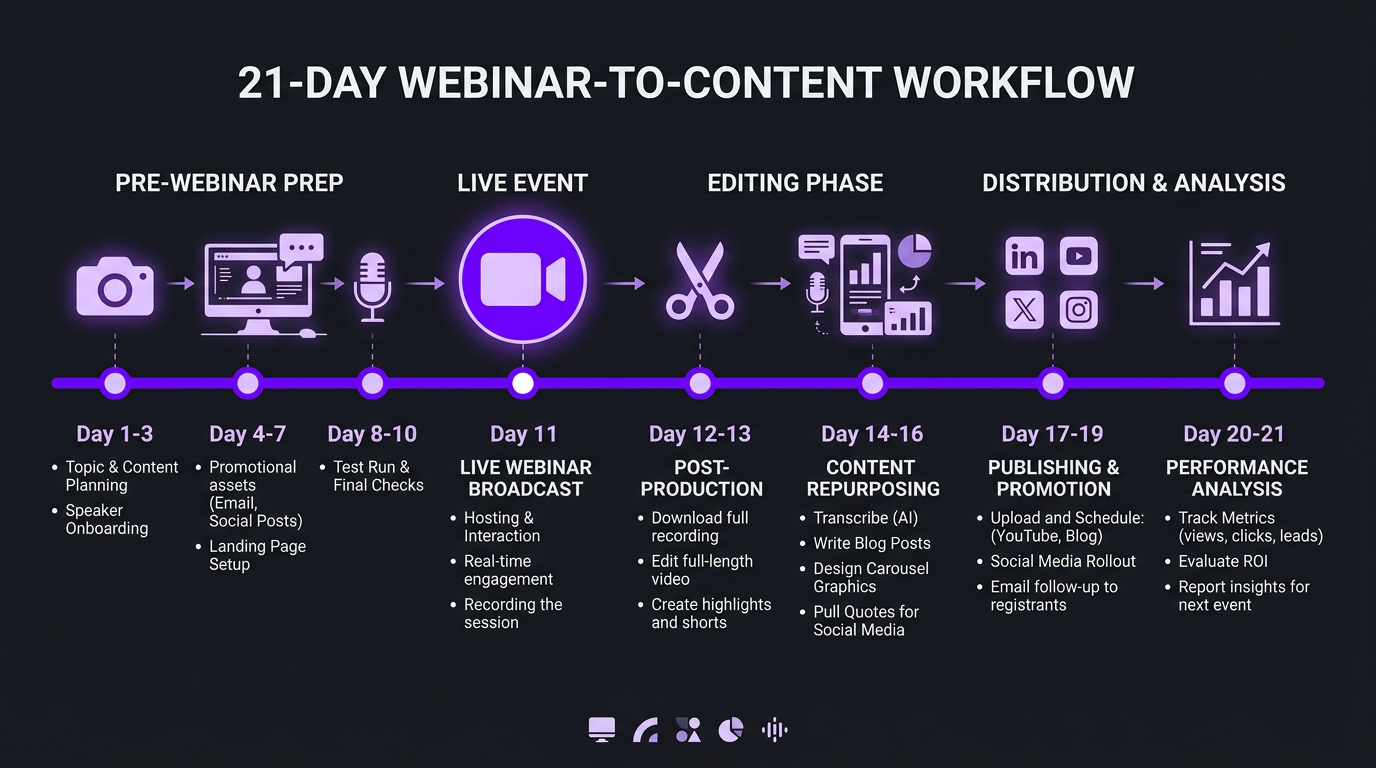
- The Ideal Webinar-to-Content Workflow
- FAQ
Why Raw Webinar Recordings Fail (And Edited Ones Don’t)
The average webinar has a live attendance rate of 40-50% of registrants. That means half the people who signed up planned to watch the replay. But replay completion rates for unedited recordings hover around 8-12%.
Why? Because raw recordings have problems that live audiences forgive but replay viewers don’t:
- Dead time at the start. The “we’ll wait a few minutes for everyone to join” kills replay viewers immediately. They click away in seconds.
- Audio inconsistencies. Different speakers at different volumes, background noise, echo from bad microphones — all tolerable live, all painful on replay.
- Static visuals. A slide deck that doesn’t change for 4 minutes straight while someone talks is a retention killer on YouTube or LinkedIn.
- No chapter structure. Replay viewers want to jump to the parts they care about. Without timestamps or visual section breaks, they leave instead.
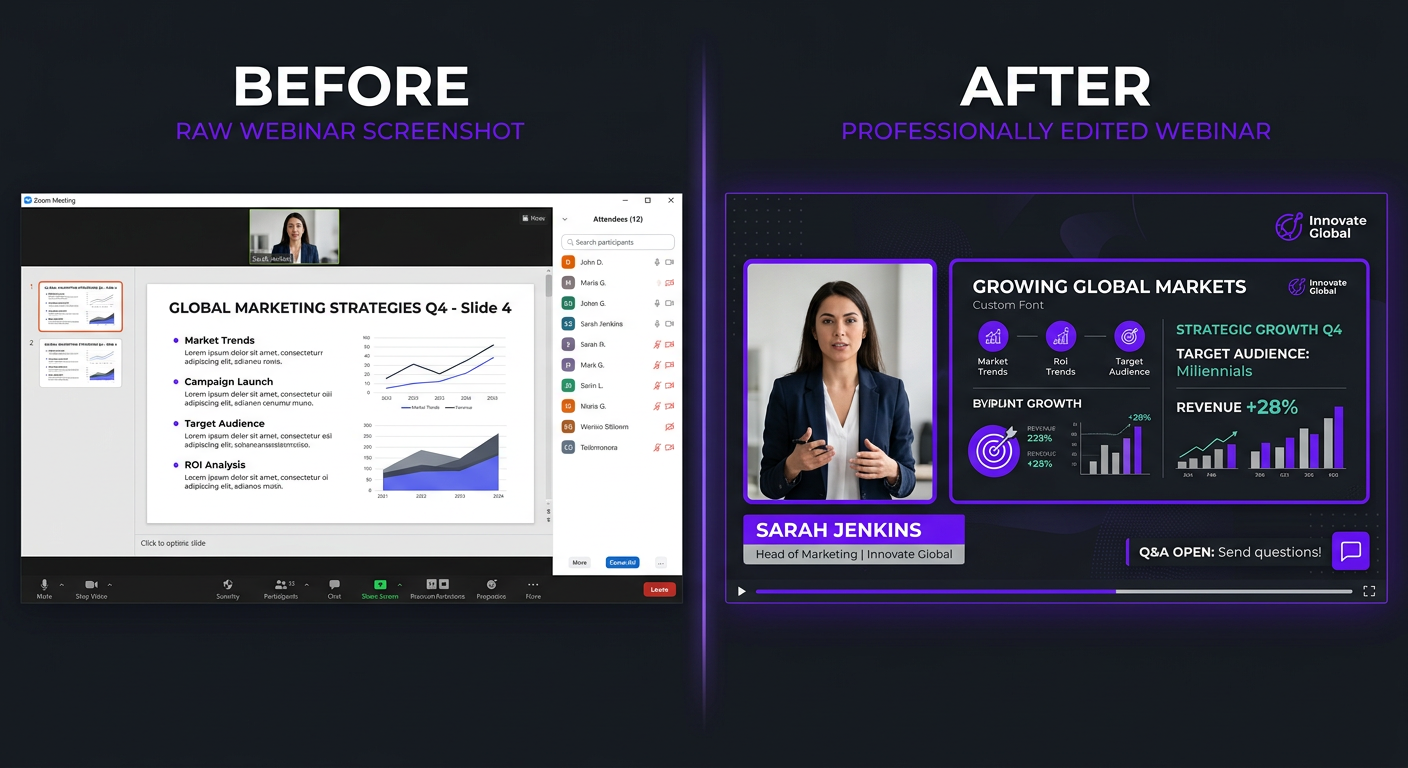
- No branding. A raw Zoom recording with the default layout looks unprofessional. It doesn’t reflect the quality of your actual content or company.
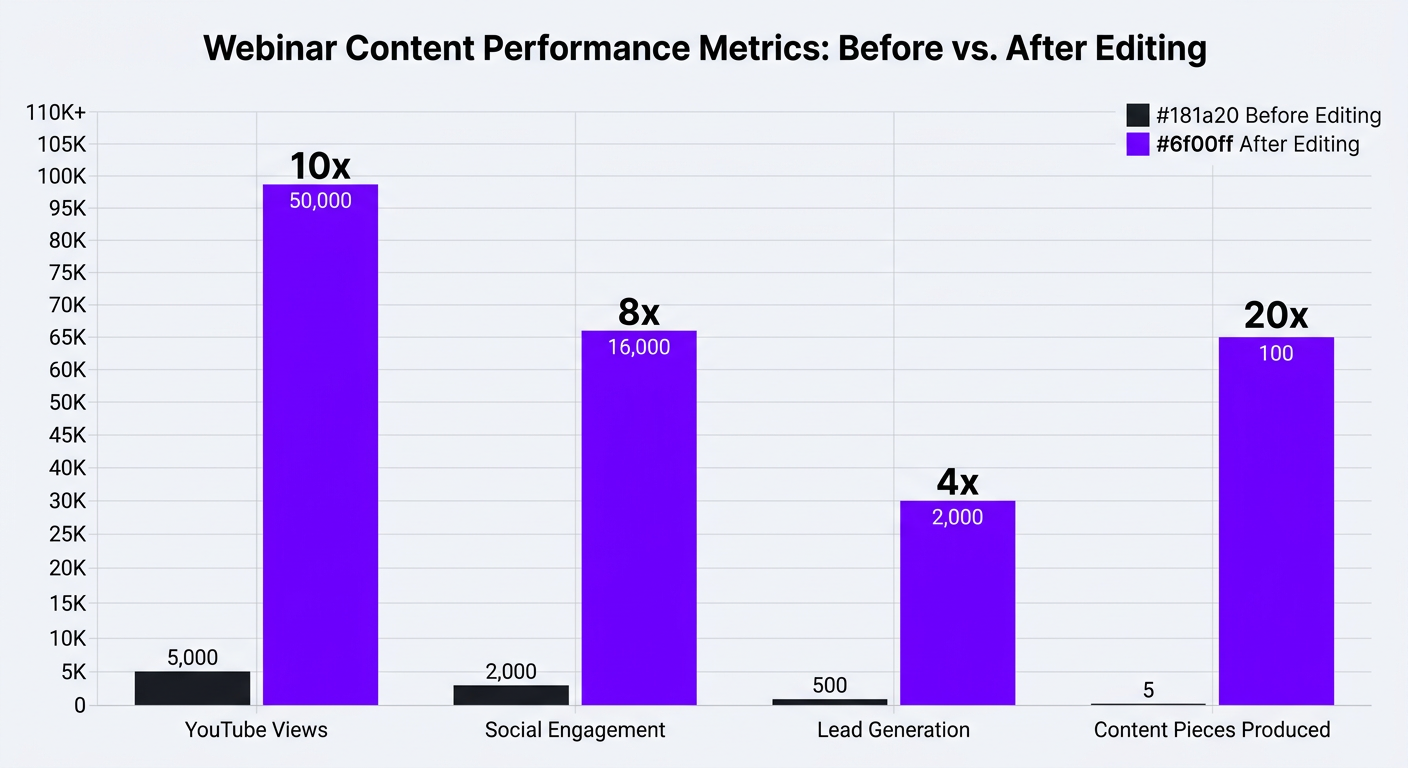
Companies like Blue Zones Health discovered this firsthand. They were hosting monthly educational webinars with 200+ live attendees but their replays averaged under 100 views. After partnering with a professional editing team, their edited replays consistently hit 2,000-5,000 views — a 20-50x improvement — because the content was tighter, visually engaging, and optimized for on-demand viewing.
The Numbers Behind Edited vs. Unedited Webinars
| Metric | Raw Recording | Professionally Edited |
|---|---|---|
| Average replay views (30 days) | 50-150 | 1,000-5,000+ |
| Replay completion rate | 8-12% | 35-50% |
| Average watch time | 4-7 minutes | 15-25 minutes |
| Lead generation (from replay) | Minimal | 20-40% of original registration |
| Social media clips generated | 0 | 5-15 per webinar |
| SEO value | Low (no optimization) | High (titles, descriptions, chapters) |
The difference isn’t subtle. Edited webinar replays outperform raw recordings by an order of magnitude on virtually every metric that matters.
What Professional Webinar Editing Actually Includes
When people hear “webinar editing,” they think trimming the start and end. That’s maybe 5% of what a good editor does. Here’s the full scope:
Level 1: Basic Cleanup ($150-$400)
- Trim dead air, waiting periods, and technical difficulties
- Normalize audio levels across all speakers
- Add branded intro and outro (5-10 seconds each)
- Insert speaker name lower thirds
- Add chapter timestamps in the description
- Basic color correction if webcam footage is included
- Export in platform-optimized format
Level 2: Enhanced Production ($400-$1,000)
Everything in Level 1, plus:
- Dynamic layout switching (speaker view ↔ slides ↔ side-by-side)
- On-screen text callouts for key statistics and quotes
- Animated transitions between sections
- Background music at low volume for energy
- Noise reduction and audio sweetening
- Custom thumbnail design
- 2-3 short clips pulled for social media
Level 3: Full Post-Production ($1,000-$2,500+)
Everything above, plus:
- Motion graphics for data points and frameworks
- B-roll integration (stock or custom footage)
- Animated diagrams replacing static slides
- Full subtitle/caption file (SRT) for accessibility
- 5-10 short-form clips optimized per platform (9:16, 1:1, 16:9)
- Audiogram versions for podcast distribution
- Engagement hooks added to the first 30 seconds
- SEO-optimized title, description, and tags
Webinar Editing Costs: Full Breakdown
Let’s get specific about what you’ll pay. These are 2026 market rates based on U.S.-facing services:
| Service | Per-Webinar Cost | Monthly Retainer (4 webinars) | What’s Included |
|---|---|---|---|
| Budget freelancer | $75-$200 | $300-$800 | Basic trim, audio fix, intro/outro |
| Mid-tier freelancer | $200-$500 | $800-$2,000 | Cleanup + lower thirds, transitions, 1-2 clips |
| Subscription service | $250-$600 | $1,000-$2,500 | Standardized template edit, quick turnaround |
| Professional agency | $500-$1,500 | $2,000-$5,000 | Full production + repurposed clips + strategy |
| Increditors | Custom quote | $2,500-$5,000+ | Dedicated team, full post-production, 10+ clips, SEO |
What Drives the Cost Up
Several factors push webinar editing costs higher:
- Webinar length. A 30-minute webinar is roughly half the editing time of a 90-minute one. Most agencies price by the hour of raw footage.
- Number of speakers. Multi-speaker panels require more audio balancing, layout switching, and lower thirds — adding 30-50% to the edit time.
- Screen share complexity. Product demos with rapid screen switching need more careful editing than a simple slide presentation.
- Repurposing scope. If you want 10 social clips, subtitles in three languages, and an audiogram — that’s significantly more work than just the long-form edit.
- Turnaround time. Need the edited replay within 24 hours? Expect a 50-100% rush premium.
The Hidden Cost of NOT Editing
Here’s the math most companies don’t do: if your webinar generated 500 registrations and only 200 attended live, that’s 300 people who planned to watch the replay. An unedited recording with 10% completion means roughly 30 people actually consumed your content. An edited version with 40% completion reaches 120 people. That’s 90 additional leads exposed to your full message — for a one-time editing investment of $500-$1,500.
If your average deal size is $5,000 and even 2% of those 90 extra viewers convert, that’s $9,000 in revenue from a single edited webinar. The ROI isn’t debatable.
Turn Your Webinars Into Your Best-Performing Content
We help B2B companies and creators transform webinar recordings into polished content that drives views, leads, and revenue for months. See our portfolio to judge the quality.
The Repurposing Framework: 1 Webinar → 20+ Content Pieces
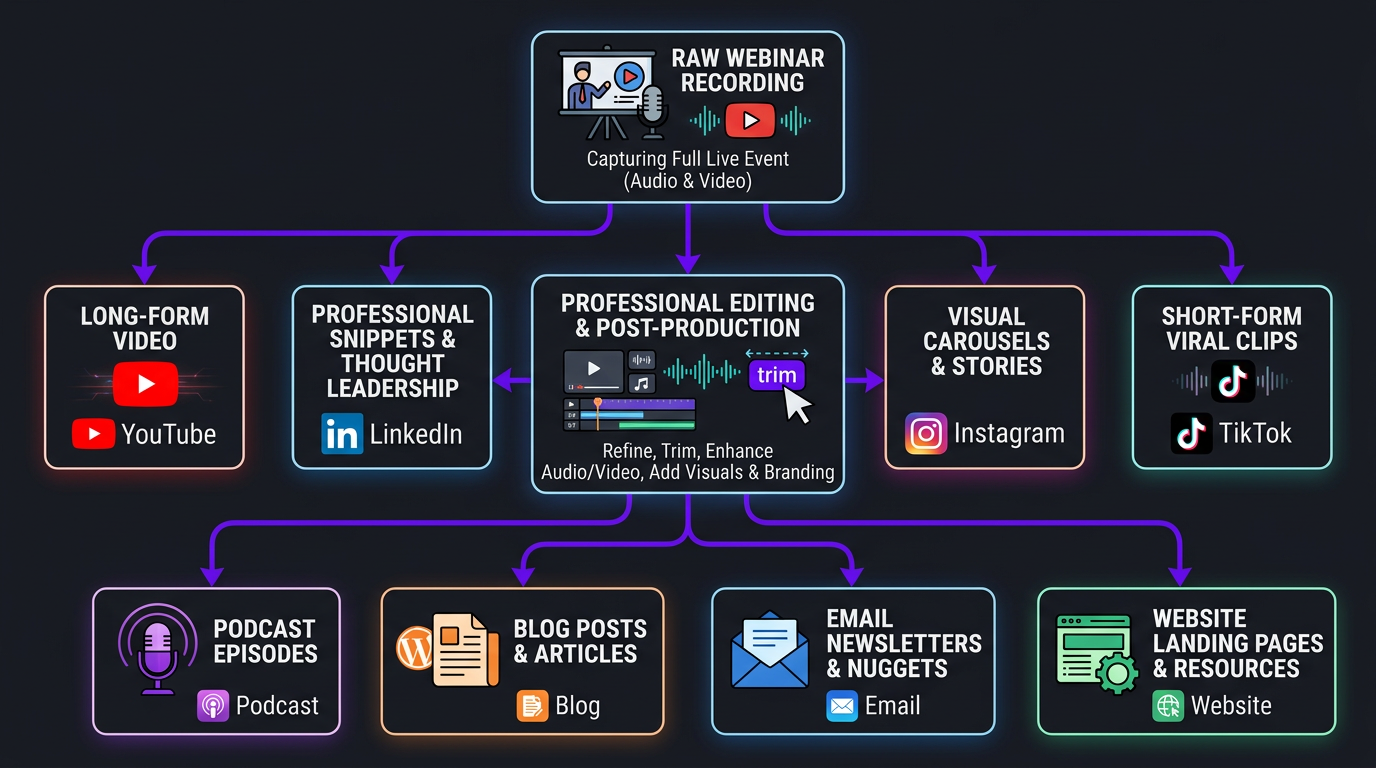
This is where webinar editing becomes a content strategy, not just a production task. A single 60-minute webinar contains enough material to fuel your content calendar for 2-4 weeks.
Here’s the framework we use with clients like eSafety, who turned their quarterly compliance webinars into a steady stream of LinkedIn content that generated more leads than the live events themselves:
The Content Multiplication Map
| Content Type | Quantity | Platform | Format |
|---|---|---|---|
| Full edited replay | 1 | YouTube, Website | 16:9 long-form |
| Key insight clips | 5-8 | LinkedIn, Twitter/X | 16:9 or 1:1, 60-90 sec |
| Vertical shorts | 3-5 | Reels, TikTok, Shorts | 9:16, 30-60 sec |
| Audiogram clips | 2-3 | Podcast feed, social | Audio + waveform visual |
| Quote graphics | 3-5 | Instagram, LinkedIn | Static image |
| Blog post / recap | 1 | Website/blog | 1,500-2,500 words |
| Email newsletter snippet | 1-2 | GIF + summary | |
| Highlight reel | 1 | Website, sales deck | 2-3 minute montage |
That’s 17-26 content pieces from one webinar. If you host 2 webinars per month, you’re producing 34-52 pieces of content monthly — enough to post daily across every platform with minimal additional creation effort.
The Sequencing Strategy
Timing matters. You don’t dump all 20 pieces at once. Here’s the optimal release sequence:
- Day 0 (webinar day): Send replay link to registrants who didn’t attend. Share 1 teaser clip on social.
- Day 1-2: Publish full edited replay on YouTube. Post first 2-3 key insight clips on LinkedIn.
- Day 3-7: Distribute vertical shorts on Reels/TikTok/Shorts (1 per day).
- Day 7-10: Publish blog recap. Send newsletter with top insights + embedded clip.
- Day 10-21: Drip remaining clips and quote graphics across social channels.
- Day 30+: Add highlight reel to website and sales materials. Use clips in retargeting ads.
This sequencing ensures your webinar content stays fresh in feeds for 3-4 weeks instead of being a one-day event that everyone forgets.
DIY vs Freelancer vs Agency: The Real Comparison
Let’s be honest about what each option actually looks like in practice:
| Factor | DIY / In-House | Freelancer | Agency |
|---|---|---|---|
| Cost per webinar | $0 (but 6-10 hrs of your time) | $150-$500 | $500-$1,500 |
| Turnaround | 3-7 days (squeezed between other work) | 2-5 days | 1-3 days |
| Quality consistency | Variable (depends on your skills) | Variable (depends on the freelancer) | Consistent (team + QC process) |
| Repurposed clips | Maybe 1-2 (if you have energy left) | 2-4 (extra charge) | 5-15 (included in package) |
| Motion graphics | ❌ | Basic (if they have the skills) | ✅ Full capability |
| Backup editor | ❌ | ❌ | ✅ |
| Strategic guidance | ❌ | Rarely | ✅ Content strategy included |
| Best for | Occasional webinars, tight budget | 1-2 webinars/month, basic editing needs | Regular webinar series, content-driven companies |
The choice usually comes down to volume and stakes. If webinars are a core part of your marketing or sales process — and for most B2B companies, they should be — the agency model delivers significantly more value per dollar because you’re getting a content multiplication engine, not just an edit.
Real Results: How Companies Use Edited Webinars
Case Study: Trade with Pat — Turning Trading Webinars Into a Content Machine
Trade with Pat hosts weekly live trading education sessions that run 60-90 minutes each. Before working with a professional editing team, they’d upload the raw recordings and get 200-400 views. The content was solid — years of trading expertise — but the presentation was rough.
After implementing professional webinar editing with full repurposing:
- YouTube replay views jumped from 300 to 3,500+ per video — a 10x improvement in average views.
- Weekly social clips (8-10 per webinar) became their primary LinkedIn growth driver, adding 500+ followers per month.
- Course enrollment increased 35% because edited clips served as “free samples” of the education quality.
- Total content output: From 4 raw videos/month to 40+ polished pieces across YouTube, LinkedIn, Instagram, and TikTok.
The editing investment? Roughly $3,500/month for a dedicated team handling all four weekly webinars plus full repurposing. The revenue increase from course enrollments alone covered that 3x over.
Case Study: Brightwell — B2B SaaS Webinars That Generate Pipeline
Brightwell, a fintech SaaS company, runs bi-weekly webinars targeting HR and finance decision-makers. Their challenge was classic: great content, terrible replay performance.
Their editing strategy focused on:
- First 30 seconds: Custom hook overlay with the webinar’s single most compelling insight — designed to stop scrollers.
- Chapter-based editing: Each webinar section became a standalone topic clip that could rank independently on YouTube.
- LinkedIn-first clips: 60-90 second clips optimized for LinkedIn’s autoplay format, with burned-in subtitles and data callouts.
Results after 6 months: webinar-sourced pipeline increased 40%, and their YouTube channel grew from 800 to 4,200 subscribers — entirely from repurposed webinar content.
Virtual Event Editing: Conferences, Summits & Panels
Virtual events are webinars on steroids — and they require more sophisticated editing. A typical virtual conference has 5-20 sessions over 1-3 days. That’s 10-40 hours of raw footage that, unedited, will never be watched.
What Virtual Event Editing Looks Like
The approach differs from single webinars in several ways:
- Consistent branding across sessions. Every speaker’s recording gets the same intro, lower thirds, and visual treatment — creating a cohesive viewing experience even though they were recorded separately.
- Highlight reels. A 5-10 minute highlights video of the entire event serves as both a recap for attendees and a promotional asset for next year’s event.
- Speaker-specific packages. Each speaker gets 2-3 clips from their session to share on their own channels — extending your event’s reach through their networks.
- On-demand library. All sessions are edited, chaptered, and organized into a gated on-demand library that generates leads for months post-event.
Virtual Event Editing Pricing
| Event Size | Sessions | Typical Edit Cost | Includes |
|---|---|---|---|
| Small summit | 5-8 sessions | $3,000-$6,000 | All sessions edited + 15-20 clips + highlight reel |
| Mid-size conference | 10-15 sessions | $6,000-$12,000 | All sessions + 30-40 clips + speaker packages + highlight reel |
| Large virtual event | 20+ sessions | $12,000-$25,000+ | Full post-production suite, on-demand library, promotional assets |
For companies running annual or quarterly virtual events, these costs are a fraction of the event production budget — and they extend the content lifespan from a single day to an entire year.
Consider this: a virtual summit with 2,000 attendees costs $20,000-$50,000 to produce (platform, speakers, promotion, production). Spending an additional $8,000-$15,000 on post-event editing gives that content a 12-month shelf life instead of a 12-hour one. The per-impression cost drops dramatically.
The On-Demand Library Strategy
Smart companies are using edited virtual event content as a gated resource. Here’s how it works:
- Edit all sessions to professional quality with consistent branding
- Build an on-demand library page on your website
- Gate access behind an email form (or offer free access to event registrants)
- Promote individual sessions through targeted social clips
- Use the library as a lead nurturing asset in email sequences
VYVE Wellness used this exact approach for their annual practitioner summit. The gated on-demand library generated 1,200 new email subscribers in the 6 months following the event — leads that would have been completely lost if the raw recordings had just been uploaded to YouTube.
How to Choose the Right Webinar Editor
Not every video editor is good at webinar editing. It’s a specific skill set that combines technical editing with content strategy and platform knowledge. Here’s what to look for:
Must-Have Skills
- Multi-source audio mixing. Webinars often have 2-4 speakers with different microphone setups. Your editor needs to balance these seamlessly.
- Dynamic layout design. Knowing when to show the speaker, when to show slides, and when to use side-by-side — this is editorial judgment, not just technical ability.
- Platform-specific formatting. The same clip needs to work as 16:9 on YouTube, 1:1 on LinkedIn, and 9:16 on Reels. That’s three different framing decisions for every clip.
- Pacing instinct. Webinars are naturally slow. A good editor knows where to tighten, where to cut, and where to add visual variety to maintain engagement.
- Subtitle/caption accuracy. Auto-generated captions are 80-85% accurate. That’s not good enough. Your editor should QC all captions, especially for technical or industry-specific terminology.
Red Flags
- They’ve never edited a webinar before (YouTube vlogs are a completely different skill)
- They can’t show you before/after examples of webinar edits
- They charge only for the long-form edit and consider clips “a separate project”
- They don’t ask about your distribution strategy before starting
- Turnaround times exceed 5 business days for a standard webinar
At Increditors, webinar editing is one of our fastest-growing service categories because B2B companies are realizing their webinar recordings are a goldmine of ungated content sitting on their hard drives. We assign dedicated editors who learn your brand, your audience, and your content style — so the 10th webinar edit is significantly better than the first.
The Ideal Webinar-to-Content Workflow
Whether you work with an agency or a freelancer, here’s the workflow that produces the best results:
Pre-Webinar (1-2 Days Before)
- Share the slide deck and speaker bios with your editor
- Confirm brand assets (logo, colors, fonts, lower third template)
- Identify 2-3 “must-capture” moments — key insights or announcements you know will be clip-worthy
- Set recording to capture speaker video and slides separately (if your platform supports it)
- Test all microphones and confirm recording quality
During the Webinar
- Have someone timestamp key moments in real-time (even rough notes help)
- Record in the highest quality your platform allows
- If using Zoom, enable “record separate audio for each participant”
- Save a local recording as backup (don’t rely solely on cloud)
Post-Webinar (Day 0-1)
- Upload raw footage to shared drive immediately
- Send timestamps and clip notes to your editor
- Provide any context the editor needs (who is the audience, what’s the goal of the replay)
Editing Phase (Days 1-3)
- Editor delivers first cut of long-form edit for review
- You review and provide feedback (one round, ideally — more = more cost)
- Editor produces final long-form + all short clips
- All files delivered with proper naming, captions, and platform specs
Distribution Phase (Days 2-21)
- Follow the sequencing strategy outlined earlier
- Track performance of replay and individual clips
- Share top-performing clips with your social media editing team for inspiration on future content
Recording Setup Tips for Better Edits
The quality of your edit is capped by the quality of your recording. Here are the technical details that make your editor’s job easier — and your final product better:
- Record at 1080p minimum. 720p recordings look pixelated when cropped for vertical clips.
- Use an external microphone. Built-in laptop mics produce audio that no amount of editing can fully fix.
- Good lighting. A $30 ring light dramatically improves webcam footage. Editors can color correct, but they can’t add light that wasn’t there.
- Separate audio tracks. If possible, record each speaker’s audio on a separate track. This gives the editor full control over levels and noise reduction.
- Stable internet. Use wired ethernet. WiFi dropouts cause quality degradation in recordings that shows up as pixelation and audio glitches.
- Clean background. Virtual backgrounds look unprofessional in close-up footage. A clean, well-lit physical background is always better.
Companies that invest 30 minutes in recording setup save 2-3 hours in editing time — which translates directly to lower costs and faster turnaround. Your video editing team will thank you.
How to Brief Your Editor
A good editing brief for a webinar should include:
- Target audience: Who will watch the replay? This affects pacing and complexity.
- Primary goal: Lead generation? Thought leadership? Course promotion? This affects CTA placement and emphasis.
- Must-include moments: Timestamp any segments that must stay in the final cut.
- Must-remove moments: Technical glitches, off-topic tangents, anything that should be cut.
- Clip priorities: Which topics or quotes would make the best standalone clips?
- Platform priorities: Is YouTube or LinkedIn more important? This affects editing decisions.
- Brand guidelines: Colors, fonts, logo placement, tone of text overlays.
Using a standardized brief template saves time on both sides and ensures nothing gets missed. For regular webinar series, the first brief is detailed — subsequent ones only need to note what’s different from the template.
Measuring Webinar Content ROI
Track these metrics to evaluate whether your webinar editing investment is paying off:
| Metric | What to Track | Target |
|---|---|---|
| Replay view count | YouTube + website embed views | 2-5x live attendance within 30 days |
| Replay completion rate | YouTube audience retention report | 35%+ average (vs. 10% for raw uploads) |
| Clip engagement | Views, likes, shares on social clips | 500+ views per clip on LinkedIn |
| Lead attribution | Leads from gated replays + clip CTAs | 10-20% of live registration volume |
| Content efficiency | Cost per content piece (total edit cost ÷ pieces produced) | Under $100/piece |
| Pipeline influence | Deals where webinar content was a touchpoint | Track via CRM attribution |
If your replay views are 2-5x your live attendance and your social clips consistently hit 500+ views, your editing investment is working. If not, the issue is usually distribution (not editing quality) — which means your content distribution strategy needs attention.
Ready to Turn Your Webinars Into a Content Engine?
We’ve helped B2B companies, educators, and creators transform webinar recordings into their highest-performing content. Let’s talk about your webinar series.
Frequently Asked Questions
Webinar editing costs range from $150-$500 for basic cleanup (trimming, transitions, lower thirds) to $800-$2,000+ for full post-production including motion graphics, chapter markers, B-roll integration, and multi-format repurposing. Monthly retainers for ongoing webinar series typically run $2,000-$5,000/month depending on volume and complexity.
A professionally edited webinar should include: branded intro and outro, speaker lower thirds, chapter markers or timestamps, cleaned audio with noise reduction, trimmed dead air and technical glitches, slide transitions synced with speaker, on-screen graphics for key points, and a compelling thumbnail. Higher-tier edits add motion graphics, B-roll, and multi-format clips for social distribution.
A basic edit of a 60-minute webinar takes 3-6 hours of editor time (1-2 day turnaround). A full production edit with motion graphics, B-roll, and repurposed clips takes 8-15 hours (3-5 day turnaround). Rush delivery within 24 hours is possible but typically costs 50-100% more. At Increditors, our standard turnaround for webinar edits is 48-72 hours.
Absolutely. A single 60-minute webinar can yield 15-25+ content pieces: the full edited replay (YouTube), 5-8 short clips (LinkedIn, Twitter/X), 3-5 vertical shorts (Reels, TikTok, Shorts), audiogram clips for podcast distribution, quote graphics, a blog post summary, and email newsletter content. This is one of the highest-ROI content strategies available for B2B companies.
For occasional webinars (1-2 per month), outsourcing to an agency is more cost-effective than hiring. For weekly webinars, a dedicated editor on retainer makes sense. Either way, the key is having someone who understands pacing, audience retention, and multi-platform formatting — not just basic video editing. The best results come from editors who think like content strategists.
Export the full replay in 1080p or 4K for YouTube and your website. Create 9:16 vertical clips for Instagram Reels, TikTok, and YouTube Shorts. Export 1:1 square clips for LinkedIn and Facebook. Include SRT subtitle files for accessibility and engagement — subtitled videos get 40% more views on average.
Key tactics: cut the first 5 minutes of small talk and “waiting for everyone,” add dynamic transitions between sections, overlay key data points as animated graphics, insert B-roll or screen recordings during demos, use jump cuts to tighten pacing, add subtle background music for energy, and include chapter timestamps so viewers can skip to relevant sections. The goal is to make the replay feel like produced content, not a surveillance recording.
Let’s Talk About Your Webinar Content Strategy
Every webinar you leave unedited is content — and leads — left on the table. Let’s fix that.
Pricing and performance data in this article reflects 2026 market rates and industry benchmarks from ON24, GoTo, and direct client results. Actual results vary by industry, audience size, and content quality. For current Increditors pricing, visit our pricing page or schedule a call.