










![3D Explainer Video - ScribbleLive.mp4_snapshot_00.12_[2022.03.09_03.14.16]](https://increditors.com/wp-content/uploads/elementor/thumbs/3D-Explainer-Video-ScribbleLive.mp4_snapshot_00.12_2022.03.09_03.14.16-r7wb53mx72rxst3qcqyrfxdmeyzb5r9jbl0wbjujh4.png "3D Explainer Video – ScribbleLive.mp4_snapshot_00.12_[2022.03.09_03.14.16]")
































Travel and lifestyle content is some of the most visually demanding video on YouTube. You’re working with footage from multiple cameras, drones, GoPros, and phones — shot across changing light conditions, noisy environments, and unpredictable settings. Then you have to turn all of that into a polished, emotionally engaging story that keeps viewers watching.
That’s why video editing for travel creators isn’t just “cutting clips together.” It’s the difference between a forgettable vacation montage and content that builds a loyal audience, attracts brand deals, and generates real revenue.
Whether you’re a solo travel vlogger, a couple documenting life abroad, or a lifestyle brand producing weekly content, this guide covers everything you need to know about editing travel and lifestyle videos — from styles and workflows to outsourcing, costs, and what separates good travel editing from great.
What’s in This Guide
- Why Editing Makes or Breaks Travel Content
- Travel & Lifestyle Editing Styles That Work in 2026
- Key Elements of Professional Travel Editing
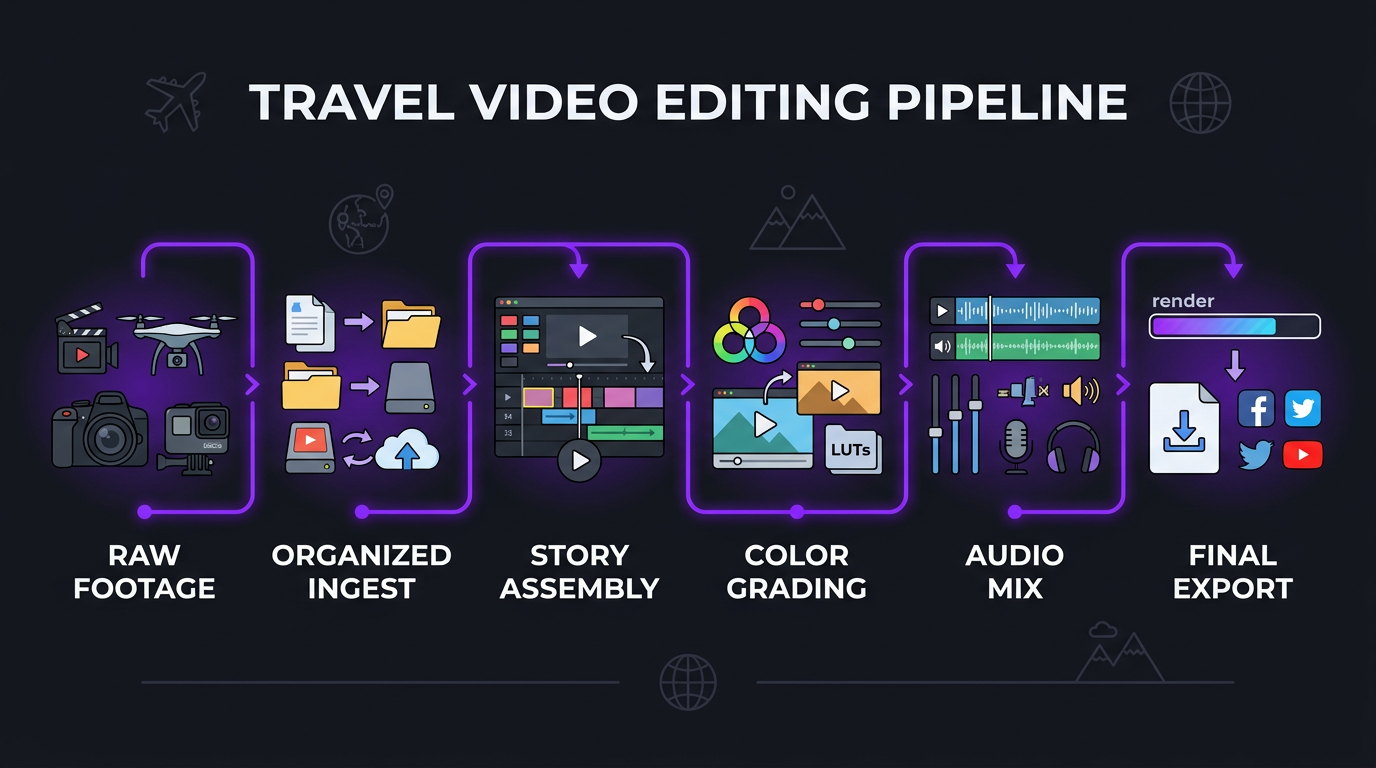
- The Travel Creator Editing Workflow
- DIY vs. Outsourcing: When to Make the Switch
- What Travel Video Editing Costs
- How to Choose a Travel Video Editor
- Travel Editing for Short-Form (Reels, Shorts, TikTok)
- Case Studies: Creators Who Leveled Up Through Editing
- Common Mistakes Travel Creators Make with Editing
- FAQ
Why Editing Makes or Breaks Travel Content
Here’s a truth most travel creators learn the hard way: nobody cares about your trip. They care about the experience of watching your trip. And that experience is almost entirely shaped by editing.
You can film at the most beautiful destination on earth with a $5,000 camera, but if the pacing is off, the color looks flat, the audio is a mess, and there’s no narrative structure — viewers click away in 30 seconds. YouTube’s algorithm notices, serves the video to fewer people, and the whole thing underperforms.
The data backs this up. According to YouTube’s own creator research, the single biggest predictor of a video’s success isn’t topic or thumbnail — it’s audience retention. And retention is an editing problem. Every cut, every transition, every music change, every text overlay is a micro-decision that either keeps viewers engaged or gives them a reason to leave.
What Travel Audiences Actually Respond To
Travel viewers are a specific breed. They’re watching for a mix of:
- Visual immersion — they want to feel like they’re there
- Storytelling — not just “here’s a place,” but “here’s what happened”
- Practical value — costs, tips, logistics they can use for their own trips
- Personality — connection with the creator as a person
- Pacing — fast enough to stay interesting, slow enough to soak in moments
Professional editing addresses all five of these simultaneously. It’s not about adding flashy effects — it’s about crafting an experience where every second serves the viewer.
The Retention Gap Between Amateur and Professional Travel Edits
We’ve analyzed hundreds of travel videos across different editing quality levels. The pattern is consistent:
| Editing Quality | Avg. Retention (10-min video) | Avg. View Duration | Typical CTR |
|---|---|---|---|
| Basic/DIY | 25-30% | 2:30–3:00 | 3-4% |
| Mid-tier editing | 35-42% | 3:30–4:12 | 5-6% |
| Professional cinematic | 45-55% | 4:30–5:30 | 7-10% |
That retention difference translates directly into algorithmic performance. A video with 50% retention gets served to exponentially more viewers than one with 30% retention. Over a year of weekly uploads, that compounds into hundreds of thousands — sometimes millions — of additional views.
Travel & Lifestyle Editing Styles That Work in 2026
Not all travel videos should look the same. The right editing style depends on your brand, your audience, and the type of content you produce. Here are the dominant styles performing well right now:
1. Cinematic Storytelling
Think Sam Kolder, Lost LeBlanc, Kraig Adams. This style emphasizes beauty, mood, and emotional narrative. Key editing characteristics:
- Wide establishing shots with slow, dramatic reveals
- Music-driven pacing (cuts synced to beat drops and transitions)
- Heavy color grading — warm tones for tropical, cool tones for urban, desaturated for moody
- Slow motion for texture and atmosphere
- Minimal talking head — the location is the star
- Smooth transitions (whip pans, match cuts, warp transitions)
This style is editing-intensive. A 10-minute cinematic travel video can take 15-25 hours to edit properly, involving careful shot selection from hundreds of clips, meticulous color grading across different locations and lighting conditions, and frame-perfect music synchronization.
2. Documentary Vlog Style
Think Yes Theory, Drew Binsky, Kara and Nate. This style balances information and entertainment with the creator as the central character. Editing characteristics:
- Conversational pacing with face-to-camera segments
- Quick cuts to maintain energy
- Text overlays for context (prices, locations, fun facts)
- Maps and graphics showing routes and destinations
- Sound bites from locals and travel companions
- B-roll interspersed with talking segments
This is the most popular style for full-time travel creators because it scales well — you can maintain quality while publishing frequently. Edit time: 8-14 hours per video.
3. Fast-Paced Information Style
Think Mark Wiens (food travel), Gabriel Traveler (budget travel). Dense information delivery with rapid visuals:
- Quick cuts every 2-4 seconds
- On-screen text reinforcing key points
- Multiple camera angles per scene
- Energy-driven music underneath narration
- Heavy use of zoom effects and punch-ins
4. Lifestyle Aesthetic
Think Matt D’Avella, Nathaniel Drew. Clean, minimalist editing that complements a curated visual brand:
- Consistent color palette across all videos
- Clean typography and minimal graphics
- Thoughtful pacing — doesn’t rush
- Ambient sound design
- Smooth, intentional transitions
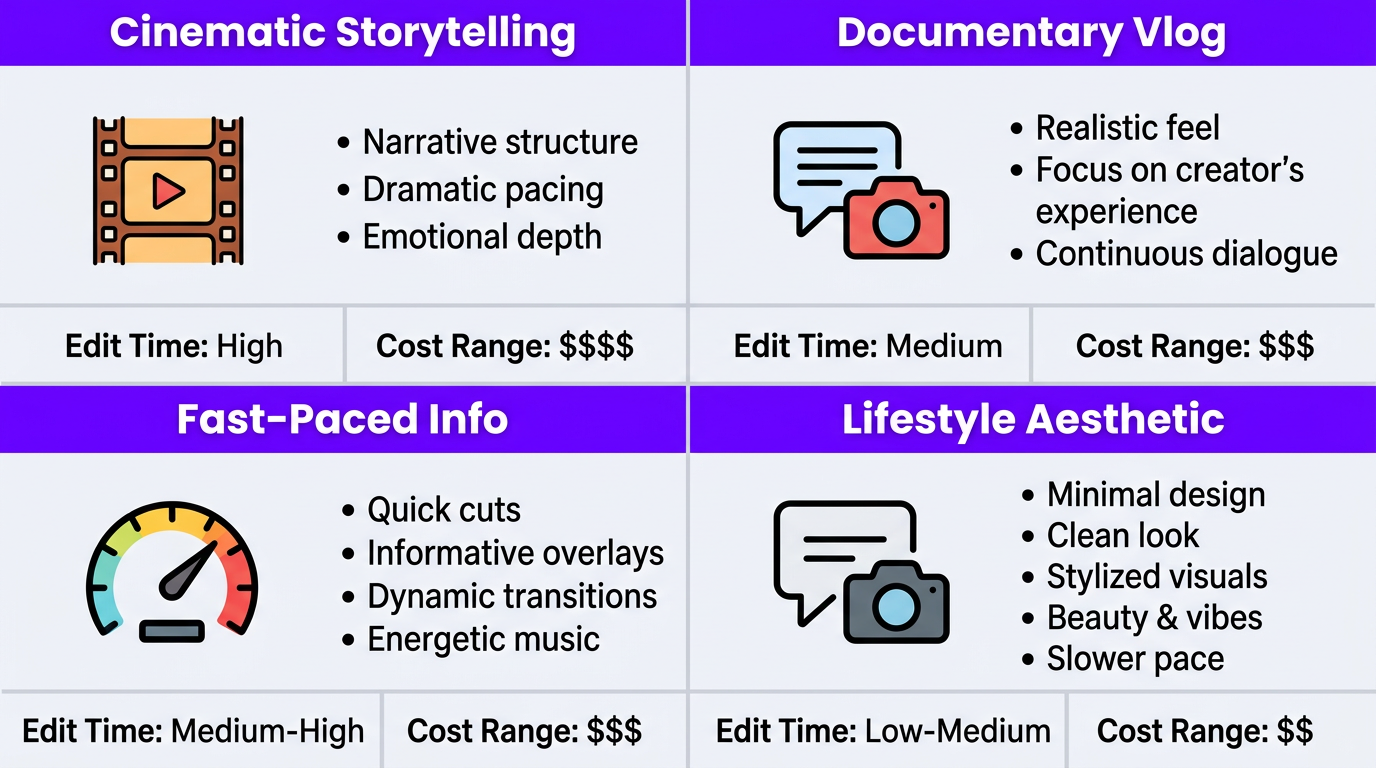
| Style | Edit Time (10-min video) | Skill Level Required | Best For | Cost Range (per video) |
|---|---|---|---|---|
| Cinematic | 15-25 hours | Advanced | Visual brands, filmmakers | $500–$1,200 |
| Documentary Vlog | 8-14 hours | Intermediate | Full-time travel YouTubers | $300–$600 |
| Fast-Paced Info | 6-10 hours | Intermediate | Food, budget, niche travel | $200–$450 |
| Lifestyle Aesthetic | 10-16 hours | Advanced | Lifestyle brands, slow content | $400–$800 |
Key Elements of Professional Travel Editing
Regardless of style, professional travel editing shares several technical and creative elements that separate it from amateur work. Understanding these helps you evaluate editors and communicate what you want.
Color Grading: The Silent Persuader
Color grading is arguably the single most important editing element in travel content. It’s what makes Bali look dreamy, Tokyo look electric, and Iceland look ethereal. Without proper color grading, even stunning footage looks like home video.
Professional travel color grading involves:
- Color correction first — normalizing white balance, exposure, and contrast across clips shot in wildly different conditions (sunrise, midday, indoor, outdoor, overcast, golden hour — sometimes all in one video)
- Look development — creating a consistent aesthetic that matches the mood of the location and your brand identity
- Scene-to-scene matching — ensuring cuts between different locations don’t feel jarring
- Skin tone protection — stylized looks that don’t make people look orange, green, or dead
A travel video might have footage from 5-10 different lighting environments in a single day. Matching all of that into a cohesive visual experience is skilled work that takes 2-4 hours alone on a complex video.
Audio: The Most Overlooked Element
Travel footage has notoriously difficult audio. Wind, crowds, traffic, music from shops, echoing interiors, and inconsistent mic placement all create problems. Professional audio editing for travel includes:
- Noise reduction without making voice sound robotic
- Ambient audio layering — adding room tone, nature sounds, or city atmosphere to create immersion
- Music selection and mixing — choosing tracks that enhance mood without overpowering narration
- Audio transitions — smoothly shifting between talking segments, ambient scenes, and music-driven sequences
Pacing and Structure
Travel videos that hold attention follow a deliberate structure. The most effective pattern we see:
- Hook (0-30 seconds) — the most visually stunning or emotionally compelling moment from the video, placed first
- Context (30-90 seconds) — who, where, why, what to expect
- Act 1 (minutes 1-4) — arrival, first impressions, establishing the location
- Rising action (minutes 4-7) — deeper exploration, unexpected moments, key experiences
- Climax (minutes 7-9) — the best moment, the most beautiful shot, the most meaningful experience
- Resolution (final 1-2 minutes) — reflection, practical takeaways, CTA for next video
Editors who understand this structure know when to speed up (quick cuts, energy), when to slow down (wide shots, breathing room), and where to place music transitions to signal shifts in the narrative.
B-Roll Integration and Visual Storytelling
Travel creators typically shoot 10-50x more footage than they use. A professional editor’s job is to select and sequence B-roll that tells a story without narration. The best travel editors think like cinematographers — they understand shot progression (wide → medium → close), visual metaphor, and the emotional weight of different compositions.
Motion Graphics and Text
Travel videos benefit from strategic use of graphics:
- Animated maps showing routes and locations
- Price tags for food, accommodations, activities
- Location name reveals with clean typography
- Comparison graphics (then vs. now, expectation vs. reality)
- Tip boxes and key information callouts
These elements add production value and practical value simultaneously — making your content both prettier and more useful.
Need Cinematic Travel Editing That Actually Grows Your Channela
We’ve edited travel content for creators across 40+ countries. See the results and let’s talk about your content.
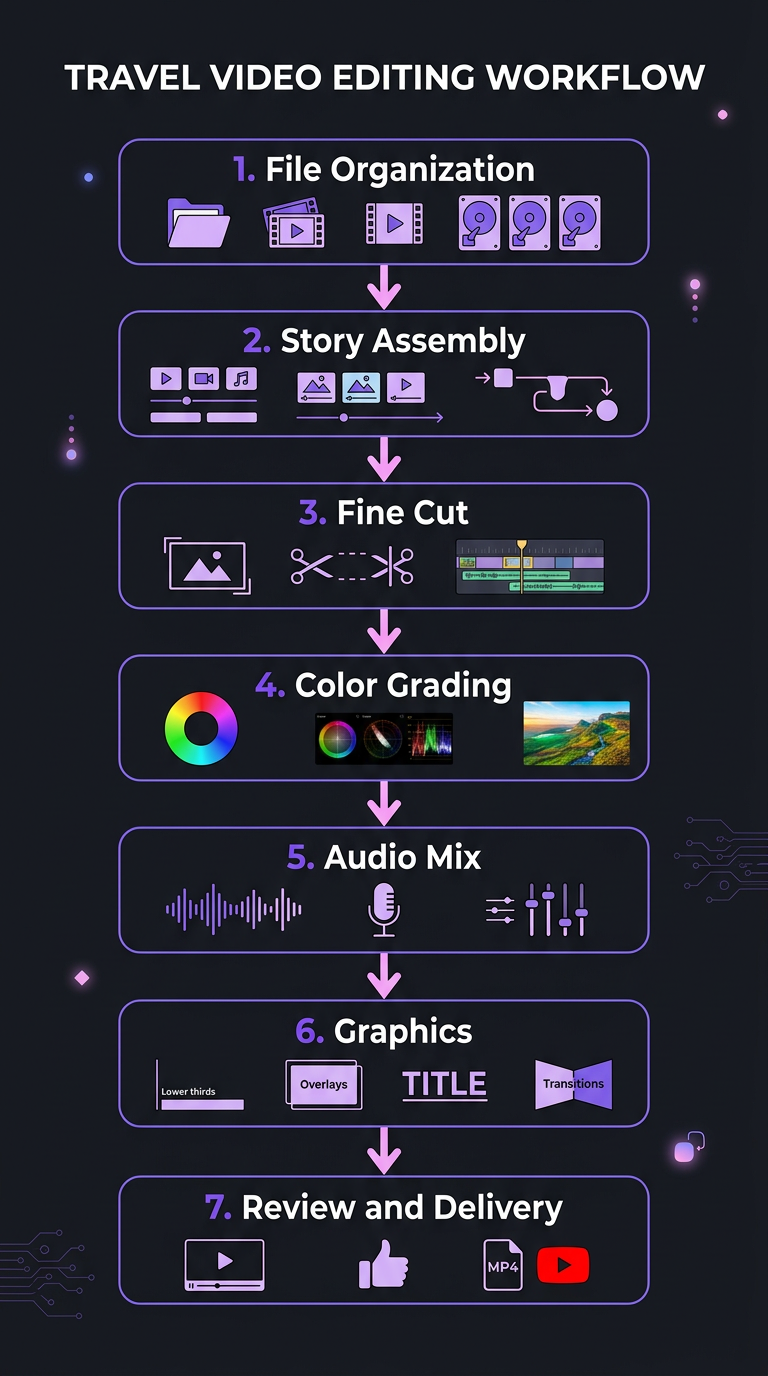
The Travel Creator Editing Workflow
Whether you edit yourself or outsource, understanding the professional workflow helps you produce better content and communicate effectively with editors.
Step 1: Organized Ingest and File Management
A typical travel shoot generates 100-500GB of footage per trip. Professional workflows start with organized file structure:
- Folders by day and location
- Camera source labels (A-cam, drone, GoPro, phone)
- Selects folders for pre-screened best clips
- Audio files separated from video where applicable
If you’re working with an editor, sending a well-organized drive saves hours and ensures nothing gets missed. We recommend using Frame.io or Google Drive with a standardized folder structure your editor can replicate across projects.
Step 2: Story Assembly (Rough Cut)
Before any polish happens, the editor builds the story. This means selecting the strongest footage, arranging it into a narrative structure, and laying down a rough audio mix with voiceover and music. The rough cut is where 70% of the creative decisions happen.
Step 3: Fine Cut and Pacing
Tightening every cut, adjusting timing, adding B-roll, refining transitions. This is where a 15-minute rough cut becomes a tight 10-minute video that holds attention throughout.
Step 4: Color Grading
Applied after the edit is locked. Color grading across 50-100 different shots from different lighting conditions requires patience, skill, and a calibrated monitor.
Step 5: Audio Mix and Sound Design
Final audio leveling, noise reduction, music mixing, and ambient sound layering. This is what makes the video feel “finished” versus “uploaded.”
Step 6: Graphics and Polish
Lower thirds, map animations, text overlays, thumbnails. The final layer of production value.
Step 7: Review and Delivery
Export, review, revisions, and final delivery in the correct format and resolution for each platform (YouTube 4K, Instagram 1080×1350, TikTok 1080×1920).
DIY vs. Outsourcing: When to Make the Switch
Every travel creator starts by editing their own videos. And honestly, for the first 20-50 videos, that’s valuable — you learn what works, develop your style, and understand the craft. But there’s a clear inflection point where DIY editing starts holding you back.
Signs It’s Time to Outsource
- You’re spending 15+ hours per video on editing — time you could spend filming, engaging your audience, or landing brand deals
- Your upload schedule is inconsistent — because editing always takes longer than planned
- You dread the editing process — and it shows in your final product
- You’re earning revenue from your content — brand deals, AdSense, affiliate income that could fund professional editing
- Your growth has plateaued — despite improving your filming, topics, and thumbnails
- You’re burning out — the travel-film-edit-publish cycle is unsustainable solo
The Math of Outsourcing for Travel Creators
| Factor | DIY Editing | Outsourced Editing |
|---|---|---|
| Time per video | 12-20 hours | 1-2 hours (review + feedback) |
| Videos per month | 2-4 (limited by editing time) | 4-8+ (limited by filming only) |
| Monthly cost | $0 (but 40-80 hours) | $1,500–$4,000 |
| Quality consistency | Variable (depends on energy) | Consistent (dedicated editor) |
| Color grading quality | Basic LUT application | Professional per-shot grading |
| Freed time for | — | Filming, brand deals, audience growth |
When Riley Coleman came to us, he was producing quality travel and lifestyle content but couldn’t maintain a consistent publishing schedule because editing consumed so much of his time. By outsourcing to our creator editing team, he doubled his output while the editing quality jumped significantly. His channel growth accelerated because he could focus on what he does best — creating engaging on-camera content and exploring new destinations.
What Travel Video Editing Actually Costs
Travel editing sits at the higher end of YouTube editing costs because of the complexity involved. Here’s what you should expect to pay in 2026:
| Service Level | Per Video | Monthly (4 videos) | What’s Included |
|---|---|---|---|
| Budget (Fiverr, Upwork) | $150–$300 | $600–$1,200 | Basic cuts, simple transitions, stock music, light color correction |
| Mid-tier (Experienced freelancer) |
$350–$600 | $1,400–$2,400 | Professional pacing, color grading, text overlays, B-roll integration, audio mixing |
| Premium (Increditors) |
$500–$1,000 | $2,500–$5,000 | Cinematic grading, motion graphics, sound design, dedicated editor, shorts repurposing, PM |
| Cinematic specialist | $800–$1,500+ | $3,200–$6,000+ | Film-quality grading, custom animations, sound design, director-level story input |
The premium tier is where most professional travel creators land — it’s the sweet spot of quality, reliability, and scale. You get editors who understand cinematic travel content, consistent turnaround so you never miss a publish date, and the ability to repurpose long-form content into shorts and Reels without hiring separately.
What Drives Travel Editing Costs Higher
- Multi-camera footage (drone + main camera + GoPro + phone) requires syncing and selection from 3-4x more footage
- Diverse lighting conditions mean more color grading work per shot
- Ambient audio challenges require noise reduction and environmental sound design
- High B-roll ratio — travel videos might use 50-100 different shots vs. 10-15 for a talking head
- Map animations and location graphics are custom motion graphics work
How to Choose a Travel Video Editor
Finding the right editor for travel content is harder than for most niches because the skill requirements are broader. Here’s what to look for:
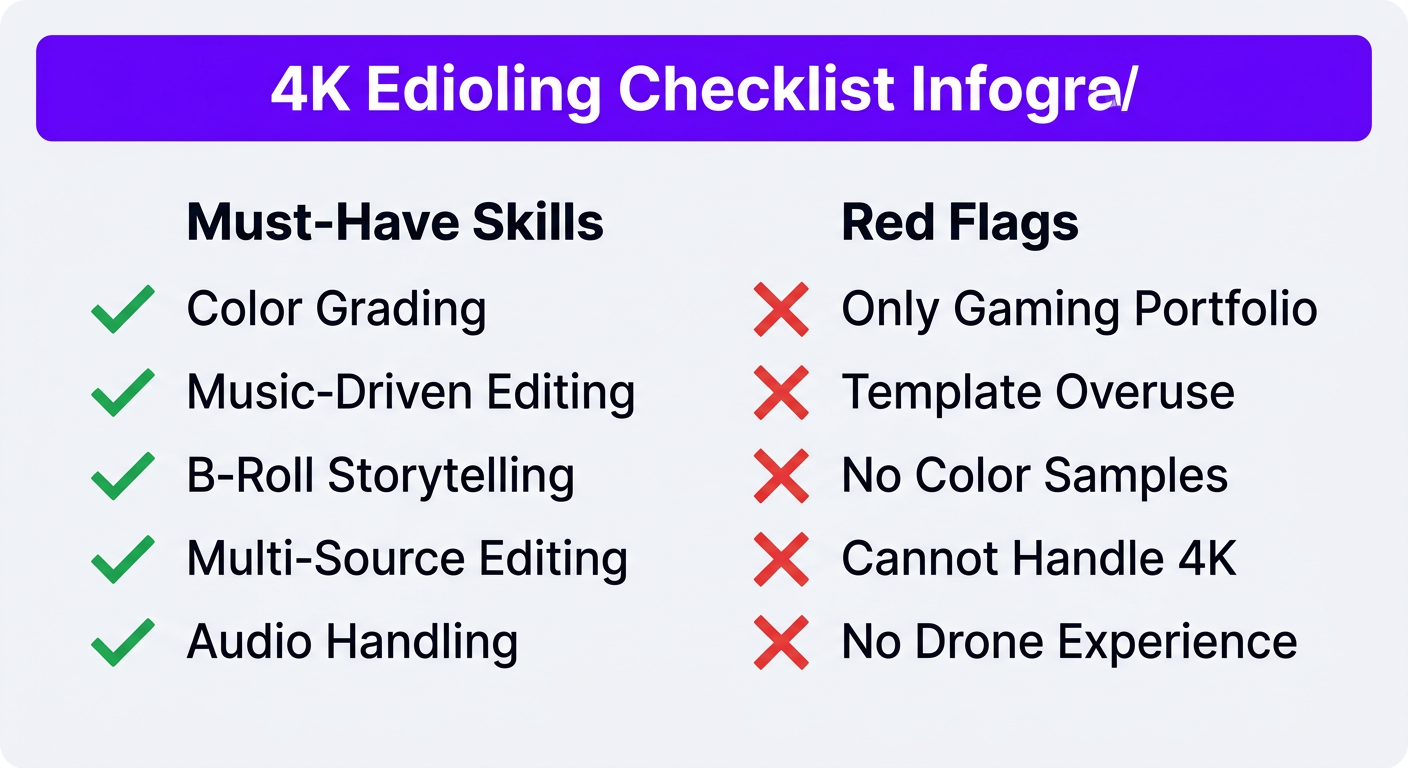
Must-Have Skills
- Color grading expertise — ask for before/after samples. If they just slap LUTs on footage, they’re not the right fit.
- Music-driven editing — can they pace a montage to music This is a core travel editing skill.
- B-roll storytelling — do their portfolios show intentional shot selection and sequencing, or random pretty clipsa
- Multi-source editing — experience working with drone, mirrorless, GoPro, and phone footage in the same project
- Audio handling — travel audio is messy. They need to make it clean.
Red Flags
- Portfolio is only gaming videos or talking head edits — different skill set entirely
- Over-reliance on templates and transitions — travel editing should feel organic, not like a preset pack
- No color grading samples — this is non-negotiable for travel content
- Can’t handle 4K+ footage workflows
- Never worked with drone footage
The Trial Project Approach
Never commit to a monthly retainer without a trial. Give a potential editor a single video — ideally one with varied footage (drone, ground, multiple locations) — and evaluate:
- Did the color grading look cohesive across locationsa
- Was the pacing engaging throughouta
- Did B-roll choices enhance the story or just fill spacea
- Was the audio clean and well-mixeda
- Did they add creative touches you didn’t ask fora
That last point is key. Great travel editors are proactive — they spot opportunities for better shots, smoother transitions, and stronger moments that you might not have noticed in your own footage.
Travel Editing for Short-Form: Reels, Shorts, and TikTok
Short-form travel content has exploded. And the editing approach is completely different from long-form.
What Works in Short-Form Travel
- Hook in 0.5 seconds — the most visually striking shot, an unexpected moment, or a bold text statement
- Beat-synced cuts — transitions timed to trending audio, every 0.5-1.5 seconds
- Text-first storytelling — many viewers watch without sound, so on-screen text carries the narrative
- Vertical framing — reframing horizontal drone and camera footage for 9:16 without losing the composition
- Speed ramping — mixing normal speed and slow motion for dynamic energy
- Trending formats — photo dumps, “POV” sequences, “places you need to visit” lists, before/after reveals
Repurposing Long-Form into Shorts
The most efficient content strategy is filming for long-form and repurposing for short-form. Your editor can extract 3-5 shorts from every long-form travel video by:
- Pulling the most visually compelling 30-60 second segments
- Reformatting from 16:9 to 9:16 with strategic cropping
- Adding trending audio and platform-specific captions
- Creating standalone narratives that work without the full video’s context
At Increditors, we bundle this into our travel creator packages — every long-form edit comes with 3-5 short-form clips optimized for Instagram, TikTok, and YouTube Shorts. It’s significantly more cost-effective than producing short-form content separately.
Case Studies: Creators Who Leveled Up Through Editing
Riley Coleman: From Inconsistent Posting to Consistent Growth
Riley was a talented on-camera creator producing travel and lifestyle content, but his editing bottleneck meant he could only publish 2-3 times per month — and the quality varied based on how much time he had. After partnering with Increditors, he shifted to weekly uploads with consistent cinematic quality. The compound effect of regular publishing plus better retention drove significant channel growth within six months.
TuMeke: Brand Storytelling Across Global Locations
While not a traditional travel creator, TuMeke’s content required filming across multiple international locations with different lighting conditions and environments — essentially travel-grade editing complexity for B2B content. Their previous freelancers couldn’t maintain visual consistency across locations. Our dedicated team developed a brand-specific color grading template and style guide that ensured every video looked like it came from the same studio, regardless of where it was filmed.
VYVE Wellness: Lifestyle Content That Converts
VYVE Wellness produces lifestyle content that blends wellness education with aspirational visuals — a category that demands the same editing sensibility as travel content. Their challenge was making educational health content feel cinematic and engaging rather than clinical. Through strategic pacing, warm color grading, and lifestyle B-roll integration, their content started performing as both informational and inspirational, driving measurable engagement increases.
Ready to Transform Your Travel Contenta
Whether you’re a solo vlogger or a travel brand, we’ll build an editing workflow that fits your production style and growth goals.
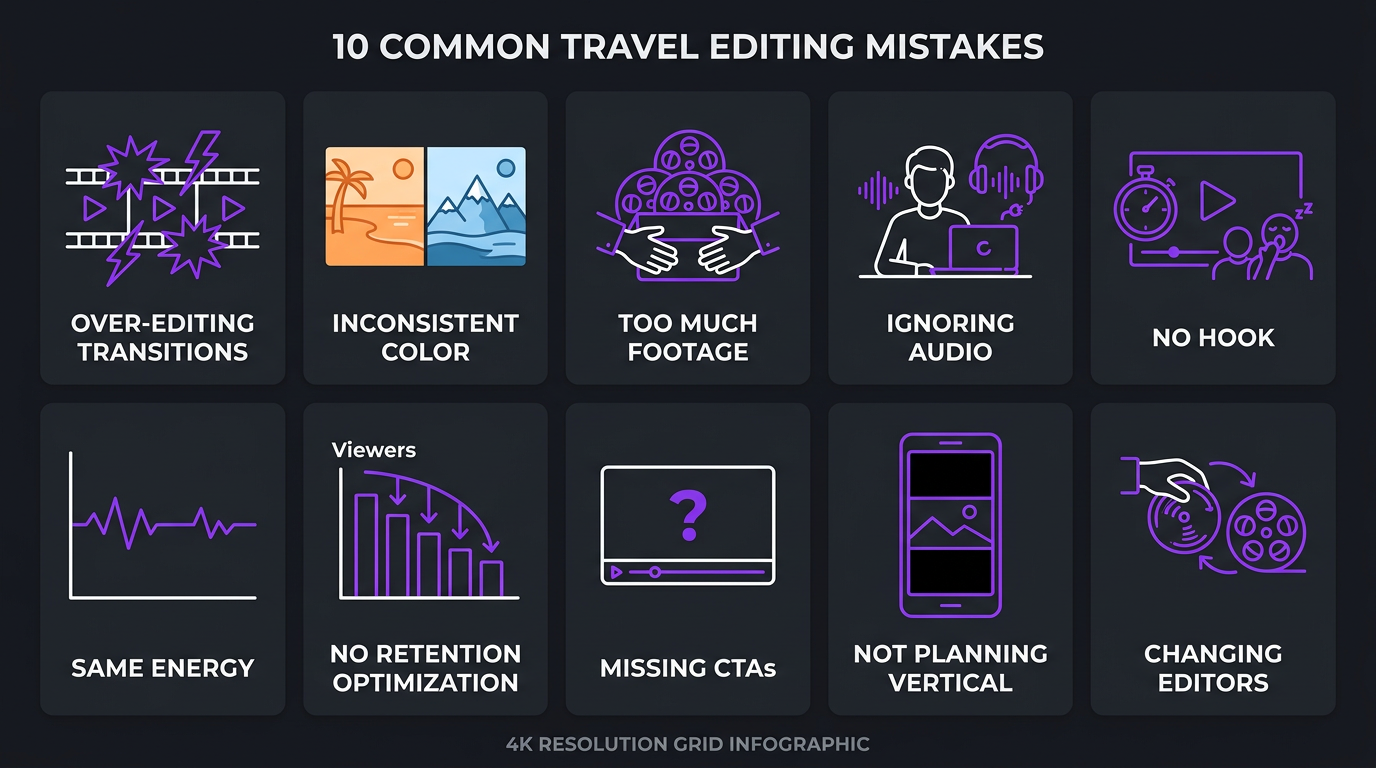
10 Common Mistakes Travel Creators Make with Editing
After editing hundreds of travel videos, we see the same mistakes repeatedly. Avoiding these will immediately improve your content:
1. Over-editing with Transitions
Whip pans, zoom transitions, and warp effects are tools, not a style. Using them every 3 seconds makes your video look like a transition preset demo reel. The best travel editors use transitions purposefully — to signal a location change, time shift, or mood change.
2. Inconsistent Color Grading
Applying a single LUT to all footage without adjustment makes indoor shots look different from outdoor shots, which look different from drone shots. Each shot needs individual attention before a stylistic look is applied.
3. Too Much Footage, Not Enough Story
Including shots because they’re “pretty” rather than because they serve the narrative. Every shot should either advance the story, provide context, or create an emotional moment. Ruthless cutting makes better videos.
4. Ignoring Audio
Wind noise, inconsistent levels, music that overpowers voiceover — audio problems are the fastest way to lose viewers. People will watch slightly imperfect video, but they won’t tolerate bad audio.
5. No Hook Structure
Starting with “Hey guys, welcome back to my channel, today we’re in…” instead of your most compelling visual or statement. The first 5 seconds determine whether viewers stay or leave.
6. Same Energy Throughout
A 10-minute video that maintains the same pacing throughout is exhausting. Great travel edits have dynamic energy — fast moments followed by breathing room, loud followed by quiet, wide followed by intimate.
7. Not Optimizing for Retention
Adding pattern interrupts (zoom cuts, B-roll switches, text reveals, music changes) every 15-30 seconds is proven to maintain attention. Going 2+ minutes with the same visual approach creates drop-off points.
8. Neglecting End Screens and CTAs
The last 20 seconds should drive viewers to your next video. Failing to add a clear visual and verbal CTA at the end wastes the attention you worked so hard to earn.
9. Not Planning for Short-Form During Filming
Shooting only in 16:9 without considering 9:16 repurposing limits your short-form options. Smart travel creators film key moments with vertical framing in mind, even while shooting horizontal — keeping subjects centered and avoiding critical action at frame edges.
10. Changing Editors Too Often
Every new editor needs 3-5 videos to learn your style. Switching editors every month or two means you’re perpetually in the ramp-up phase, never getting the benefit of an editor who truly understands your brand and audience.
Frequently Asked Questions
Travel video editing typically costs $250–$800 per video depending on complexity. Monthly retainers for travel creators producing 4-8 videos run $2,000–$5,000/month with a dedicated editor who understands cinematic travel pacing, color grading, and multi-location storytelling. Budget freelancers on Fiverr start at $150 per video but lack the color grading and audio expertise travel content demands.
The most effective travel editing combines cinematic B-roll sequences with dynamic pacing — fast cuts for energy, slow motion for atmosphere. Key elements include color grading matched to location mood, text overlays for context, drone footage integration, and music-synced transitions. The specific style depends on your brand: cinematic storytelling, documentary vlog, fast-paced information, or lifestyle aesthetic each work well for different audience types.
Outsourcing makes sense once you’re producing 4+ videos per month or earning revenue from content. Travel editing is particularly time-intensive — a single cinematic travel video can take 12-20 hours to edit due to large footage volumes, extensive color grading, and complex audio. Most successful travel creators outsource to focus on filming and audience engagement, typically seeing improved quality and faster growth.
Adobe Premiere Pro and DaVinci Resolve dominate professional travel editing. Premiere Pro leads for its integration with After Effects (motion graphics) and Lightroom (color matching). DaVinci Resolve is preferred for advanced color grading. Final Cut Pro is popular among solo creators on Mac for its speed. After Effects handles map animations and custom graphics.
Professional workflows use cloud storage (Google Drive, Frame.io, or Dropbox) with proxy editing — editors work with lower-resolution copies for speed and conform to full resolution for export. A typical travel shoot generates 200-500GB of raw footage across cameras and drones. Organized file structures sorted by day, location, and camera source are essential for efficient editing.
Travel editing requires cinematic color grading across varying lighting conditions, drone footage integration, multi-location storytelling, ambient audio mixing, music-driven pacing, and heavy B-roll usage. A 10-minute travel video might use 50-100 different shots compared to 10-15 for a talking head, making it 3-5x more complex and time-intensive to edit.
Professional travel video editing takes 8-20 hours per video depending on length and style. A 10-minute cinematic vlog with drone footage, multi-location color grading, and motion graphics typically takes 12-16 hours. Quick conversational vlogs take 4-6 hours. This is why most serious travel creators outsource — editing a weekly video would consume half their working week or more.
Let’s Make Your Travel Content Unforgettable
From cinematic vlogs to fast-paced Reels, we edit travel content that grows channels and attracts brand deals. Let’s talk about your vision.
This guide reflects 2026 market data from industry research and our experience editing travel content for creators worldwide. For current Increditors pricing and packages tailored to travel creators, book a call with our team.