










![3D Explainer Video - ScribbleLive.mp4_snapshot_00.12_[2022.03.09_03.14.16]](https://increditors.com/wp-content/uploads/elementor/thumbs/3D-Explainer-Video-ScribbleLive.mp4_snapshot_00.12_2022.03.09_03.14.16-r7wb53mx72rxst3qcqyrfxdmeyzb5r9jbl0wbjujh4.png "3D Explainer Video – ScribbleLive.mp4_snapshot_00.12_[2022.03.09_03.14.16]")
































SaaS companies have a unique problem that video editing for SaaS companies can solve: your product is invisible. Unlike a physical product that customers can hold, feel, or try on, a SaaS product lives behind a login screen. Prospects can read your feature list, scan your screenshots, and study your pricing page — but until they actually see your product in motion, they’re making a decision based on faith.
That’s why video has become the most important content format for SaaS marketing, sales, and retention. But here’s what most SaaS companies get wrong: they invest in production (cameras, studios, scripts) while treating post-production as an afterthought. The editing is where a mediocre product demo becomes a compelling sales tool. It’s where a talking-head thought leadership clip becomes a brand-building asset. And it’s where a clunky onboarding tutorial becomes the difference between a churned user and a lifelong customer.
This guide covers everything SaaS companies need to know about video editing — from the five core video types every SaaS company should produce, to the editing techniques that make each one effective, to the cost structures and team models that make it sustainable.
What’s in This Guide
- Why SaaS Companies Need Video (The Data)
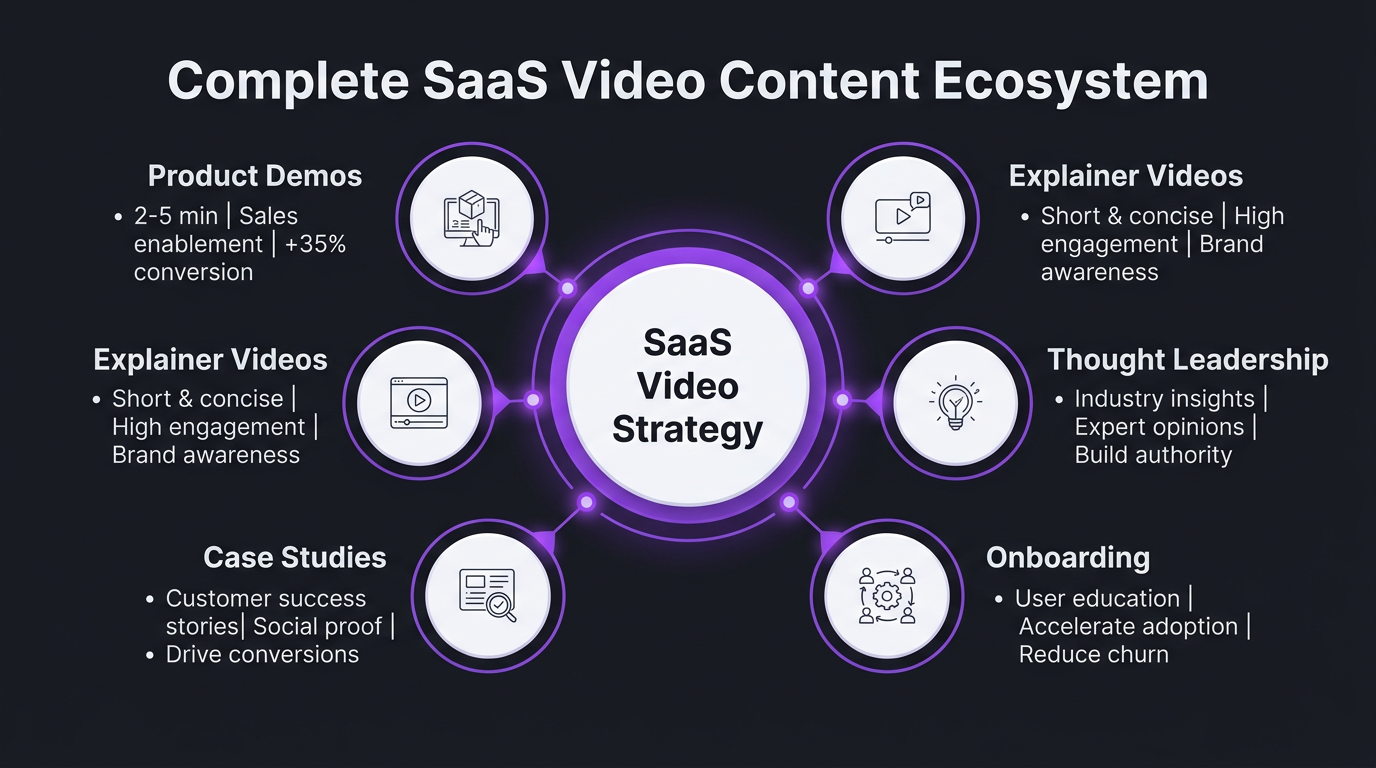
- The 5 Core Video Types for SaaS
- Product Demo Videos: Editing That Sells
- Explainer Videos: Simplifying Complexity
- Thought Leadership Videos: Building Authority
- Case Study Videos: Social Proof That Converts
- Onboarding Videos: Reducing Churn
- Mapping Videos to Your SaaS Funnel
- SaaS-Specific Editing Techniques
- What SaaS Video Editing Costs
- In-House vs Agency: The Right Model
- Real Results: SaaS Clients
- FAQ
Why SaaS Companies Need Professional Video Editing
The data on video for B2B and SaaS marketing is overwhelming:
- 96% of B2B buyers watch video content during their purchase journey (Demand Gen Report)
- 73% of B2B marketers report positive ROI from video marketing (Wyzowl, 2025)
- Companies using video grow revenue 49% faster than non-video users (Aberdeen Group)
- Including a video on a landing page can increase conversions by 80% (Unbounce)
- 59% of executives prefer watching video to reading text (Wordstream)
But here’s the nuance that most “video marketing” articles miss: the production quality of your video directly signals the quality of your product. A SaaS prospect watching a poorly edited product demo unconsciously thinks: “If this is how they present themselves, how polished can their product really be?”
Conversely, a beautifully edited demo — with smooth transitions, clear UI highlights, professional motion graphics, and polished audio — communicates competence, attention to detail, and pride in the product. These are exactly the qualities SaaS buyers evaluate.
The SaaS Video Editing Gap
Most SaaS companies fall into one of two traps:
- No video at all: They know they should produce video but can’t figure out the logistics, so they stick with blog posts and static screenshots.
- Unedited or poorly edited video: They record screen captures or talking-head clips, do minimal editing, and publish content that actually hurts their brand more than it helps.
Both traps stem from the same misunderstanding: video editing for SaaS companies isn’t just about cutting footage. It’s about translating complex software into visual narratives that prospects can understand, trust, and act on.
The 5 Core Video Types Every SaaS Company Needs
Not all SaaS videos serve the same purpose. Each type maps to a specific stage in your funnel and requires different editing approaches. Here’s the framework:
| Video Type | Funnel Stage | Ideal Length | Primary Goal | Editing Complexity |
|---|---|---|---|---|
| Product demos | Middle | 2–5 min | Show the product in action | High |
| Explainer videos | Top | 60–90 sec | Explain the problem/solution | Very High (animation) |
| Thought leadership | Top / Middle | 5–15 min | Build brand authority | Medium |
| Case study videos | Bottom | 3–5 min | Social proof, conversion | Medium-High |
| Onboarding tutorials | Post-sale | 2–10 min | Reduce churn, cut support load | Medium |
Let’s break down the editing requirements for each.
Product Demo Videos: Editing That Sells Your Software
Product demos are the workhorse of SaaS video content. They’re the videos prospects watch right before (or right after) signing up for a trial. They’re the videos your sales team sends when a prospect asks “can you show me how this works?” They’re also, unfortunately, the videos most SaaS companies edit poorly.
The #1 Demo Editing Mistake
Starting with the login screen. We see this constantly: the demo begins with someone typing credentials, waiting for the dashboard to load, then slowly clicking through menus. By the time they reach the interesting feature, the viewer has already bounced.
Professional demo editing starts with the outcome. Show the result first — the dashboard with impressive metrics, the automated workflow in action, the generated report — then walk backwards to show how you got there. This is story structure applied to software.
Essential Demo Editing Techniques
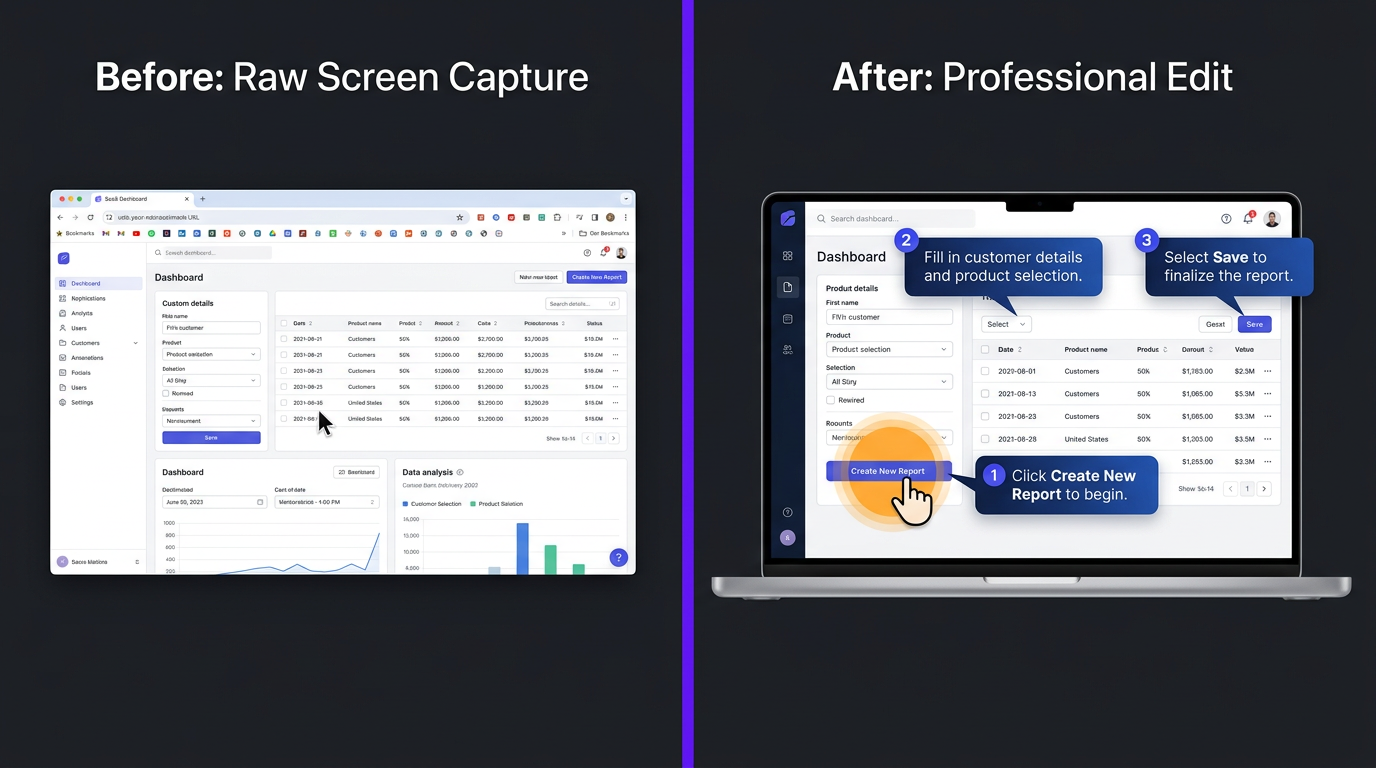
- Cursor smoothing: Raw screen recordings capture every hesitation and overshoot. Professional editing smooths cursor movements so navigation looks intentional and effortless.
- Click highlights: Subtle animations that draw attention to where the user is clicking, helping viewers follow the workflow without confusion.
- Zoom-and-pan: Gradually zooming into relevant UI elements while the narrator explains them. This keeps the viewer focused and prevents the “tiny text on full-screen recording” problem.
- Motion graphics overlays: Callout boxes, arrow annotations, step numbers, and feature labels that guide the viewer through the interface without pausing the flow.
- Transition cuts: Removing the boring parts — loading screens, navigation clicks, form filling — with clean transitions that maintain continuity.
- Branded UI frames: Placing the screen recording within a branded device mockup (browser window, laptop frame) with consistent margins and background.
- Audio layering: Professional voiceover mixed with subtle UI sound effects (click sounds, notification tones) that make the experience feel responsive and polished.
Product Demo Specs for 2026
| Spec | Recommendation | Why |
|---|---|---|
| Length | 2–5 minutes | Long enough to show value, short enough to maintain attention |
| Resolution | 4K (export 1080p for web) | 4K source allows clean zoom-ins on UI elements |
| Frame rate | 60fps for screen recordings | Smooth cursor movement and scrolling |
| Aspect ratio | 16:9 primary, 9:16 for social clips | Optimize for both web and mobile social |
| Captions | Burned-in + SRT files | 85% of social video is watched without sound |
| CTA placement | End card + mid-roll subtle overlay | Drive trials without interrupting the experience |
Explainer Videos: Simplifying Complexity Through Editing
Explainer videos live at the top of your funnel. They answer one question: “What does this product do and why should I care?” For SaaS companies with complex products, explainer videos are often the most important piece of content you’ll ever produce.
Why Explainer Videos Are Editing-Intensive
Unlike demos (which edit existing screen recordings) or thought leadership (which edit talking-head footage), explainer videos are often built entirely in post-production. The editing is the production. This includes:
- Motion graphics and animation: Custom-designed scenes that visually represent abstract concepts. “Our AI analyzes your data in real-time” isn’t compelling as text — but a smooth animation showing data flowing through a pipeline into an AI engine into actionable insights tells the story instantly.
- Visual metaphors: Editing techniques that translate technical concepts into relatable visuals. Database migrations become moving boxes. API integrations become puzzle pieces connecting. User permissions become security gates.
- Pacing for comprehension: Unlike YouTube content (where fast pacing keeps attention), explainer videos need breathing room. Each concept needs a beat to land before the next one begins. This pacing requires precise editing timing.
- Voiceover synchronization: The animation must align perfectly with the narration. A 2-second mismatch between what’s being said and what’s being shown creates cognitive dissonance that kills comprehension.
Types of SaaS Explainer Video Styles
| Style | Best For | Editing Requirements | Cost Range |
|---|---|---|---|
| 2D animation | Simple concepts, broad audiences | Character design, scene animation, transitions | $2,000–$10,000 |
| Motion graphics | Technical products, B2B audiences | Data visualization, UI animation, icon systems | $1,500–$8,000 |
| Screen + voiceover | Product-led companies, developer tools | Screen recording polish, cursor animation, callouts | $500–$2,000 |
| Live action + graphics | Enterprise SaaS, high-trust products | Filmed footage editing, graphic overlays, compositing | $3,000–$15,000 |
The 60-Second Rule
The most effective SaaS explainer videos are 60-90 seconds long. That’s roughly 150-225 words of script. Every second counts, which means every edit must be purposeful. A professional editor will cut ruthlessly — removing redundant visuals, tightening transitions, and ensuring every frame contributes to understanding.
The editing timeline for a 60-second explainer is typically 20-40 hours of post-production work, including storyboard refinement, animation, voiceover sync, sound design, and multiple revision rounds. This is why explainer videos are the most expensive per minute of any SaaS video type.
Thought Leadership Videos: Building Authority at Scale
Thought leadership is where SaaS founders, executives, and subject matter experts share insights, opinions, and industry expertise on camera. It’s the most scalable video format for SaaS companies because the raw material (an expert talking) is easy to produce. The editing is what turns a rambling monologue into a polished, shareable asset.
The Editing Challenge with Thought Leadership
Most founders and executives aren’t professional speakers. They repeat themselves, go on tangents, use filler words, and lose their train of thought. A 30-minute recording session might contain 8 minutes of usable content — scattered across the full recording.
Professional thought leadership editing involves:
- Content extraction: Identifying the 3-5 strongest points from a longer recording and structuring them into a coherent narrative.
- Jump cut refinement: Removing filler words and pauses while maintaining natural speech flow. This requires precise audio editing to avoid jarring cuts.
- B-roll integration: Covering jump cuts with relevant footage — data charts, product screenshots, stock footage of the problem being discussed — that adds visual richness.
- Lower thirds and graphics: Identifying key statistics, quotes, and frameworks mentioned in the monologue and reinforcing them with on-screen text and graphics.
- Multi-format output: Editing one recording into a 10-minute YouTube video, a 3-minute LinkedIn edit, and 3-5 short-form clips for social. This repurposing is where the ROI multiplies.
Thought Leadership Editing Workflow for SaaS
- Record 20-40 minutes of your CEO, CTO, or product lead discussing an industry topic
- Editor reviews and logs the entire recording, noting timestamps of key insights
- Structure the narrative: Rearrange clips into a logical flow (hook → context → insights → takeaway → CTA)
- Polish: Color grade, add graphics, integrate B-roll, mix audio
- Repurpose: Create social cuts, audiograms, and quote cards from the same session
One recording session, edited properly, can generate 5-10 pieces of content. That’s the leverage SaaS companies need to compete in content marketing without their executives spending all day on camera.
Need a Video Team That Understands SaaS?
We’ve edited for AI startups, B2B platforms, and enterprise SaaS. Our team speaks your language.
Case Study Videos: Social Proof That Closes Deals
Case study videos sit at the bottom of the funnel, right where prospects are deciding between you and your competitor. They answer the most critical sales question: “Does this actually work for companies like mine?”
Why Editing Makes or Breaks Case Study Videos
Raw customer testimonials are often… boring. A customer sitting in their office talking about your product for 10 minutes isn’t compelling, even if what they’re saying is amazing. The editing needs to transform that raw interview into a story with dramatic structure.
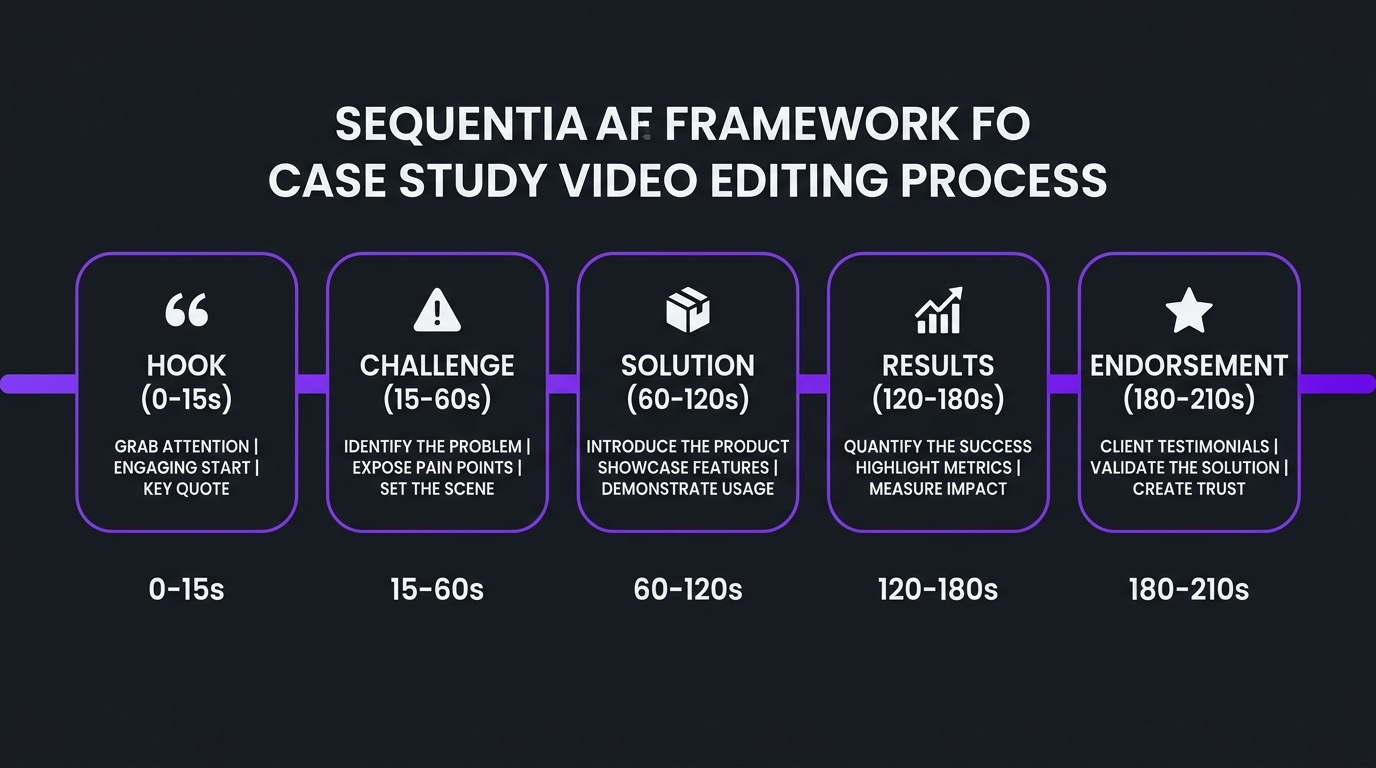
The Case Study Video Editing Framework
- The hook (0-15 seconds): Open with the most impressive result. “We increased our conversion rate by 340% in 90 days” or “We cut our support tickets by half within the first month.” Lead with the punchline.
- The challenge (15-60 seconds): Show the customer’s world before your product. Edit in visuals of their old workflow, screenshots of their problems, or B-roll of their industry that establishes relatability.
- The solution (60-120 seconds): Weave the customer’s description of discovering and implementing your product with screen recordings showing the actual product in use. This dual layer — hearing the story while seeing the product — is powerful.
- The results (120-180 seconds): Motion graphics showing the numbers. Before/after comparisons. Charts trending upward. Make the data visual and impossible to ignore.
- The endorsement (180-210 seconds): End with the customer’s strongest quote about your product. This is the emotional seal on the rational case you’ve built.
Editing Techniques for Case Study Videos
- Interview cleanup: Remove ums, ahs, long pauses, and rambling sections while maintaining natural speech patterns.
- Multi-camera illusion: Even with a single camera, using zoom-ins and slight repositions can create visual variety that keeps the viewer engaged.
- Data visualization overlays: Animate the customer’s metrics on-screen as they describe them verbally.
- B-roll storytelling: Show the customer’s workspace, team, product, or industry to make the story tangible.
- Branded consistency: Every case study video should look like it belongs to the same series — same intro, same graphics style, same music tone. This builds a library of proof that feels cohesive and professional.
Onboarding Videos: The Churn-Reduction Secret Weapon
Here’s the SaaS video type that most companies chronically underinvest in: onboarding and tutorial content. It’s not as glamorous as a product demo or as shareable as thought leadership. But onboarding videos have the most direct, measurable impact on your bottom line.
The Churn-Editing Connection
SaaS churn is often an onboarding failure. Users sign up, can’t figure out how to get value from the product quickly enough, and leave. According to ProfitWell, companies with strong onboarding see 2.4x higher retention rates in the first 90 days.
Video is the most effective onboarding medium because it:
- Shows exactly what to click, where to navigate, and what to expect
- Reduces cognitive load compared to text documentation
- Can be consumed at the user’s pace (pause, rewind, replay)
- Scales infinitely — one well-edited video replaces thousands of support interactions
Onboarding Video Editing Best Practices
- Chapter markers: Break longer tutorials into clearly labeled chapters. Users should be able to jump directly to the feature they need.
- Step numbering: On-screen step indicators (“Step 3 of 7”) that give users a sense of progress and reduce the “this is taking forever” feeling.
- Zoom precision: Zoom into exactly the UI element being discussed — not the general area. Precision builds confidence.
- Pause points: Brief pauses (1-2 seconds of silence with a “Try this now” overlay) that encourage viewers to follow along in their own account.
- Version awareness: Date stamps and version numbers in the video make it clear when content needs updating. SaaS products change constantly — your video library needs a refresh cycle.
- Error handling: Show what happens when users make a mistake, and how to recover. This builds trust and reduces support escalation.
The ROI of Onboarding Video Editing
| Metric | Without Video Onboarding | With Professional Video Onboarding |
|---|---|---|
| Time to first value | 5-14 days | 1-3 days |
| Support tickets (first 30 days) | High (8-15 per user cohort) | Low (2-5 per user cohort) |
| 30-day retention rate | 60-70% | 80-90% |
| Feature adoption rate | 30-40% of core features | 60-75% of core features |
| NPS impact | Neutral | +15-25 points |
Mapping Videos to Your SaaS Marketing Funnel
Every video type serves a different purpose in your acquisition and retention funnel. Here’s how to think about your video editing investment strategically:
| Funnel Stage | Video Type | Distribution | KPIs | Editing Priority |
|---|---|---|---|---|
| Awareness | Explainers, thought leadership clips | YouTube, LinkedIn, Twitter, ads | Views, impressions, brand recall | Hook quality, visual polish |
| Consideration | Product demos, feature deep-dives | Website, YouTube, sales emails | Watch time, demo requests | Clarity, UI polish, pacing |
| Decision | Case studies, comparison videos | Website, sales decks, email nurture | Conversion rate, sales cycle length | Story structure, data viz |
| Onboarding | Tutorials, walkthroughs | In-app, knowledge base, email | Activation rate, support tickets | Precision, chapter structure |
| Retention | Feature updates, tips, advanced tutorials | Email, in-app, community | Feature adoption, NPS, churn | Brevity, relevance |
SaaS-Specific Editing Techniques That Drive Results
SaaS video editing is a distinct discipline. The techniques that work for YouTube vlogs or ecommerce product videos don’t always translate. Here are the editing approaches that matter most for SaaS content:
Screen Recording Enhancement
Most SaaS videos include screen recordings. Raw screen captures look flat, small, and hard to follow. Professional editing transforms them:
- Device framing: Place screen recordings inside realistic browser or device mockups
- Dynamic zooming: Smoothly zoom into the relevant section of the UI as each feature is discussed
- Cursor animation: Replace the raw cursor with a larger, branded pointer with click highlights
- Loading removal: Cut out every loading screen, page transition, and navigation pause
- UI cleanup: Blur or remove irrelevant UI elements, test data, or personal information visible in the recording
Data Visualization in Video
SaaS companies deal in metrics. Charts that appear in blog posts need to come alive in video through animation — bars growing, lines trending, percentages counting up. Animated data is more memorable and more shareable than static charts.
Multi-Format Optimization
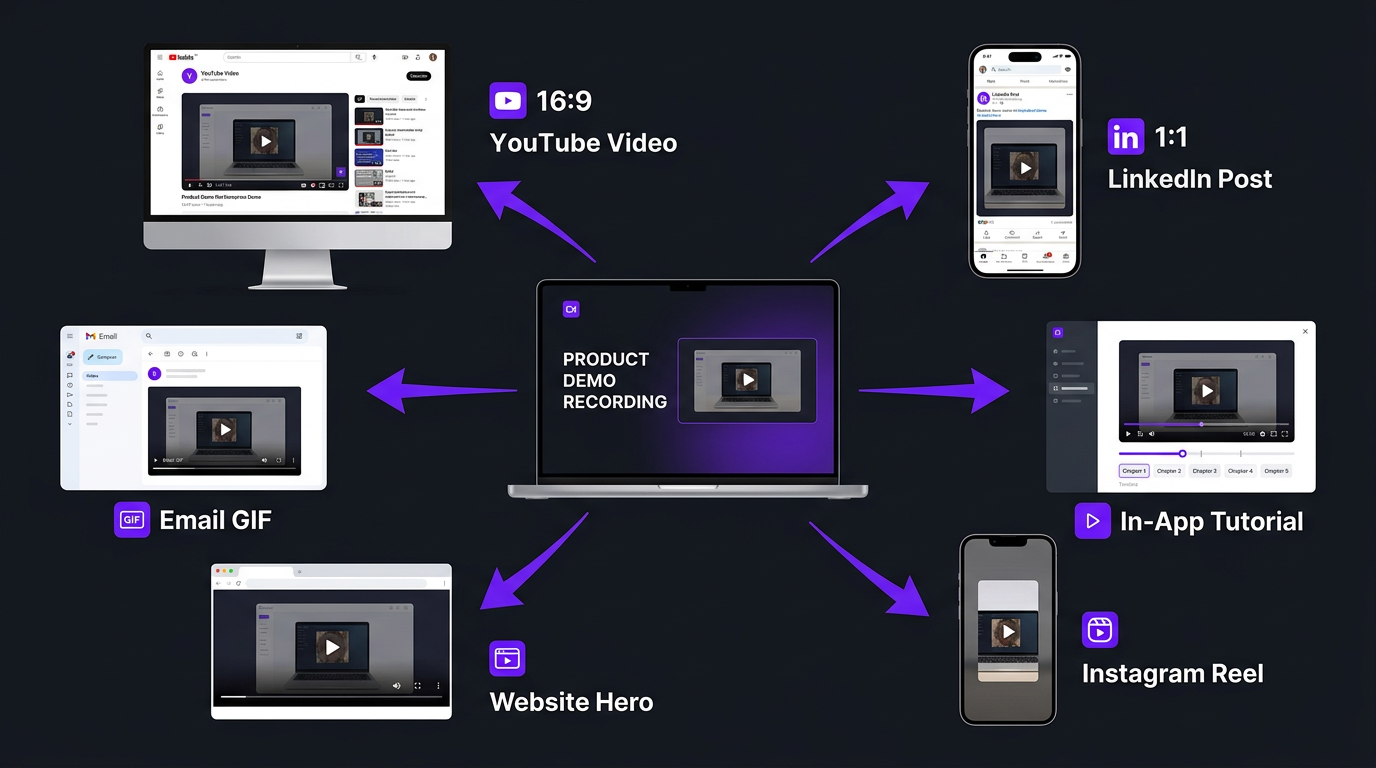
Every SaaS video should be edited into multiple formats from the same source material:
- 16:9 full version for YouTube and website
- 9:16 vertical cut for LinkedIn, Instagram, TikTok
- 1:1 square version for LinkedIn feed, Twitter
- GIF/clip exports for product documentation and email
This multi-format approach requires editing each version specifically for its platform — not just cropping. The pacing, text size, and composition need to work natively in each aspect ratio.
What SaaS Video Editing Actually Costs
Let’s talk real numbers. SaaS video editing costs more than standard YouTube editing because of the additional complexity — screen recording enhancement, motion graphics, data visualization, and the need for pixel-perfect brand consistency.
| Video Type | Per-Video Cost | Monthly Retainer (4-8 videos) | Time to Edit |
|---|---|---|---|
| Product demo (2-5 min) | $400–$1,500 | $2,000–$5,000 | 8-20 hours |
| Explainer video (60-90 sec) | $1,500–$10,000 | Custom | 20-60 hours |
| Thought leadership (5-15 min) | $200–$800 | $1,500–$4,000 | 4-12 hours |
| Case study video (3-5 min) | $500–$2,000 | $2,000–$6,000 | 10-25 hours |
| Onboarding tutorial (2-10 min) | $300–$1,000 | $1,500–$4,000 | 5-15 hours |
| Social clips (15-60 sec) | $50–$200 | $500–$2,000 | 1-3 hours |
The Full SaaS Video Editing Budget
Here’s what a typical SaaS company’s monthly video budget looks like at different stages:
| Company Stage | Monthly Video Output | Typical Budget | Team Model |
|---|---|---|---|
| Seed / Early stage | 2-4 videos (demos + explainers) | $1,000–$3,000/month | Freelancer or per-video service |
| Series A / Growth | 4-10 videos (full funnel mix) | $3,000–$6,000/month | Agency retainer |
| Series B+ / Scale | 10-30+ videos (all types + localization) | $5,000–$15,000/month | Dedicated team |
At Increditors, our SaaS startup packages start at $2,500/month and scale with your content needs. For growth-stage companies, our dedicated team model provides a full editing team (editor, motion designer, colorist, PM) for $5,000-$8,000/month — significantly less than a single in-house hire when you account for the breadth of skills covered.
In-House vs Agency: Which Model Works for SaaS?
This is one of the most common questions we hear from SaaS marketing leaders. Let’s compare the real costs:
| Factor | In-House Editor | Agency (Increditors Model) |
|---|---|---|
| Annual cost | $70,000–$110,000 (salary + benefits) | $30,000–$96,000 ($2,500–$8,000/month) |
| Skills covered | 1 generalist | Editor + motion designer + colorist + PM |
| Software costs | $3,000–$5,000/year (your expense) | Included |
| Equipment | $3,000–$10,000 upfront | Included |
| Backup coverage | None (vacation = no edits) | Team covers absences |
| Scalability | Fixed capacity | Scale up/down monthly |
| Ramp-up time | 2-4 weeks + hiring time | 1-2 weeks |
| Management overhead | Significant (direct reports) | Minimal (PM handles) |
For most SaaS companies — especially pre-Series C — an agency model provides broader capabilities at lower total cost. The in-house model makes sense when you produce daily video content and need someone embedded in your team’s daily standups, Slack channels, and product roadmap discussions.
Real Results: How SaaS Companies Transformed Their Video
TuMeke: AI Startup Scales Video Content Without Scaling Headcount
TuMeke is an AI-powered SaaS platform that was in a bind familiar to many startups: they knew they needed video content for marketing, sales enablement, and product documentation, but they didn’t have the bandwidth to produce it in-house. Their founding team was focused on product development and fundraising — not learning After Effects.
Before partnering with Increditors, TuMeke had cycled through multiple freelance editors. Each new editor meant re-explaining the product (complex AI technology), re-teaching brand guidelines, and re-establishing quality expectations. The constant onboarding cycle was burning time that the founding team didn’t have.
When TuMeke moved to a dedicated Increditors team, the dynamic shifted. We assigned editors who developed a deep understanding of their AI product, their target audience (enterprise safety managers), and their technical differentiation. The result: a consistent stream of product demos, thought leadership clips, and social content — all professionally edited with the technical precision their audience expected.
For TuMeke, the value wasn’t just better videos. It was the elimination of the management overhead that had been draining their team’s focus. One onboarding cycle with Increditors replaced the revolving door of freelancers.
eSafety: Government-Adjacent SaaS Builds Trust Through Video
eSafety operates in a space where credibility and trust are everything. Their video content needed to communicate authority, competence, and reliability — qualities that can’t be faked with basic editing.
Working with Increditors, eSafety developed a video library that matched the seriousness of their mission. Professional color grading created a consistent, authoritative visual tone. Custom motion graphics translated complex regulatory concepts into clear visual explanations. And a structured editing workflow ensured that every video met the brand standards their stakeholders expected.
The result was a video content library that positioned eSafety as a leader in their space — not through marketing claims, but through the quality and professionalism of their content itself.
Ready to Build Your SaaS Video Engine?
We’ve helped AI startups, B2B platforms, and enterprise SaaS companies build video content that drives pipeline. See our portfolio and let’s discuss your needs.
Frequently Asked Questions
SaaS products are intangible — video is often the only way prospects experience the product before buying. Well-edited demos, explainers, and thought leadership content reduce sales cycles, improve conversions, and lower churn. Companies using video see 49% faster revenue growth on average.
Five core types: product demos (sales enablement), explainer videos (awareness), thought leadership (brand authority), case study videos (social proof), and onboarding tutorials (churn reduction). Each serves a different funnel stage and requires different editing approaches. Start with demos and thought leadership — they deliver the fastest ROI.
Product demos: $400-$1,500 per video. Explainers: $1,500-$10,000. Thought leadership: $200-$800. Case studies: $500-$2,000. Monthly retainers with agencies range from $2,500-$8,000/month depending on volume and complexity. See our pricing page for current rates.
Most SaaS companies get better value from an agency. A full-time in-house editor costs $70,000-$110,000/year with limited skill range. An agency like Increditors provides a full team (editor + motion designer + colorist + PM) for $30,000-$96,000/year with broader capabilities and scalability.
Start with the outcome (not the login screen), use zooms and highlights to direct attention, add motion graphics for complex workflows, keep pace fast (2-5 minutes), include branded transitions, use cursor smoothing, and end with a clear CTA. The editing should make the product feel intuitive and powerful.
Top of funnel: 60-90 second explainers and social clips. Middle of funnel: 2-5 minute product demos. Bottom of funnel: 3-5 minute case studies. Post-sale: onboarding tutorials. Each stage needs different editing approaches optimized for viewer intent and distribution platform.
Product demos and onboarding videos should be refreshed every time a significant UI change ships — typically every 3-6 months for fast-moving SaaS products. Thought leadership and case studies have longer shelf lives (6-12 months). Build version tracking into your video library to know when content needs updating.
Statistics cited in this guide are sourced from Demand Gen Report (2024), Wyzowl State of Video Marketing (2025), Aberdeen Group, Unbounce, and ProfitWell. For current Increditors SaaS video editing pricing, visit our pricing page or schedule a call.