










![3D Explainer Video - ScribbleLive.mp4_snapshot_00.12_[2022.03.09_03.14.16]](https://increditors.com/wp-content/uploads/elementor/thumbs/3D-Explainer-Video-ScribbleLive.mp4_snapshot_00.12_2022.03.09_03.14.16-r7wb53mx72rxst3qcqyrfxdmeyzb5r9jbl0wbjujh4.png "3D Explainer Video – ScribbleLive.mp4_snapshot_00.12_[2022.03.09_03.14.16]")
































You’ve watched those YouTube videos where data comes alive as animated charts, concepts float into frame as 3D objects, and transitions feel like mini-movies. They’re impressive. They’re also expensive and time-consuming to produce.
So the question every serious YouTube creator eventually asks: do I actually need VFX and motion graphics in my videos, or am I fine with solid editing, good B-roll, and clean text overlays?
The answer — like most things in content production — is “it depends.” But after editing thousands of YouTube videos across dozens of niches, we can tell you exactly what it depends on. This guide breaks down when motion graphics and VFX are worth the investment, when they’re overkill, what they cost, and how to implement them without blowing your production budget.
What’s in This Guide
- VFX vs. Motion Graphics: What’s the Difference?
- Types of Motion Graphics Used on YouTube
- When You Actually Need Motion Graphics
- When You Don’t Need Them (And They Might Hurt)
- The Retention Impact: What the Data Shows
- How Much Do VFX & Motion Graphics Cost?
- Case Studies: Real YouTube Channels
- DIY vs. Professional: Choosing Your Path
- How to Add Motion Graphics to Your Workflow
- The Decision Framework
- FAQ
VFX vs. Motion Graphics: What’s the Difference?
These terms get used interchangeably, but they describe different things — and the distinction matters for both budgeting and creative planning.
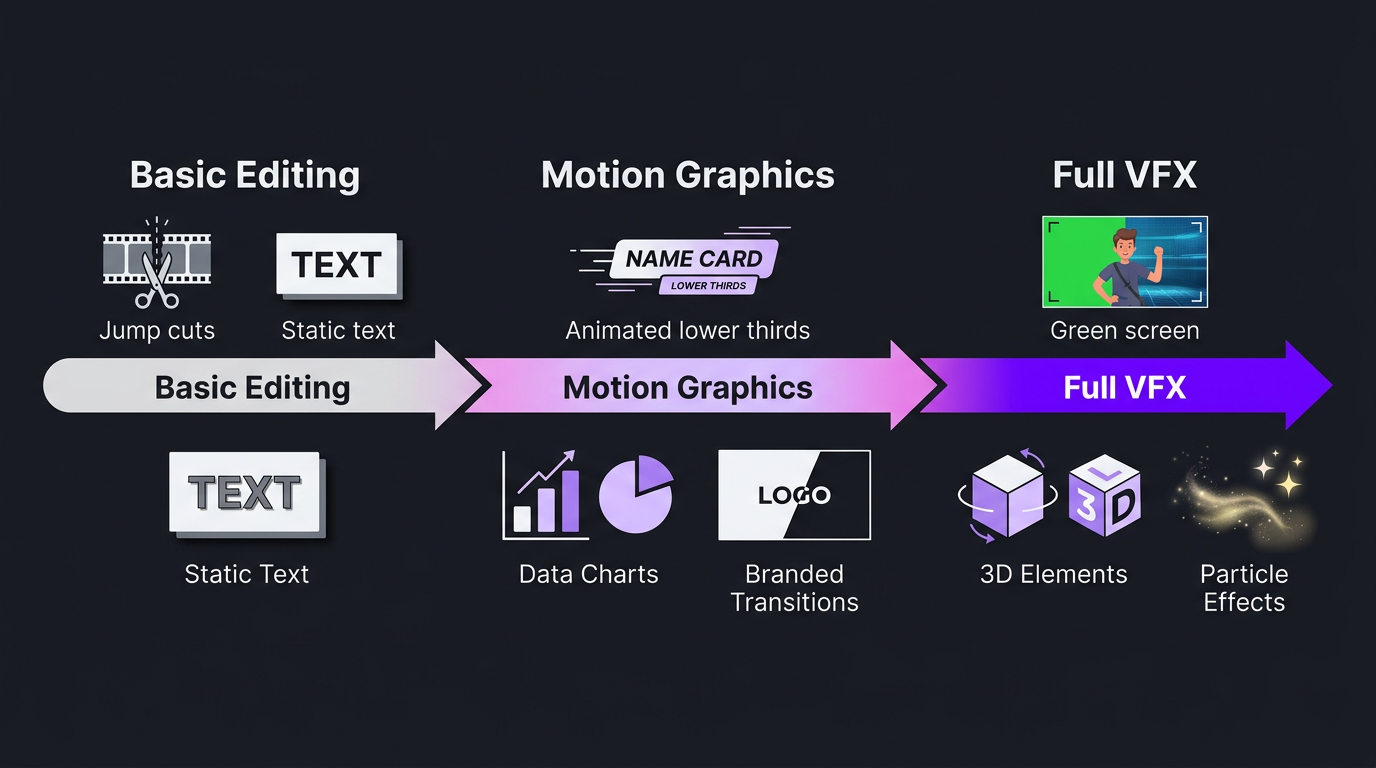
Motion Graphics
Motion graphics (often called “MoGraph”) is animated graphic design. It takes static visual elements — text, icons, shapes, data, illustrations — and brings them to life through movement. Think:
- Animated text — Words that type on, slide in, or reveal with kinetic energy
- Data visualizations — Charts, graphs, and statistics that build and animate on screen
- Lower thirds — Animated name bars that slide in when introducing a speaker
- Transitions — Branded scene changes beyond basic cuts and fades
- Logo animations — Intros, outros, and watermark reveals
- Animated icons and illustrations — Visual metaphors that animate to support spoken content
- Infographics — Complex information presented as animated visual systems
Motion graphics live in the world of design in motion. They enhance, explain, and brand your content. They don’t pretend to be real.
Visual Effects (VFX)
VFX involves creating or manipulating imagery to look realistic within your footage. This includes:
- Green screen compositing — Replacing a green background with a virtual environment
- Particle effects — Sparks, fire, smoke, rain, snow, dust
- 3D rendering — Creating three-dimensional objects that exist in your video’s space
- Rotoscoping — Cutting a person or object out of footage to place them in a different environment
- Tracking and compositing — Adding elements that stick to and move with objects in your footage
- Color replacement — Changing the color of objects in footage (sky replacement, etc.)
- Cleanup — Removing unwanted elements like boom mics, wires, or background distractions
VFX lives in the world of visual illusion. It creates elements that appear to be part of the filmed reality.
Why the Distinction Matters for YouTube
For most YouTube creators, motion graphics are the relevant investment. They enhance communication, strengthen branding, and improve retention at a reasonable cost. Full VFX is typically only necessary for specific content genres — science fiction storytelling, virtual production, high-concept educational content, or channels with a distinctly cinematic style.
Understanding the difference saves you from overspending. If you ask an editor for “VFX” when you really need animated text and data visualizations, you might get quoted $2,000 when the actual job is a $300 motion graphics package.
Types of Motion Graphics Used on YouTube
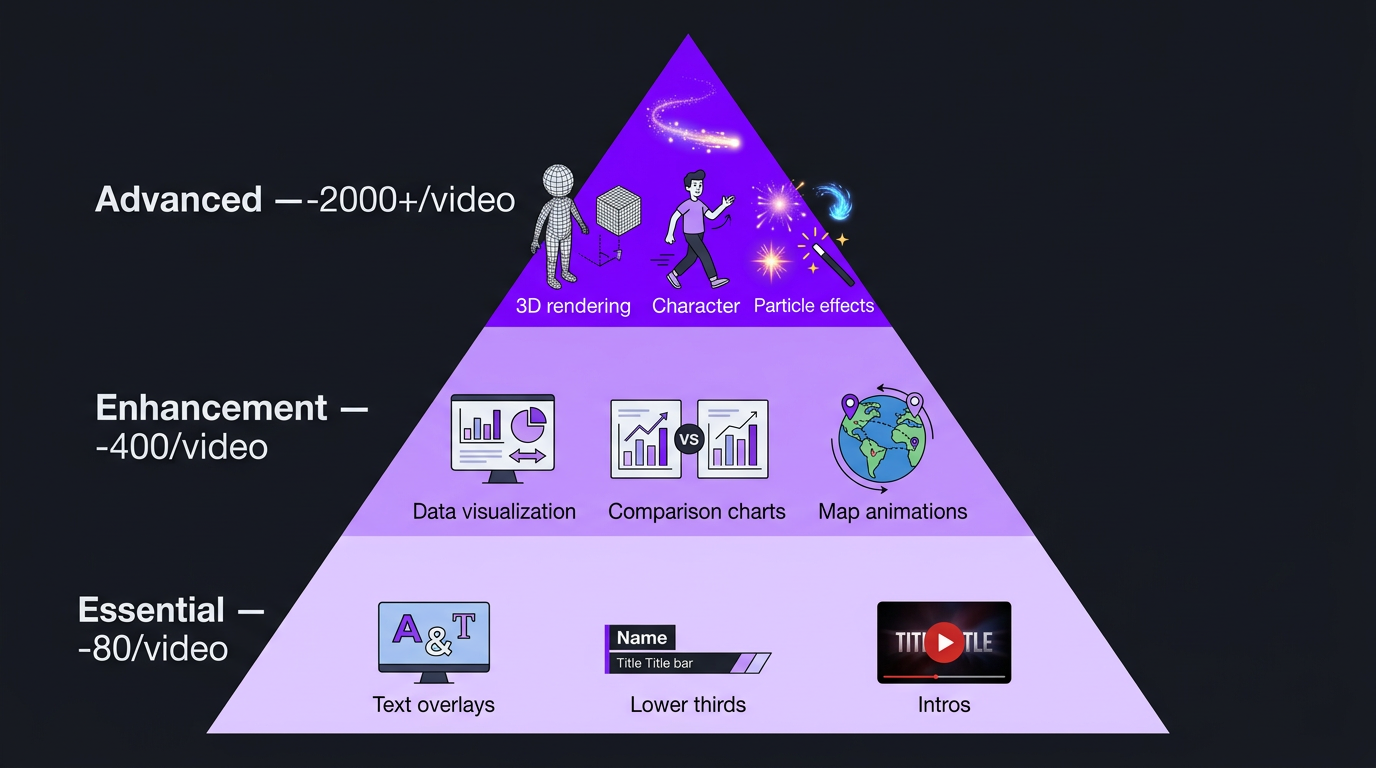
Let’s get specific about what motion graphics actually look like in YouTube content. Here are the most common applications, ranked from simplest (and cheapest) to most complex:
Tier 1: Essential Motion Graphics (Every Channel Should Have)
- Animated text overlays — Key points, statistics, and quotes that appear on screen with animation rather than static placement
- Lower thirds — Branded name bars for introducing speakers or sources
- Branded intro/outro — 3-5 second animated logo sequence that opens and closes your videos
- Subscribe/CTA animations — Animated prompts that encourage engagement without being obnoxious
- Chapter title cards — Animated section headers that break up long-form content
These are table stakes for any channel that wants to look professional. They take a few hours to design once (as templates) and minutes to implement per video. If you’re not doing at least these, you’re leaving production value on the floor.
Tier 2: Enhancement Motion Graphics (For Growing Channels)
- Animated data visualizations — Charts, graphs, and statistics that build dynamically on screen
- Process diagrams — Step-by-step workflows that animate sequentially
- Comparison graphics — Side-by-side comparisons that animate in as you discuss each point
- Map animations — Location graphics that zoom, pan, and mark points of interest
- Custom transitions — Branded scene changes that maintain visual continuity
- Animated B-roll overlays — Graphics layered over footage to add context or emphasis
This tier is where production value starts significantly impacting retention. Viewers can see what you’re explaining instead of just hearing it. For educational, tech, finance, and business channels, this tier typically delivers the highest ROI.
Tier 3: Advanced Motion Graphics (For Established/Premium Channels)
- Custom animated illustrations — Unique illustrations that animate to tell visual stories
- Explainer-style animations — Full animated sequences that explain complex concepts (like Kurzgesagt-style)
- 3D motion graphics — Three-dimensional text, objects, or environments rendered in Cinema 4D or Blender
- Character animation — Animated characters or avatars that represent concepts or narrate segments
- Particle-based graphics — Complex visual systems using particles for aesthetic or conceptual purposes
This tier is where channels develop a genuinely distinctive visual identity. It’s expensive to produce but creates a moat — viewers associate the visual style with your brand so strongly that competitors can’t replicate the experience.
When You Actually Need Motion Graphics on YouTube
Not every video benefits equally from motion graphics. Here’s when the investment pays off most:
1. You’re Explaining Complex Concepts
If your content involves abstract ideas — financial models, scientific processes, software architecture, business strategies — motion graphics transform comprehension. Viewers retain visual information 65% better than auditory information alone, according to research from the Social Science Research Network. When you animate a concept that you’re simultaneously explaining verbally, you’re encoding the information through two cognitive channels.
Example: Explaining compound interest with just your voice vs. showing an animated graph where money grows exponentially while you explain. The second version has dramatically higher retention and comprehension.
2. Your Content Is Data-Heavy
If you regularly reference statistics, comparisons, rankings, or trends, animated data visualizations make the difference between viewers understanding your point and viewers zoning out. Static numbers on screen feel like a textbook. Animated charts that build as you narrate feel like a story.
3. You’re in an Attention-Competitive Niche
In niches where dozens of creators cover similar topics — tech reviews, personal finance, marketing tips — motion graphics become a differentiator. If your competitor explains the same concept with a talking head and text slides while you use animated diagrams and branded graphics, your video feels more authoritative, more engaging, and more worth watching.
4. You’re Building a Brand, Not Just a Channel
If your YouTube presence is part of a broader business — a SaaS company, consultancy, agency, or personal brand — motion graphics signal professionalism. They communicate “this creator/company invests in quality” in a way that’s immediately visible. For B2B content especially, production quality directly impacts perceived credibility.
5. Your Retention Graphs Show Mid-Video Drop-Off
If your YouTube analytics show consistent viewer drop-off at specific points — usually during explanation-heavy segments — motion graphics can directly address this. Visual variety resets attention. When the screen changes from a talking head to an animated diagram, viewers re-engage because there’s something new to process visually.
6. You Have a Long-Form Content Strategy
For videos over 15 minutes, visual variety isn’t optional — it’s structural. You need something beyond talking head footage and B-roll to maintain attention across a 20-30 minute video. Motion graphics provide that variety without requiring additional filming. A 20-minute video with 5-8 motion graphic elements is dramatically more watchable than the same video with only jump cuts between camera angles.
When You Don’t Need Them (And They Might Hurt)
Knowing when not to use motion graphics is just as important as knowing when to use them.
Vlog and Lifestyle Content
If your content’s appeal is authenticity, personality, and real-life footage, heavy motion graphics can feel corporate and disconnected. Vlogs thrive on intimacy — overproduced graphics create a barrier between you and the viewer. Simple text overlays and clean edits serve this genre better.
When Your Content Isn’t Ready
Motion graphics amplify what’s already there. If your content — the actual substance of what you’re saying — isn’t strong, no amount of animation will save it. Fix the script first. Make sure your ideas are clear, your structure is logical, and your delivery is engaging. Then add motion graphics to elevate it.
When Budget Is Better Spent Elsewhere
If you’re choosing between motion graphics and better audio equipment, better lighting, or more consistent uploads — choose the fundamentals every time. A well-lit talking head with great audio and clean editing outperforms a poorly lit video with expensive motion graphics. Build the foundation first.
Entertainment/Comedy Content
Comedy, reaction, and entertainment content typically performs based on personality, timing, and relatability. Motion graphics rarely enhance humor and can actually undercut the casual, authentic vibe that makes entertainment content work. Simple meme-style graphics, zooms, and sound effects are more effective than polished animations in this genre.
When They Slow Down Your Publishing Cadence
If adding motion graphics means you publish every two weeks instead of weekly, the algorithm cost of reduced frequency may outweigh the quality benefit. YouTube rewards consistency. Two good videos per week will almost always outperform one great video every other week.
The Retention Impact: What the Data Shows
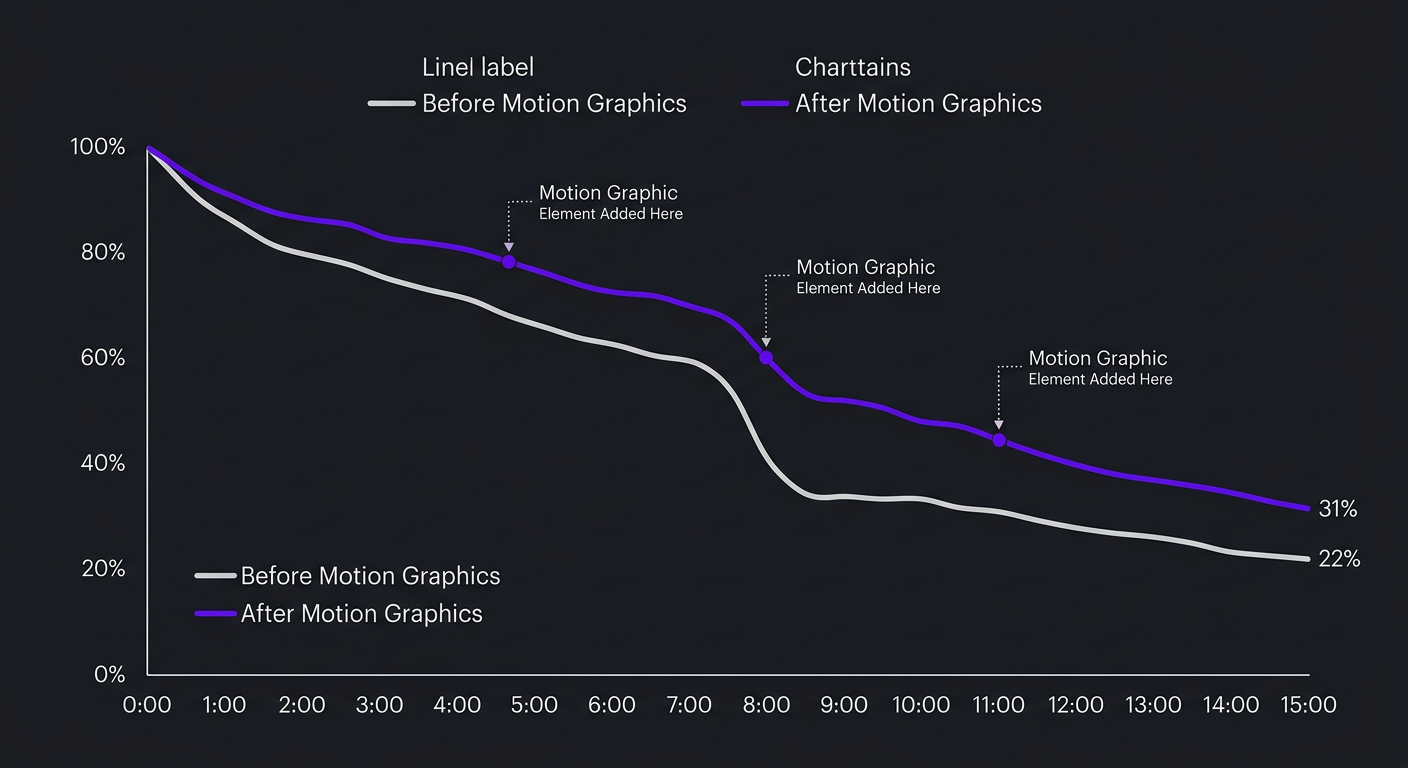
Let’s talk numbers. Here’s what we see across our client channels when motion graphics are added to an existing editing workflow:
| Metric | Without Motion Graphics | With Motion Graphics | Change |
|---|---|---|---|
| Average view duration | 5:20 (on 15-min video) | 7:10 (on 15-min video) | +34% |
| Retention at 50% mark | 38% | 48% | +10 pts |
| Retention at 75% mark | 22% | 31% | +9 pts |
| Engagement rate (likes + comments / views) | 3.2% | 4.1% | +28% |
| CTR (when thumbnail includes motion graphic frame) | 4.5% | 5.8% | +29% |
These numbers represent averages across educational and business YouTube channels we’ve worked with. The improvement is most dramatic in explanation-heavy segments — the exact moments where viewers are most likely to drop off.
The mechanism is straightforward: motion graphics create visual “resets” that re-engage attention. Every time the screen changes from a talking head to an animated diagram, the viewer’s brain registers novelty and re-focuses. In a 15-minute video, 5-8 of these visual resets can mean the difference between a 35% average retention and a 48% retention — which translates directly into more watch time, better algorithmic promotion, and more views.
The Compounding Effect on Channel Growth
Higher retention → more recommended impressions → more views → more subscribers → higher retention on future videos. This is the YouTube flywheel, and motion graphics are one of the highest-leverage inputs you can add to accelerate it.
A channel averaging 45% retention grows fundamentally differently than one averaging 35%. Over 12 months, that 10-point difference can mean 2-5x more total views — because YouTube serves higher-retention content to exponentially more people.
How Much Do VFX & Motion Graphics for YouTube Cost?
Pricing depends entirely on complexity and whether you’re using templates or custom work. Here’s a comprehensive breakdown:
| Type | Cost Per Video | Time Required | Software Used |
|---|---|---|---|
| Template-based text/lower thirds | $30-$80 | 30-60 min | Premiere Pro, CapCut |
| Custom animated text & graphics | $100-$250 | 2-4 hours | After Effects |
| Animated data visualizations | $150-$400 | 3-6 hours | After Effects, Illustrator |
| Branded intro/outro package | $200-$600 (one-time) | 4-8 hours | After Effects, Cinema 4D |
| Custom animated infographics | $300-$800 | 5-10 hours | After Effects, Illustrator |
| Green screen compositing | $200-$1,000 | 3-8 hours | After Effects, Nuke |
| 3D motion graphics | $500-$2,000+ | 8-20 hours | Cinema 4D, Blender, After Effects |
| Full explainer animation (per minute) | $1,000-$5,000/min | 20-80 hours | After Effects, Illustrator, Cinema 4D |
How Agencies Bundle Motion Graphics
At Increditors, motion graphics are built into our editing packages rather than billed separately. Our YouTube editing service includes Tier 1 and Tier 2 motion graphics — animated text, lower thirds, data visualizations, process diagrams, and branded transitions — as part of the standard per-video or monthly rate.
This bundled approach is typically 30-50% cheaper than hiring a separate motion graphics artist on top of your editor. When the same team handles both editing and motion graphics, they can plan the visual flow together rather than bolting graphics onto an already-edited video.
For channels needing Tier 3 (advanced animation, 3D, or character work), we scope those as add-on projects with custom pricing based on complexity.
Want Motion Graphics That Actually Move the Needle?
We’ll review your channel and tell you exactly which types of motion graphics would impact your retention — and which ones you can skip. Free, no commitment.
Case Studies: Real YouTube Channels
Here’s how two different creators approached the motion graphics question — and what happened.
Ink Magnet: Motion Graphics as a Content Differentiator
Ink Magnet came to us producing content in a competitive niche where many creators were covering overlapping topics. The content itself was strong — well-researched, clearly communicated, and genuinely valuable to their audience. But the production quality wasn’t reflecting the quality of the ideas.
The challenge was common: Ink Magnet’s videos looked similar to dozens of other channels in the space. Talking head footage with basic text overlays and stock B-roll. The content deserved better visual treatment, and the lack of production value was limiting how YouTube promoted the videos.
Our approach centered on strategic motion graphics. We developed a custom visual system for Ink Magnet — branded animated elements that could be used across all videos to create a consistent, recognizable look. Key concepts got animated diagram treatments. Data points became dynamic visualizations. Transitions were branded to create a seamless viewing experience.
The results were significant. Viewer retention improved measurably as the visual variety kept audiences engaged through explanation-heavy segments. More importantly, the channel developed a distinct visual identity that separated it from competitors. When viewers saw an Ink Magnet video in their feed, the production quality signaled “this is going to be worth watching” — and that perception translated into higher click-through rates and longer watch times.
For Ink Magnet, motion graphics weren’t a luxury — they were the missing piece that let the already-strong content reach the audience it deserved.
Riley Coleman: Strategic Motion Graphics for Retention
Riley Coleman represents a different starting point but similar outcome. Riley was producing consistent YouTube content with solid editing — clean cuts, good pacing, proper audio. But growth had plateaued. The videos were good but not breaking through to the next level of reach and engagement.
When we analyzed Riley’s channel, the retention curves told a clear story. Viewers were engaged for the first few minutes, then attention dropped during the mid-video explanation segments — exactly where concepts became more complex and the visual presentation couldn’t keep up with the density of the ideas being communicated.
The solution wasn’t to overhaul the entire editing approach. Riley’s fundamental editing was solid. What we added was targeted motion graphics at the exact points where retention dipped: animated diagrams for complex explanations, data visualizations for statistics, and visual process breakdowns for step-by-step content. We also developed branded lower thirds, transitions, and chapter cards that elevated the overall production feel.
The impact on retention was measurable within the first month. Riley’s average view duration climbed, and with it, YouTube’s algorithmic promotion. More watch time → more impressions → more views → more subscribers. The flywheel effect took hold, and Riley’s channel growth accelerated meaningfully.
What made this work was precision. We didn’t carpet-bomb every second of every video with graphics. We placed motion graphics strategically where they served a communicative function — turning abstract explanations into visual experiences. That restraint kept the production feeling authentic rather than overproduced, which mattered for Riley’s audience relationship.
DIY vs. Professional: Choosing Your Path
Can you create motion graphics yourself? Yes — to a point. Here’s a realistic assessment:
What You Can Do Yourself
| Tool | What It Handles | Skill Requirement | Cost |
|---|---|---|---|
| Canva | Simple animated text, basic transitions, social graphics | Beginner | Free-$15/mo |
| CapCut | Text animations, template effects, basic motion graphics | Beginner | Free |
| DaVinci Resolve (Fusion) | Motion graphics, compositing, color grading — all-in-one | Intermediate-Advanced | Free |
| After Effects | Everything: custom animation, VFX, motion design | Advanced | $23/mo |
| Blender | 3D modeling, animation, rendering | Advanced | Free |
The learning curve reality: After Effects — the industry standard for motion graphics — takes 3-6 months of consistent practice to use effectively. You can learn basic text animations in a weekend, but creating professional-quality animated infographics, data visualizations, or branded graphic systems takes hundreds of hours of practice.
For most YouTube creators, those hundreds of hours are better spent creating content. The DIY path makes sense for Tier 1 basics (text overlays, simple lower thirds). For anything beyond that, outsourcing to a professional delivers better results faster.
When to Go Professional
- You need consistent motion graphics across every video (brand consistency)
- Your content includes data visualizations or complex diagrams
- You want Tier 2 or Tier 3 quality without spending months learning After Effects
- Your time is worth more than $40-$50/hour (the breakeven for outsourcing vs. DIY)
- You’re producing 4+ videos per month and can’t add motion graphics production time
An editing team with motion graphics capability eliminates the learning curve entirely. You describe what you want visualized, and the team handles the design, animation, and integration with your edit.
How to Add Motion Graphics to Your Existing Workflow
If you’re currently producing YouTube content with standard editing and want to level up with motion graphics, here’s a practical implementation path:
Phase 1: Template Foundation (Week 1-2)
Create (or have created) a set of reusable motion graphics templates that match your brand:
- Animated intro (3-5 seconds)
- Lower third template (for introducing people/topics)
- Text overlay template (for key points and statistics)
- Transition template (for scene changes)
- Outro template with CTA
These templates are a one-time investment ($200-$600 for custom design) that get reused in every video. They immediately elevate your production value with minimal per-video effort.
Phase 2: Strategic Per-Video Graphics (Week 3-4)
For each new video, identify 3-5 moments where a custom motion graphic would enhance comprehension or retention:
- Key statistic → animated number or chart
- Step-by-step process → animated diagram
- Comparison → animated side-by-side
- Abstract concept → visual metaphor animation
Include these in your editing brief so your editor (or editing service) can plan them into the video’s visual flow from the start.
Phase 3: Full Visual System (Month 2+)
Over time, build a comprehensive visual system — a library of branded elements that can be mixed, matched, and adapted for any video. This library becomes an asset that makes every future video faster and more visually consistent.
At Increditors, we build these visual systems for clients as part of the onboarding process. By the second or third video, the team has a robust library of branded elements that can be deployed rapidly, keeping per-video costs down while maintaining high visual quality.
The Script-to-Screen Bridge
The most effective way to integrate motion graphics: plan them at the script stage. When you’re writing or outlining your video, mark the moments where you think “this would be better as a visual.” Include notes like:
- “[ANIMATE: Chart showing growth from $1K to $50K over 12 months]”
- “[ANIMATE: Three-step process — Research → Test → Scale]”
- “[ANIMATE: Comparison table — Option A vs Option B]”
These notes give your editing team clear direction and prevent the “let’s add some graphics to make it look nicer” approach, which always produces weaker results than graphics planned for specific communicative purposes.
The Decision Framework: Do You Need Motion Graphics?
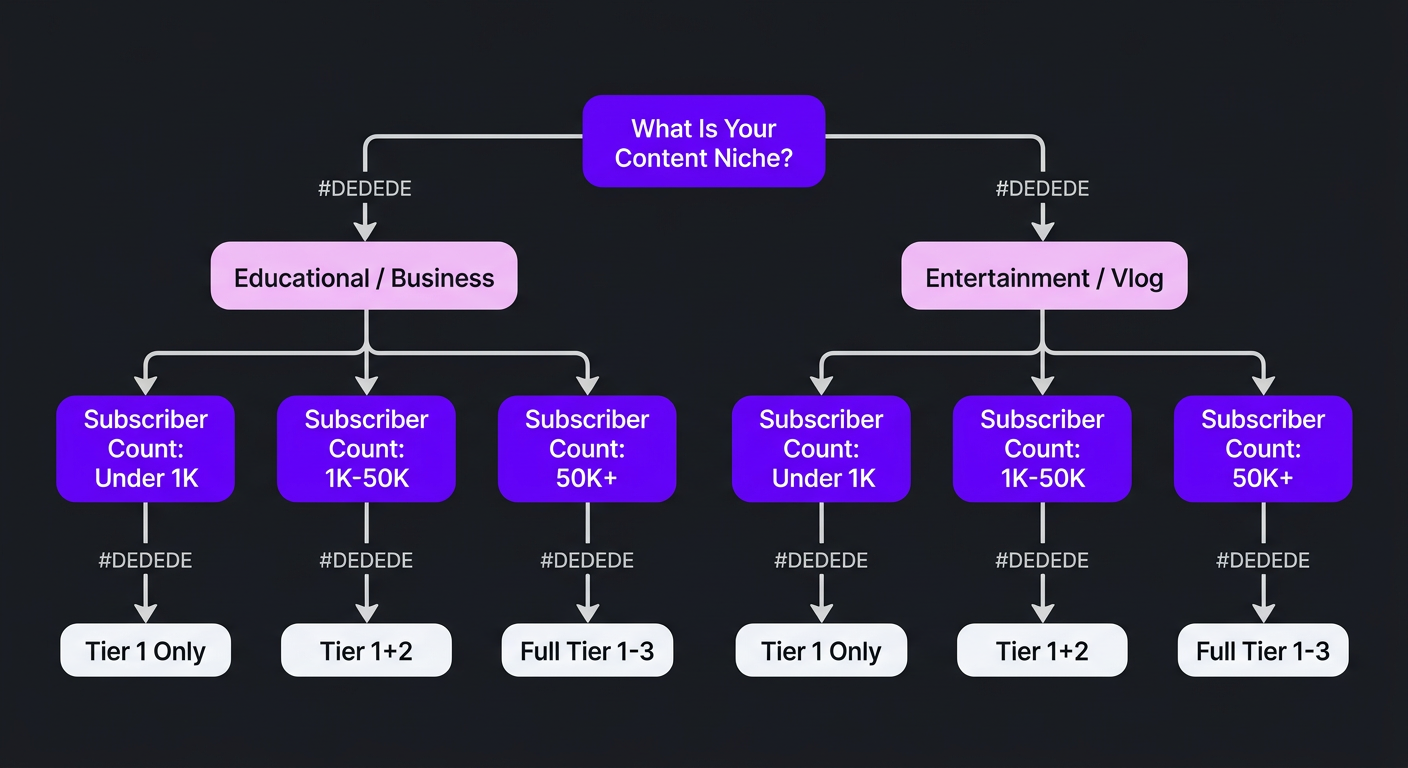
Here’s a straightforward decision tool based on your channel’s situation:
| Your Situation | Recommendation | Priority Level |
|---|---|---|
| New channel, under 1K subscribers | Tier 1 basics only (templates). Focus on content quality and consistency first. | Low |
| Growing channel, 1K-50K subs, educational/business niche | Tier 1 + Tier 2 (branded graphics, data viz). High ROI investment. | High |
| Growing channel, 1K-50K subs, entertainment/vlog niche | Tier 1 basics. Invest in better B-roll, audio, and pacing instead. | Low-Medium |
| Established channel, 50K+ subs, any educational niche | Full Tier 1 + Tier 2, explore Tier 3 for signature visual style. | High |
| Business/brand channel (SaaS, agency, consultancy) | Tier 1 + Tier 2 mandatory. Production quality = brand credibility. | Critical |
| Podcast video channel | Tier 1 basics + selective Tier 2 for key talking points. Don’t overdo it. | Medium |
| Retention plateaued, content quality is high | Tier 2 motion graphics at retention drop-off points. Test and measure. | High |
The 5-Video Test
If you’re unsure whether motion graphics will impact your channel, run a controlled test: produce 5 videos with enhanced motion graphics (Tier 2 level) and compare their retention, engagement, and view counts against your previous 5 videos of similar topics and length. The data will tell you whether the investment is worth continuing.
This is exactly the approach we take when onboarding new creator clients. The first month serves as a benchmark — establishing what enhanced production does to the metrics that matter. The data drives the ongoing production strategy, not assumptions about what “looks nice.”
Frequently Asked Questions
Not every video, but they significantly impact retention and perceived quality in certain niches. Educational, tech, finance, and business channels see the most improvement — typically 20-40% higher retention when motion graphics visualize data and concepts. Entertainment and vlog content usually benefits more from good B-roll and pacing than from heavy graphics. Evaluate based on your specific content type and audience expectations.
Basic template-based motion graphics add $30-$80 per video. Custom animations (data visualizations, branded graphics) run $100-$400 per video. Advanced VFX or 3D work costs $500-$2,000+. Many agencies like Increditors bundle motion graphics into their editing packages, which is typically 30-50% cheaper than hiring a separate motion graphics artist.
Motion graphics are animated design elements — text animations, data visualizations, animated icons, and branded transitions. VFX creates or manipulates realistic imagery — green screen compositing, particle effects, 3D rendering, and visual simulations. Most YouTube channels need motion graphics, not VFX. Knowing the distinction prevents overpaying for services you don’t need.
Basic graphics (text overlays, template lower thirds) are achievable with tools like Canva, CapCut, or DaVinci Resolve. Custom branded motion graphics typically require After Effects, which takes 3-6 months to learn effectively. Most creators outsource to save time — if your time is worth $40+/hour, professional motion graphics pay for themselves in hours saved.
Education, tech, finance/investing, science, business, and documentary-style channels see the highest ROI. These niches explain complex concepts that benefit from visual representation. Entertainment, comedy, vlog, and reaction channels typically see less impact unless they have a specific visual style that incorporates animation as part of the brand identity.
Template-based graphics add 1-2 hours to editing. Custom animated infographics take 3-6 hours. Complex VFX or 3D work can take 10-40+ hours per video. The most efficient approach is building a library of reusable branded templates that reduce per-video production time while maintaining high visual quality.
Level Up Your YouTube Production
See our portfolio of motion graphics work across YouTube channels. Then let’s talk about what would move the needle for yours.
Retention and engagement metrics cited in this article are based on aggregate data from Increditors client channels across educational, business, and tech niches. Individual results vary by content quality, niche, and audience. For current VFX and motion graphics service pricing, visit our pricing page or schedule a call.