










![3D Explainer Video - ScribbleLive.mp4_snapshot_00.12_[2022.03.09_03.14.16]](https://increditors.com/wp-content/uploads/elementor/thumbs/3D-Explainer-Video-ScribbleLive.mp4_snapshot_00.12_2022.03.09_03.14.16-r7wb53mx72rxst3qcqyrfxdmeyzb5r9jbl0wbjujh4.png "3D Explainer Video – ScribbleLive.mp4_snapshot_00.12_[2022.03.09_03.14.16]")
































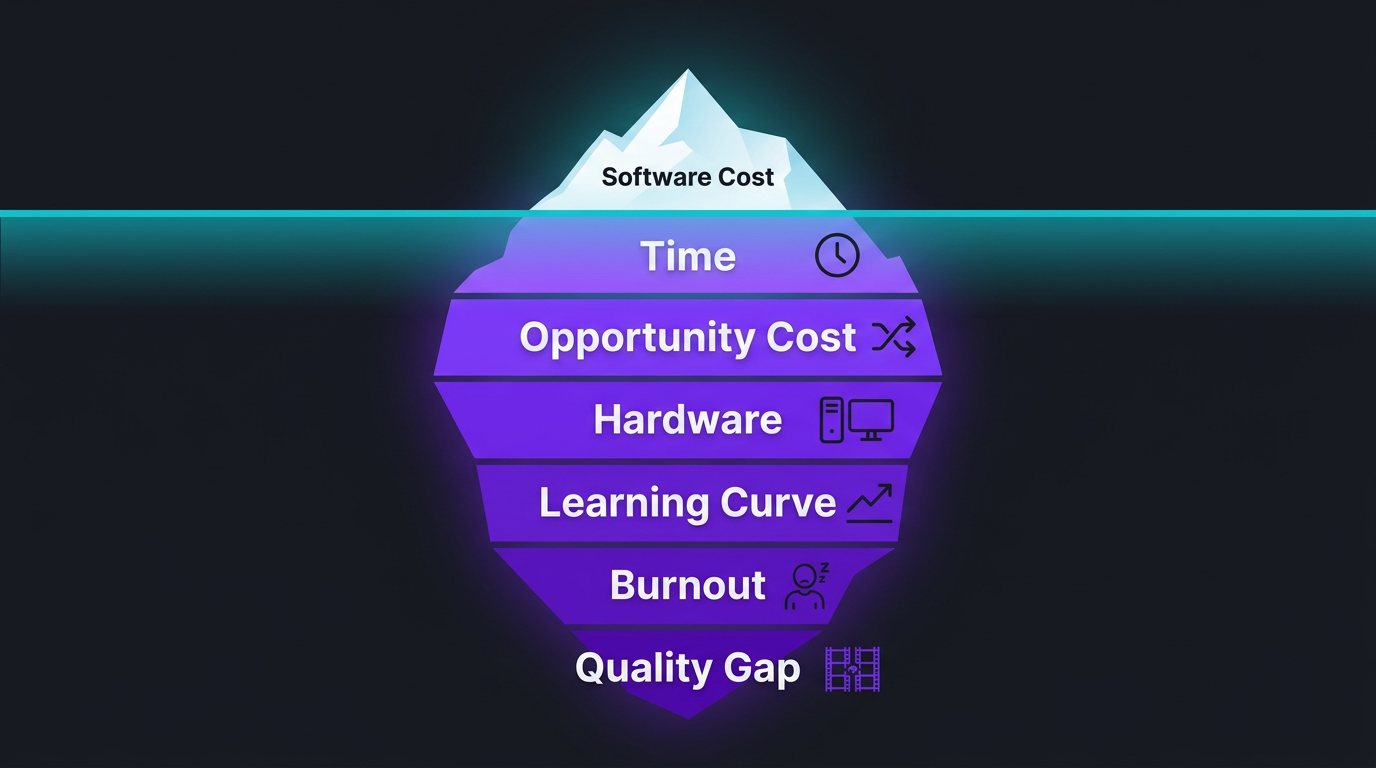
“I’ll just edit it myself” might be the most expensive sentence in content creation. Not because the software costs money — but because your time does, and you’re spending a lot more of it than you realize.
We’ve worked with hundreds of creators and businesses at Increditors who switched from DIY editing to professional outsourcing. Almost every single one says the same thing: “I wish I’d done this sooner.” Not because they couldn’t edit — but because the true cost of editing their own videos was far higher than what they were paying a professional.
This article breaks down the real cost of DIY video editing — the hard dollars, the hidden hours, and the opportunity cost that nobody talks about. By the end, you’ll know exactly what your editing habit is really costing you.
What’s in This Guide
- The “Free” Editing Myth
- The Time Cost: Hours You Can’t Get Back
- Hard Costs: Software, Hardware, and Storage
- The Learning Curve Tax
- Opportunity Cost: What You’re Not Doing
- The Quality Gap Nobody Admits
- The Burnout Factor
- The Real Math: DIY vs Outsourcing
- Case Studies: Creators Who Made the Switch
- When to Stop Editing Your Own Videos
- FAQ
The “Free” Editing Myth
Ask any creator who edits their own videos why they do it, and the most common answer is some version of “it saves money.” On the surface, this makes sense. You already own a computer. You can download DaVinci Resolve for free. YouTube tutorials will teach you the basics. Total cost: zero.
Except that calculation ignores the most expensive resource in your business: your time.
When you factor in the hours spent editing, the software you end up paying for, the hardware upgrades you need, the storage costs, and — most critically — the revenue-generating work you’re not doing while you’re adjusting audio levels at 11 PM, the true cost of DIY editing becomes staggering.
Let’s break down each component so you can see the full picture.
The Time Cost: Hours You Can’t Get Back
This is the big one. Time is the single largest cost of DIY editing, and it’s the one most creators dramatically underestimate.
Here’s what editing a single YouTube video actually looks like in hours:
| Task | Basic Edit | Standard Edit | Premium Edit |
|---|---|---|---|
| Importing & organizing footage | 0.5 hrs | 0.5 hrs | 1 hr |
| Rough cut / assembly | 1–2 hrs | 2–3 hrs | 3–5 hrs |
| Fine cut & pacing | 1 hr | 2 hrs | 3 hrs |
| Text & lower thirds | 0.5 hrs | 1 hr | 2 hrs |
| Music & sound design | 0.5 hrs | 1 hr | 2 hrs |
| Color correction/grading | — | 1 hr | 2–3 hrs |
| Motion graphics & VFX | — | 1–2 hrs | 3–5 hrs |
| Export & troubleshooting | 0.5 hrs | 1 hr | 1 hr |
| Total per video | 4–5 hrs | 9–12 hrs | 17–22 hrs |
Now multiply that by your publishing schedule. If you’re putting out two videos a week at a “standard” edit level, you’re spending 18–24 hours per week on editing alone. That’s a part-time job. And if you’re publishing daily content — shorts, reels, plus long-form — you can easily hit 30+ hours of editing per week.
The Time Cost in Dollars
What’s your time actually worth? Not your hourly wage at a day job — your effective hourly rate when you’re doing what you’re best at.
- Content creator earning $5K/month from brand deals and AdSense: Working 160 hours/month = ~$31/hour effective rate
- Business owner generating $20K/month: ~$125/hour effective rate
- Coach or consultant at $10K/month: ~$62/hour effective rate
At a $62/hour effective rate, spending 10 hours editing one video means that video cost you $620 in time — before you’ve paid for a single piece of software.
A professional editor at an agency like Increditors would charge $200–$500 for that same video, delivered faster and at a higher quality. The math speaks for itself.
Hard Costs: Software, Hardware, and Storage
Let’s set aside time for a moment and look at the actual dollars leaving your bank account for DIY editing.
Software Costs
| Software | Monthly Cost | Annual Cost | Notes |
|---|---|---|---|
| Adobe Premiere Pro | $22.99 | $275.88 | Most popular; requires After Effects for motion graphics (+$22.99/mo) |
| Adobe Creative Cloud (full) | $59.99 | $719.88 | Premiere + After Effects + Photoshop + everything |
| Final Cut Pro | — | $299.99 | One-time purchase; Mac only |
| DaVinci Resolve Studio | — | $295 | One-time; free version available but limited |
| Music/SFX libraries | $15–$30 | $180–$360 | Epidemic Sound, Artlist, etc. |
| Stock footage/graphics | $20–$50 | $240–$600 | Envato, Motion Array, etc. |
| Typical annual total | — | $700–$1,700 |
Hardware Costs
Editing video — especially 4K or anything with motion graphics — demands serious hardware. Here’s what a capable editing setup costs in 2026:
- Editing computer (PC or Mac): $1,500–$3,500 for a machine that handles 4K smoothly. MacBook Pro M3/M4 starts at $1,999.
- Monitor: $300–$800 for a color-accurate display (you need this for grading)
- External storage: $100–$400 for 1–4TB SSD. Video files eat storage fast — 1 hour of 4K footage is 300–400 GB.
- Backup storage: $100–$300/year for cloud backup or a NAS
- Audio monitoring: $100–$300 for decent headphones or studio monitors
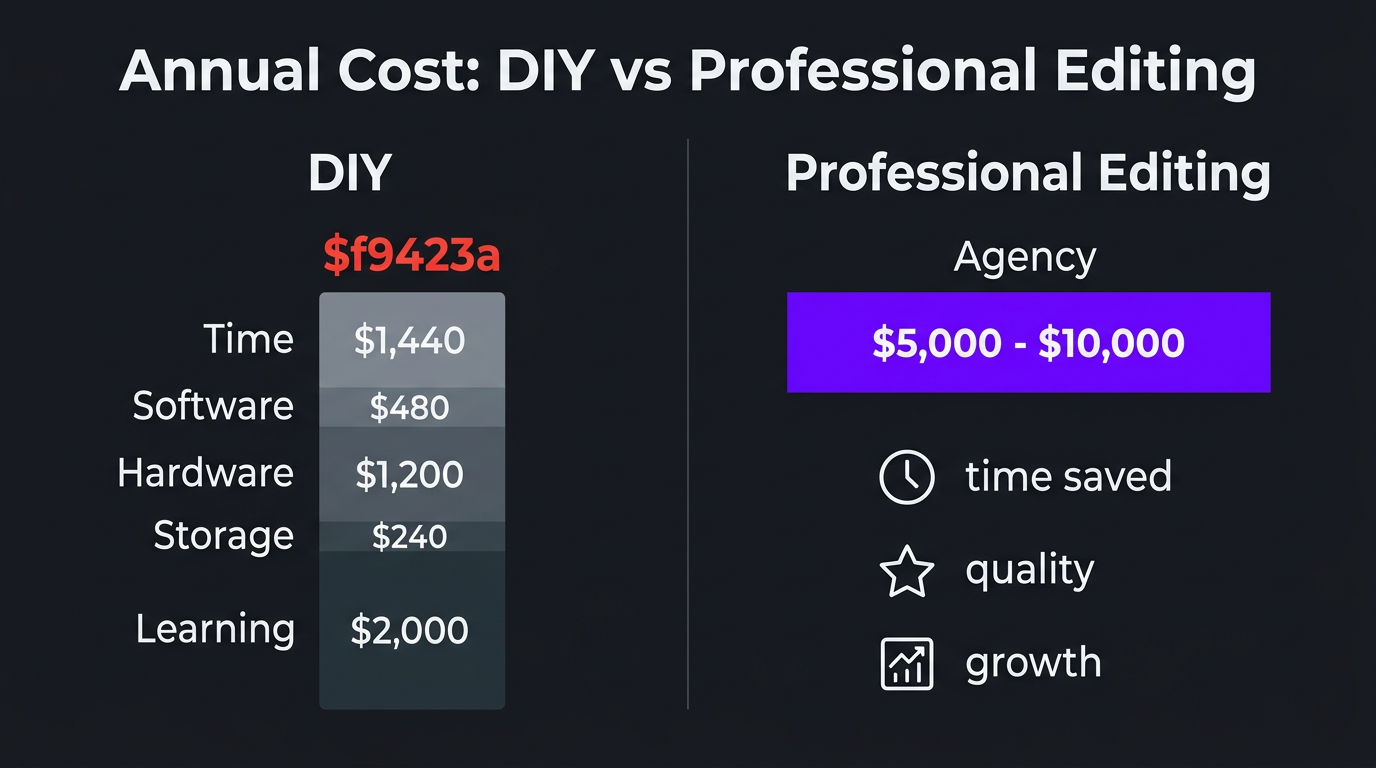
Initial hardware investment: $2,100–$5,300. And that hardware needs upgrading every 3–5 years as software demands increase and codecs evolve.
The Learning Curve Tax
Here’s a cost that almost never shows up in “should I edit my own videos” articles: the time you spend learning.
Video editing has a deceptively steep learning curve. The basics — cutting clips, adding transitions — take a few hours to learn. But the skills that actually make videos good take months or years:
- Pacing and storytelling: Knowing where to cut, when to breathe, how to build tension. This is instinct developed over thousands of hours.
- Color grading: Not just making footage “look nice” — matching shots, creating mood, maintaining consistency across videos. Professional color grading is an entire specialization.
- Sound design: Mixing dialogue, music, and effects so everything sits properly. Bad audio kills viewer retention faster than anything visual.
- Motion graphics: Creating custom lower thirds, intros, data visualizations. After Effects alone has a 6–12 month learning curve for competency.
- Platform optimization: Understanding how YouTube’s algorithm responds to pacing, how Instagram’s compression affects quality, how LinkedIn favors certain formats.
The Learning Cost in Numbers
Based on conversations with hundreds of creators who’ve gone through this journey:
- Getting “functional”: 40–80 hours of learning (2–4 weeks of part-time effort)
- Getting “decent”: 200–500 hours (3–6 months)
- Getting “good”: 1,000+ hours (1–2 years of consistent editing)
- Getting “professional-level”: 3,000–5,000+ hours (this is why professional editors exist)
At a $50/hour opportunity cost, that “functional” level represents $2,000–$4,000 in learning time alone. “Decent” costs $10,000–$25,000 in time. And even then, you’re likely producing work that a professional YouTube editor could do in half the time at twice the quality.
The learning curve never really ends, either. Software updates, new techniques, new formats, new platform requirements — there’s always something new to figure out. Professional editors stay current because it’s their full-time job. For you, it’s an ongoing time drain that competes with your actual work.
Opportunity Cost: What You’re Not Doing While You Edit
This is the silent killer. While you’re editing, you’re not doing the things that actually grow your channel or business. And those things compound over time.
For Content Creators
Every hour spent editing is an hour not spent on:
- Content ideation and research: Better ideas = better videos = more views
- Script writing: The highest-ROI activity for most YouTubers
- Filming more content: Publishing frequency directly correlates with growth
- Community engagement: Responding to comments, building relationships with your audience
- Networking and collaborations: One collaboration can bring more subscribers than weeks of solo content
- Sponsorship outreach: Every brand deal you don’t pursue because “I need to finish editing” is money left on the table
- Thumbnail and title testing: The highest-impact growth lever for existing content
For Businesses
If you’re a business owner editing marketing videos, the opportunity cost is even more severe:
- Sales calls and client work: Direct revenue generation
- Product development: Improving what you actually sell
- Team management: Your business needs leadership, not another editor
- Strategy and planning: High-level thinking that moves the needle
Stop Trading Hours for Edits
Get your time back with a dedicated editing team. Increditors handles your entire post-production pipeline so you can focus on what you do best.
The Compound Effect
Opportunity cost compounds. Consider this scenario:
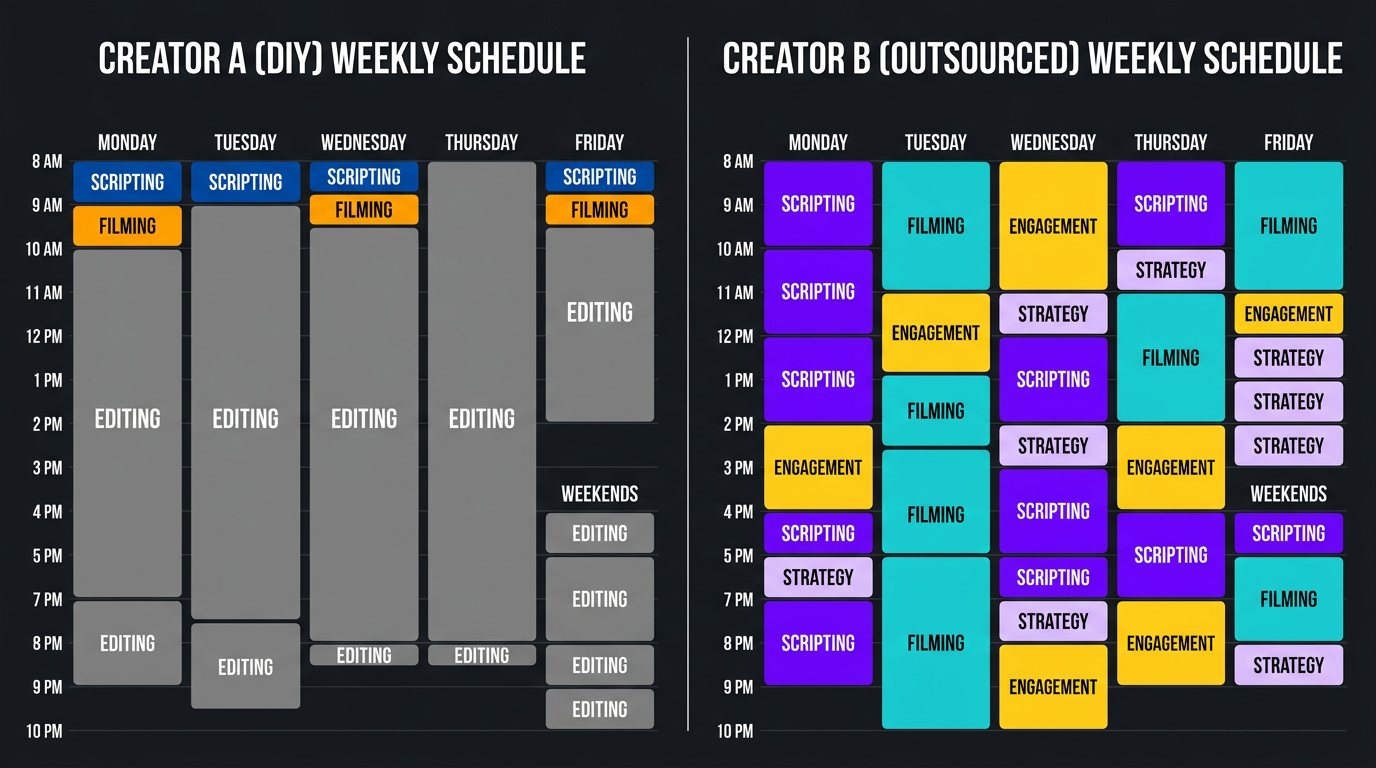
Creator A edits their own videos, spending 15 hours/week on editing. They publish 2 videos per week.
Creator B outsources editing and uses those 15 hours for scripting, filming extra content, and audience engagement. They publish 4 videos per week with better scripts and actively engage their community.
After 6 months, Creator B has published 104 videos vs Creator A’s 52. They’ve responded to 10x more comments. They’ve pitched 20 brand deals. Their channel has grown 3–5x faster — not because their videos are “better edited,” but because they had the time to do everything else right.
We’ve seen this exact pattern play out with clients like Riley Coleman, who went from editing everything himself to outsourcing to Increditors. The result wasn’t just better-looking videos — it was a complete shift in how he spent his time. More content, better content strategy, and significantly faster channel growth. The editing was the bottleneck he didn’t fully see until it was removed.
The Quality Gap Nobody Admits
Here’s an uncomfortable truth: unless you’ve been editing professionally for years, your self-edited videos are probably worse than what a professional would produce. Not slightly worse — meaningfully worse in ways that affect viewer retention, subscriber conversion, and revenue.
The quality gap shows up in subtle but important ways:
Pacing
Professional editors understand rhythm. They know when a beat needs to breathe and when it needs to punch. They’ve developed an instinct for the exact frame to cut on. Self-taught editors tend to either cut too aggressively (jarring, exhausting to watch) or too loosely (boring, causes drop-off). This directly impacts your average view duration — the metric YouTube cares about most.
Audio Quality
Most DIY editors focus on visuals and treat audio as an afterthought. Professional editors know that audio is 50% of the viewing experience. Proper mixing, noise reduction, compression, and music balancing create a polished feel that viewers sense even if they can’t articulate it. Poor audio is the #1 reason viewers click away from otherwise good content.
Visual Consistency
Color consistency between shots, consistent text styling, properly designed graphics — these create a professional “brand feel” that builds trust. DIY editors often have inconsistent colors, mismatched fonts, and graphics that look like they came from five different templates. A professional social media video editor maintains brand consistency across every piece of content.
Motion Graphics
Custom motion graphics separate professional content from amateur content immediately. Clean animated lower thirds, data visualizations, transitions, and visual effects require After Effects skills that take years to develop. Using preset templates only gets you so far — and viewers can tell.
| Quality Factor | DIY Editor (0-2 yrs) | Professional Editor | Impact on Performance |
|---|---|---|---|
| Pacing & storytelling | Inconsistent | Polished, intentional | +20-40% avg view duration |
| Audio mixing | Basic or overlooked | Broadcast-quality | Reduces early drop-off |
| Color grading | Filters or none | Custom, scene-matched | Perceived production value |
| Motion graphics | Templates | Custom, brand-aligned | Brand recognition & trust |
| Thumbnail integration | Afterthought | Planned from edit stage | Higher CTR |
| Platform optimization | One-size-fits-all export | Format-specific delivery | Better compression & reach |
The Burnout Factor
This is the cost that doesn’t show up on any spreadsheet but might be the most destructive of all.
Editing is mentally exhausting. It requires sustained concentration, creative decision-making, and repetitive fine motor work. When you add editing on top of ideation, scripting, filming, and running your business or channel, burnout isn’t a risk — it’s an inevitability.
The burnout cycle typically looks like this:
- Enthusiasm phase (months 1–3): Editing feels creative and exciting. You’re learning new skills. Videos are improving.
- Grind phase (months 4–8): The novelty wears off. Editing starts feeling like a chore. You start cutting corners on quality to save time.
- Avoidance phase (months 9–12): You dread opening your editing software. Videos sit unfinished for days. Publishing frequency drops.
- Quit or burn out (month 12+): You either stop creating content entirely, or you finally outsource — usually after significant damage to your momentum and mental health.
We’ve seen this pattern repeatedly with creators who come to Increditors after burning out on DIY editing. Trade with Pat, a finance YouTube creator, described his editing experience as “the thing that was slowly killing my channel.” He was spending so much time and energy on editing that his content quality was actually declining — not the editing quality, but the content itself. His scripts got lazier because he was drained. His on-camera energy dropped because he was exhausted. The irony: the editing was technically fine, but it was destroying everything around it.
Within three months of outsourcing to a professional team, his publishing frequency doubled, his on-camera presence improved dramatically, and his channel growth rate tripled. The editing wasn’t the product — it was the bottleneck.
The Real Math: DIY vs Outsourcing — A Full Comparison
Let’s put it all together with a concrete example. Here’s the total annual cost comparison for a creator publishing 8 YouTube videos per month:
| Cost Category | DIY Editing | Agency (Increditors) |
|---|---|---|
| Time cost (at $60/hr effective rate) | $37,440/yr (78 hrs/mo × 12 × $40 blended) | $0 (2-3 hrs/mo for briefs & feedback) |
| Software subscriptions | $720–$960/yr | $0 (included) |
| Hardware (amortized over 4 yrs) | $625–$1,325/yr | $0 |
| Storage & backup | $200–$500/yr | $0 (included) |
| Service/retainer fee | $0 | $2,500–$5,000/mo ($30K–$60K/yr) |
| Quality level | Intermediate | Professional |
| Turnaround time | Self-dependent | 24–72 hrs |
| Revision process | Redo it yourself | Unlimited revisions |
| Burnout risk | High | None |
| True annual cost | $39,000–$40,000+ | $30,000–$60,000 |
Here’s the revelation: at moderate volume, DIY editing costs roughly the same as professional editing — and sometimes more. And you get worse results. The only scenario where DIY is genuinely cheaper is when you value your time at near-zero — which is only true if you have no other productive use for those hours.
For creators and businesses at lower volumes (2–4 videos per month), the math shifts. DIY might cost $12,000–$15,000/year in true costs, while outsourcing might run $6,000–$18,000/year depending on the service tier. But even here, the opportunity cost of those 20–40 hours per month usually tips the balance toward outsourcing. Check our pricing page for current rates.
Case Studies: Creators Who Made the Switch
TuMeke: From Overworked to Optimized
TuMeke’s team was spending 20+ hours per week on video editing for their brand content. As a growing company, every team member wore multiple hats — and editing was consuming a disproportionate share of their bandwidth. The quality was acceptable but inconsistent, and their publishing schedule was erratic because editing bottlenecks kept pushing deadlines.
After switching to Increditors, they reclaimed those 20+ hours per week immediately. Their content quality improved noticeably — particularly in pacing, color grading, and motion graphics — and their publishing frequency went from “when we can” to a consistent weekly schedule. More importantly, the team members who had been editing redirected their time to product development and customer engagement, directly contributing to revenue growth.
VYVE Wellness: Quality That Matches the Brand
VYVE Wellness had been using a combination of in-house editing and freelancers, but the inconsistency was hurting their brand. Each video looked slightly different — different color temperatures, different text styles, different energy levels. For a wellness brand where trust and consistency are paramount, this was a real problem.
Working with a dedicated team at Increditors gave them the brand consistency they needed. Every video now has the same visual language, the same quality standard, and the same professional polish. Their founder told us: “People comment on how ‘premium’ our content feels now. That perception directly translates to what we can charge.”
Blue Zones Health: Scaling Content Without Scaling Headcount
Blue Zones Health needed to dramatically increase their video output to support a content marketing push, but hiring in-house editors wasn’t feasible for their budget. They were producing 4 videos per month through DIY editing and wanted to scale to 16+.
Through an unlimited editing retainer with Increditors, they quadrupled their output without adding a single team member. The cost was less than what one in-house editor would have cost in salary, benefits, and equipment — and they got an entire team instead of a single person. The scalability factor is something DIY editing simply can’t match.
When to Stop Editing Your Own Videos
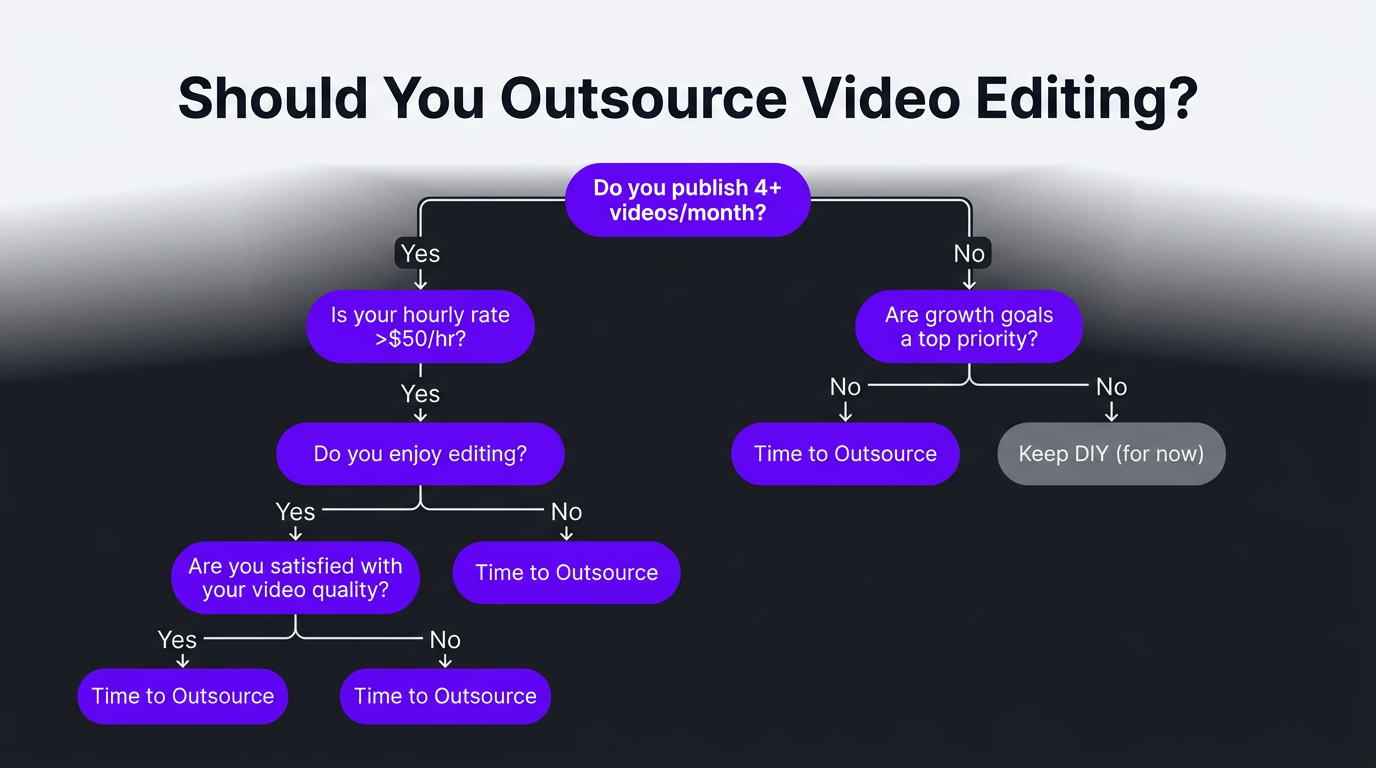
Not everyone should outsource immediately. If you’re just starting out, learning to edit teaches you visual storytelling and helps you communicate with editors later. But there comes a clear inflection point where DIY editing starts costing more than it saves.
Signs It’s Time to Stop DIY Editing
- You’re publishing less than you could. If editing is the bottleneck preventing you from hitting your desired publishing frequency, it’s time.
- Your editing has plateaued. If your videos have looked roughly the same for 6+ months despite effort to improve, you’ve hit your skill ceiling. A professional will push through it.
- You dread editing. If opening your editing software feels like a chore rather than a creative pursuit, burnout is either here or coming.
- You’re earning enough to justify it. If your channel or business generates $2,000+/month from video, outsourcing editing is almost always ROI-positive.
- Your time has better uses. If you can identify specific revenue-generating or growth activities you’d do with reclaimed editing time, the math is clear.
- Quality matters for your brand. If you’re in a space where production value affects trust and conversion (coaching, luxury, B2B, wellness), professional editing pays for itself in brand perception.
- You’re scaling up. Going from 4 to 12+ videos per month through DIY is nearly impossible. Enterprise-level content requires a team.
How to Transition from DIY to Outsourced Editing
The transition doesn’t have to be all-or-nothing. Here’s a practical approach:
- Start with one content type. Outsource your YouTube long-form editing first while keeping short-form in-house. This lets you test the process with lower risk.
- Create a style guide. Document your brand colors, fonts, pacing preferences, and examples of edits you like. This is your editor’s roadmap.
- Build a feedback loop. The first 2–3 videos with a new editor will require more feedback. This is normal and gets faster quickly.
- Track your reclaimed time. Actively fill former editing hours with revenue-generating work. This is how you measure ROI.
- Expand gradually. Once long-form is dialed in, add shorts, reels, and repurposed clips to the outsourced workflow.
Ready to Reclaim Your Time?
See how much time and money you could save with a dedicated Increditors editing team. We’ll map out exactly how the transition works for your content.
Frequently Asked Questions
Most creators spend 5–15 hours editing a single YouTube video, depending on length and complexity. A 10-minute video with basic cuts, music, and graphics typically takes 6–8 hours. Adding motion graphics, color grading, and sound design can push it to 15–20+ hours.
If your time is worth $50–200/hour in your core business, spending 10 hours editing a video costs you $500–2,000 in lost revenue or growth opportunities. Most creators find that outsourcing editing at $200–500 per video is significantly cheaper than the opportunity cost of doing it themselves.
No. DIY editing requires software subscriptions ($20–55/month), hardware upgrades ($1,000–3,000+ for a capable editing machine), storage solutions ($100–500/year), and ongoing learning time. The total annual cost often exceeds $2,000–5,000 before counting your time.
You should stop DIY editing when: editing takes time away from content creation or business growth, your editing quality has plateaued, you’re burning out, you’re publishing less frequently because of editing bottlenecks, or your revenue justifies the cost of a professional editor.
Professional video editing ranges from $100–500 per video for YouTube content, or $1,500–5,000/month for agency retainers covering multiple videos. Most creators and businesses find that outsourcing pays for itself through increased output, better quality, and reclaimed time for revenue-generating activities.
At minimum, you need editing software (Adobe Premiere Pro at $22.99/month or DaVinci Resolve free/Studio at $295 one-time), a computer with at least 16GB RAM and a dedicated GPU ($1,500–3,000+), external storage (1–4TB SSD at $100–400), and decent headphones or monitors ($100–300). Total startup cost: $1,800–4,000+.
AI tools like auto-captioning, scene detection, and auto-reframing can save 1–3 hours per video on specific tasks. However, they can’t replace creative storytelling, pacing decisions, brand-consistent motion graphics, or professional color grading. Most creators using AI tools still spend 4–10 hours per video on the creative editing work.