










![3D Explainer Video - ScribbleLive.mp4_snapshot_00.12_[2022.03.09_03.14.16]](https://increditors.com/wp-content/uploads/elementor/thumbs/3D-Explainer-Video-ScribbleLive.mp4_snapshot_00.12_2022.03.09_03.14.16-r7wb53mx72rxst3qcqyrfxdmeyzb5r9jbl0wbjujh4.png "3D Explainer Video – ScribbleLive.mp4_snapshot_00.12_[2022.03.09_03.14.16]")
































You started your YouTube channel because you had something to say. Now you’re spending 15 hours a week in Premiere Pro instead of creating, filming, or growing your audience.
The math stops making sense pretty quickly. If your time is worth $50/hour and you’re spending 60 hours per month editing, that’s $3,000 in opportunity cost — money you could reclaim by letting someone else handle post-production while you focus on what actually grows your channel.
But outsourcing video editing for YouTube isn’t as simple as posting a job on Fiverr. The wrong editor wastes your money and your time. The wrong process creates more work, not less. And the wrong expectations lead to frustration and burnt bridges.
This guide covers everything: when to outsource, how to find the right editor or agency, what to pay, how to brief effectively, how to manage quality, and how to scale from outsourcing one video to running a full content production pipeline. Based on years of experience running a YouTube editing agency and working with creators at every stage.
What’s in This Guide
- When to Start Outsourcing
- Your Outsourcing Options
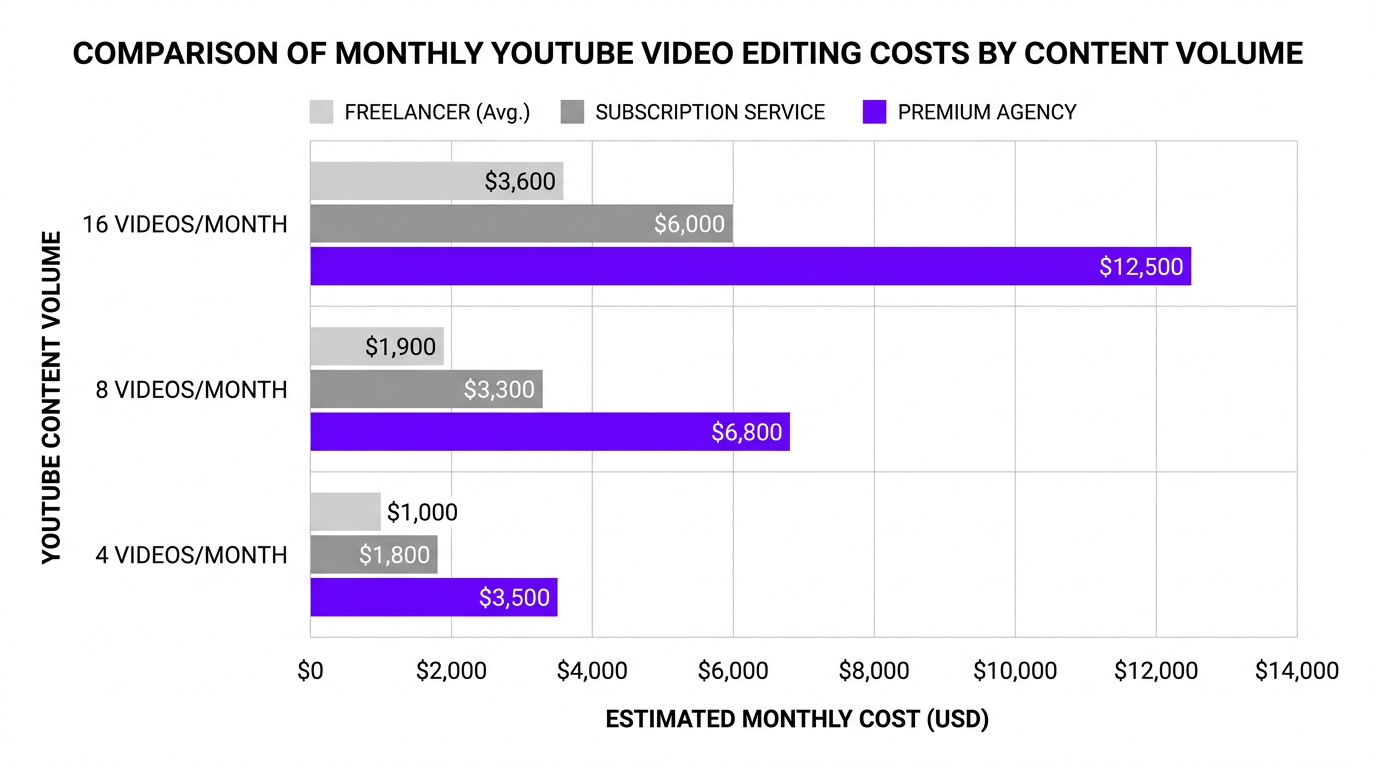
- What YouTube Editing Outsourcing Costs
- How to Find the Right Editor
- The Test Project Method
- Writing Editing Briefs That Work
- Onboarding Your Editor
- Managing Quality and Revisions
- Building Your Outsourced Workflow
- Scaling from 4 to 40 Videos Per Month
- 7 Outsourcing Mistakes That Kill Channels
- FAQ
When to Start Outsourcing Your YouTube Editing
Not every creator needs to outsource, and outsourcing too early can actually hurt — you spend money before the channel generates returns, and you lose the intimate understanding of your own content that comes from editing it yourself.
Here are the five signals that it’s time:
Signal 1: Editing Is Your Bottleneck
You have content ideas. You’ve filmed footage sitting on a hard drive. But you can’t publish because editing takes so long. When your upload schedule is limited by post-production capacity rather than content ideas, outsourcing unlocks growth.
Signal 2: You’re Spending 10+ Hours Per Week Editing
At 10 hours per week, editing is essentially a part-time job. For most creators, those 10 hours would generate more value in content planning, filming, audience engagement, brand deals, or product development. If editing absorbs time that would be better spent elsewhere, it’s costing you more than an editor would.
Signal 3: Your Quality Has Plateaued
You’ve upgraded your camera, improved your lighting, refined your scripts — but the final product still doesn’t match the channels you admire. If you’ve hit a technical ceiling in editing skill and don’t want to spend the next 6 months learning motion graphics, color grading, and sound design, a professional editor leapfrogs that gap.
Signal 4: You’re Earning Enough to Reinvest
A general benchmark: if your channel generates $1,000+/month from any combination of AdSense, sponsorships, products, or services, outsourcing editing at $500-$2,000/month is a smart reinvestment. You’re using channel revenue to accelerate channel growth.
Signal 5: You’re Burning Out
Creator burnout is real, and editing fatigue is one of the biggest drivers. If you’re starting to dread the editing process — skipping episodes, rushing through cuts, procrastinating on uploads — outsourcing can reignite your enthusiasm by letting you focus on the parts of creation you actually enjoy.
Your Outsourcing Options: Freelancer, Agency, or Subscription
There are three main models for outsourcing video editing for YouTube, each with distinct trade-offs:
Option 1: Freelance Editor
You hire an individual editor directly, typically through Upwork, Fiverr, Twitter/X, or creator community referrals.
- Pros: Direct relationship, lower entry cost, flexibility on project scope
- Cons: You manage everything, no backup coverage, scaling requires hiring additional freelancers
- Best for: 1-4 videos per month, budget under $1,500/month
- Cost: $100-$500 per video depending on complexity and editor experience
Option 2: Subscription Editing Service
Monthly subscription plans with companies like Vidchops ($495/mo for 4 videos), VeedYou ($899/mo for 5 videos), or beCreatives ($899/mo unlimited requests). You submit footage through a portal and receive edits on a recurring schedule.
- Pros: Predictable monthly cost, streamlined submission process, built-in revisions
- Cons: Less personalized attention, limited creative input, may not handle complex edits well
- Best for: 4-8 videos per month, standardized content formats (talking head, interviews)
- Cost: $495-$2,000 per month
Option 3: Premium Agency with Dedicated Team
A full-service agency assigns you a dedicated editor (or team) who learns your brand, style, and preferences. Includes project management, quality control, and multi-format capability.
- Pros: Highest quality, fastest turnaround, minimal management from you, scales easily
- Cons: Higher monthly minimum, may be overkill for very low volume
- Best for: 4-40+ videos per month, creators who value consistency and time savings
- Cost: $2,500-$8,000 per month (varies by volume and complexity)
| Factor | Freelancer | Subscription Service | Premium Agency |
|---|---|---|---|
| Entry cost | $100-$300/video | $495-$899/month | $2,500+/month |
| Dedicated editor | ✅ (but fragile) | ⚠️ Varies | ✅ With backup |
| Motion graphics | Extra cost | Limited | Included |
| Turnaround | 3-7 days | 1-3 days | 24-48 hours |
| Your management time | High (5-15 hrs/mo) | Medium (3-6 hrs/mo) | Low (1-3 hrs/mo) |
| Quality ceiling | Depends on individual | Good, not exceptional | Premium |
| Scalability | Poor | Moderate | Excellent |
What YouTube Editing Outsourcing Actually Costs
Let’s put real numbers to common YouTube content scenarios:
Scenario A: Weekly YouTube Creator (4 videos/month)
| Option | Monthly Cost | Per-Video Effective Cost | What’s Included |
|---|---|---|---|
| Fiverr freelancer | $400-$800 | $100-$200 | Basic cuts, simple graphics, 2 revisions |
| Upwork mid-tier freelancer | $1,000-$1,600 | $250-$400 | Professional editing, color correction, B-roll |
| Vidchops (Weekly plan) | $495 | $124 | Standard editing, thumbnails available |
| VeedYou (Start plan) | $899 | $180 | 5 videos, unlimited revisions, stock music |
| Tasty Edits | $1,112 | $278 | Dedicated team, royalty-free assets, 48h turnaround |
Scenario B: Ambitious Creator (8 long-form + 16 shorts/month)
| Option | Monthly Cost | What’s Included |
|---|---|---|
| Two freelancers (one long-form, one shorts) | $3,200-$5,600 | Variable quality, you manage both relationships |
| Vidchops Pro + separate shorts freelancer | $1,795-$2,595 | Basic long-form editing + separate shorts management |
| beCreatives (Scale plan) | $899 | Unlimited requests (1 at a time), may be slow for volume |
| Increditors (dedicated team) | $3,500-$5,000 | All formats bundled, dedicated editor + PM, QC, motion graphics, 24-48h turnaround |
At the 8+ video/month level, the total cost between managing multiple freelancers and using a premium agency converges. But the experience is dramatically different: one involves 15+ hours of project management per month, the other involves reviewing polished drafts for a few hours total.
How to Find the Right YouTube Video Editor
Finding an editor is easy. Finding the right editor — one who understands YouTube-specific editing, matches your style, communicates well, and delivers reliably — is the hard part.
Where to Look
For freelancers:
- Upwork: Best for finding experienced editors with verifiable track records. Filter for “video editing” + “YouTube” and review job success scores.
- Fiverr: Best for budget options and quick test projects. Quality varies wildly — always do a paid test before committing.
- Twitter/X: Search “YouTube editor available” or post in creator communities. You’ll find editors actively seeking work with public portfolios.
- YouTube editing communities: Reddit’s r/VideoEditing, r/YouTubers, and Discord communities for creators often have editors offering services.
- Referrals: Ask other YouTubers in your niche who edits their videos. The best freelancers rarely need to advertise — they’re fully booked through referrals.
For agencies and subscription services:
- Direct research: Visit sites like Tasty Edits, Vidchops, VeedYou, beCreatives, and Increditors. Compare pricing, portfolio, and reviews.
- G2 and Trustpilot: Check third-party review platforms for honest customer experiences.
- Case studies: Agencies that show before/after results or client testimonials with specific metrics (retention improvement, view growth) are more credible than those showing only polished highlight reels.
What to Look for in a YouTube Editor
Technical editing skill is table stakes. What separates a good YouTube editor from a generic editor:
- Retention awareness: Do they understand the first-30-seconds hook? Do they pace content to maintain viewer attention? Can they identify where viewers would click away and fix those moments?
- Platform knowledge: YouTube has specific best practices — chapter markers, end screens, card placements, thumbnail-matching intros. Your editor should know these cold.
- Style matching: Can they adapt to your channel’s visual identity, or do they impose a one-size-fits-all template? Look for range in their portfolio.
- Communication skills: The most talented editor in the world is useless if they don’t respond to messages, can’t interpret feedback, or miss deadlines without warning.
- Proactive creative input: The best editors don’t just execute — they suggest. “The B-roll at 4:23 is weak, I found a better angle” or “This section drags, can we trim 30 seconds?” shows an editor who’s invested in the final product.
The Test Project Method: Never Commit Before You Verify
Portfolios lie. Not intentionally — but a portfolio shows an editor’s best work on their best client’s content. It doesn’t tell you how they’ll perform with your footage, your style, and your turnaround requirements.
How to Run an Effective Test
- Select raw footage from a real video: Don’t send your best-shot footage. Send a typical recording — the kind of raw material they’ll actually be working with. Including some challenging clips (bad audio, inconsistent lighting) shows how they handle imperfect conditions.
- Write the brief you’d normally write: Don’t over-explain for the test. Give the same level of direction you’d give for a regular video. This tests their ability to interpret your vision without hand-holding.
- Pay for the test: Always. Paying $100-$300 for a test project is the cheapest market research you’ll ever do. Free tests attract desperate editors, not good ones.
- Set a real deadline: If you need 48-hour turnaround normally, set a 48-hour deadline for the test. Hitting deadlines under normal conditions is a core skill.
- Evaluate holistically: Judge the edit, but also judge the process — communication speed, clarifying questions asked, file delivery format, and responsiveness to feedback.
Red Flags in Test Projects
- Asking for an extension on a short test deadline
- No questions asked before starting (means they’re guessing at your preferences)
- Delivering in the wrong format or codec
- Missed audio issues that should have been caught
- Generic template overlays instead of style-matched graphics
- Defensiveness when receiving revision notes
Green Flags in Test Projects
- Asking 2-3 smart clarifying questions before starting
- Delivering ahead of deadline
- Including notes explaining creative choices (“I cut this section because the pacing felt slow”)
- Implementing revision feedback precisely and quickly
- Suggesting improvements you didn’t ask for
Writing Video Editing Briefs That Actually Work
A great brief reduces revision rounds from 3-4 to 0-1. A vague brief guarantees miscommunication. Here’s the formula:
The YouTube Editing Brief Template
Section 1: The Basics
- Video title and topic
- Target length (e.g., “aim for 12-15 minutes final”)
- Upload date (so they know the hard deadline)
- Raw footage links and file organization
Section 2: Content Direction
- Key timestamps in the raw footage (“the best take of the intro is at 04:32-05:15”)
- Sections to cut entirely (“skip the tangent at 23:00-26:00”)
- Sponsor integration details (timing, length, script)
- Call-to-action placement
Section 3: Style Reference
- 2-3 reference videos (your own past videos or other channels) with notes on what to emulate
- Music mood/genre preference or specific tracks
- Graphics and text style (fonts, colors, animation style)
- Pacing preference (fast/snappy vs. relaxed/conversational)
Section 4: Technical Specs
- Delivery format (1080p, 4K, codec)
- Aspect ratio (16:9 for long-form, 9:16 for Shorts)
- Whether to include end screen template
- Chapter markers needed (yes/no)
The first few briefs will be longer. Over time — especially with a dedicated editor or agency team — your briefs shrink to timestamped notes and a sentence about music preference. That efficiency is the reward for investing in a proper onboarding process.
Want a Team That Already Knows YouTube?
Our editors have produced thousands of YouTube videos. No learning curve on platform basics — we focus on learning your brand from day one.
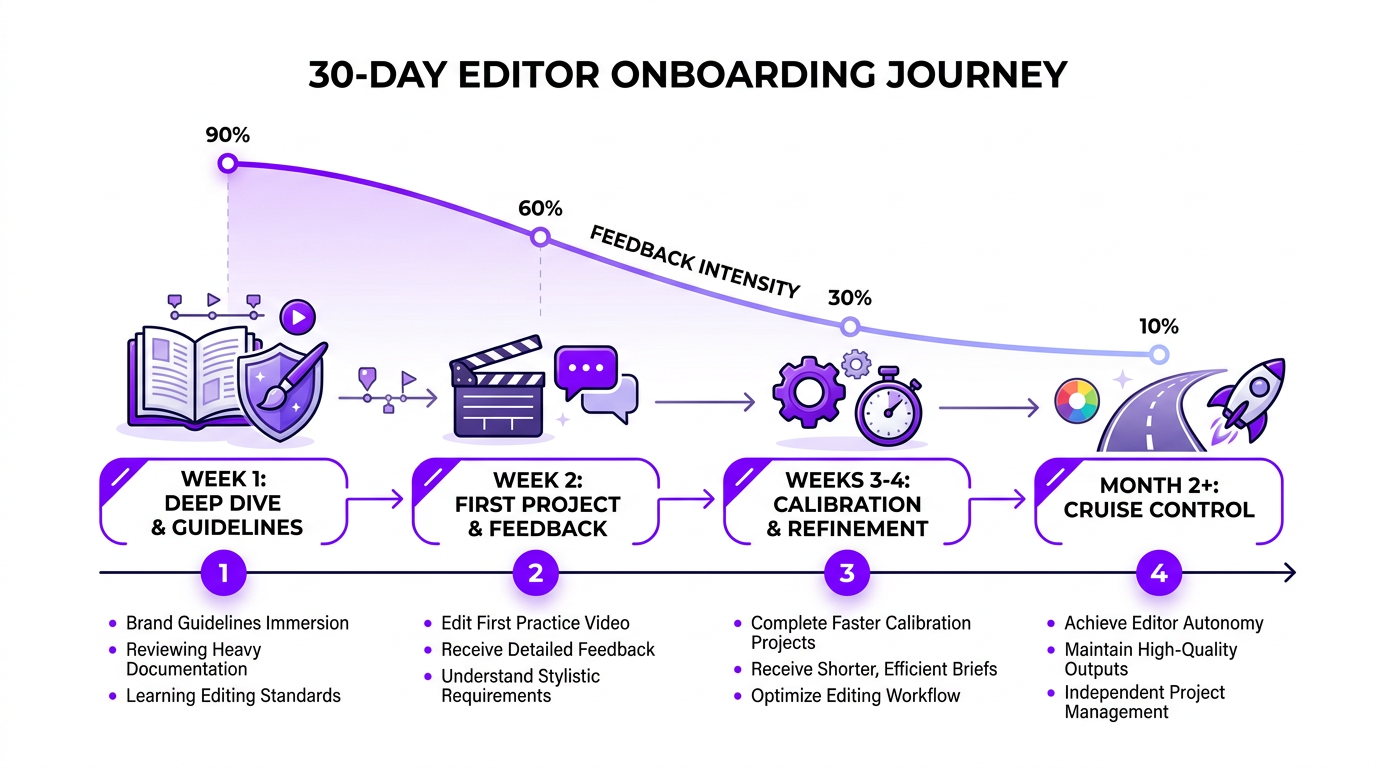
Onboarding Your Editor: The First 30 Days
The onboarding period determines whether your outsourcing experiment succeeds or fails. Invest time upfront to save exponentially more time later.
Week 1: Foundation
- Share your brand guidelines document (fonts, colors, logos, graphic templates)
- Send 5 examples of your best-edited videos with notes on what made them great
- Share 3 channels whose editing style you admire and explain what specifically you want to emulate
- Walk through your standard intro/outro format
- Discuss music preferences and any licensed library access
Week 2: First Real Video
- Send a detailed brief with your raw footage
- Expect a rough cut that’s 70-80% there. The first video always requires the most revision notes
- Be specific in feedback: “the cut at 3:42 feels abrupt, add a 0.5s transition” — not “the pacing feels off”
- Have a live call if possible to discuss the edit. Ten minutes of conversation saves hours of back-and-forth text
Weeks 3-4: Calibration
- Second and third videos should require fewer notes
- Track recurring feedback patterns. If you keep asking for the same adjustment, it’s a training issue — schedule a call to address it permanently
- Begin shortening your briefs as the editor internalizes your preferences
Month 2 and Beyond: Cruise Control
- By video 4-5, you should be reviewing polished drafts that need only minor tweaks
- Briefs become minimal — timestamps, music mood, and any special requests
- If you’re still writing extensive revision notes on video 6+, there may be a skill or compatibility mismatch
When Blue Zones Health, a wellness-focused brand, outsourced their YouTube editing to us, the onboarding included a detailed session on their visual language — calming color palettes, nature-oriented B-roll, and a deliberate, measured pacing that matched their health-conscious audience. By their third video, briefs were a paragraph long and revisions were cosmetic. That’s the onboarding payoff: front-loaded effort for long-term efficiency.
Managing Quality and Revisions Like a Pro
Quality management is where most outsourcing relationships break down. Not because editors are bad, but because creators don’t have a system for feedback.
The Three-Watch Review Method
When you receive a draft, watch it three times with different lenses:
- First watch: Gut reaction. Watch it like a viewer. Does the intro hook you? Do you get bored anywhere? Does the ending feel complete? Write down your emotional reactions, not technical notes.
- Second watch: Technical review. Check audio levels, color consistency, transition smoothness, text accuracy, and sync issues. Use timestamped notes.
- Third watch: Platform optimization. Is the first 30 seconds retention-optimized? Are there natural chapter break points? Does the end screen area work? Is the pacing right for your audience’s attention span?
How to Give Feedback That Actually Helps
Bad feedback: “The middle section is boring.”
Good feedback: “The segment from 5:20-7:45 drags. Tighten the cuts, remove the pause at 6:12, and add a B-roll transition at 6:30 to pick up the pace.”
Bad feedback: “The color doesn’t look right.”
Good feedback: “The color grading feels too warm compared to our usual look. Reference the grade from our March 15 video — cooler tones, slightly desaturated.”
The pattern: be specific about what and where, and provide a reference for how you want it fixed. Your editor isn’t a mind reader — clarity in feedback directly correlates to fewer revision rounds.
Setting Revision Expectations
- Round 1 (after first draft): Major structural and creative feedback. This is the big one — pacing changes, section reorders, music swaps.
- Round 2 (after first revision): Detail refinement. Audio tweaks, graphic adjustments, fine-tuning transitions.
- Round 3 (if needed): Polish. Minor fixes that shouldn’t require a third round if the first two were clear.
If you consistently need 4+ revision rounds, the problem isn’t the editor — it’s the brief. Invest more time in pre-production communication to fix the root cause.
Building Your Outsourced YouTube Workflow
A repeatable workflow is what transforms outsourcing from “an experiment” into “a system.” Here’s the framework that works for most YouTube creators:
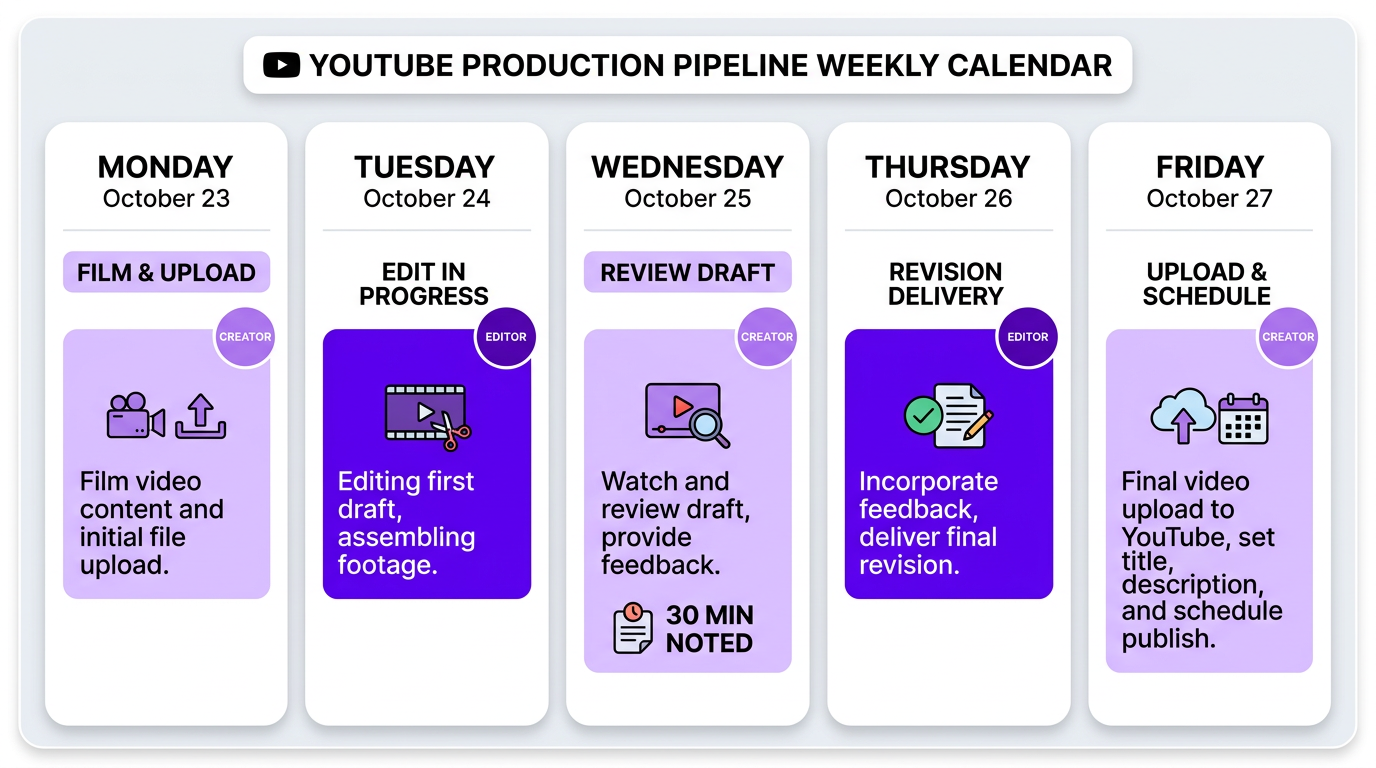
The Weekly YouTube Production Pipeline
| Day | Your Task | Editor’s Task |
|---|---|---|
| Monday | Film + upload raw footage with brief | Receive footage, review brief |
| Tuesday | Content planning for next video | Edit in progress |
| Wednesday | Review first draft (30-45 min), send revision notes | Deliver first draft, begin revisions when notes arrive |
| Thursday | Review revision (15 min), approve or minor notes | Deliver revised version |
| Friday | Upload to YouTube, schedule, film next video | Begin next video if footage is ready |
This pipeline assumes one video per week with a 48-hour turnaround. For twice-weekly uploads, you’d run two overlapping pipelines — which is where having an agency with a dedicated team becomes significantly easier than managing a single freelancer juggling both timelines.
Essential Tools for Remote Editing Collaboration
- File transfer: Frame.io (best for video review + feedback), Google Drive, or Dropbox. For large files, MASV handles multi-GB uploads efficiently.
- Communication: Slack or Discord for quick messages, Loom for visual feedback (record your screen while watching the draft and talking through notes).
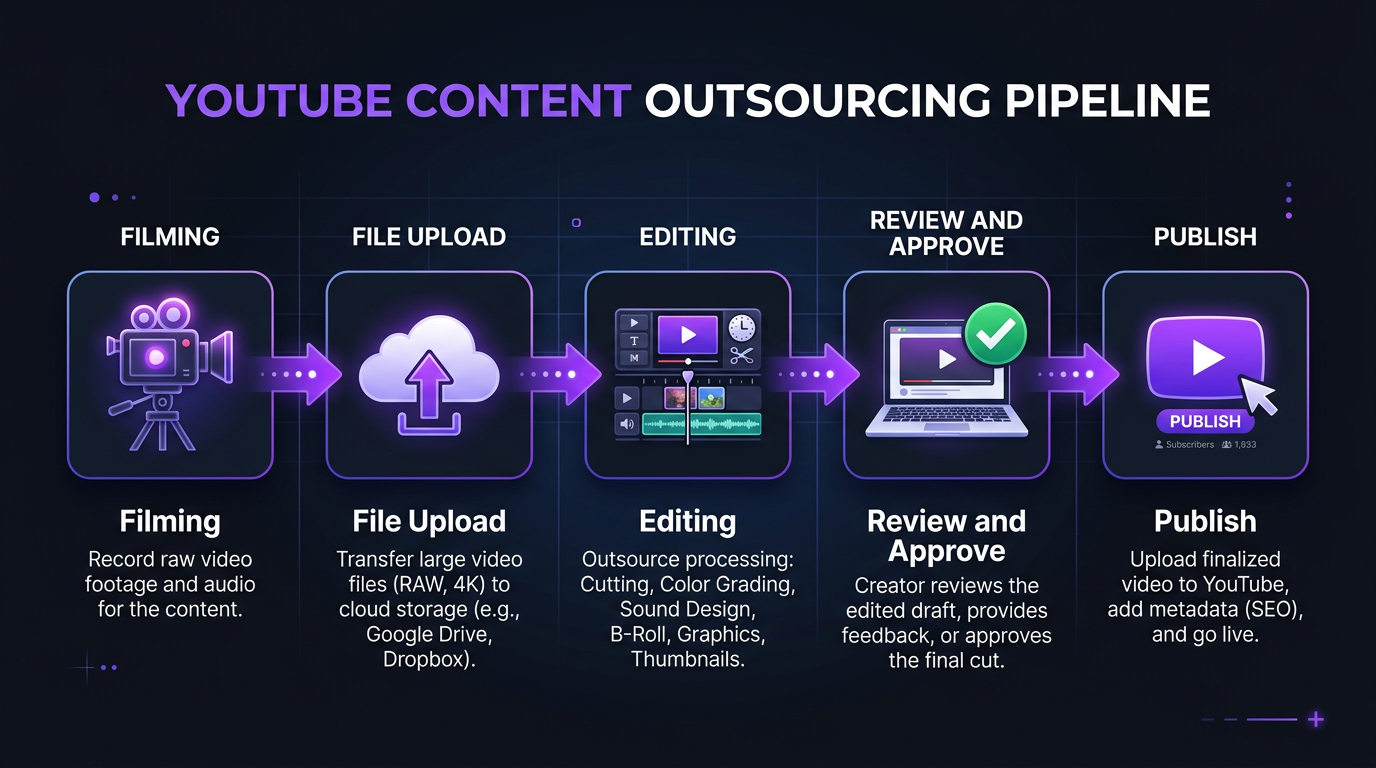
- Project management: Notion, Trello, or a simple shared spreadsheet tracking video status: Filmed → Uploaded → In Edit → Review → Approved → Published.
- Asset sharing: A shared Google Drive folder with your logos, fonts, graphic templates, intro/outro files, and music library access.
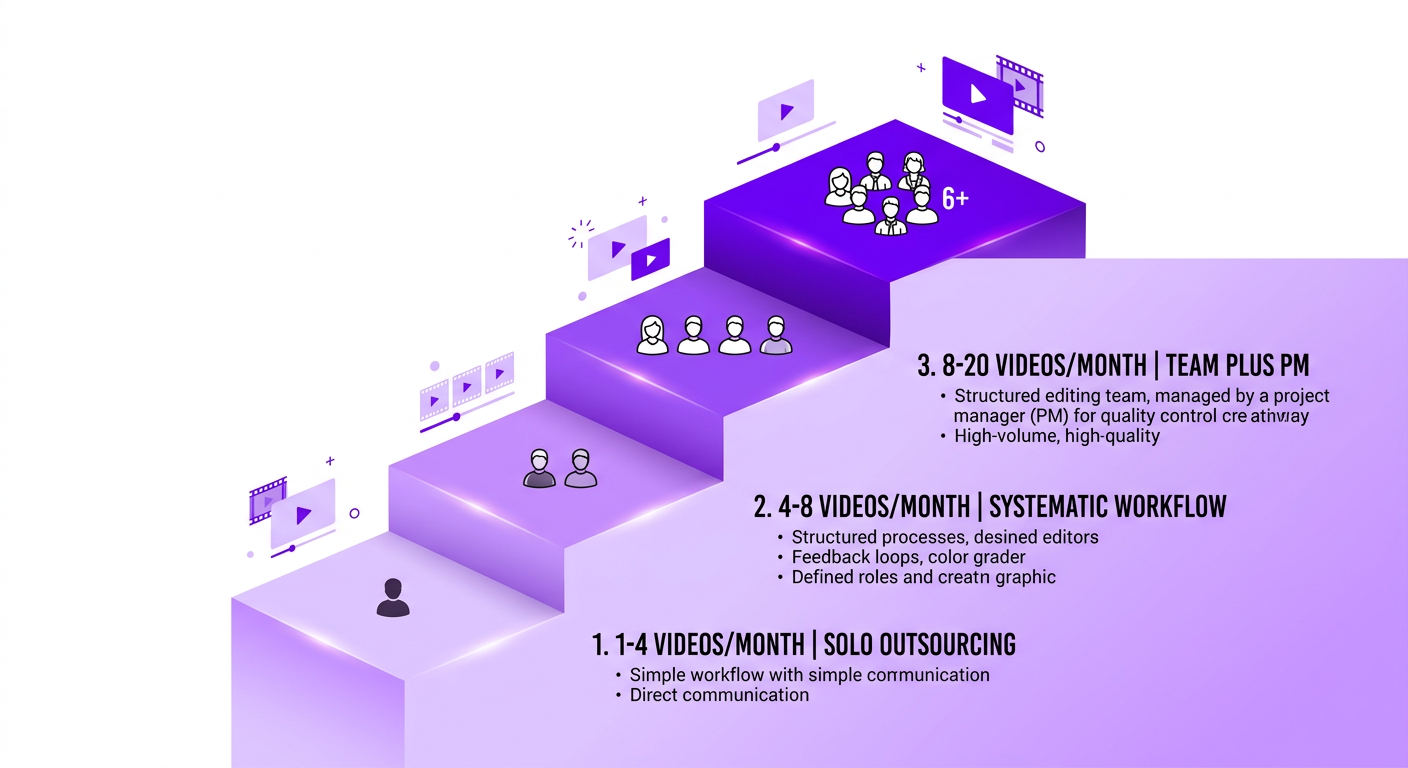
Scaling from 4 to 40 Videos Per Month
The transition from “I outsource my editing” to “I run a content production operation” happens gradually, and each stage has different needs:
Stage 1: 1-4 videos/month (Solo outsourcing)
One editor handles everything. You manage the relationship directly. Briefs are conversational. Review is hands-on. This works with a freelancer or entry-level subscription.
Stage 2: 4-8 videos/month (Systematic outsourcing)
You need a documented workflow, templated briefs, and consistent turnaround. This is where subscription services or agency retainers start making sense. A single dedicated editor with agency backup is the sweet spot.
Stage 3: 8-20 videos/month (Team outsourcing)
Multiple editors, potentially split by format (one for long-form, one for shorts). A project manager becomes essential — either you hire one or your agency provides one. This is where agencies pull far ahead of freelancer setups, because coordination across multiple editors is exactly what they’re built for.
This is the stage where VYVE Wellness operates. They produce weekly long-form YouTube videos plus daily short-form clips across platforms. Their content team at Increditors includes a primary editor for long-form, a shorts specialist, and a project manager coordinating the pipeline. VYVE’s founder spends roughly 3 hours per week on the entire editing process — reviewing drafts and providing brief notes. Everything else is handled.
Stage 4: 20-40+ videos/month (Production operation)
You’re now running a media brand. You need a dedicated production team — multiple editors, a creative director for consistency, project management infrastructure, and potentially separate tracks for different content types (YouTube, social media, client/sponsor content).
At this scale, only agencies with enterprise-grade infrastructure can deliver. The alternative is building an in-house team — which costs $15,000-$30,000+/month when you factor in salaries, benefits, software, and management overhead.
7 Outsourcing Mistakes That Kill YouTube Channels
We’ve seen these patterns repeatedly. Each one is preventable.
Mistake 1: Choosing on Price Alone
The $50 Fiverr editor is $50 for a reason. If your video looks cheap, your audience perceives your brand as cheap. The editorial quality of your videos directly impacts subscriber conversion, watch time, and sponsorship rates. Saving $200 per video while losing thousands in potential revenue is a false economy.
Mistake 2: Not Providing Reference Material
“Just make it look good” is not a brief. Every editor’s definition of “good” is different. Send specific examples. Show, don’t tell. Two minutes of reference video communicates more than two paragraphs of written description.
Mistake 3: Micromanaging Every Cut
If you’re providing 50 timestamped notes per video, you’re either working with the wrong editor or you haven’t let go of the editing process. Outsourcing means trusting someone else’s creative judgment on the details while you guide the big picture. If you can’t do that, save the money and edit yourself.
Mistake 4: Ignoring the Onboarding Period
Expecting perfect results on video one is unrealistic. Even the best editor needs 3-5 videos to learn your style. Creators who abandon editors after one or two “disappointing” videos are perpetually restarting the learning curve — and never getting the payoff of a calibrated editor who knows their content inside out.
Mistake 5: Not Tracking Performance Metrics
Are your outsourced videos performing better or worse than your self-edited ones? Track average view duration, CTR, and retention curves before and after outsourcing. Without data, you’re guessing whether the investment is working.
Mistake 6: Outsourcing Without a Workflow
If your process is “send footage whenever it’s ready and hope it comes back edited,” you’ll have inconsistent results. Build a repeatable pipeline with fixed submission days, clear turnaround expectations, and a revision process. Systems create consistency.
Mistake 7: Staying Too Long with a Bad Fit
Loyalty is admirable, but if your editor consistently misses the mark after 6+ videos of feedback, it’s a compatibility issue — not a training issue. Move on. Your channel can’t afford months of subpar content while hoping things improve. The quality gap between an adequate editor and the right editor compounds with every upload.
Frequently Asked Questions
YouTube video editing outsourcing costs $100-500 per video for freelancers or $495-5,000+ per month for agency retainers. Budget subscription services like Vidchops start at $495/month for 4 videos. Mid-tier services like VeedYou offer plans from $899/month. Premium agencies like Increditors provide dedicated teams starting at $2,500/month.
Outsource when editing takes 10+ hours per week, you’re missing upload schedules, video quality has plateaued, or your channel earns $1,000+/month. Most successful creators outsource before hitting 50K subscribers — the earlier you free up production time, the faster you grow.
Start with a paid test project using your actual raw footage — not just a portfolio review. Look for editors who understand YouTube retention, pacing, and platform best practices. Check agencies like Increditors, Tasty Edits, or VeedYou, or search Upwork and Fiverr for freelancers with YouTube-specific portfolios. Referrals from other creators are often the best source.
Include: raw footage files, target video length, key timestamps, sections to cut, music preferences, graphics requirements, reference videos showing desired style, sponsor integration details, and delivery format. The more specific your first few briefs, the faster your editor calibrates to your standards.
Expect 3-5 videos for full calibration. Videos 1-2 need heavier feedback. By video 3-4, revisions should be minimal. If an editor still isn’t matching your style by video 6, it’s likely a compatibility issue rather than a learning curve.
Freelancers work for 1-3 videos/month on a budget. Agencies are better for 4+ videos, multi-format needs, or when management overhead matters. The breakeven is usually 4-6 videos/month. See our full agency vs freelancer comparison for detailed analysis.
Yes — and you should. The same team ensures brand consistency and can efficiently repurpose long-form clips into Shorts. Most agencies offer bundled packages. At Increditors, Shorts extracted from long-form content are included in creator retainer plans.
Ready to Outsource Your YouTube Editing?
We’ll match you with a dedicated editor who understands YouTube inside and out. One week to onboard, one month to transform your content production.
Pricing data reflects 2026 market rates from publicly available sources including Vidchops, Tasty Edits, VeedYou, beCreatives, Upwork, and Fiverr. Rates vary by project specifics. For current Increditors pricing, visit our pricing page or schedule a call.