










![3D Explainer Video - ScribbleLive.mp4_snapshot_00.12_[2022.03.09_03.14.16]](https://increditors.com/wp-content/uploads/elementor/thumbs/3D-Explainer-Video-ScribbleLive.mp4_snapshot_00.12_2022.03.09_03.14.16-r7wb53mx72rxst3qcqyrfxdmeyzb5r9jbl0wbjujh4.png "3D Explainer Video – ScribbleLive.mp4_snapshot_00.12_[2022.03.09_03.14.16]")
































LinkedIn has quietly become the most important video platform for B2B brands. While everyone obsesses over YouTube and TikTok, the decision-makers who actually sign contracts are scrolling LinkedIn — and video posts get 5x the engagement of text-only updates.
But here’s the problem: most B2B LinkedIn videos are painfully boring. Talking heads with no captions, corporate jargon set to stock music, and horizontal videos that look like thumbnails on mobile. The bar is low — which means the opportunity is massive for brands that get LinkedIn video editing right.
We’ve helped B2B companies like Riley Coleman’s consultancy and TuMeke produce LinkedIn video content that actually generates leads — not just likes. This guide covers everything: formats, editing techniques, costs, and how to build a LinkedIn video system that runs without burning out your marketing team.
What’s in This Guide
- Why LinkedIn Video Matters for B2B
- LinkedIn Video Formats That Work
- Editing Techniques for LinkedIn
- Top B2B Video Content Types
- Repurposing Content for LinkedIn
- LinkedIn Video Editing Costs
- Building a LinkedIn Video Workflow
- Common Mistakes to Avoid
- Case Studies
- Outsourcing LinkedIn Video Editing
- FAQ
Why LinkedIn Video Is the Most Underrated B2B Channel
LinkedIn has over 1 billion members, but only 1% of users create content regularly. Video content is even rarer — fewer than 5% of posts include native video. That scarcity creates an algorithmic advantage: LinkedIn actively pushes video content because it needs more of it.
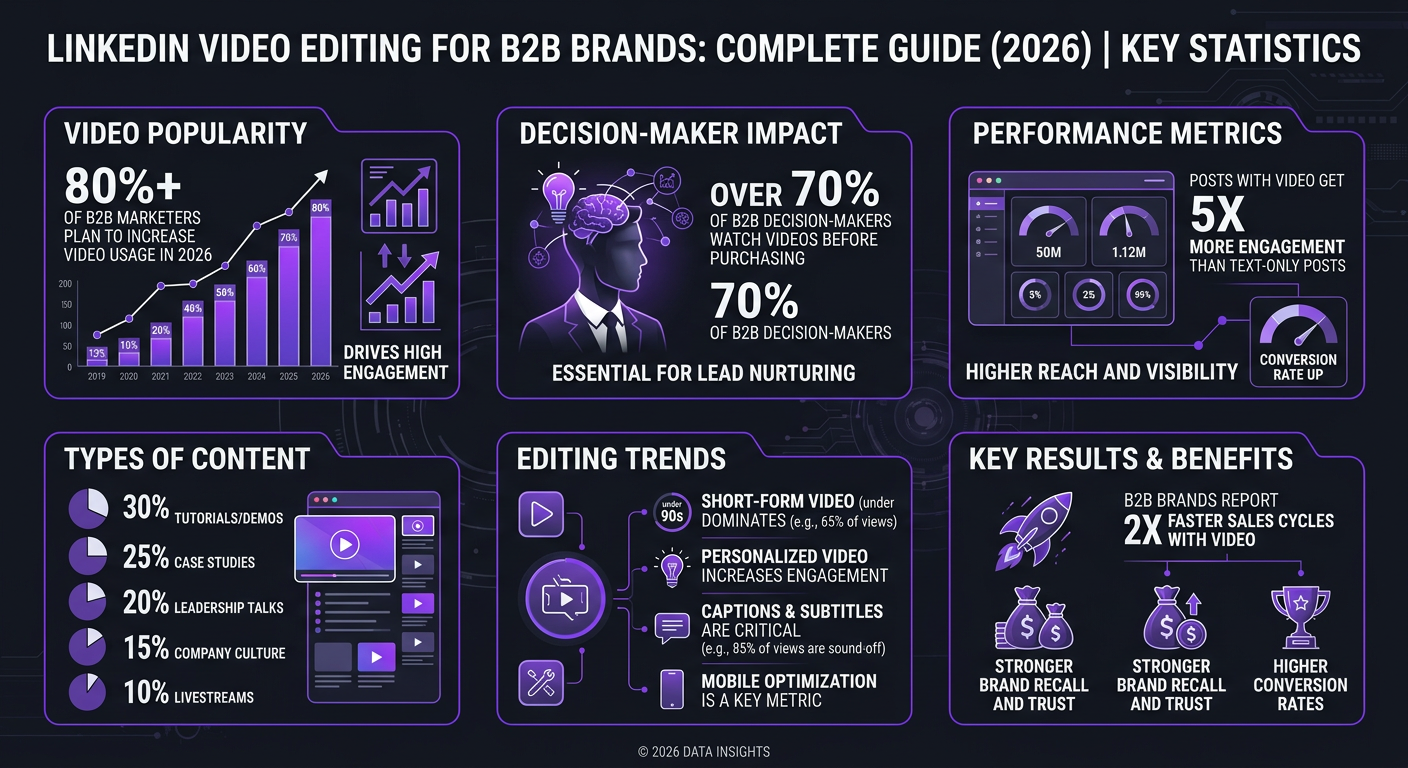
The numbers speak for themselves:
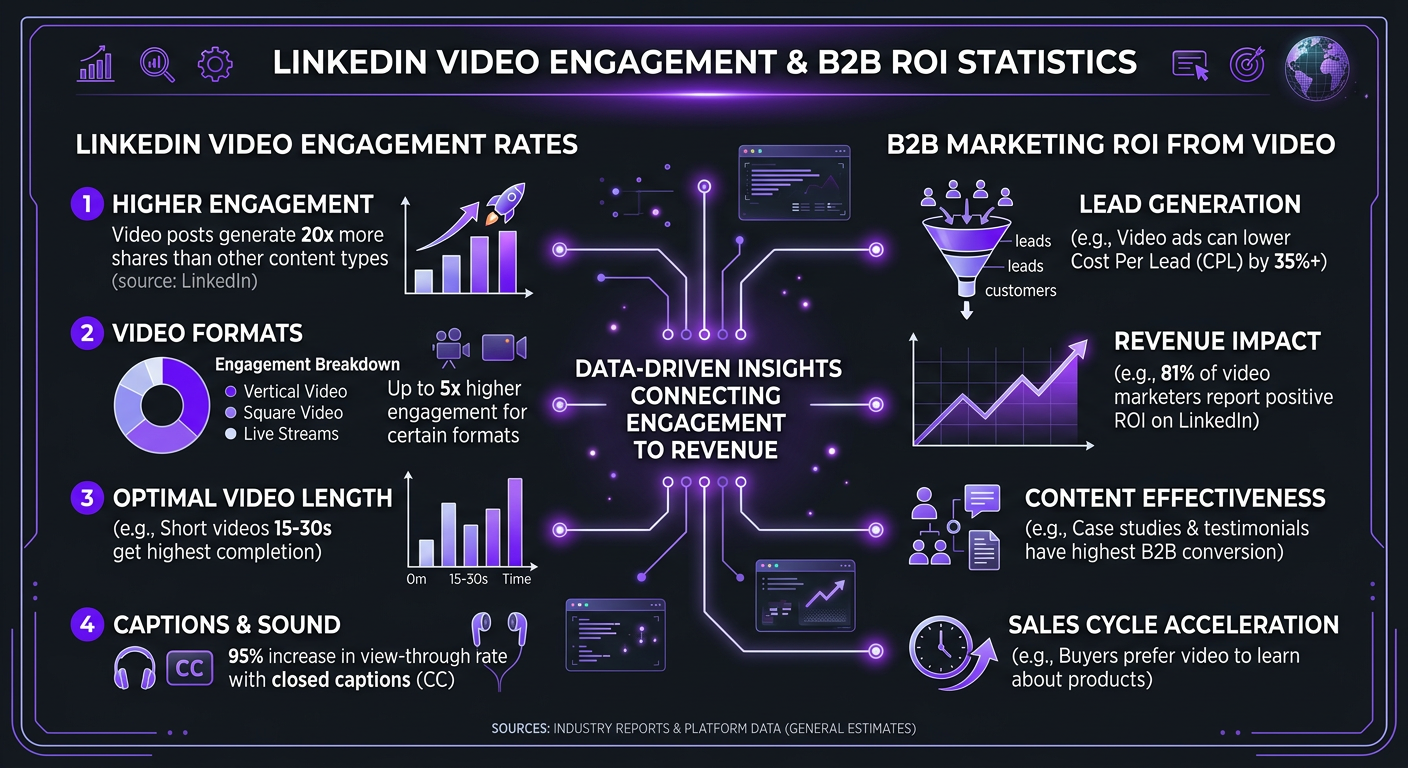
- 5x more engagement than text-only posts
- 20x more shares than any other format on the platform
- 3x higher response rate for InMail with video vs without
- 80% of LinkedIn video is watched on mobile, without sound
But the real reason LinkedIn video matters for B2B isn’t vanity metrics — it’s who’s watching. LinkedIn’s audience skews toward decision-makers, procurement managers, and C-suite executives. A viral TikTok gets you teenagers. A well-performing LinkedIn video gets you buyers.
The Algorithm Advantage in 2026
LinkedIn’s algorithm in 2026 prioritizes “dwell time” — how long someone stops scrolling to watch your content. Video naturally dominates dwell time. The platform also weights engagement velocity: early comments and reactions in the first hour determine reach.
This means well-edited, caption-driven video that hooks viewers in the first 3 seconds has an outsized advantage. And that’s an editing challenge, not a content creation challenge. Most B2B leaders have great insights — they just present them in unwatchable formats.
LinkedIn Video Formats That Actually Get Watched
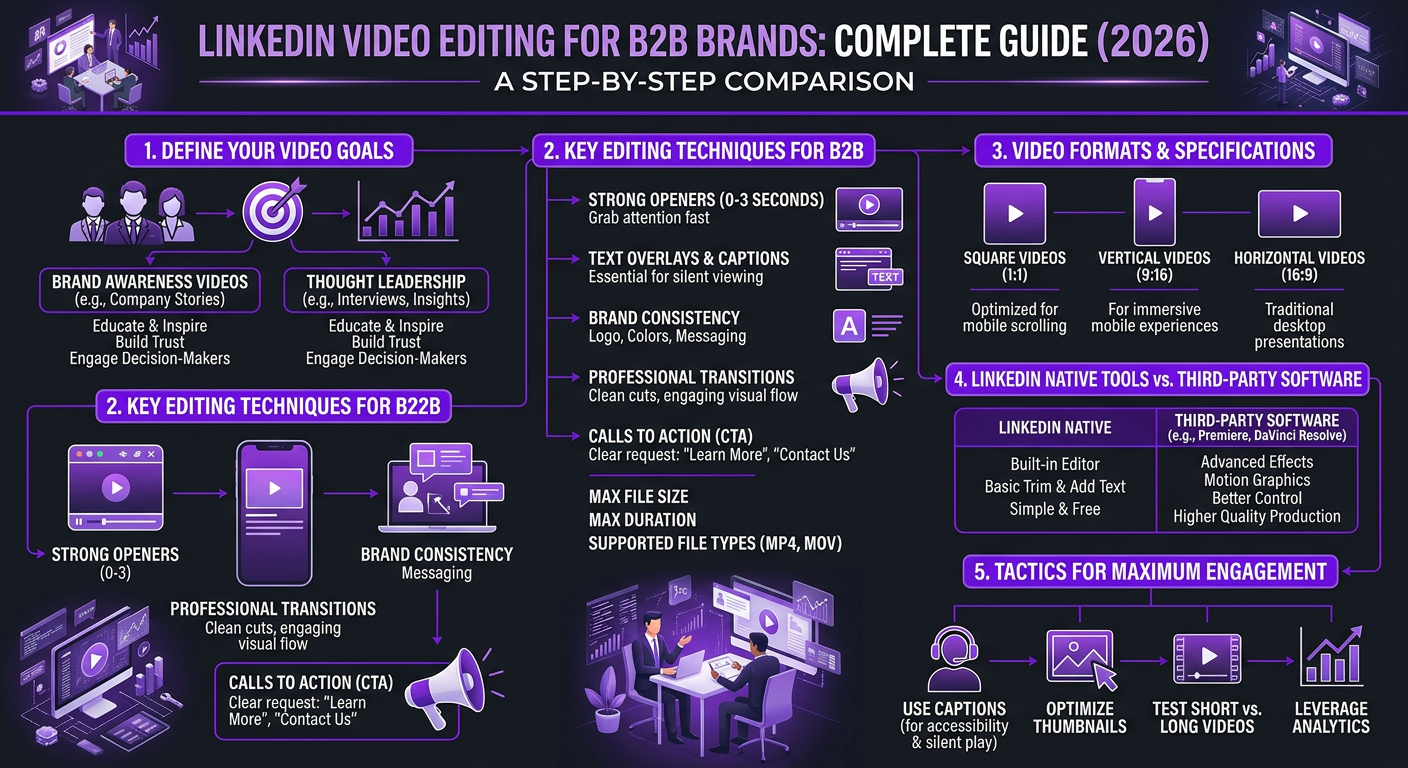
Before talking about editing, let’s nail the technical specs. Getting these wrong kills your reach before anyone sees your content.
| Format | Aspect Ratio | Best For | Mobile Experience |
|---|---|---|---|
| Square | 1:1 | Feed posts, repurposed clips | ⭐⭐⭐⭐⭐ |
| Vertical | 4:5 | Maximum screen real estate | ⭐⭐⭐⭐⭐ |
| Portrait | 9:16 | LinkedIn Stories/Reels-style | ⭐⭐⭐⭐ |
| Horizontal | 16:9 | Presentations, screen shares | ⭐⭐ |
The biggest mistake B2B brands make? Publishing horizontal video. On mobile (where 80% of LinkedIn consumption happens), a 16:9 video takes up roughly one-third of the screen. A 4:5 video takes up the entire viewport. More screen space = more dwell time = more algorithmic reach.
Technical Specifications
- File size: Up to 5GB (keep under 500MB for faster processing)
- Duration: Up to 10 minutes for native video (optimal: 60-90 seconds)
- Resolution: 1080p minimum, 4K supported
- Format: MP4 with H.264 encoding
- Captions: Burn-in (hardcoded) for reliable display
A professional social media video editing service will deliver files optimized for these specs automatically — no back-and-forth about format conversions.
LinkedIn Video Editing Techniques That Drive Engagement
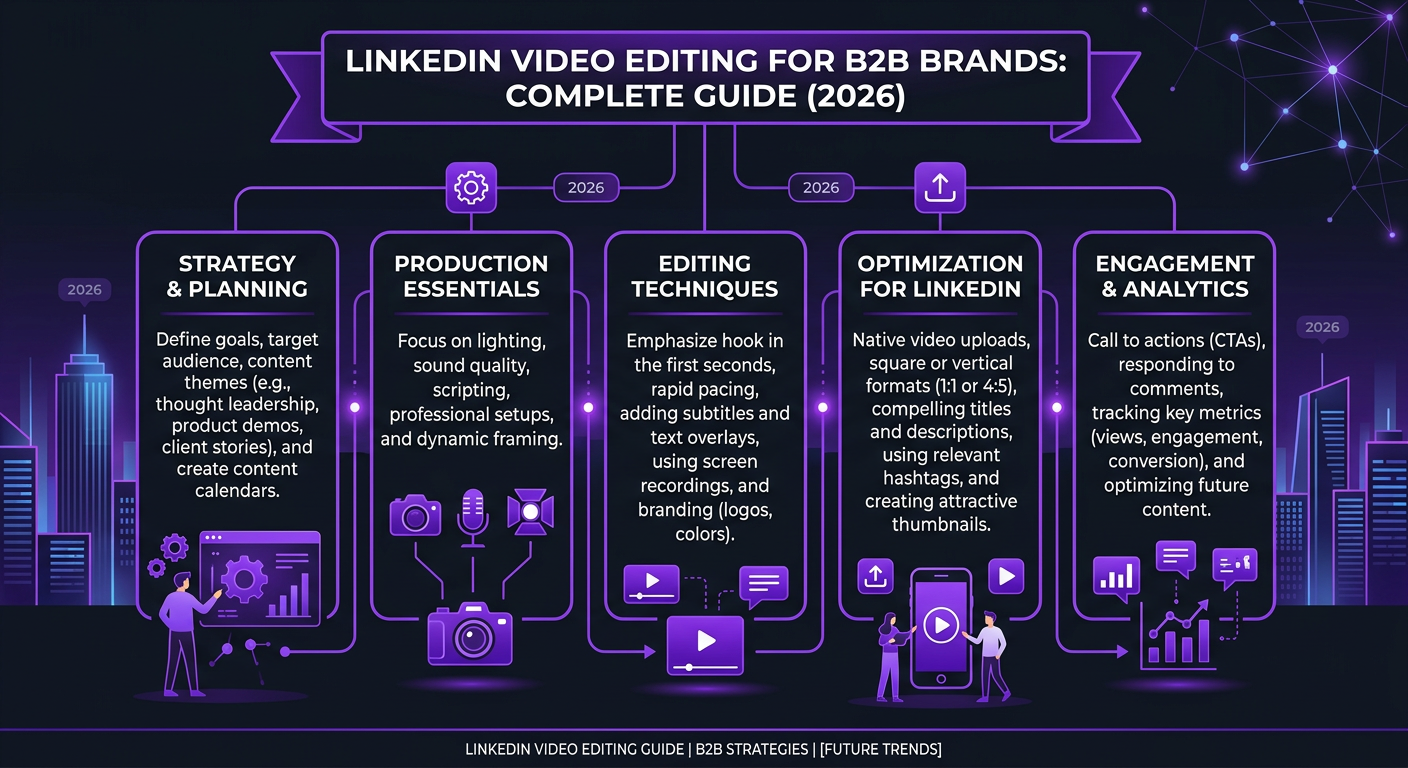
LinkedIn video editing requires a different approach than YouTube or TikTok. The audience is professional, time-poor, and skeptical of anything that feels too produced. Here’s what works:
1. The 3-Second Hook
You have 3 seconds before someone scrolls past. On LinkedIn, the hook needs to be both visual and textual (remember — no sound for most viewers). Effective hooks include:
- A bold text overlay with a provocative statement
- A before/after comparison frame
- A question that challenges conventional wisdom
- A data point that surprises (“87% of B2B buyers watch video before purchasing”)
2. Captions Are Non-Negotiable
This isn’t optional. 80% of LinkedIn video is watched muted. But the default auto-captions are small, unbranded, and often inaccurate. Professional LinkedIn video editing includes:
- Large, bold, branded captions (not SRT subtitles)
- Keyword highlighting in a different color
- Proper punctuation and timing
- Brand-consistent font and color scheme
3. Pattern Interrupts Every 5-8 Seconds
Even in a 60-second video, you need visual variety. Jump cuts alone don’t cut it. Layer in:
- B-roll footage or screen recordings
- Text callouts for key statistics
- Zoom-ins on the speaker for emphasis
- Lower-third graphics with the speaker’s name and title
- Brief animated transitions between points
4. Professional but Not Corporate
The most-engaged LinkedIn videos feel polished but human. Over-produced corporate videos with stock footage montages and sweeping music actually perform worse than a well-edited talking-head video with a founder sharing a real insight. The editing should enhance authenticity, not replace it.
The 7 B2B Video Types That Perform Best on LinkedIn
Not all video content works equally on LinkedIn. Based on our work with B2B clients, here are the formats ranked by engagement and lead generation potential:
| Content Type | Avg. Engagement Rate | Lead Gen Potential | Production Effort |
|---|---|---|---|
| Founder/CEO Thought Leadership | 4-8% | ⭐⭐⭐⭐⭐ | Low |
| Customer Testimonial Clips | 3-6% | ⭐⭐⭐⭐⭐ | Medium |
| Quick-Tip Educational | 5-10% | ⭐⭐⭐⭐ | Low |
| Behind-the-Scenes | 4-7% | ⭐⭐⭐ | Low |
| Product Demo Snippet | 2-5% | ⭐⭐⭐⭐ | Medium |
| Industry News Commentary | 3-6% | ⭐⭐⭐ | Low |
| Team/Culture Content | 3-5% | ⭐⭐ (recruiting) | Medium |
Founder Thought Leadership Videos
This is the single highest-ROI video type on LinkedIn. A founder sharing a genuine insight, lesson, or contrarian take — edited with clean cuts, bold captions, and a 60-90 second runtime — consistently outperforms everything else.
The editing requirements are simple but specific: remove ums and filler, add branded captions, include a name/title lower third, and end with a soft CTA (not “book a call” — more like “what do you think?”). The goal is building authority and trust that converts over time.
Customer Testimonial Clips
Full testimonial videos live on your website. LinkedIn gets the 60-second highlight. A professional editor extracts the single best quote, adds context with text overlays, and formats it for mobile. This is content repurposing at its most effective — one 10-minute testimonial interview becomes 5-8 LinkedIn clips.
Repurposing Content for LinkedIn: The Multiplier Effect
The smartest B2B brands don’t create content specifically for LinkedIn. They repurpose strategically. Here’s the content multiplication framework:
YouTube → LinkedIn Pipeline
One long-form YouTube video (10-20 minutes) can produce:
- 3-5 standalone LinkedIn clips (60-90 seconds each)
- 1 “highlights reel” (2-3 minutes)
- 5-10 quote cards with video background
- 1 audiogram for LinkedIn articles
The key is that repurposing isn’t just chopping. Each LinkedIn clip needs its own hook, its own caption track, and its own format optimization. That’s where professional editing makes the difference — a good YouTube video editing service can handle both the long-form and the LinkedIn derivatives in one workflow.
Podcast → LinkedIn Pipeline
If you record video of your podcast (you should), each episode yields:
- 3-5 “hot take” clips with captioned dialogue
- 1-2 audiograms for audio-only segments
- Quote graphics from key moments
Webinar → LinkedIn Pipeline
A 45-minute webinar recording is a goldmine:
- 5-8 topic-specific clips
- Q&A highlight clips
- Speaker introduction clips (great for co-marketing)
- Data/slide reveal clips with animated transitions
Need a LinkedIn Video Content Machine?
We turn your existing long-form content into a stream of LinkedIn-optimized clips — captioned, formatted, and ready to post. See how we do it.
LinkedIn Video Editing Costs: What to Budget
LinkedIn video editing is generally more affordable than YouTube long-form because the videos are shorter and simpler. But the cumulative cost depends on volume — posting 3-4 videos per week adds up fast if you’re paying per video.
| Service Level | Per Video | Monthly (12 videos) | What’s Included |
|---|---|---|---|
| Basic | $75–$150 | $900–$1,800 | Cuts, basic captions, format conversion |
| Professional | $200–$400 | $2,400–$4,800 | Branded captions, B-roll, graphics, hooks |
| Agency (Increditors) | $150–$350 | $1,800–$4,200 | Full package + repurposing from long-form |
| In-House Editor | ~$120 (effective) | $4,000+ (salary) | Everything, but you manage them |
The most cost-effective approach? Bundle LinkedIn editing with your existing YouTube or podcast editing. If your editing package already covers long-form content, adding LinkedIn derivatives typically costs 30-50% of standalone pricing.
Cost Per Lead Analysis
Here’s where LinkedIn video gets interesting from an ROI perspective. LinkedIn ads cost $5-$12 per click and $50-$200 per lead for B2B. Organic video content that generates even 2-3 qualified leads per month at an editing cost of $2,000/month gives you a cost-per-lead of $650-$1,000 — competitive with paid channels and compounding over time (unlike ads that stop the moment you stop paying).
Building a LinkedIn Video Workflow That Scales
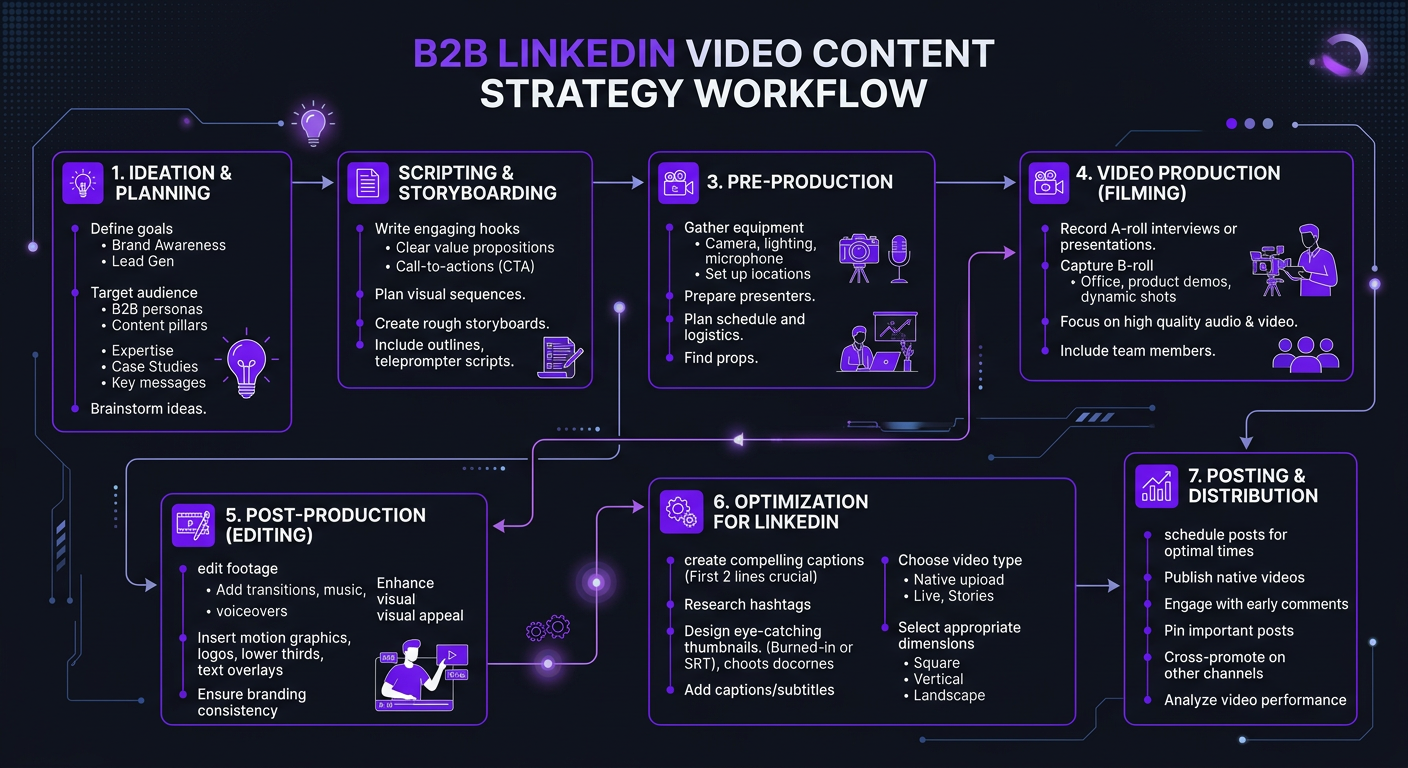
Consistency is what separates LinkedIn accounts that generate leads from ones that post sporadically and wonder why it doesn’t work. Here’s the workflow we recommend for B2B brands:
The Weekly Batching System
- Monday: Record 3-4 talking-head clips (30 minutes total, smartphone is fine)
- Tuesday: Editor receives raw footage + brief
- Wednesday: First drafts delivered for review
- Thursday-Friday: Revisions finalized, videos scheduled
- Weekend batch: Repurpose clips from any long-form content published that week
This system produces 3-4 original videos plus 2-3 repurposed clips per week — enough for daily posting without creating a content bottleneck.
The Editing Brief for LinkedIn
Your editor needs specific guidance for LinkedIn content. A good brief includes:
- Target audience (job titles, industries)
- Key message (one per video — no multi-topic videos)
- Hook suggestion (or let the editor choose the strongest opening)
- CTA type (engagement prompt vs link vs none)
- Brand assets (logo placement, color palette, font files)
- Caption style (word-by-word vs sentence, colors for emphasis)
If you want a reusable template, check out our video editing brief template — it works for LinkedIn, YouTube, and short-form content.
7 LinkedIn Video Editing Mistakes That Kill Your Reach
We’ve audited hundreds of B2B LinkedIn accounts. These mistakes show up constantly:
1. No Captions
This alone kills 80% of your potential engagement. If people can’t watch without sound, they scroll past. Every single LinkedIn video needs burned-in captions. Not auto-generated — professionally timed and styled.
2. Horizontal Format
Publishing 16:9 video on LinkedIn is leaving 50%+ of your screen real estate on the table. Reformat to 1:1 or 4:5 — even if it means adding branded side panels to horizontal footage.
3. Slow Starts
Your first 3 seconds determine everything. If you start with a logo animation, intro music, or “hey everyone, so today I want to talk about…” — you’ve already lost. Cut to the strongest statement immediately.
4. Too Long
LinkedIn isn’t YouTube. Going past 2 minutes for organic content drops completion rates dramatically. Edit ruthlessly — cut every sentence that doesn’t add value. If your insight takes 90 seconds, don’t stretch it to 3 minutes.
5. Over-Produced Corporate Feel
Stock footage montages, sweeping drone shots, and generic corporate music make LinkedIn users scroll faster. They want authentic. They want human. A well-lit talking head with smart editing beats a $50,000 corporate video every time on LinkedIn.
6. No Text Hook
The video thumbnail on LinkedIn is the first frame. If that frame is black, or a mid-word screenshot of someone talking, or a logo — nobody clicks play. Your editor should create a custom first frame with a text hook that makes the value proposition immediately clear.
7. Missing CTA
Not every video needs “book a demo.” But every video needs something: “comment your take,” “follow for more,” “link in comments.” The CTA should be both spoken (for sound-on viewers) and displayed as text (for sound-off). Your editor should add an end card with the CTA.
How B2B Brands Win with LinkedIn Video
Riley Coleman: From Zero to 15 Inbound Leads per Month
Riley Coleman’s consulting firm had strong expertise but zero LinkedIn video presence. They were posting text-only updates to 4,000 followers and getting 20-50 impressions per post.
We built a LinkedIn video system with three content pillars: founder thought leadership (2x/week), client success stories (1x/week), and industry hot takes (1x/week). All videos were 60-90 seconds, vertical format, with bold branded captions.
Within 90 days:
- Average post impressions: 20-50 → 3,500-8,000
- Follower growth: 4,000 → 7,200
- Inbound leads per month: 0-1 → 12-15
- Cost per lead: ~$133 (at $2,000/month editing investment)
The content itself wasn’t complicated — Riley recording on an iPhone in his office. The editing transformed raw, rambling 5-minute recordings into punchy 75-second clips with professional branding.
TuMeke: Technical B2B Product Made Accessible
TuMeke’s AI-powered safety platform solves a complex problem that’s hard to explain in text. They needed video to show the product in action, but traditional demo videos were too long for LinkedIn.
We created a series of 45-60 second “problem → solution” clips. Each video opened with a real workplace safety scenario, showed TuMeke’s AI analyzing the risk, and ended with the result. Heavy use of screen recording overlays, animated text callouts, and split-screen comparisons.
The result: their LinkedIn engagement rate jumped from 1.2% to 6.8%, and they directly attributed 3 enterprise demo requests to specific LinkedIn video posts in the first quarter.
Outsourcing LinkedIn Video Editing: What to Look For
If you’re ready to systematize your LinkedIn video, you have three options:
Option 1: Freelancer ($50-$150/video)
Works for 2-4 videos/month. You’ll manage the brief, revisions, and brand consistency yourself. Good freelancers are hard to find and even harder to keep — they raise rates or get poached. For a small test, this is fine. For a consistent content machine, it breaks down fast.
Option 2: Subscription Service ($500-$1,500/month)
Budget video editing subscriptions can handle basic LinkedIn cuts. But most lack the B2B expertise to create proper hooks, understand your audience, or maintain the professional-but-not-corporate tone that works on LinkedIn. You’ll spend a lot of time on revisions.
Option 3: Specialized Agency ($1,500-$4,000/month)
The best option for serious B2B brands. An agency like Increditors assigns a dedicated editor who learns your brand, voice, and audience. They handle format optimization, caption styling, repurposing from long-form content, and delivery on schedule. You record, they do everything else.
Key questions to ask any video editing service before committing:
- Do they understand LinkedIn’s algorithm and best practices?
- Can they show B2B-specific portfolio work?
- Do they handle caption creation and burn-in?
- Can they repurpose from YouTube/podcast content?
- What’s the turnaround time? (48 hours or less is standard)
- Do they deliver in the right formats (1:1, 4:5)?
If you’re producing high volumes of video content across multiple platforms, look for a partner who can handle LinkedIn as part of a broader content strategy — not a separate vendor for each platform.
Frequently Asked Questions
For organic LinkedIn posts, 60-90 seconds performs best for engagement. Thought leadership pieces can go up to 2-3 minutes if the content is compelling enough to hold attention. LinkedIn ads perform best at 15-30 seconds. One thing is consistent: native video (uploaded directly to LinkedIn) outperforms shared YouTube links by 3-5x in reach.
Basic LinkedIn video editing costs $75-$150 per video for simple cuts with captions. Professional editing with branded templates, motion graphics, and B-roll integration runs $200-$500 per video. Monthly packages for 8-12 LinkedIn videos typically range from $1,500-$3,500 depending on complexity. Bundling LinkedIn with YouTube editing packages reduces per-video costs significantly.
Absolutely — this is non-negotiable. 80% of LinkedIn video is watched without sound. Use bold, branded captions that are large enough to read on mobile — not the thin auto-generated subtitles that LinkedIn provides. Professional video editors create custom-styled captions that match your brand and highlight key words.
Square (1:1) and vertical (4:5) formats get the most screen real estate on LinkedIn’s mobile feed. Horizontal 16:9 video gets significantly less engagement because it takes up less visual space when scrolling. For maximum reach, edit in 1:1 or 4:5 with captions baked into the video file.
Yes, but don’t just re-upload. Effective repurposing means extracting the best 60-90 second segment, reformatting to square or vertical, adding LinkedIn-specific captions, and creating a new hook optimized for the first 3 seconds. A good social media editing service can turn one YouTube video into 3-5 LinkedIn clips.
2-4 video posts per week is the sweet spot for B2B brands building authority on LinkedIn. Consistency matters more than volume — posting 3 high-quality videos weekly beats daily low-effort clips. Most of our B2B clients see meaningful traction after 6-8 weeks of consistent posting.
The top-performing LinkedIn video types for B2B are: founder/CEO thought leadership (highest engagement), customer testimonial clips, behind-the-scenes culture content, quick-tip educational videos, and product demo snippets. Talking-head content with strong hooks consistently outperforms overly polished brand videos on LinkedIn.
Let’s Build Your LinkedIn Video Engine
We’ve helped B2B brands go from zero video presence to consistent inbound leads through LinkedIn. Let’s talk about your content strategy.
LinkedIn engagement data in this article reflects 2026 benchmarks from Social Insider, Hootsuite, and direct client analytics. Results vary by industry and audience. For a LinkedIn video strategy tailored to your business, schedule a call with our team.