










![3D Explainer Video - ScribbleLive.mp4_snapshot_00.12_[2022.03.09_03.14.16]](https://increditors.com/wp-content/uploads/elementor/thumbs/3D-Explainer-Video-ScribbleLive.mp4_snapshot_00.12_2022.03.09_03.14.16-r7wb53mx72rxst3qcqyrfxdmeyzb5r9jbl0wbjujh4.png "3D Explainer Video – ScribbleLive.mp4_snapshot_00.12_[2022.03.09_03.14.16]")
































You’ve decided to stop editing your own YouTube videos. Congratulations — that’s one of the best decisions you’ll make for your channel. But the next step is where most creators mess up: actually finding and hiring a video editor who understands YouTube.
Not a wedding videographer. Not a film school grad who thinks every video needs a cinematic intro. A YouTube editor — someone who understands retention curves, pacing for different content formats, and why the first 30 seconds matter more than the entire middle section.
We’ve been on both sides of this. As a YouTube video editing agency, we’ve onboarded hundreds of creators. We’ve also cleaned up after bad hires — editors who disappeared mid-project, delivered unusable work, or simply didn’t understand how YouTube differs from every other video platform.
This guide is the hiring process we wish every creator followed before reaching out to us in frustration after a bad experience. If you want to learn how to hire a video editor for YouTube and actually get someone who delivers, here’s the full playbook.
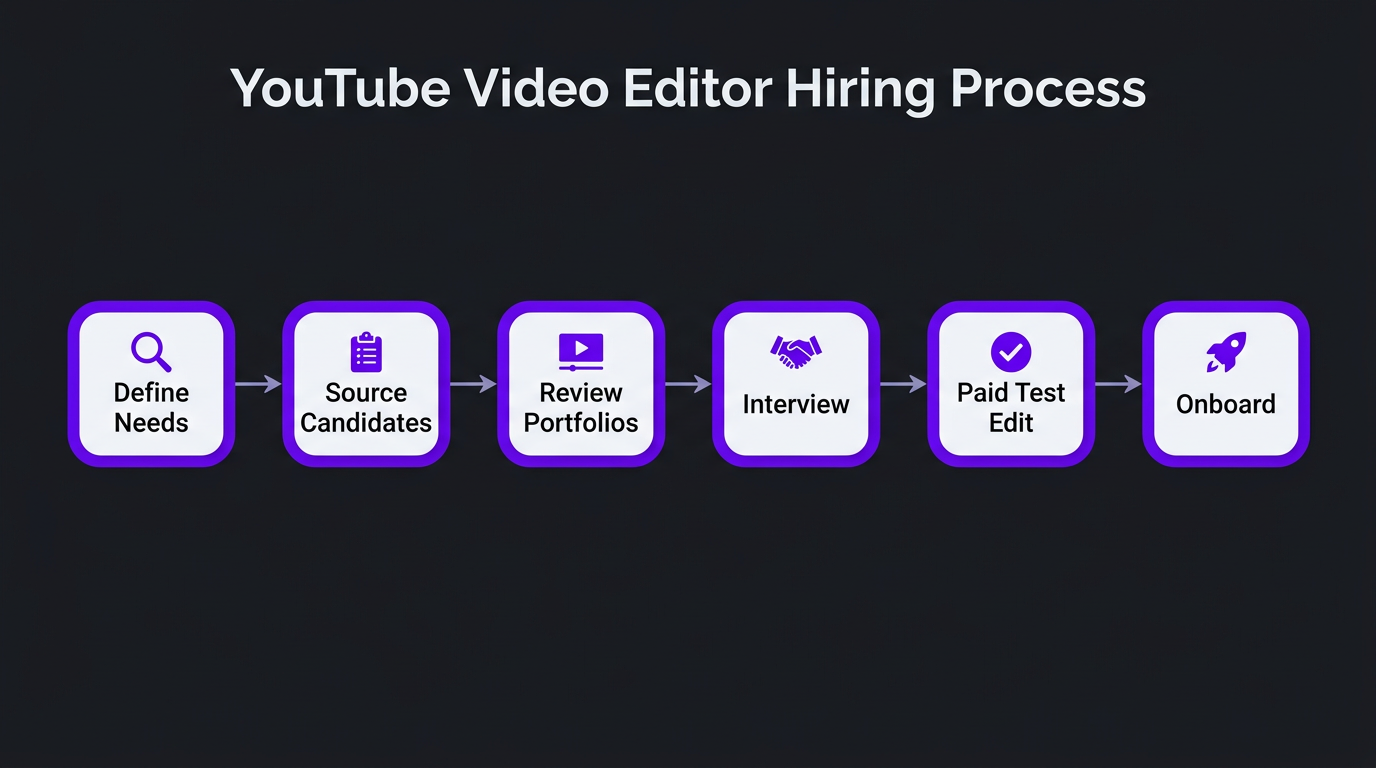
What’s in This Guide
- Why YouTube Editing Is Different
- Define What You Need Before You Search
- Where to Find YouTube Video Editors
- How to Vet Candidates (The Right Way)
- Running a Test Edit That Actually Tells You Something
- 12 Red Flags That Should Kill the Deal
- What to Pay (And What’s a Rip-Off)
- Freelancer vs Agency: Which Makes Sense for You
- Onboarding Your Editor for Long-Term Success
- 7 Expensive Mistakes Creators Make When Hiring
- FAQ
Why YouTube Editing Is Different From Every Other Type of Video Editing
This is the foundational mistake most creators make: they hire a “video editor” without specifying a YouTube editor. The difference matters more than you think.
A traditional video editor optimizes for visual polish. A YouTube editor optimizes for audience retention. These are fundamentally different objectives, and they produce fundamentally different editing choices.
What YouTube-Specific Editing Actually Means
YouTube’s algorithm prioritizes watch time and audience retention above almost everything else. An editor who understands this will make decisions that a traditional editor would never make:
- Front-loading the hook. The first 5-30 seconds determine whether someone stays or leaves. YouTube editors know how to restructure content so the most compelling moment appears before the intro — even if it means pulling a clip from the middle of the video.
- Pattern interrupts. Every 30-60 seconds, something needs to change visually — a zoom, a graphic, a B-roll cut, a text overlay. Not for aesthetics, but because retention data shows viewers drop off during static sequences.
- Pacing over polish. A cinematic editor might linger on a beautiful shot for 8 seconds. A YouTube editor knows that 8-second static shot just cost you 15% of your remaining viewers. Speed matters.
- Platform-native formatting. End screens, cards, subscribe animations, chapter markers — these aren’t decorations. They’re functional elements that affect CTR and session time.
- Audio is 50% of the edit. YouTube viewers tolerate imperfect visuals. They don’t tolerate bad audio. A YouTube editor prioritizes audio clarity, proper leveling, and strategic music use over visual effects.
When we worked with eSafety, a government organization producing educational content about online safety, their existing videos were technically competent but performing below expectations on YouTube. The footage was clean, the graphics were professional, but the editing approach was built for broadcast — not for a platform where viewers decide in seconds whether to stay.
Our team restructured their editing workflow around YouTube-specific principles: tighter pacing, stronger hooks, strategic use of text overlays to reinforce key points, and chapter markers that improved both retention and search visibility. The content itself didn’t change — the editing philosophy did. The performance difference was immediate.
Define What You Need Before You Search
The number one reason hiring goes wrong is that creators start looking for editors before they’ve clearly defined what they need. Posting “I need a video editor” on Twitter is like posting “I need a doctor” — what kind? For what?
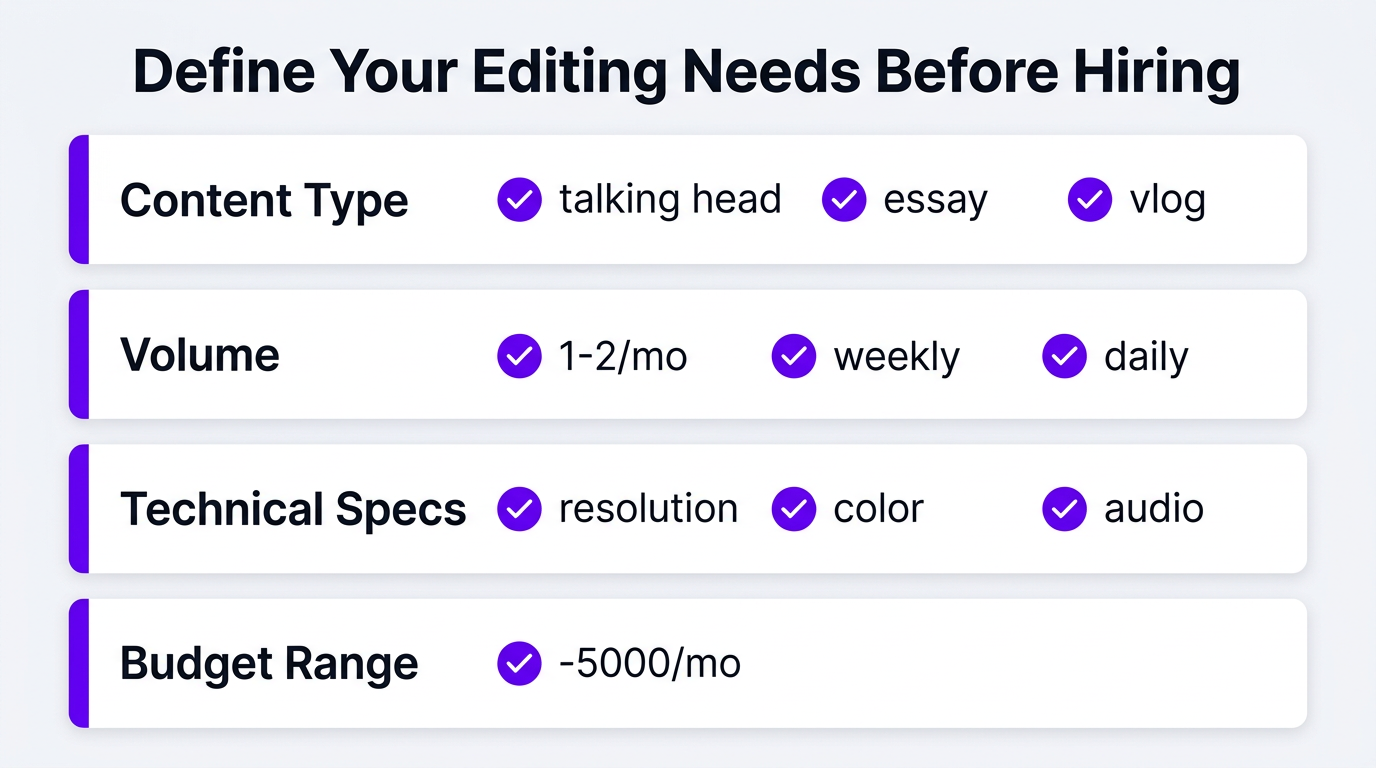
Content Type and Format
Different YouTube content formats require different editing skills. Be specific about what you produce:
| Content Type | Key Editing Skills Needed | Typical Complexity |
|---|---|---|
| Talking head / commentary | Jump cuts, B-roll insertion, lower thirds, pacing | Low–Medium |
| Educational / essay | Motion graphics, data viz, screen recordings, heavy B-roll | Medium–High |
| Vlog / lifestyle | Dynamic cuts, music sync, color grading, montages | Medium |
| Gaming | Facecam overlay, gameplay highlights, meme edits, fast cuts | Medium |
| Podcast (video) | Multi-cam switching, speaker detection, clip extraction | Low–Medium |
| Product review / unboxing | Product shots, comparison sequences, text specs overlays | Medium |
| Documentary style | Narrative structure, archival footage, interviews, sound design | High |
An editor who excels at fast-paced gaming content may struggle with educational essay content that requires custom animations. An editor who specializes in vlogs may not have the motion graphics skills for SaaS explainer videos. Know your format, hire for that format.
Volume and Frequency
How many videos per week or month? This determines whether you need a freelancer, a part-time editor, or a dedicated editing team. Here’s the general breakdown:
- 1-2 videos/month: Freelancer or per-project pricing
- 1 video/week: Reliable freelancer with retainer or small agency
- 2-3 videos/week: Dedicated editor or agency team
- Daily content (including Shorts): Full editing team with PM
Technical Requirements
Write down everything your videos need before you talk to anyone:
- Resolution and frame rate (4K/60fps? 1080/30?)
- Color grading style (natural, cinematic, branded)
- Graphics package (lower thirds, intros, transitions)
- Audio needs (music, sound effects, voiceover sync)
- Subtitle/caption requirements
- Thumbnail creation (some editors do this, most don’t)
- Short-form repurposing from long-form content
- File format and delivery method
Budget Range
Be honest with yourself about what you can afford consistently. Hiring a $500/video editor for one month and then dropping back to DIY because you can’t sustain it is worse than finding a $250/video editor you can work with for a year. Consistency matters more than peak quality.
For current market rates across all tiers, check our complete pricing breakdown.
Where to Find YouTube Video Editors (Ranked by Quality)
Not all sourcing channels are equal. Here’s where to look, ranked from most reliable to most risky:
1. Specialized YouTube Editing Agencies (Best for Reliability)
Agencies that specifically serve YouTube creators maintain teams trained in platform-specific editing. You get vetted editors, project management, backup coverage, and quality control — without doing any of the hiring yourself.
Pros: Pre-vetted talent, consistent output, backup editors, managed workflow
Cons: Higher monthly minimums (typically $2,000+/month), less direct editor control
Best for: Creators producing 4+ videos/month who value reliability over price
Companies like Increditors, Tasty Edits, and beCreatives operate in this space. The key differentiator is whether they assign you a dedicated editor who learns your style or rotate editors across clients (which kills consistency).
2. Referrals From Other Creators (Best for Quality Signal)
Ask creators in your niche who they use. A referral from someone whose videos you admire is the strongest signal of quality you can get. Join creator communities on Discord, Twitter, or Reddit’s r/YouTubers and ask directly.
Pros: Social proof, pre-validated quality
Cons: Limited pool, editor may be at capacity
Best for: Finding individual freelancers with proven track records
3. Upwork and Contra (Best for Managed Freelancing)
Upwork offers contracts, escrow payments, and work history visibility. Contra is gaining traction with creative freelancers. Both platforms let you review past work, client feedback, and success rates.
Pros: Payment protection, reviews from past clients, large talent pool
Cons: Platform fees, many unqualified applicants, time-intensive vetting
Best for: Creators with time to vet and manage, budgets under $2,000/month
4. Twitter/X and YouTube Communities
Many talented editors market themselves on Twitter. Search “YouTube editor available” or post your requirements. The quality range is enormous — from world-class editors to complete beginners — so vetting is critical.
Pros: Direct access to talent, can see their personality and communication style
Cons: No payment protection, no vetting system, high noise ratio
Best for: Experienced hirers who can quickly evaluate portfolios
5. Fiverr (Proceed with Extreme Caution)
Fiverr is the largest marketplace for video editors, which is both its strength and its problem. For every competent editor, there are dozens using stock templates and delivering cookie-cutter work.
Pros: Lowest prices, fast search, clear deliverables
Cons: Race to the bottom on quality, editors juggling too many clients, template-heavy work
Best for: Very basic editing needs, one-off projects, testing before committing
How to Vet Candidates (The Right Way)
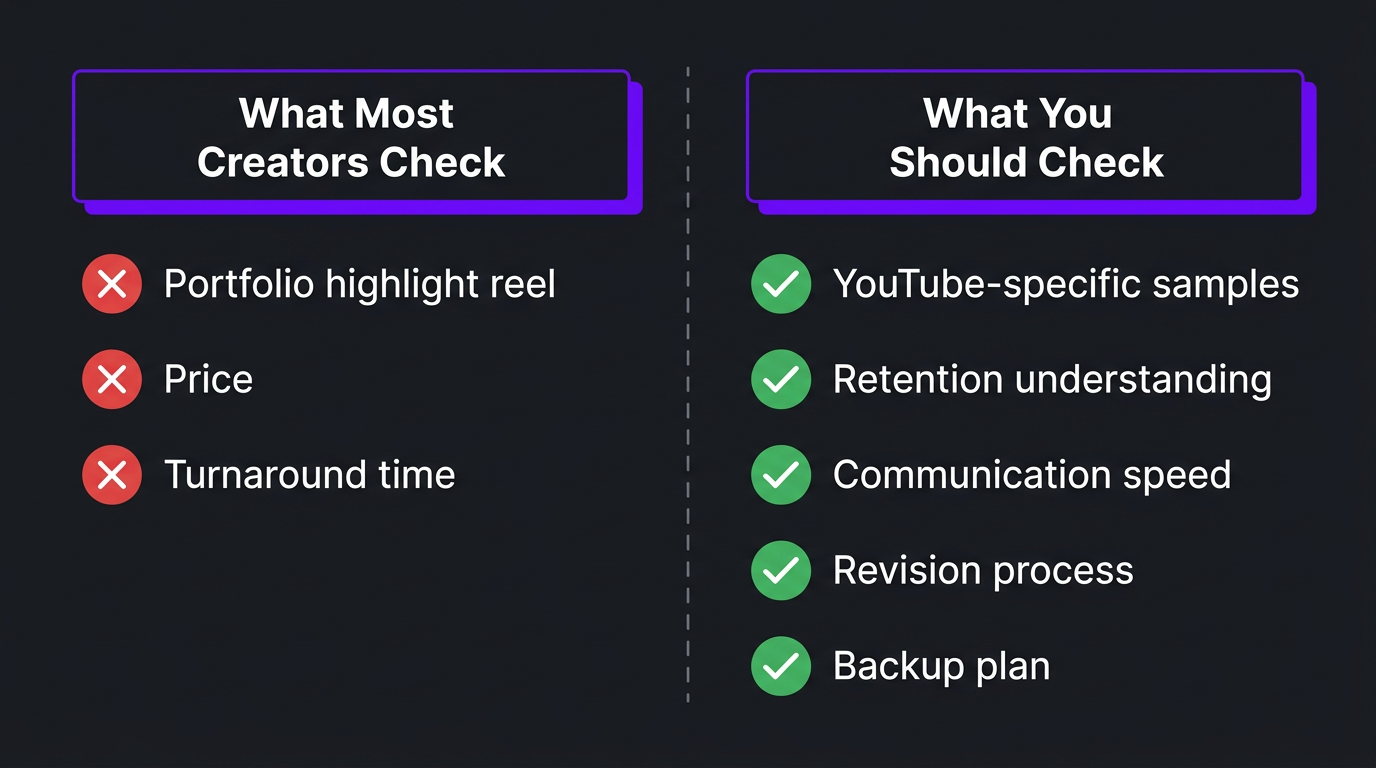
You’ve got a list of potential editors. Now the real work begins. Most creators evaluate editors the wrong way — they watch a highlight reel, like what they see, and hire on the spot. Here’s a better approach.
Step 1: Portfolio Review (With the Right Questions)
Don’t just watch — analyze. For every portfolio video, ask yourself:
- Is it YouTube content? Wedding reels and corporate videos don’t count. You need to see actual YouTube videos they edited.
- What did they actually do? Ask the editor to specify their contribution. Did they edit the entire video, or just add captions to existing edits?
- How’s the pacing? Watch for dead spots, unnecessary pauses, and static sequences. A good YouTube editor keeps things moving.
- How’s the audio? Listen for inconsistent levels, background noise, music drowning the speaker, or missing sound design.
- Are the first 30 seconds strong? This reveals whether the editor understands YouTube retention principles.
- Is there variety? Can they handle different formats, or is every sample the same style with different footage?
Step 2: Ask the Right Questions in the Interview
Skip “tell me about yourself.” These questions will reveal whether an editor actually understands YouTube:
- “Walk me through how you’d edit the first 30 seconds of a video to maximize retention.”
- “What do you do when raw footage is boring? How do you make it engaging?”
- “How do you decide where to place pattern interrupts?”
- “What’s your process when a client asks for unlimited revisions?”
- “Show me a before/after — a video where you significantly improved the quality from what the creator gave you.”
- “What software do you use, and why?”
- “How do you handle a week where you’re overloaded with work?”
An editor who can articulate specific YouTube editing strategies — not just “I make videos look good” — is someone who’s invested in understanding the platform. That distinction matters.
Step 3: Check Their Communication Style
Pay attention to how they communicate during the vetting process. Are responses prompt? Clear? Professional? This is exactly how they’ll communicate when you’re working together.
An editor who takes 3 days to respond to an initial inquiry will take 3 days to respond to revision requests. An editor who misunderstands your brief in the interview will misunderstand your briefs on real projects.
Running a Test Edit That Actually Tells You Something
Never hire a YouTube editor based on portfolio and interview alone. Always run a paid test edit. Here’s how to make it useful.
What to Send for the Test
Don’t send your easiest footage. Send a project that represents your typical content — including the rough parts:
- Raw footage that includes tangents, awkward pauses, and mistakes (don’t pre-trim it)
- Multiple camera angles if that’s your normal workflow
- Your brand kit (logos, colors, fonts, existing intros/outros)
- A brief explaining the video topic, target audience, and any specific requests
- Reference videos you like (2-3 examples of the style you’re going for)
What to Evaluate in the Test
| Evaluation Criteria | What to Look For | Red Flag |
|---|---|---|
| Hook quality | Did they restructure the opening for maximum impact? | Starts with “Hey guys, welcome to my channel” |
| Pacing | Are there dead spots? Does it feel tight? | Long pauses, repetitive sections left in |
| Audio | Clean mix, appropriate music, no jarring transitions | Music too loud, inconsistent levels, echo |
| Graphics | Clean, on-brand, enhancing — not distracting | Stock templates that don’t match your brand |
| Brief adherence | Did they follow your instructions? | Ignored specific requests from the brief |
| Proactive choices | Did they add value beyond what you asked? | Did the bare minimum, nothing more |
| Turnaround | Delivered when promised (or communicated delays) | Late with no warning |
| Revision response | Handled feedback professionally, implemented quickly | Defensive, slow, or incomplete revisions |
Pay for the Test Edit
This is non-negotiable. Asking for free test edits attracts desperate editors and repels good ones. Pay the editor’s normal per-video rate for the test. If they charge $300 per video, pay $300 for the test. You’re buying information — and $300 is cheap compared to the cost of hiring the wrong person for 6 months.
Some creators run test edits with 2-3 editors simultaneously. This costs more upfront but gives you direct comparison data that’s worth its weight in gold.
12 Red Flags That Should Kill the Deal
Over the years, we’ve seen every hiring mistake in the book — both from creators who come to us after bad experiences and from the occasional misfire in our own recruitment process. Here are the warning signs that should make you walk away:
- No YouTube-specific portfolio pieces. If they can’t show you actual YouTube content they’ve edited, they’re not a YouTube editor.
- They refuse a paid test edit. Professional editors welcome the opportunity to prove themselves. Those who refuse either know they can’t deliver or are juggling too many clients to take on test work.
- Vague pricing. “It depends” is fine as an initial answer. But if they can’t give you a clear quote after seeing your footage and understanding your needs, the final invoice will surprise you.
- Unlimited revisions as a selling point. This sounds generous. In practice, it usually means the first draft will be rough because the editor expects multiple rounds. Good editors nail it in 1-2 rounds.
- They oversell their speed. “I can edit a 20-minute video in 2 hours” means they’re doing assembly edits, not creative editing. Quality YouTube editing takes 4-12+ hours per video depending on complexity.
- Poor communication during the interview. Slow responses, vague answers, grammatical errors in professional communication — these won’t improve after you hire them.
- They don’t ask questions about your channel. An editor who doesn’t ask about your audience, goals, and style before quoting a price is planning to deliver generic work.
- Their rates are suspiciously low. If they’re charging $30 for a fully edited 15-minute YouTube video, either they’re in a very low cost-of-living area and working at unsustainable rates, or the quality will reflect the price.
- They have no revision process. “Just tell me what to change” is not a process. Professional editors have structured feedback and revision workflows.
- Every portfolio video looks the same. If their work has the same transitions, the same text animations, and the same color grade regardless of the creator — they’re applying a template, not editing your video.
- They badmouth previous clients. Even if the client was genuinely difficult, professional editors don’t trash-talk. This behavior indicates relationship problems that will eventually involve you.
- No contract or terms. Any professional editor or agency should have clear terms — payment schedules, revision limits, ownership rights, cancellation terms. Handshake deals invite disputes.
Skip the Hiring Headache Entirely
We’ve already vetted, trained, and managed the editors. You get a dedicated team that knows YouTube inside and out — no test edits, no guesswork.
What to Pay a YouTube Video Editor (And What’s a Rip-Off)
Pricing confusion kills more hiring processes than anything else. Here’s the market reality so you know what’s fair:
| Editor Type | Per-Video Rate | Monthly Retainer (4-8 vids) | What You Get |
|---|---|---|---|
| Budget freelancer (Fiverr, offshore) |
$50–$200 | $400–$1,000 | Basic cuts, simple text, stock music, 1-2 revisions |
| Mid-tier freelancer (Upwork, referral) |
$200–$450 | $1,200–$2,500 | Professional editing, color correction, graphics, 2-3 revisions |
| Senior freelancer (Specialist) |
$400–$800 | $2,000–$4,500 | Strategic editing, retention optimization, custom animations |
| Dedicated agency team (Increditors) |
$350–$700 | $2,500–$5,000+ | Dedicated editor + PM + QC, motion graphics, same-day delivery options |
How to Know If You’re Overpaying
Overpaying isn’t about the absolute number — it’s about value relative to price. You’re overpaying if:
- You’re paying $400+/video but still doing significant revision rounds on basic issues (audio levels, wrong music, missed cuts)
- Your retention rates haven’t improved since switching from DIY editing
- The editor isn’t learning your style — video 20 requires the same level of hand-holding as video 1
- You’re paying for “premium” service but getting templated output identical to their other clients
How to Know If You’re Underpaying
This is more common than overpaying. You’re underpaying if:
- Your editor’s turnaround is getting slower (they’re taking on more clients to make up income)
- Quality is inconsistent video-to-video (they’re rushing your work)
- They stop responding on weekends or holidays (burnout from unsustainable rates)
- You’re on your third editor this year because they all quit
Good editors leave bad-paying clients. If you can’t retain an editor for more than 3 months, your budget is likely the problem.
Freelancer vs Agency: Which Makes Sense for You
This is the most common decision point for creators who’ve decided to hire a video editor for YouTube. Both models work — for different situations.
When a Freelancer Is the Right Choice
- You produce 1-4 videos per month
- Your budget is under $2,000/month
- You don’t mind managing the editor directly (feedback, scheduling, communication)
- You have backup options if the editor gets sick or goes on vacation
- Your editing needs are consistent and predictable
When an Agency Is the Right Choice
- You produce 4+ videos per month (long-form + shorts)
- You need guaranteed turnaround times
- You can’t afford to miss uploads because your editor is unavailable
- You want project management and quality control handled for you
- You need multiple editing specialties (motion graphics, color grading, sound design)
- You’re scaling your content operation and need flexibility
The Ink Magnet case illustrates this well. They’re a content agency that needed reliable, high-volume editing for their clients’ YouTube channels. They initially used individual freelancers, but managing multiple editors across multiple client channels became a full-time job in itself. Switching to our agency model gave them a single point of contact, consistent quality across all channels, and the ability to scale up or down based on client needs — without re-hiring.
| Factor | Freelancer | Agency |
|---|---|---|
| Cost | Lower per-video | Higher per-video, but bundled value |
| Reliability | Single point of failure | Team coverage |
| Quality control | You’re the QC | Multi-layer QC included |
| Management time | 5-10 hrs/month | 1-3 hrs/month |
| Scalability | Need to hire another freelancer | Add capacity within existing relationship |
| Specialization | Limited to one person’s skills | Access to editors, colorists, motion designers |
| Onboarding time | 2-4 weeks per editor | 1-2 weeks (managed internally) |
Onboarding Your Editor for Long-Term Success
You’ve hired someone. The vetting is done, the test edit was great, and you’re ready to start working together. This is where most creator-editor relationships either cement into something lasting or begin a slow slide toward frustration.
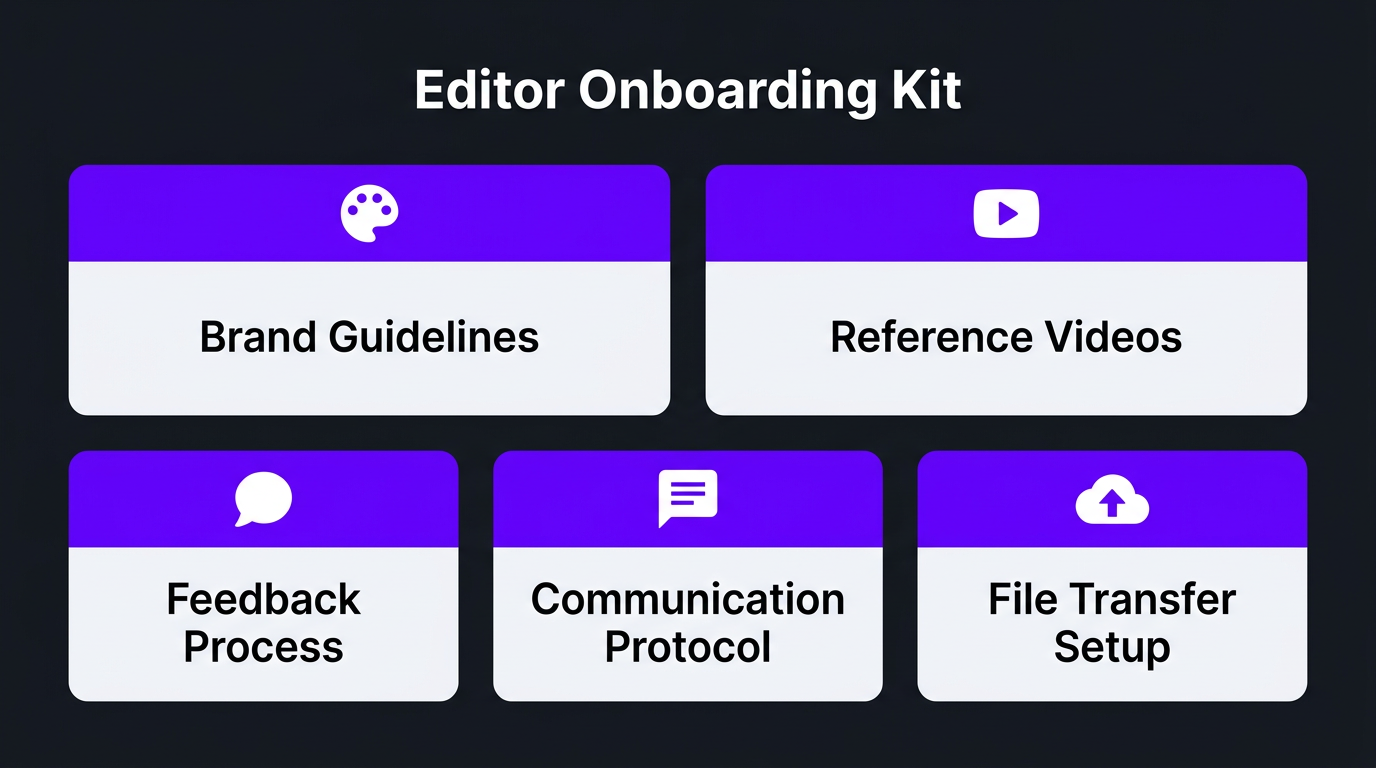
Create a Brand Guidelines Document
This is the single most impactful thing you can do. A simple document that covers:
- Brand colors and fonts — hex codes, not “dark blue”
- Logo files — in all formats and sizes
- Tone/mood references — 3-5 YouTube channels whose editing style you admire
- Music preferences — genres, energy levels, specific tracks or libraries
- Graphics style — examples of lower thirds, transitions, and text treatments you like
- Things to never do — specific effects, transitions, or styles you hate
- Intro/outro templates — standardized elements for every video
- Caption/subtitle style — font, position, background treatment
This document saves hours of revision and re-communication. The more specific you are upfront, the less time you’ll spend giving the same feedback repeatedly.
Establish a Feedback System
Unstructured feedback is the enemy of efficient editing. Set up a process:
- Use Frame.io or a similar platform for timestamped comments directly on the video. This eliminates “at around 3 minutes, there’s this part where…” confusion.
- Categorize your feedback. Is it a required change (factual error, wrong footage) or a preference (I’d like the music slightly louder)? Editors need to know what’s non-negotiable vs. suggestion.
- Give feedback in one round. Watch the entire video, compile all notes, send them at once. Drip-feeding feedback over 3 days kills turnaround time.
- Include positive feedback. “The transition at 4:32 was perfect” helps editors learn your preferences just as much as “remove the zoom at 2:15.”
Set Expectations on Turnaround and Communication
Define these clearly on day one:
- Expected turnaround time per video
- Response time for messages (same day? 24 hours?)
- How to handle rush requests
- What happens if an upload deadline might be missed
- Preferred communication channels (Slack, email, WhatsApp)
Most editor-client conflicts stem from mismatched expectations, not malice. Prevent them by being explicit from the start.
7 Expensive Mistakes Creators Make When Hiring YouTube Editors
We’ve worked with hundreds of creators transitioning from DIY editing or switching from other services. These are the patterns that cost people the most time and money:
Mistake 1: Hiring Based on Price Alone
The cheapest editor is almost never the cheapest option. When you factor in revision rounds, management time, and the opportunity cost of lower-quality content, budget hires frequently cost more than premium ones. We see this constantly — creators come to us after spending 6 months with a $100/video editor, having invested more total hours (at their own hourly value) than if they’d hired a $400/video professional from day one.
Mistake 2: Not Providing Reference Videos
“Just make it look good” is not a brief. Every editor’s definition of “good” is different. Send 3-5 reference videos that represent the style, pacing, and energy you want. Be specific: “I like how this channel handles transitions between topics” or “match this color grading style.”
Mistake 3: Changing Editors Every Few Months
Every new editor means a 2-4 week ramp-up period where quality dips and management time spikes. If you’re switching editors because of quality issues, the problem might be your onboarding process — not the editor. If you’ve switched 3+ times in a year, invest in better onboarding documentation rather than continuing to search.
Mistake 4: Not Having a Backup Plan
Your freelancer will get sick. They’ll take vacations. They’ll occasionally miss deadlines. If missing one upload isn’t an option, you need redundancy — either a secondary freelancer you can call, or an agency with built-in coverage.
Mistake 5: Micromanaging the Edit
If you hired a professional editor and then dictate every cut, transition, and music choice, you’re paying for expertise you won’t let them use. Give clear direction on what you want the final product to feel like, then let them edit. Review the result and provide feedback — but don’t pre-edit the edit.
Mistake 6: Expecting Perfection on Video One
Even the best editor needs 3-5 videos to fully calibrate to your style. The first video will require more revisions. The fifth will be smooth. If you fire an editor after one imperfect delivery, you’ll never find someone good enough — because the ramp-up period is universal.
Mistake 7: Ignoring the Relationship
Your editor isn’t a vending machine. Check in occasionally beyond revision notes. Share your channel analytics so they understand what’s working. Tell them when a video performs well because of their editing choices. Editors who feel valued produce better work and stick around longer.
The eSafety team understood this intuitively. When they partnered with our editors for their YouTube content, they didn’t just send footage and wait. They involved our team in content planning discussions, shared performance data, and treated the editing team as collaborators rather than vendors. That approach produced significantly better results than a transactional relationship would have.
Frequently Asked Questions
Start by defining your editing style, content type, and budget. Then source candidates from agencies, freelancer platforms, or creator referrals. Evaluate portfolios specifically for YouTube work, run a paid test project, assess communication and turnaround speed, and only commit to ongoing work after you’re confident in the fit. The entire process takes 2-4 weeks when done properly.
YouTube video editors charge $100–$500+ per video depending on complexity and experience. Monthly retainers for consistent weekly content range from $1,500 to $5,000+. Budget editors on Fiverr start around $50–$150, mid-tier freelancers charge $200–$450, and premium agencies with dedicated teams cost $350–$700 per video. See our full pricing breakdown for details.
Look for actual YouTube content — not wedding videos or corporate reels. Evaluate the first 30 seconds of each sample for hook quality. Check pacing consistency, audio mixing, B-roll usage, and graphic design. Ask whether the editor can show analytics impact (retention improvement) from their work. Variety across multiple content styles is a strong positive signal.
Freelancers work best for 1-4 videos per month at budgets under $2,000/month, if you’re comfortable managing the relationship directly. Agencies are better for 4+ videos monthly because they provide backup editors, project management, quality control, and consistent output without you managing anything. The total cost difference narrows significantly when you account for your management time.
The top red flags are: no YouTube-specific samples, refusing paid test edits, vague or hidden pricing, no defined revision process, slow or unprofessional communication, promising unrealistic turnaround times, and badmouthing previous clients. Any one of these should give you pause; two or more should end the conversation.
Expect 2-4 weeks if you’re sourcing from freelancer platforms and running test edits with multiple candidates. Working with an established YouTube editing agency can compress this to a few days since they already have vetted, platform-trained editors on staff ready to onboard to your channel.
Done Searching? Let’s Talk.
We’ve helped hundreds of YouTube creators find their editing groove. See our client results, then book a call to see if we’re the right fit.
This guide reflects 2026 market data and hiring best practices based on Increditors’ experience working with YouTube creators across all niches and content volumes. For current rates and availability, schedule a discovery call or visit our pricing page.