










![3D Explainer Video - ScribbleLive.mp4_snapshot_00.12_[2022.03.09_03.14.16]](https://increditors.com/wp-content/uploads/elementor/thumbs/3D-Explainer-Video-ScribbleLive.mp4_snapshot_00.12_2022.03.09_03.14.16-r7wb53mx72rxst3qcqyrfxdmeyzb5r9jbl0wbjujh4.png "3D Explainer Video – ScribbleLive.mp4_snapshot_00.12_[2022.03.09_03.14.16]")
































Most creators and brands don’t have a content calendar problem. They have a coordination problem.
They know they should publish 2 videos a week. They have a list of topics. They even have the footage filmed. But somewhere between “raw footage on a hard drive” and “published video on YouTube,” everything falls apart. The editor doesn’t know what’s priority. You forget to send the footage. Review cycles bleed into publish dates. And suddenly you’ve missed three weeks in a row.
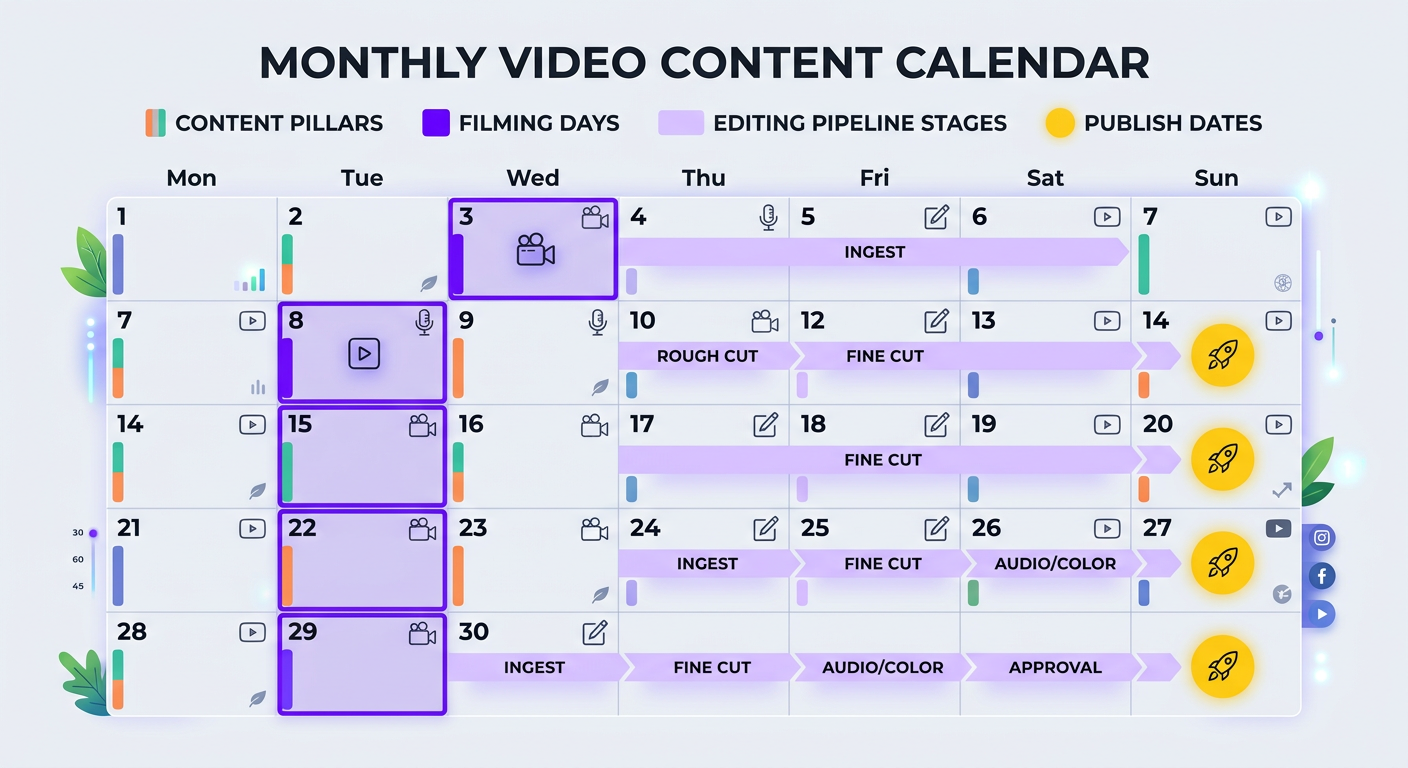
A video content calendar isn’t a spreadsheet with dates and titles. It’s a coordination system between you (the creator or brand) and your video editing team. When it works, content flows from idea to publication like a production line. When it doesn’t, you’re constantly firefighting.
This guide walks through exactly how to build and maintain a content calendar that keeps both you and your editing team on track — with real frameworks, templates, and examples from channels producing 10-40+ videos per month.
What’s in This Guide
- Why Most Video Content Calendars Fail
- The Content Calendar Framework
- Choosing Your Publishing Cadence
- Batch Filming: The Production Multiplier
- Coordinating With Your Editing Team
- Tools & Templates That Actually Work
- Content Pillars: Never Run Out of Ideas
- Scaling From 4 to 40 Videos Per Month
- How Real Channels Manage Their Calendars
- FAQ
Why Most Video Content Calendars Fail
Before we build the solution, let’s diagnose the problem. We’ve onboarded hundreds of creators and brands at Increditors, and the same calendar failures show up repeatedly:
Failure 1: The Calendar Only Has Publish Dates
A calendar that says “March 15: Video about X” is useless if it doesn’t also say when you need to film, when footage goes to the editor, when the first cut is due, and when the review needs to happen. A publish date without upstream milestones is a wish, not a plan.
Failure 2: The Editor Isn’t in the Calendar
Your editor is a key stakeholder in your content pipeline. If they don’t see the calendar — or worse, if they get footage dumps with no context — you’ll get slow turnarounds and mismatched priorities. The editor needs to know what’s coming, what’s urgent, and what can wait.
Failure 3: No Buffer for Reality
Content calendars built with zero slack time collapse at the first disruption. You get sick. A video needs more revisions than expected. A trending topic deserves a fast-turnaround video. Without buffer days, one disruption cascades through the entire month.
Failure 4: Too Ambitious, Too Fast
Going from 2 videos a month to “daily uploads” is the content equivalent of running a marathon with no training. You burn out in week three, your editor scrambles for two weeks, and then nothing gets published for a month. Sustainable growth means adding 1-2 videos per week incrementally.
Failure 5: No Content Pillar System
Without categories or pillars, topic selection becomes random — which means some weeks you have five ideas and other weeks you have none. A pillar system ensures variety, consistency, and makes topic generation predictable.
The Content Calendar Framework That Actually Works
Here’s the framework we recommend to every client. It works whether you’re publishing 4 videos a month or 40.
The 4-Layer Calendar
Think of your content calendar as four layers, each serving a different function:
| Layer | Time Horizon | What It Contains | Who Owns It |
|---|---|---|---|
| Layer 1: Theme Map | Quarterly (90 days) | Monthly themes, content pillar allocation, seasonal opportunities | You / Content strategist |
| Layer 2: Topic Plan | Monthly (30 days) | Specific video topics, target keywords, format types | You / Content strategist |
| Layer 3: Production Pipeline | Bi-weekly (14 days) | Filming schedule, footage delivery dates, editing assignments | You + Editor |
| Layer 4: Publish Queue | Weekly (7 days) | Final videos, titles, thumbnails, descriptions, scheduled publish times | You / Social media manager |
Each layer feeds into the next. The quarterly theme map informs monthly topics. Monthly topics drive bi-weekly production schedules. Production schedules determine the weekly publish queue. When all four layers are connected, content production becomes predictable instead of chaotic.
The Timeline Math
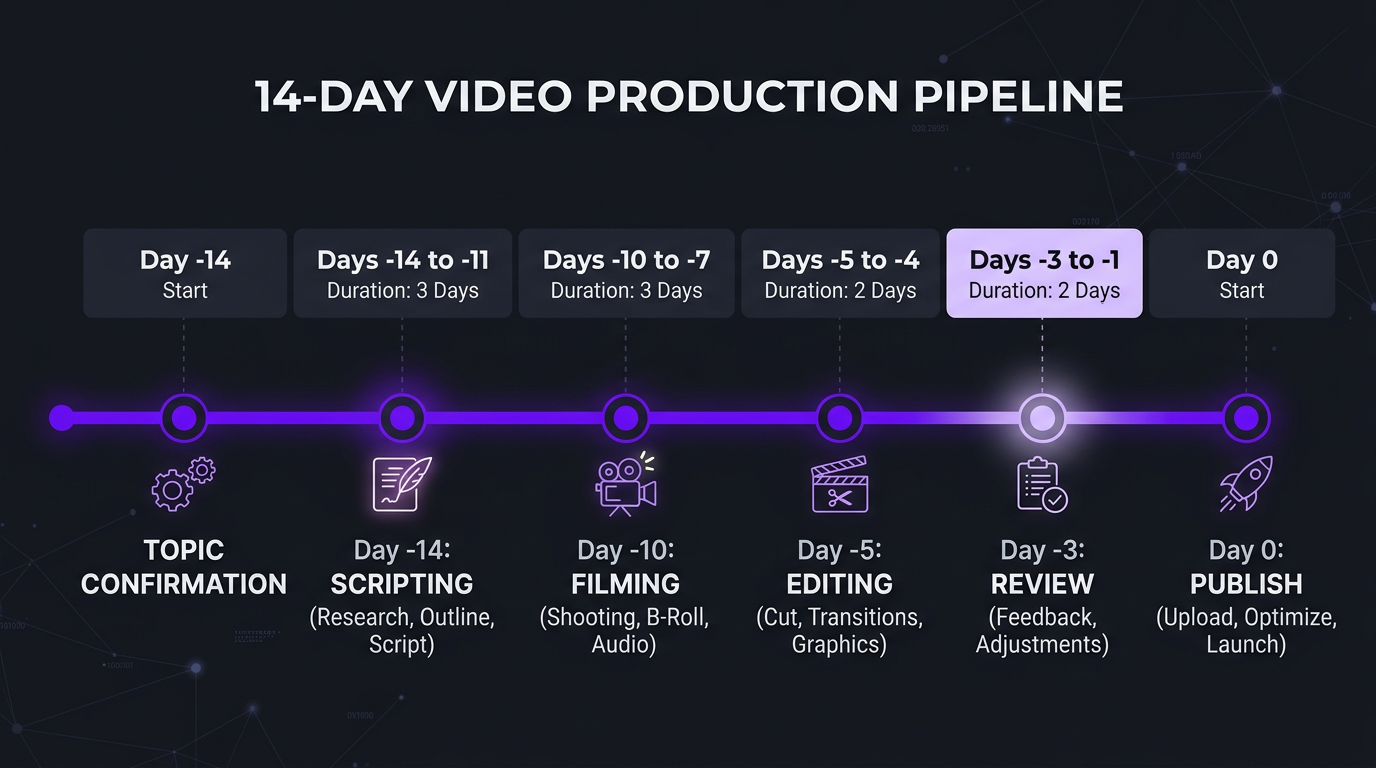
Here’s how the timeline works backwards from a publish date:
- Day -14 to -10: Topic confirmed, script or outline written
- Day -10 to -7: Filming day
- Day -7 to -5: Footage delivered to editor
- Day -5 to -3: First cut delivered for review
- Day -3 to -2: Feedback provided
- Day -2 to -1: Final version delivered
- Day 0: Video published
That’s a 14-day pipeline. If you’re publishing 2 videos per week, you need to have 4 videos in various stages of this pipeline at any given time. This is why coordination with your editing team isn’t optional — it’s the central challenge of consistent publishing.
Choosing Your Publishing Cadence
Before you build the calendar, you need to answer the most fundamental question: how often should you publish?
The answer depends on your resources, your goals, and your audience — not on what a YouTube guru told you.
| Cadence | Best For | Editing Needs | Monthly Cost Range |
|---|---|---|---|
| 1 long-form/week | Solo creators, small businesses starting out | 1 dedicated editor or per-video freelancer | $800-$2,000 |
| 2 long-form/week | Growing channels, established brands | Dedicated editor or agency retainer | $2,000-$4,000 |
| 2 long-form + 5 shorts/week | Serious creators, media brands | Agency with team (editor + shorts editor) | $3,500-$6,000 |
| Daily shorts + 3 long-form/week | Full-time creators, media companies | Full editing team with PM | $5,000-$10,000+ |
The golden rule: only commit to a cadence you can maintain for 6+ months. Consistency compounds. The algorithm rewards regularity. Your audience builds habits around your schedule. Breaking that pattern — especially with a sudden gap — hurts more than a slightly slower cadence.
Riley Coleman is a great example. When they started working with a dedicated editing team, they went from sporadic uploads (3-5 per month, random timing) to a locked schedule of 2 videos per week on Tuesday and Friday. Within 4 months, their channel growth rate doubled — not because the content was radically different, but because the algorithm recognized the consistency and started recommending their videos more aggressively.
Batch Filming: The Production Multiplier
Batch filming is the single most impactful change creators make when scaling their content production. Instead of filming one video at a time (setup → film → teardown → repeat), you block 1-2 days per month and film 4-8 videos in a single session.
Why Batch Filming Works
- Setup efficiency. You set up lighting, camera, and audio once — instead of 8 times. This saves 3-5 hours per month for most creators.
- Mental flow. Once you’re in “filming mode,” the second video is easier than the first. By the fourth, you’re in the zone. Stopping and starting between filming days breaks that momentum.
- Consistent look. Videos filmed in the same session have consistent lighting, framing, and energy — which makes your channel feel more professional.
- Editor workflow. Sending 4-8 videos to your editor at once allows them to batch their work too — which means faster turnaround and better consistency across videos.
- Buffer creation. Batch filming 8 videos gives you 2-4 weeks of buffer. If life happens, your publishing schedule doesn’t break.
The Batch Filming Day Template
| Time Block | Activity | Videos Filmed |
|---|---|---|
| 8:00-9:00 AM | Setup: lighting, camera, audio check, wardrobe | 0 |
| 9:00-10:30 AM | Film videos 1 & 2 (talking head / similar format) | 2 |
| 10:30-11:00 AM | Break + wardrobe change | — |
| 11:00-12:30 PM | Film videos 3 & 4 | 4 |
| 12:30-1:30 PM | Lunch break | — |
| 1:30-3:00 PM | Film videos 5 & 6 (different format if needed) | 6 |
| 3:00-3:30 PM | Break + wardrobe change | — |
| 3:30-5:00 PM | Film videos 7 & 8 + B-roll for all videos | 8 |
| 5:00-5:30 PM | Teardown + organize footage + upload to editor | — |
Eight videos in a single day sounds aggressive, but it’s realistic for talking-head content, tutorials, and reaction-style videos. More complex formats (cinematic, documentary, multi-location) might yield 3-4 per filming day — which is still far more efficient than one-at-a-time filming.
Preparing for a Batch Filming Day
The batch fails if you show up unprepared. Here’s what needs to be ready before filming day:
- All scripts or outlines written and reviewed. Not “rough ideas” — actual talking points in order.
- 8 different shirts laid out. Sounds trivial, but viewers notice if you’re wearing the same shirt across videos published on different days.
- Thumbnails conceptualized. Knowing the thumbnail in advance helps you film specific reaction shots or poses during the session.
- Props and screen recordings ready. If a video needs product demos, slides, or specific visuals, have them prepared.
- Editor briefed in advance. Send your editor the content calendar so they know what’s coming and can plan their workload.
Ink Magnet, a content marketing agency, adopted this exact batch filming approach for their YouTube channel. They film 8 educational videos on the first Monday of each month, send all footage to their editing team by Monday night, and have 4 weeks of content in the pipeline by Wednesday. Their founder went from spending 15+ hours per week on video to 8 hours per month.
Coordinating With Your Editing Team: The Practical Guide
This is where most content operations break down. You have the footage. Your editor exists. But the handoff between “filmed” and “edited” is where videos go to die.
The Handoff Checklist
Every time you send footage to your editor, include:
- Video title (working) — so they know the topic and tone
- Target publish date — so they know the deadline
- Raw footage files — clearly labeled and organized
- Script or outline — even rough notes help the editor understand structure
- Reference examples — “I want this to feel like [specific video]”
- Music direction — upbeat, cinematic, lo-fi, no music
- Special instructions — “Cut the first 3 minutes, I rambled” or “Keep the blooper at 14:22”
- B-roll or assets — screen recordings, images, graphics to insert
Without this context, your editor is guessing — which means more revision rounds, slower turnaround, and frustration on both sides.
Need an Editing Team That Fits Into Your Content Calendar?
We become an extension of your team — learning your style, anticipating your needs, and keeping your content pipeline flowing. See our client work to see the quality.
Communication Rhythms That Work
The best creator-editor relationships have predictable communication patterns:
- Monthly planning call (30 min): Review upcoming content calendar, discuss any format changes, align on priorities.
- Weekly async check-in: A quick Slack/email message summarizing what’s in progress, what’s delivered, and any blockers.
- Per-video feedback: One consolidated feedback round (not drip-fed comments over 3 days). Use timestamps: “At 2:34, cut to B-roll instead of jump cut.”
The worst pattern? Radio silence for 5 days, then panicked messages about a video that needs to go live tomorrow. If your editor has to ask “what should I work on?” — your coordination system is broken.
Setting Realistic Turnaround Expectations
| Video Type | Standard Turnaround | Rush Turnaround | What Affects Speed |
|---|---|---|---|
| Talking head (10-15 min) | 2-3 business days | 24-48 hours | Footage cleanliness, graphics complexity |
| Tutorial / screen share | 3-4 business days | 48 hours | Number of screen sources, annotations needed |
| YouTube long-form (20-30 min) | 4-5 business days | 2-3 days | Raw footage volume, motion graphics, B-roll |
| Short-form clip (30-60 sec) | 1-2 business days | Same day | Caption styling, format variations (9:16, 1:1) |
| Full production (cinematic) | 5-7 business days | 3-4 days | Color grading, VFX, sound design |
Build these turnaround times into your calendar backwards from publish dates. If your YouTube video goes live on Thursday, and editing takes 4 business days, footage needs to reach your editor by Friday of the previous week. Miss that window, and you’re either paying rush fees or pushing the publish date.
Tools & Templates That Actually Work
You don’t need fancy software. You need a system your entire team actually uses. Here are the tools that work best for video content calendars, based on what we see across hundreds of clients:
For Solo Creators & Small Teams (1-3 people)
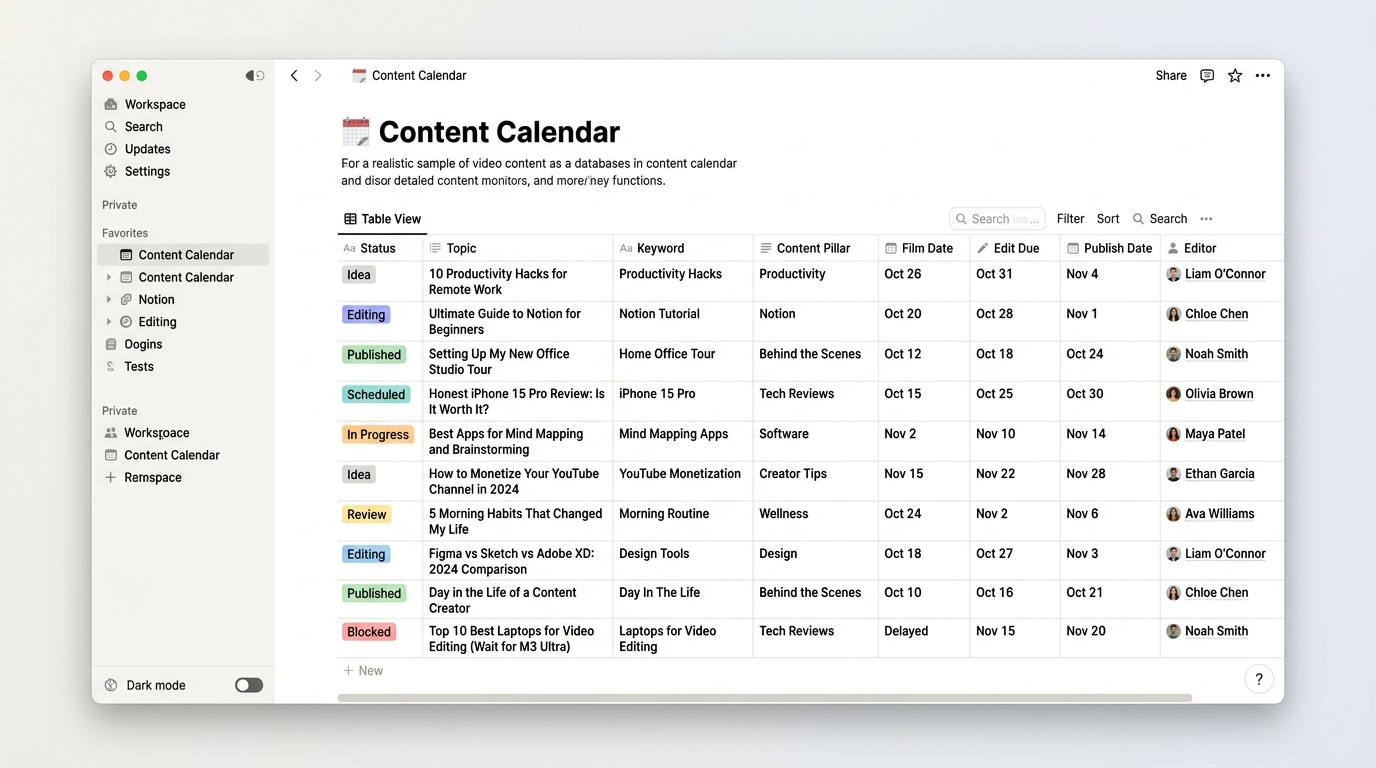
Google Sheets — Simple, free, and shareable. Create a spreadsheet with columns for: Week #, Publish Date, Topic, Keyword, Status (Scripted → Filmed → Sent to Editor → In Edit → Review → Final → Published), Editor Notes, and Link to Final File.
This works until you’re producing 10+ videos per month, at which point the spreadsheet becomes unwieldy.
For Growing Channels (4-15 videos/month)
Notion — The sweet spot for most content creators. Create a database with calendar, board (Kanban), and table views. Each entry is a video with properties for status, content pillar, platform, editor assigned, filming date, and due date. The calendar view shows publish dates; the board view shows pipeline status.
Trello — If you prefer visual simplicity. Columns for Ideation → Scripted → Filmed → In Edit → Review → Ready → Published. Each card is a video. Attach footage links, scripts, and editor notes to each card. Simple, effective, and your editor can drag cards through the pipeline themselves.
For Content Operations (15+ videos/month)
Airtable — Database power with relational tables. Link your content calendar to an editor roster, a platform distribution tracker, and a performance analytics table. Automations can notify editors when footage is uploaded and alert you when first cuts are ready.
Monday.com or Asana — Project management tools with timeline views that map dependencies. If Video B can’t start editing until Video A’s revisions are done (because it’s the same editor), these tools visualize and manage those constraints.
Content Pillars: Never Run Out of Ideas
A content pillar system solves the “what should I film?” problem permanently. Instead of brainstorming from scratch every month, you rotate through 3-5 categories that cover your audience’s needs.
How to Define Your Pillars
Your content pillars should map to three things:
- What your audience searches for — keyword research tells you this
- What positions you as an authority — your expertise and unique perspective
- What drives business results — content that actually generates leads, sales, or growth
The intersection of all three is your pillar sweet spot.
Example Pillar Framework: A SaaS Company
| Pillar | Content Types | Frequency | Goal |
|---|---|---|---|
| Product Education | Tutorials, feature demos, use cases | 2/month | Reduce churn, drive adoption |
| Industry Thought Leadership | Trends, analysis, commentary | 2/month | Build authority, attract top-of-funnel |
| Customer Stories | Case studies, interviews, testimonials | 1/month | Social proof, bottom-of-funnel conversion |
| How-To / Educational | Guides, comparisons, best practices | 2/month | SEO traffic, audience growth |
| Behind the Scenes | Team culture, process, company updates | 1/month | Brand affinity, recruitment |
That’s 8 videos per month with clear purpose and variety. Your editor knows what to expect because each pillar has a consistent format. Product tutorials always have screen recordings. Customer stories always have interview footage. Thought leadership is always talking head with data overlays. This consistency makes editing faster and more efficient over time.
The Pillar Rotation Calendar
Map your pillars to specific weeks or days:
- Week 1: Product Education + Thought Leadership
- Week 2: How-To + Customer Story
- Week 3: Product Education + Behind the Scenes
- Week 4: Thought Leadership + How-To
This rotation ensures variety in every week while keeping the overall content mix balanced. Your audience never gets 4 tutorials in a row or 3 weeks without a case study.
Scaling From 4 to 40 Videos Per Month
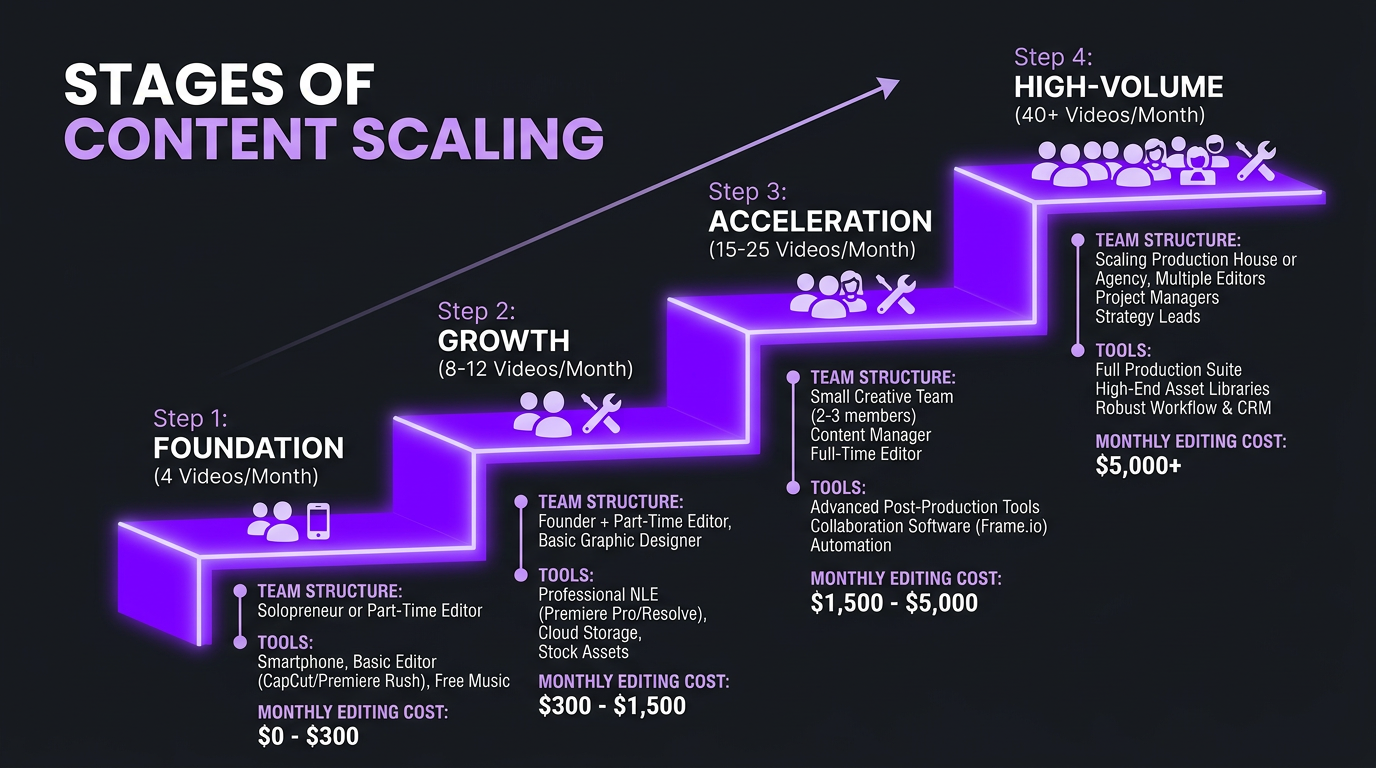
Most channels start with 4 videos per month. The ambitious ones want to get to 20-40+. That’s achievable — but it requires fundamentally different operations at each scale.
Stage 1: 4 Videos/Month (The Solo Creator Stage)
At this volume, you’re doing most of the work yourself with one freelance editor. The calendar is simple — a Google Sheet is enough. You film 4 videos in 1-2 sessions, send them to your editor, review the cuts, and publish. Total editing cost: $800-$2,000/month.
The bottleneck at this stage is usually you. You’re the ideator, writer, performer, reviewer, and publisher. Everything flows through one person.
Stage 2: 8-12 Videos/Month (The Growth Stage)
This is where you need a dedicated editor (not a freelancer doing your project between other clients). At 8-12 videos, you need predictable turnaround times and an editor who understands your style without detailed briefs for every video.
The shift: you move from per-video management to pipeline management. Your calendar needs proper status tracking, and you’ll likely need a part-time content manager or VA to handle file organization, scheduling, and distribution.
Editing cost: $2,500-$5,000/month with an agency retainer.
Stage 3: 15-25 Videos/Month (The Team Stage)
One editor can’t handle this volume at quality. You need a team — primary editor, shorts editor, motion graphics specialist, and a project manager to coordinate. Your content calendar becomes a full production schedule.
At this stage, you need:
- Multiple filming formats (long-form, shorts, interviews, screen share)
- A dedicated project manager coordinating between you and the editing team
- Automated workflows (footage uploaded → editor notified → status updated)
- Weekly production meetings instead of ad-hoc communication
Editing cost: $5,000-$8,000/month.
Stage 4: 25-40+ Videos/Month (The Media Company Stage)
At this volume, you’re running a content operation, not a YouTube channel. You likely have multiple hosts or contributors, a full-time content manager, and your editing team is 3-5 people.
The calendar at this stage is a full project management system with dependencies, resource allocation, and capacity planning. You’re scheduling editing time like a production house schedules studio time.
TuMeke reached this stage in their second year. Starting with 4 videos per month, they scaled to 30+ across YouTube, LinkedIn, and Instagram — using a dedicated editing agency that grew with them. The key insight: they didn’t try to jump from 4 to 30. They added 2-3 videos per month each quarter, giving their editing team time to learn the brand and build efficient workflows.
Editing cost: $8,000-$15,000+/month.
How Real Channels Manage Their Calendars
Case Study: Emerge — From Chaos to System
Emerge is a growing brand that went through the classic content calendar meltdown. They had a list of video ideas, two freelance editors, and no coordination system. Videos published late (or not at all). Editors received footage with no context. Every video was a fire drill.
After implementing the 4-layer calendar framework:
- Publishing consistency went from 60% on-time to 95%. Videos published on schedule almost every week.
- Editor turnaround dropped from 7 days to 3. Because editors received footage with full context and clear deadlines.
- Content output increased from 6 to 14 videos/month without adding hours to the founder’s schedule — because batch filming replaced ad-hoc filming.
- Revision rounds dropped from 3 per video to 1.2. Better briefs meant the first cut was closer to the final vision.
The total time spent on content operations by the founder went from 25 hours/week to 8 hours/week. The rest was handled by the system — calendar, editor, and a VA managing the pipeline.
Case Study: VYVE Wellness — Multi-Platform Calendar Mastery
VYVE Wellness publishes content across YouTube (2/week), Instagram Reels (5/week), TikTok (5/week), and LinkedIn (3/week). That’s 15 videos per week — 60+ per month.
Their calendar system:
- Monthly theme: Each month has a health/wellness theme that ties all content together.
- Batch filming: 2 filming days per month produce all long-form content. Short-form is often repurposed from long-form footage.
- Editing pipeline: Long-form → Agency edits → Client review → Publish. Short-form → Same editor pulls clips from long-form footage → Optimizes per platform → Publishes directly.
- Tool: Airtable with automated notifications. When footage lands in the shared drive, the editor gets pinged. When the first cut is uploaded, the founder gets pinged.
The secret to managing 60+ videos per month? The long-form content drives everything. Film 8 long-form videos, and the editing team generates 50+ short-form pieces from that footage. The calendar only needs to track 8 “source” videos — everything else cascades from there.
Common Mistakes to Avoid
After working with hundreds of channels, here are the patterns we see again and again:
- Planning topics without planning production. A list of 20 video titles means nothing if you haven’t scheduled when to film them, when to send them to your editor, and when they’ll be ready.
- Ignoring seasonal content. Q4 (Black Friday, holidays, year-end) and Q1 (New Year, resolutions) drive massive search volume in most niches. Plan seasonal content 4-6 weeks in advance.
- Not tracking performance. Your calendar should eventually include a “performance” column — views, retention, engagement — so you can see which pillars and formats perform best and adjust future planning accordingly.
- Changing the calendar every week. Frequent pivots undermine the entire system. Commit to your monthly plan and only make changes for genuinely time-sensitive opportunities.
- Treating your editor as a vendor, not a partner. Editors who understand your content strategy make better editing decisions. Share your analytics, your audience insights, and your goals with them. The more context they have, the less you need to micromanage.
Your editing team is a core part of your content operation — not an afterthought. Build your calendar with them, not just for them. The best editing partnerships feel like having an in-house team without the overhead.
Need an Editing Team That Works on Your Schedule?
Increditors integrates into your content calendar and workflow. Dedicated editors who learn your style, hit your deadlines, and scale with your output.
Frequently Asked Questions
Plan at least 2-4 weeks ahead for topic selection and 1-2 weeks ahead for filming. This gives your editing team enough lead time for quality work without rush fees. Most successful YouTube channels plan topics 30 days out while filming 7-14 days before publish dates. Quarterly theme planning (90 days out) adds strategic direction without requiring detailed planning that far ahead.
For YouTube long-form: 1-2 per week is optimal for most creators and brands. For short-form (Reels, Shorts, TikTok): 3-7 per week performs best. The key is consistency over volume — publishing 1 video weekly for 12 months beats publishing 4 per week for 3 months then burning out. Start with a sustainable cadence and increase by 1-2 videos per month as your editing team and workflow can handle it.
A complete video content calendar includes: publish date, topic/title, target keyword, content pillar/category, filming date, footage delivery date to editor, first cut due date, review deadline, final delivery date, publish platform(s), and status tracking. Adding thumbnail concepts, hook ideas, and post-publish performance metrics makes it even more useful for ongoing optimization.
Block 1-2 filming days per month. Prepare all scripts or outlines in advance. Film similar content types together (all talking heads in one session, all demos in another). Change shirts between videos to create visual variety. Aim for 4-8 videos per filming day depending on complexity. Send all footage to your editor the same day for maximum efficiency.
Share your content calendar with your editing team at the start of each month. Agree on footage delivery dates (when you send raw files) and first-cut dates (when they deliver). Build in 2-3 buffer days for feedback rounds. Use a shared project management tool (Notion, Trello, Asana) so everyone sees status in real time. Hold a brief weekly sync to align priorities.
Notion and Airtable are the most popular for content calendars because they combine database functionality with calendar views. Trello works well for simpler workflows. Google Sheets is fine for small teams. For enterprise operations, Monday.com or Asana add dependency tracking and automation. The best tool is the one your entire team — including your editor — actually uses consistently.
Build a Content Engine, Not Just a Calendar
A calendar is the plan. An editing team is the engine. Let’s put both in place for your channel.
Frameworks and examples in this article are based on direct client experience and industry best practices. Results vary by niche, audience size, and content quality. For a customized content calendar strategy, schedule a call with our team.