










![3D Explainer Video - ScribbleLive.mp4_snapshot_00.12_[2022.03.09_03.14.16]](https://increditors.com/wp-content/uploads/elementor/thumbs/3D-Explainer-Video-ScribbleLive.mp4_snapshot_00.12_2022.03.09_03.14.16-r7wb53mx72rxst3qcqyrfxdmeyzb5r9jbl0wbjujh4.png "3D Explainer Video – ScribbleLive.mp4_snapshot_00.12_[2022.03.09_03.14.16]")
































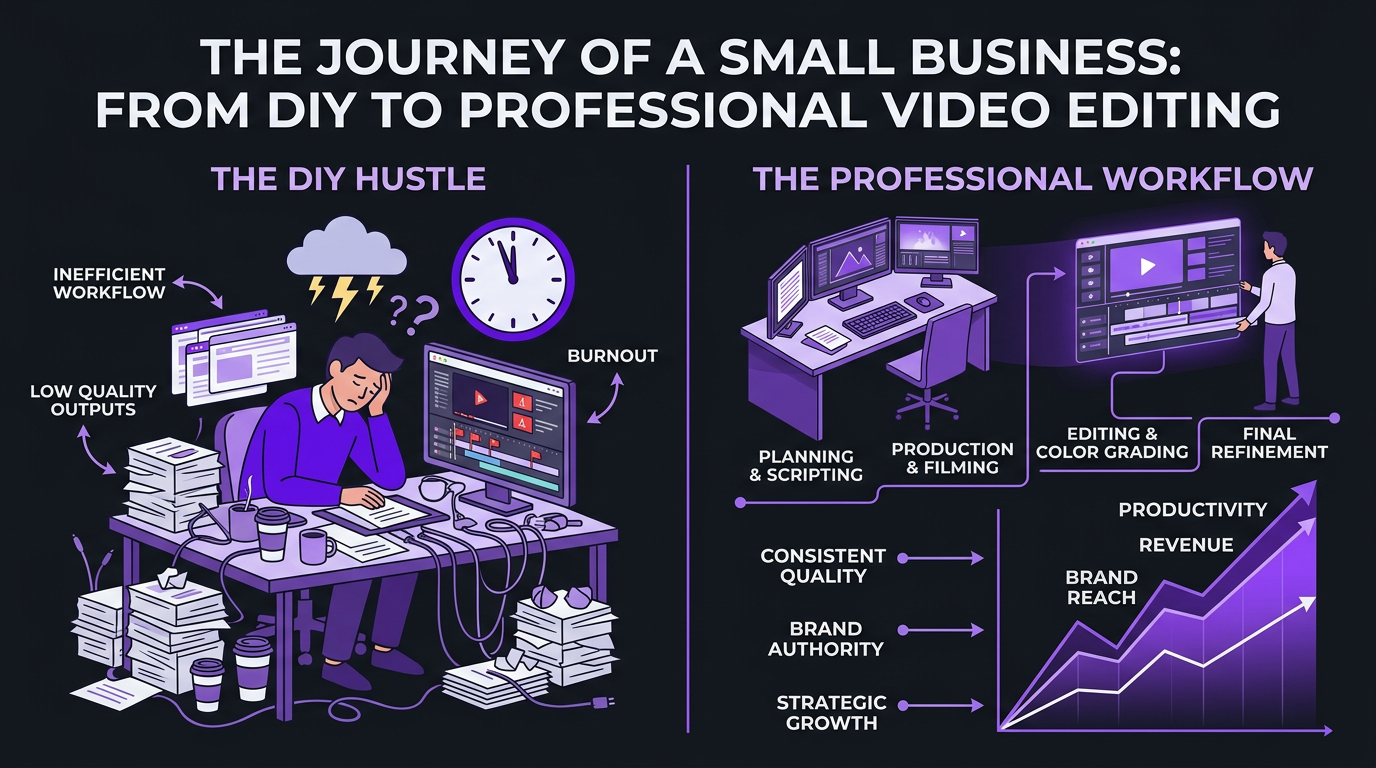
You started a small business, not a post-production studio. But somewhere between launch and growth, video became non-negotiable — for your website, YouTube channel, social media, paid ads, or all of the above.
Now you’re editing at midnight, burning weekends on CapCut tutorials, or paying a freelancer who ghosts you every other week. The content looks “fine” but never great, and you know that’s costing you customers.
Finding the right video editing company for your small business changes everything. The right partner doesn’t just clean up footage — they give you back your time, make your brand look professional, and actually move business metrics. The wrong one wastes money and adds another management headache to your plate.
We’ve worked with dozens of small businesses across SaaS, health and wellness, e-commerce, and creator-led brands. Here’s what we’ve learned about what actually matters when choosing a video editing company — and how to avoid the expensive mistakes we see constantly.
What’s in This Guide
- Why Small Businesses Need a Video Editing Company
- What to Look For (and What to Avoid)
- Types of Video Editing Companies
- Top Video Editing Companies Compared
- Small Business Pricing Guide
- Real Small Business Results
- How to Make Your Decision
- 5 Mistakes Small Businesses Make
- The ROI of Professional Video Editing
- FAQ
Why Small Businesses Need a Dedicated Video Editing Company
Let’s start with the numbers that make this conversation urgent.
According to Wyzowl’s 2025 State of Video Marketing report, 91% of businesses use video as a marketing tool — the highest number since they started tracking. HubSpot found that short-form video delivers the highest ROI of any content format. And Cisco projects that video will account for 82% of all internet traffic by 2026.
For small businesses, this creates both an opportunity and a bandwidth problem. You know you need video. You probably can’t afford a $60,000/year in-house editor. And your time — the most expensive resource in any small business — shouldn’t be spent learning keyframes in Premiere Pro.
The Real Cost of DIY Editing
When small business owners tell us “I do my own editing to save money,” we ask one question: what’s your hourly rate?
If your time is worth $100/hour (conservative for most business owners), and you spend 8 hours editing a single video, you’ve spent $800 in opportunity cost. A professional editor charges $150–$400 for the same video — and produces a better result in less time.
That math alone justifies outsourcing. But there are compounding costs that are harder to quantify:
- Inconsistent quality — your editing improves slowly, but your audience judges you against creators with professional teams
- Slow output — you publish 2 videos when you should publish 8, losing algorithmic momentum
- Creative burnout — editing drains energy you need for strategy, sales, and actually running your business
- Missed trends — by the time you edit and post, the trend has peaked
What Changes When You Get It Right
When a small business finds the right editing partner, three things happen almost immediately:
- Volume increases. Instead of one video per week, you produce two long-form pieces plus 6–8 repurposed shorts. Content compounds — the algorithm rewards consistency.
- Quality jumps. Professional pacing, color, audio, and graphics make your content look like it came from a company 10x your size. This matters for credibility, especially in B2B.
- You get your time back. The typical small business owner reclaims 15–30 hours per month when they stop editing. That time goes back into sales, product development, or — honestly — your sanity.
What to Look For in a Video Editing Company (and What to Avoid)
Not every video editing company is built for small businesses. Many cater to enterprise clients with $20,000/month budgets and dedicated account managers for a single brand. Others target hobbyist creators who need basic cuts on talking-head videos.
Small businesses sit in a specific gap: you need professional quality, reasonable pricing, fast turnaround, and — critically — a partner who understands that your videos exist to drive business outcomes, not just views.
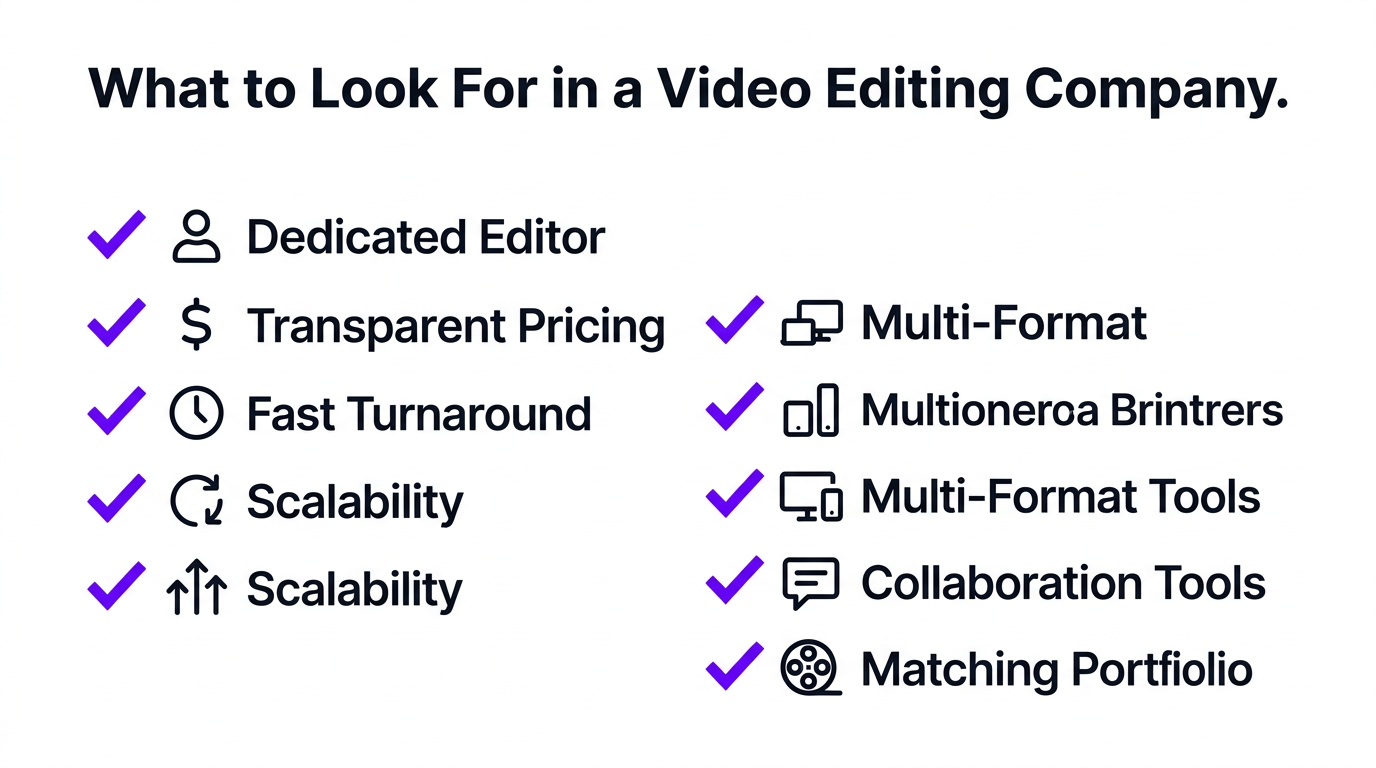
The 7 Things That Actually Matter
1. Dedicated Editor (Not a Rotating Pool)
This is the single most important factor for small businesses. You need an editor who learns your brand voice, understands your products, knows your audience, and remembers what worked in your last 10 videos.
Subscription services with rotating editor pools — where you get whoever’s available this week — create a “ramp-up tax” every single time. You re-explain your brand, re-share your style guide, and re-review basic things that a dedicated editor would already know.
At Increditors, every client gets a dedicated editor from day one. Your editor becomes an extension of your team, not a random person who saw your brand guidelines for the first time this morning.
2. Transparent, Predictable Pricing
Small businesses need to budget. Vague “custom quotes” and surprise charges for revisions, rush turnarounds, or motion graphics make it impossible to plan. Look for companies that publish their pricing clearly and don’t nickel-and-dime you on every add-on.
3. Fast, Reliable Turnaround
If your content calendar says “post Tuesday” and your editor delivers on Thursday, your entire strategy falls apart. Anything over 48 hours for standard edits is too slow for a small business that needs to stay agile.
4. Scalability
Your video needs will grow. A company that works great at 4 videos/month but can’t scale to 12 forces you to switch providers and re-onboard — an expensive, frustrating process. Choose a company that can grow with you.
5. Multi-Format Capability
Small businesses don’t just need YouTube videos. You need social media clips, ad creatives, website videos, product demos, and course content. A good video editing company handles all of these without requiring separate vendors.
6. Communication and Collaboration Tools
How do you give feedback? How do you track projects? The best companies offer structured communication — whether that’s a client portal, Slack integration, or shared project management tools. Avoid companies where “collaboration” means emailing files back and forth.
7. A Portfolio That Matches Your Needs
If a company’s portfolio is all wedding videos and music videos, they probably won’t understand your SaaS product demo or your health and wellness YouTube channel. Look for work that’s in your category or a closely adjacent one.
Red Flags to Watch For
- “Unlimited” editing with no definition — unlimited is a marketing term. What matters is editor hours per week and turnaround guarantees.
- No portfolio or case studies — if they can’t show you work, there’s a reason.
- Long-term contracts required upfront — a confident company lets you try before committing.
- Per-revision charges — 2–3 revisions should be standard. Charging per revision incentivizes delivering rough first cuts.
- No human contact before purchase — if you can’t talk to a real person before paying, the support after payment will be worse.
Types of Video Editing Companies: Which Model Fits Small Businesses?
The video editing industry has fragmented into several distinct models. Each has trade-offs that matter differently depending on your business stage and content volume.
Model 1: Subscription Services (Budget Tier)
Companies like Vidchops operate on a credit-based subscription model. You pay a flat monthly fee (starting around $495/month at Vidchops for 4 videos) and submit footage through a portal. An assigned editor handles your cuts.
Best for: Small businesses producing 2–4 simple videos per month (talking heads, basic vlogs) on a tight budget.
Limitations: Quality ceilings on complex editing. Motion graphics, advanced color grading, and VFX are usually not included or limited. Turnaround can be 2–4 days. Creative input is minimal — they execute, not strategize.
Model 2: Boutique/Per-Project Services
Companies like Veedyou Media operate on a per-project or custom quote basis. You describe what you need, they quote a price, you pay per video. No monthly commitment required.
Best for: Businesses with irregular video needs — a product launch here, a course video there — who don’t want monthly overhead.
Limitations: Per-video costs are higher than subscriptions. No dedicated editor means re-onboarding each time. You manage the relationship manually.
Model 3: Premium Agency (Dedicated Team)
Companies like Increditors provide dedicated editing teams — your editor, a project manager, and quality reviewers — working exclusively on your content. Think of it as having a post-production department without hiring one.
Best for: Small businesses producing 4–20+ videos per month who need consistent quality, fast turnaround, and a partner who understands their business goals.
Limitations: Higher monthly investment ($2,500–$5,000+). Overkill if you only need 1–2 simple videos per month.
Model 4: Freelance Marketplace
Platforms like Upwork and Fiverr give you access to individual editors. Pricing varies wildly from $25 to $150/hour.
Best for: One-off projects where you can invest time in vetting and managing the editor.
Limitations: No backup if your editor disappears. Quality inconsistency. Heavy management burden on you. Zero strategic input. This is the model most small businesses start with — and the one they usually outgrow fastest.
| Model | Monthly Cost | Videos/Month | Dedicated Editor | Best For |
|---|---|---|---|---|
| Freelance | $400–$2,400 | 2–8 | ⚠️ If they stick around | One-off projects |
| Budget subscription | $495–$1,000 | 4–8 | ✅ Assigned | Basic weekly content |
| Boutique/Per-project | $600–$3,000+ | 2–6 | ❌ Varies | Irregular video needs |
| Premium agency | $2,500–$5,000+ | 8–20+ | ✅ Dedicated team | Consistent, high-volume content |
Top Video Editing Companies for Small Businesses Compared
Let’s get specific. Here are the companies that small businesses most commonly evaluate, with honest assessments of each.
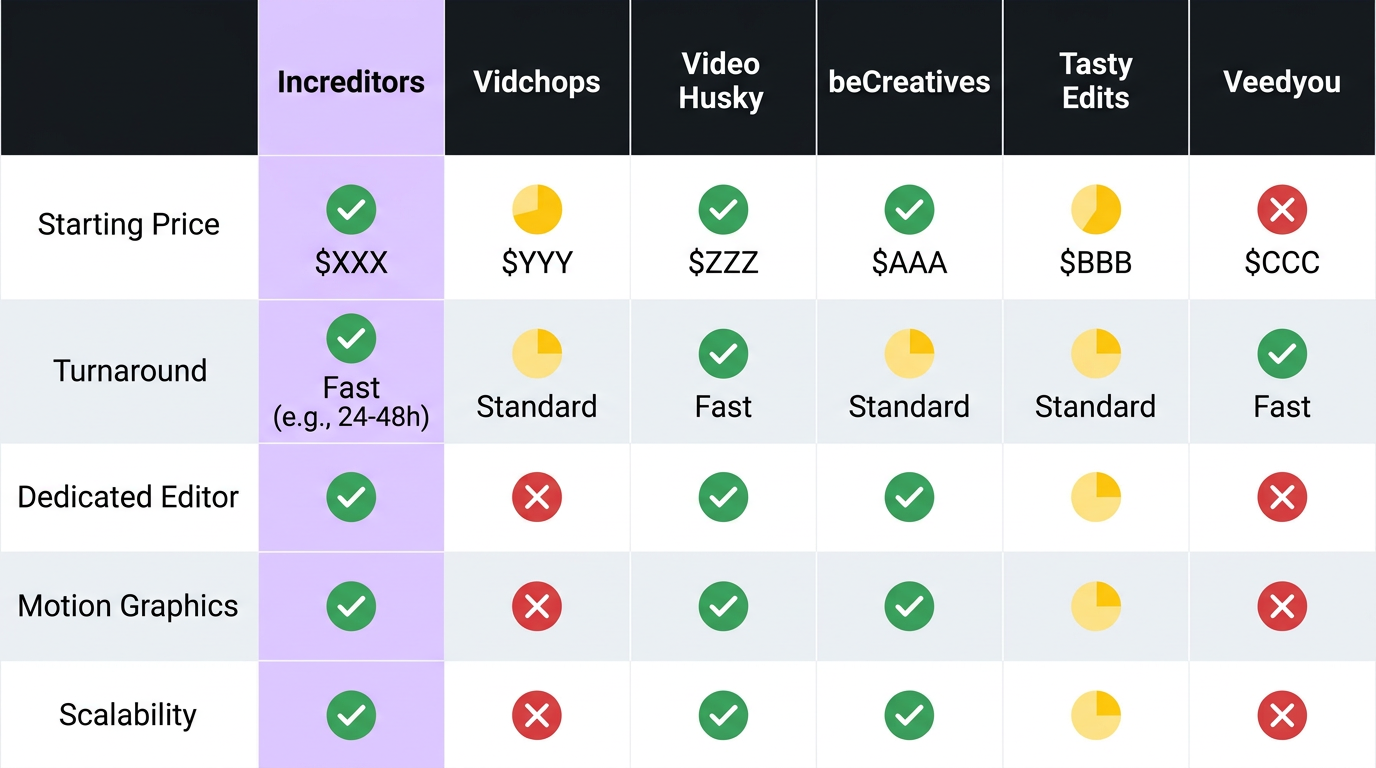
| Company | Starting Price | Turnaround | Best For | Limitation |
|---|---|---|---|---|
| Increditors | $2,500/mo | 24–48 hrs | Growing businesses needing a full team | Higher entry price |
| Vidchops | $495/mo | 1–2 days | Budget-friendly weekly YouTube | Basic editing only; 4 videos/mo at base tier |
| Video Husky | $849/mo | Based on editor hours | Creators needing structured packages | Hours-based model can be limiting |
| beCreatives | $899/mo | 1–4 days | Social media-focused businesses | Sequential processing (one video at a time) |
| Tasty Edits | ~$240/video | 48–72 hrs | YouTube creators, per-video pricing | Add-on fees for extras; 90-day package expiry |
| Veedyou Media | Custom quote | 48 hrs | Boutique, personalized service | No fixed monthly plans; custom pricing |
Increditors: The Full-Team Approach
Full disclosure: this is us. We include ourselves because honesty matters more than false modesty. Increditors provides dedicated editing teams — an editor, project manager, and quality reviewer — for businesses producing content at scale.
Our pricing starts at $2,500/month for short-form packages and $5,000/month for full YouTube production. That’s a real investment, and it’s not the right fit for every small business. If you’re producing 1–2 basic videos a month, a budget subscription is probably smarter.
Where we shine is when video is a core business driver: YouTube channels that need weekly uploads with professional pacing, SaaS startups building thought leadership through video content, and brands that need a consistent production partner who understands their audience deeply.
Vidchops: The Budget Workhorse
Vidchops has established itself as a solid entry point for small businesses. At $495/month for 4 credits (1 credit = 1 long-form video or 4 short-form clips), it’s one of the most affordable structured services available. They include a dedicated editor, royalty-free music, and 1–2 day turnaround.
The trade-off: you’re getting clean, competent cuts — not strategic editing. Don’t expect motion graphics, advanced color grading, or creative input on your content strategy. Their Pro plan at $995/month for 8 credits unlocks unlimited revisions and a dedicated account manager, which is a meaningful upgrade.
Video Husky: The Structured Middle Ground
Video Husky structures pricing around weekly editor hours rather than video count. Their Eskimo plan ($849/month) gives you 10 hours of editor time per week. Their Siberian plan ($1,590/month) doubles that to 20 hours. Their top-tier St. Bernard plan ($2,749/month) provides a full-time 40-hour editor.
This model works well if your editing needs are predictable. The hours-based approach means complex videos simply consume more of your allotment. Unlimited revisions across all plans is a genuine perk. They also include premium music licensing through Epidemic Sound — a nice touch that saves you $13–$50/month on a separate subscription.
beCreatives: Social-First Editing
beCreatives focuses on social media content and repurposing. Starting at $899/month for their basic plan and $1,999/month for Pro, they offer unlimited editing requests processed sequentially — your editor works on one video at a time, then moves to the next.
Their “beRepurposed” tool is clever: submit existing long-form content and they’ll cut it into shorts, reels, and social clips without you specifying timestamps. For small businesses that already have a library of long-form content gathering dust, this is a genuine value-add.
The sequential processing model is both a feature and a limitation. It means your editor is fully focused on each video (good), but if you need 3 videos done simultaneously for a product launch (bad), you’ll be waiting.
Not Sure Which Model Fits Your Business?
We’ll give you an honest recommendation — even if it’s not us. Book a 15-minute call and tell us what you’re producing.
Small Business Video Editing Pricing Guide
Let’s map pricing to specific small business stages, because “small business” covers everything from a solo consultant to a 50-person company.
Stage 1: Just Getting Started (1–3 videos/month)
Budget: $300–$600/month
At this stage, you’re testing whether video works for your business. You need basic editing — clean cuts, simple transitions, lower thirds, and background music. Nothing fancy.
Best option: Vidchops Weekly ($495/mo for 4 credits) or a vetted freelancer on Upwork ($150–$300/video).
Don’t overspend here. Prove the channel works before investing in premium production. But also don’t go below $100/video — at that price, you’re getting offshore editors who won’t understand your English-speaking audience’s expectations.
Stage 2: Building Momentum (4–8 videos/month)
Budget: $800–$2,000/month
Video is working. You’re getting views, leads, or sales. Now you need consistency and quality — both of which suffer when you’re managing a freelancer or editing yourself.
Best option: Video Husky Eskimo ($849/mo) or beCreatives Basic ($899/mo) for social-heavy businesses. Vidchops Pro ($995/mo) if YouTube is your primary platform.
This is the stage where most small businesses feel the pain of inadequate editing. Your content quality is the bottleneck, not your content ideas. Investing in better editing here compounds quickly.
Stage 3: Scaling Up (8–20+ videos/month)
Budget: $2,500–$5,000+/month
Video is a proven revenue channel. You’re publishing multiple times per week, repurposing across platforms, and your brand depends on consistent, high-quality output.
Best option: Increditors (starting at $2,500/mo) or Video Husky St. Bernard ($2,749/mo) for a dedicated full-time editor. At this volume, the per-video economics of subscription services start to break down — you need a dedicated team, not a shared resource.
| Business Stage | Videos/Month | Monthly Budget | Recommended Provider | Per-Video Cost |
|---|---|---|---|---|
| Getting started | 1–3 | $300–$600 | Vidchops / Freelancer | $125–$300 |
| Building momentum | 4–8 | $800–$2,000 | Video Husky / beCreatives | $125–$250 |
| Scaling up | 8–20+ | $2,500–$5,000+ | Increditors / Video Husky St. Bernard | $125–$315 |
Real Small Business Results: Two Case Studies
Theory is useful. Results are better. Here’s what happened when two very different small businesses found the right video editing partner.
Case Study 1: Blue Zones Health — From Zero to Consistent Content Machine
Blue Zones Health is a health and wellness brand focused on longevity and lifestyle content. Like many small businesses in the health space, they had the expertise and the passion — what they lacked was a production workflow.
Before working with Increditors, their content was sporadic. A video here, a post there — no consistency, no visual identity across their content. Their founder was spending evenings trying to edit videos that “looked okay” but didn’t match the credibility their brand had built through other channels.
The challenge wasn’t just editing. It was building a sustainable content system that a small team could maintain without burning out.
What we built:
- A consistent visual template system that made every video instantly recognizable as Blue Zones Health
- A production pipeline: film → upload → edit → review → publish, with 48-hour turnaround
- Repurposing workflows that turned every long-form video into 4–6 social media clips
- Custom motion graphics for data visualizations (health statistics, longevity research)
The result: Blue Zones Health went from publishing irregularly to maintaining a consistent multi-platform content presence. Their founder reclaimed 15+ hours per month that went back into patient consultations and business development. The content quality jump was immediately visible to their audience — engagement metrics reflected it within the first 30 days.
Case Study 2: Ink Magnet — Scaling Content Without Scaling Headcount
Ink Magnet is a creative agency that found itself needing video content — lots of it — but without the budget to hire a full-time video editor. They were a small team with big output demands.
Their initial approach was the classic small business playbook: hire freelancers on project-by-project basis. It worked for the first few months, then the cracks showed. Inconsistent style across videos. Missed deadlines during busy periods. Hours spent managing editors instead of managing clients.
What changed:
- A dedicated Increditors editor who learned Ink Magnet’s brand guidelines, client preferences, and creative style
- Seamless integration into their existing project management workflow
- The ability to scale from 4 videos/month to 12+ during peak periods without onboarding new editors
- Consistent quality across all deliverables — client-facing content that reflected well on Ink Magnet’s own brand
The result: Ink Magnet effectively added a post-production department without adding headcount. Their per-video cost dropped as volume increased, turnaround became predictable, and — most importantly — their client deliverables gained a polish that helped them win larger accounts.
How to Make Your Decision: A Step-by-Step Framework
Choosing a video editing company doesn’t need to be complicated. Here’s the framework we recommend to every small business we talk to — whether they end up working with us or not.
Step 1: Define Your Content Volume and Complexity
Write down exactly what you need per month:
- How many long-form videos? (YouTube, courses, webinars)
- How many short-form clips? (Reels, Shorts, TikToks)
- Do you need motion graphics, VFX, or advanced color grading?
- What’s your turnaround requirement? (Same day? 48 hours? Weekly?)
This list immediately narrows your options. If you need 2 basic videos a month, a premium agency is overkill. If you need 15 videos with motion graphics, a budget subscription won’t cut it.
Step 2: Set Your Budget Range
Be realistic. Include not just the editing cost but your time managing the relationship. A $500/month subscription that requires 10 hours/month of your management time costs $500 + (10 × your hourly rate). A $2,500/month agency that requires 2 hours/month costs $2,500 + (2 × your hourly rate).
Step 3: Test Before You Commit
Every company on this list offers some form of trial — 14-day money-back guarantees, trial projects, or month-to-month contracts. Use them. Submit your hardest editing challenge as the test, not your easiest. You want to see how a company handles complexity, not how they trim a talking head.
Step 4: Evaluate the First Month Honestly
After your first month, ask:
- Did turnaround meet expectations?
- How many revision rounds did each video require?
- Did the quality improve over the month as the editor learned your style?
- How much of your time did management consume?
- Would you trust this team with a client-facing or public-facing deliverable?
If the answer to any of those is “no,” you have the wrong partner. Switch early — the longer you stay with a mediocre editor, the more it costs in lost quality and opportunity.
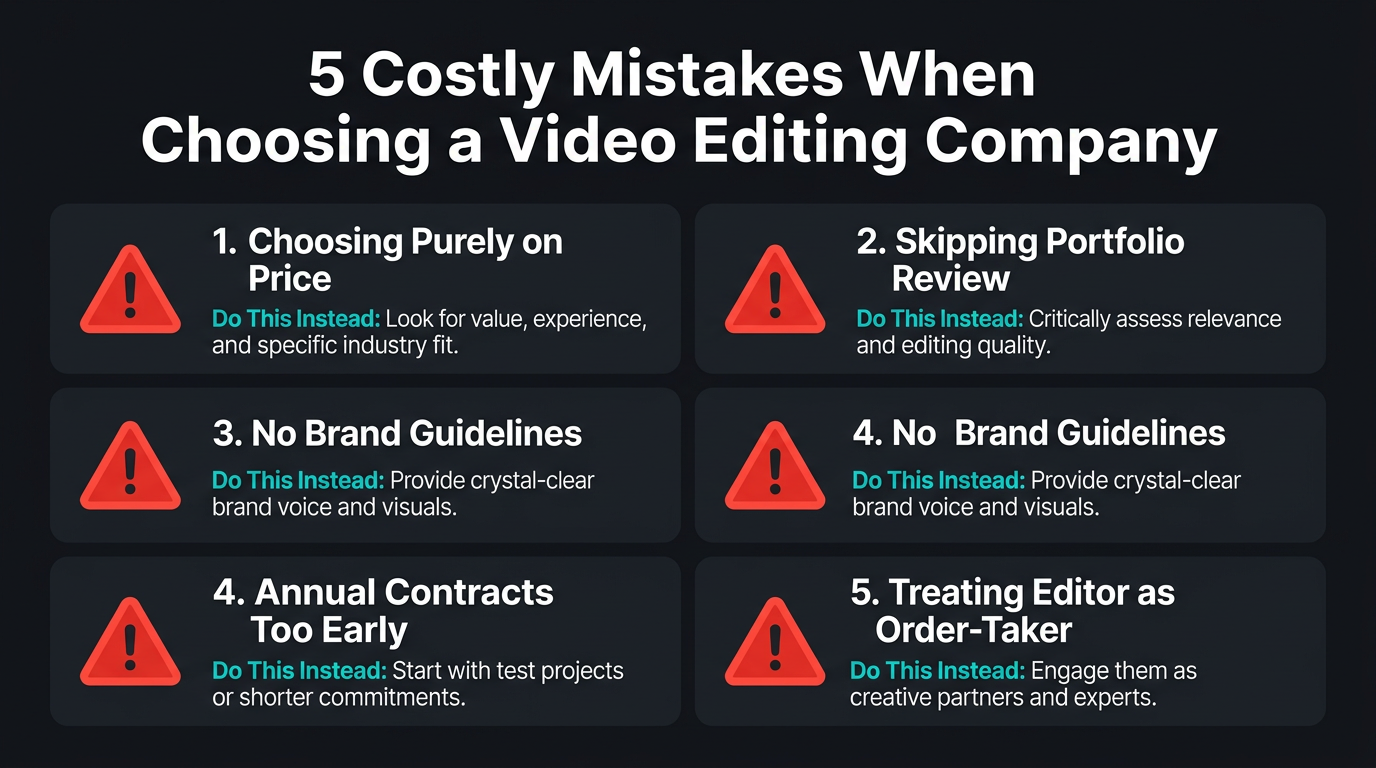
5 Expensive Mistakes Small Businesses Make When Choosing a Video Editing Company
Mistake 1: Choosing Purely on Price
The cheapest option is almost never the cheapest option. A $200/video editor who requires 3 revision rounds and 4 hours of your feedback time is more expensive than a $400/video editor who nails it on the first cut. Always calculate total cost of ownership, including your time.
Mistake 2: Skipping the Portfolio Review
We’ve seen small businesses sign up for editing services based on testimonials alone, without watching a single video in the company’s portfolio. Testimonials tell you about customer service. The portfolio tells you about quality. Both matter, but quality is what your audience sees.
Mistake 3: Not Defining Brand Guidelines Upfront
If you hand footage to an editor with no style guide, no brand colors, no examples of what you like and don’t like — you’ll get generic output. The best editing companies will ask for this. But the preparation is your responsibility. Spend 2 hours creating a simple brand document before your first submission. It saves dozens of hours in revision cycles.
Mistake 4: Committing to Annual Contracts Too Early
Annual contracts save money (typically 10–20% discount). But signing a 12-month deal based on a single test video is risky. Do at least 2–3 months on a monthly plan before committing. Any company that pressures you into annual contracts before you’ve validated the fit is prioritizing their revenue over your results.
Mistake 5: Treating the Editor as an Order-Taker Instead of a Partner
The best results come from editors who understand your goals, not just your footage. Share your strategy. Explain why a video exists, not just what it should look like. Tell your editor what’s working and what’s not. The companies that deliver the most value for small businesses are the ones that think with you — and that requires you to invite them into the conversation.
The ROI of Professional Video Editing for Small Businesses
Let’s do the math for a realistic small business scenario.
Scenario: An e-commerce brand spending $1,500/month on video editing
| Metric | Before (DIY) | After (Professional Editing) |
|---|---|---|
| Videos published/month | 3 | 8 (+ 16 shorts) |
| Hours spent on editing | 24 hrs/month | 3 hrs/month (review only) |
| Social media engagement | ~200 interactions/month | ~800 interactions/month |
| Leads from video content | 5/month | 15–20/month |
| Average customer value | $200 | $200 |
| Monthly revenue from video | $1,000 | $3,000–$4,000 |
| Editing cost | $0 (but 24 hrs of your time) | $1,500/month |
| Net monthly gain | — | +$500–$1,500/mo + 21 hrs freed |
This isn’t hypothetical optimism. These are the kinds of numbers we see with small business clients who commit to consistent, professionally edited content for 90+ days. The compounding effect is real: better content → more engagement → more algorithmic distribution → more leads → more revenue.
For B2B small businesses where a single client is worth $5,000–$50,000, the math is even more dramatic. One video-sourced lead that converts covers your editing costs for 3–12 months.
And the 21 freed hours? If you’re a founder, that time goes to sales calls, product development, partnerships, or strategic planning. Every one of those activities has a higher ROI per hour than trimming clips in Premiere Pro.
Ready to Find Out What a Dedicated Editing Team Does for Your Business?
See our client portfolio first. Then let’s talk about your content goals.
Frequently Asked Questions
Small businesses typically spend $500–$3,000 per month on video editing, depending on volume and complexity. Per-video rates range from $150 for basic edits to $500+ for premium production with motion graphics, color grading, and sound design. See our pricing guide for detailed breakdowns.
Look for a dedicated editor (not a rotating pool), transparent pricing, fast turnaround (48 hours or less), a portfolio with businesses similar to yours, and the ability to scale as your content needs grow. Avoid long-term contracts that lock you in before you’ve tested the quality.
For small businesses producing 4+ videos per month, a video editing company typically offers better value. You get project management, backup editors, quality control, and consistent output — none of which freelancers provide. For 1–2 simple videos monthly, a freelancer can work if you have time to manage them.
Yes. Professional editing improves viewer retention by 30–60%, which directly impacts how YouTube’s algorithm promotes your content. Companies like Increditors also provide strategic input on pacing, hooks, and visual storytelling — not just cuts and transitions.
Most professional video editing companies deliver within 24–72 hours. Premium agencies with dedicated teams often guarantee 24–48 hour turnaround. Budget subscription services may take 3–5 business days. Always confirm turnaround guarantees before signing up.
Even at one video per week, outsourcing saves 5–15 hours monthly and ensures consistent quality. If you’re repurposing long-form content into Reels, Shorts, and TikToks, your actual editing volume is much higher than one video — making a dedicated company even more valuable.
Your Small Business Deserves Professional Video
Tell us what you’re producing and your budget. We’ll recommend the right solution — whether that’s us or someone else.
Pricing and feature data in this article reflects publicly available information as of March 2026. Competitor details may change — always verify directly with each provider. For current Increditors pricing, visit our pricing page or schedule a call.