










![3D Explainer Video - ScribbleLive.mp4_snapshot_00.12_[2022.03.09_03.14.16]](https://increditors.com/wp-content/uploads/elementor/thumbs/3D-Explainer-Video-ScribbleLive.mp4_snapshot_00.12_2022.03.09_03.14.16-r7wb53mx72rxst3qcqyrfxdmeyzb5r9jbl0wbjujh4.png "3D Explainer Video – ScribbleLive.mp4_snapshot_00.12_[2022.03.09_03.14.16]")
































Stock footage saves time and budget when used for establishing shots, generic b-roll, and visual filler — but it actively damages brand trust when it replaces authentic storytelling, features visibly clichéd clips, or clashes with your actual product and culture. This guide breaks down exactly when to lean on libraries and when to invest in original footage, with a practical mixing strategy for business video teams at every budget level.
- What Is Stock Footage in a Business Context?
- When Stock Footage Genuinely Works
- When Stock Footage Hurts Your Brand
- The Cliché Problem: Clips Your Audience Has Already Seen
- The Mixing Strategy: Combining Stock with Original Footage
- Budget Framework: What to Shoot vs. What to License
- Top Stock Footage Libraries Compared
- Making Stock Footage Feel On-Brand
- Frequently Asked Questions
- Verdict
What Is Stock Footage in a Business Context?
Stock footage is pre-shot video content licensed from libraries — clips of people, places, objects, and abstract visuals filmed by independent creators or agency teams and made available for commercial use. For business videos, it functions as a shortcut: you can add professional-looking visuals to a product explainer, company overview, or ad campaign without booking a crew.
The global stock footage market spans everything from royalty-free subscription libraries like Storyblocks and Shutterstock to rights-managed premium archives at Getty. Resolution now extends to 4K and 6K. Drone, slow-motion, and time-lapse clips are abundant. On paper, the value proposition is obvious: access to cinematic visuals for a fraction of what it would cost to produce them.
But the operative phrase is “for a fraction.” There is a hidden cost that never shows up on a licensing invoice: the cost to your brand’s credibility when audiences recognize the same clip they saw in a competitor’s ad last month. Or the cost of a customer service video that shows a call center that looks nothing like your team. Stock footage is a tool — and like every tool, it produces outcomes that depend entirely on how and where you apply it.
This guide is specifically about stock footage for business videos: the explainers, brand films, social ads, training videos, and corporate communications that companies produce at scale. The calculus here is different from a documentary or a short film. Business video carries brand weight. Audiences are increasingly sophisticated. And the footage decisions you make signal whether you are investing in real storytelling or papering over a gap.
The Two Categories of Stock Use
Before getting into specifics, it helps to distinguish between two fundamentally different uses of stock footage in business video:
Functional use: Stock as infrastructure — establishing shots of a city skyline, a close-up of hands typing, a generic office environment as a brief cutaway. The audience isn’t meant to dwell on it; it’s visual punctuation.
Storytelling use: Stock as narrative — people meant to represent your team, environments meant to represent your offices, scenes meant to represent your customers’ lives. This is where stock footage fails most visibly, and most expensively.
The guidance in this post maps against these two modes. Functional stock use is almost always defensible. Storytelling stock use requires much more care — and in many cases, the honest answer is that you need original footage.
When Stock Footage Genuinely Works
Stock footage earns its keep in a predictable set of scenarios. These are contexts where the production benefit is real and the brand risk is minimal.
Establishing Shots and Context Setting
If you are making a video about remote work trends, opening with an aerial shot of a major city or a clean shot of a laptop on a desk is entirely defensible. No viewer expects you to have filmed the Manhattan skyline yourself. These are signals of setting, not identity.
The test: if the audience’s takeaway from the clip is “this is set in a city” rather than “this is your company’s culture,” you are in safe territory. Establishing shots are contextual shorthand, and stock libraries are rich with them.
Abstract and Concept Visualization
Technology concepts, data security, supply chains, cloud infrastructure — these are ideas that are notoriously hard to film. Stock footage of flowing data particles, server rooms, network diagrams, or abstract light trails work as visual shorthand for complex technical concepts that would otherwise sit as a talking head for two minutes.
Used well, this kind of stock footage gives editors a canvas to work with while a voiceover or interview explains the concept. The key is that the footage is illustrative, not representational — it does not claim to be your data center or your software.
Tight Deadlines and Limited Budgets
A product explainer with a two-week deadline and a $3,000 budget cannot afford a full custom shoot. Stock footage, used strategically alongside screen recordings, motion graphics, and voiceover, can produce a professional result within those constraints.
This is the reality for most early-stage companies, nonprofits, and internal communications teams. Stock is not a compromise in these cases — it is a rational allocation of limited resources. The decision calculus changes when budgets grow and brand differentiation becomes a competitive lever.
Cutaways and B-Roll Filler
Interview-based videos — case studies, thought leadership, executive communications — often need visual variety to break up static talking-head shots. If you have shot your interview subject but need coverage for a voiceover about supply chain resilience, cutting to a stock shot of a shipping warehouse or a logistics dashboard is legitimate and expected.
The viewer understands intuitively that these are illustrative visuals, not documentation. This is the most defensible use of stock footage in professional video production.
💡 Pro Tip: When browsing stock libraries for b-roll, search for the concept rather than the industry. “Focused work” produces more useful results than “marketing team” — and you are less likely to land on a clip that has appeared in a dozen competitor videos.
Training and Instructional Content at Scale
For internal training videos — compliance, onboarding, software walkthroughs — authenticity is less critical than clarity. A stock clip of a person reviewing documents or a team in a meeting room functions perfectly as visual context while the actual instructional content is delivered via voiceover or screen recording. Shooting custom footage for every training module at a company producing dozens of videos per year is rarely justifiable.
When Stock Footage Hurts Your Brand
Stock footage damages brands in predictable ways, and the damage is usually invisible to the production team and very visible to audiences. These are the scenarios where stock works against you.
When It Claims to Represent Your Culture
The most common and most damaging misuse of stock footage: the “people at our company” clip. If your brand video is narrating how collaborative, diverse, and energetic your team is — while cutting to stock footage of people who very clearly are not your team — the dissonance is immediate. Audiences feel it even when they cannot articulate it.
Recruitment videos are especially vulnerable. A company claiming a dynamic, authentic culture while showing stock office footage signals one of two things: either the real workplace does not look like the video, or the company did not care enough to show it. Neither interpretation helps with hiring.
When the Clip Is Visibly Overused
Some stock clips have appeared in so many videos that they function as cultural shorthand for “this company couldn’t be bothered.” The person triumphantly pointing at a whiteboard. The perfectly lit handshake in a glass-walled conference room. The diverse group of models staring at a single laptop, all laughing for reasons that are not clear.
When audiences recognize a clip — consciously or not — the video loses credibility. It signals a production shortcut. For a brand trying to project expertise, premium positioning, or authentic values, that signal is expensive.
When It Contradicts Your Actual Product
SaaS products are particularly prone to this failure mode. A software company shows stock footage of people working in manufacturing environments when the product is actually used by finance teams. A logistics platform shows a generic shipping warehouse that looks nothing like the actual customer workflows the product supports.
The problem is not just aesthetic — it creates a trust gap. If the video does not accurately represent what the product does or who it serves, prospects who watch it will feel misled when they see the actual product, the actual UI, or the actual use case. It is a small mismatch that produces a disproportionate chilling effect on conversion.
When Your Competitors Are Using the Same Clips
In competitive markets, multiple companies targeting the same audience will often use the same stock libraries — and, because the most relevant clips rise to the top of search results, frequently the same clips. The result is brand video that is indistinguishable from competitors. When differentiation is a strategic priority, stock footage actively works against it.
💡 Pro Tip: Before finalizing any stock clip for a client-facing video, search for that clip on YouTube by pasting a few seconds of it into a reverse video search tool. If it appears in a competitor’s video or a widely shared ad, pull it.
When Authenticity Is the Whole Point
Testimonial videos, founder stories, behind-the-scenes content, and community-focused communications derive their value entirely from authenticity. Stock footage in these contexts does not just fail to add value — it actively undermines the premise of the video. If you are telling an authentic story, the footage needs to be authentic.
The Cliché Problem: Clips Your Audience Has Already Seen
Stock footage clichés are a well-documented phenomenon. Certain clips, shot to represent aspirational business scenarios, have been licensed so many times that they have become cultural jokes. The problem is not limited to the obvious offenders — it operates at a subtler level too.
Most business video teams search stock libraries the same way: they type in the industry or theme, sort by relevance or popularity, and select from the first page of results. This means the most “popular” clips — which are popular precisely because they are visually generic and widely applicable — end up appearing in enormous numbers of unrelated videos.
A few categories that are saturated with overused clips:
The pattern is consistent: the most clichéd clips show idealized, aspirational scenarios that could apply to any company. The alternative is to search for specific actions and contexts — things that are concrete rather than symbolic. These results are less visually polished but far more believable.
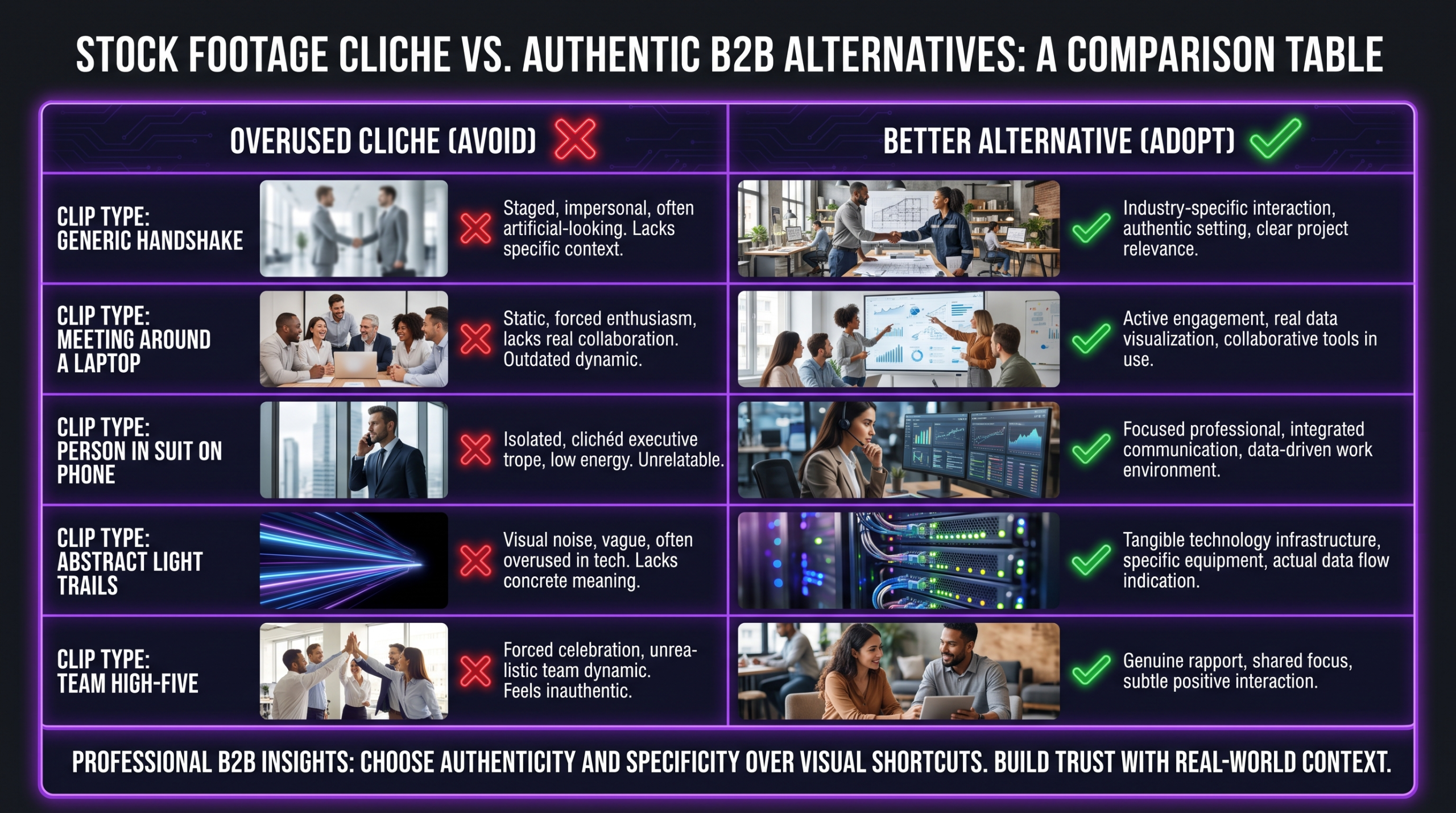
Free Footage and the Credibility Gap
Free stock footage platforms like Pexels and Pixabay offer remarkable quality at zero cost. They also have much smaller libraries than paid services, which means the same clips get reused at significantly higher rates. For internal use or low-stakes content, free footage is entirely reasonable. For public-facing brand content, the saturation risk is meaningfully higher.
The Mixing Strategy: Combining Stock with Original Footage
The most practical approach for most business video teams is a deliberate mix: original footage for the moments that carry brand identity and trust, stock footage for the context and coverage that supports them. This hybrid model lets you produce at scale without either sacrificing quality or blowing budgets on custom shoots for every frame.
The Anchor and Supplement Model
Think of your original footage as the anchor and stock as the supplement. The anchor shots — your team, your product, your office, your customers — are what makes the video distinctively yours. They carry the brand. Everything else is supplementary coverage that provides visual variety and context.
In practice, this often means shooting 20–40% of a video’s runtime with original footage and filling the remaining coverage needs with stock. The exact ratio depends on the video type. A company overview might be 70% original footage. A conceptual explainer for a software product might be 80% stock and motion graphics.
Where the Seams Show
Mixed footage fails when the production values are dramatically inconsistent. A professional-grade interview shot paired with a poorly lit stock clip creates a jarring visual transition that undermines both. Matching color temperature, shooting style, and resolution between your original and stock footage is essential. A skilled editor can color-grade stock footage to match your original material, and this is often the most important single editing decision in a mixed project.
This is where working with a dedicated video editing agency that understands both color science and brand consistency pays off — a mixed-footage video that looks seamless is a specific technical skill, not something that happens automatically in a timeline.
Briefing Your Editor on Stock Use
If you are working with an external editing team, brief them explicitly on your stock footage policy. Common brief elements include: maximum number of stock clips per minute of finished video, prohibited clip categories (generic team shots, handshake imagery, specific clichés), preferred libraries, and whether clips need to be approved before cutting. Without explicit guidance, editors default to what is visually available and easy — which is often the most-used stock.
Budget Framework: What to Shoot vs. What to License
The decision between shooting original footage and licensing stock is fundamentally a budget allocation question — but it is also a brand maturity question. Here is a practical framework for making the call.
Understanding how much professional video editing costs helps you budget the stock vs. original decision properly — editing a stock-heavy video is typically faster and less expensive than a color-matched mixed project, so the footage decision affects your post-production costs as well as your production budget.
The $5K vs. $50K Decision Point
At budgets under approximately $5,000 for a single video, stock footage is almost always the right call for any coverage needs beyond the core content you specifically shoot. The economics simply do not support extensive custom b-roll production at that level.
Above approximately $15,000 for a flagship video — brand film, product launch, major campaign — the brand cost of overused stock footage typically outweighs the production savings. This is where investing in custom footage for the entire video, or at minimum a custom shoot for all people-facing footage, becomes clearly justified.
The range between those numbers is where the mixing strategy earns its value — and where smart editorial judgment about which specific shots to license and which to shoot makes a meaningful difference to the final product.
Top Stock Footage Libraries Compared
Not all stock libraries are equal. The right choice depends on your budget model (per-clip vs. subscription), the style of footage you need, and the resolution requirements for your final output.
For teams producing stock footage for business videos at scale, a Storyblocks subscription combined with selective Shutterstock purchases for specific high-quality clips is a common and cost-effective approach. Checking published video performance data from Wistia and similar sources can help you calibrate which video types in your pipeline deserve premium footage investment versus where generic coverage is sufficient.
Making Stock Footage Feel On-Brand
When stock footage is the right call, the editing process determines whether it blends into your brand identity or clashes with it. These are the specific techniques that make the difference.
Color Grading to a Consistent LUT
Stock footage arrives graded to the colorist’s preference, which often has nothing to do with your brand palette. Applying a consistent LUT (Look-Up Table) across all clips — original and stock — is the single most effective way to make a mixed project look unified. A warm, desaturated look or a cool, high-contrast grade applied consistently makes very different source material feel like it belongs to the same world.
This is one area where the difference between a competent editor and an experienced colorist is immediately visible. Companies producing flagship brand videos at any meaningful scale benefit from working with teams that have dedicated color expertise — which is worth considering when you are deciding between a video editing agency and a freelancer for a major project.
Motion and Pace Matching
A slow, cinematic 24fps pull alongside a handheld 60fps clip creates visual whiplash. Before licensing a clip, check its frame rate and intended motion style. Slow-motion clips work best within sections that are already playing at a reflective pace. Handheld, dynamic footage should appear in energetic sequences where the motion style is consistent throughout.
Brand Color Overlays and Text Treatment
Overlaying brand-colored lower thirds, text treatments, or subtle graphic elements on top of stock footage creates visual ownership without requiring custom production. A clip of a generic cityscape with your brand’s typography and color language reading over it is no longer generic — it is a branded asset. This is a standard technique in professional motion graphics work and is significantly more cost-effective than custom footage for supporting shots.
Avoiding the “Clip Art” Look
The telltale sign of poor stock use is footage that looks like it was selected from the first page of a search result. To avoid this: search with specific adjectives (“rainy window laptop”, “warehouse forklift detail”) rather than category terms (“office work”, “technology”). Prefer clips that are slightly off-center or imperfect — a touch of visual imperfection reads as more authentic than sterile studio lighting. And rotate your library sources to avoid returning to the same creators repeatedly.
Teams producing video content at scale for specific verticals — SaaS, healthcare, finance, logistics — benefit from having a curated internal library of pre-approved stock clips that have been pre-graded and cleared for reuse. This library approach is something Increditors builds as part of ongoing retainer relationships, maintaining consistency across a client’s entire video output rather than searching from scratch on every project.
If you’re producing content at the volume where this kind of systematized approach makes sense, reading about video editing workflows for SaaS companies gives useful context on how high-output teams structure their production pipeline.
Frequently Asked Questions
Is it okay to use stock footage in a brand video?
Yes, with the right scope. Stock footage is acceptable for establishing shots, abstract concept visuals, and supporting b-roll in brand videos. It becomes a problem when it is used to represent your team, your culture, or your product — moments that require authentic footage of real people and real environments. The threshold question is: does this clip claim to be something it is not?
How do I know if a stock clip is overused?
Check the download count on the library page — very high download counts indicate a clip has appeared in many videos. You can also search YouTube and Vimeo for a few frames of the clip to see if it appears in other videos. As a practical rule of thumb, any clip that appears on the first page of a major stock library search for a broad category term has almost certainly been widely licensed.
What is the best stock footage library for business videos?
For teams producing content at volume, Storyblocks’ unlimited subscription model typically offers the best value. Shutterstock has the largest library but per-clip costs add up quickly. For higher-end brand work where exclusivity matters, Getty Images’ rights-managed licensing allows you to control who else can use the same clip in the same market. The best approach for most business video teams is combining a subscription service for volume needs with occasional premium licenses for hero clips in flagship videos.
Can stock footage hurt SEO or video performance?
Stock footage does not directly affect technical SEO, but it can affect engagement metrics that matter for video performance. Videos where audiences recognize the stock feel less credible and more interchangeable — they watch for shorter durations, share less, and convert less effectively. Research into video engagement patterns consistently shows that authentic, brand-specific content outperforms generic stock-heavy video on watch time and completion rate metrics, even when production quality is higher on the stock version.
How much does it cost to replace stock footage with custom footage?
A half-day corporate b-roll shoot typically ranges from a few thousand to ten thousand dollars depending on crew size, location, and equipment. That shoot can produce enough material to replace stock footage in multiple videos — which changes the economics considerably when you are thinking about a video content program rather than a single project. Teams producing more than four to six videos per year often find that a quarterly b-roll shoot is more cost-effective than licensing individual clips for every project.
Verdict: Stock Footage Is a Tool, Not a Strategy
Stock footage for business videos operates on a simple principle: it earns its place when it serves a functional purpose without claiming to be something it is not. Establishing shots, concept visuals, generic b-roll, and internal training coverage are all legitimate use cases. The moment stock footage is asked to carry brand identity, represent your team, or substitute for authentic storytelling, it starts costing you more than it saves.
The companies that handle this best treat stock as infrastructure and original footage as identity. They know which shots require authenticity and they protect those shots from budget pressure. They use stock for everything else — but they use it with an editorial eye, checking for saturation, matching color and motion to their original material, and layering brand elements to create visual ownership.
The worst outcomes happen when stock footage decisions are made by default — when teams reach for the first-page search result because it is fast, without asking whether it is right. That default is what produces the handshake shot, the generic call center, the laughing-at-a-laptop montage that audiences have learned to recognize and discount.
For teams producing video at scale, the most durable approach is building a system: a pre-approved stock library, a clear policy on which video types require original footage, a consistent color treatment, and an editorial review step that specifically checks for overused clips. That system — more than any single footage decision — is what keeps your video output feeling consistent, credible, and distinctively yours.
Ready for Video That Actually Converts?
Tell us about your project and we will put together a custom plan.