










![3D Explainer Video - ScribbleLive.mp4_snapshot_00.12_[2022.03.09_03.14.16]](https://increditors.com/wp-content/uploads/elementor/thumbs/3D-Explainer-Video-ScribbleLive.mp4_snapshot_00.12_2022.03.09_03.14.16-r7wb53mx72rxst3qcqyrfxdmeyzb5r9jbl0wbjujh4.png "3D Explainer Video – ScribbleLive.mp4_snapshot_00.12_[2022.03.09_03.14.16]")
































Video post-production is everything that happens after you stop filming: editing the rough cut, color grading, audio mixing, adding motion graphics, and delivering the final file. It typically takes longer than the shoot itself — and it’s where good footage becomes a finished video that actually works for your audience.
What Is Video Post-Production?
Video post-production is the phase of video-making that begins the moment you finish your last take and ends when the final file is approved and delivered. It encompasses every creative and technical process that transforms raw camera footage into a polished, publish-ready video — from the first rough assembly edit through final audio mix, color grade, motion graphics, and export.
The word “post” simply means “after” — as in, after production (filming) and after pre-production (planning, scripting, scouting). In practice, post-production is where the majority of a video’s storytelling decisions get locked in. A great performance on set can be killed by bad audio or chaotic editing, and mediocre footage can be elevated by skilled color work and tight pacing.
For business teams — marketing managers, founders, content leads — understanding the post-production process matters for two practical reasons. First, it helps you set realistic timelines and budgets. Second, it helps you brief your editing team (in-house or agency) in ways that actually save time rather than creating revision spirals.
💡 Pro Tip: Most video projects spend 60–70% of their total production time in post. A three-day shoot can easily require two or three weeks of editing, audio work, and revisions before final delivery.
The Full Video Post-Production Workflow (Step by Step)
Post-production follows a structured sequence because each phase builds on the last. Jumping to color grading before the edit is locked, for example, wastes hours — any structural cut made after color work means redoing graded clips. Here is the standard workflow from footage delivery to final export.
Step 1 – Ingesting and Organizing Footage
Before a single cut is made, all raw footage is transferred from camera cards to a secure drive (or cloud storage), backed up in at least two locations, and organized into a logical folder structure. Editors typically sort clips by shoot day, scene, or camera angle, and create bins or collections inside the editing software.
At this stage, footage may also be transcoded — converted from a camera-native format (like RED RAW, BRAW, or ARRI LogC) into a proxy format that plays back smoothly on editing workstations without burning through GPU resources. Proxies are temporary working copies; the final export always uses the original high-resolution files.
Logging — watching all raw clips and noting the best takes — happens here too. For interview-heavy content this can take as long as the edit itself. Projects shot with proper slate discipline (accurate scene/take markers) are significantly faster to log than chaotic multi-cam shoots with no slates.
Step 2 – Assembly Cut and Rough Cut
The assembly cut is the first stitched-together version of the video. Every usable clip goes in, roughly in order, with no trimming or pacing decisions made yet. It’s more of a structural draft than a real edit — often running two to four times the intended final length.
From there, the editor refines it into a rough cut: removing weak takes, tightening timing, building the narrative arc, and establishing the overall pacing. This is where story decisions happen — which interview soundbites make the cut, where B-roll supports the narration, what sequences should move or be cut entirely.
If the project involves multiple camera angles (two-camera interviews, multi-cam events), editors use a multicam sequence to sync and switch between angles efficiently. Most professional NLEs (non-linear editing systems) handle this automatically using audio waveform sync or timecode.
Step 3 – Fine Cut and Picture Lock
The fine cut is the client-review version — tighter than the rough cut, with most pacing, transition, and structure decisions made. This is typically the first version stakeholders see. Feedback rounds happen here. Once all parties approve the cut, the project reaches picture lock: the edit is officially frozen and no structural changes can be made.
Picture lock is a critical milestone. Every downstream phase — color grading, audio mix, VFX, motion graphics — is performed on the locked edit. Changing a cut after picture lock (known as an “online edit” change) forces those teams to redo work on the affected sections, which is expensive and time-consuming. Experienced producers enforce picture lock discipline to keep post-production on schedule.
Step 4 – Color Correction and Color Grading
Color correction and color grading are two distinct processes that usually happen in sequence. Color correction fixes technical problems: exposure inconsistencies between shots, white balance shifts, log-format footage that needs to be converted to a viewable image. The goal is a technically clean, balanced image across all clips.
Color grading is the creative layer on top: applying a visual tone, mood, or style. A warm, high-contrast grade gives a different emotional feel than a cool, desaturated look. Professional colorists use dedicated software like DaVinci Resolve and specialized hardware (color control surfaces, calibrated reference monitors) to make grading decisions that hold up on every screen the video will be viewed on.
💡 Pro Tip: Filming in a “flat” or log color profile (S-Log, C-Log, BRAW) gives your colorist much more latitude during grading. Footage shot in a standard picture profile is already “baked in” and leaves almost no room for correction.
Step 5 – Audio Post-Production (Mixing and Sound Design)
Audio post-production is one of the most underestimated phases — and one of the most impactful. Viewers tolerate imperfect visuals far better than they tolerate bad audio. This phase includes dialogue editing (removing umms, cleaning gaps, smoothing between takes), noise reduction, music selection and licensing, sound effects, and the final mix where all audio elements are balanced in relation to each other.
For corporate and marketing videos, audio work also includes loudness normalization — ensuring the video meets broadcast or platform standards (typically -14 LUFS for streaming platforms like YouTube, -23 LUFS for broadcast). YouTube’s audio normalization can crush quiet dialogue tracks or distort overloaded music beds if the mix wasn’t prepared correctly.
Voiceover recording, if needed, typically happens before the audio mix phase. The VO is recorded in a treated space, edited for flow and pacing, then handed to the audio mixer with all other audio elements.
Step 6 – Visual Effects (VFX) and Motion Graphics
Visual effects range from invisible clean-up work (removing a boom mic that dipped into frame, erasing a bystander from a product shot) to complex compositing (green screen replacement, 3D elements integrated into live footage). For most marketing and commercial videos, this phase is lighter — primarily screen replacements on devices, object removal, or basic compositing.
Motion graphics covers animated text, infographic sequences, logo animations, transitions, and data visualizations. For corporate and marketing content, motion graphics often carry more narrative weight than traditional VFX — explaining a product process, illustrating a data point, or building brand consistency across a series of videos.
Both disciplines work on top of the picture-locked edit. VFX artists and motion designers use software like Adobe After Effects, Nuke, Cinema 4D, or Houdini depending on complexity.
Step 7 – Titles, Subtitles, Lower Thirds, and Captions
Opening titles, end cards, lower thirds (the name/title graphics that appear when someone speaks), chapter markers, and captions all live in this phase. For social-first videos, animated captions are not optional — research consistently finds that a significant share of social video is watched without sound, making captions a direct engagement driver.
Accessibility captions (SRT or VTT files for platforms) are increasingly a legal requirement for certain types of content and a baseline expectation for B2B video. Editors create closed captions either manually, via auto-transcription tools, or by importing a script and syncing it to the audio.
Step 8 – Final Export, Encoding, and Delivery
Export is not just “clicking render.” Each delivery destination has different technical requirements: YouTube prefers H.264 or H.265 in an MP4 container at specific bit rates; broadcast requires ProRes or MXF; social platforms have aspect ratio and file size constraints; client archives may need the highest-quality master file possible.
A professional post-production workflow typically produces multiple deliverables from the same timeline: a broadcast master, a web-optimized version, square and vertical crops for social, and a clean SRT caption file. Organizing deliverables clearly and handing them off in the agreed format saves the client from having to re-export themselves — a step that can introduce unexpected quality loss.
The eight stages of a professional video post-production workflow, from ingest to final delivery.
Key Roles in Video Post-Production
Post-production is a team sport. On large film and TV productions, each role is a distinct specialist. On commercial and marketing projects, one person may wear two or three hats — but the functions themselves don’t disappear. Here are the core roles and what they own.
Video Editor
The editor is responsible for the assembly cut, rough cut, fine cut, and picture lock. They control pacing, narrative flow, and structural decisions. On smaller projects they may also do basic color work, motion graphics, and export — though this typically sacrifices quality in those areas compared to having dedicated specialists.
Senior editors bring more than technical skill — they understand story structure, can advise on what footage serves the video’s goal, and know when to cut something that doesn’t work even if the client shot it specifically for the video. A skilled video editing agency typically assigns editors by content type — interview-heavy corporate work, fast-paced social content, and long-form documentary each require different editorial instincts.
Colorist
The colorist takes the picture-locked edit and builds the look. They work in a calibrated environment — calibrated monitors displaying accurate color, controlled ambient lighting — because color perception shifts dramatically depending on viewing conditions. Their job is to make the grade hold up across all the screens your audience will use: phone, laptop, broadcast TV, and cinema.
For brand videos, colorists also match look to brand guidelines and ensure consistency across a series — so episode 1 and episode 12 feel like they belong to the same world even if they were shot months apart on different cameras.
Audio Engineer / Sound Designer
The audio engineer handles dialogue editing, noise reduction, music licensing and placement, sound effects, and the final mix. Sound design — creating or selecting non-dialogue audio that supports the video’s mood and action — is a creative discipline that’s often invisible when done well and painful when missing.
For marketing teams sourcing stock music, audio engineers often advise on licensing: royalty-free vs rights-managed vs sync licensing all have different cost structures and usage restrictions. Choosing music without understanding the licensing implications can result in content ID claims or takedowns after publication.
VFX Artist and Motion Designer
VFX artists handle composite work, screen replacements, particle effects, and complex visual integrations. Motion designers focus on animated graphics — titles, lower thirds, transitions, explainer animations, and data-driven infographic sequences. For most corporate and marketing video, motion design contributes more deliverable value than traditional VFX.
Tools and Software Used in Post-Production
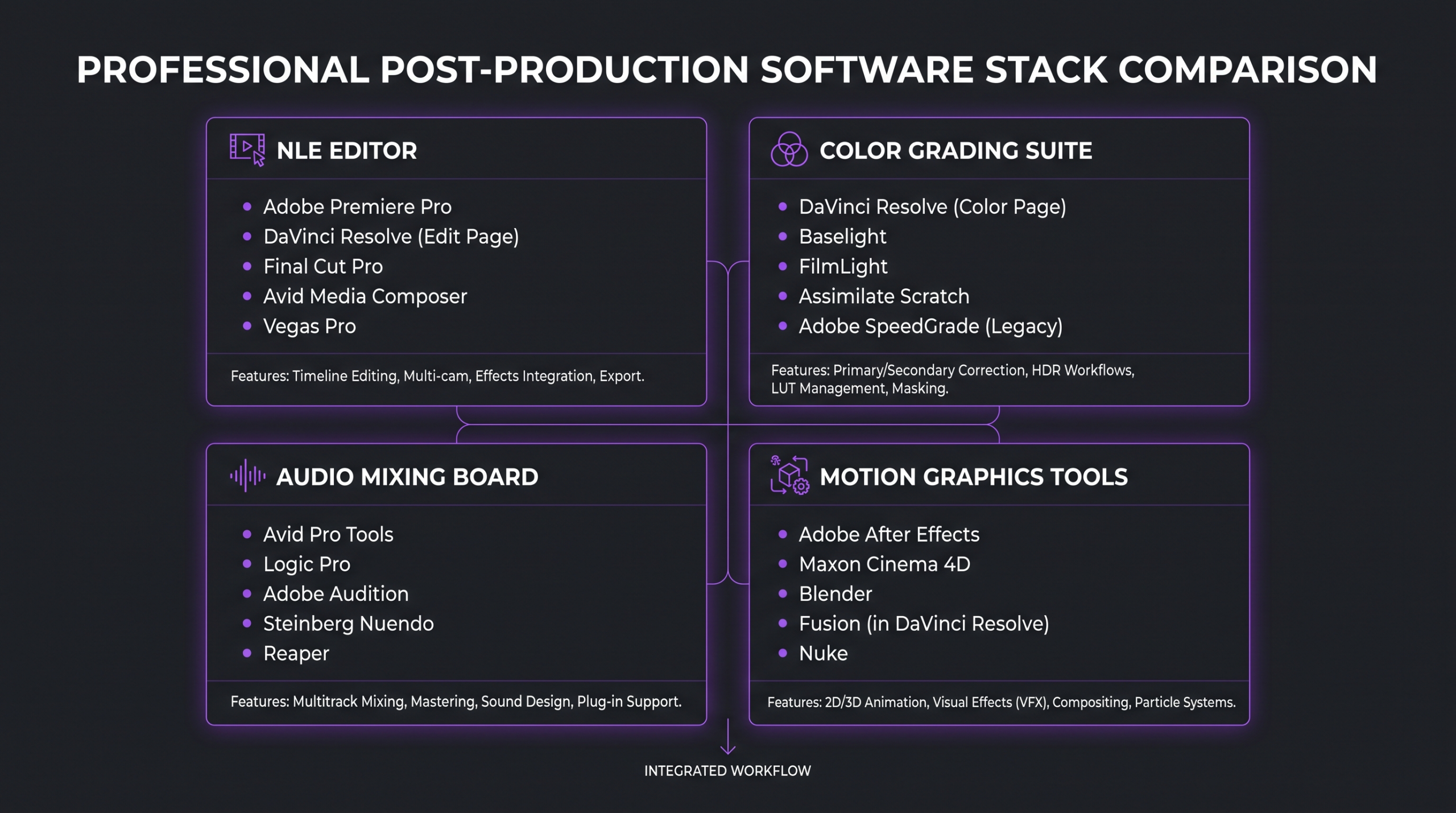
The software stack for post-production has consolidated around a few dominant platforms, each with genuine strengths for specific use cases. Here’s how the major tools compare.
Most professional workflows are hybrid: editing in Premiere or Final Cut, grading in DaVinci Resolve, compositing in After Effects, audio in Audition or Pro Tools. The round-trip between applications — moving a locked edit from Premiere into DaVinci for grading, then back — is a standard workflow that professional editors handle via EDL, XML, or AAF interchange files.
A typical professional post-production software stack, combining editing, color, audio, and motion graphics tools.
How Long Does Video Post-Production Take?
Post-production timelines depend on video length, complexity, revision rounds, and the number of deliverable formats required. The table below gives indicative ranges for common video types — real timelines on your project will depend on your brief, footage quality, and feedback speed.
The biggest time variable most clients underestimate is revision cycles. A project with clear upfront feedback, consolidated from a single decision-maker, moves far faster than one where feedback comes in dribs and drabs from five stakeholders. Each additional revision round on a complex piece can add 2–5 days to a timeline that was originally budgeted for two rounds.
If budget is a consideration, see our guide on how much professional video editing costs — it breaks down pricing by video type and what drives costs up or down across the post-production workflow.
Post-Production vs Production: What’s the Difference?
The three-phase model of video production — pre-production, production, and post-production — is standard across all video formats, from social reels to feature films. Understanding where each phase begins and ends helps teams allocate time and budget correctly.
Pre-production covers everything before the camera rolls: concept development, scripting, storyboarding, casting, location scouting, shot lists, equipment booking, and scheduling. A thorough pre-production phase dramatically shortens post — a script that’s been through multiple rounds of approval before filming means no one’s discovering structural problems in the edit suite.
Production is the shoot itself: recording footage, capturing performances, filming B-roll, recording voiceover, and gathering all the raw material the editor will work with. A good production team hands over organized, well-labeled footage with a clear log — a bad production hand-off means the editor spends their first day just figuring out what they have.
Post-production transforms that raw material into the finished video. It’s the longest phase for most projects, and it’s where the gap between a competent result and an exceptional one becomes clear. You can add time in post to compensate for a weak shoot, but you can never add footage that wasn’t captured.
💡 Industry perspective: The adage “we’ll fix it in post” is only partly true. Audio problems from a noisy environment, focus misses, and badly lit faces can be partially corrected — but they take time and money that a better shoot setup would have avoided entirely. Post can polish; it rarely resurrects.
In-House vs Outsourcing Post-Production
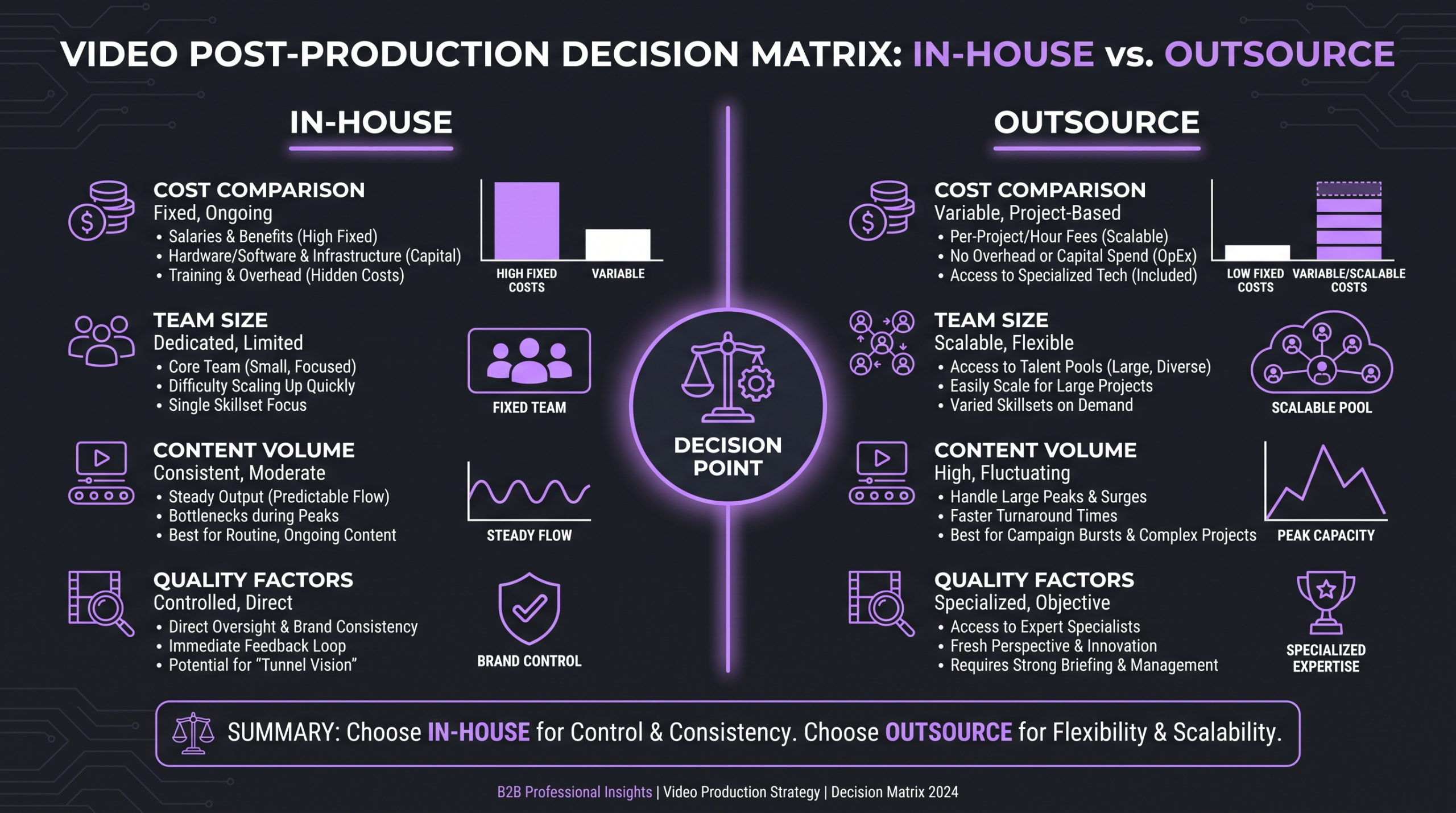
For growing businesses and marketing teams, the question isn’t whether post-production matters — it’s whether to build the capability in-house or partner with specialists. Both models work; the right answer depends on your volume, consistency requirements, and where your team’s time is best spent.
When In-House Post-Production Makes Sense
In-house editing works well when you have consistent, high-volume, low-complexity content — daily social posts, weekly YouTube uploads, interview cuts without heavy motion graphics. A skilled in-house editor who knows your brand deeply can move faster than any external team on familiar formats. The trade-off is fixed headcount cost, limited specialization (one person rarely has deep skills in editing AND color AND motion design), and capacity ceilings during high-output periods.
When Outsourcing Post-Production Makes Sense
Outsourcing to a specialist video editing agency makes sense when you need quality that requires multiple specialists (editor + colorist + motion designer + audio engineer), when your volume is variable, or when you’re scaling content output faster than your team can absorb. Agencies also bring cross-client pattern recognition — they’ve seen what works across dozens of brands and can apply those lessons to your content.
The cost comparison isn’t as simple as headcount vs retainer. A full in-house post-production setup includes not just salary but software licenses, hardware (editing workstations, calibrated monitors, external drives), and ongoing training. For teams doing high-complexity video at moderate volume, outsourcing often costs less per deliverable than maintaining those capabilities internally. Our detailed breakdown of the video editing workflow for SaaS companies goes deeper into this tradeoff for one common use case.
Increditors works with B2B brands and content-heavy teams on retainer — dedicated senior editors who know your brand’s style, supported by colorists, audio engineers, and motion designers as each project requires. The result is consistent quality at scale without the overhead of building a full internal post-production department.
Frequently Asked Questions
What is included in video post-production?
Video post-production includes editing (assembly, rough cut, fine cut, picture lock), color correction and color grading, audio post-production (dialogue editing, mixing, sound design), visual effects, motion graphics, titles and captions, and final export and delivery. The exact phases included depend on the project type — a social media reel may skip VFX; a brand film will include all stages.
How much does video post-production cost?
Post-production costs vary widely by video type, complexity, and who does the work. Freelance editors typically charge project-based or hourly rates; agencies charge per deliverable or on retainer. A simple interview cut might be budgeted in the hundreds; a full brand film with color, audio, and motion graphics can run into the thousands. For a detailed breakdown by video type and market, see our guide on professional video editing costs.
What is “picture lock” and why does it matter?
Picture lock is the point in post-production when the edit is approved and structurally frozen — no more cuts, no timing changes. It matters because all downstream phases (color grading, audio mix, VFX, motion graphics) are performed on the locked edit. Changing a cut after picture lock forces those teams to redo work on affected sections, which adds cost and delays delivery.
What software do professional editors use for post-production?
The most common professional editing platforms are Adobe Premiere Pro, DaVinci Resolve, Final Cut Pro, and Avid Media Composer. For color grading, DaVinci Resolve is the industry standard. Motion graphics and VFX work is typically done in Adobe After Effects. Audio post uses Adobe Audition, Pro Tools, or Logic Pro. Most professional workflows use multiple applications in combination, with standardized interchange formats (EDL, XML, AAF) to move projects between them.
Can I speed up the post-production process?
Yes — but speed comes from good inputs, not from rushing the process. The biggest time-savers are: organized, well-labeled footage with a clear log; a final-approved script before filming (not during editing); consolidated feedback from a single decision-maker rather than multiple rounds of conflicting notes; and working with a post-production team that already knows your brand and format. Trying to compress the process itself — rushing a rough cut into picture lock, or grading before the edit is approved — typically results in expensive rework.
Verdict: Why the Post-Production Phase Defines Your Video
Video post-production is not the finish line — it’s where the race is actually won or lost. Every creative and technical decision that shapes how your audience experiences your video happens in post: the pacing that keeps them watching, the color that signals brand, the audio that earns their trust, the motion graphics that make complex ideas clear.
Understanding the process — from ingest and rough cut through picture lock, color, audio, and delivery — helps you brief teams better, set realistic timelines, and make decisions that protect quality rather than accidentally shortcut it. The most expensive mistake in post-production is not spending on a professional team; it’s spending on a shoot and then underinvesting in the editing that determines whether that footage actually does anything.
For teams that need specialist-grade post-production without building an internal department, working with a dedicated video editing agency gives you senior editorial talent, color, audio, and motion design under one roof — with the consistency and scale that internal teams struggle to maintain as content volume grows.
Ready for Video That Actually Converts?
Tell us about your project and we will put together a custom plan.