










![3D Explainer Video - ScribbleLive.mp4_snapshot_00.12_[2022.03.09_03.14.16]](https://increditors.com/wp-content/uploads/elementor/thumbs/3D-Explainer-Video-ScribbleLive.mp4_snapshot_00.12_2022.03.09_03.14.16-r7wb53mx72rxst3qcqyrfxdmeyzb5r9jbl0wbjujh4.png "3D Explainer Video – ScribbleLive.mp4_snapshot_00.12_[2022.03.09_03.14.16]")
































Livestream Editing and Clipping Cost 2026
Freelancers typically charge $15–$75 per clip or $200–$600 to edit a full VOD from a 1–3 hour stream. Agencies generally package full VOD plus clips for $500–$2,000+ per stream. Monthly subscription services for ongoing clipping commonly run $800–$3,500 depending on volume. Costs shift significantly based on platform, clip complexity, turnaround time, captions, motion graphics, and thumbnail production. This guide breaks down every pricing tier so you can build an accurate livestream content budget for 2026.
- What Is Livestream Editing and Clipping?
- Livestream Editing Cost by Service Type
- What Drives Livestream Clipping Costs?
- Freelancer vs. Agency vs. Subscription: Which Model Fits?
- Platform-Specific Demands: Twitch, YouTube, LinkedIn Live
- Hidden Costs Brands Miss in Their Livestream Budget
- How to Maximize Your Livestream Clipping Budget
- FAQ
- Verdict
What Is Livestream Editing and Clipping?
Livestream editing and clipping is the post-production process that transforms raw, uncut streaming footage into polished, distributable content. Where a traditional video shoot produces a controlled recording, a livestream produces hours of unscripted footage — audience questions, technical hiccups, quiet moments, and genuine high-value insight — all tangled together with no editorial structure. A skilled editor’s job is to mine that raw feed for signal and strip out the noise.
The output takes two primary forms. VOD editing (Video on Demand) means cutting the full stream recording down to a watchable, chaptered replay — typically 30–60% shorter than the original — with color correction, audio normalization, intro/outro sequences, and chapter markers. Clip production means extracting 30-second to 3-minute highlight moments, formatting them vertically or horizontally for social platforms, adding captions, sound design, and often motion graphics, then delivering multiple platform-ready versions in a single turnaround.
Brands and creators invest in this workflow for one straightforward reason: a single 2-hour stream can generate 15–30 pieces of social content if it’s edited well. That’s the repurposing math that makes livestream post-production one of the highest-ROI activities in a content calendar — when it’s executed at the right quality level.
Who Hires Livestream Editors?
The client profile has expanded significantly since 2022. Twitch streamers and YouTube creators remain a core segment, but the faster-growing buyer is the B2B brand — SaaS companies hosting product demos, thought-leadership panels, and virtual events on LinkedIn Live or YouTube. Corporate marketing teams, conference organizers, podcast hosts who also stream, and ecommerce brands running live shopping events now account for a meaningful share of the market. Each segment has different complexity requirements, turnaround expectations, and budgets, which is why pricing varies so dramatically.
Why 2026 Pricing Has Shifted
Several market forces have repriced livestream editing work in 2026. AI-assisted rough-cut tools (auto-highlight detection, automated transcription, scene detection) have lowered the floor on basic clipping — some platforms now include basic automated clips as a built-in feature. Meanwhile, the ceiling on premium editing has risen: brands competing for attention on saturated feeds are investing more in motion graphics, custom caption animations, sound design, and multi-format delivery. The result is a wider pricing spread than ever before, which makes understanding where your specific needs sit on that spectrum more important.
Livestream Editing Cost by Service Type
Pricing structures in this space fall into four main models: per-clip rates, per-hour-of-source-footage rates, per-stream packages, and monthly retainers. Understanding which model a vendor uses matters as much as the number itself, because they optimize for different volumes and use cases.
These ranges represent what the market broadly looks like across freelancer platforms, mid-tier agencies, and subscription-based editing services. Prices outside these ranges exist — you can find offshore freelancers quoting $5/clip or boutique studios charging $5,000 per stream — but the table above reflects where the majority of quality-level transactions settle.
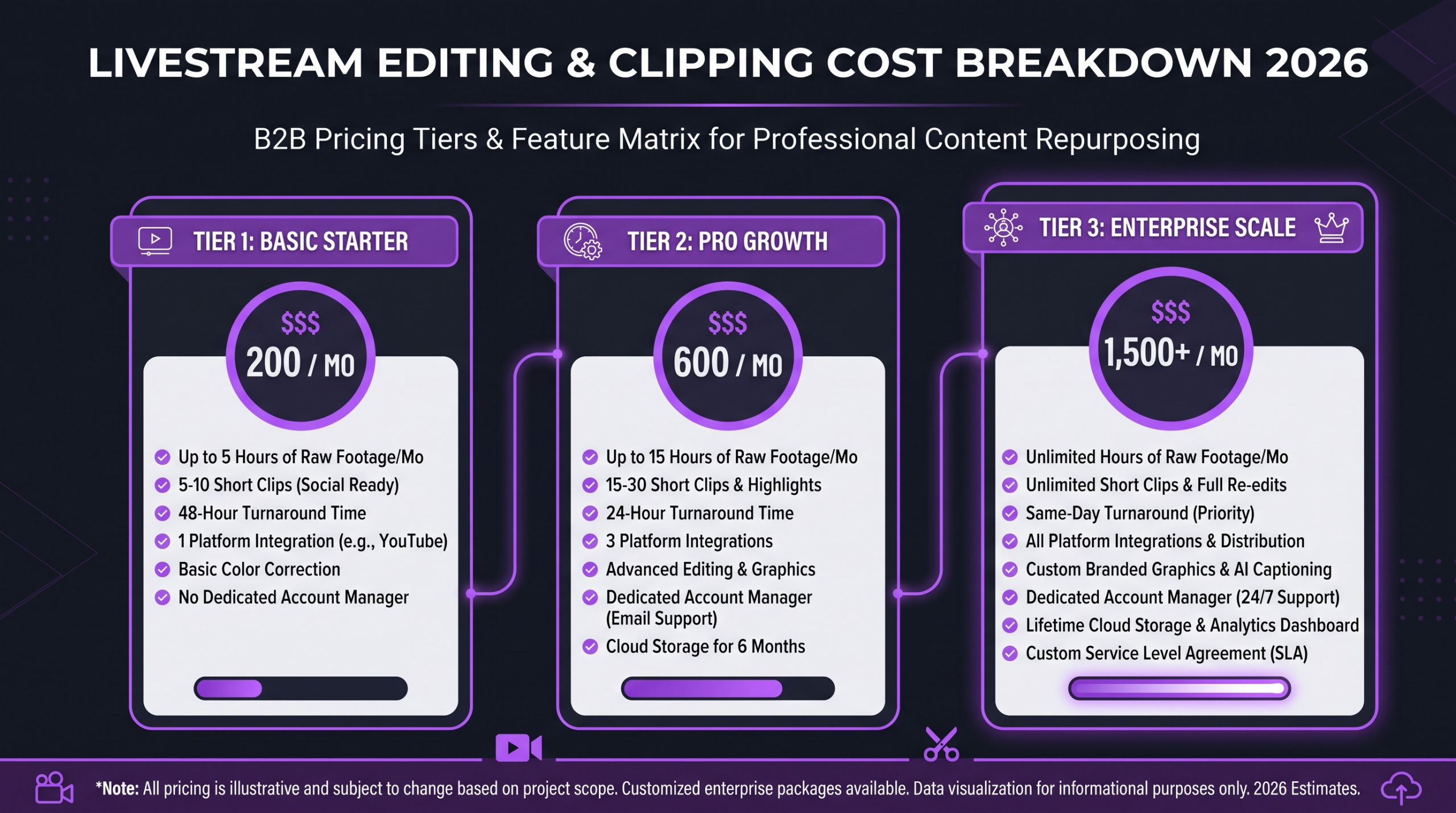
Per-Clip Pricing: When It Works and When It Doesn’t
Per-clip rates feel intuitive — you pay for exactly what you get. But the math shifts quickly at scale. If you stream three times per week and want 10 clips per stream, you’re ordering 120–130 clips per month. At $40 per clip, that’s $4,800–$5,200 monthly — well above what a comparable monthly retainer would cost for the same volume. Per-clip pricing makes more sense for one-off events, irregular stream schedules, or when you’re testing a new editor before committing to a retainer.
VOD Editing vs. Clip Production: Not the Same Budget
Many buyers conflate VOD editing (cutting the full replay) with clip production (creating standalone social moments). They are distinct deliverables with different skill sets, time requirements, and pricing. VOD editing prioritizes narrative flow, pacing, chapter coherence, and watch-time optimization. Clip production prioritizes hook engineering, vertical formatting, caption styling, and platform-native feel. Some editors do both well; many specialize. When you request a package that includes both, verify the quality and experience level for each deliverable — a strong clip editor is not automatically a strong long-form editor and vice versa.
What Drives Livestream Clipping Costs?
Pricing isn’t arbitrary — it tracks real inputs that scale with complexity. Understanding the drivers puts you in a much stronger position when comparing quotes or scoping a project.
Source Footage Length
Longer streams generate more raw footage to review. Even with auto-transcription tools, an editor still needs to watch, assess pacing, and make creative judgments about what makes a compelling clip. A 4-hour stream takes meaningfully longer to clip than a 45-minute one, and most experienced editors price accordingly. Per-stream packages typically specify a maximum footage length (e.g., “up to 2 hours of source footage”) — excess footage is billed at an hourly overage rate.
Number and Length of Deliverables
A single 60-second clip costs more to produce than a 20-second clip — more footage to review, more decisions about pacing, more places where the caption timing matters. Requesting 15 clips instead of 5 multiplies hours almost linearly. Be specific when requesting quotes: define the clip count, the target duration range, and whether you want multiple aspect ratios per clip (9:16 + 16:9 + 1:1 triples the export work).
Complexity and Motion Graphics
Basic clipping (cut → captions → export) is a fundamentally different job than branded clipping with animated lower thirds, custom caption styles, transition effects, background music with licensed tracks, and multi-camera switching. The latter can cost 3–5× more per deliverable — and rightly so, because it requires a different tool stack, higher-skilled operators, and significantly more hours. If your brand guide specifies exact font treatments, color gradients, and animation timing, budget accordingly.
Turnaround Time
Same-day or next-morning delivery carries a premium. Editors who provide 6–12 hour turnarounds are either working nights/weekends or dedicating capacity that could otherwise serve multiple clients — and they price that exclusivity in. Standard 48–72 hour windows are significantly cheaper than rush delivery. If your livestream is time-sensitive (e.g., a product launch event where clips need to hit social before your news cycle fades), factor rush fees into your budget from the start.
Caption Quality and Accuracy
Auto-generated captions (Whisper, Descript, CapCut AI) are fast and cheap but error-prone — especially for technical terminology, brand names, product names, or accented speakers. Human-reviewed and corrected captions cost more but produce a notably cleaner result. For brands, inaccurate captions on branded clips are a real reputational risk. Know what level of caption accuracy you’re paying for before signing off on a package.
💡 Pro Tip: Before requesting quotes, document your exact spec: clip count, target duration, aspect ratios needed, caption style, motion graphics complexity, and turnaround window. Editors who can quote against a concrete spec give you dramatically more accurate and comparable pricing than those quoting from a vague description.
Audio Quality of the Source Feed
Noisy, clipped, or inconsistently leveled audio in the source stream adds work. Editors who clean audio — applying noise reduction, normalizing levels, removing echo — spend additional time that pushes clips into higher price territory. If you stream from a quiet studio with a broadcast-grade microphone, your editing costs will be lower than someone streaming from a home office with echo and background noise. Audio cleanup is invisible to the viewer but visible in the invoice.
Freelancer vs. Agency vs. Subscription: Which Model Fits?
The three-way choice between a freelancer, a dedicated video editing agency, and a subscription-based clipping service is the central budget decision for most brands. Each model has genuine advantages — and genuine failure modes. Knowing which fits your situation saves significant frustration downstream.
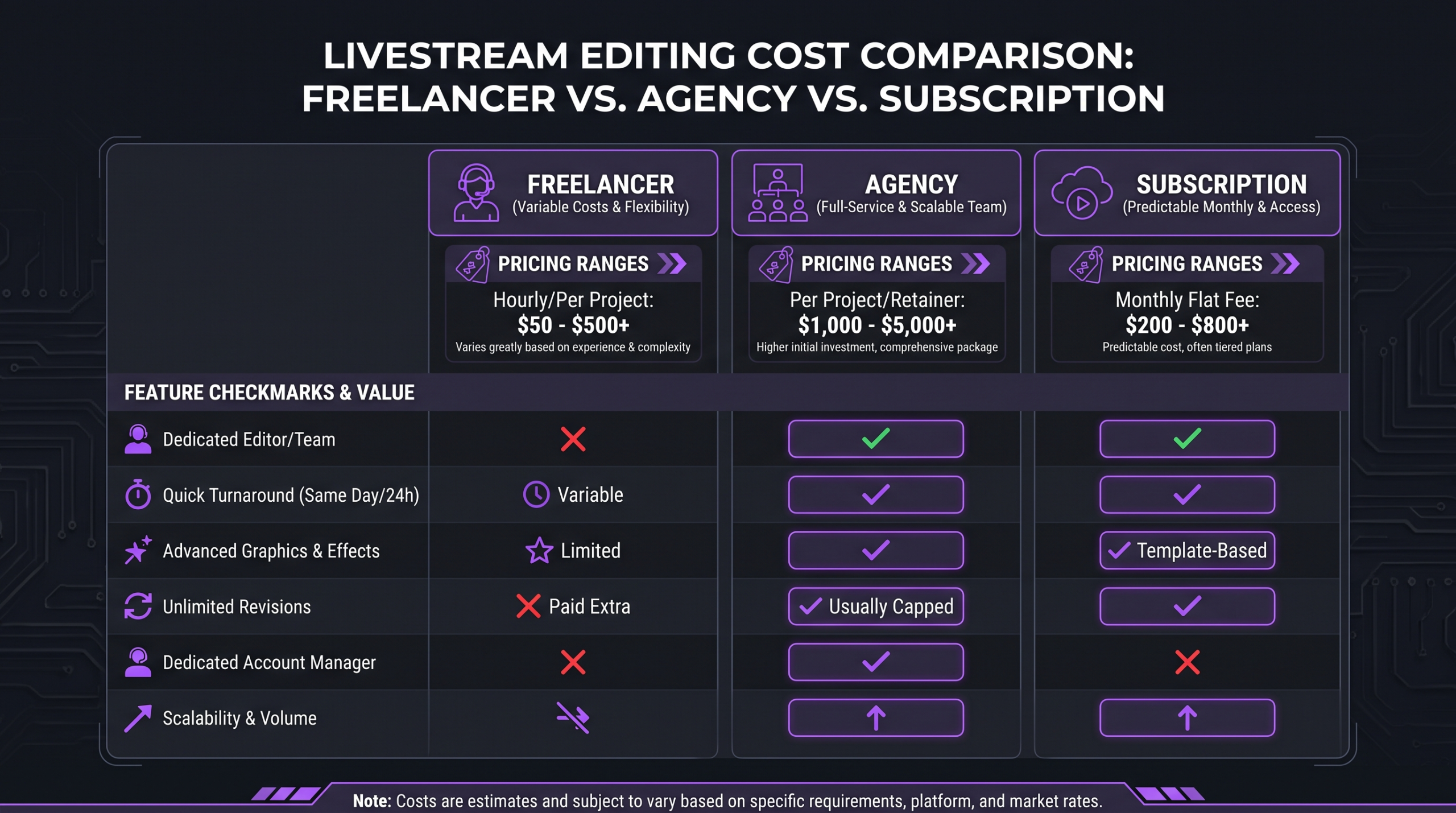
For a deeper breakdown of the tradeoffs between going independent vs. professional for all your video needs, the video editing agency vs. freelancer comparison covers the full picture beyond just live content.
Freelancer Pros and Cons
Freelancers on platforms like Fiverr, Upwork, or Contra offer the lowest per-unit cost for simple clips, and the best ones develop a deep understanding of your voice and platform over time. The risks are well-documented: availability conflicts, capacity ceilings during busy weeks, and the disruption of starting over when someone goes quiet. For solo creators early in their content journey, a trusted freelancer is often the right starting point — just build redundancy by establishing relationships with two or three before you need them.
Subscription Service Pros and Cons
Subscription-based clipping services — platforms that charge a flat monthly fee for a defined clip volume — offer predictable costs and streamlined submission workflows. The trade-off is creative constraint: you typically work within their templates and processes rather than a bespoke brand system. For creators who want speed and simplicity over differentiation, subscriptions are efficient. For brands where visual identity consistency is non-negotiable, subscription services often fall short on customization.
Agency Pros and Cons
A premium agency brings a dedicated team, a strategic layer, and the ability to scale across both clip production and full VOD editing within a single relationship. Quality ceilings are higher — because agencies invest in senior editors, brand onboarding processes, and quality control systems that individual freelancers rarely build. The cost is higher too, and justifiably so. The buyer who gets the most from an agency relationship is typically a brand doing multiple streams per month with real performance expectations attached to the content — not someone testing whether live video is worth the investment at all.
Platform-Specific Demands: Twitch, YouTube, LinkedIn Live
Not all platforms require the same clip format, and the platform you’re targeting meaningfully affects what good clipping costs. Editors who specialize in one platform don’t always have the skills or tooling for another — factor this into your vendor evaluation.
Twitch: Gaming, Personality, and Virality
Twitch’s native Clips tool lets viewers and creators capture raw 30–60 second moments — but these raw clips rarely perform well without additional polish. For Twitch-native content, clipping editors focus on reaction timing, highlight reels for YouTube, and TikTok/Reels vertical cuts. The complexity is lower than B2B content — most Twitch clip work doesn’t require motion graphics — which keeps per-clip costs closer to the $15–$45 range. Twitch Partners and Affiliates with consistent audiences often commission monthly clip packages to feed their YouTube channel.
YouTube Live: VOD-First Strategy
YouTube is unique because the live archive becomes a permanent indexed page on your channel. YouTube’s live streaming platform auto-saves VODs, making VOD editing particularly important for search discoverability. Chapters, a polished thumbnail, and a cleaned-up replay can continue driving views months after a live event — a value proposition that justifies a higher editing spend compared to platforms where VODs are ephemeral. Budget for full VOD editing plus clip extraction if YouTube is your primary distribution platform.
LinkedIn Live: B2B and Thought Leadership
LinkedIn Live audiences skew professional and senior. The platform’s Live events infrastructure increasingly supports virtual events, panels, and product launches. Clips repurposed from LinkedIn Live need a notably different treatment than gaming clips — clean branded lower thirds, legible captions for silent scroll viewing, a more conservative pacing, and often a professional intro/outro. This increases the per-clip cost meaningfully, with premium branded clips for LinkedIn commonly running $80–$150+ each. B2B brands that treat LinkedIn clips as just a cheaper version of YouTube Shorts typically see poor engagement — the production investment signals credibility to a professional audience.
Multi-Platform Distribution
Brands that stream once and want clips delivered across TikTok, Instagram Reels, YouTube Shorts, and LinkedIn simultaneously need multiple aspect ratio exports per clip. A 9:16 vertical cut, a 16:9 horizontal cut, and a 1:1 square cut from the same source clip can add 30–60 minutes of additional work per deliverable. Some agencies include multi-format delivery as standard; others charge per export. Clarify this before you commit to a package — multi-platform delivery can add 40–80% to the base quote.
💡 Pro Tip: If you’re distributing across LinkedIn and TikTok simultaneously, those two platforms have almost opposite audience expectations for pacing, caption size, and energy level. Editors who understand platform context — not just export specs — produce clips that actually convert on each platform. Ask vendors for platform-specific portfolio examples before hiring.
Hidden Costs Brands Miss in Their Livestream Budget
The quoted rate is rarely the full cost. Brands that plan their livestream editing budget around the top-line number routinely find themselves overspent by 20–40% once all the supporting costs are factored in. Understanding these before you sign a contract prevents unpleasant surprises.
Thumbnail Production
Custom thumbnails for VOD replays on YouTube or LinkedIn are often scoped separately. A strong custom thumbnail — not a random frame grab — is one of the highest-ROI investments on a VOD because it directly drives click-through rate on the archive page for years. Thumbnail design typically costs $15–$75 per image depending on complexity, and it’s not always included in a clipping package. Ask explicitly.
Music Licensing
Background music in clips requires licensed tracks — either from a library the editor already subscribes to, or sourced and licensed separately. Using copyrighted music without clearance can trigger strikes on YouTube or content removal on TikTok. Editors who use their own library subscriptions (Artlist, Epidemic Sound, Musicbed) typically roll this cost into their rate; editors who bill licensing separately or don’t provide licensed music at all are a risk. If music matters to your clip quality, confirm licensing coverage upfront.
Revision Rounds
Most quotes include one round of revisions. A second or third round — common when brand guidelines are complex or when feedback is vague — adds billable time. For clips at $40–$80 each, a full revision cycle can effectively double the unit cost. Minimize revision costs by providing a detailed brief with reference examples and written feedback rather than verbal notes after the fact. Clear briefs reduce revision rates significantly.
File Transfer and Storage
Source footage from a 3-hour stream at broadcast quality can run 10–50 GB. Transferring that to an editor requires either a large cloud storage allowance or a dedicated file transfer solution. Some editors absorb this cost; others pass it through. Archived source footage also accumulates — brands that don’t have a clear file management strategy end up paying for cloud storage indefinitely or losing access to original files they later need.
Scheduling and Project Management Overhead
Coordinating clip delivery with your posting schedule — especially across multiple platforms and time zones — takes administrative effort that freelancers typically don’t absorb. If your marketing team is spending 2–3 hours per week managing the editing workflow, briefing, reviewing, and posting, that internal overhead is a real cost even if it doesn’t appear on an invoice. Agencies with structured client workflows and dedicated project managers reduce this overhead substantially, which is one of the genuine value propositions for higher-cost retainer relationships.
How to Maximize Your Livestream Clipping Budget
Getting better output for the same (or lower) spend is possible — it just requires intentional choices at the planning stage, not just the invoicing stage.
Prioritize Your Stream Quality as a Production Input
Every dollar you invest in your streaming setup reduces editing cost downstream. A clean audio signal, stable video quality, a consistent streaming background, and disciplined stream structure (defined segments, clear topic transitions, minimal dead air) all make an editor’s job faster and cheaper. Brands that invest in a proper streaming setup before scaling their editing budget generally see better cost-per-clip outcomes at volume.
Define a Clip Brief Template Your Editors Can Follow
A one-page clip brief template — specifying your preferred clip length, caption style, music type, intro/outro format, platform destination, and tone — cuts briefing time and revision rounds dramatically. Editors who work from a clear brief produce closer-to-spec first drafts. This is especially valuable for brands working with subscription services or mid-tier freelancers where creative consultation isn’t part of the service.
Batch Stream and Clip Together
Editors often offer volume discounts when you provide multiple streams’ footage at once. Instead of sending individual streams as they happen, batching a week’s worth of footage and requesting a combined delivery can reduce per-clip costs by 10–25% depending on the vendor. This works well for brands with predictable stream schedules where content doesn’t need to post immediately after the live event.
Understand Where Professional Editing Creates the Most Value
Not every clip needs the same level of investment. High-stakes clips — your company’s keynote moments, founder soundbites for LinkedIn, event highlight reels going into paid promotion — warrant premium editing. Behind-the-scenes or community-building clips can run at a lower spec. Building a tiered clip strategy (premium clips for owned distribution, standard clips for organic social) lets you allocate editing budget to the deliverables that return the most.
For a broader view of how livestream editing fits into overall professional video editing costs, understanding the full landscape helps calibrate your total content production budget, not just the livestream line item.
According to Wyzowl’s annual video marketing report, video content remains one of the most consistently cited formats for positive marketing ROI, and live video specifically scores well on audience engagement metrics. That’s the commercial context for why brands are allocating real budget here — not just as a content experiment, but as a core distribution channel.
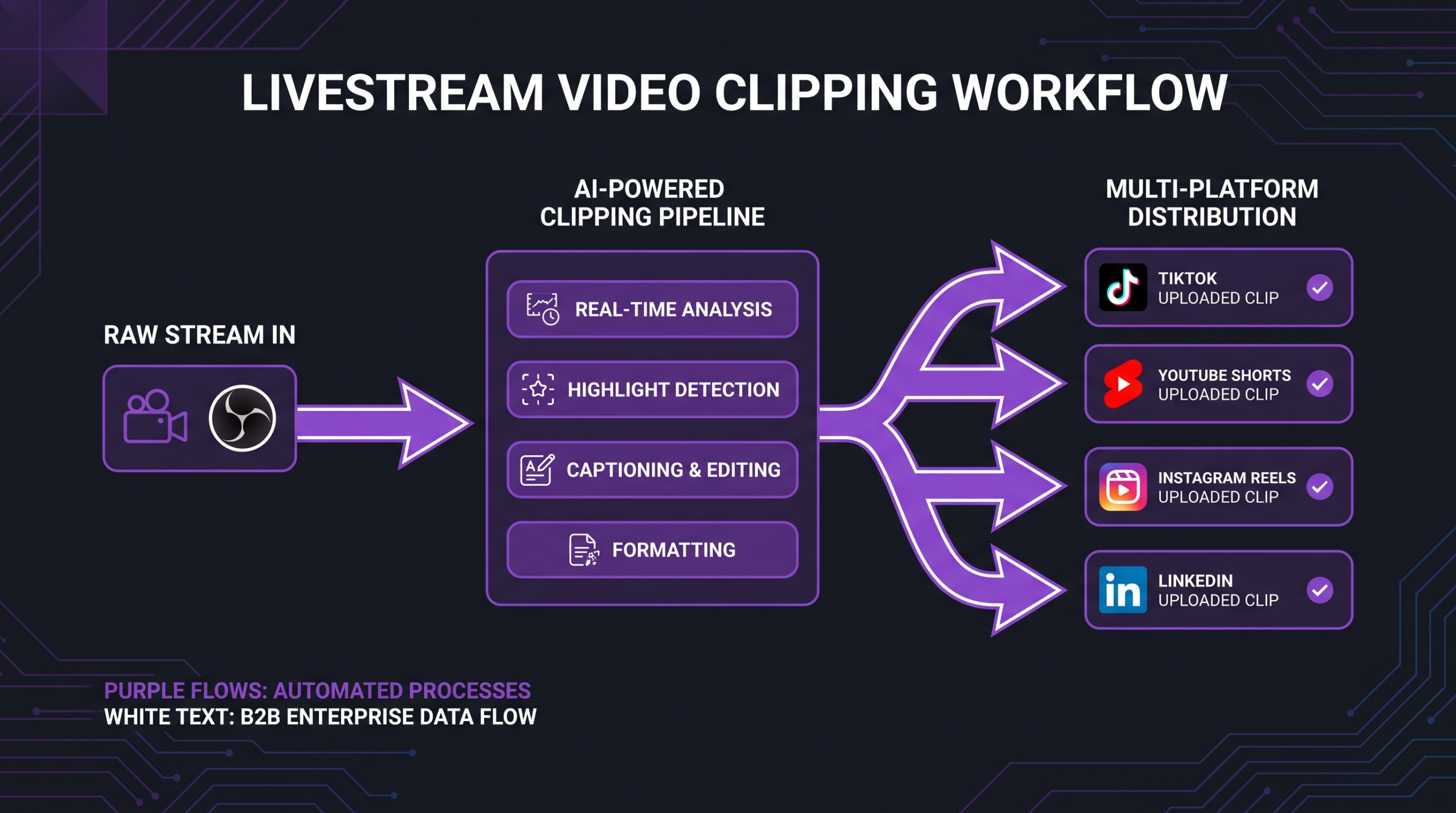
Think About the Full Content Lifecycle, Not Just the Clip
The best livestream editing teams don’t just produce clips — they help you think about how a single stream becomes a week’s worth of content across channels. That includes the VOD replay for YouTube, the highlight reel for LinkedIn, the short clips for Reels and TikTok, and the audiogram for podcast feeds. When you evaluate vendors, ask about their multi-format and cross-channel experience, not just their per-clip rate. A team that understands the full distribution picture will make more effective editing decisions at every stage.
Platforms like Restream have built multi-destination streaming infrastructure that many brands now rely on for distributing live events simultaneously across platforms — when you’re streaming to four destinations at once, your post-production workflow needs to match the distribution ambition. Platform-aware editors understand these nuances; generalist editors often don’t.
FAQ
How much does it typically cost to get 10 clips from a single livestream?
At standard freelancer rates, 10 clips with captions typically runs $150–$550 depending on complexity and turnaround time. For branded clips with motion graphics and multi-format delivery, expect $750–$1,500. Agency packages for 10 premium clips commonly run $1,000–$2,000 when bundled with VOD editing. These are typical market ranges — the actual quote depends on your specific spec, the editor’s location and experience, and the turnaround window.
Is it worth editing a VOD if I already have clips?
Yes, for most brands — but the value depends on platform. On YouTube, a polished VOD replay continues generating search views and watch time for months or years after the live event. On Twitch or LinkedIn, VOD replay audiences are typically much smaller. The ROI on VOD editing correlates directly with how searchable your topic is on YouTube. If your stream covers a high-search-volume topic, investing in VOD editing is almost always worth it. If your stream is primarily community-oriented with a niche audience, clips may deliver higher return than a full VOD edit.
Can AI tools replace a human editor for livestream clipping in 2026?
Partially. AI-powered tools like Opus Clip, Vidyo.ai, and similar platforms have improved meaningfully at identifying potentially high-engagement moments, generating auto-captions, and producing a basic vertical crop. They work well for high-volume low-complexity clipping where the goal is quantity over brand precision. For anything requiring editorial judgment, brand consistency, motion graphics, or polished audio design, human editors still outperform automated tools — especially on the clips that matter most for a brand’s reputation.
What’s a reasonable monthly budget for a brand doing 2–3 streams per week?
At 2–3 streams per week with a target of 5–8 clips per stream, you’re producing roughly 40–100 clips per month. Budget range depends heavily on quality tier: basic freelancer clipping commonly runs $1,500–$4,000/month; mid-tier subscription services typically $1,200–$2,800/month; premium agency retainers commonly $3,000–$6,000/month for this volume with motion graphics and multi-format delivery. A full VOD edit for each stream adds significantly to any of these figures. For brands where live content is a primary growth channel, the higher end of this range is commonly considered a reasonable production investment.
How do I evaluate whether a livestream editor is the right fit before committing to a retainer?
Request a paid trial project: provide two or three segments of raw stream footage and ask the editor to produce three clips to your spec. Evaluate turnaround time, caption accuracy, how well they understood your brief without clarification, the quality of the final cut, and how the clips actually perform when you publish them. The trial cost is small relative to the risk of signing a multi-month retainer with the wrong partner. Review their existing portfolio for examples on your specific platform — a strong gaming-clip editor doesn’t always translate to a strong LinkedIn Live specialist, and vice versa.
Verdict: What You Should Actually Budget
Livestream editing and clipping costs span a genuine range because the deliverables, complexity, and vendor quality levels span a genuine range. There’s no single “right” number — only the right number for your specific volume, platform, quality requirements, and internal capacity to manage the workflow.
Creators and small brands testing the model should start with a trusted freelancer, define a tight spec, and use a trial project before committing to a retainer. Budget for $25–$60 per clip at this stage and build your evaluation criteria from real experience with the deliverables.
Growing brands streaming regularly with performance goals attached to their content should evaluate monthly retainer options — either a subscription service for volume efficiency or a premium agency for brand consistency and creative strategy. Budget $1,500–$5,000/month depending on stream frequency and clip complexity, and treat it as a production cost comparable to any other content channel investment.
Enterprise brands and conference organizers running high-stakes events should scope per-event packages with clear deliverables, build rush fees into the planning budget for time-sensitive content, and treat clip production as part of the event marketing spend — not an afterthought. Per-event costs commonly run $1,000–$5,000+ for a comprehensive VOD-plus-clips package at premium quality.
The brands that get the most from livestream editing are the ones that treat post-production as a strategic investment rather than an administrative task. A stream that’s edited well extends its value for weeks and months; a stream that goes straight to archive with no clipping generates a fraction of its potential reach. The question isn’t whether to invest in editing — it’s how to invest at the right level for your current stage.
At Increditors, we work with brands that have moved past the “testing phase” and are ready to treat livestream content as a serious distribution channel. That typically means dedicated senior editors, a defined brand system applied consistently across every clip, strategic input on what to clip and why, and reliable multi-format delivery — not just faster turnaround on whatever spec you hand us. The case for video as a primary marketing channel has never been stronger, and livestream-to-clips is increasingly how smart brands are making that investment work at scale.
Ready for Video That Actually Converts?
Tell us about your project and we will put together a custom plan.