










![3D Explainer Video - ScribbleLive.mp4_snapshot_00.12_[2022.03.09_03.14.16]](https://increditors.com/wp-content/uploads/elementor/thumbs/3D-Explainer-Video-ScribbleLive.mp4_snapshot_00.12_2022.03.09_03.14.16-r7wb53mx72rxst3qcqyrfxdmeyzb5r9jbl0wbjujh4.png "3D Explainer Video – ScribbleLive.mp4_snapshot_00.12_[2022.03.09_03.14.16]")
































If you’re trying to figure out what professional video editing cost looks like in 2026, you’ve probably already discovered the frustrating truth: prices are all over the map. A freelancer on Fiverr might quote you $50 per video, while a boutique agency asks $5,000 for the same length of content. Both can be “right” depending on what you actually need. The real question isn’t “What does video editing cost?”—it’s “What am I getting for my money, and will it return more than I spend?”
We’ve been in the video editing business long enough to see what actually drives outcomes for creators, brands, and enterprise teams. This guide breaks down the current 2026 market rates with honest numbers, compares pricing models side-by-side, and walks through real ROI data from three of our clients—Riley Coleman, TuMeke, and VYVE Wellness. By the end, you’ll know exactly what to budget, where you can cut costs safely, and where cutting costs will cost you more in the long run.
Whether you’re a solo YouTuber spending your first $500 or a marketing director allocating a six-figure annual video budget, this breakdown is built to help you make a decision you won’t regret at the end of the quarter.
Table of Contents
Quick Cost Overview: 2026 Market Rates
Before we go deep, here’s the snapshot. Most businesses and creators end up choosing between three buckets: individual freelancers, full-service agencies, and subscription-based services. Each has clear tradeoffs on price, quality, speed, and management overhead.
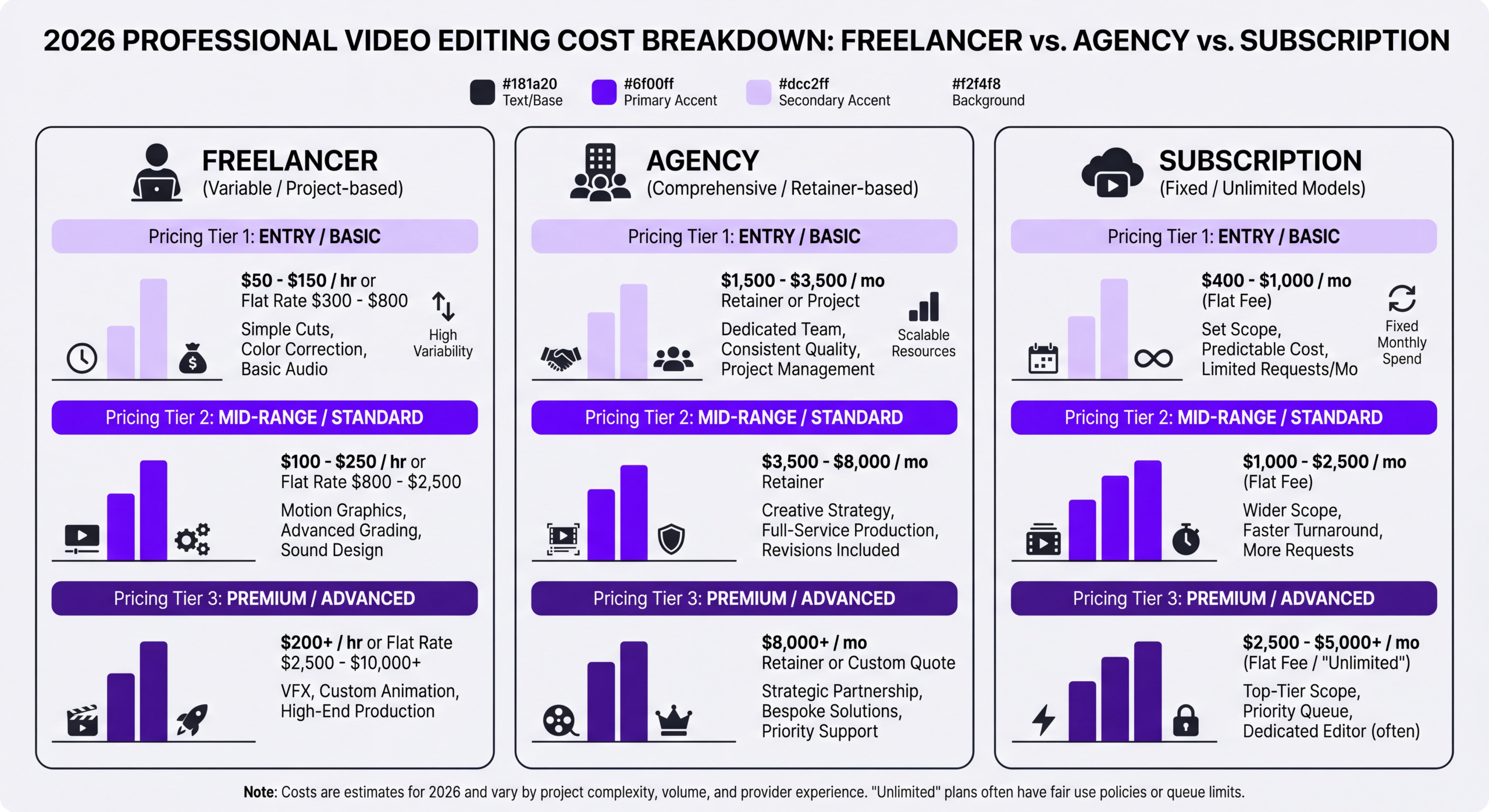
| Service Type | Typical Price Range | Turnaround | Best For | Key Risk |
|---|---|---|---|---|
| Freelancer (marketplace) | $50–$500 per video | 3–10 days | One-off projects, tight budgets | Quality variance, disappearing editors |
| Freelancer (experienced) | $75–$150/hour | 2–7 days | Specialized creative work | Single point of failure |
| Boutique agency | $1,500–$10,000 per video | 2–4 weeks | Brand films, launches | Slow iteration, expensive revisions |
| Subscription service | $1,200–$6,000/month | 24–72 hours | Ongoing YouTube/social content | Volume caps, style fit |
| Dedicated editing team | $3,500–$15,000/month | 24–48 hours | Scaling content operations | Higher commitment |
If you walk away with only one number from this section, make it this: in 2026, the realistic total cost to produce one professionally edited 8–12 minute YouTube video with graphics, color, sound design, and B-roll integration lands between $300 and $1,800. Anything cheaper typically shifts the work back to you (or delivers work you’ll need to redo). Anything more expensive usually includes strategy, production, or custom motion design beyond basic editing.
Factors That Affect Video Editing Costs
Price tags on editing services rarely explain themselves. When two editors quote wildly different numbers for what sounds like the same job, one of the factors below is almost always the reason.
1. Editor Experience and Specialization
A generalist editor two years into their career charges differently than a specialist who has shipped 300 YouTube videos in your niche. Experience compresses decision-making: a senior editor might spend 4 hours on a video that takes a junior 14. You’re paying for speed and fewer revision rounds.
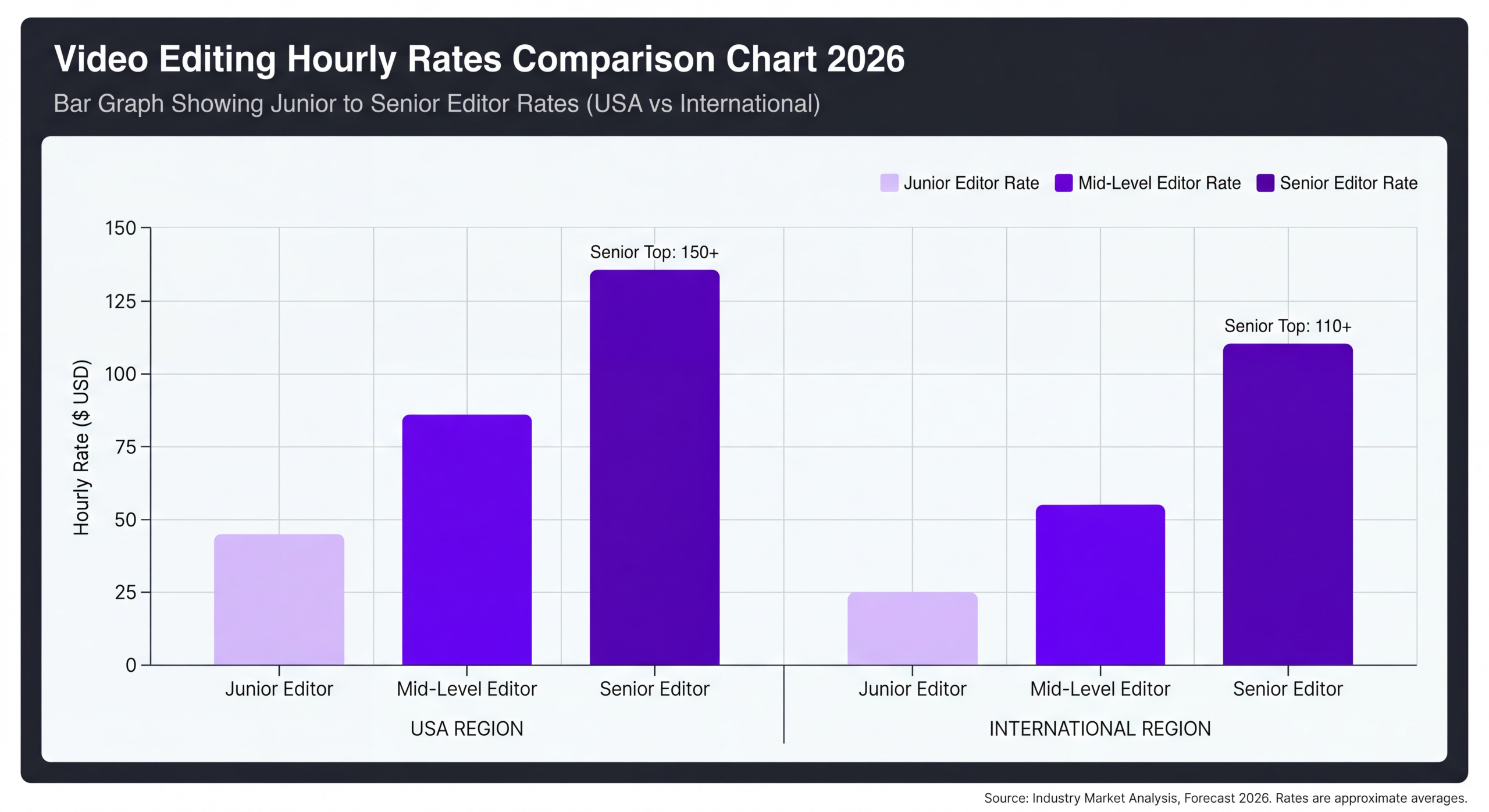
| Experience Level | Hourly Rate (2026) | Typical Output | Revision Rounds Needed |
|---|---|---|---|
| Entry-level (0–2 years) | $25–$45 | Basic cuts, simple graphics | 3–5 |
| Mid-level (2–5 years) | $50–$80 | Multi-cam, color grading, motion | 2–3 |
| Senior (5–10 years) | $85–$125 | Full post-production ownership | 1–2 |
| Expert / Specialist | $130–$200+ | Creative direction, complex VFX | 0–1 |
2. Video Length and Raw Footage Volume
A 10-minute finished video often starts with 60–120 minutes of raw footage. The edit-to-source ratio matters as much as final runtime. A 5-minute tutorial shot in one take costs less to edit than a 5-minute vlog cut from 90 minutes of travel footage. Always quote raw footage duration alongside finished length when you ask for pricing.
3. Creative Complexity
Motion graphics, custom animations, 3D elements, speed ramping, match cuts, and visual effects each add hours. A basic lower third takes minutes; a custom animated logo reveal takes an afternoon. If your video sits closer to a documentary or commercial than a talking head, expect the quote to double.
4. Sound Design and Color
Most budget quotes assume “standard” audio cleanup. Dedicated sound design (custom transitions, Foley, spatial audio) and professional color grading are billed separately or included only in premium packages. On a well-produced YouTube video, we typically allocate 15–25% of editing time to audio alone.
5. Turnaround Speed
Rush fees in 2026 range from 25% to 100% above base rate. A three-day turnaround on a project that typically takes two weeks will roughly double the bill. The flip side: consistent weekly delivery with a locked schedule often earns a discount because editors can plan capacity.
6. Revisions and Approval Layers
Every revision round costs time. Freelancers typically include 1–2 rounds; agencies include 2–3. Unlimited revisions sound appealing but usually cap the number of changes per round. If three stakeholders need to approve every video, that friction is a real line item.
Pricing Models Explained
The same editor can quote the same project four different ways depending on how they structure their pricing. Understanding each model helps you pick the one that actually fits your content cadence.
Hourly Pricing
Straightforward on paper: the editor tracks hours and bills at their rate. Great for short or unpredictable projects. The downside is the incentive mismatch—hourly billing rewards slower work. We recommend hourly only for exploratory projects or small touch-ups, not for ongoing content production.
When it makes sense: Event highlight reels, one-off brand videos, consulting on existing edits.
Per-Video (Flat Rate) Pricing
A fixed price per finished video, usually scoped by length, style, and deliverable count. This is the most transparent model for buyers and the most common at agencies. Scope creep is the thing to watch—always confirm what counts as a “deliverable” (horizontal master, vertical cutdown, thumbnail frame, captions file).
When it makes sense: Predictable content types, YouTube videos, podcast clips, explainer videos.
Monthly Retainer
You pay a fixed monthly fee for a defined volume of output—say, four videos per month with a standard turnaround. Retainers almost always come in 10–30% cheaper per video than one-off pricing because the provider can plan capacity. This is the model most growing creators and brands land on once they’re past the experiment phase.
When it makes sense: Weekly YouTube uploads, consistent podcast or social content, brand teams publishing on a calendar.
Unlimited (or “All-You-Can-Edit”) Subscriptions
A growing category in 2026. For a flat monthly fee ($1,500–$6,000), you submit as many videos as you want, and they work through a queue. These work well when volume is high and style is consistent. They break down when you need premium creative work or very fast turnarounds. Read the fine print on active projects (usually capped at 1–3 at a time) and revision limits.
When it makes sense: Agencies repackaging content, creators with huge back catalogs, short-form social-first brands.
Hybrid / Custom
Our own service pricing uses a hybrid: a core retainer for predictable weekly output plus per-project pricing for launches, ads, and campaign work. Most serious content operations end up here because real content calendars aren’t one-size-fits-all.
Cost Breakdown by Video Type
“Video editing” is a single phrase covering hundreds of output types. Here’s what to budget for the formats we see most often in 2026.
| Video Type | Length | Typical Cost (per video) | Complexity Drivers |
|---|---|---|---|
| Basic talking head | 3–8 min | $150–$500 | Single camera, minimal graphics |
| YouTube vlog / creator content | 8–15 min | $400–$1,800 | B-roll, graphics, pacing, color |
| Podcast video (full episode) | 30–90 min | $300–$1,200 | Multi-cam, captions, chapter markers |
| Short-form (Reels, Shorts, TikTok) | 15–60 sec | $50–$250 | Hook design, captions, trends |
| Product explainer | 1–3 min | $800–$4,000 | Screen capture, motion graphics, VO |
| Testimonial / case study | 1–3 min | $600–$2,500 | Interview editing, b-roll, branding |
| Paid social ad | 15–90 sec | $400–$3,000 | Multiple variants, A/B testing cuts |
| Brand film / commercial | 30 sec–3 min | $3,500–$20,000+ | Cinematography grade, VFX, sound design |
| Webinar / course module | 20–60 min | $300–$1,500 | Chapter markers, graphics, screen overlays |
| Event recap | 1–5 min | $800–$4,500 | Multi-day footage, music sync, titles |
What Changes Pricing Most Within a Category
Even within the same video type, three variables swing the quote more than anything else:
- Raw footage ratio: 3:1 vs. 15:1 source-to-final doubles edit time.
- Graphics expectations: Template lower thirds vs. custom motion design.
- Number of deliverables: One master vs. six platform-specific cutdowns.
If you’re a creator publishing weekly, we’ve broken down what sustainable content costs look like in more depth in our guide to YouTube video editing services.
Geographic Pricing Differences
Geography still matters in 2026, though less dramatically than five years ago. Remote-first editing has compressed the global market, but cost-of-living differences and currency shifts still produce real gaps. Here’s what we see across major markets:
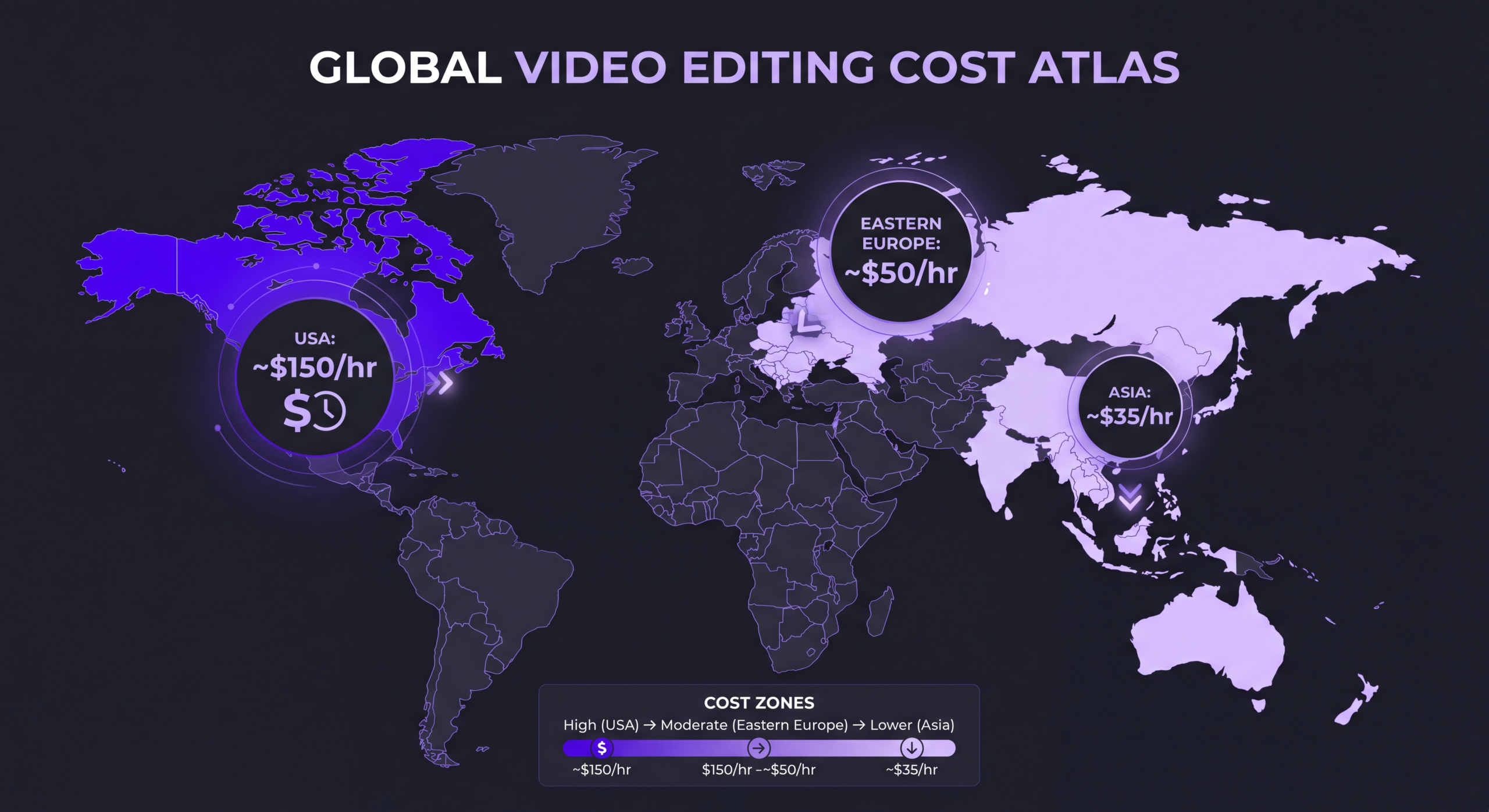
| Region | Hourly Rate Range | Per-Video (YouTube 10-min) | Pros | Cons |
|---|---|---|---|---|
| United States / Canada | $60–$150 | $600–$2,500 | Same-timezone communication, premium quality | Highest cost bracket |
| Western Europe | $55–$130 | $550–$2,200 | Strong creative tradition, GDPR-compliant | Summer shutdowns, VAT complexity |
| Eastern Europe | $30–$70 | $300–$1,100 | Strong technical skill, good value | Time zone gap for US clients |
| Latin America | $25–$60 | $250–$900 | US-friendly time zones, growing talent pool | Infrastructure varies by country |
| India / South Asia | $15–$50 | $150–$700 | Lowest rates, 24-hour turnaround possible | Communication overhead, style calibration |
| Southeast Asia | $20–$55 | $200–$800 | Fast turnaround, English fluency | Time zone gap for Western clients |
| Australia / New Zealand | $65–$140 | $650–$2,400 | Premium quality, English-native | Time zone challenges for North America |
The honest take: Geography is a rough proxy, not a guarantee. We’ve seen $30/hour editors in Manila deliver work that outclasses $150/hour editors in New York, and vice versa. What matters more is portfolio fit, communication reliability, and how long they’ve been working with clients in your specific niche.
For distributed teams, hybrid arrangements work well: a lead editor in your time zone handling creative direction and client communication, with production support in a lower-cost region. That’s the model we use internally for our enterprise clients who need both premium quality and scale economics.
Ready to stop guessing and get numbers specific to your content?
Every quote we give starts with a short call to understand your volume, style, and deadlines—so the number we share actually means something. No generic pricing pages, no bait-and-switch tier upgrades.
Case Studies: Real Client Numbers
Pricing charts are useful, but they don’t tell you whether the spend actually returned more than it cost. These three cases come from our own client roster. Numbers are shared with permission and anonymized where necessary.
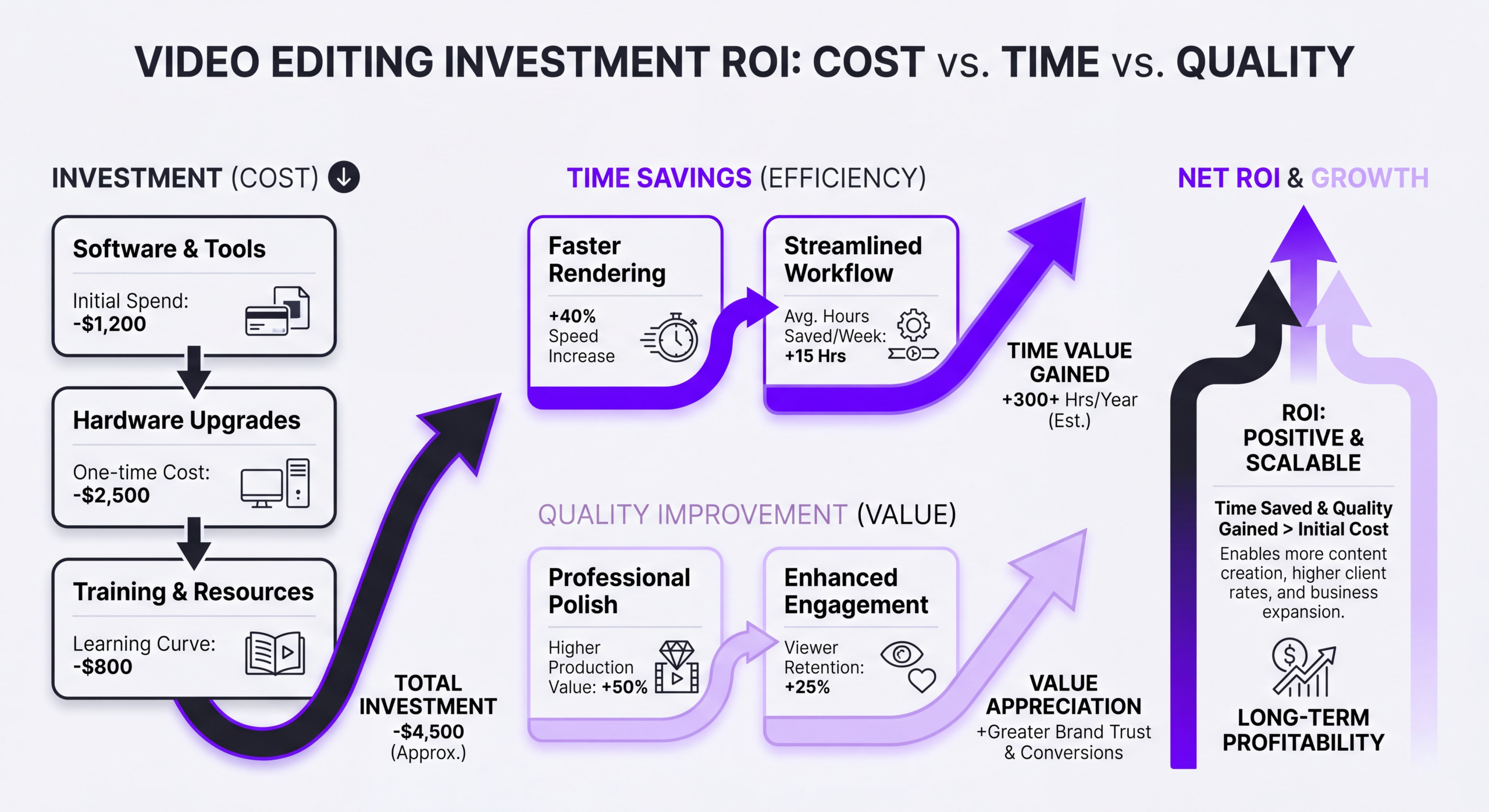
Case Study 1: Riley Coleman — YouTube Creator ROI After Switching Editors
Riley Coleman runs a YouTube channel in the finance education space. When he came to us, he was publishing 2 videos per week edited by a freelancer he’d hired through a marketplace. The editing cost was low ($180 per video, $1,440/month for 8 videos), but Riley was spending about 6 hours per week doing revisions, reshooting intros, and manually fixing pacing issues before upload.
Here’s what changed in the first 90 days after switching to a dedicated editing team:
| Metric | Before (Freelancer) | After (Dedicated Team) | Change |
|---|---|---|---|
| Cost per video | $180 | $425 | +$245 |
| Monthly editing spend | $1,440 | $3,400 | +$1,960 |
| Riley’s hours/week on post | 6 hours | 45 minutes | –5.25 hours |
| Avg. watch time (8-min videos) | 3:42 | 5:18 | +43% |
| Monthly revenue from channel | $4,200 | $7,850 | +$3,650 |
Net impact: an additional $1,960/month in editing cost returned $3,650 in monthly revenue plus ~21 hours of Riley’s time. The ROI wasn’t subtle. The interesting part wasn’t that professional editing “worked”—it’s that the freelancer was actually doing competent cuts. The difference came from consistency, faster iteration on thumbnail testing, and retention-focused pacing decisions. Small wins on every video compounded.
If you’re a solo creator evaluating this exact tradeoff, our content creators page walks through the decision framework we use with new clients.
Case Study 2: TuMeke — AI Company Reduces Management Overhead by 12+ Hours/Month
TuMeke is a workplace safety AI company producing weekly customer education content, monthly webinar recaps, and quarterly brand videos. Before partnering with us, their content manager was coordinating across three separate freelancers (one for YouTube, one for social cutdowns, one for webinar editing). The coordination alone was eating 12–15 hours per month of senior marketing time.
Here’s the operational shift after consolidating to a single dedicated team:
| Operational Metric | Before | After |
|---|---|---|
| Number of vendor relationships | 3 freelancers | 1 team |
| Monthly invoices to process | 3–4 | 1 |
| Avg. revision rounds per video | 3.2 | 1.4 |
| Content manager hours/month on editing ops | 12–15 | 2–3 |
| Total monthly editing spend | $4,100 | $4,800 |
| Effective cost (incl. internal time) | ~$5,800 | ~$5,050 |
TuMeke paid about $700 more per month in direct editing fees but saved roughly $1,450 per month in internal coordination costs—a net savings of $750/month, before counting the strategic work their content manager redirected that time toward. This is the pattern we see repeatedly with growth-stage B2B teams: the sticker price goes up, the real cost goes down.
The TuMeke model is documented in more detail on our startups resource page.
Case Study 3: VYVE Wellness — Scaling Video Content Cost-Effectively
VYVE Wellness operates a growing wellness center with Instagram, TikTok, and YouTube presences plus internal training content. When we started working together, they wanted to go from 4 videos per month to 20, but their existing per-video freelance budget made that a $7,000+/month spend they couldn’t justify.
We rebuilt the model around a dedicated retainer with templated workflows for their most common content types (class previews, practitioner spotlights, wellness tips). Here’s what it looked like after 6 months:
| Metric | Baseline (4 videos/mo) | Scaled (20 videos/mo) |
|---|---|---|
| Total monthly spend | $1,600 ($400/video) | $4,200 ($210/video) |
| Effective cost per video | $400 | $210 (–47%) |
| Avg. Instagram engagement rate | 2.1% | 3.7% |
| New client bookings attributed to video | ~11/month | ~34/month |
| Cost per attributed booking | $145 | $123 |
VYVE 5x’d their output at roughly 2.6x the cost—and the per-booking acquisition cost actually went down. The leverage came from systematizing repeatable formats so the editing team wasn’t starting from scratch every video. If you’re scaling social content specifically, we’ve written about this approach in social media video editing.
ROI Calculation Table: What These Cases Share
| Client | Monthly Cost Increase | Time Savings (hrs/mo) | Measurable Return | Break-even Timeline |
|---|---|---|---|---|
| Riley Coleman | +$1,960 | 21 hrs | +$3,650/mo revenue | <30 days |
| TuMeke | +$700 direct / –$750 net | 10–13 hrs | Immediate net savings | Day 1 |
| VYVE Wellness | +$2,600 | 8–10 hrs | +23 bookings/mo | ~45 days |
Hidden Costs to Consider
The quoted rate is rarely the total rate. Here’s what catches most first-time buyers off-guard.
1. Asset Licensing (Music, Stock Footage, Fonts)
A lot of editors include “music and stock footage” in their pricing without being clear about licensing scope. Royalty-free tracks from Epidemic Sound or Artlist typically run $15–$60/month, while exclusive or sync-licensed music can cost $200–$5,000 per track. Always confirm: Who owns the license? Is it transferable? Does it cover paid ads?
2. File Storage and Delivery
Raw 4K footage from a 10-minute shoot can easily exceed 100GB. Cloud storage fees ($10–$50/month per project) and large-file delivery services are sometimes passed through to clients. Get clarity on where your files live and who’s responsible for archival.
3. Revisions Beyond the Included Rounds
Most quotes include 1–3 revision rounds. Additional rounds typically bill at $50–$150 each or as hourly add-ons. If your approval process involves multiple stakeholders, factor in at least one extra round per video.
4. Rush Fees
“We need this by Friday” often triggers a 25–100% surcharge. Building a two-week buffer into your content calendar is the single biggest cost-saver for teams with unpredictable publishing schedules.
5. Platform-Specific Deliverables
One horizontal 16:9 master doesn’t give you a vertical Reel, a 1:1 square for LinkedIn, or a 9:16 YouTube Short. Each cutdown typically adds $50–$250. Clarify upfront how many aspect ratios you actually need.
6. Captions, Translations, and Accessibility
Burned-in captions: typically $25–$100 per video. Multi-language subtitles: $50–$200 per language. These matter more in 2026 as platforms like YouTube weight accessibility signals in recommendation algorithms.
7. Onboarding and Brand Kit Setup
First-time agency engagements often include a $500–$2,500 onboarding fee covering brand guide creation, template setup, and style alignment. This is almost always worth paying for—it pays itself back in faster, more consistent videos after month one.
8. Cancellation and Minimum Commitments
Retainer and subscription services often include 30–90 day cancellation windows or minimum 3-month commitments. Read the contract before you sign, especially if you’re testing the fit.
How to Budget for Video Editing
The best budget isn’t the smallest one—it’s the one that matches your content strategy’s actual goals. Here’s a framework we’ve refined across hundreds of engagements.
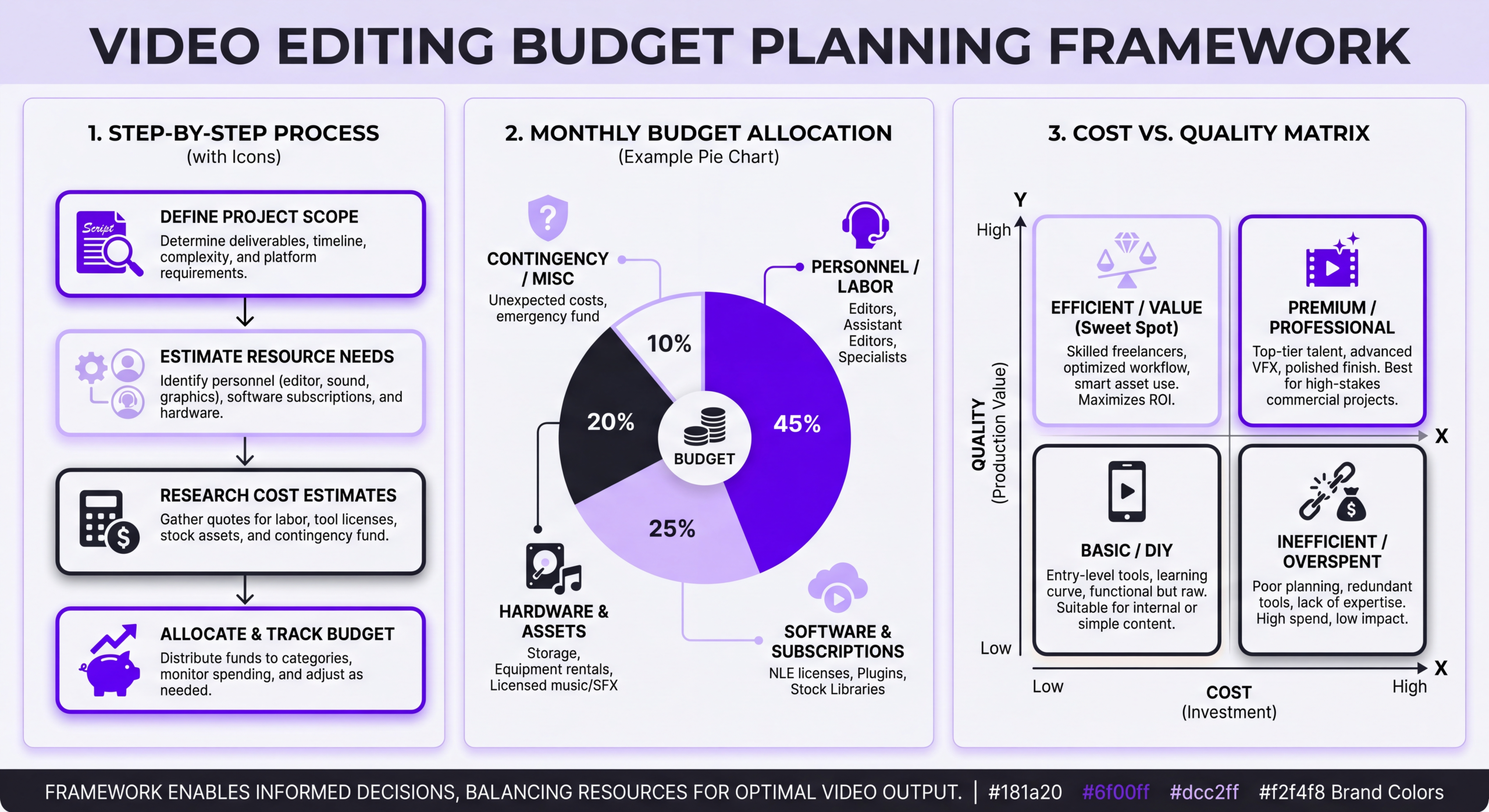
Step 1: Define the Role Video Plays in Your Business
Videos that directly drive revenue (sales pages, paid ads, course modules, sales enablement) justify a much higher per-video spend than videos that build long-term awareness (social posts, behind-the-scenes, team content). Map each planned video to one of three buckets:
- Revenue-producing: Budget 5–15% of the revenue each video reasonably attributes.
- Lead-generating: Budget based on cost-per-lead targets and expected conversion.
- Brand-building: Budget as a percentage of total marketing spend (typically 5–20%).
Step 2: Calculate Total Cost of Ownership (TCO)
Don’t just compare editor A’s rate to editor B’s rate. Total cost includes:
- Direct editing fees
- Your team’s coordination time (valued at loaded hourly rate)
- Asset licensing and software
- Opportunity cost of delayed publishing
- Revision and rework cycles
A “cheap” editor who needs 5 revision rounds and weekly check-ins often costs 2–3x the “expensive” editor who delivers polished work on the first pass.
Step 3: Match Pricing Model to Content Cadence
- Less than 2 videos/month: Per-video freelancer or boutique agency.
- 2–8 videos/month: Monthly retainer with a dedicated team.
- 8+ videos/month or heavy short-form: Retainer or subscription with tiered volume.
- Mixed: daily social + weekly long-form: Hybrid (retainer for long-form, subscription or in-house for social).
Step 4: Build in a Test Budget
Before committing to a 6-month engagement, allocate budget for a 2–4 video pilot. A good partner will happily run a pilot. A partner who insists on a long-term commitment without letting you see their process is one to be cautious about.
Step 5: Re-evaluate Every Quarter
Video performance data from each quarter should feed back into the next quarter’s budget. If your Q1 YouTube videos drove measurable pipeline, scaling Q2’s budget is justified. If Shorts didn’t move the needle, that line item should shrink. Most teams set and forget their editing budget, which is almost always a mistake.
For teams evaluating in-house vs. outsourced models at scale, our enterprise page includes more detailed frameworks including TCO worksheets.
Frequently Asked Questions
What’s the average cost of professional video editing per hour?
In 2026, professional video editors charge between $25 and $200+ per hour depending on experience. Entry-level editors average $25–$45/hour, mid-level $50–$80, senior editors $85–$125, and specialists or creative directors $130–$200+. For most standard business and creator content, $60–$100/hour is the sweet spot balancing quality and cost.
Is it cheaper to hire a freelancer or agency for video editing?
On a direct cost-per-video basis, freelancers are almost always cheaper. But “cheaper” depends on what you include. When you factor in coordination time, revision rounds, and replacement costs when freelancers disappear, agencies often win on total cost of ownership for teams producing more than 4 videos per month. For one-off projects, freelancers typically make more sense. For ongoing content operations, agencies or dedicated teams tend to pay back their premium.
How much should I budget for YouTube video editing monthly?
For a channel publishing weekly (4 videos/month), expect $1,200–$4,000/month for professional editing. Creators under 100K subs typically land at $1,500–$2,500/month. Larger channels investing in production value spend $3,000–$8,000+/month, including motion graphics, custom thumbnails, and strategic editing consulting. Solo creators starting out can begin at $300–$600/video with quality freelancers and scale from there.
What factors increase video editing costs the most?
The biggest cost drivers are, in order: (1) custom motion graphics and VFX, (2) raw footage volume—high source-to-final ratios, (3) number of deliverables (platform cutdowns, language variants), (4) rush turnaround, and (5) revision rounds beyond what’s included. Of these, motion graphics and raw footage volume are the two that quietly double quotes more often than anything else.
Do video editing subscriptions actually save money?
Sometimes—it depends on volume and style fit. Subscriptions typically deliver 30–50% savings per video compared to per-project pricing if you fully use the volume allowance and your content has a consistent style. They lose their advantage when you produce fewer videos than the plan allows, when you need premium creative work that falls outside the plan’s scope, or when revision limits create friction. Run the math on your actual expected volume before committing.
How do international vs US video editing rates compare?
International rates from South Asia, Southeast Asia, and parts of Latin America typically run 40–70% below US rates for comparable skill levels. Eastern Europe is 30–50% cheaper, Western Europe 10–25% cheaper. The tradeoff is communication overhead, time zone alignment, and style calibration—it usually takes 2–3 projects for an overseas team to fully absorb your brand’s aesthetic. For teams prioritizing price over speed of iteration, international can be a strong choice; for teams needing same-day responsiveness, domestic or near-shore typically wins.
What hidden costs should I expect when hiring video editors?
The most common surprises are: music and stock footage licensing ($15–$200+/month or per-use), additional revision rounds beyond what’s included ($50–$150 each), rush fees (25–100% surcharge), platform-specific cutdowns ($50–$250 each), captions and translations ($25–$200 per language), and onboarding fees for new agency engagements ($500–$2,500). Ask specifically about all of these before signing. A good provider will walk through them proactively; a provider who avoids the question is one to watch.
When does it make sense to invest in professional editing?
Professional editing pays off when: (1) your video directly influences revenue or lead generation, (2) you’re publishing consistently (at least weekly), (3) your time is worth more to your business than the hours you’d spend editing yourself, or (4) audience retention and production value measurably affect your channel’s growth. For hobby content, first experiments, or videos with short lifespans, DIY or budget freelancing is often the right call. The switch to professional editing usually makes sense the moment your content strategy becomes a business input rather than a side project.
Ready to Get a Real Number?
This guide gave you ranges. What most people actually need is a number for their content, their volume, and their goals. That’s what our free strategy consultation is built for.
In 30 minutes, we’ll:
- Review your current content calendar and goals
- Benchmark your current spend against what similar teams achieve
- Walk through honest tradeoffs—including when a cheaper option makes more sense for you
- Share a specific monthly budget and pricing model recommendation
No pitch deck, no high-pressure close. Just numbers that actually apply to your situation.
Book Your Free Video Strategy Consultation
Get specific pricing and budget recommendations for your content goals. No sales pitch—just honest guidance.
Want to keep exploring? Check out how we structure pricing on our service pricing page, or see how we help creators, startups, and enterprise teams build sustainable video operations.