










![3D Explainer Video - ScribbleLive.mp4_snapshot_00.12_[2022.03.09_03.14.16]](https://increditors.com/wp-content/uploads/elementor/thumbs/3D-Explainer-Video-ScribbleLive.mp4_snapshot_00.12_2022.03.09_03.14.16-r7wb53mx72rxst3qcqyrfxdmeyzb5r9jbl0wbjujh4.png "3D Explainer Video – ScribbleLive.mp4_snapshot_00.12_[2022.03.09_03.14.16]")
































📋 Table of Contents
- What Are Video Editing Packages? (Direct Answer)
- Types of Video Editing Packages in 2026
- Video Editing Subscription Plans Explained
- Video Content Packages: What's Included
- 2026 Pricing Comparison Table
- Choosing a Video Production Package
- Monthly Video Editing Service vs. Per-Project
- Who Needs What: Package Matching Guide
- How Increditors Packages Work
- FAQ
What Are Video Editing Packages?
A video editing package is a bundled service plan — monthly retainer or per-project — that covers editing, colour grading, captions, and delivery for a fixed price. In 2026, most video editing companies offer three tiers: Starter (~$500–900/month), Growth (~$1,200–2,500/month), and Pro/Unlimited ($3,000+/month). The right package depends on your monthly video volume, turnaround needs, and whether you need raw footage management or platform-optimised cuts.
⚡ TL;DR — Video Editing Packages in 2026
- Starter package: 4–8 short-form videos/month, $500–900, 2–3 day turnaround
- Growth package: 12–20 videos/month + repurposing, $1,200–2,500
- Pro/Unlimited: 30+ pieces, priority turnaround, dedicated editor, $3,000+
- Per-video pricing is best for one-offs; subscriptions cut cost per video by 30–50%
- Start with a trial project to test quality before committing to a retainer
Types of Video Editing Packages in 2026
The market has consolidated around four packaging models. Understanding each helps you avoid overpaying for idle capacity or under-buying and creating a bottleneck.
| Package Model | Best For | Pricing Structure | Typical Turnaround |
|---|---|---|---|
| Monthly Retainer | Brands publishing 8+ videos/month | Fixed monthly fee | 24–72 hours |
| Per-Video | Occasional campaigns | Pay per deliverable | 3–7 business days |
| Unlimited | Agencies, content studios | Flat monthly, queue-based | 1–2 business days per video |
| Credit-Based | Variable monthly volume | Pre-purchased credits | Per-job SLA |
According to Backlinko's 2025 video marketing research, 91% of businesses use video as a marketing tool — up from 61% in 2016. That volume demand is exactly why retainer-based packages have become the default for growth-focused brands.
Video Editing Subscription Plans Explained
A video editing subscription works like a SaaS seat for your editing pipeline: you pay monthly, submit footage via a shared drive or project management tool, and receive edited deliverables on a rolling basis. The model's key advantage is cost predictability.
Research from HubSpot's Marketing Statistics report shows that video content generates 66% more qualified leads per year than text-based content. Brands that lock in a subscription can sustain that output without per-project budgeting cycles.
How most subscription tiers break down:
- Starter: Up to 8 videos/month (30–90 sec each), basic colour grade, captions, 1 revision round
- Growth: Up to 20 videos/month, multi-platform cuts (16:9, 9:16, 1:1), 2 revision rounds, motion graphics
- Pro/Unlimited: Unlimited submissions, dedicated editor, same-day rush available, custom templates
Learn how to evaluate capacity on a subscription in our guide to scaling your video output.
Video Content Packages: What's Included in 2026
A well-structured video content package does more than cut footage. Modern packages now bundle deliverables across every stage of post-production:
| Deliverable | Starter | Growth | Pro |
|---|---|---|---|
| Video editing & assembly | ✓ | ✓ | ✓ |
| Colour grading | Basic | Advanced | Cinema-grade |
| Captions / subtitles | Auto-caption | Reviewed captions | Multi-language |
| Multi-format cuts | — | 3 formats | All platforms |
| Motion graphics / titles | Templates | Custom | Full brand kit |
| Revisions | 1 round | 2 rounds | Unlimited |
| Dedicated editor | — | — | ✓ |
| Rush (same-day) delivery | Add-on | Add-on | Included |
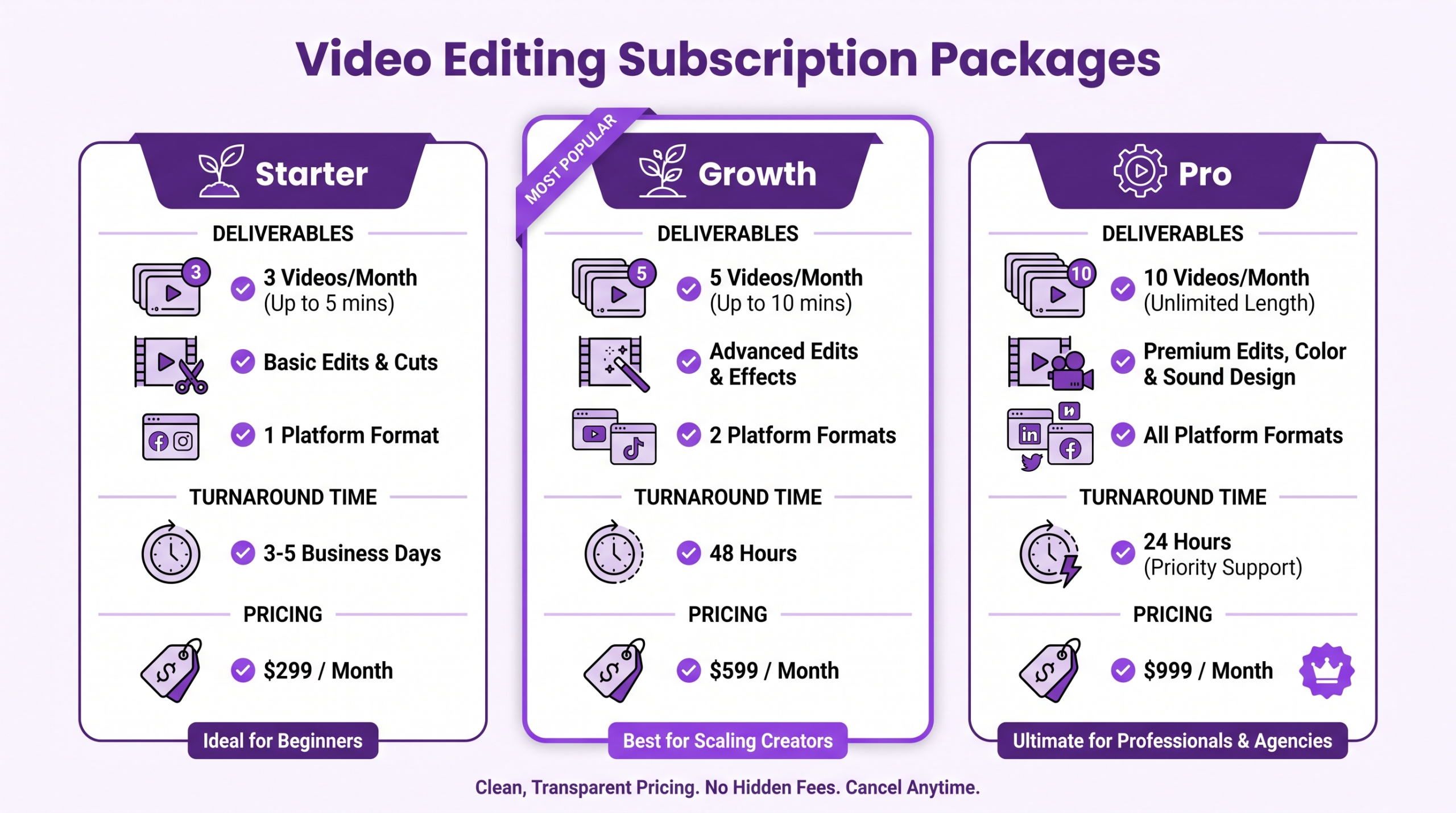
2026 Video Editing Packages: Pricing Comparison
Prices have stabilised post-AI-disruption. Agencies that blend human expertise with AI-assisted workflows now offer better cost-per-finished-minute ratios. See our cost-per-finished-minute calculator for a breakdown by video type.
| Tier | Monthly Price (USD) | Videos Included | Avg. Cost/Video | Turnaround |
|---|---|---|---|---|
| Starter | $500–$900 | 4–8 | $90–$150 | 48–72 hrs |
| Growth | $1,200–$2,500 | 12–20 | $65–$110 | 24–48 hrs |
| Pro / Unlimited | $3,000–$5,000 | 30+ | $50–$85 | Same day–24 hrs |
| Enterprise | Custom | Unlimited | Negotiated | SLA-based |
Data synthesised from current agency pricing across North America and the EU (Q3 2026). Prices exclude stock music licensing.
What to Look for in a Video Production Package
Not all video production packages are equal. Before signing, evaluate five factors:
- Scope of deliverables — Does the package cover multi-format exports (YouTube 16:9, Reels 9:16, LinkedIn 1:1)? Or just one format?
- Revision policy — Unlimited revisions sound good; in practice, “unlimited” often means unlimited small tweaks, not structural re-edits. Clarify upfront.
- Editor continuity — Will the same editor learn your brand voice, or is it a rotating pool? Consistent editors cut revision cycles by ~40%.
- Approval workflow — Does the agency use a proper video editing services platform (Frame.io, Vimeo Review) or just email with attached files?
- Turnaround guarantees — SLA-backed turnarounds matter if you're running time-sensitive campaigns. Get the guarantee in writing.
According to Neil Patel's video marketing research, companies that publish video consistently (4+ pieces/month) see 41% more web traffic than sporadic publishers. That consistency is only achievable with a reliable package partner.
Monthly Video Editing Service vs. Per-Project: Which Wins?
A monthly video editing service subscription almost always wins on economics once you're producing more than six videos per month. Here's why:
| Factor | Monthly Subscription | Per-Project |
|---|---|---|
| Cost at 10 videos/month | $1,200–$2,000 | $2,000–$4,000 |
| Editor brand familiarity | Builds over time | Reset each project |
| Turnaround speed | Guaranteed SLA | Varies |
| Scalability | Upgrade/downgrade monthly | Requires re-negotiation |
| Budget predictability | Fixed | Variable |
Sprout Social's video statistics confirm that brands posting video daily on social platforms see 2–3× higher engagement than weekly publishers. A monthly service is the operational backbone that makes daily publishing sustainable.
If you're unsure whether a subscription fits your workflow, our trial project option lets you test the full workflow — turnaround, communication, quality — before committing.
Who Needs What: Package Matching Guide
| Your Situation | Recommended Package | Why |
|---|---|---|
| Solopreneur, 1–2 videos/month | Per-video or Starter | Low volume doesn't justify retainer |
| SaaS brand, 8–15 videos/month | Growth | Multi-format + consistent turnaround |
| Agency managing 3+ client channels | Pro / Unlimited | Unlimited queue, dedicated editors |
| E-commerce brand, seasonal spikes | Credit-based or flex retainer | Scale up Q4 without a permanent upgrade |
| B2B company, LinkedIn + webinars | Growth | Webinar clips, LinkedIn cuts, repurposing all in one |
For B2B-specific strategy, read our breakdown of how to scale video output for B2B brands.
How Increditors Video Editing Packages Work
As a video editing company built for brand-scale content, Increditors structures packages around your editorial calendar — not arbitrary video counts. Here's what sets our approach apart:
- Brief-to-delivery workflow: Submit footage + creative brief via a shared Frame.io workspace; we deliver via the same link — no email chains.
- Brand kit onboarding: Your colour palette, fonts, intro/outro, and music preferences are locked in on session 1. Every video after that is on-brand by default.
- Predictable turnarounds: We publish our SLAs publicly. Growth clients receive first cut within 48 hours. Pro clients within 24 hours.
- Flexible volume: Roll over unused videos within the same billing month, or top up with add-on credits during busy launches.
- Transparent pricing: No hidden fees for captions, format exports, or platform-specific optimisation — it's all in the package.
→ Start with a free trial project to experience the workflow before committing to a monthly plan.
Questions about what's right for your volume? Meet the Increditors team or book a discovery call.
For a broader view of video's ROI in 2026, see Oberlo's video marketing statistics — the data on video's conversion lift makes the case for any C-suite budget conversation.
FAQ — Video Editing Packages
What does a video editing package include?
Most packages include: editing and assembly, colour grading, sound mix, captions, and delivery in your required formats. Higher tiers add motion graphics, multi-platform exports, dedicated editors, and unlimited revisions.
How much does a video production package cost per month?
In 2026, video production packages range from $500/month (4–8 short videos) to $5,000+/month for unlimited volumes with dedicated editors. The sweet spot for growth-stage brands is the $1,200–$2,500/month Growth tier.
Is a video editing subscription worth it?
Yes — if you publish six or more videos per month. A video editing subscription reduces cost-per-video by 30–50% compared to per-project pricing and eliminates re-onboarding overhead with every job. The break-even point is typically 5–7 videos/month depending on duration and complexity.
What are video content packages vs. video production packages?
Video content packages focus on post-production outputs: editing, captions, graphics, and repurposing existing footage. Video production packages often include pre-production and shoot coordination. If you're filming in-house and need editing only, a content package is more cost-effective.
Can I change my package tier mid-month?
Most subscription providers — including Increditors — allow tier upgrades immediately and downgrades at the next billing cycle. This flexibility is a key advantage of the monthly model over per-project contracts.
What is a monthly video editing service?
A monthly video editing service is a subscription where you pay a fixed recurring fee for a set volume of edited videos. You submit raw footage; the agency returns polished deliverables. It's the operational equivalent of having an in-house editor without the salary, software costs, and management overhead.
How long does it take to get a video edited?
On a retainer: 24–72 hours for standard edits; same-day for Pro/Unlimited tier clients. Per-project: 3–7 business days. Rush delivery is available as an add-on on most plans.