










![3D Explainer Video - ScribbleLive.mp4_snapshot_00.12_[2022.03.09_03.14.16]](https://increditors.com/wp-content/uploads/elementor/thumbs/3D-Explainer-Video-ScribbleLive.mp4_snapshot_00.12_2022.03.09_03.14.16-r7wb53mx72rxst3qcqyrfxdmeyzb5r9jbl0wbjujh4.png "3D Explainer Video – ScribbleLive.mp4_snapshot_00.12_[2022.03.09_03.14.16]")
































Your event was incredible. The speakers delivered, the crowd was energized, sponsors were thrilled, and the networking was exactly what attendees hoped for. Now it’s over — and you have 6 hours of raw footage sitting on a hard drive doing absolutely nothing.
This is where most event organizers drop the ball. They spend $50,000–$500,000 producing a conference, capture thousands of minutes of footage, and then either never edit it or throw together a forgettable 30-second clip that gets 200 views on LinkedIn.
That footage is a goldmine — if you know how to edit it into content that actually drives registrations, sponsorship renewals, and brand authority. Professional video editing transforms raw event footage into strategic assets that sell next year’s event, close sponsorship deals, and build your brand for months after the last attendee leaves.
Here’s exactly how to turn your conference footage into recap videos that convert.
What’s in This Guide
- Why Event Recap Videos Matter More Than You Think
- 7 Types of Event Videos You Should Be Creating
- Anatomy of a High-Converting Recap Video
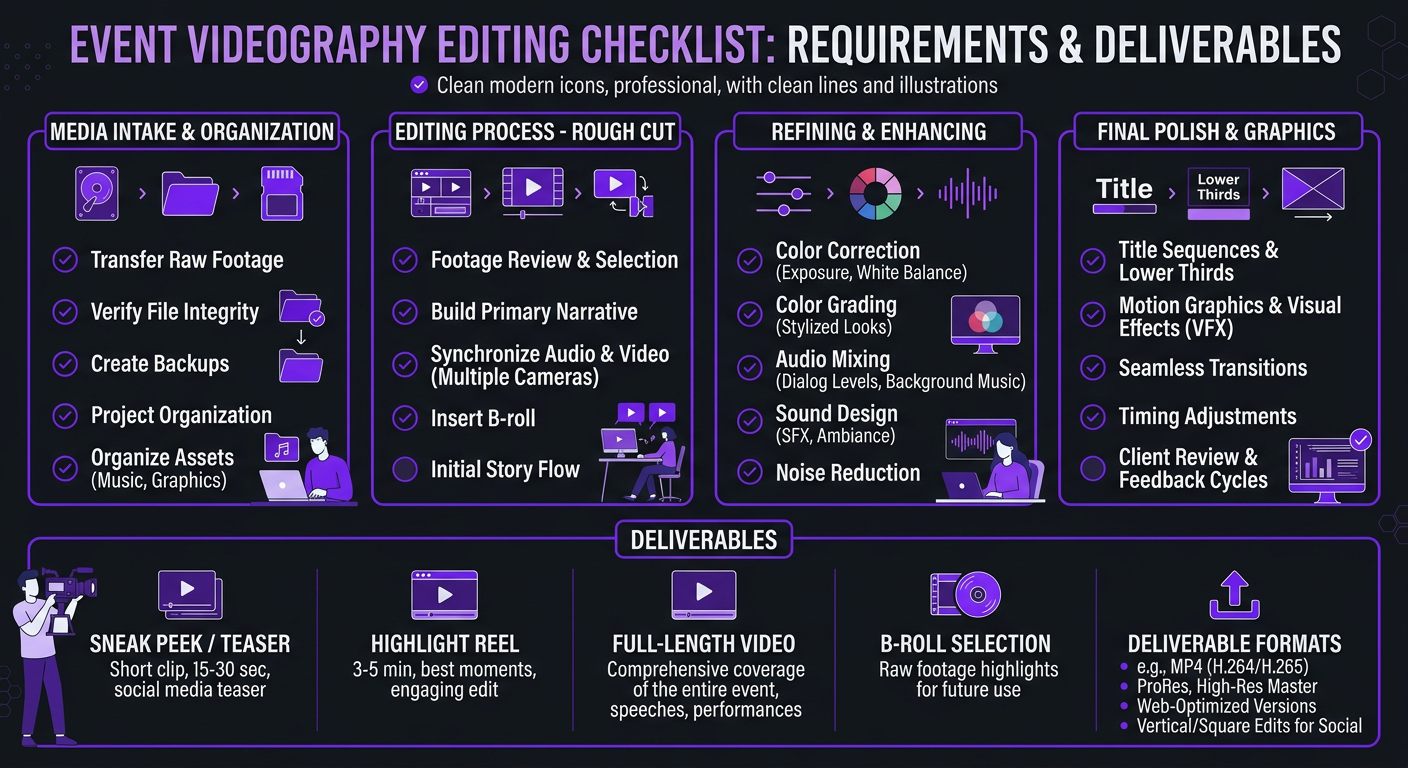
- The Event Video Editing Process: From Raw to Revenue
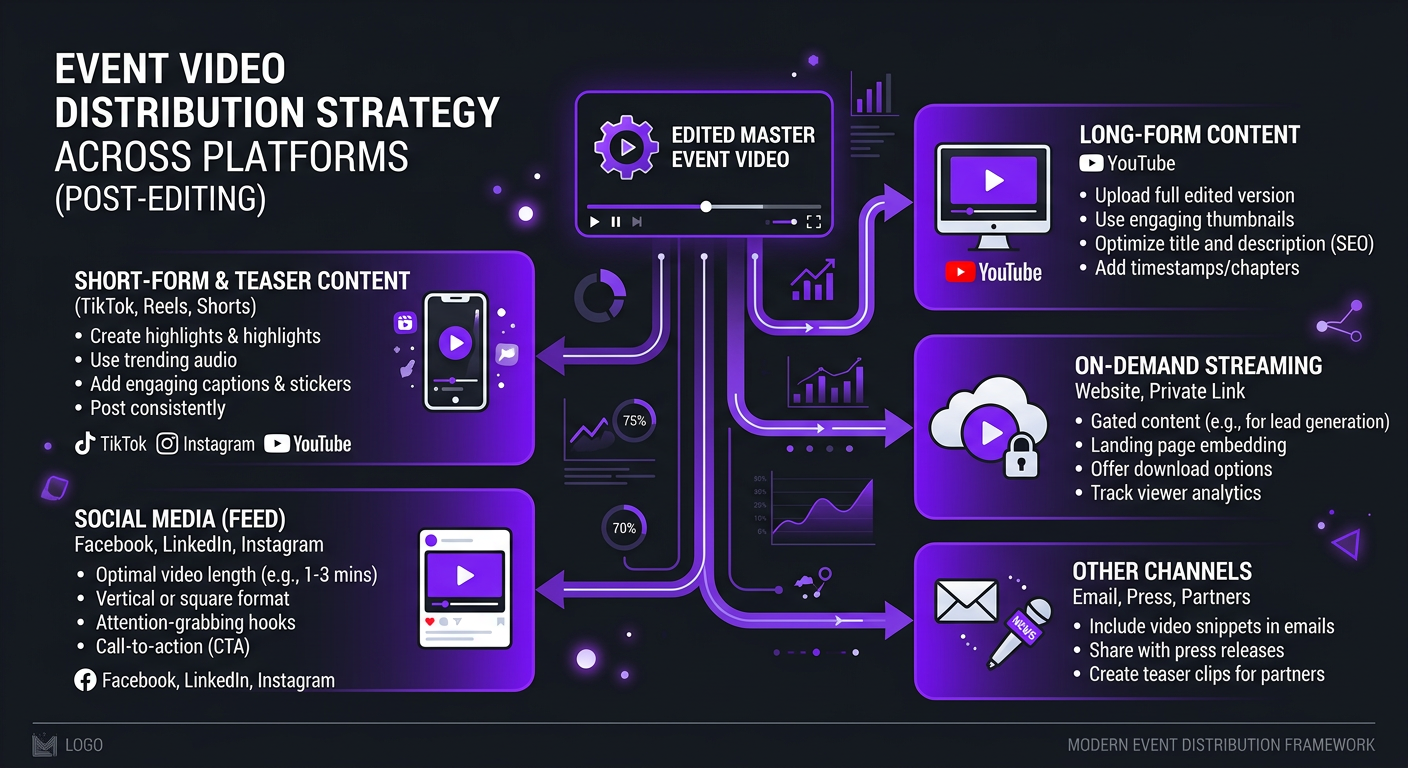
- How to Repurpose One Event Into 30+ Pieces of Content
- Event Video Editing Costs: What to Expect
- 5 Mistakes That Kill Event Videos
- Case Studies: Event Videos That Drove Real Results
- DIY vs Professional Event Video Editing
- FAQ
Why Event Recap Videos Matter More Than You Think
A well-edited event recap video isn’t just a nice souvenir. It’s one of the hardest-working marketing assets in your arsenal — and most organizations massively undervalue it.
They Sell Next Year’s Event
Nothing convinces someone to attend a conference like seeing what they missed. A two-minute highlight reel that captures the energy, the caliber of speakers, the quality of networking, and the production value does more selling than any email campaign or landing page copy. Event organizers who use professional recap videos in their marketing consistently report 20-40% higher registration rates for subsequent events.
They Close Sponsorship Deals
Sponsors want proof that their investment delivered visibility. A recap video that strategically features sponsor branding, booth traffic, and audience engagement becomes a powerful renewal tool. Instead of sending sponsors a PDF with attendance numbers, you send them a video where they can see their brand in front of an engaged audience.
They Build Authority for Months
A single two-day conference can generate enough video content to fuel your social media, email marketing, and website for 3-6 months. Speaker clips become LinkedIn thought leadership. Attendee reactions become testimonials. Panel discussions become podcast episodes. The event lasts two days — the content lasts all year.
They Create FOMO
The psychological power of a great recap video is that it makes people who didn’t attend feel like they missed something important. That feeling — “I need to be there next time” — is worth more than any discount code or early-bird offer.
7 Types of Event Videos You Should Be Creating
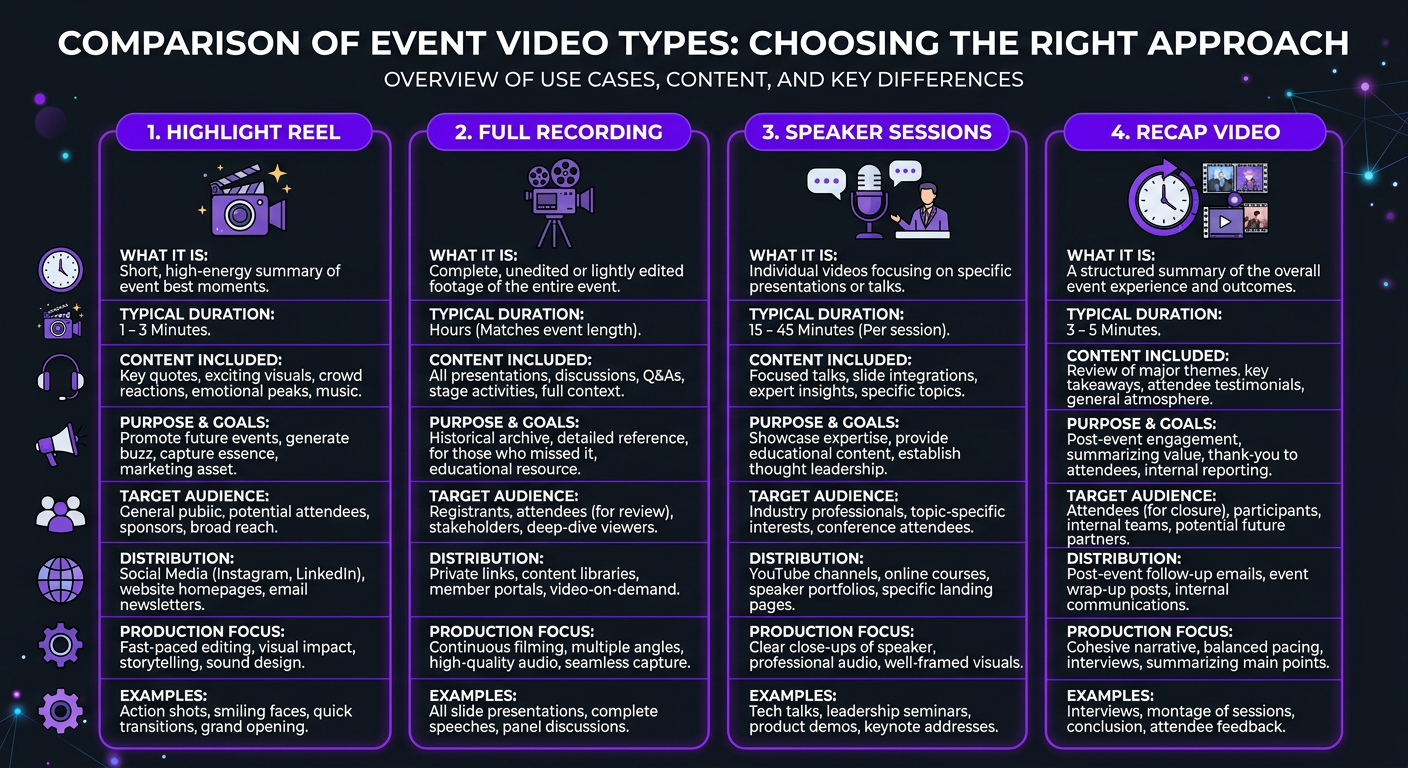
Most event organizers think “recap video” and picture one thing: a highlight reel set to upbeat music. That’s one option — and it’s the least strategic one. Here are the seven video types that maximize your event footage ROI:
| Video Type | Length | Purpose | Best Platform |
|---|---|---|---|
| Highlight reel | 2-4 min | Emotional recap, sell next event | Website, YouTube, email |
| Sizzle reel | 30-60 sec | High-energy teaser for ads/social | Instagram, LinkedIn, paid ads |
| Speaker highlight clips | 60-90 sec | Showcase expertise, build speaker brand | LinkedIn, Twitter/X, YouTube Shorts |
| Attendee testimonial clips | 30-60 sec | Social proof for ticket sales | Website, sales pages, email |
| Sponsor recap | 1-2 min | Showcase sponsor ROI, drive renewals | Direct to sponsors, sponsor decks |
| Full session recordings | 20-60 min | Gated content, virtual ticket upsell | Website (gated), YouTube |
| Social micro-clips | 15-30 sec | Drip content over weeks/months | TikTok, Reels, Shorts |
The smartest event organizers plan for all seven before the event even starts. They brief their videographers on what to capture, set up multi-camera rigs for keynotes, and have an editing team ready to start cutting content the moment footage lands.
When we worked with Trade with Pat on their trading education events, we didn’t just create one recap video. We produced a full content package: a 3-minute highlight reel for their sales page, individual speaker clips for LinkedIn, attendee testimonials for their social media channels, and micro-clips that fueled their content calendar for three months. One event, 25+ pieces of edited content — each one strategically designed to serve a specific marketing goal.
Anatomy of a High-Converting Recap Video
A recap video that converts — whether “conversion” means ticket sales, sponsorship renewals, or brand authority — follows a specific structure. It’s not random B-roll over music. It’s engineered storytelling.
The First 3 Seconds: The Hook
Open with your single most visually striking moment. A packed auditorium erupting in applause. A speaker delivering a mic-drop line. A dramatic wide shot of your venue. You have three seconds before someone scrolls past on LinkedIn — make them count.
Seconds 3-15: Establish Scale and Energy
Quick cuts showing the scope of the event: crowd shots, venue exteriors, registration lines, networking areas buzzing with conversation. The editing pace should be fast — 1-2 second cuts — with music building energy. The goal is to communicate “this was big, this was important, you should have been here.”
Seconds 15-60: The Substance
Slow down. Feature 2-3 powerful speaker sound bites (5-10 seconds each), interspersed with reaction shots and relevant B-roll. This is where you showcase the intellectual value of the event. Choose quotes that are universally compelling — not inside-baseball jargon that only attendees would understand.
Seconds 60-120: The Community
Show the human side: networking conversations, laughing groups, hands-on workshops, one-on-one mentoring moments. This section sells the experience, not just the content. People attend conferences for connections as much as for education.
Seconds 120-180: The Crescendo
Build to a climax with your best remaining footage, increasing the editing pace again. End with a powerful final moment — a standing ovation, a closing keynote quote, or a drone shot pulling away from the venue. Then: your call to action. “Join us next year.” Registration link. Date and location.
The Sound Design Difference
Amateur event videos rely entirely on one music track laid over footage. Professional event video editing layers ambient sound from the venue — applause, crowd murmur, speaker audio — underneath the music track. This creates depth and authenticity that a music-only approach can’t match. The viewer doesn’t just see the event; they feel like they’re there.
Audio mixing for event footage is particularly challenging because on-site recordings often include echo, microphone bleed, HVAC noise, and inconsistent levels across different rooms and stages. A skilled editor with proper color grading and audio tools can clean this up dramatically — but it’s one of the main reasons DIY event editing tends to look and sound amateur.
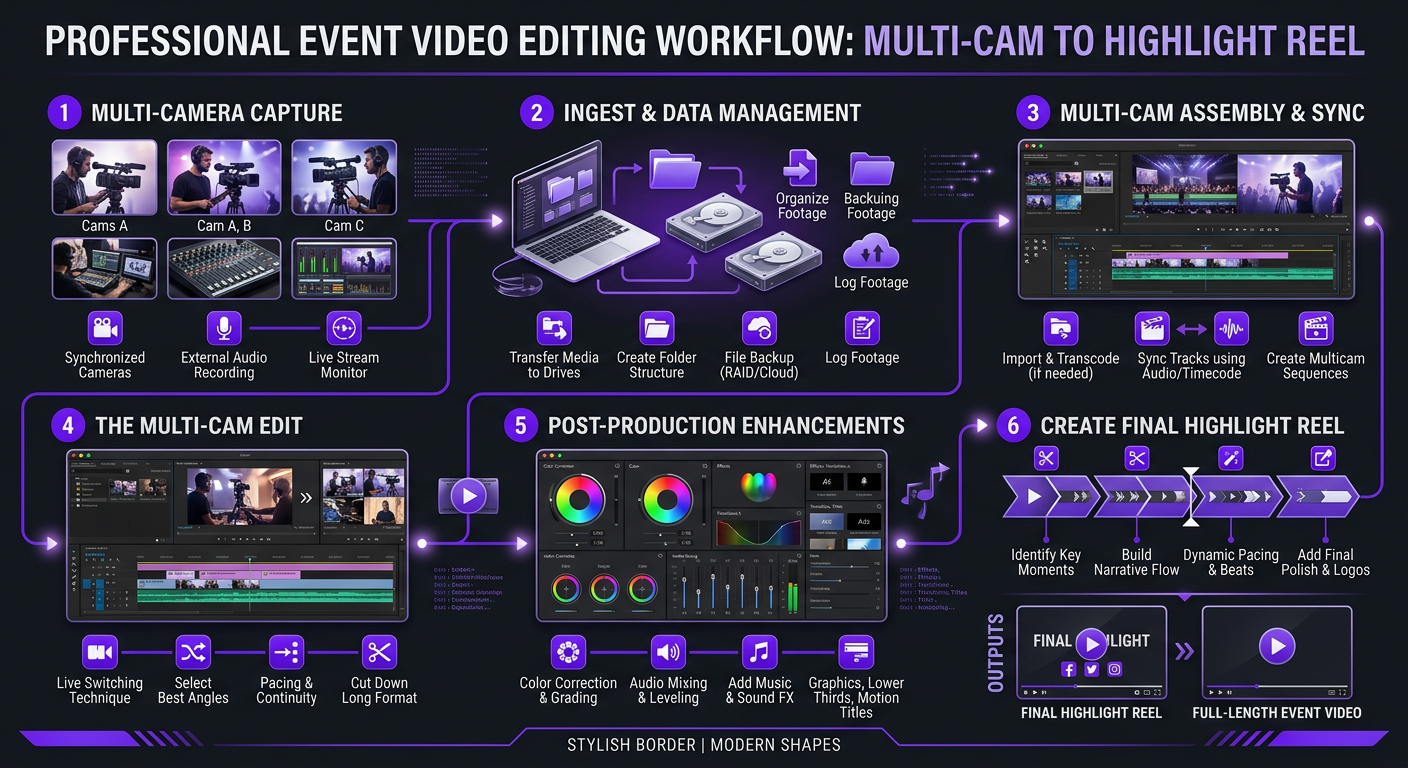
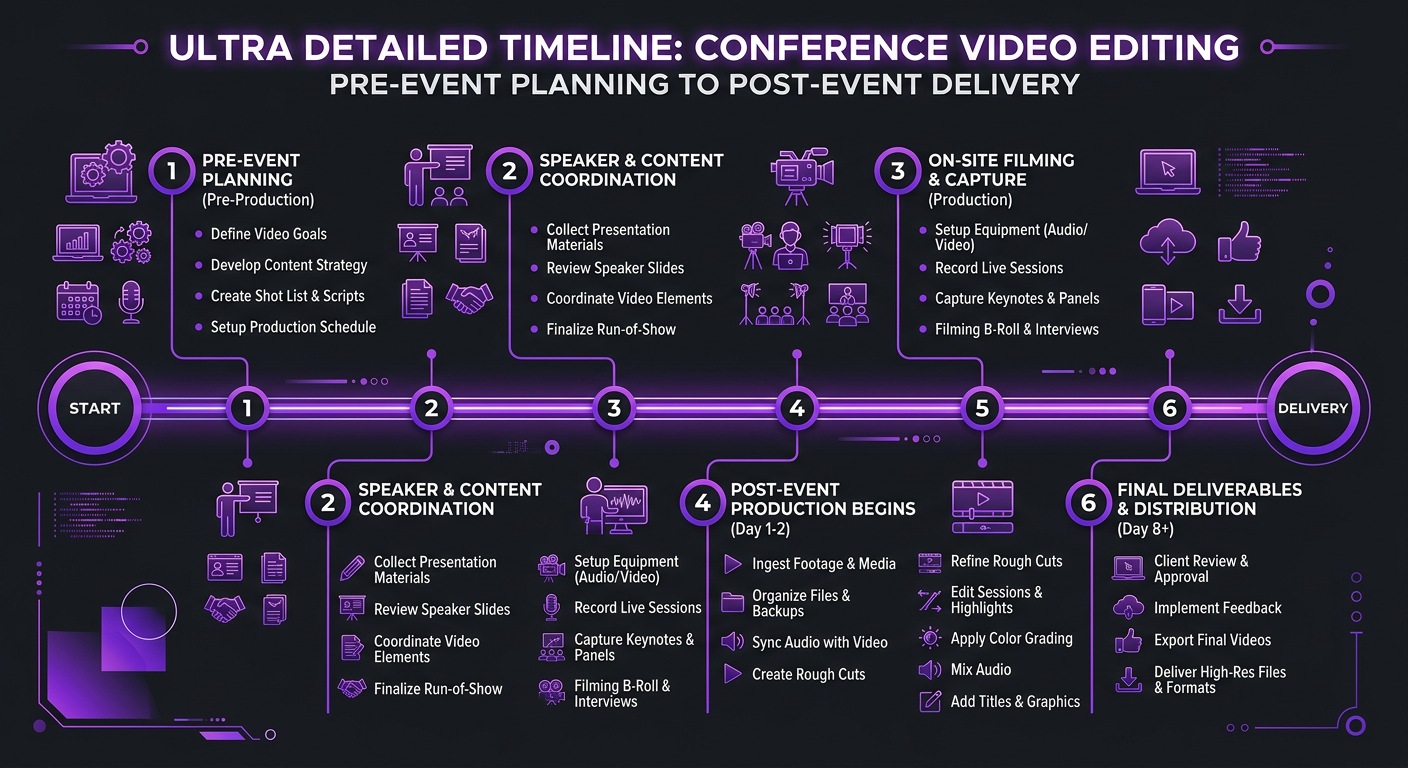
The Event Video Editing Process: From Raw to Revenue
Here’s what actually happens when raw conference footage goes through a professional editing pipeline — and why it takes more than drag-and-drop in iMovie.
Step 1: Footage Ingest and Organization (2-4 hours)
A two-day conference with three stages, a lobby camera, and a roaming videographer generates 500GB–2TB of raw footage. The first job is organizing it: syncing timecodes, labeling cameras, cataloging moments by type (speaker, crowd, B-roll, interviews), and identifying the best takes. Without this step, you’re hunting through hours of footage blind.
Step 2: Selects and Story Mapping (3-5 hours)
Before any cutting happens, the editor (or editorial team) creates a story map — a document or timeline identifying which moments serve which video type. The best crowd reaction goes in the highlight reel. The strongest speaker quotes go in speaker clips. Attendee testimonials get flagged for testimonial videos. This upfront planning prevents the “we forgot to include that amazing moment” problem.
Step 3: Rough Cut Assembly (4-8 hours per video)
The highlight reel gets assembled first, usually as a 4-5 minute rough cut that will be tightened to 2-3 minutes. Pacing, music selection, and narrative flow get established here. Speaker clips and social cuts are assembled in parallel if you’re working with a team.
Step 4: Fine Cut and Sound Design (3-6 hours per video)
This is where the magic happens. Pacing gets refined to the frame. Music cues align with visual beats. Ambient audio gets layered in. Color correction ensures consistent look across different cameras and lighting conditions. Lower thirds, logos, and text overlays get added. Transitions get polished.
Step 5: Review, Revisions, and Delivery (2-4 hours)
The client reviews and provides feedback. Typically 1-2 revision rounds for event content. Final exports happen in multiple formats: landscape for YouTube and website, square for LinkedIn and Instagram feed, vertical for Stories and Reels. Each format isn’t just cropped — it’s re-framed to ensure key visual elements remain in frame.
| Editing Phase | Time Investment | What Happens |
|---|---|---|
| Ingest & organization | 2-4 hours | Sync, label, catalog all footage |
| Selects & story mapping | 3-5 hours | Identify best moments, plan each video |
| Rough cut assembly | 4-8 hours/video | First assembly with pacing and music |
| Fine cut & sound design | 3-6 hours/video | Polish pacing, audio, color, graphics |
| Review & delivery | 2-4 hours | Client feedback, revisions, multi-format export |
| Total (highlight reel) | 14-27 hours | Full pipeline for one polished recap video |
This is why professional event video editing costs what it does. A 3-minute highlight reel represents 15-25+ hours of skilled editorial work — not including the capture itself. The editor isn’t just cutting footage; they’re crafting a narrative from chaotic, multi-source material shot across multiple days, rooms, and lighting conditions.
Have Event Footage That Needs Professional Editinga
We turn raw conference footage into strategic content packages — highlight reels, speaker clips, social cuts, and more. Fast turnaround, no hassle.
How to Repurpose One Event Into 30+ Pieces of Content
The biggest ROI from event video editing doesn’t come from one hero recap video — it comes from the content multiplication strategy. Here’s a real framework we use with clients:
The Content Multiplication Framework
From one 2-day conference, you can create:
- 1 hero highlight reel (2-3 minutes) — website, YouTube, email campaigns
- 1 sizzle reel (30-60 seconds) — paid social ads, LinkedIn
- 5-8 speaker highlight clips (60-90 seconds each) — LinkedIn, Twitter/X
- 3-5 attendee testimonial clips (30-60 seconds each) — website, sales pages
- 1 sponsor recap reel (1-2 minutes) — direct to sponsors
- 10-15 social micro-clips (15-30 seconds each) — TikTok, Reels, Shorts
- 3-5 full session recordings (edited, branded) — gated content, virtual tickets
- 1 behind-the-scenes video (2-3 minutes) — brand storytelling
That’s 25-38 pieces of video content from a single event. If you release one piece per week, that’s 6-9 months of content from two days of footage.
The Drip Strategy
Don’t dump everything at once. The most effective approach is a strategic drip:
- Day of / Day after: Same-day highlight reel (60-90 seconds, fast turnaround)
- Week 1: Full highlight reel + best speaker clip
- Weeks 2-4: One speaker clip per week + social micro-clips
- Months 2-3: Testimonial clips + behind-the-scenes content
- Months 4-6: Throwback content + “early bird” messaging for next event
This keeps your event top-of-mind long after it’s over and creates a natural pipeline into marketing for your next event.
Event Video Editing Costs: What to Expect
Event video editing is a different beast from standard YouTube or social media editing. The footage volume is higher, the source material is more varied, and the expectations around turnaround are often tighter. Here’s what the market looks like in 2026:
| Deliverable | Budget Range | Premium Range | What You Get |
|---|---|---|---|
| Highlight reel (2-4 min) | $500–$1,500 | $1,500–$3,000 | Music, color grade, basic graphics vs. custom motion graphics, sound design |
| Sizzle reel (30-60 sec) | $200–$500 | $500–$1,200 | Quick cut vs. cinematic, ad-ready edit |
| Speaker clips (per clip) | $75–$200 | $200–$500 | Basic trim vs. branded with lower thirds and B-roll |
| Full session edit (per session) | $300–$800 | $800–$2,000 | Clean cut vs. multi-cam, chapters, graphics |
| Social micro-clips (batch of 10) | $300–$800 | $800–$1,500 | Basic captions vs. branded templates, hooks |
| Full content package | $2,000–$5,000 | $5,000–$15,000 | Everything above, bundled and strategic |
For context, if your event budget is $50,000, spending $3,000–$5,000 on professional video editing (6-10% of total budget) is an investment that extends the value of that $50,000 for months. Many event organizers spend 15-20% of their budget on AV and production but less than 2% on post-production editing — a massive strategic oversight.
At Increditors, we offer event video editing both as one-off packages and as part of monthly retainers. Clients who run quarterly events often find that a retainer model — where we handle all their ongoing content plus event recaps — is significantly more cost-effective than project-based pricing.
5 Mistakes That Kill Event Videos
1. Editing the Video Like a Documentary Instead of Marketing
Your recap video isn’t a chronological record of the event. It’s a marketing asset. Nobody outside your organization cares about the opening remarks or the lunch break. Lead with energy, feature highlights, and cut everything that doesn’t serve the conversion goal.
2. Using One Music Track on Loop
The most common amateur tell in event videos is a single upbeat track playing start to finish with no variation. Professional editing uses music dynamics — building energy in crowd sections, pulling back for speaker moments, creating emotional crescendos. The music should support the narrative, not wallpaper over it.
3. Ignoring Audio Quality
Event audio is notoriously difficult: room echo, crowd noise, different microphone setups across stages. If you don’t invest in proper audio cleanup in post-production, your video will sound amateur no matter how good the footage looks. This is one area where professional post-production tools make a dramatic difference.
4. Making It Too Long
The number one rule of event recap videos: shorter is almost always better. A tight 2-minute video that leaves viewers wanting more will outperform a 7-minute video that loses them at minute 3. For social media specifically, 60-90 seconds is the sweet spot. Save the longer cuts for gated content or sponsor deliverables.
5. Not Planning for Video Before the Event
The biggest mistake happens before the event even starts. If you don’t brief your videographers on what to capture — specific angles, must-get shots, audio requirements — you’ll end up with gaps in your footage that no editor can fix. Create a shot list. Assign camera positions to specific moments. Brief the team on the final video goals so they can capture accordingly.
Case Studies: Event Videos That Drove Real Results
Blue Zones Health: Conference Content That Fueled a Year of Marketing
Blue Zones Health, a wellness and longevity brand, hosted a two-day health summit with keynote speakers, panel discussions, and interactive workshops. They came to us with 12 hours of multi-camera footage and a goal: extend the impact of their event well beyond the two days.
We produced a comprehensive content package:
- A 3-minute cinematic highlight reel for their website and YouTube
- 8 individual speaker highlight clips (60-90 seconds each) for LinkedIn
- 15 social micro-clips for Instagram and TikTok
- 4 attendee testimonial videos for their registration page
- A 90-second sponsor recap for renewal conversations
The result: their event content generated more engagement over the following 6 months than all their other marketing content combined. The highlight reel became the centerpiece of their next event’s registration page, and early-bird registrations increased by 35% compared to the previous year — when they had no video from the event at all.
TuMeke: Tech Conference Speaker Clips That Generated Leads
TuMeke, an AI safety company, needed to establish thought leadership in a competitive space. We edited their founder’s conference speaking appearances into a series of polished clips optimized for LinkedIn. Each clip featured a single compelling insight with branded lower thirds, clean audio, and a clear call-to-action.
The approach worked because conference speaking footage carries inherent authority — it’s not just someone talking to a camera in their office; it’s someone presenting to a room full of industry professionals. We leveraged that perception through editing choices: showing audience reactions, including wide shots of the full venue, and tightening the speaker’s delivery to remove filler words and pauses. The clips consistently outperformed their standard social content by 3-4x in engagement and directly generated inbound demo requests from LinkedIn viewers.
For brands building authority through events, this is one of the highest-ROI applications of professional video editing. The footage already exists — the editing is what transforms it from a “nice memory” into a lead generation tool. Whether you’re a startup or an established enterprise, event footage is an underused asset.
DIY vs Professional Event Video Editing
Can you edit event videos yourself Technically, yes. Should you Let’s compare.
| Factor | DIY Editing | Professional Editing |
|---|---|---|
| Time investment | 20-40+ hours per video | 0 hours (your time) |
| Multi-camera sync | Manual, error-prone | Automated with pro tools |
| Audio cleanup | Basic noise reduction | Professional mixing, EQ, room tone matching |
| Color consistency | Inconsistent across cameras | Matched and graded for cinematic look |
| Motion graphics | Basic templates | Custom branded elements |
| Multi-format exports | Manual re-editing per format | Strategic reframing for each platform |
| Turnaround | 2-4 weeks (realistically) | 3-7 business days |
| Cost | “Free” (but 20-40 hours of your time) | $1,500–$10,000 per package |
The real cost of DIY isn’t the editing itself — it’s the delay. Events have a marketing half-life. The energy and excitement peak during and immediately after the event. Every week that passes without content, the impact diminishes. If your DIY recap video goes live 6 weeks after the event, you’ve missed the window where it drives the most engagement.
Professional editing teams like Increditors can deliver same-day highlight reels during the event and full content packages within a week. That speed is what turns event footage from a nice-to-have into a strategic weapon.
Turn Your Next Event Into a Content Machine
From same-day highlights to full content packages, we make your event footage work harder and longer. Let’s plan your post-production strategy before your next event.
Frequently Asked Questions
Event recap video editing typically costs $500–$3,000 for a single highlight reel (2-5 minutes), depending on footage volume, complexity, and turnaround time. Full multi-day conference packages with speaker clips, social cuts, and a long-form recap run $3,000–$10,000+. Monthly retainers with agencies like Increditors start at $2,500/month for ongoing event content. See our pricing page for current rates.
The ideal event recap video is 2-4 minutes for social media and email campaigns, capturing the energy and key moments without losing viewer attention. For internal stakeholders or sponsors, a 5-10 minute version with more detail performs well. Speaker highlight clips should be 60-90 seconds for maximum shareability on LinkedIn and other platforms.
Same-day highlight reels (60-90 seconds) are possible with a dedicated editing team working remotely during the event. Full recap videos typically take 3-7 business days. Rush delivery within 24-48 hours is available from agencies with dedicated teams, usually at a 25-50% premium.
Essential footage includes: venue establishing shots, crowd reactions and networking moments, speaker highlights (key quotes and audience engagement), sponsor signage, behind-the-scenes setup, attendee testimonials, and closing moments. Multi-camera coverage of keynotes significantly improves quality. Create a shot list before the event and brief your videographers on the final deliverables.
Absolutely — and they should be. A single conference generates enough content for 3-6 months: highlight reels for social and email, teaser clips for ads, individual speaker highlights for LinkedIn, attendee testimonials for sales pages, behind-the-scenes content for brand storytelling, and full session recordings as gated content.
You need both. A videographer captures footage on-site; a video editor transforms it into polished, strategic content. Many organizers hire local videographers for capture and send footage to a professional editing team like Increditors for post-production — this is often more cost-effective than hiring a full production crew and ensures the editing quality matches your brand standards.
Let’s Make Your Event Footage Work Harder
Whether your event is next week or last month, we can help turn that footage into content that drives registrations, sponsorships, and brand authority.
Pricing and timelines in this article reflect 2026 market rates based on industry research and our direct experience producing event content for conferences, summits, and corporate events. Actual costs vary by footage volume, complexity, and turnaround requirements. For current Increditors pricing, visit our pricing page or schedule a call.