










![3D Explainer Video - ScribbleLive.mp4_snapshot_00.12_[2022.03.09_03.14.16]](https://increditors.com/wp-content/uploads/elementor/thumbs/3D-Explainer-Video-ScribbleLive.mp4_snapshot_00.12_2022.03.09_03.14.16-r7wb53mx72rxst3qcqyrfxdmeyzb5r9jbl0wbjujh4.png "3D Explainer Video – ScribbleLive.mp4_snapshot_00.12_[2022.03.09_03.14.16]")
































Gaming is the largest content category on YouTube, with over 100 billion hours watched annually. But the barrier to entry has never been lower — which means the bar for quality has never been higher.
The creators pulling millions of views aren’t just better gamers. They have better editing. Watch any top gaming channel — MrBeast Gaming, Technoblade’s legacy content, TypicalGamer, SypherPK — and you’ll notice the editing carries as much weight as the gameplay itself. Dynamic zooms, perfectly timed cuts, sound effects that hit exactly right, transitions that feel like part of the game.
Whether you make montages, commentary videos, esports breakdowns, or gaming essays, this guide covers everything about video editing for gaming content — the styles that work, the techniques that keep viewers watching, what it costs, and when it’s time to outsource.
What’s in This Guide
- Why Editing Separates Top Gaming Channels from the Rest
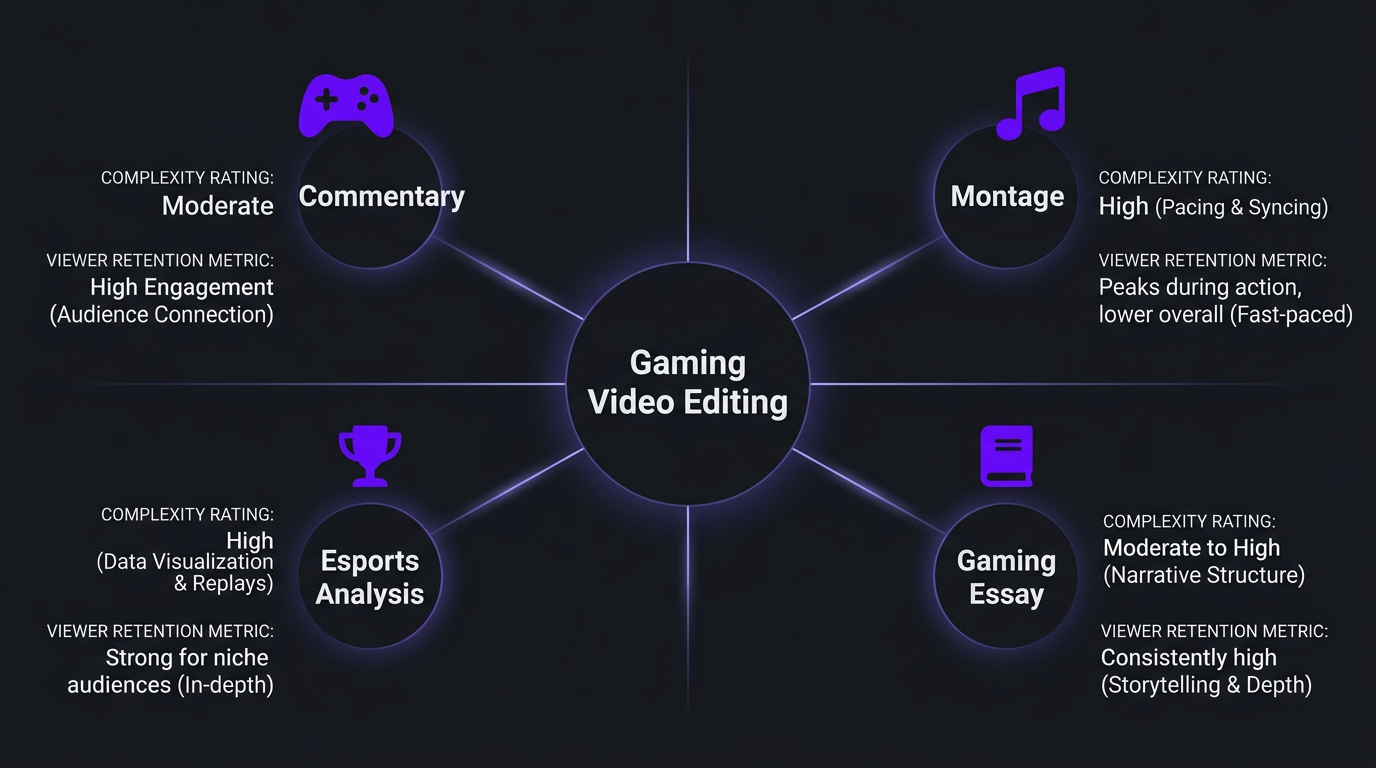
- Gaming Video Editing Styles Explained
- The Art of the Gaming Montage
- Essential Editing Techniques for Gaming Content
- The Gaming Creator Editing Workflow
- Best Software for Gaming Video Editing
- What Gaming Video Editing Costs in 2026
- When to Outsource Your Gaming Edits
- Gaming Shorts and Clips: The Growth Engine
- How Pro Gaming Creators Use Editing Teams
- FAQ
Why Editing Separates Top Gaming Channels from the Rest
Raw gameplay is inherently repetitive. Even the best gamers spend most of their time doing routine things — farming, walking between objectives, waiting for queues, managing inventory. The magic of a great gaming video is that the viewer never sees the boring parts.
That’s editing. And it goes far beyond just cutting out dead time.
The Attention Economics of Gaming Content
Gaming viewers are the most attention-fragmented audience on YouTube. They’re often watching while playing games themselves, browsing between tabs, or watching on a second monitor. Every second of your video is competing with the game they could be playing instead.
Professional gaming editing combats this with:
- Pattern interrupts every 8-15 seconds — zoom effects, sound effects, camera shake, text overlays
- Dynamic energy matching — editing intensity rises and falls with gameplay intensity
- Visual clarity — highlighting the important action so viewers instantly understand what’s happening
- Sound design — effects that amplify emotional peaks (bass-boosted hits, reverb on key moments, comedic sounds for funny moments)
- Narrative hooks — showing the payoff before the setup to pull viewers through slower sections
The retention difference is measurable. Gaming videos with professional editing consistently show 40-60% average retention compared to 20-30% for unedited or minimally edited gameplay. On a 15-minute video, that’s the difference between an average view duration of 6 minutes vs. 9+ minutes — which dramatically changes how YouTube’s algorithm treats your content.
The Volume Problem
Successful gaming channels typically publish 3-7 videos per week. That’s an enormous editing workload. If each video takes 6-10 hours to edit well, you’re looking at 30-70 hours per week of editing alone — which is why virtually every gaming creator who crosses 100K subscribers has at least one dedicated editor.
Gaming Video Editing Styles Explained
Different gaming content types require fundamentally different editing approaches. Here’s what works for each:
1. Commentary/Let’s Play Style
The bread-and-butter of gaming YouTube. Creator plays a game while providing commentary — reactions, strategy, humor, narration. Think Markiplier, Jacksepticeye, or CoryxKenshin.
Editing approach:
- Jump cuts to remove dead air and boring gameplay
- Zoom effects on the gameplay at key moments (kills, reactions, scares)
- Facecam integration with dynamic sizing (bigger during reactions)
- Sound effects to punctuate moments
- Subtitles/captions for emphasis (often animated or stylized)
- Meme references and on-screen images for comedy
Edit complexity: Medium. 4-8 hours per 15-minute video.
2. Montage/Highlight Reel Style
Compilation of best moments set to music. Popular in FPS, fighting games, and competitive titles. Think FaZe Clan highlights, rocket league montages, or Valorant frag movies.
Editing approach:
- Beat-synced cuts aligned precisely to music
- Velocity/speed ramping (slow-mo for key moments, speed-up between)
- Color grading for cinematic mood
- Shake effects and screen distortion on impacts
- Custom transitions (often game-specific)
- VFX overlays and particle effects
Edit complexity: High. 10-20+ hours for a 3-5 minute montage.
3. Esports/Analysis Style
Breakdowns of competitive gameplay, strategy guides, or esports coverage. Think LS, Jankos, or The Score Esports.
Editing approach:
- Multi-angle replay integration
- Telestrator-style annotations (drawing on screen to explain positioning)
- Statistics and data visualization overlays
- Split-screen comparisons
- Slow-motion replay with voice-over analysis
- Clean, professional graphics matching esports broadcasting
Edit complexity: Medium-High. 6-12 hours per video.
4. Gaming Essay/Documentary Style
Long-form analytical content about games, gaming culture, or industry topics. Think Dunkey’s reviews, videogamedunkey, or NeverKnowsBest.
Editing approach:
- Carefully paced voiceover with illustrative gameplay footage
- Research graphics, timelines, and data visualizations
- Custom motion graphics for key concepts
- Cinematic footage selection from multiple games
- Humor through editing timing and juxtaposition
- Strong narrative arc with deliberate pacing
Edit complexity: Very High. 15-30+ hours per video.
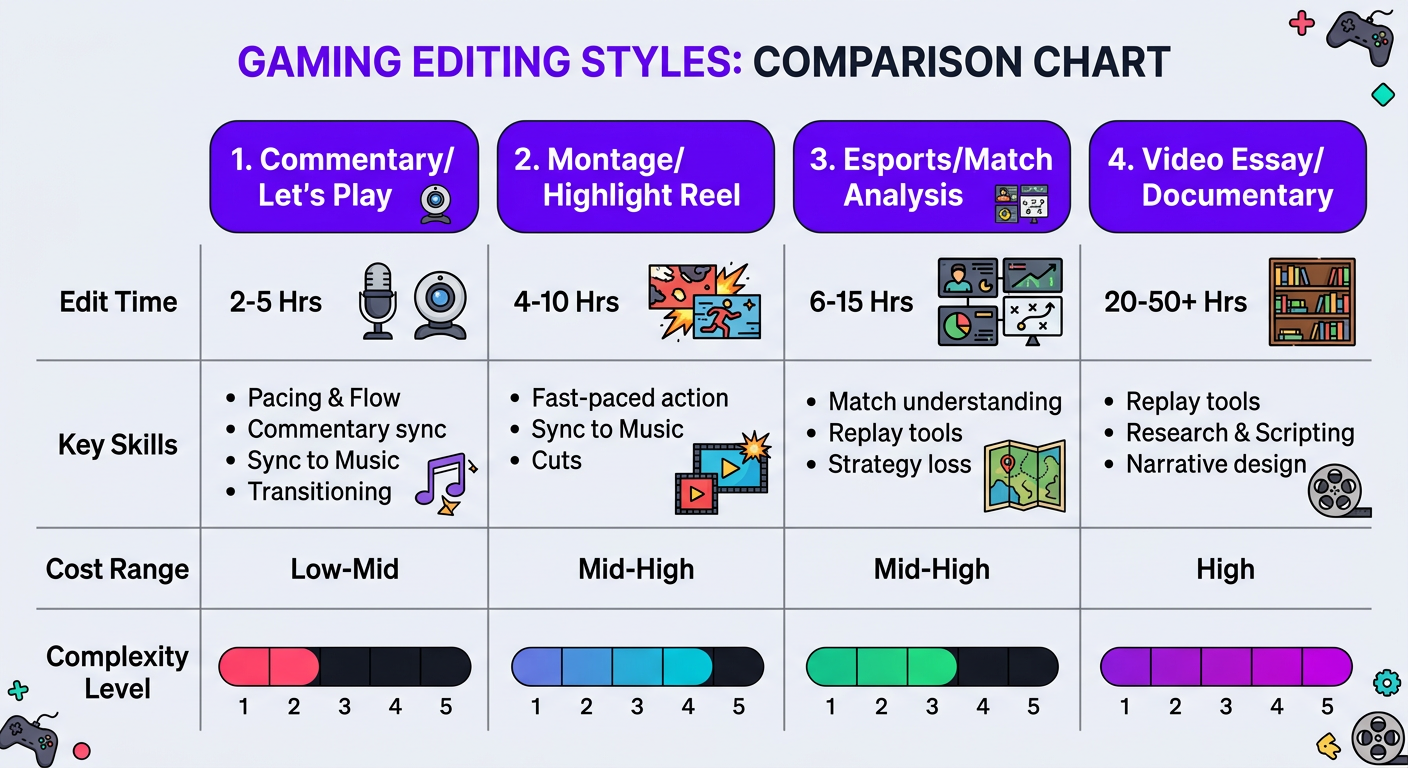
| Style | Edit Time | Key Skills | Per-Video Cost |
|---|---|---|---|
| Commentary/Let’s Play | 4-8 hrs | Jump cuts, zooms, sound effects, subtitles | $100–$350 |
| Montage/Highlight | 10-20 hrs | Beat sync, VFX, speed ramp, color grading | $300–$800 |
| Esports/Analysis | 6-12 hrs | Annotations, data viz, multi-angle, graphics | $200–$500 |
| Essay/Documentary | 15-30 hrs | Motion graphics, narrative pacing, research viz | $500–$1,200 |
The Art of the Gaming Montage
Montages deserve their own section because they represent the pinnacle of gaming editing craft. A great montage isn’t just a compilation of plays — it’s a music video where the gameplay IS the visual performance.
Beat Synchronization
The foundation of any montage is music sync. Every major cut, every impact, every velocity change should align with the rhythm, drops, and transitions of the chosen track. This requires:
- Analyzing the music’s waveform and marking beats, drops, and transitions
- Selecting clips that match the energy level of each musical section
- Frame-perfect timing — even being 2-3 frames off makes a cut feel “wrong”
- Building intensity with the music — slower, wider clips during verses; rapid, intense clips during drops
Velocity and Speed Ramping
Speed ramping is what gives montages their signature cinematic feel. The technique:
- Slow down to 20-50% speed as the key moment approaches (the windup)
- Return to 100% or accelerate to 150-200% at the moment of impact
- Use bezier curves (not linear speed changes) for smooth velocity transitions
- Time the speed change to coincide with a musical beat for maximum impact
Visual Effects in Montages
The VFX layer is where amateur montages diverge from professional ones. Pro montage editors use:
- Directional blur on transitions to simulate camera motion
- RGB split/chromatic aberration at impact moments
- Camera shake synced to hits and explosions
- Light leak overlays for transitions between clips
- Particle effects that complement the game’s visual language
- Color shifts that match the energy level (warmer for intense, cooler for smooth)
The key is restraint. The best montage editors use effects to amplify gameplay, not distract from it. If a viewer notices the effects more than the plays, the edit failed.
Sound Design for Montages
Beyond the music track, professional montages layer additional audio:
- Game sound effects isolated and re-timed to match the edit
- Impact sounds (bass hits, whooshes, risers) at key moments
- Crowd reactions or commentary clips for emotional context
- Vocal chops or stingers at transition points
- Audio ducking — briefly lowering music to let a game sound or reaction breathe
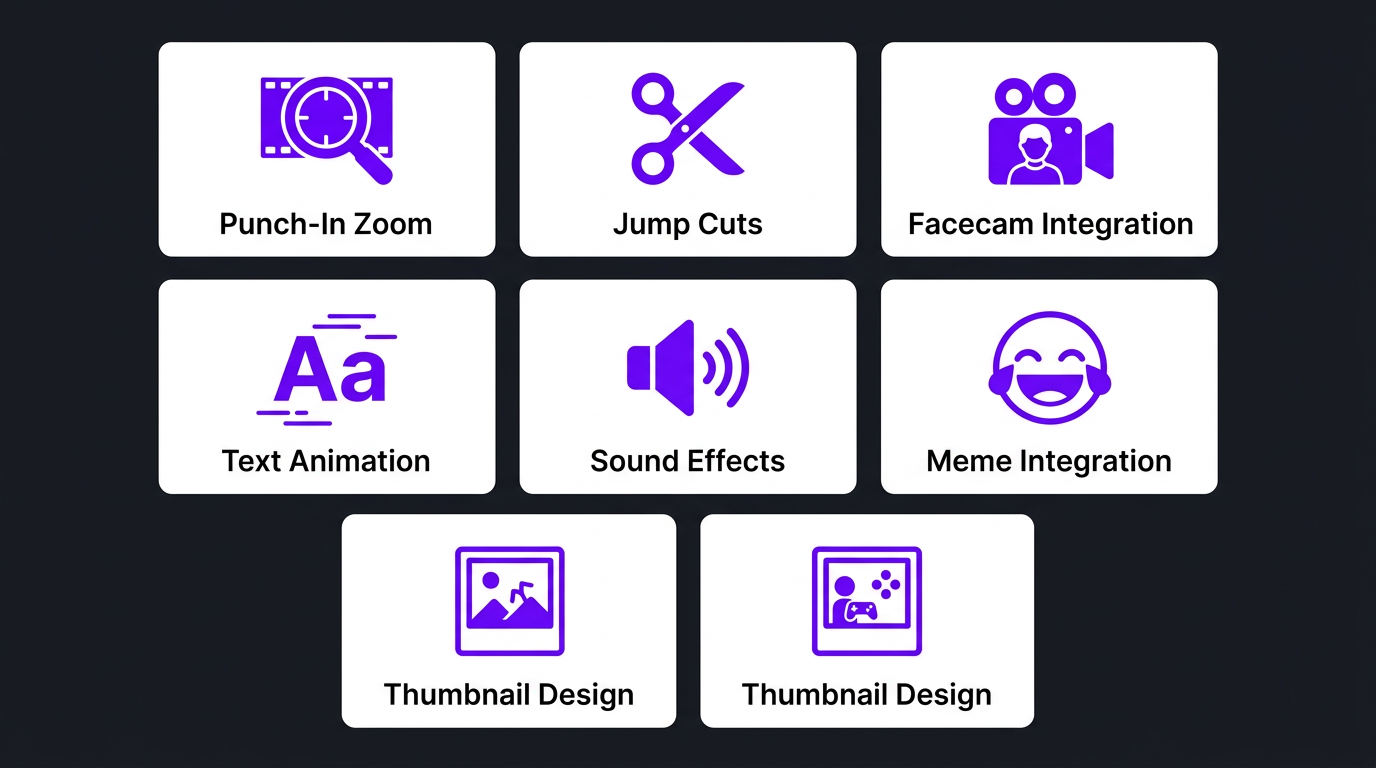
Essential Editing Techniques for Gaming Content
Beyond style-specific approaches, certain techniques are universal in gaming editing. Master these (or ensure your editor has them) to compete at the top level:
1. The “Punch-In” Zoom
Scaling into gameplay footage at key moments to simulate camera movement and draw attention. Standard zoom is 110-130%. More dramatic zooms (150%+) work for comedic effect or emphasis. The zoom should be slightly eased (not a sudden snap) unless the hard snap is intentional for comedy.
2. Jump Cut Mastery
Not all jump cuts are equal. Great gaming editors cut on action (mid-movement, mid-sentence) rather than during pauses. This creates urgency and forward momentum. The rhythm of cuts should vary — predictable timing becomes monotonous.
3. Facecam Integration
For creators who use facecam, dynamic sizing adds energy. Standard size during normal gameplay, enlarging during big reactions, picture-in-picture transitions, and occasional full-screen face cuts for maximum emotional impact. The facecam border and placement should be consistent with your brand.
4. Text and Subtitle Animation
Gaming content has adopted a distinctive subtitle style — large, bold text with outlines or backgrounds, often with tracking animations that follow the speaker. Key words are highlighted in different colors, emoji or icons replace common words, and text sizes change for emphasis (bigger = louder/more important).
5. Sound Effect Library
Every gaming editor needs a curated sound effect library: whooshes, impacts, risers, stingers, vine booms, record scratches, and platform-specific trending sounds. The timing of sound effects is critical — even 100ms off feels wrong to viewers who’ve been conditioned by thousands of gaming videos.
6. Meme and Reference Integration
Gaming culture is meme culture. Professional gaming editors stay current with meme trends and know how to integrate them naturally — a well-timed GTA “wasted” screen, a Minecraft death sound, or a trending audio clip. This is editing-as-comedy and requires cultural fluency that pure technical skill can’t replace.
7. Thumbnail and Title Card Design
Many gaming editors also handle thumbnails and intro sequences. Gaming thumbnails have their own design language — expressive faces, bright colors, clean text, and game-specific visual elements. Having the same person/team handle both editing and thumbnails ensures visual brand consistency.
The Gaming Creator Editing Workflow
Gaming editing workflows are unique because of the volume of raw footage and the frequency of publishing. Here’s the professional process:
Step 1: Recording with Editing in Mind
Smart gaming creators make editing easier during recording:
- Marking timestamps for key moments (kills, reactions, funny moments)
- Recording separate audio tracks (game audio, mic, discord)
- Using replay buffers for unexpected highlights
- Recording at higher resolution than delivery for zoom headroom (4K recording for 1080p delivery)
- Keeping a “kill log” or notes document with timestamps
Step 2: Footage Transfer and Organization
Gaming sessions generate massive files — a 3-hour 4K recording can be 100-200GB. Professional workflows use:
- Dedicated NAS or cloud storage with fast upload
- Proxy generation for smoother editing
- Standardized file naming (date_game_session#.mp4)
- Quick-reference thumbnail strips for long recordings
Step 3: Content Selection
The creator reviews footage and selects key moments — or provides timestamped notes. This is often the bottleneck in outsourced workflows. The best creator-editor relationships have a system for this: a shared spreadsheet, a Notion board, or timestamped notes in Discord.
Step 4: Assembly and Rough Cut
Building the video structure, arranging selected clips, and establishing the narrative flow. For commentary videos, this means syncing commentary audio with gameplay. For montages, it means mapping clips to the music timeline.
Step 5: Polish and Effects
Adding zooms, sound effects, text, transitions, VFX, color grading, and all the elements that turn raw cuts into engaging content.
Step 6: Review, Revise, Publish
Creator reviews, requests changes (usually minor timing adjustments or alternate clip choices), and the editor delivers the final export optimized for YouTube.
Need a Gaming Editor Who Actually Gets Your Stylea
We match gaming creators with editors who understand your game, your audience, and your brand. See our gaming edits.
Best Software for Gaming Video Editing
| Software | Price | Best For | Gaming Strengths |
|---|---|---|---|
| Adobe Premiere Pro | $23/mo | Professional all-round editing | After Effects integration, plugin ecosystem, multi-format support |
| DaVinci Resolve | Free / $295 | Color grading + editing | Fusion VFX built-in, best free option, handles high-res gameplay well |
| Final Cut Pro | $300 one-time | Mac-based creators | Fast rendering, magnetic timeline speeds up cuts, Apple ecosystem |
| Sony Vegas Pro | $250-$400 | Montage editors | Legacy in montage community, velocity curves, plugin support |
| CapCut | Free | Short-form gaming clips | Trending templates, auto-captions, fast export, mobile editing |
| After Effects | $23/mo (with PP) | Motion graphics & VFX | Custom intros, montage effects, text animations, particle systems |
For professional gaming editing, the Premiere Pro + After Effects combo is the industry standard. Premiere handles the timeline and cuts, After Effects handles motion graphics, custom transitions, and VFX sequences. DaVinci Resolve is the best free alternative and increasingly competitive at the professional level.
What Gaming Video Editing Costs in 2026
Gaming editing costs less per video than travel or cinematic content, but gaming creators typically need higher volume — so monthly spend can be similar or higher.
| Content Type | Per-Video Cost | Monthly (8 videos) | Editing Time |
|---|---|---|---|
| Basic gameplay highlights | $100–$200 | $800–$1,600 | 3-5 hrs |
| Commentary/Let’s Play | $150–$350 | $1,200–$2,800 | 4-8 hrs |
| Polished gaming content | $300–$500 | $2,400–$4,000 | 6-12 hrs |
| Premium/Montage quality | $400–$800+ | $3,200–$6,400+ | 10-20 hrs |
| Gaming shorts (per clip) | $30–$100 | $600–$2,000 (20 clips) | 1-3 hrs |
Most gaming creators at the growth stage spend $2,000–$4,000/month on editing — which covers 8-12 long-form videos plus 15-20 short-form clips. At Increditors, our gaming creator packages are built for this volume, with dedicated editors who specialize in gaming content and understand platform-specific optimization.
Why Gaming Editing Can Be Cost-Effective
Compared to travel or cinematic content, gaming editing has some cost advantages:
- No color grading across multiple locations (consistent in-game footage)
- No audio field recording challenges (clean digital game audio)
- Templatable elements (intros, outros, lower thirds) that scale across videos
- Commentary style allows faster cutting decisions
However, the volume demands typically offset these savings. A gaming channel publishing 5x per week spends more monthly than a travel channel publishing weekly, even at lower per-video rates.
When to Outsource Your Gaming Edits
The decision point for gaming creators is different from other niches because of the volume factor.
Signs You Need an Editor
- You can’t maintain your upload schedule — consistency is everything in gaming YouTube
- You’re choosing between gaming and editing — and gaming is your content engine
- Your editing quality is inconsistent — good on Monday’s video, sloppy by Thursday
- You’re missing trending moments — by the time you edit, the hype has passed
- You’re earning $2,000+/month from your channel — enough to fund professional editing
- You want to stream AND post edited content — physically impossible to do both solo
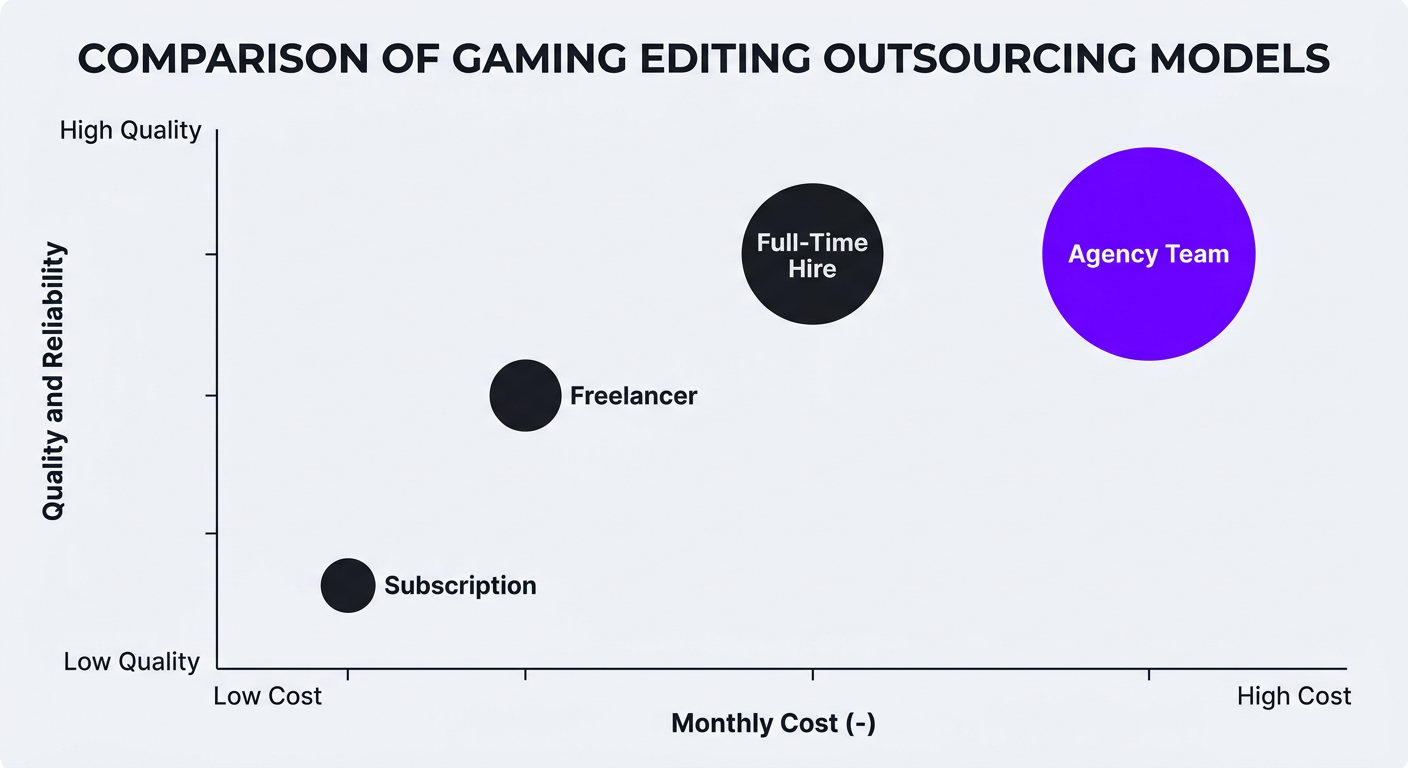
Outsourcing Models for Gaming Creators
| Model | Monthly Cost | Best For | Pros | Cons |
|---|---|---|---|---|
| Single freelancer | $1,000–$3,000 | Channels under 100K | Personal relationship, affordable | No backup, limited bandwidth |
| Editing subscription | $500–$2,000 | Budget-conscious creators | Predictable cost, some flexibility | Generic editing, rotating editors |
| Dedicated team (agency) | $3,000–$6,000 | Channels 100K+, daily uploaders | Consistent quality, fast turnaround, backup | Higher investment |
| Full-time hire | $3,000–$6,000 | High-volume, established channels | Full control, maximum availability | HR overhead, no backup, benefits cost |
For most gaming creators between 50K-500K subscribers, the dedicated agency team is the best value proposition. You get the consistency of a full-time hire with the reliability of a team and none of the HR headaches. At Increditors, our unlimited editing plans are specifically designed for high-volume gaming creators who need fast turnaround without sacrificing quality.
Gaming Shorts and Clips: The Growth Engine
Short-form gaming content is the single fastest way to grow a gaming channel in 2026. YouTube Shorts, TikTok clips, and Instagram Reels drive discovery — pushing your content to audiences who haven’t found your long-form yet.
Types of Gaming Shorts That Perform
- “Insane moment” clips — the best 30-60 seconds from a session, edited for maximum impact
- Funny/fail compilations — relatable moments that drive shares
- Tips and tricks — quick-value content (fastest way to do X in Y game)
- Reaction clips — genuine reactions to game moments, often with exaggerated editing
- Before/after — showing skill progression or setup evolution
Editing Shorts from Long-Form
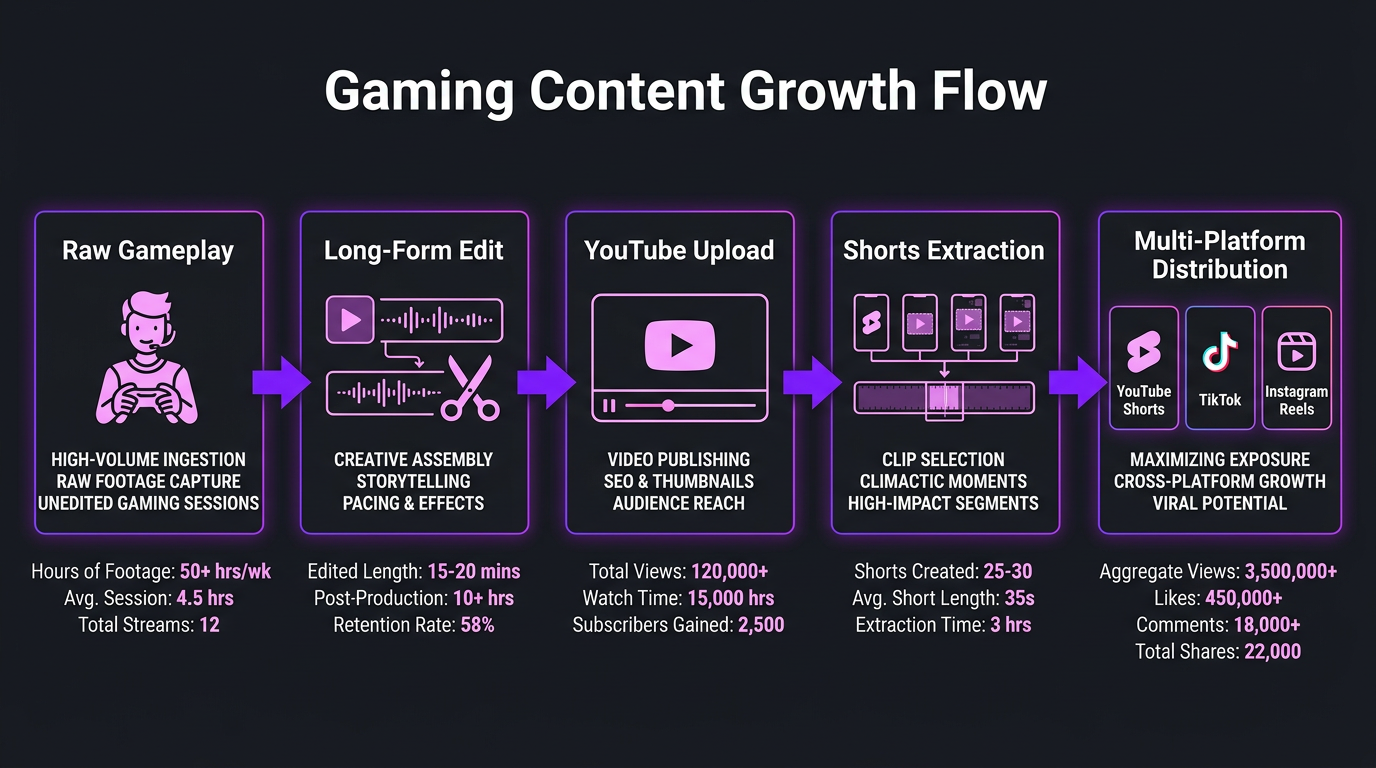
The most efficient approach is extracting shorts from your long-form content. A single 15-minute video can yield 3-8 shorts. Professional editors identify the strongest standalone moments and repackage them with:
- Vertical reframing (9:16) with strategic cropping
- Auto-captions with gaming-style typography
- Hook text in the first 0.5 seconds
- Trending audio when it enhances the clip
- Faster pacing than the long-form version — tighter cuts, more energy
At $30-$100 per clip, shorts are extremely cost-effective when bundled with long-form editing. Our short-form packages include batch processing — meaning we extract and edit all shorts from your long-form content as part of the production pipeline.
How Pro Gaming Creators Use Editing Teams
Trade with Pat: Educational Gaming Content
Trade with Pat produces content that bridges gaming-style editing energy with educational material. The editing challenge: making complex information as engaging as gameplay footage. Our team developed a custom editing template with dynamic text animations, data visualizations, and energetic pacing that maintained the educational value while keeping viewer retention comparable to entertainment content.
Ink Magnet: Building a Brand Through Content Quality
Ink Magnet needed high-volume content production with consistent quality across multiple content types. The approach: a dedicated editing team that maintained brand consistency whether the content was short-form clips, long-form deep dives, or promotional material. By standardizing their editing pipeline through Increditors, they eliminated the quality inconsistency that comes with juggling multiple freelancers.
Emerge: Scaling Content Without Scaling Headcount
Emerge faced the classic creator scaling problem — growing content demands without proportional team growth. By partnering with our enterprise editing solution, they scaled from 4 videos per week to 12+ without adding internal headcount. The dedicated team handled everything from raw footage to final delivery, including shorts repurposing and platform-specific optimization.
Frequently Asked Questions
Gaming video editing costs $100–$600 per video depending on style and complexity. Simple gameplay highlight edits run $100–$200. Commentary/let’s play videos with zooms, sound effects, and subtitles cost $150–$350. Fully produced montages with VFX and beat-synced editing cost $400–$800+. Monthly retainers for gaming creators producing 8+ videos range from $1,500–$4,000/month with a dedicated editor.
The best style depends on your content type. Commentary/let’s play videos need clean jump cuts, dynamic zooms, and sound effects. Montages require beat-synced cuts, speed ramping, and VFX. Esports highlights need multi-angle replays and analytical overlays. Gaming essay content needs B-roll curation, motion graphics, and cinematic pacing. Match your editing style to your audience’s expectations.
A 10-15 minute gaming commentary video takes 4-8 hours to edit professionally. A polished montage takes 10-20+ hours due to beat-synced cuts, VFX, and sound design. Gaming essay/documentary content takes 15-30 hours. Quick highlight clips (under 60 seconds) take 1-3 hours each. The biggest variable is the ratio of raw footage to final video — more raw footage means more selection time.
Self-editing is valuable for learning but becomes a bottleneck as channels grow. Once you’re producing 4+ videos per week or earning revenue from your channel, outsourcing editing is almost always the right move. Professional editors maintain higher quality at volume and free you to focus on gameplay, streaming, and audience engagement. Most gaming YouTubers above 50K subscribers use dedicated editors.
Adobe Premiere Pro is the industry standard for gaming content, paired with After Effects for motion graphics and VFX. DaVinci Resolve offers a strong free alternative with excellent color grading tools. Sony Vegas maintains a dedicated following in the montage community. CapCut is widely used for short-form clips. For professional editing, the Premiere Pro + After Effects combination provides the most versatility.
Professional workflows include: creator-provided timestamps for key moments, AI-powered highlight detection tools, proxy editing for smooth playback of large files, and standardized file organization. The best creator-editor relationships use shared systems (Notion, Google Sheets, Discord timestamps) for marking moments during recording, dramatically reducing the editor’s selection time.
A highlight reel compiles the best gameplay moments with clean cuts and simple transitions — the focus is the plays. A montage is an artistic edit using beat-synced cuts, velocity changes, color grading, VFX, sound design, and cinematic techniques to create an emotional experience. Montages take 2-3x longer to edit, cost significantly more, and require specialized skills in music timing and visual effects.
Level Up Your Gaming Content
From daily uploads to cinematic montages, we edit gaming content that grows channels. Let’s build your editing pipeline.
This guide reflects 2026 gaming content trends and pricing data from industry research. For current Increditors gaming editing packages, schedule a call with our team.